2007 BMW 760LI SEDAN roof
[x] Cancel search: roofPage 124 of 253
Things to remember when driving
122
Things to remember when driving
Breaking-in
Moving parts need time to adjust to one
another. To ensure that your vehicle continues
to furnish optimized economy of operation
throughout an extended service life, we request
that you devote careful attention to the follow-
ing information.
Engine and differential
Always obey all official speed limits.
Up to 1,200 miles/2,000 km
Drive with changing engine and vehicle speeds,
but do not exceed:
4500 rpm or 100 mph/160 km/h
Avoid full-throttle operation and use of the
transmission's kick-down mode during these
initial miles.
After 1,200 miles/2,000 km
The engine and vehicle speed can gradually be
increased.
Tires
Due to technical factors associated with their
manufacture, tires do not achieve their full trac-
tion potential until after an initial break-in
period. Therefore, drive reservedly during the
first 200 miles/300 km.
Brake system
Brakes require an initial break-in period of
approx. 300 miles/500 km to achieve optimized
contact and wear patterns between brake pads
and rotors.
Following component replacements
Follow the break-in sequence again if compo-
nents addressed above must be replaced again
during subsequent driving.
General driving notes
Closing luggage compartment lid
Operate the vehicle only when the lug-
gage compartment lid is completely
closed. Otherwise, exhaust fumes could pene-
trate into the passenger compartment.<
If special circumstances should make it abso-
lutely necessary to operate the vehicle with the
luggage compartment lid open:
1.Close all windows and the glass sunroof.
2.Adjust the automatic climate control's
blower to supply a high rate of airflow, refer
to page106.
Hot exhaust system
As in all vehicles, extremely high temper-
atures are generated in the exhaust sys-
tem. Do not remove the heat shields installed
adjacent to it, and never apply undercoating to
them. When driving, standing at idle, and park-
ing, take care to avoid possible contact
between the hot exhaust system and any highly
flammable materials such as hay, leaves, grass,
etc. Such contact could lead to a fire, accompa-
nied by the risk of serious property damage and
personal injury.<
Mobile communications devices in
vehicle
BMW does not recommend using mobile
communications devices, e.g. mobile
phones, inside the vehicle without a direct con-
nection to an outside antenna. Otherwise, the
vehicle electronics and mobile communications
device can interfere with each other. In addition,
there is no assurance that the radiation which
results during transmission will be discharged
from the vehicle interior.<
Page 127 of 253
Driving tips
125Reference
At a glance
Controls
Communications
Navigation
Entertainment
Mobility
Securing cargo
>Use the luggage net* or securing straps to
secure small and lightweight luggage and
cargo.
>Heavy-duty straps
* for securing larger and
heavier objects are available at your BMW
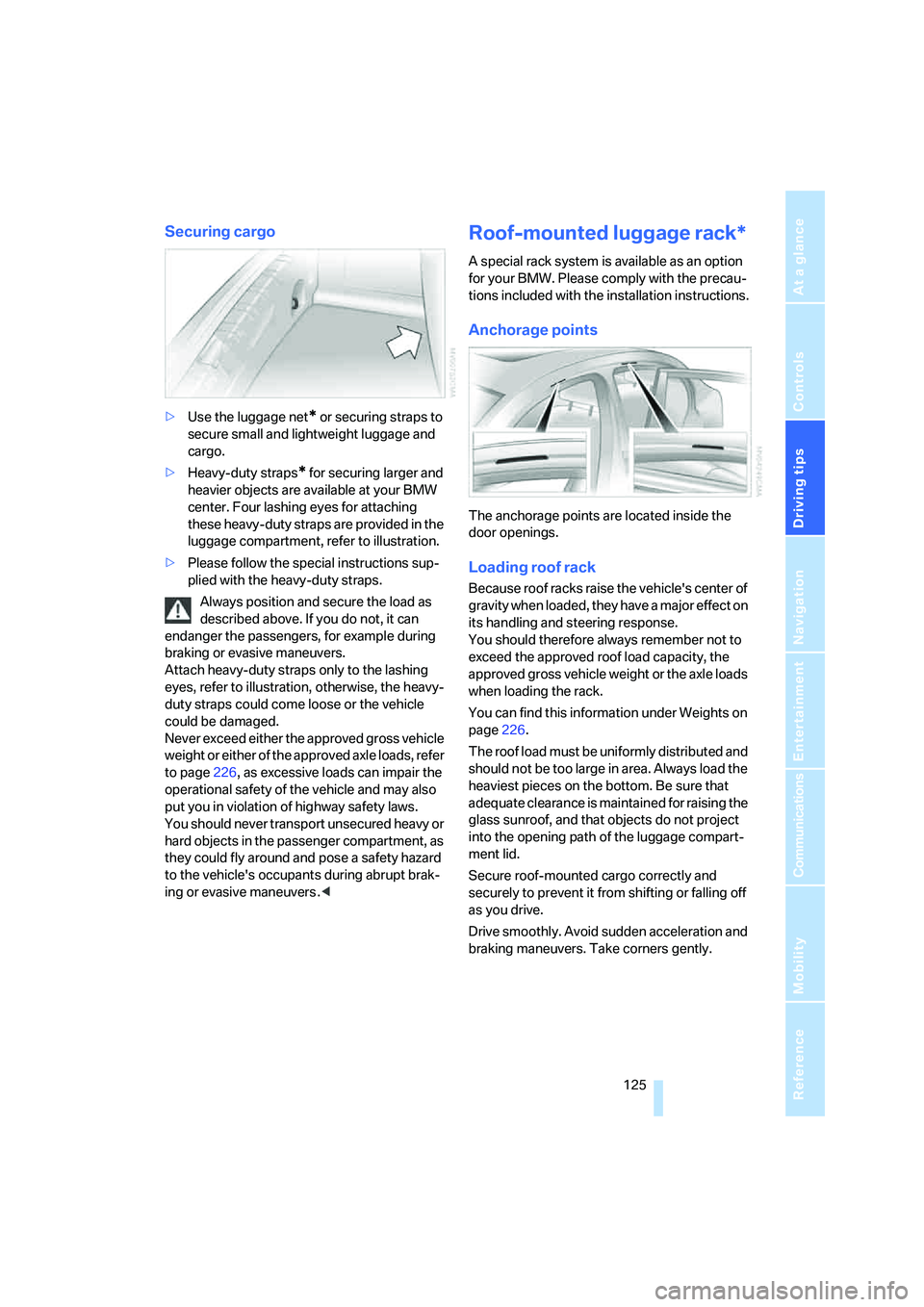
center. Four lashing eyes for attaching
these heavy-duty straps are provided in the
luggage compartment, refer to illustration.
>Please follow the special instructions sup-
plied with the heavy-duty straps.
Always position and secure the load as
described above. If you do not, it can
endanger the passengers, for example during
braking or evasive maneuvers.
Attach heavy-duty straps only to the lashing
eyes, refer to illustration, otherwise, the heavy-
duty straps could come loose or the vehicle
could be damaged.
Never exceed either the approved gross vehicle
weight or either of the approved axle loads, refer
to page226, as excessive loads can impair the
operational safety of the vehicle and may also
put you in violation of highway safety laws.
You should never transport unsecured heavy or
hard objects in the passenger compartment, as
they could fly around and pose a safety hazard
to the vehicle's occupants during abrupt brak-
ing or evasive maneuvers .<
Roof-mounted luggage rack*
A special rack system is available as an option
for your BMW. Please comply with the precau-
tions included with the installation instructions.
Anchorage points
The anchorage points are located inside the
door openings.
Loading roof rack
Because roof racks raise the vehicle's center of
gravity when loaded, they have a major effect on
its handling and steering response.
You should therefore always remember not to
exceed the approved roof load capacity, the
approved gross vehicle weight or the axle loads
when loading the rack.
You can find this information under Weights on
page226.
The roof load must be uniformly distributed and
should not be too large in area. Always load the
heaviest pieces on the bottom. Be sure that
adequate clearance is maintained for raising the
glass sunroof, and that objects do not project
into the opening path of the luggage compart-
ment lid.
Secure roof-mounted cargo correctly and
securely to prevent it from shifting or falling off
as you drive.
Drive smoothly. Avoid sudden acceleration and
braking maneuvers. Take corners gently.
Page 228 of 253
Technical data
226
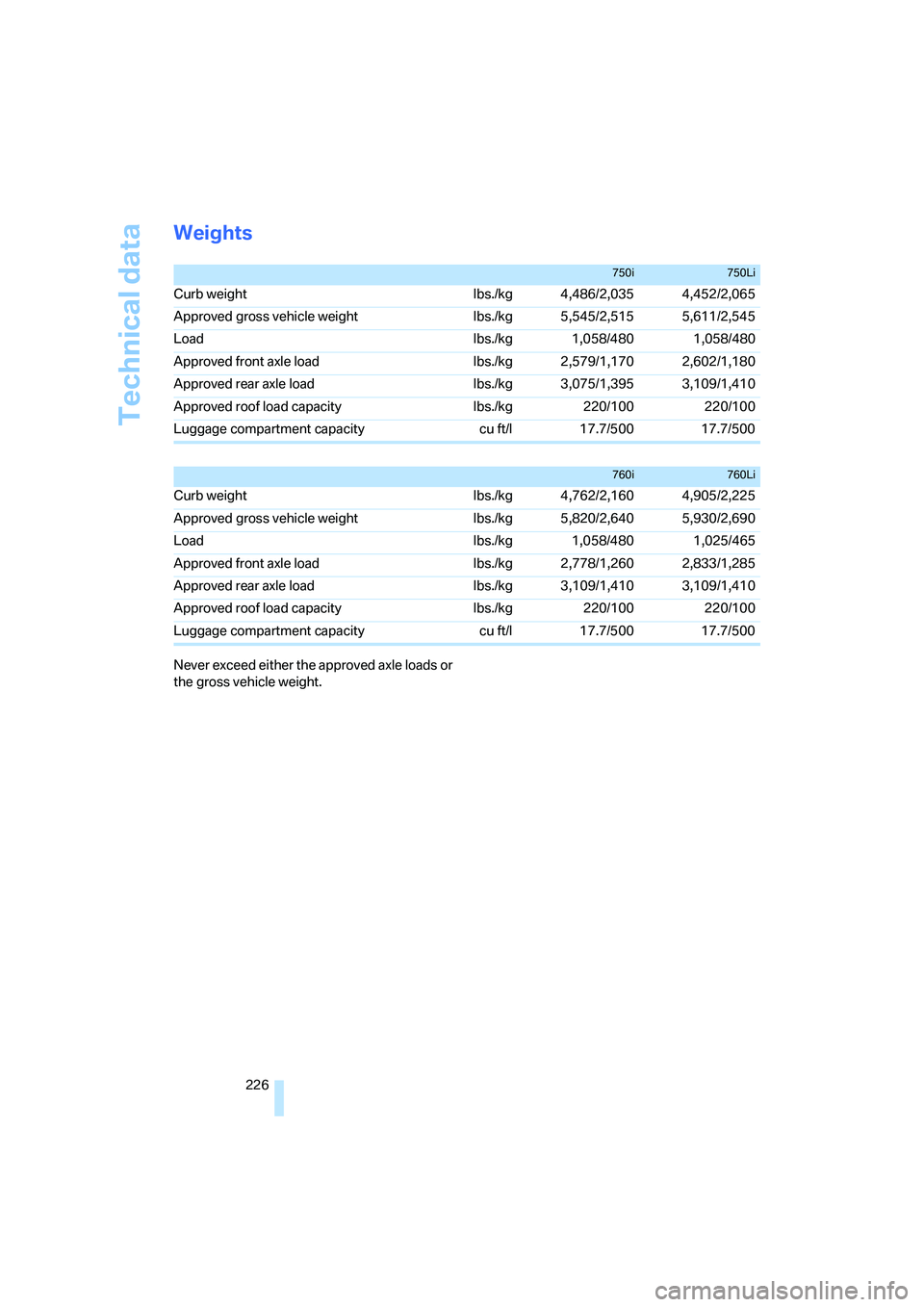
Weights
Never exceed either the approved axle loads or
the gross vehicle weight.
750i750Li
Curb weight lbs./kg 4,486/2,035 4,452/2,065
Approved gross vehicle weight lbs./kg 5,545/2,515 5,611/2,545
Load lbs./kg 1,058/480 1,058/480
Approved front axle load lbs./kg 2,579/1,170 2,602/1,180
Approved rear axle load lbs./kg 3,075/1,395 3,109/1,410
Approved roof load capacity lbs./kg 220/100 220/100
Luggage compartment capacity cu ft/l 17.7/500 17.7/500
760i760Li
Curb weight lbs./kg 4,762/2,160 4,905/2,225
Approved gross vehicle weight lbs./kg 5,820/2,640 5,930/2,690
Load lbs./kg 1,058/480 1,025/465
Approved front axle load lbs./kg 2,778/1,260 2,833/1,285
Approved rear axle load lbs./kg 3,109/1,410 3,109/1,410
Approved roof load capacity lbs./kg 220/100 220/100
Luggage compartment capacity cu ft/l 17.7/500 17.7/500
Page 237 of 253
Reference 235
At a glance
Controls
Driving tips
Communications
Navigation
Entertainment
Mobility
DVD changer170
– adjusting picture172
– adjusting volume153
– controls152
– country codes171
– DVD controller171
– fast forward172
– freeze frame173
– opening specific menu174
– playing DVD171
– reverse172
– searching for chapter172
– selecting language173
– selecting picture format173
– selecting subtitles173
– starting171
– tone control153
DVD multimedia changer,
refer to DVD changer170
Dynamic Brake Control
DBC87
Dynamic Drive89
Dynamic Stability Control
DSC87
– indicator lamp13
Dynamic Traction Control
DTC88
– indicator lamp13
E
"EDC"89
EDC Electronic Damping
Control89
Eject button, refer to Buttons
on CD player152
Electrical malfunction
– door lock34
– driver's door34
– fuel filler door196
– glass sunroof, electric42
– luggage compartment lid36
– parking brake60
Electric steering wheel
adjustment52
Electronic brake-force
distribution87Electronic Damping Control
EDC89
Electronic Stability Program
ESP, refer to DSC Dynamic
Stability Control87
Electronic toll collection
device, refer to Entry/pass
tags126
Emergency actuation, refer to
Manual operation
– door lock34
– driver's door34
– fuel filler door196
– glass sunroof42
– luggage compartment lid36
– parking brake60
– transmission lock for
automatic transmission with
Steptronic64
Emergency call218
Emergency release of luggage
compartment lid from inside
the luggage
compartment37
Emergency services, refer to
Roadside
Assistance189,218
Energy-conscious driving,
refer to Energy Control/
current fuel consumption77
Energy Control77
Engine
– breaking-in122
– data224
– overheated, refer to Coolant
temperature76
– speed75,224
– starting57
– starting difficulties58
– switching off58
Engine compartment207
Engine coolant208Engine oil
– additives, refer to Approved
engine oils208
– approved oils208
– checking oil level207
– electronic oil level check207
– oil types, also refer to
Approved engine oils208
– possible displays of oil level
check208
"Engine oil level O.K."208
"Engine oil level too high"208
Engine output, refer to Engine
specifications224
Engine overheating, refer to
Coolant temperature76
Engine speed224
"Enter", navigation134
Entering activation time of
parked car ventilation109
– "Time 1"110
– "Time 2"110
Entering destination
address133
Entering destination town/
city132
Entering house number or
intersection, navigation133
Entering intersection,
navigation133
Entering name, destination in
navigation132
Entering street,
navigation133
"Entertainment", tone
control153
Entertainment sound output
on/off153
Entry/pass tags126
Entry for current position and
destination, refer to Entering
destination manually131
Environmentally friendly
driving, refer to Energy
Control77
Erasing entire list, refer to
Deleting entries in lists186
Page 238 of 253
Everything from A to Z
236 ESP Electronic Stability
Program, refer to DSC
Dynamic Stability
Control87
Event Data Recorders211
Exhaust system, refer to Hot
exhaust system122
Exterior mirrors50
– adjusting50
– automatic dimming
feature51
– automatic heating51
– folding in and out51
– tilting down passenger-side
mirror51
External audio
device114,169
"Extra"
– rear air conditioner108
– rear refrigerator117
Eyes for lashing, refer to
Securing cargo125
F
"Fader", balance and
fader154
Failure messages, refer to
Check Control80
Failure of an electrical device,
refer to Fuses217
False alarm, refer to Avoiding
unintentional alarms38
Fastening safety belts48
"Fastest route",
navigation141
Fast forward
– CD changer167
– CD player164
– DVD changer172
Filter, refer to Microfilter/
activated-charcoal filter107
First-aid kit219
Fittings for towing and tow
starting220
Flashlight, refer to
Rechargeable flashlight113Flat tire
– Flat Tire Monitor90
– refer to Changing
wheels214
– refer to Tire condition203
– run-flat tires91,93,204
– spare tire215
– Tire Pressure Monitor91
Flat Tire Monitor90
– initializing system90
– limits of system90
– show chains205
– warning lamp91
Flooding, refer to Driving
through water123
Floor coverings, carpet, refer
to Caring for your vehicle
brochure
Floor mat, refer to Caring for
your vehicle brochure
"FM", radio156
FM, refer to Radio156
Fog lamps, refer to Front fog
lamps101
Footbrake, refer to Braking
safely123
Footwell lamps, refer to
Interior lamps102
For specified oil grades, refer
to Approved engine oils208
Fresh air vents, refer to
Ventilation107
Front airbags95
Front fog lamps, indicator
lamp11,13
Fuel197
– average fuel
consumption77
– gauge76
– quality197
– refer to Average fuel
consumption77
– reserve, refer to Fuel
gauge76
– tank capacity227
Fuel consumption display,
refer to Energy control/
current consumption77Fuel filler door196
– manually unlocking196
Fuel level, refer to Fuel
gauge76
Fuel-saving driving, refer to
Energy Control77
"Full", rear seat screen22
"FULL MENU", DVD
changer173
"Full screen", BMW Night
Vision98
Fuses217
G
Garage door opener, refer to
Integrated universal remote
control111
Gas
– display, refer to Fuel
gauge76
– fuel quality197
Gear changes, refer to
Automatic transmission with
Steptronic62
Gear display, refer to Displays
on Info Display62
"General destination",
navigation135
General driving notes122
Glasses compartment115
Glass sunroof, electric41
– convenience operation32
– moving manually42
Glove compartment113
Grilles, refer to Ventilation107
Gross weight, refer to
Weights226
Page 241 of 253
Reference 239
At a glance
Controls
Driving tips
Communications
Navigation
Entertainment
Mobility
Lug bolts
– refer to Preparing for a wheel
change215
– tightening torque, refer to
After mounting216
– wrench, refer to What you
will need214
Luggage compartment119
– capacity226
– convenient access39
– locking separately35
– net119
– opening/closing, refer to
Luggage compartment
lid35
– opening from inside36
– opening from outside35
– opening with remote
control33
– refer to Luggage
compartment lid35
Luggage compartment lid
– automatic operation33,36
– Comfort Access39
– emergency actuation, refer
to Manual operation36
– emergency release37
– locking separately35
– opening from inside36
– opening from outside35
– opening separately35
– opening with remote
control33
– remote control33
– unlocking manually, refer to
Opening separately35
Luggage rack, refer to Roof-
mounted luggage rack125
Lumbar support
adjustment45
M
M+S tires, refer to Winter
tires205
Maintenance210
– refer to Service required78
Maintenance System210Make-up mirror, refer to
Illuminated vanity mirror52
Malfunction
– door lock34
– fuel filler door196
– glass sunroof42
– luggage compartment lid37
Malfunction displays, refer to
Check Control80
"MANUAL",
radio157,159,162
Manually releasing
transmission lock64
Manual operation
– door lock34
– driver's door34
– fuel filler door196
– glass sunroof42
– luggage compartment lid36
– parking brake60
– transmission lock for
automatic transmission with
Steptronic64
Manual station scan157
Map CD, refer to Navigation
CD/DVD130
"Map dir. travel",
navigation144
"Map facing N.",
navigation144
Map for navigation
– changing scale25,144
– destination entry134
Map view facing north144
Master key, refer to Remote
control/key30
Maximum cooling106,108
"medium", automatic climate
control105
"Memo", hour signal85
Memory, refer to
– Key Memory31
– Seat, mirror and steering
wheel memory46
"MENU", DVD changer174
"menu", rear seat screen22
"Menu name"19
Menus, Control Display17Microfilter, automatic climate
control107
Microphone for voice
command179
Mirror dimming feature51
Mirrors50
– automatic curb monitor51
– folding in and out51
– heating51
– memory, refer to Seat, mirror
and steering wheel
memory46
"Missed", phone186
Missed calls, refer to Dialing
numbers stored in a list186
Mobile phone
– changing between mobile
phone and hands-free
system187
– changing from hands-free
system to mobile phone187
– changing from mobile phone
to hands-free system187
– dialing a number from Top 8
list186
– hands-free system179
– initiating an emergency
call218
– inserting181
– inserting phone cradle181
– logging off from vehicle183
– logging onto vehicle182
– missed calls186
– operating181
– operating via retracting
telephone keypad179
– operating with buttons on
steering wheel11
– overview178
– phone book185
– redialing185
– refer to Telephone
overview178
– removing182
– removing phone cradle181
– snap-in adapter178
– volume adjustment179
Page 243 of 253
Reference 241
At a glance
Controls
Driving tips
Communications
Navigation
Entertainment
Mobility
"On town/city",
navigation136
Opening and closing
– from inside34
– from outside32
– via door lock34
– with remote control32
Oral note26
Orientation menu, refer to
Opening start menu18
Outlet slits, refer to
Ventilation107
Outside air, refer to Automatic
recirculated-air control
AUC/recirculated-air
mode105
Outside temperature
display75
– changing units of
measure84
Overview
– all around the steering
wheel10
– comfort area14
– iDrive16
– radio control152
P
"PAIRING", phone182
Panic mode33
Park Distance Control PDC86
"Parked car", parked car
ventilation109
Parked car ventilation109
– activating activation
time110
– preselecting activation
time109
– switching on and off
directly109
Parking, vehicle58
Parking aid, refer to PDC Park
Distance Control86
Parking assistant, refer to
PDC Park Distance
Control86Parking brake58
– Automatic Hold59
– manual operation59
Parking lamps100
Parking lamps/low beams100
Parking with Automatic
Hold60
Park lock, refer to Parking63
Partial distance odometer,
refer to Trip odometer75
Parts and accessories, refer to
Your individual vehicle5
Passenger airbag status
lamp96
Passenger-side exterior
mirror, tilting down51
Pathway lighting100
PDC Park Distance Control86
"PDC pic."87
Pen tray, refer to Storage
compartment in center
console115
Perimeter lighting, refer to
Interior lamps102
Permissible axle load, refer to
Weights226
Permissible gross weight,
refer to Weights226
"Perspective", navigation144
"Phone"182
Phone book185
– deleting all entries186
– deleting entry186
– displaying entry185
– on the Control Display185
– select entry186
– via iDrive185
Phone book, refer to Voice
command phone book186
– creating entry186
– deleting all entries187
– deleting entry
187
– reading entry aloud187
– selecting entry187
– updating186Phone number
– deleting individual entry187
– dialing from phone book185
– dialing via retracting
telephone keypad179
– redialing185
– Top 8 list186
Phone preparation package,
refer to Preparation package
mobile phone178
"Pict.format", DVD
changer173
"Picture", DVD
changer172,173
Pinch protection system
– glass sunroof, electric41
– power windows40
Plasters, refer to First-aid
kit219
Plastic, refer to Caring for your
vehicle brochure
Playing music tracks in
random sequence
– CD changer167
– CD player164
Pollen, refer to Microfilter/
activated-charcoal filter107
Position, refer to
– displaying current
position146
– saving current position139
Power failure217
Power output, refer to Engine
specifications224
Power rear backrests45
Power seat, rear45
Power socket116
Power windows39
– convenience operation32
– safety switch40
Precious wood, refer to Caring
for your vehicle brochure
Preparedness services, refer
to Roadside Assistance218
"Presets", radio156,161
Pressure, tires198
Pressure monitoring, tires,
refer to Flat Tire Monitor90
Page 244 of 253
Everything from A to Z
242 Pressure monitoring, tires,
refer to Tire Pressure
Monitor91
"Profile", BMW Assist193
Programmable
– buttons52
– cruise control67
Protective function
– glass sunroof, electric41
– power windows40
"Public places, business and
shopping", navigation136
Puncture, Flat Tire Monitor90
R
Radiator, refer to Coolant208
Radiator fluid, refer to
Coolant208
Radio156
– Autostore158
– controls152
– High Definition Radio162
– sampling stations157
– satellite radio160
– selecting the waveband156
– storing stations158
– switching on/off153
– tone control153
– updating selection of
stations in receiving
range158
– volume153
– weather reports159
Radio Data System RDS159
Radio key, refer to Remote
control/key30
Radio ready state57
– with Comfort Access39
Rain sensor65
"RDS", radio159
RDS Radio Data System159
Reading lamps102
"Rear", rear seat screen22
Rear air conditioner
– cooling adjustment108
– switching off108
– switching on/off via
iDrive108Rear armrest, refer to Center
armrest114
Rear climate control108
"Rear climate control", rear air
conditioner108
Rear climate control, rear
refrigerator117
Rear lamps
– refer to Tail lamps213
– replacing bulbs213
Rear lock, rear seat screen22
"Rear refrigerator"117
Rear refrigerator117
Rear-seat area ventilation107
Rear seat backrests, electric,
refer to Rear comfort seat
adjustment45
Rear seats
– adjusting45
– adjusting passenger seat
from rear45
– head restraint adjustment47
– heating50
Rear seat screen21
Rearview mirror50
Rear window blind, refer to
Sun blinds112
Rear window defroster107
Rear window safety switch40
Reception, radio
– refer to Changing
station156
– refer to Updating stations in
receiving range158
Rechargeable flashlight113
"Recirc. air", programmable
buttons52
Recirculated-air mode,
automatic climate
control105
Reclining seat, refer to Seat
adjustment44
Recording time, refer to
Stopwatch83
Reflectors, refer to Tail
lamps213
Refueling196Remaining distance
– for service required78
– refer to Cruising range77
Remaining distance to
destination77
Remote control30
– changing battery39
– Comfort Access38
– garage door opener111
– luggage compartment lid33
– malfunction33
Removing fog on the
windows106
Removing head restraints,
rear seats47
Replacement fuses217
Replacement key, refer to
New remote controls30
Replacement of tires204
– changing wheels214
– tire replacement204
Replacing bulbs, refer to
Lamps and bulbs212
Reporting an accident, refer
Initiating an emergency
call218
Reserve, fuel, refer to Fuel
gauge76
Reservoir for washer
systems67
"RESET"
– Tire Pressure Monitor92
– tone control155
Reset, resetting tone
settings155
"Reset tire pressure", Flat Tire
Monitor90
Residual heat106
Restraint systems
– for children54
– refer to Safety belts
48
Retaining straps, refer to
Securing cargo125
Retracting telephone
keypad179
Reverse
– CD changer167
– CD player164
– DVD changer172