2007 BMW 650I CONVERTIBLE Convertible top
[x] Cancel search: Convertible topPage 54 of 254

Adjusting
52
Convertible
Adjusting height
>To raise: move the switch upward.
>To lower: move the switch downward.
Adjusting tilt angle
Swivel the head restraints.
Entering rear
Before starting to drive, fold backrests
back, otherwise there is the danger of
accident due to an unexpected movement of
the seat.<
Coupe: releasing backrest
Pull the lever upward and fold the backrest for-
ward.
The lever is designed so that the safety belt can
be hooked onto it. This enables you to fasten
the safety belt more conveniently.
Convertible: releasing backrest
The belt system integrated in the seat makes it
easier to get in back.
1.Pull lever 1 up and fold the backrest for-
ward.
2.Press and hold button 2 until the seat has
moved into the desired position.
3.After passengers have entered the rear, fold
the backrest back and lock it in place.
4.Press and hold button 3 until the seat has
moved back into its previous position. If you
release button3 before this, the seat stops
in its current position.
You can lock the backrest in place when it
is folded forward. This is useful, for exam-
ple, when you get into the vehicle while it is
parked on a hill. Press the backrest until it audi-
bly locks into place. To fold it back, you do not
need to use lever 1 to release it.<
Page 99 of 254
Controls
97Reference
At a glance
Driving tips
Communications
Navigation
Entertainment
Mobility
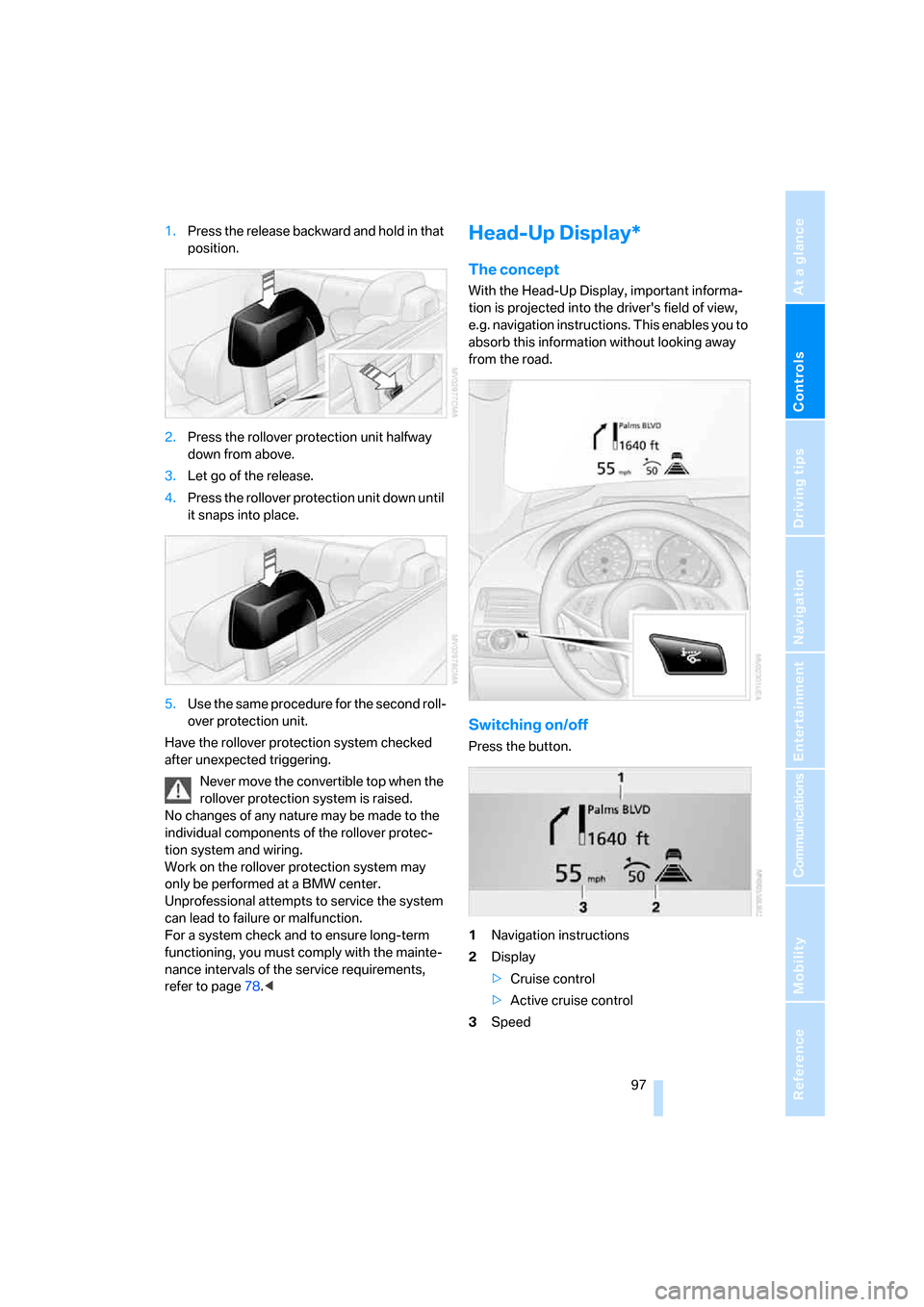
1.Press the release backward and hold in that
position.
2.Press the rollover protection unit halfway
down from above.
3.Let go of the release.
4.Press the rollover protection unit down until
it snaps into place.
5.Use the same procedure for the second roll-
over protection unit.
Have the rollover protection system checked
after unexpected triggering.
Never move the convertible top when the
rollover protection system is raised.
No changes of any nature may be made to the
individual components of the rollover protec-
tion system and wiring.
Work on the rollover protection system may
only be performed at a BMW center.
Unprofessional attempts to service the system
can lead to failure or malfunction.
For a system check and to ensure long-term
functioning, you must comply with the mainte-
nance intervals of the service requirements,
refer to page78.
With the Head-Up Display, important informa-
tion is projected into the driver's field of view,
e.g. navigation instructions. This enables you to
absorb this information without looking away
from the road.
Switching on/off
Press the button.
1Navigation instructions
2Display
>Cruise control
>Active cruise control
3Speed
Page 109 of 254
Controls
107Reference
At a glance
Driving tips
Communications
Navigation
Entertainment
Mobility
The current setting for air distribution is dis-
played on the Control Display.
A congenial climate
The AUTO program offers the optimum air dis-
tribution and air volume for virtually all condi-
tions, refer to AUTO program below. Now you
only need to select an interior temperature that
you find pleasant.
The following sections contain more detailed
information on the available setting options.
Most settings are stored for the remote control
currently in use, also refer to Personal Profile
settings on page29.
AUTO program
The AUTO program handles the
adjustment of air volume and air
distribution to the windshield and
side windows, in the direction of the upper body
and in the footwell. It also adapts your instruc-
tions for the temperature to outside influences
throughout the year.
The cooling is switched on automatically with
the AUTO program. At the same time, a con-
densation sensor controls the program in such
a way that window condensation is prevented
as much as possible.
Intensity of AUTO program
To meet your individual needs, you can
increase or decrease the intensity of the auto-
matic climate control.
iDrive, for explanation of principle, refer to
page16.
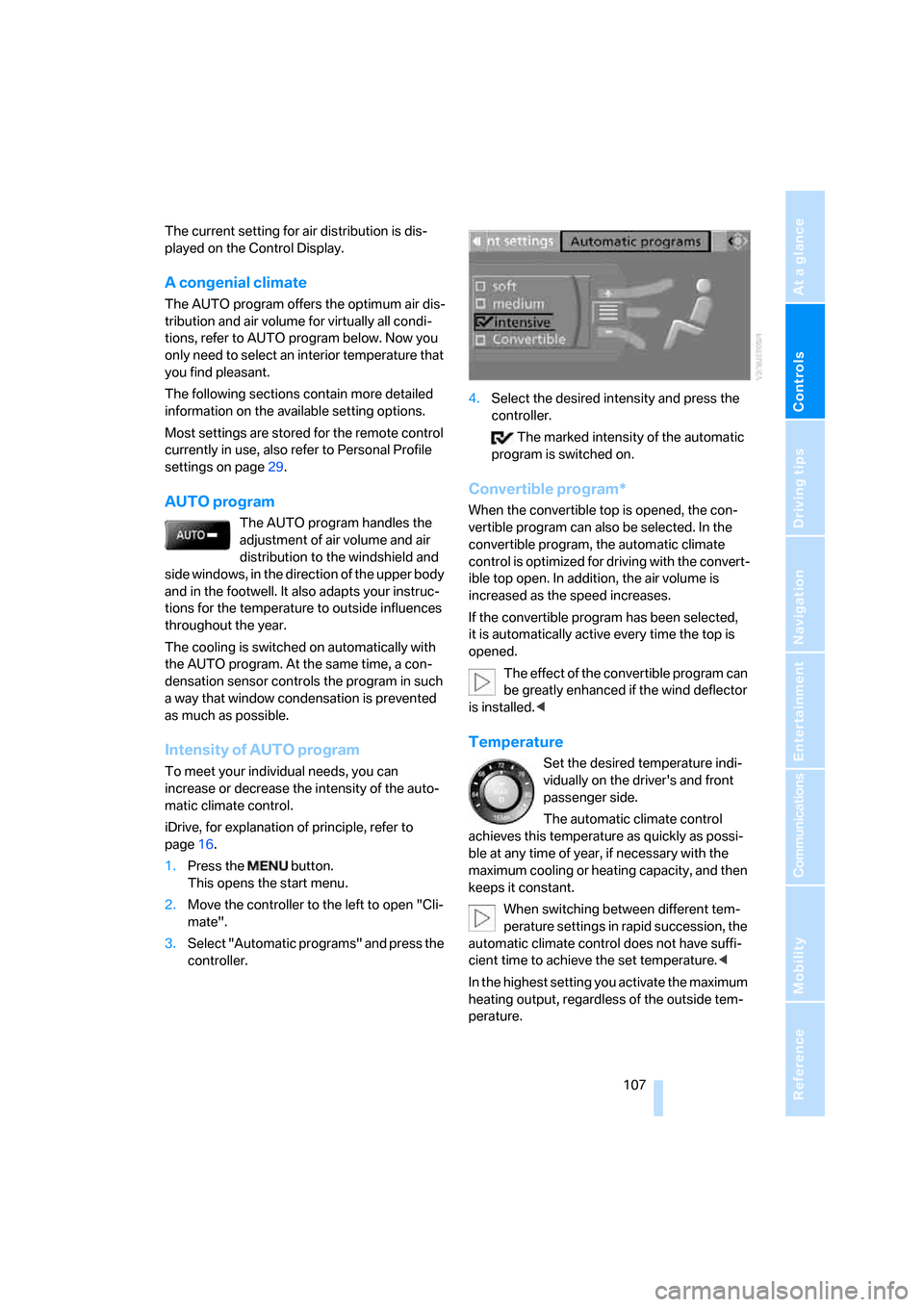
1.Press the button.
This opens the start menu.
2.Move the controller to the left to open "Cli-
mate".
3.Select "Automatic programs" and press the
controller.4.Select the desired intensity and press the
controller.
The marked intensity of the automatic
program is switched on.
Convertible program*
When the convertible top is opened, the con-
vertible program can also be selected. In the
convertible program, the automatic climate
control is optimized for driving with the convert-
ible top open. In addition, the air volume is
increased as the speed increases.
If the convertible program has been selected,
it is automatically active every time the top is
opened.
The effect of the convertible program can
be greatly enhanced if the wind deflector
is installed.<
Temperature
Set the desired temperature indi-
vidually on the driver's and front
passenger side.
The automatic climate control
achieves this temperature as quickly as possi-
ble at any time of year, if necessary with the
maximum cooling or heating capacity, and then
keeps it constant.
When switching between different tem-
perature settings in rapid succession, the
automatic climate control does not have suffi-
cient time to achieve the set temperature.<
In the highest setting you activate the maximum
heating output, regardless of the outside tem-
perature.
Page 122 of 254

Things to remember when driving
120
Things to remember when driving
Breaking-in
Moving parts need time to adjust to one
another. To ensure that your vehicle continues
to provide optimized economy of operation
throughout an extended service life, we request
that you devote careful attention to the follow-
ing section.
Engine and differential
Always obey all official speed limits.
Up to 1,200 miles/2,000 km
Drive at changing engine and driving speeds,
however do not exceed 4,500 rpm or 100 mph/
160 km/h.
Avoid full-throttle operation and use of the
transmission's kick-down mode during these
initial miles.
From 1,200 miles/2,000 km
The engine and vehicle speed can gradually be
increased.
SMG Sequential Manual Transmission
Do not use the acceleration assistant during the
break-in period, refer to page65.
Tires
Due to technical factors associated with their
manufacture, tires do not achieve their full trac-
tion potential until after an initial break-in
period. Therefore, drive reservedly during the
first 200 miles/300 km.
Brake system
Brakes require an initial break-in period of
approx. 300 miles/500 km to achieve optimized
contact and wear patterns between brake pads
and rotors. Drive in a reserved manner during
this break-in period.
Clutch
The function of the clutch is only at its opti-
mized level after a distance driven of approx.
300 miles/500 km. During this break-in period,
engage the clutch gently.
Following part replacement
Observe the break-in instructions again if com-
ponents mentioned above must be replaced
after subsequent driving operation.
General driving notes
Closing luggage compartment lid
Only drive with the luggage compartment
lid completely closed, otherwise exhaust
can penetrate into the passenger compart-
ment.<
If special circumstances should make it abso-
lutely necessary to operate the vehicle with the
luggage compartment lid open:
1.Coupe: close both windows and the glass
sunroof.
Convertible: with closed top, close all win-
dows.
2.Increase the air volume of the automatic cli-
mate control to a high level, refer to
page108.
Hot exhaust system
As in all vehicles, extremely high temper-
atures are generated in the exhaust sys-
tem. Do not remove the heat shields installed
adjacent to it, and never apply undercoating to
them. When driving, standing at idle and while
parking, take care to avoid possible contact
between the hot exhaust system and any highly
flammable materials such as hay, leaves, grass,
etc. Such contact could lead to a fire, and with it
the risk of serious property damage as well as
personal injury. Do not touch hot exhaust tail
pipes. Otherwise there is a risk of burns.<
Page 228 of 254

Technical data
226
Weights
Never exceed either the approved axle loads or
the gross vehicle weight.
Capacities
650i Coupe 650i Convertible
Curb weight lbs./kg 3,814/1,730 4,277/1,940
Approved gross vehicle weight lbs./kg 4,652/2,110 5,049/2,290
Load lbs./kg 838/380 772/350
Approved front axle load lbs./kg 2,337/1,060 2,403/1,090
Approved rear axle load lbs./kg 2,491/1,130 2,778/1,260
Luggage compartment capacity cu ft/l 15.9/450 10.6/300
>with raised convertible top com-
partment floor, refer to page35cu ft/l – 12.4/350
Notes
Fuel tank US gal/liters approx. 18.5/70 Fuel specification: page199
including reserve of: US gal/liters approx. 2.6/10
Window and headlamp
wiper system US quarts/liters approx. 5.3/5For details: page67
Page 237 of 254

Reference 235
At a glance
Controls
Driving tips
Communications
Navigation
Entertainment
Mobility
CD changer165
– controls152
– fast forward/reverse168
– installation location168
– random sequence168
– repeating a track167
– sampling a track167
– selecting a CD165
– selecting a track166
– switching on/off152
– tone control153
– volume153
CD player165
– controls152
– fast forward/reverse168
– random sequence168
– repeating a track167
– sampling a track167
– selecting a track166
– switching on/off152
– tone control153
– volume153
Center armrest, adjusting
height114
Center console14
"Central locking"30
Central locking
– from inside32
– from outside30
Central locking system30
– comfort access37
– hotel function33
Changes, technical, refer to
For your own safety6
Changing a wheel215
Changing language on
Control Display85
Changing scale for navigation
system display142
Changing units of measure on
Control Display85
Changing wheels204
CHECK button81
Check Control80
"Check Control
messages"81
Check Gas Cap198
Checking air pressure, refer to
Tire inflation pressure200Child-restraint fixing system
LATCH58
Child restraint systems57
Child seats, refer to
Transporting children
safely57
Chrome parts, refer to Caring
for your vehicle brochure
Cigarette lighter
116
Cigarette lighter socket, refer
to Connecting electrical
devices116
Cleaning, refer to Caring for
your vehicle brochure
"Climate"107
Clock75
– 12h/24h mode84
– hour signal84
– setting time and date83
Closing
– from inside32
– from outside30
Closing fuel filler cap198
Clothes hooks, Coupe115
Cockpit10
Cold start, refer to Starting
engine60
Comfort access37
– observe in car wash38
– replacing battery, remote
control38
Comfort closing
– windows, with comfort
access with Coupe37
– with comfort access37
Comfort operation
– convertible top31,32
– glass sunroof31,32
– windows31,32
"Communication"180,190
Compact disc
– refer to CD changer165
– refer to CD player165
Compartment for remote
control, refer to Ignition
lock59
Compartments, refer to
Storage compartments114
Compressed audio files165Computer76
– displays on Control
Display77
– hour signal84
"Concert hall", refer to Tone
control155
"Concierge"192
Condensation, refer to When
vehicle is parked122
Condition Based Service
CBS210
"Confirmation"31
Confirmation signals for
locking and unlocking31
Connecting car vacuum
cleaner, refer to Connecting
electrical devices116
Consumption display, refer to
Average fuel
consumption
76
Consumption statistics, refer
to Average fuel
consumption76
"Continue guidance to
destination?"141
"Contrast" with BMW Night
Vision101
Control Center, refer to
iDrive16
Control Display, refer to
iDrive16
– setting brightness84
– switching off/on21
Controller, refer to iDrive16
Controls, refer to Cockpit10
Convertible
– convertible program for
automatic climate
control107
– opening and closing
windows39
– rollover protection
system96
– top42
– wind deflector46
– window and convertible top
operation with comfort
access37
Page 238 of 254

Everything from A to Z
236 Convertible top
– care, refer to Caring for your
vehicle brochure
– closing manually44
– comfort operation32
– emergency closing44
– opening and closing43
Coolant209
– checking level209
– temperature75
Cooling, maximum109
Cooling function, automatic
climate control108
Cooling system, refer to
Coolant209
Copyright2
Cornering Brake Control
CBC87
Country of destination for
navigation129
Courtesy lamps, refer to
Interior lamps104
Cradle for telephone or mobile
phone114
Cruise control67
– active cruise control68
Cruising range76
Cup holders115
Curb weight, refer to
Weights226
"Current position"148
Current position
– displaying148
– entering136
– storing136
"Curve mode" with
BMW Night Vision101
"Customer
Relations"184,192
D
Dashboard, refer to
Cockpit10
Data, technical224
– capacities226
– dimensions224
– measurements224
– weights226"Date"84
Date75
– display format84
– setting84
"Date format"84
"Daytime running lamps"103
Daytime running lamps103
DBC Dynamic Brake Control,
warning lamp89
"Deactivated"51
Deactivating selector lever
interlock64
Decommissioning the vehicle,
refer to Caring for your
vehicle brochure
Defect
– tires, refer to Flat Tire
Monitor89
– tires, refer to Tire Pressure
Monitor91
Defrosting windows108
Defrosting windows and
removing condensation108
Defrosting windshield, refer to
Defrosting windows108
Defrost position, refer to
Defrosting windows108
"Delete address book" for
navigation system137
"Delete all numbers" for
mobile phone183
"Delete data" for navigation
system137
"Delete" for mobile
phone183
Destination address
– deleting137
– entering128,131
Destination for navigation
– destination list135
– entering via voice131
– entry128
– home address138
– selecting from address
book136
– selecting using
information134
– storing136Destination guidance140
– bypassing route
sections144
– canceling voice
instructions56
– changing specified
route
138
– displaying route141
– distance and arrival140
– interrupting140
– starting140
– terminating/continuing140
– voice instructions143
– volume of voice
instructions144
Destination list for
navigation135
Destinations recently driven
to135
"Details" in audio mode167
"Detour" for navigation
system147
"Dial" for mobile phone181
"Dial number"181
"Diamond button"56
Digital clock75
Digital radio, refer to High
Definition Radio160
Dimensions
– Convertible225
– Coupe224
Directional indicators, refer to
Turn signals65
Direction announcements,
refer to Voice
instructions143
Direction instructions, refer to
Voice instructions143
Directory, refer to Phone
book182
Directory for navigation, refer
to Address book136
"Display"85
Display, refer to iDrive
controls16
Display elements, refer to
Instrument cluster12
Displaying vehicle data195
Page 239 of 254
Reference 237
At a glance
Controls
Driving tips
Communications
Navigation
Entertainment
Mobility
Display lighting, refer to
Instrument lighting104
"Display off"21
Displays
– on Control Display, refer to
iDrive16
– refer to Instrument
cluster12
"Display settings"85,98
Displays on the windshield,
refer to Head-Up Display97
Disposal
– battery of remote control
with comfort access38
– coolant209
– vehicle battery215
Distance, refer to
Computer77
Distance control, refer to
Active cruise control68
"Distance to dest."77
Distance to destination, refer
to Computer77
Distance warning, refer to
PDC Park Distance
Control86
Door entry lighting, refer to
Interior lamps104
Door key, refer to Keys/
remote control28
Door lock32
"Door locks"30,79
Doors
– manual operation32
– remote control31
DOT Quality Grades202
Draft-free ventilation110
"Driver's door only"30
Driving lamps, refer to Parking
lamps/low beams102
Driving route, refer to
Displaying route141
Driving stability control
systems87
Driving through water121
Driving tips, refer to General
driving notes120Drying the air, refer to Cooling
function108
DSC Dynamic Stability
Control88
– indicator lamp13,88
– malfunction89
DTC Dynamic Traction
Control88
– activating88
– indicator lamp13,89
DVD for navigation
126
Dynamic Drive89
Dynamic Driving Control64
"Dynamic route" for
navigation139
Dynamic Stability Control
DSC88
Dynamic Traction Control
DTC88
E
Easy entry, refer to Entering
rear52
Easy entry/exit55
Eject button, refer to Buttons
on CD player152
Electrical malfunction
– convertible top44
– door lock32
– driver's door32
– fuel filler door198
– glass sunroof41
– luggage compartment lid34
– storage compartment, hotel
function34
Electric convertible top42
Electric steering wheel
adjustment55
Electronic brake-force
distribution87
Electronic oil level check207
Emergency assistance, refer
to Roadside Assistance218
Emergency call217Emergency operation, refer to
Manual operation
– convertible top44
– door lock32
– driver's door32
– fuel filler door198
– glass sunroof41
– hotel function34
– luggage compartment lid34
– selector lever interlock,
automatic transmission64
Emergency release for
luggage compartment lid in
luggage compartment35
Emergency services, refer to
Roadside Assistance218
"Enable services"195
"End call"182
Engine
– breaking-in120
– overheated, refer to Coolant
temperature75
– starting60
– starting, comfort access37
– switching off60
– switching off when equipped
with Automatic
transmission, with comfort
access38
Engine compartment207
Engine coolant209
Engine oil
– adding208
– additives, refer to Approved
engine oils208
– approved oils208
– electronic oil level check207
– interval between changes,
refer to Service
requirements78
– oil change208
– oil grades, refer to Approved
engine oils208
– recommended oils208
– temperature76
– temperature gauge76