2007 BMW 530I TOURING Memory
[x] Cancel search: MemoryPage 194 of 286
Telephoning
192
Telephoning
The concept
Your BMW is equipped with a full mobile phone
preparation package. After pairing a suitable
mobile phone in the vehicle once, you can oper-
ate the mobile phone via iDrive, with the buttons
on the steering wheel and by voice.
A mobile phone that has been paired once is
automatically detected again with the engine
running or the ignition switched on as soon as
it is in the vehicle interior. The logon data of up
to four mobile phones can be stored simulta-
neously. If several mobile phones are detected
simultaneously, the respective last mobile
phone paired can be operated via the vehicle.
Using a phone in your vehicle
Using snap-in adapter*
The so-called snap-in adapter, a mobile phone
cradle, enables the battery to be charged and
the mobile phone to be connected to the exter-
nal antenna of your vehicle. This ensures
improved network reception and a consistent
voice reproduction quality. Ask your BMW cen-
ter which mobile phones snap-in adapters are
offered for.
BMW discourages the use of mobile
phones or other mobile communications
devices inside the vehicle without a direct con-
nection to an outside antenna. Otherwise, the
vehicle electronics and mobile communication
device can influence one another. In addition,
there is no assurance that the radiation which
results from transmission will be dissipated
from the vehicle interior.<
For your safety
A car phone makes life more convenient in
many ways, and can even save lives in an emer-
gency. While you should consult your mobile
phone's separate operating instructions for a
detailed description of safety precautions and information, we request that you direct your
particular attention to the following:
Only make entries when the traffic situa-
tion allows you to do so. Do not hold the
mobile phone in your hand while you are driving;
use the hands-free system instead. If you do
not observe this precaution, your being dis-
tracted can endanger vehicle occupants and
other road users.<
Suitable mobile phones
Ask your BMW center which mobile phones
with a Bluetooth interface are supported by the
mobile phone preparation package or which
mobile phones snap-in adapters are available
for. These mobile phones support the functions
described in this Owner's Manual with a certain
software version. Malfunctions can occur with
other mobile phones.
Care instructions
You can find what you need to know about car-
ing for your mobile phone in the separate Caring
for your vehicle brochure and in the mobile
phone operating instructions.
Operating options
You can operate the mobile phone* using:
>Buttons on steering wheel, refer to
page12 11
>iDrive, refer to page16
>Voice commands, refer to page203
>Programmable memory/direct selection
buttons, refer to page21
Avoid operating a mobile phone detected by
the vehicle with the keypad of the mobile
phone, otherwise malfunctions can occur.
*
Page 201 of 286
199
Entertainment
Reference
At a glance
Controls
Driving tips Communications
Navigation
Mobility
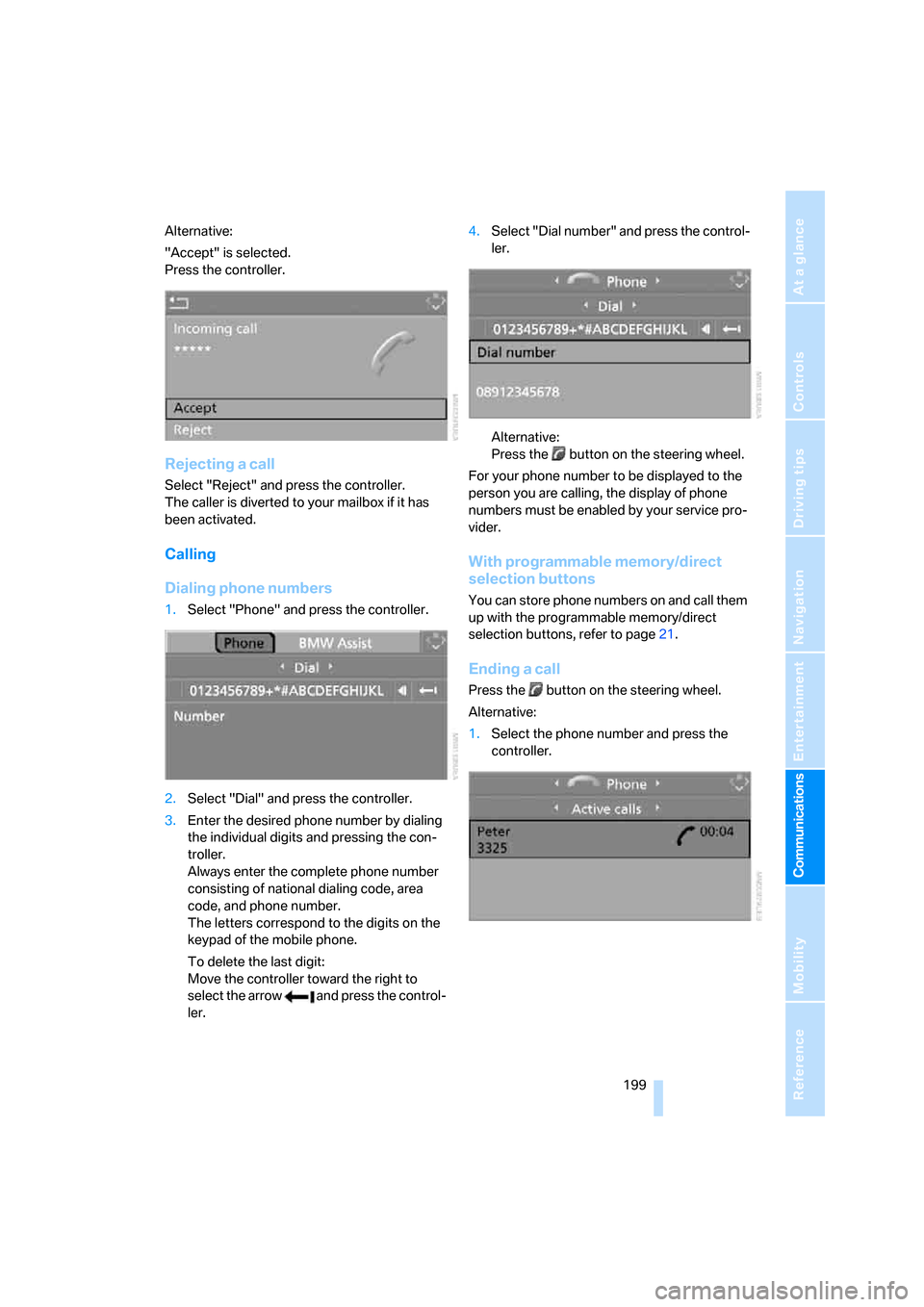
Alternative:
"Accept" is selected.
Press the controller.
Rejecting a call
Select "Reject" and press the controller.
The caller is diverted to your mailbox if it has
been activated.
Calling
Dialing phone numbers
1.Select "Phone" and press the controller.
2.Select "Dial" and press the controller.
3.Enter the desired phone number by dialing
the individual digits and pressing the con-
troller.
Always enter the complete phone number
consisting of national dialing code, area
code, and phone number.
The letters correspond to the digits on the
keypad of the mobile phone.
To delete the last digit:
Move the controller toward the right to
select the arrow and press the control-
ler.4.Select "Dial number" and press the control-
ler.
Alternative:
Press the button on the steering wheel.
For your phone number to be displayed to the
person you are calling, the display of phone
numbers must be enabled by your service pro-
vider.
With programmable memory/direct
selection buttons
You can store phone numbers on and call them
up with the programmable memory/direct
selection buttons, refer to page21.
Ending a call
Press the button on the steering wheel.
Alternative:
1.Select the phone number and press the
controller.
Page 206 of 286
Telephoning
204
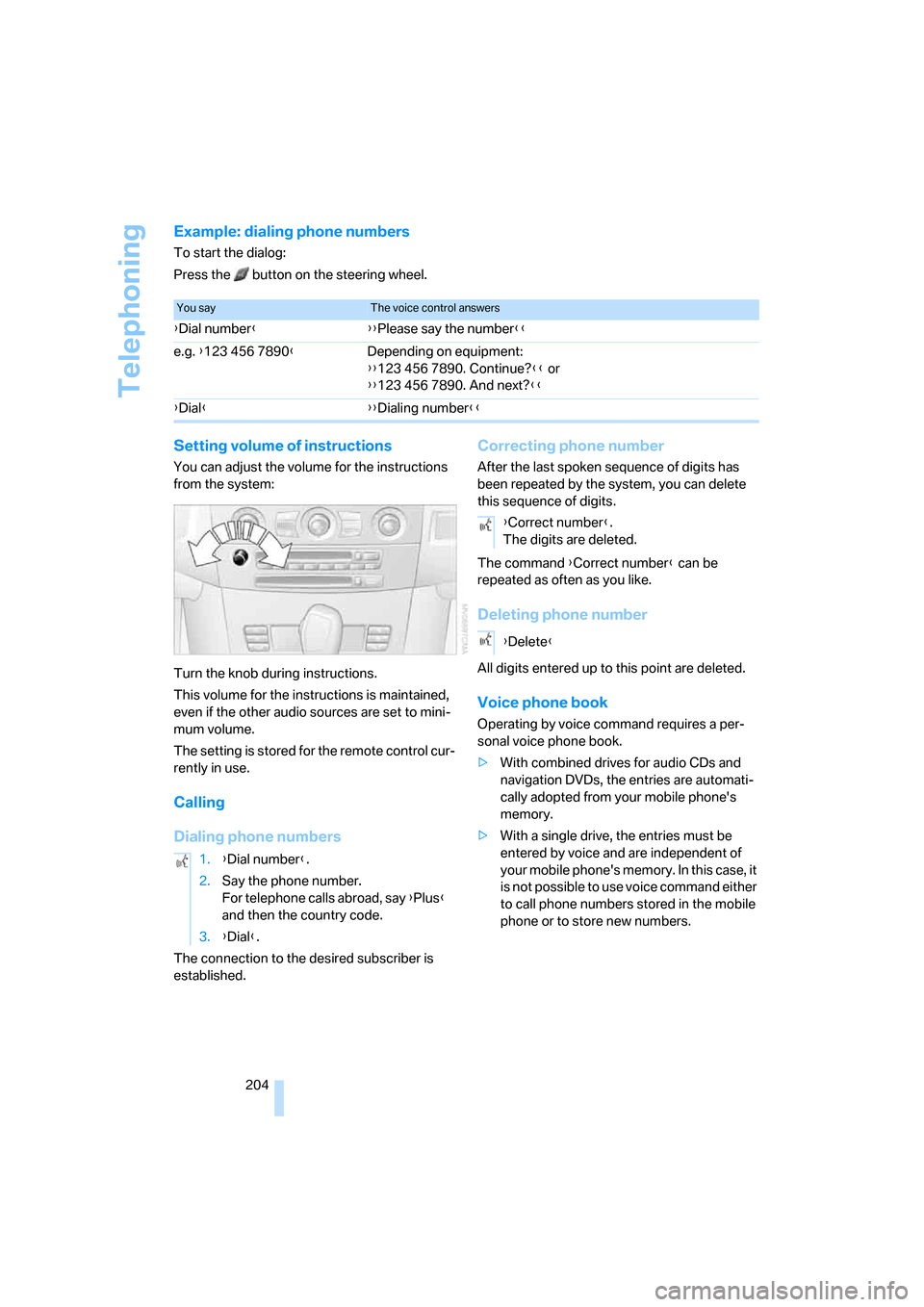
Example: dialing phone numbers
To start the dialog:
Press the button on the steering wheel.
Setting volume of instructions
You can adjust the volume for the instructions
from the system:
Turn the knob during instructions.
This volume for the instructions is maintained,
even if the other audio sources are set to mini-
mum volume.
The setting is stored for the remote control cur-
rently in use.
Calling
Dialing phone numbers
The connection to the desired subscriber is
established.
Correcting phone number
After the last spoken sequence of digits has
been repeated by the system, you can delete
this sequence of digits.
The command {Correct number} can be
repeated as often as you like.
Deleting phone number
All digits entered up to this point are deleted.
Voice phone book
Operating by voice command requires a per-
sonal voice phone book.
>With combined drives for audio CDs and
navigation DVDs, the entries are automati-
cally adopted from your mobile phone's
memory.
>With a single drive, the entries must be
entered by voice and are independent of
your mobile phone's memory. In this case, it
is not possible to use voice command either
to call phone numbers stored in the mobile
phone or to store new numbers.
You sayThe voice control answers
{Dial number}{{Please say the number}}
e.g. {123 456 7890}Depending on equipment:
{{123 456 7890. Continue?}} or
{{123 456 7890. And next?}}
{Dial}{{Dialing number}}
1.{Dial number}.
2.Say the phone number.
For telephone calls abroad, say {Plus}
and then the country code.
3.{Dial}.
{Correct number}.
The digits are deleted.
{Delete}
Page 244 of 286

Replacing components
242 3.Check and correct the tire inflation pressure
at the earliest opportunity.
Protect valve stems with valve stem
seal caps against dirt and contamina-
tion. Dirt in valve stems is a frequent source
of gradual air loss.<
4.Initialize the Flat Tire Monitor, refer to
page94, or reset the Tire Pressure Monitor,
refer to page96.
5.Replace the damaged tire as soon as possi-
ble and have the new wheel/tire balanced.
Driving with compact wheel
Drive reservedly and do not exceed a speed of
50 mph/80 km/h.
The driving characteristics change, for example
reduced track stability on braking, extended
braking distance, and altered self-steering
characteristics in the limit range. In conjunction
with winter tires, these characteristics are more
pronounced.
Only one compact wheel may be
mounted. You should re-equip with
wheels and tires of the original size as quickly as
possible.<
Vehicle battery
Battery care
The battery is 100 % maintenance-free, i.e., the
electrolyte will last for the life of the battery
when the vehicle is operated in a temperate cli-
ma te. Your BM W center will be glad to advise in
all matters concerning the battery.
Charging battery
Only charge the battery in the vehicle via the
terminals in the engine compartment with the
engine switched off. Connections, refer to
Jump starting on page246.
Disposal
Have old batteries disposed of by your
BMW center or hand them in to a recy-
cling center. Maintain the battery in an upright
position for transport and storage. Always
restrain the battery to prevent it from tipping
over during transport.<
Power failure
After a temporary power loss, the functioning of
some equipment may be limited and require
reinitialization. Individual settings are also lost
and must be updated:
>Seat, mirror and steering wheel memory
The positions must be stored again, refer to
page48.
>Time and Date
The values must be updated, refer to
page85.
>Radio
Stations must be stored again if necessary,
refer to page172.
>Navigation system
Wait until the system starts, refer to
page140.
Fuses
Never attempt to repair a blown fuse and
do not replace a defective fuse with a sub-
stitute of another color or amperage rating, as
this could lead to a circuit overload, ultimately
resulting in a fire in the vehicle.<
Sedan
Spare fuses, plastic tweezers and fuse alloca-
tion diagram are located in the compartment for
the onboard tool kit, refer to page234.
Sports Wagon
Spare fuses and a pair of plastic tweezers are
contained in the onboard tool kit, refer to
page234. A fuse allocation diagram is located
in the cargo bay behind the right-hand side
panel.
Page 273 of 286

Reference 271
At a glance
Controls
Driving tips
Communications
Navigation
Entertainment
Mobility
Inflation pressure, refer to Tire
inflation pressure218
Inflation pressure monitoring
– refer to Flat Tire Monitor94
– refer to TPM Tire Pressure
Monitor95
Info menu17
Information
– on another location147
– on current position147
– on destination location147
"Information" for navigation
system147
Information menu, refer to
imenu17
"Information on
destination"149
Information service210
"Info sources"80
Initializing
– Flat Tire Monitor94
– radio, refer to Storing
stations172
– refer to Power failure242
– refer to Setting time and
date85
– seat, mirror and steering
wheel memory47
"Input map"147
Installation location
– CD changer183
– drive for navigation DVD140
– mobile phone120
Instructions for navigation
system, refer to Voice
instructions157
Instrument cluster12
Instrument illumination, refer
to Instrument lighting110
Instrument lighting110
Instrument panel
– refer to Cockpit10
– refer to Instrument
cluster12
Integrated key28
Integrated universal remote
control118
Interesting destination for
navigation147"Interim time"85
Interior lamps110
– switching on with remote
control31
Interior motion sensor38
– switching off38
Interior rearview mirror53
– automatic dimming
feature53
Intermittent mode of the
wipers67
J
Jacking points241
Joystick
– refer to iDrive16
– refer to Selector lever,
selecting transmission
positions63
Jump starting246
K
Keyless-Go, refer to Comfort
access39
Keyless opening and closing,
refer to Comfort access39
Key Memory, refer to Personal
Profile29
"Keypad"202
Keys28
– key-related settings, refer to
Personal Profile29
– spare key28
Kick-down, automatic
transmission with
Steptronic63
Knock control217
L
Lamps, refer to Parking lamps/
low beams107
Lamps and bulbs235
Lane limit lines, refer to
Leaving lane warning105"Language / Units"87
– for navigation
system141,157
"Languages"87
– for navigation
system141,157
Lashing eyes, refer to
Securing cargo135
Last destinations, refer to
Destination list149
"Last seat pos."48
LATCH child restraint fixing
system58
Leaving lane warning105
LEDs light-emitting
diodes235
Length, refer to
Dimensions253
License plate lamp, replacing
bulbs239
Light-emitting diodes
LEDs235
Lighter122
"Lighting"66
Lighting
– instruments110
– lamps and bulbs235
– of the vehicle, refer to
Lamps107
Light switch107
"Limit"84
Loading
– securing cargo135
– stowing cargo135
– vehicle134
Load securing equipment,
refer to Securing cargo135
"Lock after driving"33
Locking31,33
– confirmation signals31
– from inside33
– from outside31
– without key, refer to Comfort
access39
Locking and unlocking doors
– confirmation signals31
– from inside33
– from outside30
Page 274 of 286

Everything from A to Z
272 Low beams107
– automatic107
– replacing bulbs236
Lower back support, refer to
Lumbar support47
Lug bolts241
– tightening torque, refer to
After mounting241
– wrench240
Luggage compartment, refer
to Cargo bay
Luggage compartment lid34
– emergency operation, refer
to Manual operation34
– emergency release35
– locking separately34
– opening from inside34
– opening from outside34
– unlocking and locking from
inside33
– unlocking manually34
Luggage compartment lid/
tailgate, comfort access39
Luggage net, refer to
Separation net125
Luggage rack, refer to Roof-
mounted luggage rack136
Lumbar support47
LW, waveband170
M
M+S tires, refer to Winter
tires227
Maintenance232
– refer to Service and
Warranty Information
Booklet for US models232
– refer to Service
requirements80
– refer to Warranty and
Service Guide Booklet for
Canadian models232
Malfunction warnings, refer to
Check Control82
Manual air distribution113
Manual mode, automatic
transmission with
Steptronic63"Manual" on the radio171
Manual operation
– door lock32
– driver's door32
– fuel filler door216
– glass sunroof43
– luggage compartment lid34
– panorama glass sunroof44
– transmission lock, automatic
transmission64
Manual transmission62
"Map direction of travel"156
Map display156
"Map facing north"156
Map for navigation
– changing scale156
– destination entry146
Map view facing north156
Master key, refer to Keys/
remote control28
Maximum cooling114
Maximum speed
– with compact wheel242
– with winter tires227
Measurements, refer to
Dimensions253
Memory, refer to Seat, mirror
and steering wheel
memory47
MENU, button refer to Start
menu17
Menus, refer to iDrive16
Message list for traffic
information159
Microfilter115
Microphone
– for mobile phone14
– for voice command
system14
Mirror dimming feature53
Mirrors52
– automatic curb monitor53
– folding in and out53
– heating53
– memory, refer to Seat, mirror
and steering wheel
memory47
"Missed calls"200
Missed calls201Mobile communications
devices in vehicle132
Mobile phone
– accepted calls201
– adjusting volume198
– calling199
– ending call199
– installation location, refer to
Center armrest120
– missed calls201
– operation by voice203
– operation via iDrive198
– redialing201
– refer to separate operating
instructions
– Top 8201
– touch tone dialing, refer to
Tone dialing method202
Mobile phone battery206
Mobile phones, use in the
interior, refer to Mobile
communications
devices132
Monitor, refer to iDrive16
Monitoring pressure of tires,
refer to Flat Tire Monitor94
"Monitor on / off"55
Most recent mobile phone
numbers201
MP3
– compressed audio files179
– USB/audio interface186
Multi-function steering wheel,
refer to Buttons on steering
wheel11
Multifunction switch
– refer to Turn signals/
headlamp flasher66
– refer to Wiper system67
Music tracks
– finding181
– random play sequence182
– sampling, scan181
"Mute on / off"55
MW, waveband170
Page 276 of 286

Everything from A to Z
274 Parking assistant, refer to
PDC Park Distance
Control89
Parking brake, refer to
Handbrake62
Parking lamps107
– replacing bulbs236
Parts and accessories6
Passenger-side exterior
mirror, tilting down53
"Pathway lighting"108
Pathway lighting108
"PDC"90
"PDC display on"90
PDC Park Distance Control89
Personal Profile29
"Perspective"156
"Phone"194,196,199
Phone book198
– changing entry200
– creating and editing voice
phone book204
– deleting all entries201
– deleting entry201
– dialing phone number200
Phone numbers
– deleting from phone
book201
– dialing199
– most recent numbers201
– selecting in phone book201
– Top 8201
Pinch protection system
– glass sunroof, electric42
– panorama glass sunroof44
– power windows41
Plasters, refer to First-aid
kit245
Plastic, refer to Caring for your
vehicle brochure
"Play" on the radio178
Plug-in unit for remote
control, refer to Ignition
lock60
Pollen, refer to Microfilter/
activated charcoal filter115Position
– displaying162
– storing150
Power failure242
Power windows, refer to
Windows40
Preselecting activation times
of the parked car
ventilation116
"Presets" on the
radio170,177
Pressure, tires218
Pressure monitoring of tires,
refer to TPM Tire Pressure
Monitor95
"Profile"213
Programmable buttons on
steering wheel54
Programmable memory
buttons21
Protective function, refer to
Pinch protection system
– glass sunroof, electric42
– panorama glass sunroof44
– windows41
R
Radio
– autostore172
– controls166
– High Definition Radio174
– sampling stations171
– satellite radio176
– selecting frequency
manually171
– selecting
waveband166,170
– station search171
– station selection170
– station with the best
reception172
– storing stations172
– switching on/off166
– tone control167
– volume167
– Weather Band, refer to
Weather news flashes174Radio key, refer to Keys/
remote control28
Radio position, refer to Radio
readiness60
Radio readiness60
– switched off61
– switched on60
– with comfort access40
Radio stations, storing172
Rain sensor67
"Random", random play
sequence182
"Random all" in audio
mode183
"Random directory" in audio
mode182
"RDS"173
Reading lamps110
Rear armrest, refer to Center
armrest, rear123
Rear lamps, refer to Tail
lamps237
– replacing bulbs237
Rear seats
– adjusting head restraints49
– folding over backrest123
– heating52
– removing head restraints50
Rear socket123
Rear ventilation115
Rearview mirror52
Rear window
– changing wiper blade234
– heating113
– opening and closing on
Sports Wagon35
– roller sun blind, refer to Sun
blinds119
– window wiper on Sports
Wagon68,134
Rear window safety switch41
"Received calls"200
Reception
– quality173
– radio stations173
– regional station172
Page 278 of 286

Everything from A to Z
276 Safety systems
– ABS Antilock Brake
System90
– airbags99
– driving stability control
systems90
– safety belts50
Safety tires, refer to Run-flat
tires226
Satellite radio176
– enabling channel176
– selecting channel177
– storing channel177
"SAT" with radio166,176
"Save current
destination"152
"Scan"
– music tracks on CD181
– stations with radio171
Scan
– CD changer181
– CD player181
– radio171
"Scan all" in audio mode181
"Scan directory" in audio
mode181
Screen, refer to iDrive16
Screw thread for tow
fitting247
SDARS, refer to Satellite
radio176
"Seat heater distribution"51
Seats46
– active backrest width
adjustment47
– adjusting the seats46
– comfort seat46
– easy entry/exit47
– heating51
– lumbar support47
– memory, refer to Seat, mirror
and steering wheel
memory47
– shoulder support46
– sitting safely45
– storing the setting47
– thigh support46
– ventilation, refer to Active
seat ventilation52Securing load
– refer to Securing cargo135
– with ski bag, refer to
Securing cargo127
"Select as
destination"148,211
"Select current speed"84
Selecting audio sources, refer
to Operation via iDrive166
Selecting distance with active
cruise control71
Selecting frequency
manually171
Selecting menu items19
Selecting route152
Selection options with
navigation system152
Selector lever interlock,
automatic transmission,
refer to Engaging
transmission position63
Self-leveling suspension93
Separation net, Sports
Wagon125
"Service"80,209,229
Service, refer to Roadside
Assistance245
Service and Warranty
Information Booklet for
US models232
Service Interval Display
– refer to CBS Condition
Based Service232
– refer to Service
requirements80
"Service notification"209
"Service Request"202,209
"Service
requirements"81,209,230
Service requirements80
– refer to CBS Condition
Based Service232
"Service Status"213
"Set"
– in audio mode166
– on trip computer80
"Set date"86
"Set service date"81
"Set time"86Setting button, refer to
Controls, controller16
"Settings"213
– for BMW Assist211
– for unlocking30
Settings
– BMW Night Vision104
– changing on Control
Display85
– clock, 12h/24h mode86
– configuring, refer to
Personal Profile29
– date86
– language87
– units of measure87
Settings menu, refer to
imenu17
Setting time, refer to
Preselecting activation
times116
Shifting gears, automatic
transmission with
Steptronic63
Shift paddles on steering
wheel65
Short commands of voice
command system257
"Short route" for
navigation152
Short route in navigation, refer
to Selecting route152
Shoulder support46
"Show current position"147
"Show destination
position"147
Shuffled, refer to Random
– CD changer182
– CD player182
Side airbags99
Side marker lamps, replacing
bulbs237
Side-mounted turn signals,
replacing bulbs237
Side window blinds, refer to
Sun blinds119
Signal horn, refer to Horn10