Page 163 of 442
Open any door.
Remove the key from the ignition
switch.
Unlock the doors with the key,
locktabonthedriver’sdoor,
master door lock switch, or
remote transmitter.
After all doors are closed tightly, the
light(s) dims slightly, then fades out
in about 30 seconds. If
you do not open any door after
unlocking the driver’s door or
removing the key from the ignition
switch, the light(s) fade out in about
30 seconds. If you leave any door
open without the key in the ignition
switch, the light(s) will go off after 3
minutes.
You can use the front ceiling lights
whenever the lights are off.
To turn the lights on or off, push its
lens.
In
the door activated position, both
front and rear ceiling lights come on
when you:
You can change the ‘‘INTERIOR
LIGHT DIMMING TIME’’ setting in
the multi-information display (see
page ).103
On RDX with Technology Package
model
Interior Lights
Inst rument s and Cont rols
159
LENSES
�����—�����—�
���y�
����
��������y���
�(�)� �������y���
�����y
Page 164 of 442

The courtesy lights in the ceiling
console come on when the light
switch is in the or the
position. You can adjust their
brightness by turning the Select/
Reset knob on the instrument panel. The
cargo area light has a two
position switch. In the OFF (right)
position, the light does not come on.
In the ON (left) position, the light
comesonwhenyou openthetailgate.
Your
vehicle also has a courtesy light
in the ignition switch. This light
comesonwhenyou;
Unlock the driver’s door.
Remove the key from the ignition
switch. Open any door.
The
courtesy light in each front door
comes on when the door is opened,
and goes out when the door is closed.
After all doors are closed tightly, the
light fades out in about 30 seconds.
You can change the ‘‘INTERIOR
LIGHT DIMMING TIME’’ setting in
the multi-information display (see
page ). 103
On RDX with Technology Package
model
Interior Lights
Courtesy Lights Cargo Area Light
160
COURTESY LIGHTS ON OFF
�����—�����—�
���y�
����
��������y���
�(�)� �������y���
�����y
Page 168 of 442
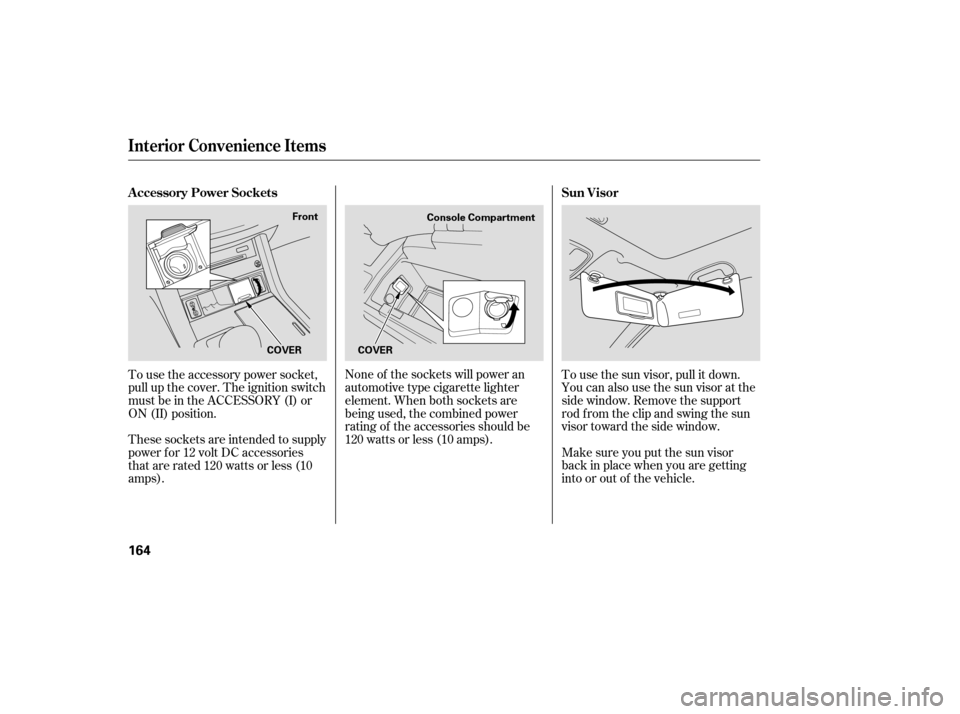
None of the sockets will power an
automotive type cigarette lighter
element. When both sockets are
being used, the combined power
rating of the accessories should be
120 watts or less (10 amps).To use the sun visor, pull it down.
You can also use the sun visor at the
side window. Remove the support
rod from the clip and swing the sun
visor toward the side window.
Make sure you put the sun visor
back in place when you are getting
into or out of the vehicle.
To use the accessory power socket,
pull up the cover. The ignition switch
must be in the ACCESSORY (I) or
ON (II) position.
These sockets are intended to supply
power f or 12 volt DC accessories
that are rated 120 watts or less (10
amps).
Interior Convenience Items
A ccessory Power Sockets
Sun Visor
164
COVERConsole Compartment
COVER Front
�����—�����—�
���y�
���������
�
�y���
�(�)� �������y���
�����y
Page 184 of 442
XM satellite radio information is
available on page .
The band and f requency that the
radio was last tuned to is displayed.
To change bands, press the AM or
FM button. On the FM band, ‘‘ST’’
will be shown on the center display if
the station is broadcasting in stereo.
Stereo reproduction on AM is not
available. The ignition switch must be in the
ACCESSORY (I) or the ON (II)
position. Turn the system on by
pushing the PWR/VOL knob, or the
AM or FM button. Adjust the volume
by turning the PWR/VOL knob.
193
On U.S. models
On RDX model
Audio System
To Play the AM/FM Radio
180
STEREO
INDICATOR
FM BUTTON
SCAN BUTTON
TUNE/FOLDER BAR AM BUTTONSCAN
INDICATOR
A.SEL
INDICATOR
A.SEL/RDM BUTTON VOLUME
LEVEL
PWR/VOL KNOB
PRESET BARS
SEEK/SKIP BAR
U.S. model is shown.
�����—�����—�
���y�
�������������y���
�(�)� �������y���
�����y
Page 189 of 442

Your audio system has an in-dash
CD changer that holds up to six CDs,
providing several hours of
continuous entertainment. You
operate this CD changer with the
same controls used for the radio.
To load CDs or operate the CD
changer, the ignition switch must be
in the ACCESSORY (I) or ON (II)
position. For
best results when using CD-R or
CD-RW discs, use only high quality
discs labeled for audio use. When
recording a CD-R or CD-RW, the
recordingmustbeclosedinorder
for the disc to be played by CD
player.
You cannot load and play 3-inch
(8-cm)discsinthissystem.
Video CDs and DVDs will not work
in this unit.
The
disc changer can play these disc
formats:
The disc packages or jackets should
have one of these marks. The changer can also play MP3 or
WMA format (see page ).
CD (CD-DA)
CD-R/RW 187
CONT INUED
Audio System
Features
185
Do not use CDs with adhesive labels.
The label can curl up and cause the CD
to jam in the unit.
�����—�����—�
���y���������������y���
�(�)� �������y���
�����y
Page 196 of 442

To pause a disc, press the
corresponding number of the
cu rrent disc on the appropriate side
of the preset bars. To play the disc
again, press the preset bar again.
If you turn the system off while a CD
is playing, either with the PWR/VOL
knob or by turning off the ignition
switch, the disc will stay in the drive.
When you turn the system back on,
the CD will begin playing where it
left off.
To take the system out of CD mode,
press the AM or FM, CD/AUX, or
button. To return to CD
mode, press the CD/AUX or CD
(Canadian model) button. The
system will continue at the same
point that it left off. To
remove the disc that is currently
playing, press and release the eject
( ) button. You will see
‘‘EJECT’’ on the center display.
When you remove the disc from the
slot, the system begins the load
sequence so you can load anoth er
disc in that position. If you do not
load another CD within 10 seconds,
the system selects the previous
mode [AM, FM1, FM2, or XM Radio
(U.S. models)]. Press
and hold the eject button until
you hear a beep to remove all the
discs from the changer.
You can also eject discs when the
ignition switch is off by pressing the
eject button. The disc that was last
selected is ejected first. You can
eject the rest of the discs one at a
time.
For information on how to handle
and protect compact discs, see page
.
For information, see page .
For information, see page .
If you do not remove the CD f rom
the slot, the system will reload the
CD af ter 10 seconds and put the CD
changer in pause mode. To begin
playing the CD, press the CD/AUX
or CD (Canadian model) button.
To remove a dif f erent CD f rom the
changer, select it with the
appropriate side of the preset bar.
When that CD begins playing, press
the eject button. 234
196
233
To Pause a Disc
To Stop Playing a Disc
Removing CDs f rom the Changer
Protecting Discs
CD Changer Error Messages
Adjusting the Sound
Audio System
192
�����—�����—�
���y�
���������
���y���
�(�)� �������y���
�����y
Page 198 of 442

�µ�µ
�µ
�µ
To listen to the XM satellite Radio,
turn the ignition switch to the
ACCESSORY (I) or ON (II) position.
Push the PWR/VOL knob to turn on
the audio system, and press the
button. Adjust the volume by
turning the PWR/VOL knob. The
last channel you listened to will show
on the center display. Each time you press and
release the DISP/MODE button, the
center display changes in the
f ollowing sequence: Channel name,
category, artist name, and music title.
To switch between the
category mode and channel mode,
press and hold the DISP/MODE
button until the mode changes. ‘‘CH
(channel)’’ or ‘‘CAT (category)’’
mode indicator appears on the center
display. When in the satellite radio mode,
you can use any of f our methods to
f ind channels: TUNE, SEEK/SKIP
(CATEGORY), SCAN, and the
preset bars.
Press either side of the SEEK/SKIP
(CATEGORY) bar ( or )
to select another category.Press the TUNE/
FOLDER bar to change channel
selections. Press the side of the
bar to tune to higher numbered
channels, and the side of the
bar to tune to lower numbered
channels. In the category mode, you
can only select channels within that
category.
Operating the XM Radio
DISP
MODE T o Select a Channel
SEEK /SK IP (CA T EGORY) TUNE
Audio System
194
�����—�����—�
���y���������������y���
�(�)� �������y���
�����y
Page 206 of 442

�µ
The
ignition switch must be in the
ACCESSORY (I) or the ON (II)
position. Press the AUDIO button to
vi ew the audio control display. Turn
the system on by pressing the PWR/
VOL knob or the AM/FM button
(AMorFMbuttononCanadian
models). Adjust the volume by
turning the PWR/VOL knob.
To tune with the interface dial, press
the AUDIO button to view the audio
control display, then push the
selector down, and turn the dial to
TUNE. Then press ENTER on the
selector, and turn the dial to the
desired frequency. To exit the
TUNE mode, press ENTER again.
XM satellite radio inf ormation is
available on page .
You can use any of f ive methods to
f ind radio stations on the selected
band: TUNE, SEEK, SCAN, the
preset buttons or icons, and AUTO
SELECT.
Use the TUNE/FOLDER
bar to tune the radio to a desired
f requency. Press the side of the
bar to tune to a higher f requency,
and the side of the bar to tune
to a lower f requency.
If youpressandholdthe or side of the bar, the f requency
will begin to change rapidly. It will
stop when you release it.
The band and f requency the radio
waslasttunedtoareshownonthe
upper display. To change bands,
press the AM/FM button (AM or
FM button). You can also change
bands with the interf ace dial. Press
the AUDIO button to view the audio
control display and the band changes
to FM1, FM2, or AM each time you
push the selector up. On the FM
bands, ‘‘STEREO’’ will be shown on
the audio control display. ‘‘ST’’ will
also appear on the upper display if
the station is broadcasting in stereo.
Stereo reproduction on AM is not
available. 221
On U.S. models
Audio System
To Select a Station
TUNE
202
TUNE ICON
�����—�����—�
���y�
�������������y���
�(�)� �������y���������y