Page 128 of 442

The level of brightness is shown on
the multi-information display while
you adjust it. It goes out 5 seconds
af ter you f inish adjusting.
The knob on the instrument panel
controls the brightness of the instru-
ment panel lights. Turn the knob to
adjust the brightness.
Separate adjustments can be made
when the headlights are on and of f . To reduce glare at night, the
instrument panel illumination dims
when you turn the light switch to the
or position.
The level of brightness is shown in
the inf ormation display while you
adjust it. It goes out 5 seconds af ter
you f inish adjusting.
You will hear a beep when maximum
or minimum brightness is reached.
You will also hear a beep when the
maximum level is canceled by
turning the knob a click to the lef t.
On RDX with Technology Package
model
On RDX model
Instrument Panel Brightness
124
INSTRUMENT PANEL BRIGHTNESS
CONTROL KNOB U.S. model is shown
U.S. model is shown
�����—�����—�
���y�
����
��������y���
�(�)� �������y���
�����y
Page 129 of 442

The rear window def ogger clears f og,
frost,andthinicefromthewindow.
Push the def ogger button to turn it
onandoff.Pushingthisbuttonalso
turns the mirror heaters on and of f .
The indicator in the button comes on
to show the def ogger is on.If you do not turn it of f , the def ogger
will automatically shut itself of f af ter
a certain period depending on the
ambient temperature. It also shuts
of f when you turn of f the ignition
switch. You have to turn it on again
when you restart the vehicle.
In cold weather, the def ogger will
not automatically shut itself of f . You
must manually shut of f the rear
window def ogger when it is no
longer needed.
Thedefoggerwiresontheinsideof
the rear window can be accidentally
damaged. When cleaning the glass,
always wipe side-to-side. Make sure the rear window is clear
and you have good visibility bef ore
starting to drive.
Push the button between the center
vents to turn on the hazard warning
lights (f our-way f lashers). This
causes all outside turn signals and
both indicators in the instrument
panel to f lash. Use the hazard
warning lights if you need to park in
a dangerous area near heavy traffic,
or if your vehicle is disabled.
Rear Window Def ogger
Hazard Warning Button
Rear Window Def ogger, Hazard Warning Button
Inst rument s and Cont rols
125
�����—�����—�
���y�
����
��������y���
�(�)� �������y���
�����y
Page 144 of 442

�µ�µ
When you press the UNLOCK
button, the ceiling lights (if the front
and rear ceiling light switches are in
the door activated position) will
come on. If you do not open any door,
the lights stay on for about 30
seconds, then fade out. If you relock
the doors with the remote
transmitter before 30 seconds have
el ap sed, the lights go off
immediately.
You can change the ‘‘INTERIOR
LIGHT DIMMING TIME’’ setting in
the multi-information display (see
page ).
Press
this button once to
lock all doors and the tailgate. Some
exterior lights will flash once. When
you push LOCK twice within 5
seconds, you will hear a beep to
verify that the security system has
set. You cannot lock the doors and
thetailgateifanydoororthetailgate
is not fully closed or the key is in the
ignition switch. Press
this button once
to unlock the driver’s door. Push it
twice to unlock the remaining doors
and the tailgate. Some exterior lights
will flash twice each time you press
the button.
You can change the ‘‘KEYLESS
LOCK ACKNOWLEDGMENT’’
setting in the multi-information
display (see page ).
You can change the ‘‘DOOR LOCK
MODE’’ setting in the multi-
info rmation display (see page ).
103
110
112
On RDX with Technology Package
model
On RDX with Technology Packagemodel
Remote Transmitter
LOCK UNL OCK
140
UNLOCK
BUTTON
LOCK
BUTTON
PANIC
BUTTON
�����—�����—�
���y�
���������
���y���
�(�)� �������y���
�����y
Page 145 of 442
�µ
If
you unlock the doors and the
tailgate with the remote transmitter,
but do not open any of the doors or
thetailgatewithin30seconds,the
doors and the tailgate automatically
relock and the security system sets. Protect
the transmitter from
extreme temperature.
Do not immerse the transmitter in
any liquid.
If you lose a transmitter, the
replacement needs to be
reprogrammed by your dealer.
Avoid
dropping or thro wing the
transmitter.
You can change the ‘‘SECURITY
RELOCK TIMER’’ setting in the
multi-inf ormation display (see page ).
Pressthisbuttonfor
about 1 second to attract attention;
the horn will sound, and the exterior
lights will f lash f or about 30 seconds.
To cancel panic mode, press any
button on the remote transmitter, or
turn the ignition switch to the ON
(II) position. 114
On RDX with Technology Package
model
Remote Transmitter
Remote Transmitter Care
PA NIC
Inst rument s and Cont rols
141
�����—�����—�
���y�
����
��������y���
�(�)� �������y���
�����y
Page 159 of 442
Keeptheinsideandoutsidemirrors
clean and adjusted f or best visibility.
Be sure to adjust the mirrors bef ore
you start driving.The inside mirror has day and night
positions. The night position reduces
glare f rom headlights behind you.
Flip the tab on the bottom edge of
the mirror to select the day or night
position. Turn the ignition switch to the ON
(II) position.
Move the selector switch to L
(driver’s side) or R (passenger’s
side).
1.
2.
CONT INUED
Mirrors
Adjusting the Power Mirrors
Inst rument s and Cont rols
155
SELECTOR SWITCH
TAB
�����—�����—�
���y�
�������������y���
�(�)� �������y���
�����y
Page 162 of 442
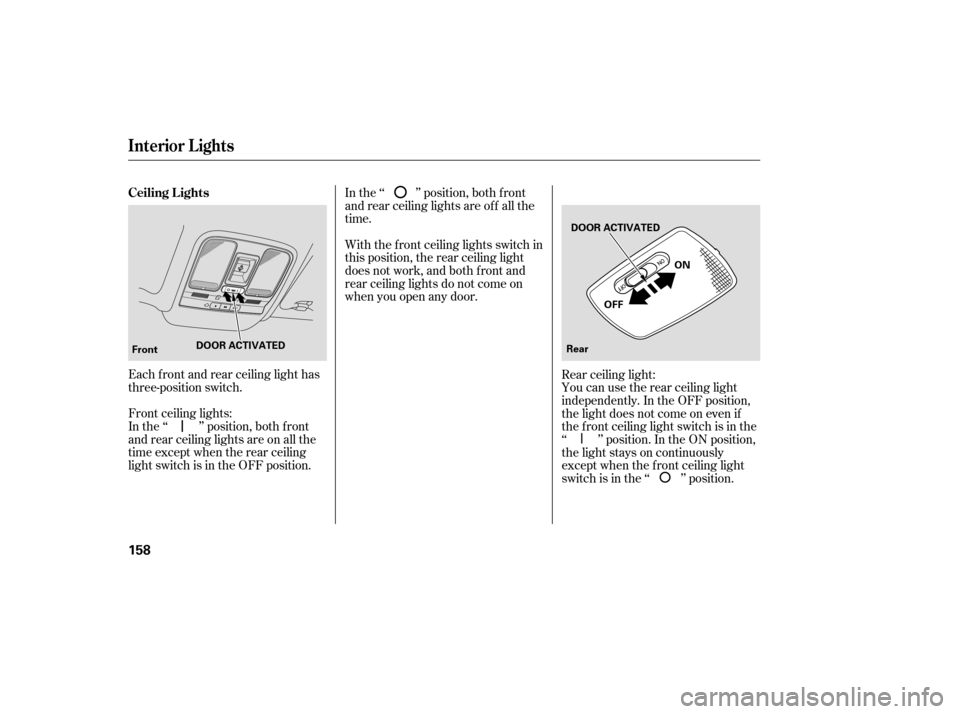
Each f ront and rear ceiling light has
three-position switch.
Front ceiling lights:
In the ‘‘ ’’ position, both f ront
and rear ceiling lights are on all the
time except when the rear ceiling
light switch is in the OFF position.In the ‘‘ ’’ position, both f ront
and rear ceiling lights are of f all the
time.
With the f ront ceiling lights switch in
this position, the rear ceiling light
does not work, and both f ront and
rear ceiling lights do not come on
when you open any door.
Rear ceiling light:
You can use the rear ceiling light
independently. In the OFF position,
the light does not come on even if
the f ront ceiling light switch is in the
‘‘ ’’ position. In the ON position,
the light stays on continuously
except when the f ront ceiling light
switch is in the ‘‘ ’’ position.
Ceiling L ights
Interior Lights
158
Front
DOOR ACTIVATED DOOR ACTIVATED
Rear OFF
ON
�����—�����—�
���y�
�������������y���
�(�)� �������y���
�����y
Page 163 of 442
Open any door.
Remove the key from the ignition
switch.
Unlock the doors with the key,
locktabonthedriver’sdoor,
master door lock switch, or
remote transmitter.
After all doors are closed tightly, the
light(s) dims slightly, then fades out
in about 30 seconds. If
you do not open any door after
unlocking the driver’s door or
removing the key from the ignition
switch, the light(s) fade out in about
30 seconds. If you leave any door
open without the key in the ignition
switch, the light(s) will go off after 3
minutes.
You can use the front ceiling lights
whenever the lights are off.
To turn the lights on or off, push its
lens.
In
the door activated position, both
front and rear ceiling lights come on
when you:
You can change the ‘‘INTERIOR
LIGHT DIMMING TIME’’ setting in
the multi-information display (see
page ).103
On RDX with Technology Package
model
Interior Lights
Inst rument s and Cont rols
159
LENSES
�����—�����—�
���y�
����
��������y���
�(�)� �������y���
�����y
Page 164 of 442

The courtesy lights in the ceiling
console come on when the light
switch is in the or the
position. You can adjust their
brightness by turning the Select/
Reset knob on the instrument panel. The
cargo area light has a two
position switch. In the OFF (right)
position, the light does not come on.
In the ON (left) position, the light
comesonwhenyou openthetailgate.
Your
vehicle also has a courtesy light
in the ignition switch. This light
comesonwhenyou;
Unlock the driver’s door.
Remove the key from the ignition
switch. Open any door.
The
courtesy light in each front door
comes on when the door is opened,
and goes out when the door is closed.
After all doors are closed tightly, the
light fades out in about 30 seconds.
You can change the ‘‘INTERIOR
LIGHT DIMMING TIME’’ setting in
the multi-information display (see
page ). 103
On RDX with Technology Package
model
Interior Lights
Courtesy Lights Cargo Area Light
160
COURTESY LIGHTS ON OFF
�����—�����—�
���y�
����
��������y���
�(�)� �������y���
�����y