Page 126 of 479

Make sure the rear window is clear
and you have good visibility before
starting to drive.
The defogger wires on the inside of
the rear window can be accidentally
damaged. When cleaning the glass,
always wipe side to side.
This button turns the rear window
defogger off and on. Pushing this
button also turns the mirror heaters
on or of f (see page ).
The rear window def ogger will clear
fog, frost, and thin ice from the
window. Push the def ogger button to
turn it on and off. The indicator in
the button lights to show the
def ogger is on. If you do not turn it
of f , the def ogger will shut itself of f
af ter about 15 minutes. It also shuts
of f when you turn of f the ignition.
You have to turn it on again when
you restart the vehicle.
Push the button between the center
vents to turn on the hazard warning
lights (f our-way f lashers). This
causes all f our outside turn signals
and both indicators in the instrument
panel to f lash. Use the hazard
warning lights if you need to park in
a dangerous area near heavy traffic,
or if your vehicle is disabled. 154
Rear Window Def ogger
Hazard Warning Button
Hazard Warning, Rear Window Def ogger
122
�����—�����—�����y�
����
��������y���
�(�)�-�������y���
�����y
Page 136 of 479

The tailgate can also be closed by
pressing the button on the tailgate. If
you press the button again while the
tailgate is closing, you will hear three
beep s, and the tailgate will stop
moving, reverse direction, and stop
at the fully opened position.
Press
and hold the tailgate button on
the remote transmitter or the switch
for about 1 second to open or close
the tailgate. Each time you press the
button on the remote transmitter or
the switc h, you will hear a beep, and
some front and rear lights will flash.
If you push the same button or
switch again while the tailgate is
opening or closing, you will hear
three beeps, and the tailgate will stop
moving, reverse direction, and stop
at the f ully opened or closed position.
The tailgate can be opened and
closed with the remote transmitter
(see page ) or the switch in the
driver’s door pocket when both f ront
doors are unlocked. 135U.S. Entertainment Packages and
Canadian Elite Package models
Power Tailgate
Tailgate
132
TAILGATE SWITCH
POWER TAILGATE SWITCH
�����—�����—�����y�
���������
���y���
�(�)�-�������y���
�����y
Page 139 of 479
�µ
Ifyoucannotopenthetailgate,
remove the cover on the back of the
tailgate(seepage ).Pushthe
release lever to the right as shown,
then pull the outer handle to open
the tailgate. Press
this button once to
lock all doors and the tailgate. Some
exterior lights will flash. When you
push LOCK twice within 5 seconds,
you will hear a beep to verify that the
doors and tailgate are locked and the
security system has set. This button
does not work if any door or tailgate
is not fully closed. To change the ‘‘KEYLESS LOCK
ACKNOWLEDGEMENT’’ setting,
see page .
134 110
CONT INUED
MDX, Technology, and Sport Packages
models
Tailgate, Remote Transmitter
LOCK Remote Transmitter
Inst rument s and Cont rols
135
UNLOCK
BUTTON
PANIC
BUTTON LOCK
BUTTON
UNLOCK
BUTTON
PANIC
BUTTONLOCK
BUTTON
U.S. Entertainment Packages and
Canadian Elite Package models
MDX, Technology, and Sport
Packages models
TAILGATE
BUTTON
�����—�����—�����y�
����
����
���y���
�(�)�-�������y���
�����y
Page 140 of 479

�µ�µ�µ
Press
this button once
to unlock the driver’s door. Push it
twice to unlock the other doors.
Some exterior lights will flash twice
when you push the button. If you do
not open any door or the tailgate
wi thin 30 seconds, they will
automati cally relock.
To change the ‘‘KEY AND REMOTE
UNLOCK MODE’’ setting, see page
.
To change the ‘‘SECURITY
RELOCK TIMER’’ setting, see page
. When
you press the UNLOCK
button, the front and rear individual
map lights and the cargo area light,
depending on their swi tch positions,
will come on (see page ). If you
do not open any door or the tailgate,
the lights stay on for about 30
seconds, then go out. If you relock
thedoorsandthetailgatewiththe
remote transmitter before 30
seconds have elapsed, the lights will
go of f immediately. Press and hold this
button for about 1 second to attract
attention; the horn will sound and
the exterior lights will f lash f or about
30 seconds. To cancel panic mode,
press any other button on the remote
transmitter, or turn the ignition
switch to the ON (II) position. Panic
mode does not work when the key is
in the ignition switch.
Press and hold the
TAILGATE button to open or close
the power tailgate. When the tailgate
begins to move, you will hear a beep,
and some f ront and rear lights will
flash. 158
109 111
U.S. Entertainment Packages and Canadian Elite Package models
Remote Transmitter
UNL OCK PA NIC
TAILGATE
136
�����—�����—�����y�
����
��������y���
�(�)�-�������y���
���
�y
If you push the same button again
while the tailgate is opening or
closing, three beeps sound, the
tailgate stops moving, reverses
direction and stops in the fully
opened or fully closed position.
Page 156 of 479
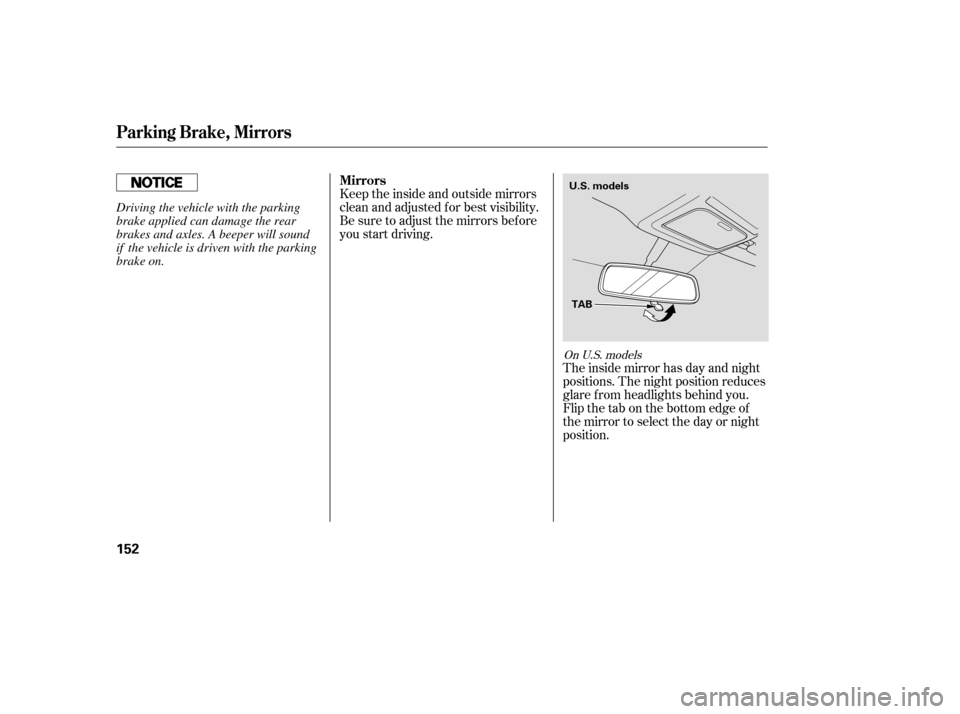
Keeptheinsideandoutsidemirrors
clean and adjusted f or best visibility.
Be sure to adjust the mirrors bef ore
you start driving.The inside mirror has day and night
positions. The night position reduces
glare f rom headlights behind you.
Flip the tab on the bottom edge of
the mirror to select the day or night
position.
On U.S. models
Mirrors
Parking Brake, Mirrors
152
U.S. models
TAB
Driving the vehicle with the parking
brake applied can damage the rear
brakes and axles. A beeper will sound
if the vehicle is driven with the parking
brake on.
�����—�����—�����y�
�������������y���
�(�)�-�������y���
�����y
Page 157 of 479
The inside mirror can automatically
darken to reduce glare. To turn on
this feature, press the button on the
bottom of the mirror. The AUTO
indicator comes on as a reminder.
When it is on, the mirror darkens
when it senses the headlights of a
vehicle behind you, then returns to
normal visibility when the lights are
gone. Press the button again to turn
of f this sensing.Turn the ignition switch to the ON
(II) position.
Move the selector switch to L
(driver’s side) or R (passenger’s
side).
1.
2.
On Canadian models
CONT INUED
Adjusting the Power Mirrors
Mirrors
Inst rument s and Cont rols
153
Canadian models
SELECTOR
SWITCH
AUTO BUTTON
INDICATOR SENSOR
There is also a sensor on the back of
the mirror. Items hung on the mirror
may block this sensor and af f ect
perf ormance.
�����—�����—�����y�
�������������y���
�(�)�-�������y���
�����y
Page 161 of 479

The individual map lights in the
front can be turned on and off by
pressing the lenses.
The
light control switch has three
positions: OFF, Door Activated, and
ON. Withanydoororthetailgateleft
open,
the lights stay on about 3
minutes, then go out.
After
all doors are closed tightly, the
lights dim slightly, then fade out in
about 30 seconds.
To change the ‘‘INTERIOR LIGHT
DIMMING TIME’’ setting, see page
.
The lights also come on when the
key is removed from the ignition
switch.
The
individual map lights in the
second row and the cargo area
light in the third row cannot be
turned on.
The individual map lights in the
front and second rows come on
whenanydoororthetailgateis
opened, or when the remote
transmitter is used to unlock the
doors (see page ). When the
doors and the tailgate are closed,
eachlightcanbeturnedonandoff
by pushing the lens.
The cargo area light comes on
whenanydoororthetailgateis
opened if the light control switch
is in the door activated (center)
position. When the doors and the
tailgate are closed, the cargo area
lightcanbeturnedonwiththe
switch in the light.
The individual door lights or the
tailgate lights will operate when a
door or the tailgate is opened. 136
101
When the switch is in the OFF position: When the switch is in the door activated
position:
CONT INUED
L ight Control Switch
Interior Lights
Inst rument s and Cont rols
157
DOOR ACTIVATED POSITION
ON OFF
�����—�����—�����y�
������
������y���
�(�)�-�������y���
�����y
Page 162 of 479
�´�µ
When the light control switch is in theposition:
ON
All the individual map lights come
onandstayonaslongasthe
switch remains in the ON position.
The cargo (3rd row) area light
comes on if the switch is in the
door activated position.
Turn on the f ront row individual map
lights by pushing the lens. Push the
lens again to turn it off. With the
light control switch in the door
activated position, the second row
map lights can be turned on by
pushing the lens. Push the lens again
to turn it off. The courtesy light between the map
lights comes on when you turn the
parking lights on. To adjust its
brightness, press either of the
instrument panel brightness control
buttons ( or ).
Individual Map L ights
Interior Lights
158
FRONT
COURTESY LIGHT
�����—�����—�����y�
������
������y���
�(�)�-�������y���
�����y