Page 107 of 140
4-10
E
EJU01355
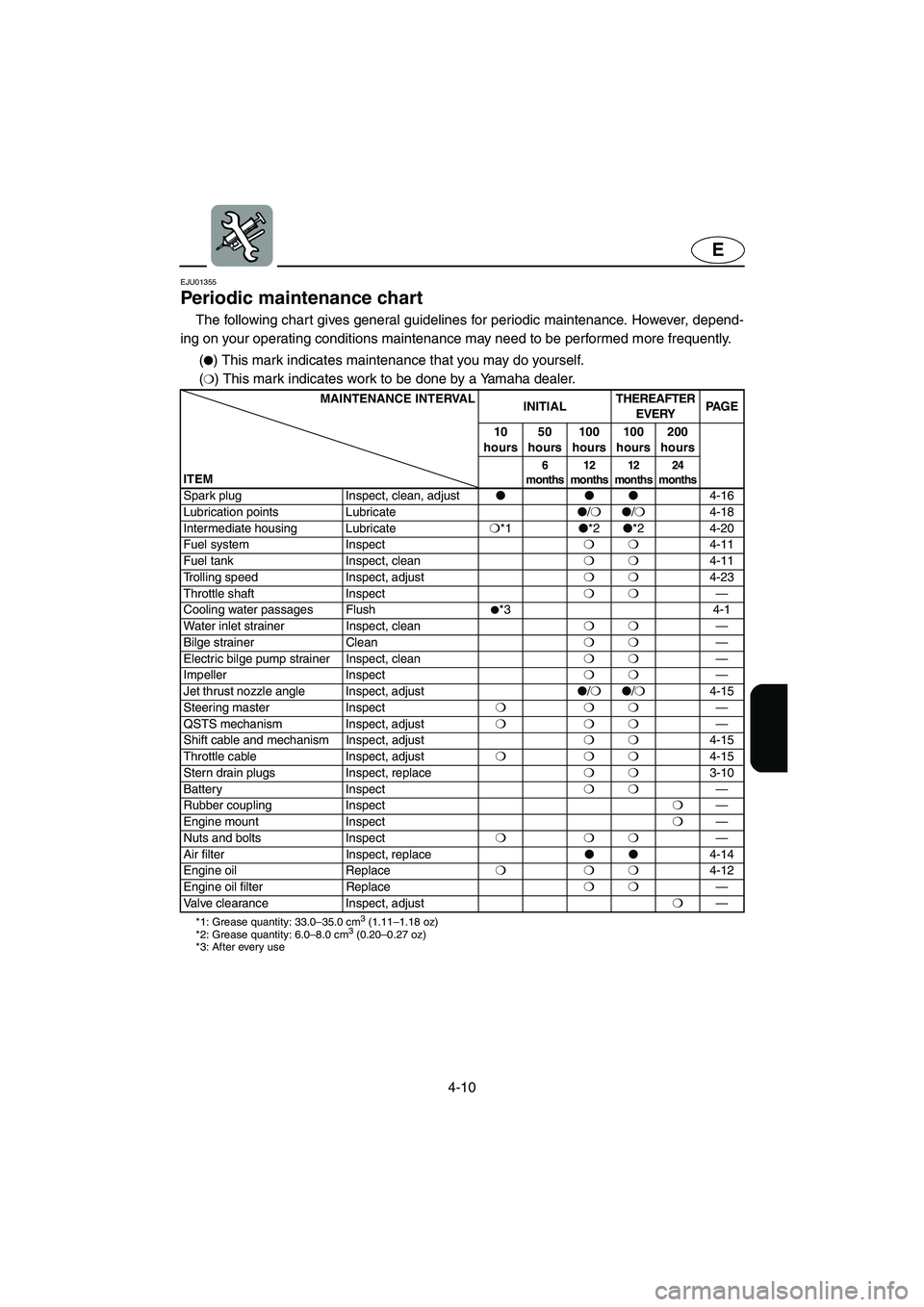
Periodic maintenance chart
The following chart gives general guidelines for periodic maintenance. However, depend-
ing on your operating conditions maintenance may need to be performed more frequently.
PMC-F1B1(�) This mark indicates maintenance that you may do yourself.
(
❍) This mark indicates work to be done by a Yamaha dealer.
MAINTENANCE INTERVAL
INITIALTHEREAFTER
EVERYPA G E
10
hours50
hours100
hours100
hours200
hours
ITEM
6
months12
months12
months24
months
Spark plug Inspect, clean, adjust���
4-16
Lubrication points Lubricate�
/❍�
/❍
4-18
Intermediate housing Lubricate❍
*1�
*2�
*2 4-20
Fuel system Inspect❍❍
4-11
Fuel tank Inspect, clean❍❍
4-11
Trolling speed Inspect, adjust❍❍
4-23
Throttle shaft Inspect❍❍
—
Cooling water passages Flush
�*3 4-1
Water inlet strainer Inspect, clean❍❍
—
Bilge strainer Clean❍❍
—
Electric bilge pump strainer Inspect, clean❍❍
—
Impeller Inspect❍❍
—
Jet thrust nozzle angle Inspect, adjust�
/❍�
/❍
4-15
Steering master Inspect❍❍❍
—
QSTS mechanism Inspect, adjust❍❍❍
—
Shift cable and mechanism Inspect, adjust❍❍
4-15
Throttle cable Inspect, adjust❍❍❍
4-15
Stern drain plugs Inspect, replace❍❍
3-10
Battery Inspect ❍❍
—
Rubber coupling Inspect❍
—
Engine mount Inspect❍
—
Nuts and bolts Inspect❍❍❍
—
Air filter Inspect, replace��
4-14
Engine oil Replace❍❍❍
4-12
Engine oil filter Replace❍❍
—
Valve clearance Inspect, adjust❍
—
*1: Grease quantity: 33.0–35.0 cm3 (1.11–1.18 oz)
*2: Grease quantity: 6.0–8.0 cm3 (0.20–0.27 oz)
*3: After every use
E_F1Y-70.book Page 10 Friday, August 26, 2005 9:47 AM
Page 118 of 140

4-21
E
EJU01971
Inspecting the battery
Check the level of the battery electrolyte
and make sure that the negative and posi-
tive leads are securely tightened.
WARNING@ �Battery electrolyte is poisonous and
dangerous, causing severe burns, etc.
Electrolyte contains sulfuric acid.
Avoid contact with skin, eyes, or cloth-
ing.
Antidotes
External: Flush with water.
Internal: Drink large quantities of water
or milk. Follow with milk of magnesia,
beaten egg, or vegetable oil. Call phy-
sician immediately.
Eyes: Flush with water for 15 minutes
and get prompt medical attention.
Batteries produce explosive gases.
Keep sparks, flame, cigarettes, etc.,
well away. If using or charging the bat-
tery in an enclosed space, make sure
that it is well ventilated. Always shield
your eyes when working near batter-
ies.
KEEP OUT OF THE REACH OF CHIL-
DREN.
�Be sure to connect the breather hose
to the battery. Fire or explosion could
result if the breather hose is damaged,
obstructed, or not connected properly.
@
CAUTION:@ �Be careful not to place the battery on
its side.
�Be sure to remove the battery from the
battery compartment when adding
electrolyte or charging the battery.
@
E_F1Y-70.book Page 21 Friday, August 26, 2005 9:47 AM
Page 119 of 140

4-22
E
To replenish the battery:
1. Make sure that the electrolyte level is
between the upper 1 and lower 2 level
marks.
2. Refill the battery with distilled water if
necessary.
CAUTION:@ Normal tap water contains minerals that
are harmful to a battery. Use only dis-
tilled water for replenishing the battery.
@
To recharge the battery:
CAUTION:@ Do not attempt to charge a battery hast-
ily. Battery life could be shortened.
@
It is recommended to have a Yamaha
dealer charge the battery. If you charge the
battery yourself, carefully read the battery
charger instructions before charging and fol-
low the points below.
1. Remove all caps from the battery cell.
2. Add distilled water to the specified level if
the electrolyte level is low.
3. Set the charging rate to 1.9 ampere and
charge the battery slowly until the explo-
sive gases are discharged vigorously
from the battery cells.
To connect the battery terminals:
1. Make sure that the connections are cor-
rect when you install the battery in the
watercraft.
2. Make sure that the breather hose is
properly connected and that it is not
damaged or obstructed.
3. Make sure that the battery is securely
held in place.
1Positive (+): Red lead
2Negative (–): Black lead
3Breather hose
E_F1Y-70.book Page 22 Friday, August 26, 2005 9:47 AM
Page 122 of 140

4-25
E
EJU01359
Specifications
MODEL
ITEMUnit FX/FX Cruiser
WATERCRAFT CAPACITY
Maximum people on board Number of people 3
Maximum load capacity kg (lb) 240 (530)
DIMENSIONS
Length mm (in) 3,340 (131.5)
Width mm (in) 1,230 (48.4)
Height mm (in) 1,160 (45.7)/1,240 (48.8)
Dry weight kg (lb) 384 (847)/392 (864)
PERFORMANCE
Maximum output kW (PS) @ r/min 103.0 (140)@ 10,000
Maximum fuel consumption L/h (US gal/h, Imp gal/h) 44 (11.6, 9.7)
Cruising range at full throttle hr. 1.59
Trolling speed r/min 1,600–1,700
ENGINE
Engine type 4-stroke
Number of cylinders 4
Engine displacement
cm
3 (cu in)998 (60.9)
Bore & stroke mm (in) 74 ×
58 (2.91 ×
2.28)
Compression ratio 11.4:1
Valve clearance (cold)
Intake mm (in) 0.11–0.20 (0.0043–0.0079)
Exhaust mm (in) 0.25–0.34 (0.0098–0.0134)
Lubrication system Dry sump
Cooling system Water cooled
Starting system Electric starter
Ignition system TCI
Spark plug CR9EB (NGK)
Spark plug gap mm (in) 0.7–0.8 (0.028–0.031)
Battery capacity V-AH 12-19
Charging system Flywheel magneto
E_F1Y-70.book Page 25 Friday, August 26, 2005 9:47 AM
Page 125 of 140
E
5
EJU01115
TROUBLESHOOTING
AND EMERGENCY
PROCEDURES
Troubleshooting ...................................... 5-1
Troubleshooting chart ............................ 5-1
Emergency procedures .......................... 5-3
Cleaning the jet intake and impeller ...... 5-3
Jumping the battery ............................... 5-5
Towing the watercraft ............................ 5-7
Submerged watercraft ........................... 5-8
E_F1Y-70.book Page 1 Friday, August 26, 2005 9:47 AM
Page 126 of 140

5-1
E
EJU01116
Troubleshooting
If you have any trouble with your watercraft, use this section to check for the possible
cause.
If you cannot find the cause, or if the procedure for replacement or repair is not described
in this Owner’s/Operator’s Manual, have a Yamaha dealer perform the necessary service.
EJU01367
Troubleshooting chart
TBC-F0P7ETROUBLE POSSIBLE CAUSE REMEDY PAGE
Engine does not
startStarter motor does not turn over
Engine shut-
off switchClip not in place Install clip
2-8
Fuse Burned out Replace the fuse and
check wiring4-24
Battery Run down Recharge 4-21
Poor terminal connec-
tionsTighten as required
4-21
Terminal corroded Clean 4-5
Starter motor Faulty Have serviced by
Yamaha dealer—
Starter motor turns over
Throttle lever Squeezed Release 2-8
Fuel Empty Refill as soon as possi-
ble3-4
Stale or contaminated Have serviced by
Yamaha dealer4-11
Fuel tank Water or dirt present Have serviced by
Yamaha dealer4-11
Spark plug Fouled or defective Clean or replace 4-16
Spark plug cap Not connected or loose Connect properly 4-16
Connected to wrong
cylinderConnect properly
4-16
Fuel injection
systemFuel pump faulty Have serviced by
Yamaha dealer—
E_F1Y-70.book Page 1 Friday, August 26, 2005 9:47 AM
Page 130 of 140
5-5
E
EJU01844
Jumping the battery
If the watercraft battery has run down, the
engine can be started using a 12-volt bat-
tery and jumper cables.
WARNING@ Battery electrolyte is poisonous and dan-
gerous, causing severe burns, etc. Elec-
trolyte contains sulfuric acid. Avoid
contact with skin, eyes or clothing.
Antidotes
External: Flush with water.
Internal: Drink large quantities of water
or milk. Follow with milk of magnesia,
beaten egg or vegetable oil. Call physi-
cian immediately.
Eyes: Flush with water for 15 minutes
and get prompt medical attention.
Batteries produce explosive gases. Keep
sparks, flame, cigarettes, etc. well away.
If using or charging the battery in an
enclosed space, make sure that it is well
ventilated. Always shield your eyes when
working near batteries.
KEEP OUT OF THE REACH OF CHILDREN.
E_F1Y-70.book Page 5 Friday, August 26, 2005 9:47 AM
Page 131 of 140

5-6
E
EJU01845
Connecting the jumper cables
1. Connect the positive (+) jumper cable 1
to the positive (+) terminals of both bat-
teries.
2. Connect one end of the negative (–)
jumper cable 2 to the negative (–) termi-
nal of the booster battery 3.
3. Connect the other end of the negative (–)
cable to an engine hanger 4.
CAUTION:@ Do not connect the end of the jumper
cable to the negative (–) terminal on the
watercraft battery! Be sure all connec-
tions are secure and correct before
attempting to start the engine. Any
wrong connection may damage the elec-
trical system.
4. Start the engine, and then disconnect
the cables by reversing the steps above.
CAUTION:@ �Never push the start switch while the
engine is running.
�Do not operate the start switch for
more than 5 seconds, otherwise the
battery will be discharged and the
engine will not start. Also, the starter
motor may be damaged. If the engine
does not start in 5 seconds, release
the start switch, wait 15 seconds, and
then try again.
E_F1Y-70.book Page 6 Friday, August 26, 2005 9:47 AM

