2006 VOLVO V70 radio
[x] Cancel search: radioPage 45 of 138
Use the switch on the front door armrests to lock/unlock the car from the inside.
WARNING!
If the doors are locked while driving, this may hinder rapid access to the occupants of the car in the event of an
accident. (Also see information on "Child safety locks").
NOTE: To help prevent accidentally locking the keys in the car, the central locking system is designed to unlock the
doors immediately if the key is left in the ignition switch, the car is locked using the lock button on the door and the
door is then closed. A sound from the lock will be audible at this time.
Please note that this function will not unlock the doors if the engine is running.
Immobilizer (start inhibitor)
Each of the keys supplied with your car contains a coded transmitter. The code in the key is transmitted to an antenna
in the ignition switch where it is compared to the code stored in the start inhibitor module. The car will start only with
a properly coded key.
Each key has a unique code, which your Volvo retailer uses if new keys are required. A maximum of six remote
controls/keys can be programmed and used for one car.
If you misplace a key, take the other keys to an authorized Volvo retailer for reprogramming as an antitheft measure.
*This key operates only driver's door and ignition switch/steering wheel lock.
This device complies with part 15 of the FCC rules. Operation is subject to the following condition: (1) This device
may not cause harmful interference, and (2) this device must accept any interference received, including interference
that may cause undesired operation.
pg. 81 Remote keyless entry system
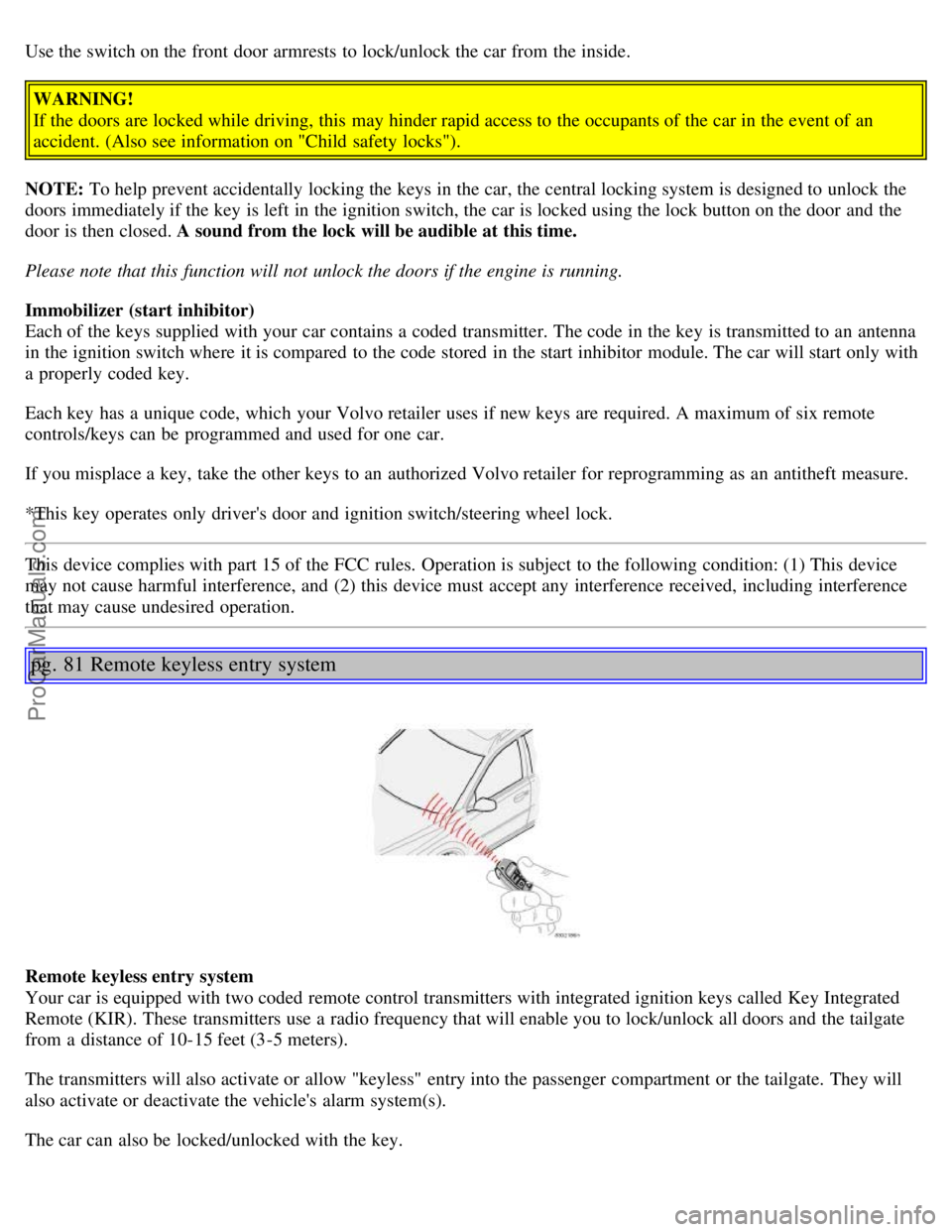
Remote keyless entry system
Your car is equipped with two coded remote control transmitters with integrated ignition keys called Key Integrated
Remote (KIR). These transmitters use a radio frequency that will enable you to lock/unlock all doors and the tailgate
from a distance of 10-15 feet (3-5 meters).
The transmitters will also activate or allow "keyless" entry into the passenger compartment or the tailgate. They will
also activate or deactivate the vehicle's alarm system(s).
The car can also be locked/unlocked with the key.
ProCarManuals.com
Page 67 of 138

of the accelerator pedal is not impeded. Not more than one protective floor covering may be used at one time.
Electrical system
When replacing the battery or when carrying out work involving the electrical system, the following should be
observed:
A battery connection to the wrong terminal will damage the electrical system. Be sure to connect the positive battery
cable to the positive battery terminal and the negative battery cable to the negative battery terminal.
If booster batteries are used for starting, they must be properly connected to minimize the risk of the electrical
system being damaged. For correct connection, see "Jump starting" section.
Never disconnect the battery circuit (for example, to replace the battery) while the engine is running, as this may
damage the generator. Always make sure that all the battery connections are properly cleaned and tightened.
If any electrical welding work is performed on the vehicle, the battery's ground lead (negative cable) and all the
connecting cables of the generator must be disconnected and the welder cables placed as near the welding points as
possible.
The radio must be turned off before the battery is disconnected.
Switch off the ignition for at least 10 minutes before disconnecting the battery.
pg. 103 Roof racks/Load carriers
Load carriers (accessory)
Load carriers are available as Volvo accessories. Observe the following points when in use:
To avoid damaging your car and to achieve maximum safety when driving, we recommend using the load carriers
that Volvo has developed especially for your car.
Volvo-approved removable roof racks are designed to carry the maximum allowable roof load for this vehicle: 220
lbs (100 kg). For Non-Volvo roof racks, check the manufacturer's weight limits for the rack.
Never exceed the rack manufacturer's weigh limits and never exceed the maximum rated roof load of 220 lbs (100
kg).
Avoid single-point loads. Distribute loads evenly.
Place heavier cargo at the bottom of the load.
Anchor the cargo correctly with appropriate tie-down equipment.
Check periodically that the load carriers and load are properly secured.
Remember that the car's center of gravity and handling change when you carry a load on the roof.
The car's wind resistance (and correspondingly, fuel consumption) will increase with the size of the load.
Drive smoothly. Avoid rapid starts, fast cornering and hard braking.
Load carrier attachment points
Attaching load carriers (models without rails)
The attachment brackets for the load carriers are located under the roof molding.
ProCarManuals.com
Page 75 of 138

Temporary spare tire
T125/80R1761 (420)
61 (420)
V70 R
235/45R17 35 (240)35 (240)
Temporary spare tire
T115/85R18 61 (420)
61 (420)
XC70
215/65R16 30 (210)
430 (210)4
215/60R1730 (210)430 (210)4
Temporary spare tire
T135/90R1761 (420)
61 (420)
4 The optional tire pressure shown in this table may not be used on XC70s equipped with the Tire Pressure Monitoring
System (option as available). Vehicles with this system must use the standard tire pressure listed in the table in the left
column (38 psi/260 kPa).
pg. 123 Wheels and tires
Tire Pressure Monitoring System (TPMS) - option on certain U.S. models only
The tire pressure monitoring system uses sensors mounted in the tire valves to check inflation pressure levels. When
the vehicle is moving at a speed of 20 mph (30 km/h) or faster, these sensors transmit inflation pressure data to a
receiver located in the vehicle.
USA - FCC ID: MRXTG315AM04
This device complies with part 15 of the FCC rules. Operation is subject to the following conditions: (1) This device
may not cause harmful interference, and (2) this device must accept any interference received, including interference
that may cause undesired operation.
WARNING!
The TPMS system uses a radio frequency of 315 MHz. Accessory electrical equipment using the same frequency
could interfere with TPMS and should not be installed in the vehicle. Please consult your Volvo retailer, a qualified
Volvo service technician, or the accessory equipment's supplier for further information.
When low inflation pressure is detected, TPMS will light up the tire pressure warning light (
) i (also referred to as a
telltale) in the instrument panel, and will display a message in the text window. The wording of this message is
determined by the degree of inflation pressure loss.
When the tire pressure monitoring system warning light is on, one or more of your tires is significantly under-inflated.
You should stop and check your tires as soon as possible, and inflate them to the proper pressure as indicated on the
vehicle's tire information placard.
Driving on a significantly under-inflated tire causes the tire to overheat and can lead to tire failure. Under-inflation
also reduces fuel efficiency and tire tread life, and may affect the vehicle's handling and stopping ability. Each tire,
including the spare, should be checked monthly when cold and set to the recommended inflation pressure as specified
in the vehicle placard and owner's manual.
NOTE: If a fault occurs in TPMS, the tire pressure warning light will flash for approximately 1 minute and TIRE
PRESS SYST SERVICE REQUIRED will be displayed.
ProCarManuals.com
Page 114 of 138

2 0 0 6
VOLVO V70
Chapter 10 - Audio systems
pg. 175 Audio systems
Introduction176
Audio system HU-650 overview177
Audio system HU-850 overview178
Radio functions179
RBDS functions183
HU - 650 CD player186
HU - 850 internal CD changer187
External CD changer (option)188
Dolby Surround Pro Logic II189
Specifications191
HomeLink®192
pg. 176 Introduction
The audio system in your car is operated with the buttons and knobs in the system's front panel. Certain functions,
such as adjusting the volume, changing radio stations or tracks on a CD, etc, can also be controlled with the optional
steering wheel-mounted keypad.
The audio system is available in two versions:
HU-650
Features: AM/FM radio, single-disc CD player, 4x25W output, six speakers.
HU-850
Features: AM/FM radio, integrated 6-disc CD changer, 4x50W or 4x70W output plus 25W Dolby Pro Logic II, eleven
speakers.
A subwoofer mounted under the floor in the cargo area is available as an option. Consult your Volvo retailer.
Compact disc care
• Keep the discs clean. Wipe them with a soft, clean, lint-free cloth, working from the center outwards. If necessary,
dampen the cloth with a neutral soap solution. Dry thoroughly before using.
ProCarManuals.com
Page 115 of 138

• Never use cleaning spray or antistatic liquid. Use only cleaners specifically made for CDs.
• Use discs of the correct size only (3.5" discs should never be used). The discs should conform to the norms EN60908
(IEC60908).
• Do not put tape or labels on the disc itself.
• Volvo does not recommend the use of plastic outer rings on the disc.
• Condensation may occur on discs/optical components of the changer in cold winter weather. The disc can be dried
with a clean, lint-free cloth. Optical components in the CD changer may, however, take up to one hour to dry off.
• Never attempt to play a disc which is damaged in any way.
• When not in use, the discs should be stored in their covers. Avoid storing discs in excessive heat, direct sunlight or
dusty locations.
pg. 177 Audio system HU-650 - overview
1. On/off - press
Volume - turn
2. Buttons for selecting stored radio stations/discs in optional CD changer
3. Bass (press to release control and turn to adjust)
4. Treble (press to release the control, and turn to adjust)
5. Balance (left/right) - press to release control and turn to adjust
6. Fader (front/rear) - press to release the control, and turn to adjust
7. Source/Menu
Press to open main menu
Turn to select FM, AM, CD, CD changer (option)
8. Scan function (automatically search for radio stations)
9. Exit (exit the menu)
10. Navigation buttons (seek/change radio station or CD track)
11. CD eject
12. CD slot
ProCarManuals.com
Page 116 of 138

13. CD random play
14. FM (select FM1, FM2, FM3)
15. AM (select AM1 or AM2)
16. CD player
17. AUTO - automatically search for radio stations
18. Display
pg. 178 Audio system HU-850 - overview
1. On/off - press
Volume - turn
2. Buttons for selecting stored radio stations/discs in optional CD changer
3. Bass (press to release control and turn to adjust)
4. Treble (press to release the control, and turn to adjust)
5. Balance (left/right) - press to release control and turn to adjust
6. Fader (front/rear) - press to release the control, and turn to adjust
7. Source/Menu
Press to open main menu
Turn to select FM, AM, CD, CD changer (option)
8. Scan function (automatically search for radio stations)
9. Exit (exit the menu)
10. Navigation buttons (seek/change radio station or CD track)
11. CD eject
12. Dolby Surround Pro Logic II
ProCarManuals.com
Page 117 of 138

13. 2-channel stereo
14. 3-channel stereo
15. CD slot
16. CD random play
17. FM (select FM1, FM2, FM3)
18. AM (select AM1 or AM2)
19. CD player
20. AUTO - automatically search for radio stations
21. Display
pg. 179 Radio functions HU-650/HU-850
Switch on/off
Press the knob to switch on or turn off the radio.
Volume control
Turn the knob clockwise to increase volume. Volume control is electronic and does not have an end stop. If you have
a key pad in the steering wheel, increase or decrease the volume with the + or - buttons.
Volume control - ALARM
If a CD is playing when the radio receives an alarm bulletin (available in certain areas only), the CD player enters
pause mode. The bulletin is broadcast at the volume selected for this type of message.
After the bulletin has been completed, the audio system reverts to the originally selected sound source (radio or CD),
which is played at the volume that was selected for that source.
If the bulletin volume is adjusted while the bulletin is being broadcast, this new volume is saved and used for
subsequent bulletins.
ProCarManuals.com
Page 118 of 138

Volume control - Subwoofer
Turn the knob clockwise to increase volume.
Turn the knob counterclockwise to lower volume or switch off the subwoofer.
When the knob is in the middle, bass effect is "equalized".
pg. 180 Radio functions HU-650/HU-850
Sound settings
Bass
Adjust the bass by pressing the button to extend the control and turning it to the left (less bass) or to the right (more
bass). A "detent" indicates "equalized" bass. Press the button back in when you have made the adjustment.
Treble
Adjust the treble by pressing the button to extend the control and turning it to the left (less treble), or to the right (more
treble). A "detent" indicates "equalized" treble. Press the button back in when you have made the adjustment.
Fader - Balance front/rear
Adjust front/rear speaker balance by pressing the button to extend the control and turning it to the left (more sound
from the rear speakers) or to the right (more sound from the front speakers). A "detent" indicates "equalized" balance.
Press the button back in when you have made the adjustment.
Balance right/left
Adjust left/right speaker balance by pressing the button to extend the control, and turning it to the left (more sound
from the left speakers) or to the right (more sound from the right speakers). A "detent" indicates "equalized" balance.
Press the button back in when you have made the adjustment.
MID EQ level
ProCarManuals.com