2006 VOLVO C70 wheel
[x] Cancel search: wheelPage 129 of 182
Unscrew the hose from the tire's inflation valve and reinstall the valve cap.
Disconnect the electrical wire from the 12-volt socket.
Return the hose and electrical wire to the compartment on the side of the unit.
NOTE: When the tire sealing system has been used to seal a flat tire, the tank containing the sealing compound, and
the hose must be replaced. See the instructions on the following page. Contact a Volvo retailer for replacement parts.
pg. 145 Wheels and tires
Tire sealing system
CAUTION!
If your vehicle is equipped with the optional Tire Pressure Monitoring System (see page 117
), the use of the sealing
compound may lead to incorrect tire pressure readings or in rare cases, damage to the tire pressure sensor. Use the
tire sealing system to check and adjust the damaged tire's pressure.
After use, return the tire sealing system to its storage compartment behind the ski hatch in the center of the rear seat
backrest.
WARNING!
If you interrupt your trip for more than one hour, check the inflation pressure in the damaged tire again before
continuing. See the section "Stage 2: Checking inflation pressure" on page 143
.
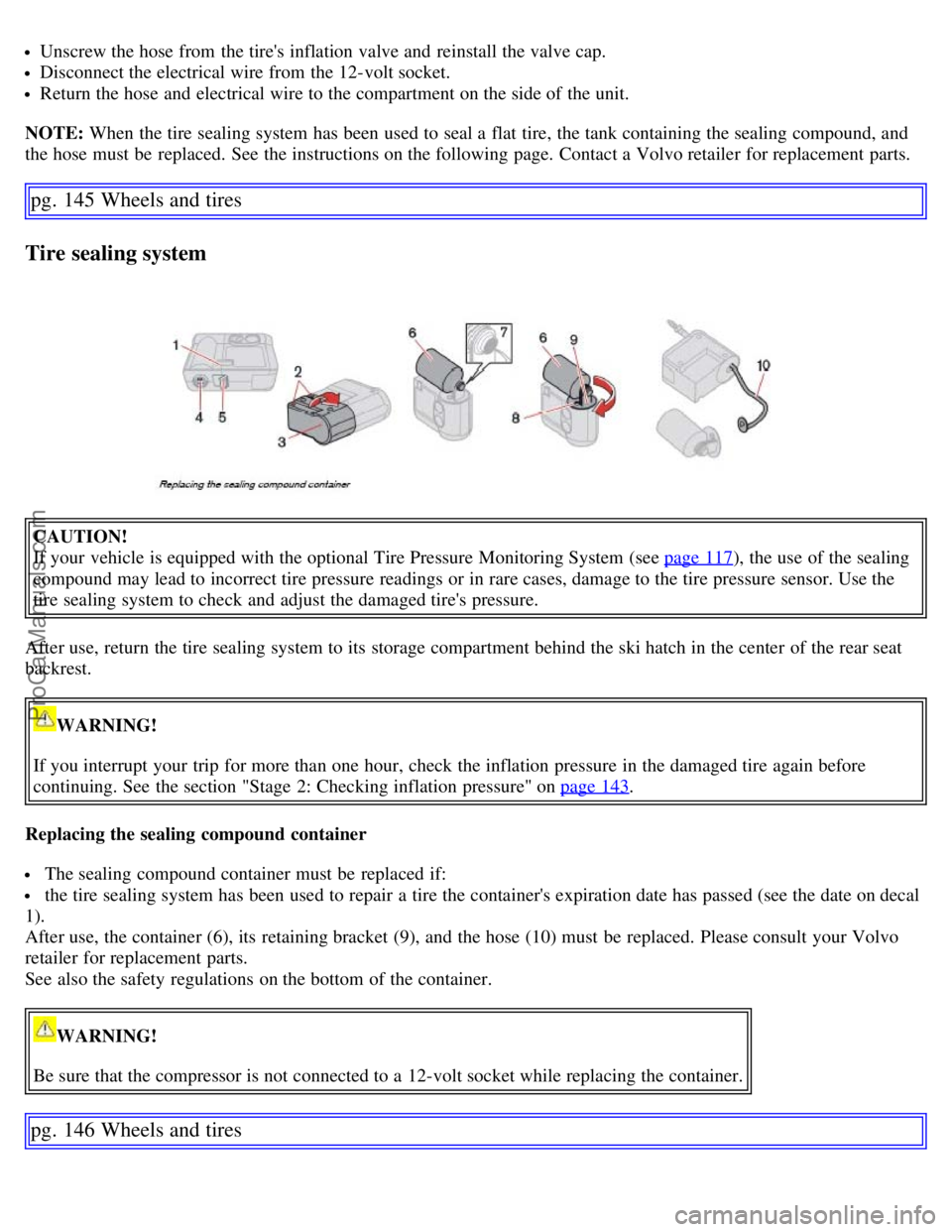
Replacing the sealing compound container
The sealing compound container must be replaced if:
the tire sealing system has been used to repair a tire the container's expiration date has passed (see the date on decal
1).
After use, the container (6), its retaining bracket (9), and the hose (10) must be replaced. Please consult your Volvo
retailer for replacement parts.
See also the safety regulations on the bottom of the container.
WARNING!
Be sure that the compressor is not connected to a 12-volt socket while replacing the container.
pg. 146 Wheels and tires
ProCarManuals.com
Page 131 of 182

2 0 0 6
VOLVO C70
Chapter 9 - Vehicle care
pg. 147 Vehicle care
Washing and cleaning the car 148
Paint touch up151
pg. 148 Vehicle care
Washing and cleaning the car
Washing the car
The following points should be kept in mind when washing and cleaning the car:
The car should be washed at regular intervals since dirt, dust, insects and tar spots adhere to the paint and may cause
damage. To help prevent corrosion, it is particularly important to wash the car frequently in the wintertime.
Avoid washing your car in direct sunlight. Doing so may cause detergents and wax to dry out and become abrasive.
To avoid scratching, use lukewarm water to soften the dirt before you wash with a soft sponge, and plenty of sudsy
water.
Bird droppings: Remove from paintwork as soon as possible. Otherwise the finish may be permanently damaged.
A detergent can be used to facilitate the softening of dirt and oil.
A water-soluble grease solvent may be used in cases of sticky dirt. However, use a wash place equipped with a
drainage separator.
Dry the car with a clean chamois and remember to clean the drain holes in the doors and rocker panels.
Tar spots can be removed with kerosene or tar remover after the car has been washed.
A stiff-bristle brush and lukewarm soapy water can be used to clean the wiper blades. Frequent cleaning improves
visibility considerably.
Wash off the dirt from the underside (wheel housings, fenders, etc).
In areas of high industrial fallout, more frequent washing is recommended.
After cleaning the engine, the spark plug wells should be inspected for water and blown dry if necessary.
Exterior plastic components
Cleaning exterior plastic components should be done with a cleaning agent specially designed for this purpose.
Solvents or stain removers should not be used. Consult your Volvo retailer.
NOTE: When washing the car, remember to remove dirt from the drain holes in the doors and sills.
CAUTION!
During high pressure washing, the spray mouthpiece must never be closer to the vehicle than 13" (30 cm). Do not
spray into the locks.
When washing or steam cleaning the engine, avoid spraying water or steam directly on the electrical components or
toward the rear side of the engine.
ProCarManuals.com
Page 143 of 182

Fluid type: Volvo power steering fluid or equivalent.
Replace: No fluid change required
WARNING!
If a problem should occur in the power steering system or if the vehicle has no electrical current and must be towed,
it is still possible to steer the vehicle. However, keep in mind that greater effort will be required to turn the steering
wheel.
pg. 161 Maintenance and servicing
Wiper blades
Replacing windshield wiper blades
Fold out the wiper arm and fold out the wiper blade at a 90° angle to the wiper arm.
Pull off the wiper blade from the attachment, straight to the side.
Slide in a new wiper blade at a 90° angle to the wiper arm.
Fold in the wiper blade under the metal plate and fold the wiper arm down.
NOTE: The wiper blades are different lengths. The blade on the driver's side is longer than the one on the passenger's
side.
ProCarManuals.com
Page 159 of 182

The system will automatically start the next time the key is turned to position I.
Turn the volume dial or use the buttons in the optional steering wheel keypad to adjust the volume level. The volume
level is also adjusted automatically according to the vehicle's speed, see page 177
for more information on this
function.
Steering wheel keypad
The four buttons on the steering wheel keypad can be used to control the audio system. The steering wheel keypad can
be used to adjust volume, shift between preset stations and change CD tracks. Press one of the two left-hand buttons
briefly to change to the next/previous preset radio station, or to go to the next/previous track on a CD. Press and hold
down these buttons to search within a track on a CD.
Daytime/twilight display
In daylight the information is displayed against a light background. In darkness it is displayed against a dark
background.
Sound source
A sound source can be selected by pressing AM/FM (2) or CD (3). Press AM/FM repeatedly to toggle between FM1,
FM2, and AM. The currently selected sound source will be shown in the display.
Sound settings
Press SOUND (5). Press this button repeatedly until you come to the setting that you wish to change.
Turn the TUNING dial (4) to make the desired setting.
The following settings can be made:
BASS -set the bass level
TREBLE-set the treble level
BALANCE-set the left/right sound balance
FADER-set the front/rear sound balance
SUBWOOFER (option)-set the level for the subwoofer (bass speaker)
pg. 177 Audio
Audio functions
CENTER1-make settings for the center speaker
SURROUND
1-make settings for surround sound
Subwoofer (option)
To switch the subwoofer on or off:
Press MENU followed by ENTER.
ProCarManuals.com
Page 165 of 182

CD function controls
1. MENU NAVIGATION CONTROL-press the up or down arrow keys to scroll in a menu, or the keys on the
left/right sides of the control to change CD tracks/fast forward/back
2. Buttons for selecting a disc in the CD changer
3. CD eject button
4. CD slot
5. CD player button
6. TUNING dial for selecting tracks on a CD
Playing a CD
The CD changer can hold up to six discs.
Press the CD button.
Select an empty position using the 1-6 buttons or the up/down keys on the MENU NAVIGATION control. The
display shows which positions are empty.
Insert a disc into the slot (4).
NOTE: Ensure that INSERT DISC is displayed before inserting a disc.
Changing tracks
Press the left or right arrow keys on the MENU NAVIGATION control to skip to the previous or next track.
NOTE: The TUNING dial (6) (turn clockwise to go to the next track, or counterclockwise to go to the previous track)
or the optional steering wheel keypad can also be used for this purpose.
Fast forward/back
Press and hold down the left or right arrows keys in the MENU NAVIGATION control (or the corresponding keys on
the steering wheel keypad) to search within a track or the whole disc. The search continues for as long as the buttons
are held down.
Random play
This function plays the tracks on all of the CDs in the changer in random order (shuffle).
Select CD (5) and press the MENU button.
Press ENTER.
Select RANDOM from the menu and press ENTER.
Select SINGLE DISC or ALL DISCS for the CD changer to randomly choose from one or all discs. RND ALL is
shown in the display for as long as the function is activated. Press the right arrow key on the MENU NAVIGATION
control (1) to select the next random track.
NOTE: You can only select the next random track on the current disc.
ProCarManuals.com
Page 177 of 182

Central locking system, remote controls86
Changing oil158
Changing wheels138
Charge air cooler192
Child safety28
Clock setting button32
Cold weather precautions99
Collision status26
Compact disc care184
Compartments, storage79
Compass in rearview mirror49
Convertible top -- buttons for operating72
Convertible top -- emergency operation73
Convertible top -- temporary cover73, 75
Coolant159
Cover, temporary75
Cruise control42
D
Dimensions189
Disabling the passenger's side front airbag18
Display, instrument panel32
Door mirrors50
Door open warning36
Double locking91
Driving after a collision26
E
Economical driving98
Electrical current - conserving99
Electrical sockets, 12 volt47
Electrical system193
Electronic Brake Force Distribution (EBD)112
Emission inspection readiness156
Engine compartment157
Engine oil, changing158
Engine specifications192
Environment2
Equalizer, audio system177
Eyelets in trunk83
F
Federal Clean Air Act154
Flash, high beam40
Floor mats105
Floor mats, cleaning150
Fog lights38
ProCarManuals.com
Page 181 of 182

SEE MANUAL37
SERVICE REQUIRED37
Shiftlock2
Shiftlock override110
Side impact protection (SIPS) airbags21
Side marker light, replacing167
Sockets, 12 volt47
Spare tire138
Speedometer32
Spin control - SC113
SRS warning light35
Stability system113, 114
Start inhibitor (immobilizer)86
Starting the car105
Station formats180
Steering wheel adjustment46
Steering wheel lock104
Stone chips, paint touch-up151
STOP ENGINE37
STOP SAFELY37
Storage compartments79
Storing wheels and tires126
T
Tachometer32
Tail light bulb holder, removing168
Technician certification195
Temperature gauge32
Temporary cover75
Temporary spare tire138
Three-way catalytic converter194
TIME FOR REGULAR SERVICE37
Tire inflation pressure tables130
Tire rotation137
Tires, changing138
Tires, general information126
Tires, storing126
Traction control - TC113
Transmission, automatic108
Tread wear indicator127
Trip computer41
Trip odometer32
Trunk, loading82
Trunk divider71
Trunk lighting, replacing169
ProCarManuals.com
Page 182 of 182

Trunk, limiting access to89
Trunk, opening from the inside91
Trunk, opening mechanically90
Turn signal bulb, replacing167
U
Uniform Tire Quality Grading134
Unlock (personal settings)51
Unlocking the fuel filler door38
Unlocking the fuel filler door manually39
V
Valet locking89
Vanity mirror lighting, replacing169
Vehicle Event Data154
Vehicle Identification Number188
Vehicle loading133
Volvo and the environment2
Volvo Customer Care Center, contacting1, 16, 19
Volvo maintenance154
Volvo On Call Roadside Assistance195
W
W Winter/Wet driving mode109
Warning flashers46
Warning symbol32, 33
Warranties154
Washer fluid159
Washing the car148
Waxing149
Weight distribution98
Weights189
Wheel nuts136
Wheels, changing138
Wheels, storing126
Whiplash Protection System (WHIPS)23
Wind blocker76
Windshield washer fluid159
Windshield wiper blades161
Windshield wipers44
Winter/Wet driving mode109
Wiper blades161
Contents| Top of Page
ProCarManuals.com