2006 VOLVO C70 alarm
[x] Cancel search: alarmPage 85 of 182
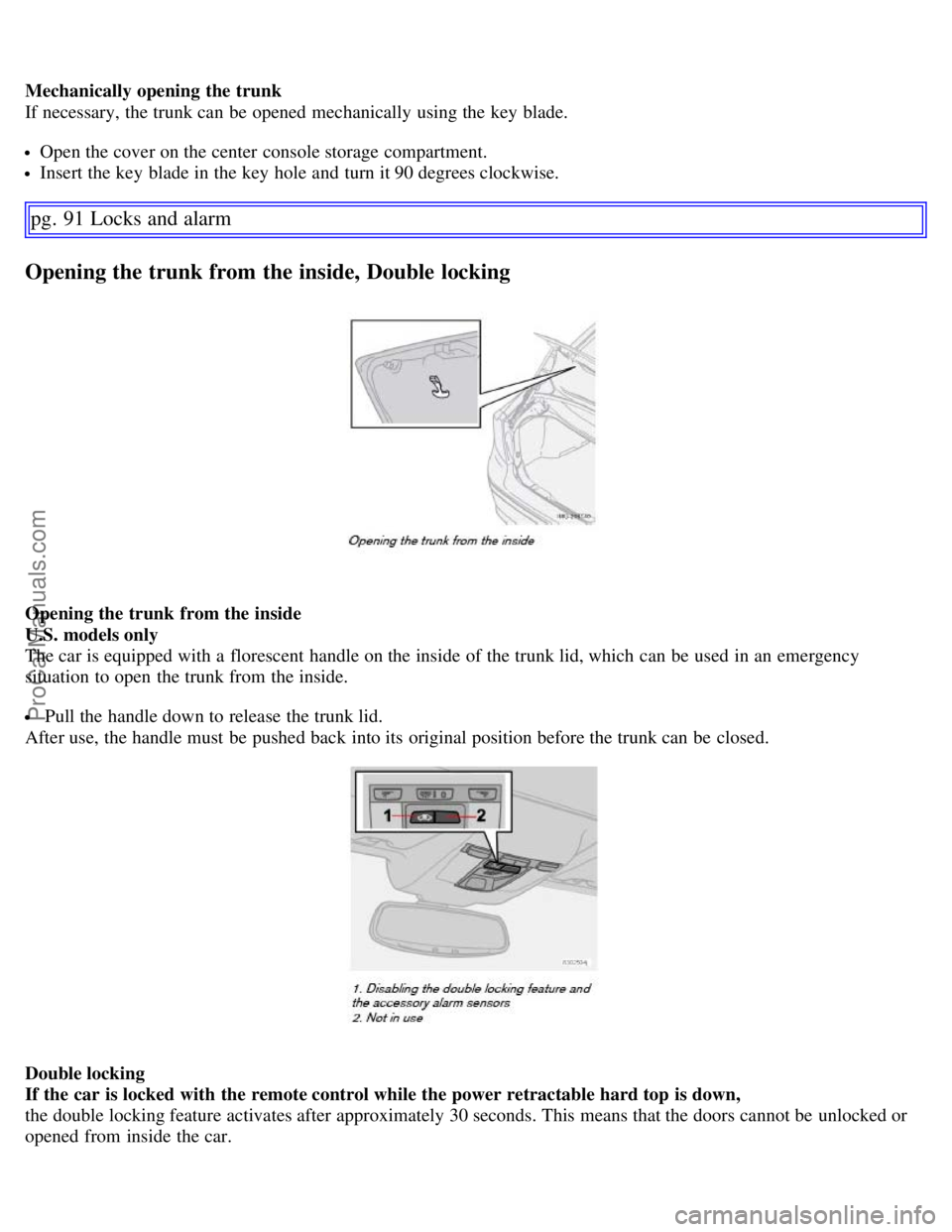
Mechanically opening the trunk
If necessary, the trunk can be opened mechanically using the key blade.
Open the cover on the center console storage compartment.
Insert the key blade in the key hole and turn it 90 degrees clockwise.
pg. 91 Locks and alarm
Opening the trunk from the inside, Double locking
Opening the trunk from the inside
U.S. models only
The car is equipped with a florescent handle on the inside of the trunk lid, which can be used in an emergency
situation to open the trunk from the inside.
Pull the handle down to release the trunk lid.
After use, the handle must be pushed back into its original position before the trunk can be closed.
Double locking
If the car is locked with the remote control while the power retractable hard top is down,
the double locking feature activates after approximately 30 seconds. This means that the doors cannot be unlocked or
opened from inside the car.
ProCarManuals.com
Page 86 of 182

Temporarily disabling the double locking function
If a person or pet is to remain in the car when the top is down and the car has been locked using the remote, the double
locking feature can be temporarily disabled.
Turn the ignition key to position II and then back to position 0.
Press the button (1). The LED in the button will remain on for one minute after the key has been removed from the
ignition switch or until the car is locked. A text message will also be displayed.
NOTE:
This procedure also disables the alarm system's accessory inclination and movement sensors. These sensors are
automatically reconnected to the alarm system the next time the car is unlocked and then locked again.
The double locking function will be automatically enabled the next time the car is locked with the remote while the
power retractable hard top is open.
Disabling the double locking function and accessory alarm sensors does not disarm the car's standard alarm.
pg. 92 Locks and alarm
Remote control battery
Weak battery in the remote control
When the battery begins to lose its charge, the Information symbol in the instrument panel (see page 33
) lights up and
REMOTE BATTERY LOW VOLTAGE is shown in the information display.
Replacing the battery in the remote control
If the range of the transmitter is noticeably reduced, this indicates that the battery (type CR 2032, 3V) is weak and
should be replaced. To replace the battery:
Remove the key blade.
Place the remote control with the keypad downward. Remove the screw (1) using a small slotted screwdriver.
Remove the cover.
Note how the + and - sides of the battery are positioned on the inside of the cover. The plus side of the new battery
(marked on the battery) must face downward.
CAUTION!
When replacing the battery, avoid touching the electrical circuitry in the other half of the remote control.
Pry out (2) and replace the battery. Avoid touching the battery and its contact surfaces with your fingers.
Press the cover back into place and tighten the screw.
ProCarManuals.com
Page 87 of 182

Reinsert the key blade in the remote control.
The old battery should be disposed of properly at a recycling center or by a trained and qualified Volvo service
technician.
pg. 93 Locks and alarm
Locking and unlocking
Locking/unlocking the car from the inside
The switches near the door opening handles on the driver's and passenger's doors can be used to lock or unlock all
doors and the trunk, and to set the alarm.
Unlocking: Press in the upper section in the lock button. A long press (at least two seconds) also opens all the side
windows.
Locking: Press in the lower section of the lock button.
Lock indicator lights
An indicator light in each door will illuminate for approximately 5 minutes after the car has been locked using the
remote control.
If the car is locked from the inside while the ignition is on, the light will remain on until the car is unlocked or the
ignition is switched off.
NOTE:
ProCarManuals.com
Page 88 of 182

The doors cannot be opened by pulling up the lock button.
If both doors are closed when a lock button is pressed, the alarm will not be armed.
Each door can also be locked manually using the lock button on that particular door. This applies only if the car has
not been locked from the outside.
The doors can also be unlocked (and the door opened) by pulling the handle in the door twice.
Locking the doors when leaving the vehicle
The lock switches in the doors can also be used for locking all doors when leaving the vehicle. However, please be
aware of the following:
If one or more of the doors is open and the key is not in the ignition when the button is pressed, the doors will lock
automatically when they are closed. This will also arm the alarm.
If the key is in the ignition and one of the doors is open, the vehicle cannot be locked using the buttons on the
doors.
pg. 94 Locks and alarm
Alarm
The alarm system
The alarm is automatically armed whenever the car is locked with the remote control, or if a front lock button is
depressed.
When armed, the alarm continuously monitors a number of points on the car. The following conditions will trigger the
alarm:
The hood, trunk, or a door is forced open.
The ignition switch is tampered with
An attempt is made to start the car with a non-approved key (a key not coded to the car's ignition).
If there is movement in the passenger compartment (if the car is equipped with the optional movement sensor).
The car is lifted or towed (if the car is equipped with the optional inclination sensor)
The battery is disconnected (while the alarm is armed).
The siren is disconnected when the alarm is disarmed.
NOTE: The alarm system functions in the same way, regardless of whether the power retractable hard top is raised or
lowered.
The alarm indicator light
The status of the alarm system is indicated by the indicator light on at the top of the dashboard (see illustration):
ProCarManuals.com
Page 89 of 182

Indicator light off - the alarm is not armed
The indicator light flashes every two seconds - the alarm is armed
The indicator light flashes rapidly before the ignition is switched on - the alarm has been triggered. The message
"ALARM TRIGGERED, CHECK CAR" will also be displayed.
Fault in the alarm system : If a fault has been detected in the alarm system, a message will be shown in the
information display. Contact a trained and qualified Volvo service technician to have the alarm system inspected and
repaired if necessary.
Arming the alarm
Press the LOCK button on the remote control, or press the central lock button on one of the doors with the door open.
One long flash of the turn signals will confirm that the alarm is armed.
Disarming the alarm
Press the UNLOCK button on the remote control or insert the key in the ignition to disarm the alarm. Two short
flashes from the car's direction indicators confirm that the alarm has been deactivated and that all doors are unlocked.
Turning off (stopping) the alarm
If the alarm is sounding, it can be stopped by pressing the UNLOCK button on the remote control or by inserting the
key in the ignition switch.
Audible/visual alarm signal
An audible alarm signal is given by a battery powered siren. The alarm cycle lasts for 30 seconds.
pg. 95 Locks and alarm
Alarm
The visual alarm signal is given by flashing all turn signals and turning on the interior lighting for approximately 5
minutes.
Temporarily turning off the accessory alarm sensor(s)
In certain situations it may be desirable to turn off the accessory inclination and movement alarm sensors if, for
example, you drive your vehicle onto a ferry where the rocking of the boat could trigger the alarm or if a pet is left in
the vehicle with the doors locked.
Turn the ignition key to position II and then back to position 0 and remove it from the ignition switch.
Press the button (1). The LED in the button will remain on for one minute after the key has been removed from the
ignition switch or until the car is locked.
ProCarManuals.com
Page 90 of 182

Important
The accessory sensors are automatically reconnected to the alarm system the next time the vehicle is unlocked and
then locked again.
This function will not turn off the vehicle's standard alarm.
U,S.A. FCC ID: MAYDA 5823(3)
This device complies with part 15 of the FCC rules. Operation is subject to the following conditions: (1) This device
may not cause harmful interference, and (2) this device must accept any interference received, including interference
that may cause undesired operation.
Canada IC: 4405A-DA 5823(3)
Movement sensor DA5823 by Dynex Operation is subject to the following conditions: (1) this device may not cause
interference, and (2) this device must accept any interference, including interference that may cause undesired
operation of the device.
pg. 96 Locks and alarm
This page left intentionally blank.
Contents | Top of Page
ProCarManuals.com
Page 156 of 182

into the mounting clips again. The mounting clips then expand, holding the upholstery in position.
pg. 173 Maintenance and servicing
Fuses
Fuses in the passenger compartment
37. Not in use
38. Not in use
39. Not in use
40. Not in use
41. Not in use
42. Not in use
43. Audio system, Volvo Navigation system (option),15A
44. Supplemental Restrain System (SRS), 10A
45. 12-volt socket in passenger compartment, 15A
46. Lighting - glove compartment, instrument panel, and footwells, 5A
47. Interior lighting, 5A
48. Windshield washers, 15A
49. Supplemental Restrain System (SRS), Occupant Weight Sensor (OWS), 10A
50. Not in use
51. Park assist (option), 10A
52. Transmission control module (TCM), 5A
53. ABS, power steering, Bi -Xenon headlights (option), 10A
54. Engine control module, turbo (ECM), 10A
55. Not in use
56. Alarm siren control module, 10A
57. On-board diagnostic socket, brake light switch,15A
58. Right high beam, auxiliary lights relay, 7.5A
59. Left high beam, 7.5A
60. Heated driver's seat (option), 15A
61. Heated passenger's seat (option), 15A
62. Not in use
63. Power window - rear passenger's side, 20A
64. Lock indicator lights i door panels, Volvo Navigation system (option), 5A
65. Audio system, 5A
66. Audio system control module (ICM), climate system, 10A
67. Not in use
68. Cruise control, 5A
69. Climate system, rain sensor (option), 5A
70. Not in use
71. Not in use
ProCarManuals.com
Page 163 of 182

Volvo has no control over the accuracy of the data or information.
Coverage by local broadcasters may be limited at this time, but as the technology and benefits grow, you will find the
radio in your car is equipped to take advantage of this system.
PI (Program Information) seek
When an FM station has been stored as a preset, the radio also stores RBDS program information if it is available.
When the preset is selected at a later time, the radio tries to access updated program information. In weak signal areas,
there may be a delay before the station becomes audible. During this delay, there will be no sound.
PI seek can be interrupted by pressing EXIT.
Radio text
Certain RBDS stations broadcast program information, which can be shown in the display.
To start this function:
Select FM1 or FM2 and press the MENU button.
Press ENTER.
Select RADIOTEXT in the menu and press ENTER.
pg. 180 Audio
Radio functions
To deactivate this function, select RADIOTEXT again and press ENTER.
Alarm
Alarms bulletins are transmitted automatically by certain RBDS stations. The function cannot be deactivated.
"Alarm!" is shown in the radio display when an alarm message is sent. The function is used to warn motorists of
serious accidents, etc.
Program type/station format - PTY
The PTY function allows you to find stations whose programs suit your taste. Use the PTY function to select among
the different station formats shown in the list. To show the format of the current station:
Select FM1 or FM2 and press the MENU button.
Press ENTER.
Select PTY from the menu and press ENTER.
Select SHOW PTY and press ENTER.
The PTY (program type) of the selected station is now shown in the display.
NOTE: Not all RBDS radio stations have PTY designations.
Station formats
Switch off/deactivate (Clear all PTY)
News
Information
Sports
Talk
Rock
Classic rock
Adult hits
Soft rock
Top 40
Country
Oldies
Soft
ProCarManuals.com