Page 9 of 312
22006 YARIS HATCHBACK from Aug. ’05 Prod. (OM52703U)
Instrument panel overview
1. Window lock switch
2. Cup holders
3. Side vents
4. Engine immobilizer/theft deterrent sys-tem indicator light
5. Auxiliary boxes
6. Instrument cluster
7. Center vents
8. Glove boxes
9. Personal lights
10. Power window switches 11. Automatic transmission selector lever or manual transmission gear shift lever
12. Parking brake lever
13. Power door lock switches
14. AUX adapter
15. Power rear view mirror control switches
16. Hood lock release lever
17. Instrument panel light control knob
PS11505
Page 10 of 312
32006 YARIS HATCHBACK from Aug. ’05 Prod. (OM52703U)
1. Headlight, turn signal and front fog lightswitches
2. Wiper and washer switches
3. Emergency flasher switch
4. Audio system
5. Front passenger airbag on −off indicator
lights
6. Front passenger ’s seat belt reminder light
7. Rear window defogger switch
8. Power outlet
9. Air conditioning controls
10. Ignition switch 11. Tilt steering lock release lever
PS11502
Page 11 of 312
42006 YARIS HATCHBACK from Aug. ’05 Prod. (OM52703U)
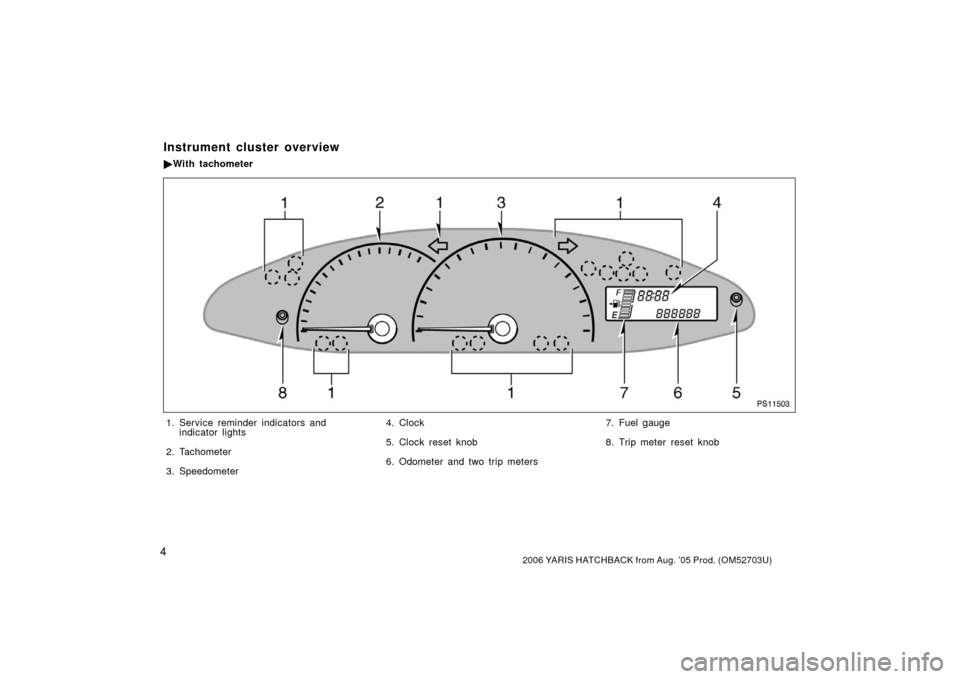
PS11503
1. Service reminder indicators andindicator lights
2. Tachometer
3. Speedometer 4. Clock
5. Clock reset knob
6. Odometer and two trip meters
7. Fuel gauge
8. Trip meter reset knob
Instrument cluster overview
�
With tachometer
Page 12 of 312
52006 YARIS HATCHBACK from Aug. ’05 Prod. (OM52703U)
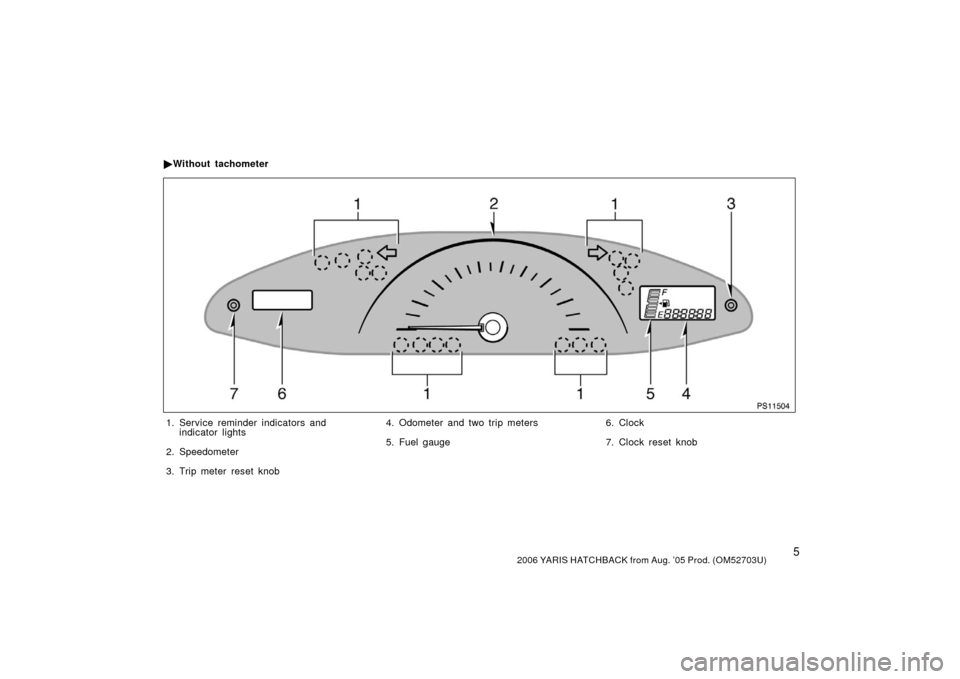
PS11504
1. Service reminder indicators andindicator lights
2. Speedometer
3. Trip meter reset knob 4. Odometer and two trip meters
5. Fuel gauge
6. Clock
7. Clock reset knob
�
Without tachometer
Page 14 of 312
72006 YARIS HATCHBACK from Aug. ’05 Prod. (OM52703U)
“AIRBAG ON” indicator light
Taillight indicator light
Turn signal indicator lights
Headlight high beam indicator light High engine coolant temperature warning light
∗
1
Headlight low beam indicator light
∗1: For details, see “Service reminder indicators and warning
buzzers” on page 114 in Section 1− 6.
∗
2: For details, see “Engine coolant temperature indicator and
warning light” on page 111 in Section 1− 6.
Low engine coolant temperature indicator light∗
2
Engine oil replacement reminder light∗1
“AIRBAG OFF” indicator light
Front fog light indicator light
Page 23 of 312

162006 YARIS HATCHBACK from Aug. ’05 Prod. (OM52703U)
PS12513
Locking operation
PS12514
Unlocking operation
To lock and unlock all the doors, push
the switches of the wireless remote
control key slowly and securely.
To lock: Push the lock switch. All the side
doors and back door are locked simulta-
neously. At this time, the turn signal lights
will flash once.
Check to see that the doors are securely
locked.
If any of the doors is not securely closed,
or if the key is in the ignition switch,
locking cannot be performed by the lock
switch.
To unlock: Push the unlock switch once to
unlock the driver ’s door alone. Pushing
the switch twice within 3 seconds unlocks
all the doors simultaneously. Each time
the unlock switch is pushed, the turn sig-
nal lights will flash twice.
When the unlock switch is pressed, the
interior light will come on and remain on
for about 15 seconds before fading out.
(For further information, see “Interior light”
on page 105.)
You have 30 seconds to open a door after
using the wireless remote unlock feature.
If a door is not opened by then, all the
side doors and back door will be automati-
cally locked again.If the lock or unlock switch is kept
pressed in, the locking or unlocking opera-
tion is not repeated. Release the switch
and then push it again.
—Locking and unlocking the
doors and back door
Page 24 of 312
172006 YARIS HATCHBACK from Aug. ’05 Prod. (OM52703U)
—Activating panic mode
PS12515
Pushing the panic switch for 1 second
blows the horn intermittently and
flashes the headlights, tail lights and
emergency flashers and turns on the
interior light.
The panic switch is used to deter vehicle
theft when you witness anyone attempting
to break into or damage your vehicle.
The panic mode will last for one minute.
To stop the panic mode midway, do the
following:
�Push any switch on the key.
�Turn the ignition key from the “LOCK”
to “ON” position.
The panic mode does not work when the
ignition key is in the “ON” position.
—Replacing battery
For replacement, use a CR2016 lithium
battery or equivalent and a flathead
screwdriver or equivalent.
CAUTION
Special care should be taken to pre-
vent small children from swallowing
the removed battery or components.
NOTICE
� When replacing the battery, be care-
ful not to lose the components.
� Replace only with the same or
equivalent type recommended by a
Toyota dealer.
� Dispose of used batteries according
to the local laws.
Replace the battery by following these
procedures:
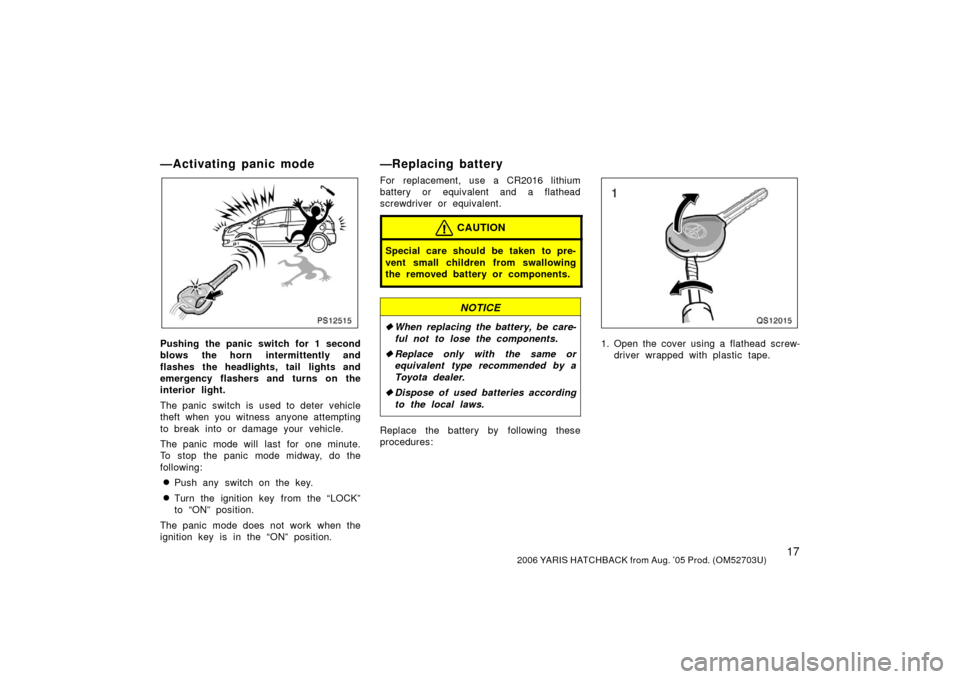
QS12015
1. Open the cover using a flathead screw-
driver wrapped with plastic tape.
Page 33 of 312

262006 YARIS HATCHBACK from Aug. ’05 Prod. (OM52703U)
PS12530
3. Hold the hood open by inserting thesupport rod into the slot.
To insert the support rod into the slot,
move it straight up. If it is moved to the
side or toward the inside of the vehicle,
it may become detached.
Before closing the hood, check to see that
you have not forgotten any tools, rags,
etc. and return the support rod to its clip−
this prevents rattles. Then lower the hood
and make sure it locks into place. If nec-
essary, press down gently on the front
edge to lock it.
CAUTION
After inserting the support rod into
the slot, make sure the rod supports
the hood security from falling down
on to your head or body.
NOTICE
Be sure to return the support rod to
its clip before closing the hood. Clos-
ing the hood with the support rod up
could cause the hood to bend.
PS12531
To deter vehicle theft, the system is
designed to sound an alarm if any of
the side doors, back door or hood is
forcibly unlocked and opened.
The alarm blows the horn intermittently
and flashes the headlights, tail lights and
turn signal lights, and turns on the interior
light.
Theft deterrent system
(vehicles sold in Puerto Rico
only)