Page 14 of 527
’06 TUNDRA_U (L/O 0508)
2
2006 TUNDRA from Oct. ’06 Prod. (OM 34458U)
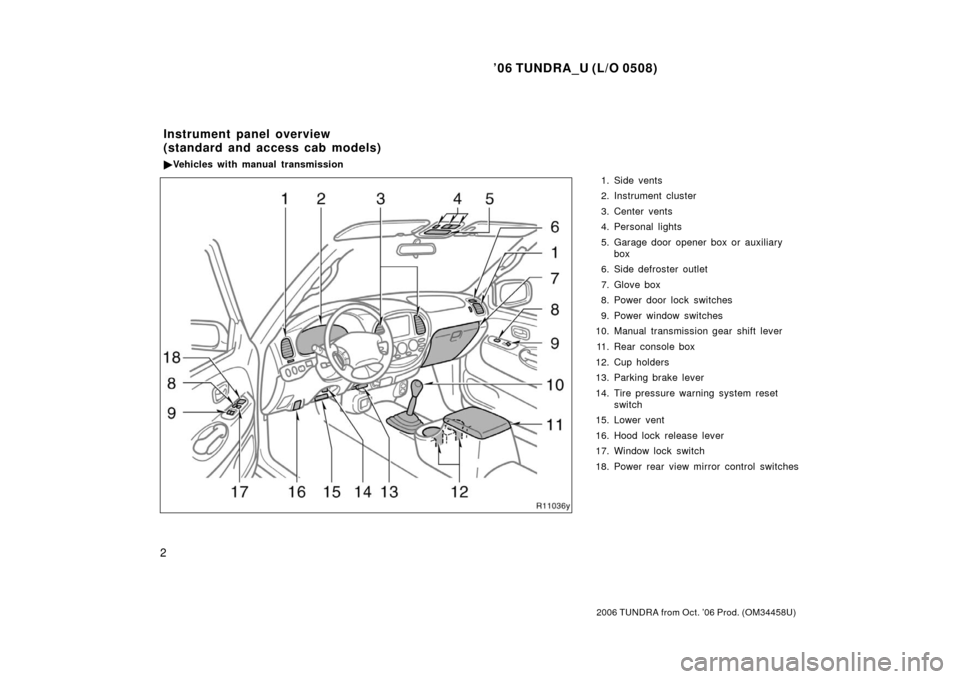
1. Side vents
2. Instrument cluster
3. Center vents
4. Personal lights
5. Garage door opener box or auxiliary
box
6. Side defroster outlet
7. Glove box
8. Power door lock switches
9. Power window switches
10. Manual transmission gear shift lever
11. Rear console box
12. Cup holders
13. Parking brake lever
14. Tire pressure warning system reset switch
15. Lower vent
16. Hood lock release lever
17. Window lock switch
18. Power rear view mirror control switches
Instrument panel overview
(standard and access cab models)
� Vehicles with manual transmission
Page 15 of 527
’06 TUNDRA_U (L/O 0508)
3
2006 TUNDRA from Oct. ’06 Prod. (OM 34458U)
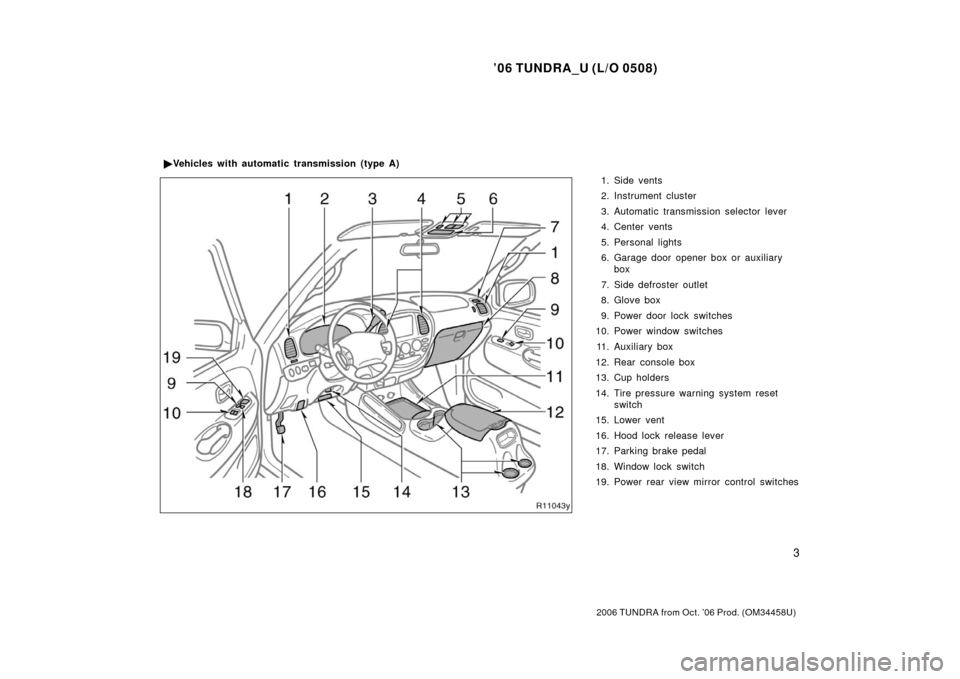
1. Side vents
2. Instrument cluster
3. Automatic transmission selector lever
4. Center vents
5. Personal lights
6. Garage door opener box or auxiliary
box
7. Side defroster outlet
8. Glove box
9. Power door lock switches
10. Power window switches
11. Auxiliary box
12. Rear console box
13. Cup holders
14. Tire pressure warning system reset switch
15. Lower vent
16. Hood lock release lever
17. Parking brake pedal
18. Window lock switch
19. Power rear view mirror control switches
�
Vehicles with automatic transmission (type A)
Page 16 of 527
’06 TUNDRA_U (L/O 0508)
4
2006 TUNDRA from Oct. ’06 Prod. (OM 34458U)
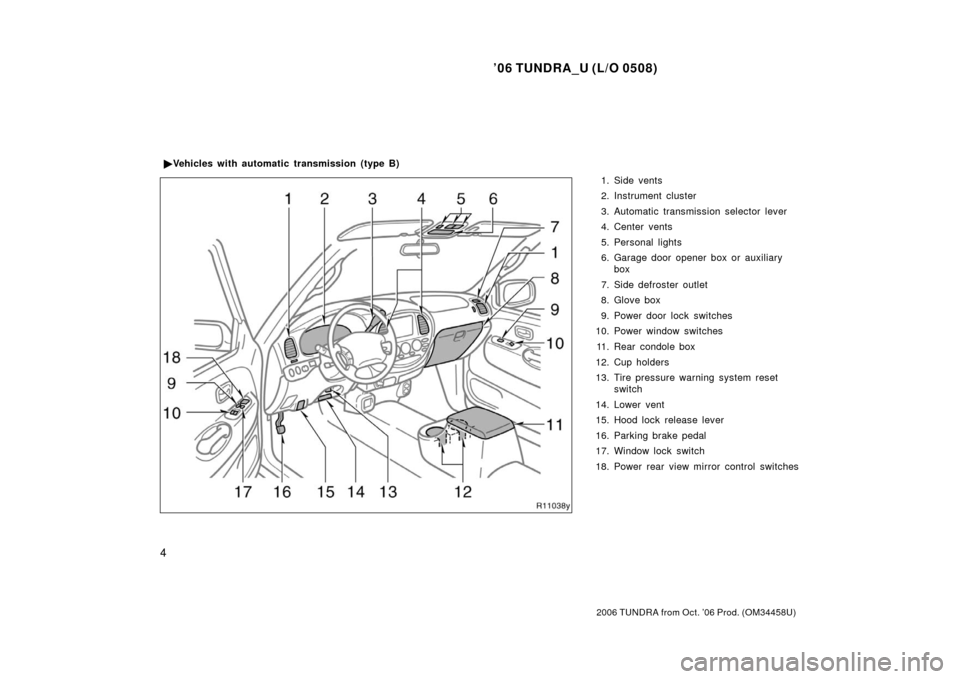
1. Side vents
2. Instrument cluster
3. Automatic transmission selector lever
4. Center vents
5. Personal lights
6. Garage door opener box or auxiliary
box
7. Side defroster outlet
8. Glove box
9. Power door lock switches
10. Power window switches
11. Rear condole box
12. Cup holders
13. Tire pressure warning system reset switch
14. Lower vent
15. Hood lock release lever
16. Parking brake pedal
17. Window lock switch
18. Power rear view mirror control switches
�
Vehicles with automatic transmission (type B)
Page 19 of 527
’06 TUNDRA_U (L/O 0508)
7
2006 TUNDRA from Oct. ’06 Prod. (OM 34458U)
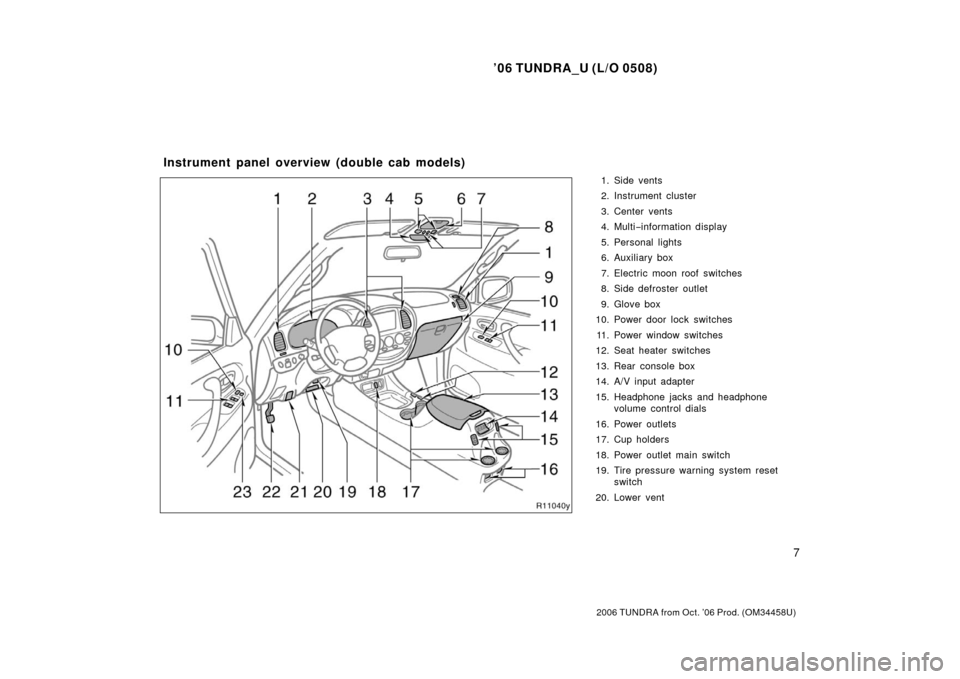
1. Side vents
2. Instrument cluster
3. Center vents
4. Multi−information display
5. Personal lights
6. Auxiliary box
7. Electric moon roof switches
8. Side defroster outlet
9. Glove box
10. Power door lock switches
11. Power window switches
12. Seat heater switches
13. Rear console box
14. A/V input adapter
15. Headphone jacks and headphone volume control dials
16. Power outlets
17. Cup holders
18. Power outlet main switch
19. Tire pressure warning system reset switch
20. Lower vent
Instrument panel overview (double cab models)
Page 23 of 527
’06 TUNDRA_U (L/O 0508)
11
2006 TUNDRA from Oct. ’06 Prod. (OM 34458U)
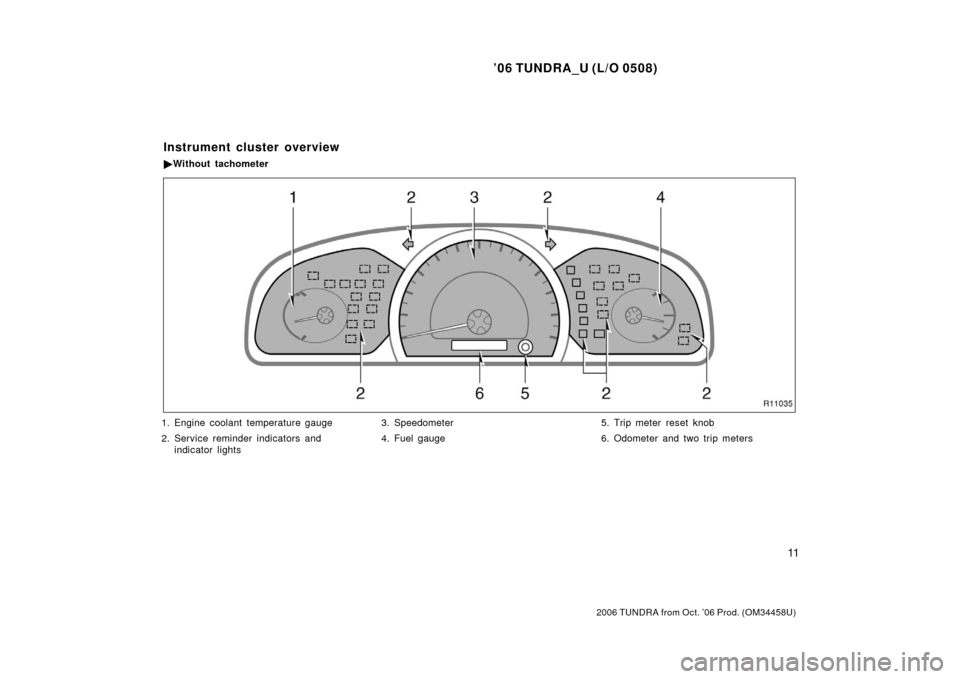
1. Engine coolant temperature gauge
2. Service reminder indicators and
indicator lights 3. Speedometer
4. Fuel gauge
5. Trip meter reset knob
6. Odometer and two trip meters
Instrument cluster overview
�
Without tachometer
Page 24 of 527
’06 TUNDRA_U (L/O 0508)
12
2006 TUNDRA from Oct. ’06 Prod. (OM 34458U)
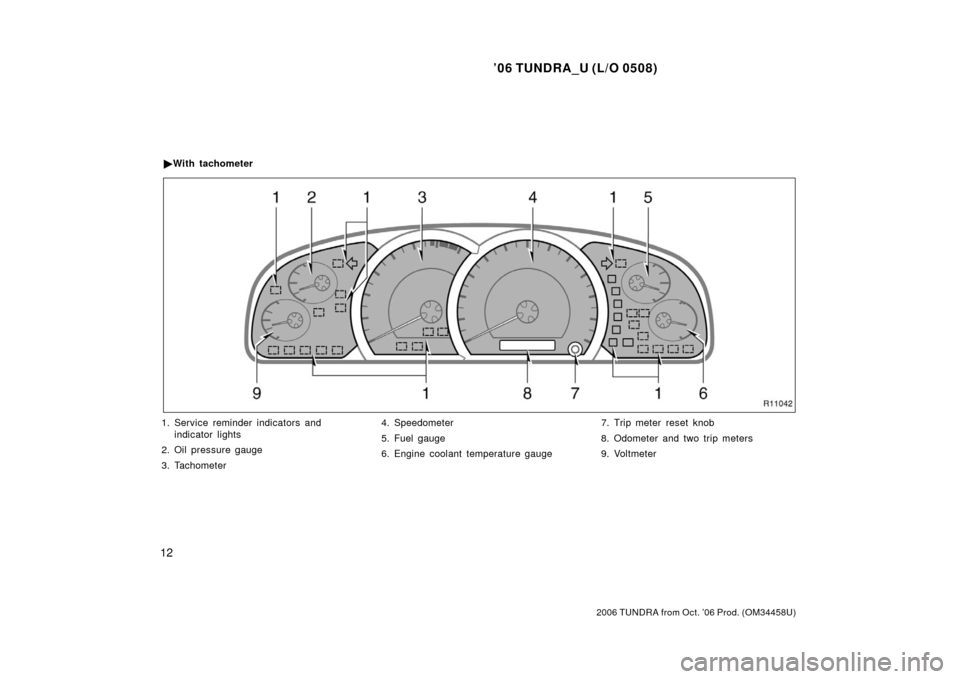
1. Service reminder indicators and
indicator lights
2. Oil pressure gauge
3. Tachometer 4. Speedometer
5. Fuel gauge
6. Engine coolant temperature gauge
7. Trip meter reset knob
8. Odometer and two trip meters
9. Voltmeter
�
With tachometer
Page 55 of 527
’06 TUNDRA_U (L/O 0508)
43
2006 TUNDRA from Oct. ’06 Prod. (OM 34458U)
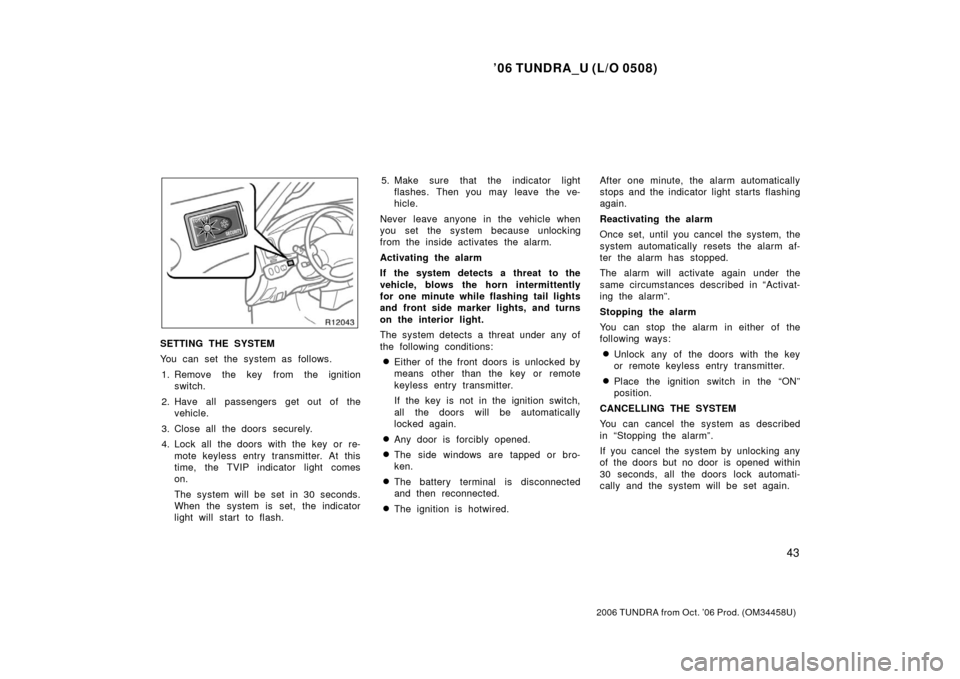
SETTING THE SYSTEM
You can set the system as follows.
1. Remove the key from the ignition switch.
2. Have all passengers get out of the vehicle.
3. Close all the doors securely.
4. Lock all the doors with the key or re- mote keyless entry transmitter. At this
time, the TVIP indicator light comes
on.
The system will be set in 30 seconds.
When the system is set, the indicator
light will start to flash. 5. Make sure that the indicator light
flashes. Then you may leave the ve-
hicle.
Never leave anyone in the vehicle when
you set the system because unlocking
from the inside activates the alarm.
Activating the alarm
If the system detects a threat to the
vehicle, blows the horn intermittently
for one minute while flashing tail lights
and front side marker lights, and turns
on the interior light.
The system detects a threat under any of
the following conditions:
�Either of the front doors is unlocked by
means other than the key or remote
keyless entry transmitter.
If the key is not in the ignition switch,
all the doors will be automatically
locked again.
�Any door is forcibly opened.
�The side windows are tapped or bro-
ken.
�The battery terminal is disconnected
and then reconnected.
�The ignition is hotwired. After one minute, the alarm automatically
stops and the indicator light starts flashing
again.
Reactivating the alarm
Once set, until you cancel the system, the
system automatically resets the alarm af-
ter the alarm has stopped.
The alarm will activate again under the
same circumstances described in “Activat-
ing the alarm”.
Stopping the alarm
You can stop the alarm in either of the
following ways:
�Unlock any of the doors with the key
or remote keyless entry transmitter.
�Place the ignition switch in the “ON”
position.
CANCELLING THE SYSTEM
You can cancel the system as described
in “Stopping the alarm”.
If you cancel the system by unlocking any
of the doors but no door is opened within
30 seconds, all the doors lock automati-
cally and the system will be set again.
Page 57 of 527

’06 TUNDRA_U (L/O 0508)
45
2006 TUNDRA from Oct. ’06 Prod. (OM 34458U)
The system will automatically be set after
30 seconds. When the system is set, the
indicator light will start flashing again.
4. After making sure the indicator light starts flashing, you may leave the ve-
hicle.
Never leave anyone in the vehicle when
you set the system, because unlocking
from the inside will activate the system.
WHEN THE SYSTEM IS SET
Activating the system
The system will sound the alarm under
the following conditions:
�If any of the doors is unlocked or
opened without the key or wireless re-
mote control transmitter, or if the hood
is forcibly opened
�If the battery terminal is disconnected
and then reconnected
The indicator light will come on when the
system is activated.
If the alarm has been activated and the
key is not in the ignition switch, all the
doors will re −lock automatically.
After one minute, the alarm will automati-
cally stop and the indicator light will starts
flashing again. Reactivating the alarm
Once set, the system automatically resets
the alarm after the alarm stops.
The alarm will activate again under the
same circumstances described in
“Activating the system”.
Stopping the alarm
The alarm will be stopped by the following
two ways:
�Turn the ignition key from the “LOCK”
to “ON” position.
�Unlock any of the doors with the key
or wireless remote control transmitter.
These ways cancel the system at the
same time. TESTING THE SYSTEM
1. Open all the windows.
2. Set the system as described above. The doors should be locked with the
key or wireless remote control transmit-
ter. Be sure to wait until the indicator
light goes off or starts flashing.
3. Unlock any door from the inside. The system s hould activate the alarm.
4. Stopping the alarm as described above.
5. Repeat this operation for the other doors and hood. When testing the
hood, also check that the system is
activated when the battery terminal is
disconnected and then reconnected.
If the system does not work properly,
have it checked by your Toyota dealer.