Page 240 of 480

’06_SEQUOIA_U (L/O 0508)
230
BEFORE USING THE CONTROLLER
(for new vehicle owners)
A battery is already set in the control-
ler with an insulating sheet, which pre-
vents the battery from being dis-
charged. Before using the controller,
remove the insulating sheet.
USING THE CONTROLLER
To use the rear seat audio system con-
troller, direct the signal output portion
of the controller to the signal reception
portion of the rear seat audio system
display.
The rear seat audio system controller can
be operated when the ignition switch is in
the “ACC” or “ON” position.
The controller does not operate properly
when the signal reception portion of the
display is exposed to direct sunlight.
Block the display from direct sunlight.
Details of specific buttons, controls, and
features of the controller, see
“CONTROLLER FEATURES” on page 232
in this Section.
NOTICE
Observe the followings, otherwise the
controller may be damaged.
�Do not drop or strongly knock the
controller against hard objects.
� Do not sit on or place heavy ob-
jects on the controller.
Page 245 of 480
’06_SEQUOIA_U (L/O 0508)
235
Replace the battery by using the following
procedures:1. Pull the case out while pushing the lock release button to the side.2. Remove the discharged battery.
3. Put in a new battery with the positive
(+) side up.
Put in the case securely.
NOTICE
�Make sure that the positive side of
the controller battery is facing cor-
rectly.
� Do not replace the battery with wet
hands. Water may cause rust.
� Do not touch or move any compo-
nents inside of the controller, or it
may interfere with proper operation.
�Be careful not to bend the electrode
of the controller battery insertion
and that dust or oil does not ad-
here to the transmitter case.
� Close the battery case securely.
After replacing the battery, check that the
controller operates properly. If the control-
ler still does not operate properly, contact
your Toyota dealer.
Page 249 of 480
’06_SEQUOIA_U (L/O 0508)
239
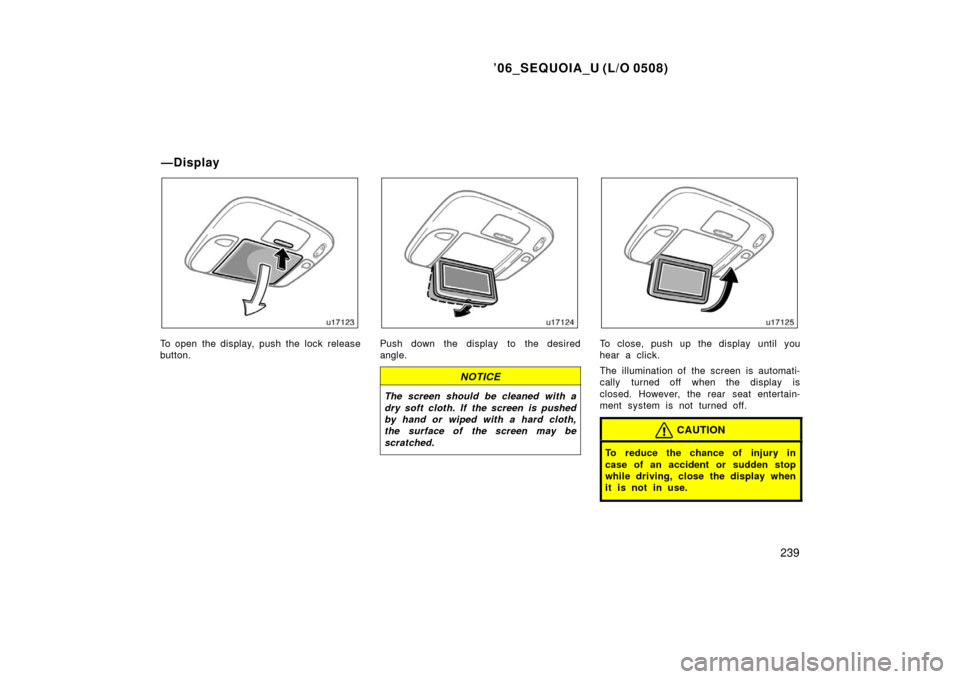
To open the display, push the lock release
button.Push down the display to the desired
angle.
NOTICE
The screen should be cleaned with a
dry soft cloth. If the screen is pushed
by hand or wiped with a hard cloth,
the surface of the screen may be
scratched.
To close, push up the display until you
hear a click.
The illumination of the screen is automati-
cally turned off when the display is
closed. However, the rear seat entertain-
ment system is not turned off.
CAUTION
To reduce the chance of injury in
case of an accident or sudden stop
while driving, close the display when
it is not in use.
—Display
Page 251 of 480
’06_SEQUOIA_U (L/O 0508)
241
USING THE CONTROLLER
To use the rear seat entertainment sys-
tem controller, direct the signal output
portion of the controller to the signal
reception portion of the rear seat enter-
tainment system display.
The controller does not operate properly
when the signal reception portion of the
display is exposed to direct sunlight.
Block the display from direct sunlight.
NOTICE
Observe the followings, otherwise the
controller may be damaged.
�Do not drop or strongly knock the
controller against hard objects.
� Do not sit on or place heavy ob-
jects on the controller.CONTROLLER HOLDER
The controller can be stowed in the
holder when it is not in use. The holder
can be hooked on the back of the driv-
er ’s or front passenger ’s seatback.
CAUTION
To reduce the chance of injury in
case of an accident or a sudden stop
while driving, stow the controller in
the holder when it is not in use.
Page 259 of 480
’06_SEQUOIA_U (L/O 0508)
249
REPLACING CONTROLLER BATTERY
For replacement, use a CR2025 lithium
battery or equivalent.
CAUTION
Special care should be taken that
small children do not swallow the re-
moved battery or components.
NOTICE
�When replacing the battery, be care-
ful not to lose the components.
� Replace only with the same or
equivalent type of battery recom-
mended by a Toyota dealer.
� Dispose of used batteries according
to local regulations.
Replace the battery by using the following
procedures:
1. Pull the case out while pushing the lock release button to the side.2. Remove the discharged battery.
3. Put in a new battery with the positive
(+) side up.
Put it in the case securely.
NOTICE
�Be sure that the positive side of
the controller battery is facing cor-
rectly.
� Do not replace the battery with wet
hands. Water may cause rust.
� Do not touch or move any compo-
nents inside of the controller, or it
may interfere with proper operation.
Page 260 of 480

’06_SEQUOIA_U (L/O 0508)
250
�Be careful not to bend the electrode
of the controller battery insertion
and that dust or oil does not ad-
here to the transmitter case.
� Close the battery case securely.
After replacing the battery, check that the
controller operates properly. If the control-
ler still does not operate properly, contact
your Toyota dealer.
The DVD player is set in the console
box.
The DVD player can play audio CDs,
DVD video discs, CD texts, dtsCDs
and video CDs.
For appropriate discs for this player, see
“Audio/video system operating hints” on
page 285.
To access the DVD player, pull up the
console box lid while pushing the lock
release button.
The DVD player works when the ignition
key is in the “ACC” or “ON” position.
To turn on the DVD player, a disc must
be loaded in the player.
To turn off the player, eject the disc.
Error messages
If the player malfunctions, your audio sys-
tem will display following error messages.
If “DISC CHECK” appears on the
screen: It indicates that the disc is dirty,
damaged or it was inserted upside down.
Clean the disc or insert it correctly.
If “REGION CODE ERROR” appears on
the screen: It indicates that the DVD re-
gion code is not set properly.
—DVD player
Page 295 of 480

’06_SEQUOIA_U (L/O 0508)
285
NOTICE
To ensure correct audio/video system
operation:
�Be careful not to spill beverages
over the system.
� Do not put anything other than a
cassette tape or Compact Disc into
the slot.
� Do not put anything other than a
DVD video, DVD audio, video CD,
dtsCD and audio CD into the DVD
player.
� The use of a cellular phone inside
or near the vehicle may cause a
noise from the speakers of the sys-
tem which you are listening to.
However, this does not indicate a
malfunction.
RADIO RECEPTION
Usually, a problem with radio reception
does not mean there is a problem with
your radio—it is just the normal result of
conditions outside the vehicle. For example, nearby buildings and terrain
can interfere with FM reception. Power
lines or telephone wires can interfere with
AM signals. And of course, radio signals
have a limited range. The farther you are
from a station, the weaker its signal will
be. In addition, reception conditions
change constantly as your vehicle moves.
Here are some common reception prob-
lems that probably do not indicate a prob-
lem with your radio:
FM
Fading and drifting stations—Generally, the
effective range of FM is about 40 km (25
miles). Once outside this range, you may
notice fading and drifting, which increase
with the distance from the radio transmit-
ter. They are often accompanied by distor-
tion.
Multi
−path—FM signals are reflective,
making it possible for two signals to reach
your antenna at the same time. If this
happens, the signals will cancel each oth-
er out, causing a momentary flutter or
loss of reception. Static and fluttering—These occur when
signals are blocked by buildings, trees, or
other large objects. Increasing the bass
level may reduce static and fluttering.
Station swapping—If the FM signal you
are listening to is interrupted or weak-
ened, and there is another strong station
nearby on the FM band, your radio may
tune in the second station until the origi-
nal signal can be picked up again.
AM
Fading—AM broadcasts are reflected by
the upper atmosphere—especially at night.
These reflected signals can interfere with
those received directly from the radio sta-
tion, causing the radio station to sound
alternately strong and weak.
Station interference—When a reflected sig-
nal and a signal received directly from a
radio station are very nearly the same
frequency, they can interfere with each
other, making it difficult to hear the broad-
cast.
Static—AM is easily affected by external
sources of electrical noise, such as high
tension power lines, lightening, or electri-
cal motors. This results in static.
Audio/video system operating
hints
Page 303 of 480

’06_SEQUOIA_U (L/O 0508)
293
“AUTO” button
For automatic operation of the air condi-
tioning, press the “AUTO” button. An indi-
cator light will illuminate to show that the
automatic operation mode has been se-
lected.
In the automatic operation mode, the air
conditioning selects the most suitable fan
speed and air flow, on−off of the air condi-
tioning and air intake according to the
temperature.
When you press the “AUTO” button with
the air intake mode at FRESH, internal
circulation may be applied for maximum
cooling.
When you adjust the temperature selector
to maximum cooling, a “MAX. COLD” mes-
sage will appear on the display and the
air intake mode will be automatically
changed to RECIRCULATE.
You may use manual controls if you want
to select your own settings. In the default mode, air intake changes in
accordance with the temperature when the
automatic operation mode is selected. This
feature can be disabled by doing the fol-
lowing:
Turn the ignition switch to “ACC” or
“LOCK”. Turn the ignition switch to the
“ON” position while pressing the “AUTO”
and “OFF” buttons at the same time.
When the automatic operation of the air
intake mode is disabled, it may affect the
cooling performance. You can set the de-
fault mode by the following:
Turn the ignition switch to “ACC” or
“LOCK”. Turn the ignition switch to the
“ON” position while pressing the wind-
shield air flow button and “OFF” button at
the same time.
Fan speed selector
Turn the knob to adjust the fan speed—to
the right to increase, to the left to de-
crease.
In automatic operation, the fan speed is
adjusted automatically unless you desire
another fan speed mode.Temperature selector
Turn the knob to adjust the temperatu-
re—to the right to warm, to the left to
cool.
The temperature display changes between
“
� C” and “� F” when the unit of the outside
temperature display is changed. (For de-
tails, see “Multi −information display” on
page 304 in Section 1 −10.)
“OFF” button
Push the button to turn off the air condi-
tioning system.