2006 SUZUKI SX4 Eps
[x] Cancel search: EpsPage 903 of 1556

Downloaded from www.Manualslib.com manuals search engine Power Assisted Steering System: 6C-23
DTC Detecting Condition and Trouble Area
DTC TroubleshootingDTC detecting condition Trouble area
DTC C1121:
Vehicle speed signal is 0 km/h even though engine speed
is more than 4000 rpm for more than 60 seconds
continuously (before elapse of 5 min from engine start)
or
Vehicle speed signal is 0 km/h even though engine speed
is more than 2500 rpm for more than 60 seconds
continuously (after elapse of 5 min for engine start).
(1 driving cycle detection logic but “EPS” warning light
does not light up)
DTC C1123:
Vehicle speed signal is 0 km/h with continuously more
than 3 driving cycles even though engine speed is more
than 4000 rpm for more than 30 seconds continuously
(before elapse of 5 min from engine start)
or
Vehicle speed signal is 0 km/h with continuously more
than 3 driving cycles even though engine speed is more
than 2500 rpm for more than 30 seconds continuously
(after elapse of 5 min for engine start).
(3 driving cycle detection logic)
DTC C1124:
Vehicle speed signal is less than 5 km/h for more than 5
seconds continuously with more than specified
deceleration speed (–20 m/s
2) from over 20 km/h.
(1 driving cycle detection logic but “EPS” warning light
does not light up)• Vehicle speed signal circuit
•BCM
•ECM
• TCM (A/T model)
• ABS control module (M/T model)
• P/S control module
• CAN communication line circuit
Step Action Yes No
1Was “EPS System Check” performed?Go to Step 2. Go to “EPS System
Check”.
2DTC check
1) DTC check for ECM referring to “DTC Check in Section
1A”.
Is there any DTC detected?Go to applicable DTC
diag. flow.Go to Step 3.
3Vehicle spec check
Is vehicle equipped with A/T?Go to Step 4 Go to Step 5
4DTC check
1) Check TCM for DTC referring to “DTC Check in Section
5A”.
Is there any DTC detected?Go to applicable DTC
diag. flow.Go to Step 6.
5DTC check
1) Check ABS control module and BCM for DTC referring
to “DTC Check in Section 4E” and “DTC Check in
Section 10B”.
Is there any DTC detected?Go to applicable DTC
diag. flow.Go to Step 6.
Page 905 of 1556

Downloaded from www.Manualslib.com manuals search engine Power Assisted Steering System: 6C-25
DTC Detecting Condition and Trouble Area
DTC TroubleshootingDTC detecting condition Trouble area
Engine speed signal is less than 220 rpm for more than
0.8 seconds.
or
Engine speed signal is less than 220 rpm for more than 20
seconds continuously even though vehicle speed signal is
more than 50 km/h.
(1 driving cycle detection logic)• Engine speed signal circuit
•ECM
• P/S control module
Step Action Yes No
1Was “EPS System Check” performed?Go to Step 2. Go to “EPS System
Check”.
2DTC check
1) Check ECM for DTC referring to “DTC Check in Section
1A”.
Is there any DTC(s) detected?Go to applicable DTC
diag. flow.Go to Step 3.
3Engine speed signal circuit check
1) With ignition switch turned OFF, disconnect P/S control
module connector.
2) Check P/S control module connector for proper
connection.
3) If OK, turn ON ignition switch, measure voltage between
“E11-12” wire terminal of P/S control module connector
and vehicle body ground.
Is voltage 10 – 14 V?Go to Step 4. Go to Step 5.
4ECM voltage check
1) With ignition switch turned OFF, connect P/S control
module and ECM connectors.
2) Check engine speed signal output referring to
“Inspection of ECM and Its Circuits in Section 1A”.
Is it in good condition?Substitute a known-
good P/S control
module and recheck.Substitute a known
good ECM and recheck.
5Engine speed signal circuit check
1) Disconnect ECM connector.
2) Check that engine speed signal circuit is as follows.
• Insulation resistance of wire harness is infinity
between “Engine speed signal circuit” terminal and
other terminal at P/S control module connector.
• Wiring harness resistance of “Engine speed signal
circuit” is less than 1Ω.
• Insulation resistance between “Engine speed signal
circuit” and vehicle body ground is infinity
• Circuit voltage between “Engine speed signal circuit”
and ground circuit is 0 – 1 V with ignition switch turned
ON.
Is it in good condition?Substitute a known
good ECM and recheck.Repair or replace
defective circuit.
Page 907 of 1556

Downloaded from www.Manualslib.com manuals search engine Power Assisted Steering System: 6C-27
DTC Troubleshooting
DTC C1153: P/S Control Module Power Supply CircuitS6RW0D6304017
Wiring Diagram
DTC Detecting Condition and Trouble AreaStep Action Yes No
1Was “EPS System Check” performed?Go to Step 2. Go to “EPS System
Check”.
2DTC check
Is DTC C1153 and/or C1155 indicated, together?Go to applicable DTC
diag. flow.Go to Step 3.
3Power supply and ground circuit check
1) Check P/S control module power supply and ground
circuit referring to “P/S Control Module Power Supply
and Ground Circuit Check”.
Is it in good condition?Go to Step 4. Repair or replace
defective circuit.
4Motor circuit check
1) With ignition switch turned OFF, disconnect P/S control
module connector No.3 and P/S motor connector.
2) Check P/S control module connector and P/S motor
connector for proper connection.
3) If OK, check for open, short and/or high resistance in
motor circuit between P/S control module and P/S motor.
Refer to “Electrical Circuit Inspection Procedure in
Section 00”.
Are they in good condition?Go to Step 5. Repair motor circuit.
5P/S motor check
1) Check P/S motor referring to “P/S Motor and Its Circuit
Inspection”.
Is P/S motor in good condition?Substitute a known-
good P/S control
module and recheck.Replace the steering
gear case assembly and
recheck.
[A]
123
4567
8
9 11
10 12 13
141516
17 18 1920
1
2
[B]
LT GRN/
BLKE11-1E13-1 GRNGRN
WHT
5
3 6
8
9
7
4 12
12V
E13-2BLK
I6RW0C630009-01
[A]: P/S control module connector No.1 “E11” (viewed from harness side) 3. Junction block assembly 7. “IGN” fuse
[B]: P/S control module connector No.2 “E13” (viewed from harness side) 4. Main fuse 8. “P/S” fuse
1. Main fuse box 5. P/S control module 9. “IG1 SIG” fuse
2. Ignition switch 6. Individual circuit fuse box No.1
DTC detecting condition Trouble area
Power supply voltage of P/S control module is less than 9
V for 5 seconds continuously while engine speed is more
than 600 rpm.
(1 driving cycle detection logic)• P/S control module power supply circuit
• Battery
• Generator
• P/S control module
Page 908 of 1556

Downloaded from www.Manualslib.com manuals search engine 6C-28 Power Assisted Steering System:
DTC Troubleshooting
DTC C1155: P/S Control Module Internal FailureS6RW0D6304018
Wiring Diagram
Refer to “DTC C1153: P/S Control Module Power Supply Circuit”.
DTC Detecting Condition and Trouble Area
DTC TroubleshootingStep Action Yes No
1Was “EPS System Check” performed?Go to Step 2. Go to “EPS System
Check”.
2Battery voltage check
1) Check circuit fuse for P/S control module.
2) If OK, measure voltage between positive (+) battery
terminal and vehicle body ground with engine running.
Is voltage 10 V or more?Go to Step 3. Check charging system
referring to “Generator
Test (Undercharged
Battery Check) in
Section 1J”.
3P/S control module power supply circuit check
Check power supply circuit and ground circuit for P/S control
module referring to “P/S Control Module Power Supply and
Ground Circuit Check”.
Is check result in good condition?Substitute a known-
good P/S control
module and recheck.Repair defective circuit.
DTC detecting condition Trouble area
Internal memory (EEPROM) is data error.
(In this case, “EPS” warning light does not light up)
or
Internal circuit is faulty.
or
Power supply voltage of P/S control module exceeded
17.5 V
(1 driving cycle detection logic)• Generator
• P/S control module
Step Action Yes No
1Was “EPS System Check” performed?Go to Step 2. Go to “EPS System
Check”.
2P/S control module power supply and ground circuit
check
Check power supply circuit and ground circuit for P/S control
module referring to “P/S Control Module Power Supply and
Ground Circuit Check”.
Is check result in good condition?Go to Step 3. Repair or replace
defective circuit.
3Battery voltage check
1) Check voltage between positive (+) battery terminal and
vehicle body ground with engine speed at 3000 rpm.
Is voltage 15.5 V or less?Replace P/S control
module.Check charging system
referring to “Generator
Test (Overcharged
Battery Check) in
Section 1J”.
Page 911 of 1556

Downloaded from www.Manualslib.com manuals search engine Power Assisted Steering System: 6C-31
Terminal Wire color Circuit Normal voltage Condition
E11-1 LT GRN/BLKIgnition switch signal for P/S
control module10 – 14 V Ignition switch ON
E11-2 — — — —
E11-3 — — — —
E11-4 PPL Vehicle speed signal*0 – 1 V
↑↓
8 – 14 V
(“Reference
waveform No.7”
under “Inspection
of BCM and Its
Circuits in
Section 10B”)• Ignition switch ON
• Front left tire turned quickly with right
tire locked
E11-5 GRY “EPS” warning light0 V Ignition switch ON
0 – 14 V Engine running
E11-6 — — — —
E11-7 — — — —
E11-8 GRN9 V power supply for torque
sensorAbout 9 V• Ignition switch ON
• Voltage between “E11-8” and “E11-9”
terminals
E11-9 BLK Ground for torque sensors — —
E11-10 WHT Torque sensor signal (Sub)About 2.5 – 4.0 V• Steering wheel with left turn
• Out put voltage varies linearly
depending on steering force
About 2.5 V Steering wheel at free
About 1.0 – 2.5 V• Steering wheel with right turn
• Out put voltage varies linearly
depending on steering force
E11-11 BLUSerial communication circuit for
data link connector——
E11-12 BRN Engine speed signal*0 – 1 V
↑↓
8 – 14 V
(“Reference
waveform No.24
and No.25” under
“Inspection of
ECM and Its
Circuits in
Section 1A”)Engine idling
E11-13 — — — —
E11-14 RED/BLU P/S active signal (idle up signal)About 12 V Ignition switch ON
0 – 1 VEngine idling and turned steering wheel
to the right or left until it stops
E11-15 — — — —
E11-16 — — — —
E11-17 — — — —
E11-18 YEL Torque sensor signal (Main)About 1.0 – 2.5 V• Steering wheel with left turn
• Out put voltage varies linearly
depending on steering force
About 2.5 V Steering wheel at free
About 2.5 – 4.0 V• Steering wheel with right turn
• Out put voltage varies linearly
depending on steering force
E11-19 GRY Ground for shield wire — —
Page 917 of 1556

Downloaded from www.Manualslib.com manuals search engine Power Assisted Steering System: 6C-37
3) Inspect for proper toe referring to “Front Wheel
Alignment Inspection and Adjustment in Section 2B”.
4) After confirming proper toe, tighten tie-rod end lock
nut to specified torque.
Tightening torque
Tie-rod end lock nut (a): 45 N·m (4.5 kgf-m, 32.5
lb-ft)
5) Tighten wheel bolts to specified torque and lower
hoist.
Tightening torque
Wheel bolt: 85 N·m (8.5 kgf-m, 61.5 lb-ft)
Tie-Rod End InspectionS6RW0D6306004
• Inspect for play in ball joint.
• Inspect for play in rack end ball joint.
In either case, if found defective, replace.
Steering Shaft Joint On-Vehicle InspectionS6RW0D6306005
Check shaft joint for wear, breakage and any other
damage and replace if any defect exists.
Steering Gear Case Assembly Removal and
Installation
S6RW0D6306006
Removal
CAUTION!
Be sure to set front wheels (tires) in straight
direction and remove ignition key from key
cylinder before performing the following
steps, otherwise, contact coil of air bag
system may get damaged.
1) Remove steering joint cover.
2) Make alignment marks (1) on pinion shaft (2) and
joint of steering lower shaft (3) for a guide during
reinstallation.
3) Loosen joint bolt (steering column side) (4) and
remove joint bolt (pinion shaft side) (5) and
disconnect steering lower shaft (3) from pinion shaft
(2).
4) Disconnect torque sensor connector and P/S motor
connector from steering gear case.
5) Remove front suspension frame referring to “Front
Suspension Frame, Stabilizer Bar and/or Bushing
Removal and Installation in Section 2B”, and then
remove steering gear case.
Installation
1) Install grommet (1) as shown in figure.
I3RM0A630030-01
I4RS0A630043-01
I4RS0B630012-01
2. Protrusion
5
2
1
5
34
3
I4RS0B630013-01
1
2
1
2
I5RW0A630018-02
Page 922 of 1556

Downloaded from www.Manualslib.com manuals search engine 6C-42 Power Assisted Steering System:
5) Turn ON ignition switch without engine running and
select scan tool “Data List” mode due to checking
“Sensor (Main) Torque” and “Sensor (Sub) Torque”
displayed on scan tool when steering wheel turned
left and right (if used).
6) Check that characteristic of torque sensor (main and
sub) output voltage or scan tool data and steering
force is as following graph when steering wheel is
turned left and right. If sensor voltage or scan tool
data is out of specified value or does not vary linearly
as the following graph, check EPS control module
and its circuit referring to “Inspection of P/S Control
Module and Its Circuits”.
If they are OK, replace steering gear case assembly.P/S Motor and Its Circuit InspectionS6RW0D6306013
1) Check motor circuit referring to Step 2 to 3 of “DTC
C1141 / C1142 / C1143 / C1145: Motor Circuit
Failure”. If check result is not satisfactory, repair
motor circuit.
2) Disconnect motor connector from steering gear case
assembly with ignition switch turned OFF.
3) Check for resistance between terminals of motor
connector.
If check result is not as specified, check P/S motor
harness for continuity. If it is OK, replace steering
gear case assembly.
Motor circuit resistance
4) Check for insulation between each terminal of motor
connector and body ground.
If check result is not as specified, check P/S motor
harness for insulation. If it is OK, replace steering
gear case assembly.
Motor circuit resistance
5) Hoist vehicle
6) Check that steering wheel turns to left and right
smoothly. If steering wheel does not turn smoothly,
inspect and repair defective steering and suspension
parts.
7) Connect “E12” connector with ignition switch turned
OFF.
[A]: Main sensor
[B]: Sub sensor
[C]: Steering force at left turn
[D]: Steering force at right turn
[E]: Steering wheel at free
[F]: “Sensor (Main) Torque” in “Data List” displayed on scan tool
[G]: “Sensor (Sub) Torque” in “Data List” displayed on scan tool
0
[E][N.m]
MAX
MAX [D] [C]
[E][D] [C]
2.33 - 2.68[V] [F]
[G] [A]
[B]
66
1.65 - 1.9
(1.0 - 1.3)3.0 - 3.4 (3.7 - 4.0)
0 5
2.33 - 2.681.65 - 1.9
(1.0 - 1.3)3.0 - 3.4 (3.7 - 4.0)
0 5
0
[N.m]
MAX
MAX
[V]
6 11.76 11.7611.76 11.766
0 11.5
-12.00 -12.0
11.5
I7RW01632011-02
“E12-1” and “E12-2” (For motor) Approx. 1 Ω
Each terminal and body ground No continuity
[A]: Motor connector “E12” (viewed from harness side)
12
[A]
I6RW0C630012-02
Page 951 of 1556
Downloaded from www.Manualslib.com manuals search engine Air Conditioning System: Manual Type 7B-11
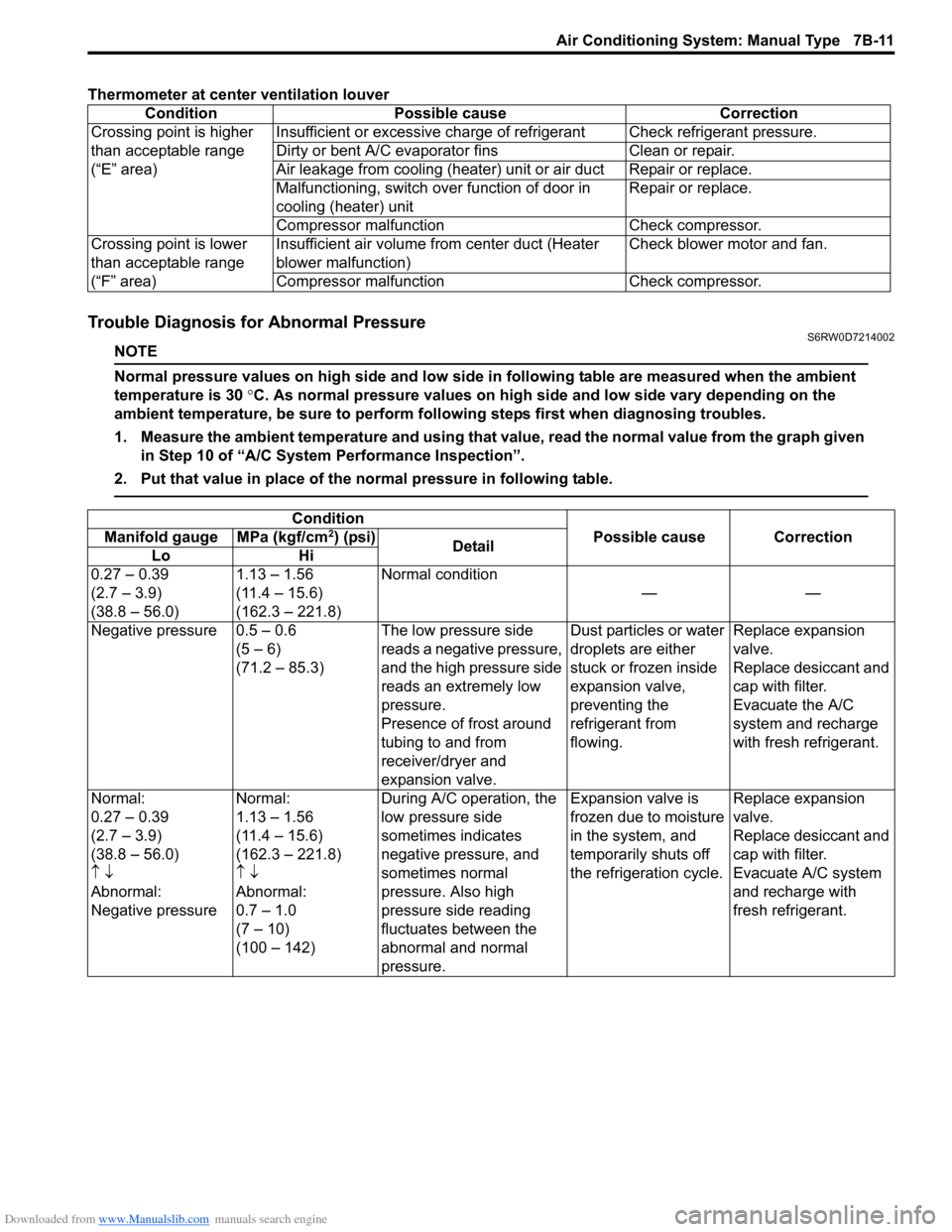
Thermometer at center ventilation louver
Trouble Diagnosis for Abnormal PressureS6RW0D7214002
NOTE
Normal pressure values on high side and low side in following table are measured when the ambient
temperature is 30 °C. As normal pressure values on high side and low side vary depending on the
ambient temperature, be sure to perform following steps first when diagnosing troubles.
1. Measure the ambient temperature and using that value, read the normal value from the graph given
in Step 10 of “A/C System Performance Inspection”.
2. Put that value in place of the normal pressure in following table.
Condition Possible cause Correction
Crossing point is higher
than acceptable range
(“E” area)Insufficient or excessive charge of refrigerant Check refrigerant pressure.
Dirty or bent A/C evaporator fins Clean or repair.
Air leakage from cooling (heater) unit or air duct Repair or replace.
Malfunctioning, switch over function of door in
cooling (heater) unitRepair or replace.
Compressor malfunction Check compressor.
Crossing point is lower
than acceptable range
(“F” area)Insufficient air volume from center duct (Heater
blower malfunction)Check blower motor and fan.
Compressor malfunction Check compressor.
Condition
Possible cause Correction Manifold gauge MPa (kgf/cm2) (psi)
Detail
Lo Hi
0.27 – 0.39
(2.7 – 3.9)
(38.8 – 56.0)1.13 – 1.56
(11.4 – 15.6)
(162.3 – 221.8)Normal condition
——
Negative pressure 0.5 – 0.6
(5 – 6)
(71.2 – 85.3)The low pressure side
reads a negative pressure,
and the high pressure side
reads an extremely low
pressure.
Presence of frost around
tubing to and from
receiver/dryer and
expansion valve.Dust particles or water
droplets are either
stuck or frozen inside
expansion valve,
preventing the
refrigerant from
flowing.Replace expansion
valve.
Replace desiccant and
cap with filter.
Evacuate the A/C
system and recharge
with fresh refrigerant.
Normal:
0.27 – 0.39
(2.7 – 3.9)
(38.8 – 56.0)
↑ ↓
Abnormal:
Negative pressureNormal:
1.13 – 1.56
(11.4 – 15.6)
(162.3 – 221.8)
↑ ↓
Abnormal:
0.7 – 1.0
(7 – 10)
(100 – 142)During A/C operation, the
low pressure side
sometimes indicates
negative pressure, and
sometimes normal
pressure. Also high
pressure side reading
fluctuates between the
abnormal and normal
pressure.Expansion valve is
frozen due to moisture
in the system, and
temporarily shuts off
the refrigeration cycle.Replace expansion
valve.
Replace desiccant and
cap with filter.
Evacuate A/C system
and recharge with
fresh refrigerant.