2006 SUBARU LEGACY turn signal
[x] Cancel search: turn signalPage 149 of 425

3-34 Instruments and controls
Front fog light switch (if
equipped)
The front fog lights operate only when the
light switch is in the “ ” position.
However, the front fog lights turn off when
the headlights are switched to high beam.
To turn on the front fog lights, turn the front
fog light switch on the turn signal lever up-
ward to the “ ” position. To turn off the
front fog lights, turn the switch back down
to the “OFF” position. The indicator light located on the combi-
nation meter will illuminate when the front
fog lights are on.
Wiper and washer
300512
300282
In freezing weather, do not use the
windshield washer until the wind-
shield is sufficien
tly warmed by the
defroster.
Otherwise the washer fluid can
freeze on the windshield, blocking
your view. y Do not operate the washer contin-
uously for more than ten seconds,
or when the washer fluid tank is
empty. This may cause overheat-
ing of the washer motor. Check
the washer fluid level frequently,
such as at fuel stops.
y Do not operate the wipers when
the windshield or rear window is
dry. This may scratch the glass,
damage the wiper blades and
cause the wiper mo tor to burn out.
Before operating the wiper on a
dry windshield or rear window, al-
ways use the windshield washer.
Page 253 of 425
7-14 Starting and operating
“R” position when it has been placed in the
“P” position and then placed again in the
“N” position. When movement of the se-
lector lever from the “N” position to the “R”
position has become impossible, turn the
ignition switch back to the “ON” position
then move the selector lever to the “P” po-
sition. Pressing the se lector lever release
button also makes it possible to move the
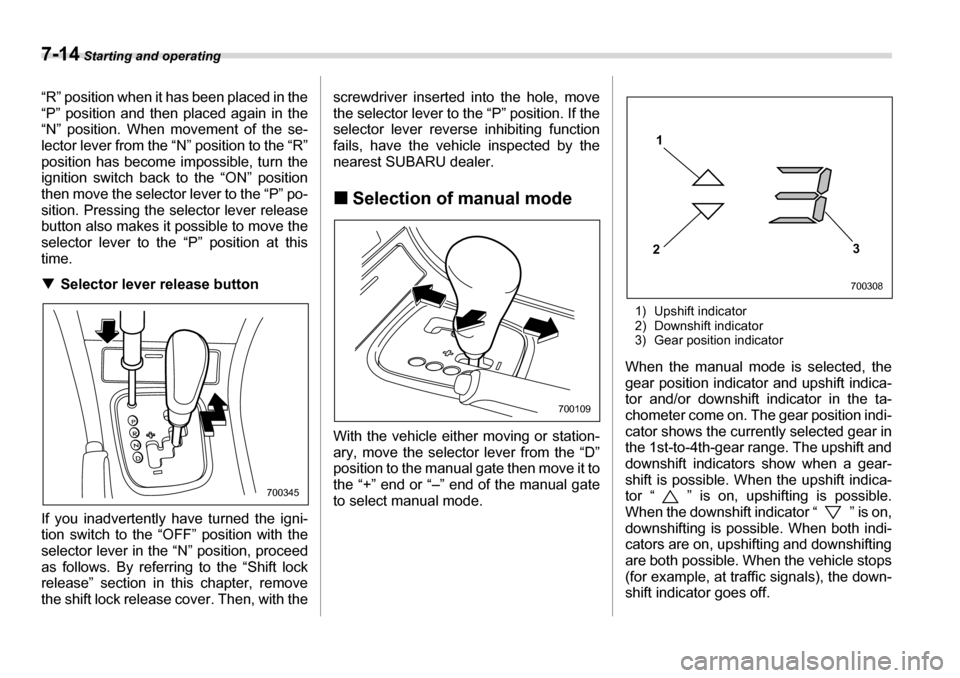
selector lever to the “P” position at thistime. T Selector lever release button
If you inadvertently have turned the igni-
tion switch to the “O FF” position with the
selector lever in the “N” position, proceed
as follows. By referring to the “Shift lock
release” section in this chapter, remove
the shift lock release cover. Then, with the screwdriver inserted into the hole, move
the selector lever to the “P” position. If the
selector lever reverse inhibiting function
fails, have the vehicle inspected by the
nearest SUBARU dealer. „
Selection of manual mode
With the vehicle either moving or station-
ary, move the selector lever from the “D”
position to the manual gate then move it to
the “+” end or “–” end of the manual gate
to select manual mode. 1) Upshift indicator
2) Downshift indicator
3) Gear position indicator
When the manual mode is selected, the
gear position indicator and upshift indica-
tor and/or downshift indicator in the ta-
chometer come on. The gear position indi-
cator shows the curren tly selected gear in
the 1st-to-4th-gear range. The upshift and
downshift indicators show when a gear-
shift is possible. When the upshift indica-
tor “ ” is on, upshifting is possible.
When the downshift indicator “ ” is on,
downshifting is possible. When both indi-
cators are on, upshifting and downshifting
are both possible. When the vehicle stops
(for example, at traffic signals), the down-
shift indicator goes off.
700345
700109
1
2 3
700308
Page 260 of 425

Starting and operating 7-21
– CONTINUED –
1) Upshift indicator
2) Downshift indicator
3) Gear position indicator
When the manual mode is selected, the
gear position indicator and upshift indica-
tor and/or downshift indicator in the ta-
chometer come on. The gear position indi-
cator shows the currently selected gear in
the 1st-to-5th-gear range. The upshift and
downshift indicators show when a gear-
shift is possible. When the upshift indica-
tor “ ” is on, upshifting is possible.
When the downshift indicator “ ” is on,
downshifting is possible. When both indi-
cators are on, upshifting and downshifting
are both possible. When the vehicle stops
(for example, at traffic signals), the down-
shift indicator goes off. Gearshifts can be performed using the se-
lector lever or the sh
ift switch on the steer-
ing wheel (turbo model only).
Using the selector lever
Shift to the next-higher gear by briefly
pushing the selector lever toward the “+”
end of the manual gate.
Shift to the next-lower gear by briefly pull-
ing the selector lever toward the “–” end of
the manual gate. Using the shift swit
ch (turbo models)
Shift to the next-higher gear by briefly
pressing the “+” button of the shift switch.
Shift to the next-lower gear by briefly
pressing the “–” button of the shift switch.
To deselect the manual mode, return the
selector lever to the “D” position from the
manual gate.
If you press the “+” button or “–” button of
the shift switch while driving with the se-
lector lever in the “D” position, the manual
mode will be selected. At this time, the
currently selected gear will be shown by
the gear position indicator and the upshift
indicator and downshift indicator will come
on.
If you subsequently ease off the accelera-
tor pedal and then accelerate again, the
1
2 3
700308
700111
300106
Page 272 of 425

Starting and operating 7-33
– CONTINUED –
The Vehicle Dynamics Control system will
be deactivated and the vehicle will behave
like a model not equipped with the Vehicle
Dynamics Control
system. When the
switch is pressed again to reactivate the
Vehicle Dynamics Control system, the in-
dicator light goes off.
With the Vehicle Dynamics Control sys-
tem deactivated, traction and stability en-
hancement offered by Vehicle Dynamics
Control system is unavailable. Therefore
you should not deactivate the Vehicle Dy-
namics Control syst em except under
above-mentioned situations.
NOTE y When the switch has been pressed
to deactivate the Vehicle Dynamics
Control system, the Vehicle Dynamics
Control system automatically reacti-
vates itself the next time the ignition
switch is turned to the OFF position
and the engine is restarted.y If the switch is held down for 10 sec-
onds or longer, the indicator light goes
off, the Vehicle Dynamics Control sys-
tem is activated, and the system ig-
nores any further pressing of the
switch. To make the switch usable
again, turn the igni tion switch to the
OFF position and restart the engine.y When the switch is pressed to deac- tivate the Vehicle Dynamics Control
system, the vehicle’s running perfor-
mance is comparable with that of a ve-
hicle that does not have a Vehicle Dy-
namics Control system. Do not deacti-
vate the Vehicle Dynamics Control sys-
tem except when absolutely neces-
sary.
Tire pressure monitoring
system (TPMS) (if equipped)
The tire pressure monitoring system pro-
vides the driver with a warning message
by sending a signal from a sensor that is
installed in each wheel when tire pressure
is severely low.
The tire pressure mo
nitoring system will
activate only when the vehicle is driven at
speeds above 20 mph (32 km/h). Also,
this system may not react immediately to
a sudden drop in tire pressure (for exam-
ple, a blow-out caused by running over a
sharp object).
700352
Page 299 of 425
8-20 Driving tips
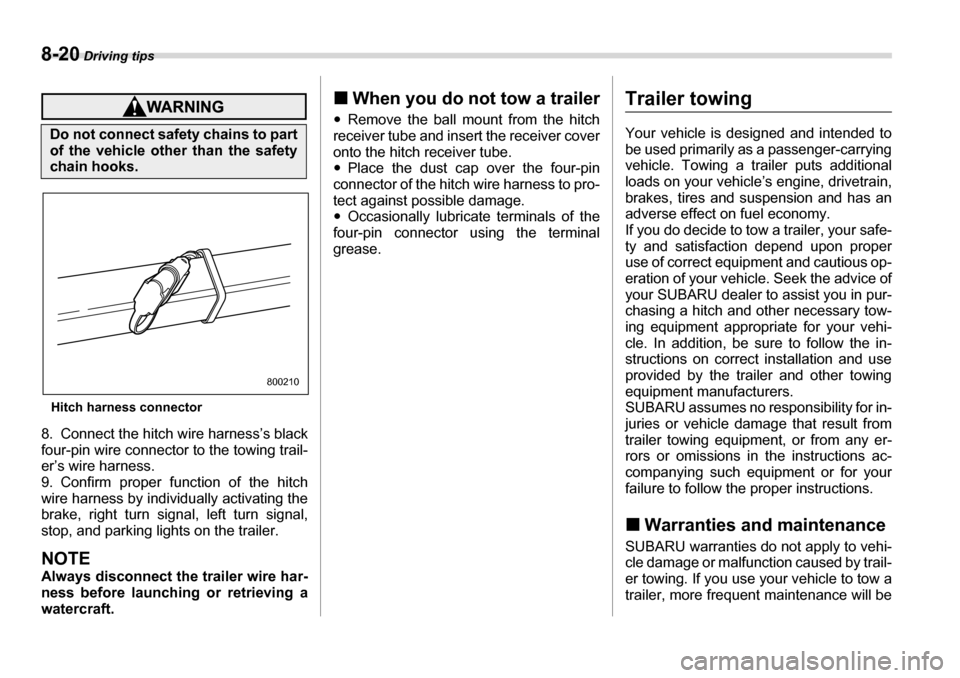
Hitch harness connector
8. Connect the hitch wire harness’s black
four-pin wire connector to the towing trail-
er’s wire harness.
9. Confirm proper function of the hitch
wire harness by individually activating the
brake, right turn signal, left turn signal,
stop, and parking lights on the trailer.
NOTE
Always disconnect the trailer wire har-
ness before launching or retrieving awatercraft. „
When you do not tow a trailer
y Remove the ball mount from the hitch
receiver tube and insert the receiver cover
onto the hitch receiver tube. y Place the dust cap over the four-pin
connector of the hitch wire harness to pro-
tect against possible damage. y Occasionally lubricate terminals of the
four-pin connector using the terminal
grease.
Trailer towing
Your vehicle is designed and intended to
be used primarily as a passenger-carrying
vehicle. Towing a trailer puts additional
loads on your vehicle’s engine, drivetrain,
brakes, tires and suspension and has an
adverse effect on fuel economy.
If you do decide to tow a trailer, your safe-
ty and satisfaction depend upon proper
use of correct equipment and cautious op-
eration of your vehicle. Seek the advice of
your SUBARU dealer to assist you in pur-
chasing a hitch and other necessary tow-
ing equipment appropriate for your vehi-
cle. In addition, be sure to follow the in-
structions on correct installation and use
provided by the trailer and other towing
equipment manufacturers.
SUBARU assumes no responsibility for in-
juries or vehicle damage that result from
trailer towing equipment, or from any er-
rors or omissions in the instructions ac-
companying such equipment or for your
failure to follow the proper instructions. „ Warranties and maintenance
SUBARU warranties do not apply to vehi-
cle damage or malfunction caused by trail-
er towing. If you use your vehicle to tow a
trailer, more frequent maintenance will be
Do not connect safety chains to part
of the vehicle other than the safety
chain hooks.
800210
Page 305 of 425

8-26 Driving tips
TSide mirrors
After hitching a trailer to your vehicle,
check that the standard side mirrors pro-
vide a good rearward field of view without
significant blind spots. If significant blind
spots occur with the vehicle’s standard
side mirrors, use towing mirrors that con-
form with Federal, state/province and/or
other applicable regulations. T Trailer lightsConnection of trailer lights to your vehi-
cle’s electrical system requires modifica-
tions to the vehicle’s lighting circuit to in-
crease its capacity and accommodate wir-
ing changes. To ensure the trailer lights
are connected properly, please consult
your SUBARU dealer. Check for proper
operation of the turn signals, the brake
lights and parking lights each time youhitch up. TTires
Make sure that all the tires on your vehicle
are properly inflated.
The recommended cold tire pressure un-
der trailer towing conditions is shown in
chapter 12, “Specifications” and in “GAS STATION REFERENCE” at the end of this
manual. Adjust the rear tire pressure to
the recommended pressure when the tires
are cold. Normal pressure should be maintained in the front tires.
Trailer tire condition, size, load rating and
proper inflation pressure should be in ac-
cordance with the trailer manufacturer’s
specifications.
In the event your v
ehicle gets a flat tire
when towing a trailer, ask a commercial
road service to repair the flat tire.
If you carry a regular size spare tire in your
vehicle or trailer as a precaution against
getting a flat tire, be sure that the spare
tire is firmly secured. „ Trailer towing tips
Direct splicing or other improper
connection of trailer lights may
damage your vehicle’s electrical
system and cause a malfunction of
your vehicle’s lighting system.
800018
Never tow a trailer when the tempo-
rary spare tire is used. The tempo-
rary spare tire is not designed to
sustain the towing load. Use of the
temporary spare tire when towing
can result in failure of the spare tire
and/or less stability of the vehicle.
yNever exceed 45 mph (72 km/h)
when towing a trailer in hilly coun-
try on hot days.
y When towing a trailer, steering,
stability, stopping distance and
braking performance will be dif-
ferent from normal operation. For
safety’s sake, you should employ
extra caution when towing a trail-
er and you should never speed.
You should also keep the follow-
ing tips in mind:
Page 306 of 425

Driving tips 8-27
– CONTINUED –
T
Before starting out on a trip
y Check that the vehicle and vehicle-to-
hitch mounting are in good condition. If
any problems are apparent, do not tow thetrailer. y Check that the vehicle sits horizontally
with the trailer attached. If the vehicle is
tipped sharply up at the front and down at
the rear, check the total trailer weight,
GVW, GAWs and tongue load again, then
confirm that the load and its distribution
are acceptable. y Check that the tire pressures are cor-
rect. y Check that the vehicle and trailer are
connected properly. Confirm that
– the trailer tongue is connected prop-
erly to the hitch ball.
– the trailer lights connector is connect-
ed properly and trailer’s brake lights illu-
minate when the vehicle’s brake pedal
is pressed, and that the trailer’s turn sig-
nal lights flash when the vehicle’s turn
signal lever is operated.
– the safety chains are connected prop-
erly.
– all cargo in the trailer is secured safe-
ty in position.
– the side mirrors provide a good rear-
ward field of view without a significant
blind spot.
y Sufficient time should be taken to learn the “feel” of the vehicle/trailer combination
before starting out on a trip. In an area free
of traffic, practice turning, stopping and
backing up. T
Driving with a trailer
y You should allow for considerably more
stopping distance when towing a trailer.
Avoid sudden braking because it may re-
sult in skidding or jackknifing and loss of
control. y Avoid abrupt starts and sudden acceler-
ations. If your vehicle has a manual trans-
mission, always start out in first gear and
release the clutch at moderate engine rev-
olution. y Avoid uneven steering, sharp turns and
rapid lane changes.y Slow down before turning. Make a long-
er than normal turning radius because the
trailer wheels will be closer than the vehi-
cle wheels to the inside of the turn. In a
tight turn, the trailer could hit your vehicle. y Crosswinds will adversely affect the
handling of your vehicle and trailer, caus-
ing sway. Crosswinds can be due to
weather conditions or the passing of largetrucks or buses. If swaying occurs, firmly
grip the steering wheel and slow down im-
mediately but gradually.y When passing other vehicles, consider-
able distance is required because of the added weight and length caused by at-
taching the trailer to your vehicle.
1) Left turn
2) Right turn
y Backing up with a trailer is difficult and
takes practice. When backing up with a
trailer, never accelerate or steer rapidly.
When turning back, grip the bottom of the
steering wheel with one hand and turn it to
the left for a left turn, and turn it to the right
for a right turn. y If the ABS warning light illuminates
while the vehicle is in motion, stop towing
the trailer and have repairs performed im-
mediately by the nearest SUBARU dealer. T Driving on grades
y Before going down a steep hill, slow
down and shift into lower gear (if neces-
1 2
800251
Page 309 of 425

9-2 In case of emergency
In case of emergencyIf you park your vehicle in an
emergency
The hazard warning flasher should be
used in day or night to warn other drivers
when you have to park your vehicle under
emergency conditions.
Avoid stopping on the road. It is best to
safely pull off the road if a problem occurs.
The hazard warning flasher can be acti-
vated regardless of the ignition switch po-sition.
Turn on the hazard warning by pushing
the hazard warning flasher switch. Turn it
off by pushing the switch again.
NOTE
When the hazard warning flasher is on, the turn signals do not work.
Temporary spare tire
300177
y
Never tow a trailer when the tem-
porary spare tire is used. The tem-
porary spare tire is not designed
to sustain the towing load. Use of
the temporary spare tire whentowing can result in failure of the
spare tire and/or less stability of
the vehicle and may lead to an ac-
cident.
yWhen a spare tire is mounted or a
wheel rim is replaced without the
original pressure sensor/trans-
mitter being transferred, the low
tire pressure warning light will
flash. This indicates the tire pres-
sure monitoring system (TPMS) is
unable to monitor all four road
wheels. Contact your SUBARU
dealer as soon as possible for tire
and sensor replacement and/or
system resetting.