2006 SUBARU IMPREZA display
[x] Cancel search: displayPage 170 of 365
Audio 5-7
CONTINUED
Compact disc player operation
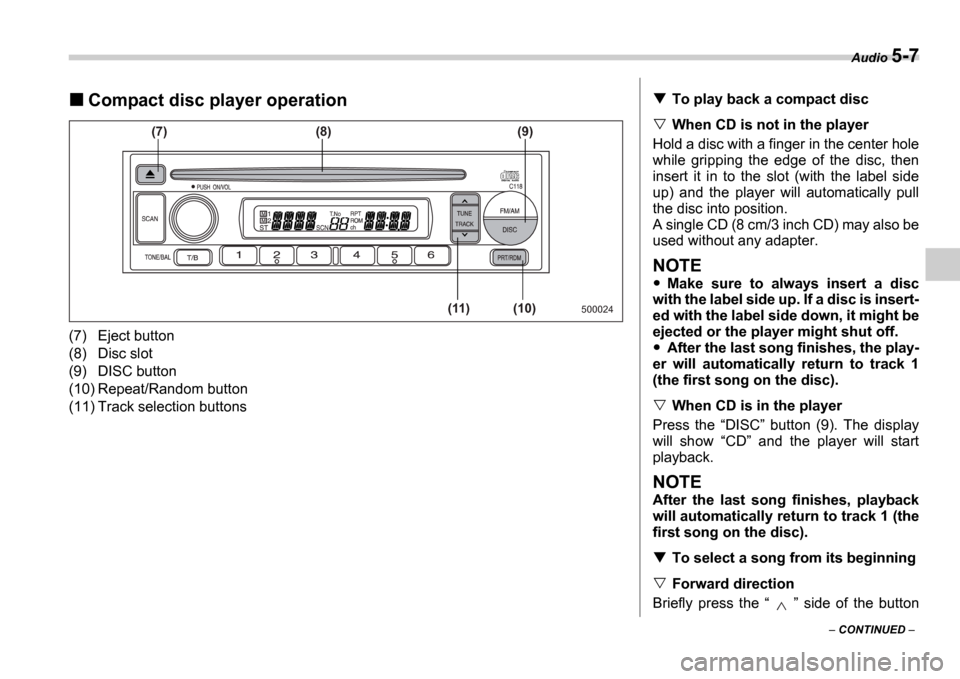
(7) Eject button
(8) Disc slot
(9) DISC button
(10) Repeat/Random button
(11) Track selection buttons
500024
(7) (8)
(11) (10)(9)
To play back a compact disc
When CD is not in the player
Hold a disc with a finger in the center hole
while gripping the edge of the disc, then
insert it in to the slot (with the label side
up) and the player will automatically pull
the disc into position.
A single CD (8 cm/3 inch CD) may also be
used without any adapter.
NOTE
Make sure to always insert a disc
with the label side up. If a disc is insert-
ed with the label side down, it might be
ejected or the player might shut off.
After the last song finishes, the play-
er will automatically return to track 1
(the first song on the disc).
When CD is in the player
Press the DISC button (9). The display
will show CD and the player will start
playback.
NOTE
After the last song finishes, playback
will automatically return to track 1 (the
first song on the disc).
To select a song from its beginning
Forward direction
Briefly press the side of the button
Page 172 of 365
Audio 5-9
CONTINUED
CD changer control (if optional in-dash CD changer is connect-
ed)
An optional CD changer can be connected to this audio un it. Consult the instructions that
accompany the CD changer for operating the CD changer i tself (e.g., how to load or un-
load CDs). See your SUBARU dealer for more informatio n.
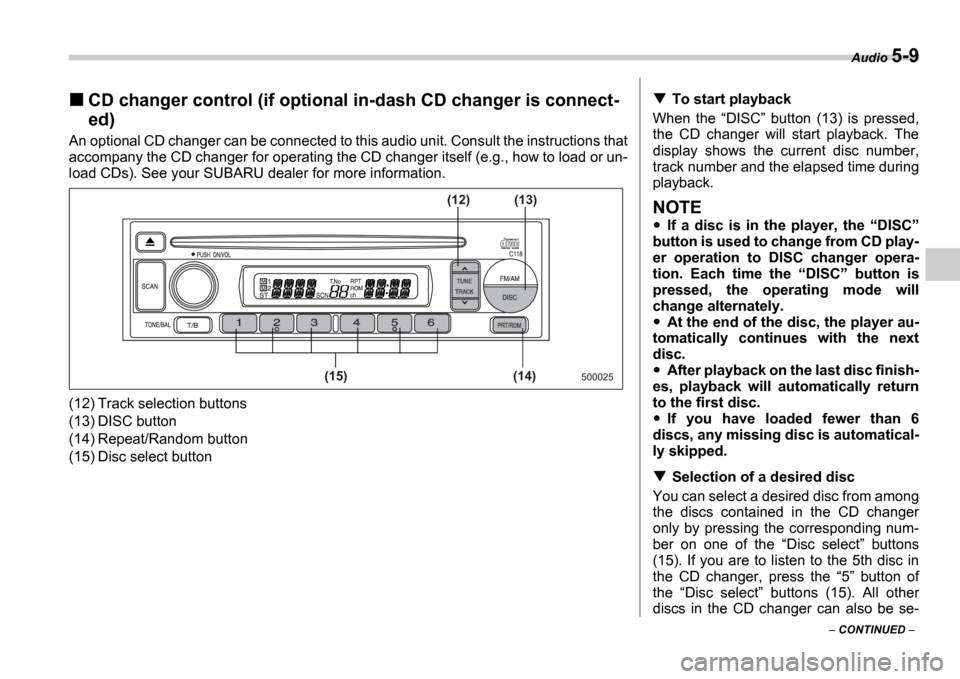
(12) Track selection buttons
(13) DISC button
(14) Repeat/Random button
(15) Disc select button
500025(14)
(15) (13)
(12)
To start playback
When the DISC button (13) is pressed,
the CD changer will start playback. The
display shows the current disc number,
track number and the elapsed time during
playback.
NOTE
If a disc is in the player, the DISC
button is used to change from CD play-
er operation to DISC changer opera-
tion. Each time the DISC button is
pressed, the operating mode will
change alternately.
At the end of the disc, the player au-
tomatically continues with the next
disc.
After playback on the last disc finish-
es, playback will automatically return
to the first disc.
If you have loaded fewer than 6
discs, any missing disc is automatical-
ly skipped.
Selection of a desired disc
You can select a desired disc from among
the discs contained in the CD changer
only by pressing the corresponding num-
ber on one of the Disc select buttons
(15). If you are to listen to the 5th disc in
the CD changer, press the 5 button of
the Disc select buttons (15). All other
discs in the CD changer can also be se-
Page 175 of 365
5-12 Audio
Tone control
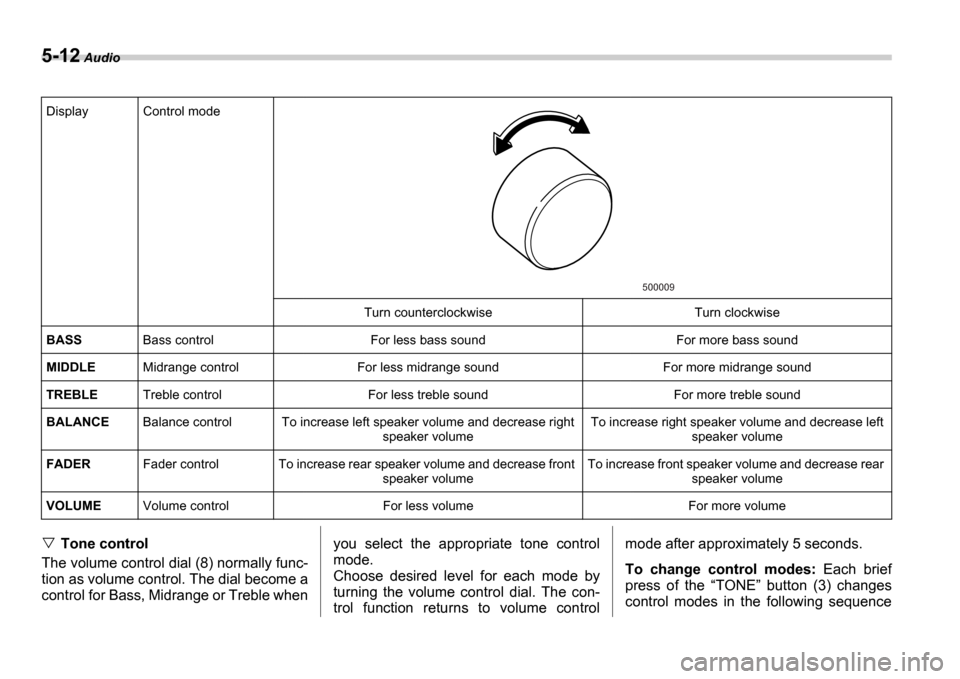
The volume control dial (8) normally func-
tion as volume control. The dial become a
control for Bass, Midrange or Treble when you select the appropriate tone control
mode.
Choose desired level for each mode by
turning the volume control dial. The con-
trol function returns to volume controlmode after approximately 5 seconds.
To change control modes:
Each brief
press of the TONE button (3) changes
control modes in the following sequence
Display Control mode
Turn counterclockwise Turn clockwise
BASS Bass control For less bass sound For more bass sound
MIDDLE Midrange control For less midrange sound For more mid range sound
TREBLE Treble control For less treble sound For more treble sound
BALANCE Balance control To increase left speaker volume and decrease right
speaker volume To increase right speaker volume and decrease left
speaker volume
FADER Fader control To increase rear speaker volume and de crease front
speaker volume To increase front speaker volume and decrease rear
speaker volume
VOLUME Volume control For less volume For more volume
500009
Page 176 of 365
Audio 5-13
CONTINUED
starting from bass control mode. (When
the radio is first turned on, the control
mode is in the volume control.)
Fader and balance control
The volume control dial (8) normally func-
tion as volume control. The dial become
the controls for Fader or Balance when
you select the appropriate fader and bal-
ance control mode.
Choose desired setting for each mode by
turning the volume control dial. The con-
trol function returns to volume control
mode after approximately 5 seconds.
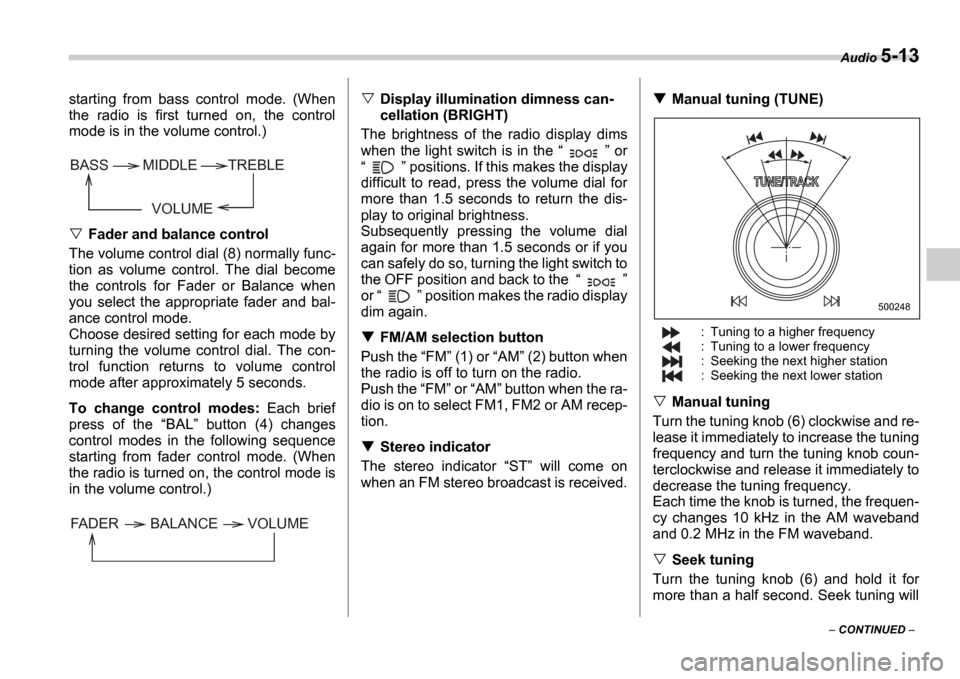
To change control modes: Each brief
press of the BAL button (4) changes
control modes in the following sequence
starting from fader control mode. (When
the radio is turned on, the control mode is
in the volume control.)
Display illumination dimness can-
cellation (BRIGHT)
The brightness of the radio display dims
when the light switch is in the or
positions. If this makes the display
difficult to read, press the volume dial for
more than 1.5 seconds to return the dis-
play to original brightness.
Subsequently pressing the volume dial
again for more than 1.5 seconds or if you
can safely do so, turning the light switch to
the OFF position and back to the
or position makes the radio display
dim again.
FM/AM selection button
Push the FM (1) or AM (2) button when
the radio is off to turn on the radio.
Push the FM or AM button when the ra-
dio is on to select FM1, FM2 or AM recep-
tion.
Stereo indicator
The stereo indicator ST will come on
when an FM stereo broadcast is received.
Manual tuning (TUNE)
: Tuning to a higher frequency
: Tuning to a lower frequency
: Seeking the next higher station
: Seeking the next lower station
Manual tuning
Turn the tuning knob (6) clockwise and re-
lease it immediately to increase the tuning
frequency and turn the tuning knob coun-
terclockwise and release it immediately to
decrease the tuning frequency.
Each time the knob is turned, the frequen-
cy changes 10 kHz in the AM waveband
and 0.2 MHz in the FM waveband.
Seek tuning
Turn the tuning knob (6) and hold it for
more than a half second. Seek tuning will
VOLUME
BASS TREBLE
MIDDLE
FADER BALANCE VOLUME
500248
Page 177 of 365
5-14 Audio
operate and stop automatically on the
next station.
Continue this operation until you find the
desired station.
Automatic tuning (SCAN)
Press the SCAN button (5) to change the
radio to the SCAN mode. In this mode, the
radio scans through the radio band until a
station is found. The radio will stop at the
station for five seconds while displaying
the frequency, after which scanning will
continue until the entire band has been
scanned from the low end to the high end.
Press the SCAN button again to cancel
the SCAN mode and to stop on any dis-
played frequency.
When the SCAN button is pressed for
automatic tuning, stations are scanned in
the direction of low frequencies to high fre-
quencies only.
Automatic tuning may not function proper-
ly if the station reception is weakened by
distance from the station or proximity to
tall buildings and hills.
Selecting preset stations
Presetting a station with a Preset button
(7) allows you to select that station in a
single operation. Up to six AM, FM1 and
FM2 stations each may be preset.
How to preset stations
1. Press the FM/AM selection button to
select AM, FM1 or FM2 reception.
2. Press the SCAN button (5) or tune
the radio manually until the desired station
frequency is displayed.
3. Press one of the Preset buttons (7)
for at least 1.5 seconds to store the fre-
quency. The frequency of the station will
flash once on the display at this time. If the
button is pressed for less than 1.5 sec-
onds, the preceding selection will remain
in memory.
NOTE
If the connection between the radio
and battery is broken for any reason
such as vehicle maintenance or radio
removal, all stations stored in the pre-
set buttons are cleared. If this occurs,
it is necessary to reset the preset but-
tons.
If a cell phone is placed near the ra-
dio, it may cause the radio to emit
noise when it receives calls. This noise
does not indicate a radio fault.
Page 178 of 365

Audio 5-15
CONTINUED
Built in CD changer operation
(9)
(17) (16)(12)
(11)
(10) (13) (14) (15)
500249
(9) LOAD button
(10) Disc slot
(11) Repeat button
(12) Random button
(13) SCAN button
(14) CD button
(15) Eject button
(16) Fast-forwarding/Fast-reversing and
track UP/DOWN knob
(17) Disc select button
NOTE
Make sure to always insert a disc with
the label side up. If a disc is inserted
with the label side down, it might be
ejected or the player might shut off.
How to insert a CD(s)
Inserting a CD
1. Press LOAD button (9). If the maga-
zine in the player has an idle position
where you can insert a disc, the DISC in-
dicator associated with the idle position
will blink.
If no indicator blinks, it means that there is
no idle position in the magazine.
2. As soon as the DISC indicator begins
to blink, the LOAD will appear on display
for a period of 15 seconds. Insert a disc
during the period. The disc will be then au-
tomatically drawn in, and the player will
Page 179 of 365

5-16 Audio
begin to play back the first track of the
disc.
To insert more discs in succession, re-
peat Steps 1 and 2. The magazine will be
loaded with discs in the ascending order
of position number.
If you do not insert any disc in 15 seconds
after you have pressed the LOAD but-
ton, the player will begin to play back the
first track of the last disc you have insert-
ed.
The disc indicator steadily lights up if a
disc is already inserted in the correspond-
ing position of the magazine.
While the player is in the loading mode,
if you press any of the other mode buttons FM (1), AM (2), the player will enter the
standby mode. Press the CD button (14)
to start playback.
Inserting a disc in a desired position
1. Press the LOAD button (9). If the
magazine in the player has an idle posi-
tion where you can insert a disc, the DISC indicator associated with the idle
position will blink.
The positions in the magazine the indica-
tor of which steadily lights up are already
loaded with discs.
2. Press the Disc select button (17) at
the position where you want to insert a
disc. The associated DISC indicator will blink, and the
LOAD will be displayed.
3. If you insert a disc during the 15-sec-
ond period while the LOAD is on display,
the disc will be automatically drawn in,
and the player will start playback of the
disc, beginning with the first track.
To insert more discs in succession, re-
peat Steps 1 and 2.
While the player is in the loading mode,
if you press any of the other mode buttons FM (1), AM (2), the player will enter
standby mode. Press the CD button (14)
to start playback.
Loading all the magazine (Full disc
loading mode)
1. If you continue to press the LOAD
button (9) for more than 1.5 seconds, the
player will produce beep sound and will
enter the full disc loading mode.
2. A DISC indicator will blink, and the
ALL LOAD will be on display for a period
of 15 seconds. If a disc is successfully
loaded during this period, the DISC indi-
cator will stop blinking and will steadily
light.
3. When the loading of a disc is complete,
the next DISC indicator will blink. Then
repeat Step 2.
4. When the magazine is filled with discs
by repeating Steps 2 and 3, the player will
start playback of the discs, beginning with the one inserted first.
If you fail to insert any disc during each 15
seconds interval, the full disc loading
mode will be canceled, and the player will
start playback of the disc inserted first.
How to play back a CD or make a
pause
When there is no CD inserted:
Insert a CD by referring to How to Insert
a CD(s) .
When a CD is loaded, the player will start
playback of the CD, beginning with the
first track.
When there are CDs loaded:
Press a desired one of the Disc select
buttons (17) the DISC indicator of which
steadily lights up. The player will then start
playback of the selected CD, beginning
with the first track.
Page 289 of 365
11-10 Maintenance and service
11.Reinstall under cover.
12.Pour engine oil through the filler neck.
Oil capacity (guideline):
4.2 US qt (4.0 liters, 3.5 Imp qt)
The oil quantity indicated above is only
guideline.
The necessary quantity of oil depends on
the quantity of oil that has been drained.
The quantity of drained oil differs slightly
depending on the temperature of the oil
and the time the oil is left flowing out. After refilling the engine with oil, therefore, you
must the dipstick to confirm that the level
is correct.
13.Start the engine and make sure that no
oil leaks appear around the filter
s rubber
seal and drain plug.
14.Run the engine until it reaches the nor-
mal operating temperature. Then stop the
engine and wait a few minutes to allow the
oil drain back. Check the oil level again
and if necessary, add more engine oil.
Recommended grade and
viscosity
Oil grade:
ILSAC GF-4, which can be identified
with the ILSAC certification mark
(Starburst mark)
or API classification SM with the
words ENERGY CONSERVING
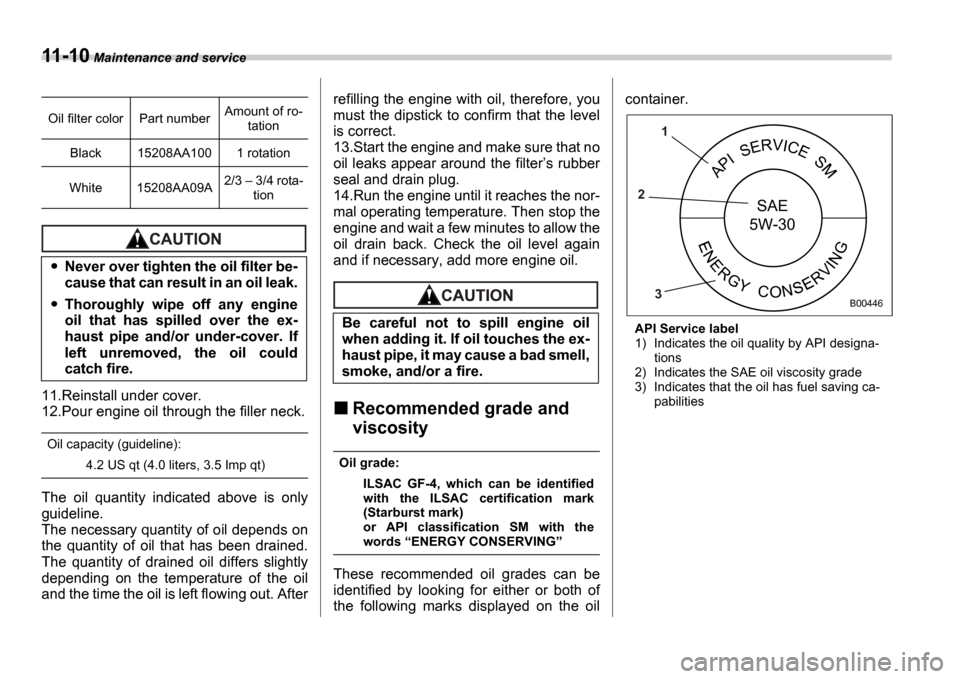
These recommended oil grades can be
identified by looking for either or both of
the following marks displayed on the oil container.
API Service label
1) Indicates the oil quality by API designa-
tions
2) Indicates the SAE oil viscosity grade
3) Indicates that the oil has fuel saving ca- pabilities
Oil filter color Part number
Amount of ro-
tation
Black 15208AA100 1 rotation
White 15208AA09A 2/3
3/4 rota-
tion
Never over tighten the oil filter be-
cause that can result in an oil leak.
Thoroughly wipe off any engine
oil that has spilled over the ex-
haust pipe and/or under-cover. If
left unremoved, the oil could
catch fire.
Be careful not to spill engine oil
when adding it. If oil touches the ex-
haust pipe, it may cause a bad smell,
smoke, and/or a fire.
APISERVICES
NERGYCONRVING
SAE
5W-30
1
2
3
B00446