2006 Seat Toledo display
[x] Cancel search: displayPage 3 of 48
Contents
2ContentsGeneral information
. . . . . . . . . . . . . . . .
Introduction
. . . . . . . . . . . . . . . . . . . . . . . . . .
Remember
. . . . . . . . . . . . . . . . . . . . . . . . . . . .
Convenience anti-theft code
. . . . . . . . . . . . . . .
Display on instrument panel
. . . . . . . . . . . . . .
Important information concerning the
handling of your radio equipment
. . . . . . . . .
Brief instructions
. . . . . . . . . . . . . . . . . . .
General overview
. . . . . . . . . . . . . . . . . . . . . . . . .
Settings
. . . . . . . . . . . . . . . . . . . . . . . . . . . . . . .
AUDIO Menu
. . . . . . . . . . . . . . . . . . . . . . . . . . . . .
Sound setting memory
. . . . . . . . . . . . . . . . . . . .
PROG Function
. . . . . . . . . . . . . . . . . . . . . . . . . . .
Possible functions in the PROG menu
. . . . . .
Radio mode
. . . . . . . . . . . . . . . . . . . . . . . . . .
General overview
. . . . . . . . . . . . . . . . . . . . . . . . .
AM or FM buttons
. . . . . . . . . . . . . . . . . . . . . . . . .
Search functions
. . . . . . . . . . . . . . . . . . . . . . . . .
Switching to traffic reports (TP function)*
. .
MUTE button
. . . . . . . . . . . . . . . . . . . . . . . . . . . . .
Storing and selecting radio stations
. . . . . . .
LEARN memory(lrn)
. . . . . . . . . . . . . . . . . . . . . . .
Alternative frequencies (AF)
. . . . . . . . . . . . . . .
PTY mode
. . . . . . . . . . . . . . . . . . . . . . . . . . . . . . . .
CD mode
. . . . . . . . . . . . . . . . . . . . . . . . . . . . . .
General overview
. . . . . . . . . . . . . . . . . . . . . . . . .
CD mode
. . . . . . . . . . . . . . . . . . . . . . . . . . . . . . . . .
Selecting a CD track and searching through a
CD
. . . . . . . . . . . . . . . . . . . . . . . . . . . . . . . . . . . . . . .
Traffic reports when in CD mode
. . . . . . . . . . .
AUX* Mode
. . . . . . . . . . . . . . . . . . . . . . . . . . .
AUX-IN* Operation
. . . . . . . . . . . . . . . . . . . . . . . .
Auxiliary input volume
. . . . . . . . . . . . . . . . . . . .
Traffic reports when in AUX mode
. . . . . . . . . .
Apple* iPod connection
. . . . . . . . . . .
General information
. . . . . . . . . . . . . . . . . . . . . .
Apple iPod® connector
. . . . . . . . . . . . . . . . . . .
Turning the iPod® on and off
. . . . . . . . . . . . .
Control of the iPod® through the sound
system
. . . . . . . . . . . . . . . . . . . . . . . . . . . . . . . . . . .
USB* Connection
. . . . . . . . . . . . . . . . . . .
Connecting a memory stick / MP3 player
. . .
Authorised memory devices and radios
. . . .
Playing music files with the radio
. . . . . . . . . .
MP3 mode
. . . . . . . . . . . . . . . . . . . . . . . . . . . .
Comments about CD-R (CD Write) / CR-RW (CD
Re-write)
. . . . . . . . . . . . . . . . . . . . . . . . . . . . . . . . .
What are MP3 files?
. . . . . . . . . . . . . . . . . . . . . .
Accepted recording formats
. . . . . . . . . . . . . . .
Information from the ID3 data field
. . . . . . . .
Structure of folders and files
. . . . . . . . . . . . . .
Important information concerning
the CD reader
. . . . . . . . . . . . . . . . . . . . . . . .
Precautionary measures for the use of laser
equipment
. . . . . . . . . . . . . . . . . . . . . . . . . . . . . . .
Tips for CD mode
. . . . . . . . . . . . . . . . . . . . . . . . .
Tips on cleaning CDs
. . . . . . . . . . . . . . . . . . . . .
Index
. . . . . . . . . . . . . . . . . . . . . . . . . . . . . . . . . .
3
4
5
5
5
5
6
6
9
9
9
10
11
13
13
14
15
16 16
17
18
18
19
21
21
23
23
25
27
27
28
28
29
29
30
33
33
35
35
37
39
41
41
41
41
41
43
44
44
44
44
45
RadioMP3_ingles Seite 2 Mi
ttwoch, 3. Mai 2006 12:25 12
Page 6 of 48
Remember5
RememberConvenience anti-theft codeThe sound equipment automatically identifies “its” vehicle.
If the electricity supply is interrupted, when the ignition is switched on again,
the sound equipment automatically checks whether it can still identify “its”
vehicle. Once the vehicle has been identified, the sound equipment is again
ready for use after a few seconds.
With the convenience code it is no longer necessary to manually unblock the
sound equipment.
However if the sound equipment is in another vehicle, it must be unblocked
by entering the code. To obtain the code, contact an authorised SEAT
dealer.Display on instrument panel Information referring to the radio is also displayed on the instrument panel.
The function is activated by pressing and holding the lower button of the
rocker switch located at the end of the windscreen wiper lever and selecting
the function “Audio” in the menu.
Important information concerning the handling of your radio equipmentUse when driving
Travelling on today's roads requires the driver's full attention at all times.
Modern radios offer many sophisticated features providing a variety of forms
of entertainment and a range of inform ation on traffic and road conditions
etc.
However, the radio, with all its possib ilities, should only be used if condi-
tions really allow it.
For example, changing CDs or reading CD labels while driving has frequently
led to dangerous situations.
The radio volume should be set so that acoustic signals from outside can also
be heard at all times.
WARNING
Please keep your attention on driving as a priority!
RadioMP3_ingles Seite 5 Mi ttwoch, 3. Mai 2006 12:25 12
Page 8 of 48
Brief instructions7
- Adjusting volume: turn the knob to the right to increase the volume and to
the left to lower the volume.
Buttons
- Radio: Press the button briefly to search for a station ⇒page 14.
- CD mode: Press briefly for track selection; press and hold if you wish to hear
fast forward or reverse within a track ⇒page 23.
- PROGRAM menu functions can be activated and deactivated by pressing
these buttons briefly ⇒page 10.
- AUDIO menu functions can be modified by pressing these buttons briefly
⇒ page 9.
PROG. Button Programme
- The functions SCV, ON-VOL, TAVOL,.. .can be adjusted using the buttons
or the rotary/push control ⇒page 10.
AUDIO Button
- A sound property (TREBLE, BASS) and the volume distribution (BALANCE,
FADER) can be selected using the multifunction keys
1). The settings are
altered using the keys ⇒ page 9.
CD/AUX Button
- Select the CD/Input AUX mode (where available).
AM Button
- This allows you to se lect AM wavelength ⇒ page 14.
FM Button
- This allows you to select FM wavelength ⇒page 14. Pre-tuning buttons
- Two radio stations can be stored on each button, one on each memory level
(AM1, AM2 and FM1, FM2) for each frequency (AM or FM) ⇒page 14.
TP Button
2) / MUTE Button
3)
TP Button. Traffic Programmes
2)
- This activates or deactivates the traffic reports ⇒page 16, interrupting,
where necessary, the playing of the CD ⇒page 21.
MUTE Button
3)
- This allows you to silence the audio source to which you are listening
(volume to 0). PTY Button
2) / LOUD Button
3)
PTY Button
- On FM stations with RDS, this allows you to select the type of programme
you desire (SPORT, NEWS,...) ⇒page 19.
LOUD Button
- This allows you to activate or deactivate the LOUDNESS function, which
enhances the bass and trebles at low volume.
Multifunction keys
- The function of these keys depends on the operating mode. The current
multi-function key assignment is shown on the display.
Display
- All information on the current operating status as well as the current alloca-
tion of the multi-function keys is displayed.
1)Vehicles with loudspeakers at the rearA2A3A2
A1
A4
A2
A5A6A7
2)Only European version.3)Only American version.A8A9A10A11A12
A11
RadioMP3_ingles Seite 7 Mi ttwoch, 3. Mai 2006 12:25 12
Page 10 of 48
Settings9
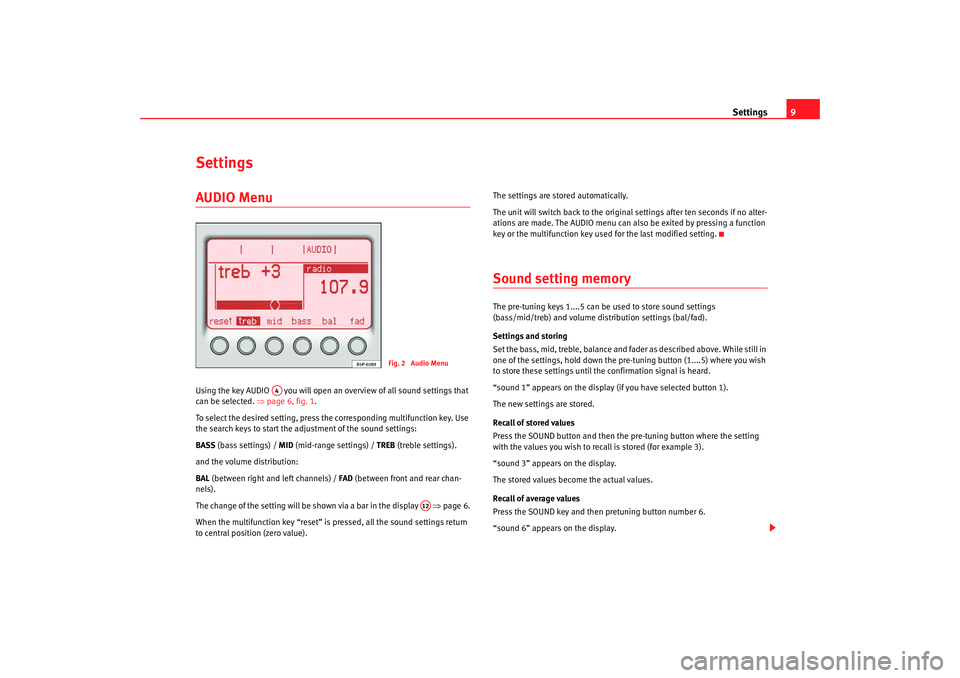
SettingsAUDIO Menu Using the key AUDIO you will open an overview of all sound settings that
can be selected. ⇒page 6, fig. 1 .
To select the desired setting, press the corresponding multifunction key. Use
the search keys to start the adjustment of the sound settings:
BASS (bass settings) / MID (mid-range settings) / TREB (treble settings).
and the volume distribution:
BAL (between right and left channels) / FAD (between front and rear chan-
nels).
The change of the setting will be shown via a bar in the display ⇒page 6.
When the multifunction key “reset” is pressed, all the sound settings return
to central position (zero value). The settings are stored automatically.
The unit will switch back to the original settings after ten seconds if no alter-
ations are made. The AUDIO menu can al
so be exited by pressing a function
key or the multifunction key used for the last modified setting.
Sound setting memory The pre-tuning keys 1....5 can be used to store sound settings
(bass/mid/treb) and volume distribution settings (bal/fad).
Settings and storing
Set the bass, mid, treble, balance and fa der as described above. While still in
one of the settings, hold down the pr e-tuning button (1....5) where you wish
to store these settings until the confirmation signal is heard.
“sound 1” appears on the display (if you have selected button 1).
The new settings are stored.
Recall of stored values
Press the SOUND button and then the pre-tuning button where the setting
with the values you wish to recall is stored (for example 3).
“sound 3” appears on the display.
The stored values become the actual values.
Recall of average values
Press the SOUND key and then pretuning button number 6.
“sound 6” appears on the display.
Fig. 2 Audio Menu
A4
A12
RadioMP3_ingles Seite 9 Mi ttwoch, 3. Mai 2006 12:25 12
Page 11 of 48
Settings
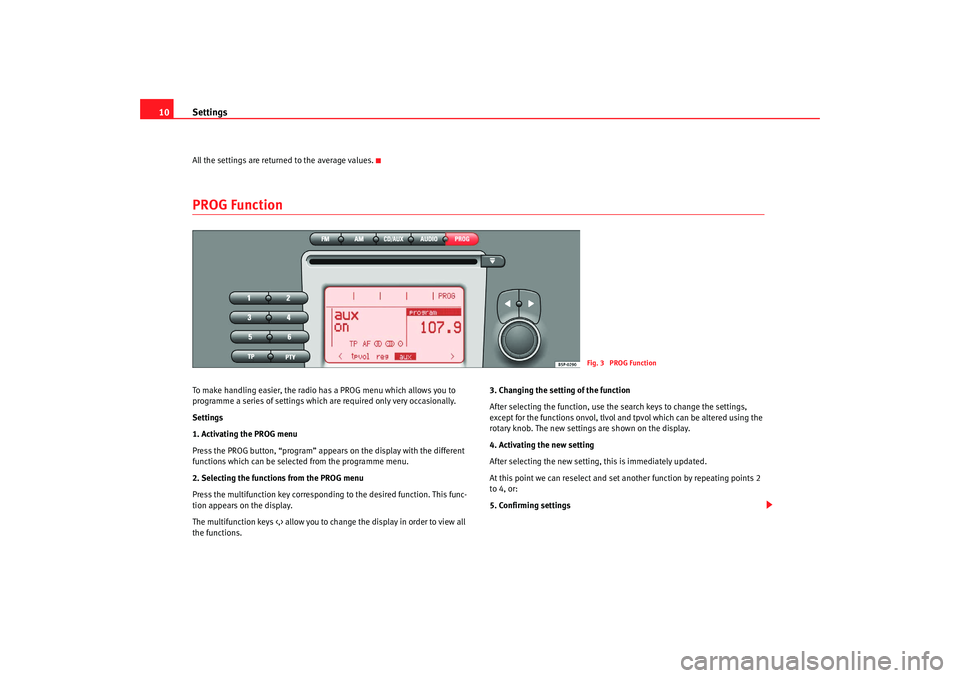
10All the settings are returned to the average values.PROG Function To make handling easier, the radio has a PROG menu which allows you to
programme a series of settings which are required only very occasionally.
Settings
1. Activating the PROG menu
Press the PROG button, “program” appears on the display with the different
functions which can be selected from the programme menu.
2. Selecting the functions from the PROG menu
Press the multifunction key correspondin g to the desired function. This func-
tion appears on the display.
The multifunction keys <,> allow you to change the display in order to view all
the functions. 3. Changing the setting of the function
After selecting the function, use the search keys to change the settings,
except for the functions onvol, tlvol and tpvol which can be altered using the
rotary knob. The new settings are shown on the display.
4. Activating the new setting
After selecting the new setting, this is immediately updated.
At this point we can reselect and set another function by repeating points 2
to 4, or:
5. Confirming settings
Fig. 3 PROG Function
RadioMP3_ingles Seite 10
Mittwoch, 3. Mai 2006 12:25 12
Page 12 of 48
Settings11
The unit will switch back to the original settings after ten seconds if no alter-
ations are made. It is also possible to exit the PROG menu by pressing any of
the function keys.Possible functions in the PROG menu Display sequence:
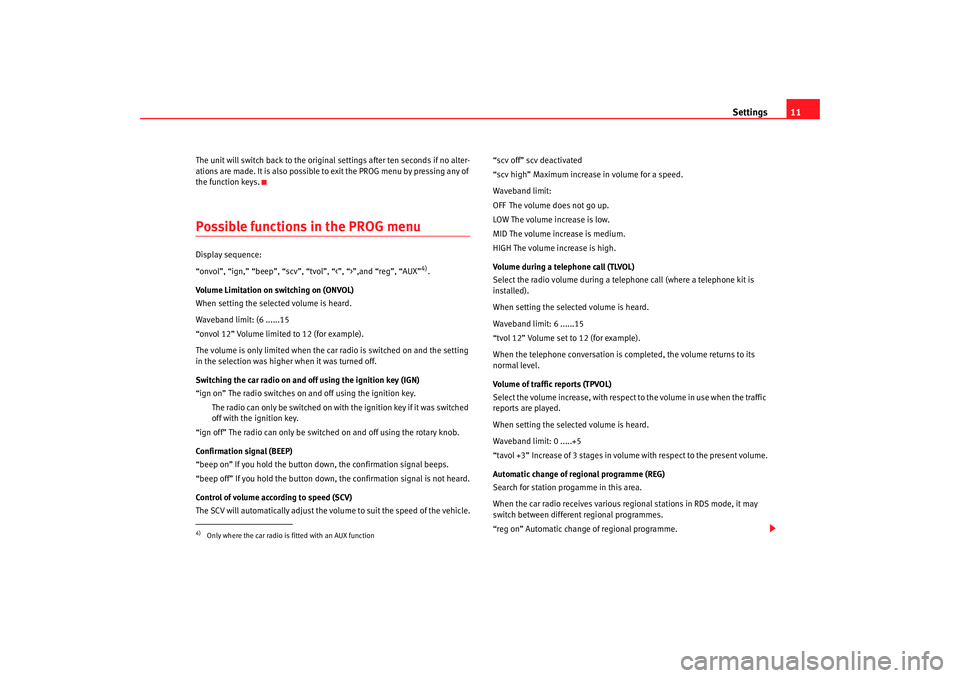
“onvol”, “ign,” “beep”, “scv”, “tvol”, “<”, “>”,and “reg”, “AUX”
4).
Volume Limitation on switching on (ONVOL)
When setting the selected volume is heard.
Waveband limit: (6 ......15
“onvol 12” Volume limited to 12 (for example).
The volume is only limited when the car radio is switched on and the setting
in the selection was higher when it was turned off.
Switching the car radio on and off using the ignition key (IGN)
“ign on” The radio switches on and off using the ignition key.
The radio can only be switched on with the ignition key if it was switched
off with the ignition key.
“ign off” The radio can only be switched on and off using the rotary knob.
Confirmation signal (BEEP)
“beep on” If you hold the button down, the confirmation signal beeps.
“beep off” If you hold the button down, the confirmation signal is not heard.
Control of volume according to speed (SCV)
The SCV will automatically adjust the volume to suit the speed of the vehicle. “scv off” scv deactivated
“scv high” Maximum increase in volume for a speed.
Waveband limit:
OFF The volume does not go up.
LOW The volume increase is low.
MID The volume increase is medium.
HIGH The volume increase is high.
Volume during a telephone call (TLVOL)
Select the radio volume during a telephone call (where a telephone kit is
installed).
When setting the selected volume is heard.
Waveband limit: 6 ......15
“tvol 12” Volume set to 12 (for example).
When the telephone conversation is completed, the volume returns to its
normal level.
Volume of traffic reports (TPVOL)
Select the volume increase, with respect to the volume in use when the traffic
reports are played.
When setting the selected volume is heard.
Waveband limit: 0 .....+5
“tavol +3” Increase of 3 stages in volume with respect to the present volume.
Automatic change of regional programme (REG)
Search for station progamme in this area.
When the car radio receives
various regional stations in RDS mode, it may
switch between different regional programmes.
“reg on” Automatic change of regional programme.
4)Only where the car radio is fitted with an AUX function
RadioMP3_ingles Seite 11 Mittwoch, 3. Mai 2006 12:25 12
Page 14 of 48
Radio mode13
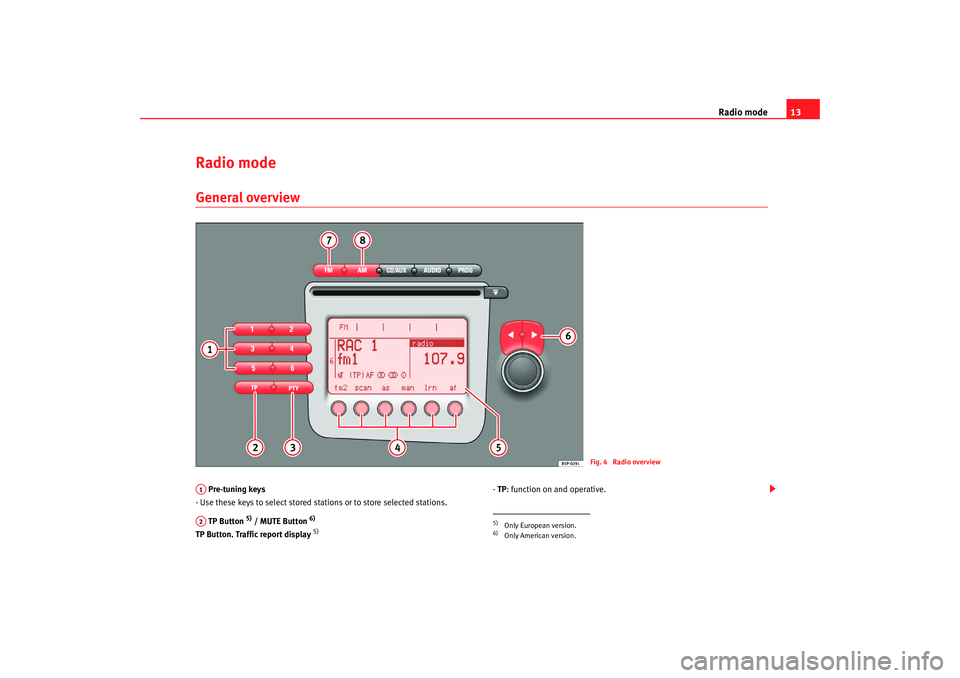
Radio modeGeneral overview Pre-tuning keys
- Use these keys to select stored stations or to store selected stations.
TP Button
5) / MUTE Button
6)
TP Button. Traffic report display
5)
- TP : function on and operative.
Fig. 4 Radio overview
A1A2
5)Only European version.6)Only American version.
RadioMP3_ingles Seite 13 Mittwoch, 3. Mai 2006 12:25 12
Page 15 of 48
Radio mode
14- (TP): function on, but not operative, as no station is tuned or is broadcasting
traffic reports.
- No display: TP function switched off.
MUTE Button
6)
- This allows you to turn the MUTE function on/off (reduce volume to 0).
PTY Button
5) / LOUD Button
6)
PTY Button
5)
- This allows you to select the desired programme type (SPORT, NEWS,....)
LOUD button (LOUDNESS function)
6)
- This allows you to turn the LOUDNESS function on/off . The bass and trebles
are enhanced at low volumes. When the function is active, “LD” is shown on
the display.
Multifunction keys
- FM1, FM2, AM1 or AM2: wavelength and corr esponding memory level.
- SCAN : Turn on/off SCAN function.
- AS : Turns autostore function on.
- MAN : Allows manual selection of stations.
- LRN : Updates the LEARN memory, which is used for the automatic search
(only in FM mode).
- AF : Activates/deactivates the alternative frequencies (only in FM mode).
Display
- Indicates the station frequency, the waveband selected and the pre-tuning
number if the station is stored in the memory.
- For FM stations with RDS the name of the station is also displayed.
Search buttons
- Activates the automatic search.
FM Button
- Use the FM button to select the radio mode on the corresponding waveband.
AM Button
- Use the AM button to select th e radio mode on the corresponding
waveband.
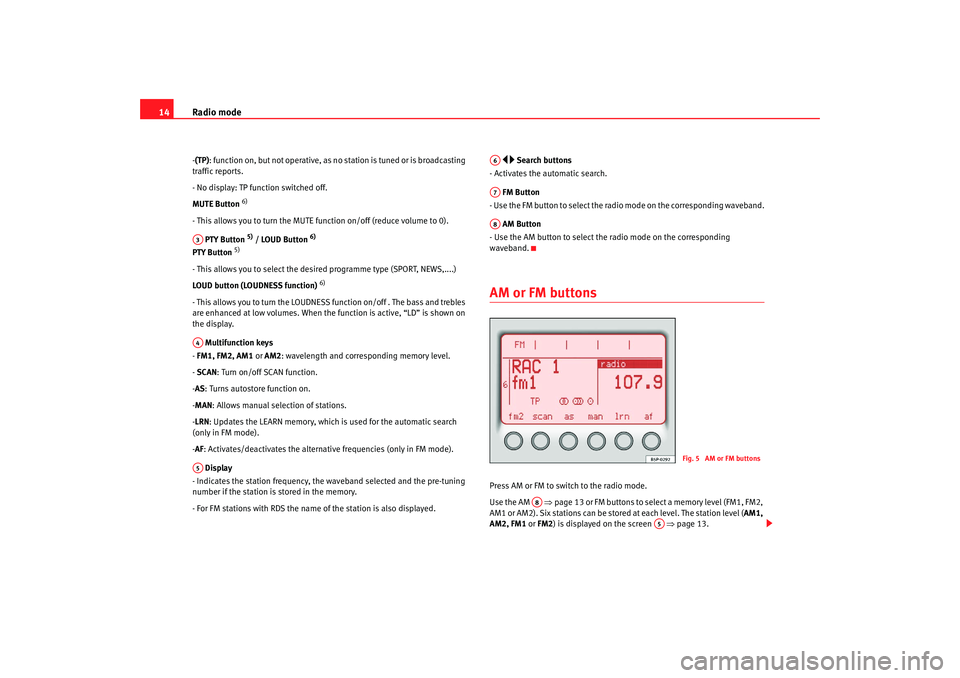
AM or FM buttons Press AM or FM to switch to the radio mode.
Use the AM ⇒ page 13 or FM buttons to select a memory level (FM1, FM2,
AM1 or AM2). Six stations can be stor ed at each level. The station level (AM1,
AM2, FM1 or FM2 ) is displayed on the screen ⇒page 13.
A3A4A5
A6A7A8
Fig. 5 AM or FM buttons
A8
A5
RadioMP3_ingles Seite 14 Mittwoch, 3. Mai 2006 12:25 12