2006 SAAB 9-3 ignition
[x] Cancel search: ignitionPage 79 of 318

79 9-3 Convertible
Electric windows
To openSoft top raised – The windows open individ-
ually.
Soft top folded – The button for the front
window opens both side windows.
Automatic opening: Press the button all
the way down and release it. If the soft top
is folded, the rear side window is also low-
ered.
To closeSoft top raised – The windows are operated
individually.
Soft top folded – The button for the front
window closes both side windows.
Automatic closing of a front side
window: Raise the button all the way and
release it. The rear side window must be
fully closed. Pinch protection3 is available
for the front side windows.
For further information on the electric win-
dows, refer to page 129.Deactivating the passenger door
window buttonWith the button on the driver’s door,
you can deactivate the window button on
the passenger door.
The illuminated switch will change color
from green to amber (deactivated).
WARNING
Bear in mind the pinch hazard when clos-
ing the side windows. May cause serious
or fatal injuries!
Always remove the remote control
from the ignition switch when you
leave the car to prevent personal
injury caused by the activation of the
electric windows, for example, due to
children playing.
The person operating the electric
window is responsible for ensuring
that no one, especially a child, has
their head, hands or fingers in the
window openings, before raising the
window.
Do not stick any part of the body or the
head out through an open window
while the car is moving.
Window switches
93U S M 06.book Page 79 Friday, February 18, 2005 1:15 PM
ProCarManuals.com
Page 80 of 318
80 9-3 ConvertibleCalibrating front electric
windows with pinch protection3The window lifts should be calibrated if auto-
matic closing does not work or if the battery
has been disconnected. The pinch protec-
tion will not work if the windows are not
calibrated.
Perform calibration as follows:
1 Make sure the soft top is raised.
2 Make sure the doors are closed.
3 Let the engine idle.
4 Press and hold the soft top button up
until a chime sounds.
During calibration, the four windows will
be raised and lowered several times.
If calibration fails twice in a row, have the car
checked and rectified. We recommend that
you contact a Saab dealer.
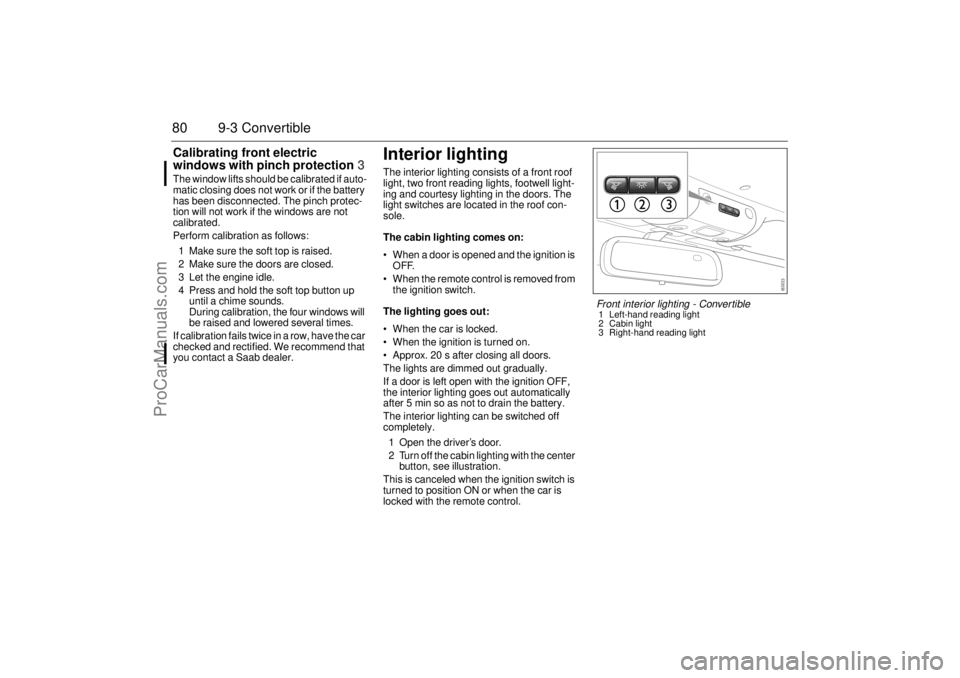
Interior lightingThe interior lighting consists of a front roof
light, two front reading lights, footwell light-
ing and courtesy lighting in the doors. The
light switches are located in the roof con-
sole.
The cabin lighting comes on:
When a door is opened and the ignition is
OFF.
When the remote control is removed from
the ignition switch.
The lighting goes out:
When the car is locked.
When the ignition is turned on.
Approx. 20 s after closing all doors.
The lights are dimmed out gradually.
If a door is left open with the ignition OFF,
the interior lighting goes out automatically
after 5 min so as not to drain the battery.
The interior lighting can be switched off
completely.
1 Open the driver’s door.
2 Turn off the cabin lighting with the center
button, see illustration.
This is canceled when the ignition switch is
turned to position ON or when the car is
locked with the remote control.
Front interior lighting - Convertible1 Left-hand reading light
2 Cabin light
3 Right-hand reading light
93U S M 06.book Page 80 Friday, February 18, 2005 1:15 PM
ProCarManuals.com
Page 85 of 318

85 Instruments and controls
This light will come on if the engine oil pres-
sure is too low. If the warning light flashes or
comes on while you are driving, stop imme-
diately in a safe place, switch off the engine
and check the oil level (see page 219).
The following message is shown on the
Saab Information Display (SID):This light indicates a malfunction in the fuel
or ignition system. The car may still be
driven with care but the performance of the
engine will be somewhat diminished (see
page 164).
The following message is shown on the
Saab Information Display (SID):
Warning, oil pressure
(engine oil)
NOTICE
Never drive the car when the oil pressure
warning lamp is on. Low oil pressure can
cause serious engine damage.
Oil pressure low.
Make a safe stop.
Turn off engine.
Engine malfunction
(CHECK ENGINE)
WARNING
An illuminated “Engine malfunction
(CHECK ENGINE)” indicator light indi-
cates an engine-related problem. While
your car may be able to be driven with the
“Engine malfunction (CHECK ENGINE)”
indicator light illuminated (limp-home
mode), you are advised to have your car
serviced at an authorized Saab dealer as
soon as possible.
Continued driving without this problem
being corrected might cause serious
further damage to your car and create
unsafe driving conditions. The operator
should be prepared to take action if such
unsafe conditions arise (e.g. brake
smoothly, engage neutral, stop in a suita-
ble place, switch off the engine, etc.)
Engine malfunction.
Contact Saab dealer.
NOTICEThe car should be checked immediately
at a Saab dealer to prevent more serious
faults from arising.
93U S M 06.book Page 85 Friday, February 18, 2005 1:15 PM
ProCarManuals.com
Page 86 of 318

86 Instruments and controlsThis light shows when the high beam is on
(see page 103).
This light indicates when the front fog lights
are on (see page 104).
The front fog lights are switched off auto-
matically when the engine is switched off.
When the fog lights are next needed, they
will have to be switched on manually.
This light should come on briefly when you
turn the ignition key to ON. If it doesn´t come
on, have it fixed so it will be ready to warn
you if there is a problem. This light indicates
when the brake fluid level is too low (see
page 224).The following message is shown on the
Saab Information Display (SID):
For safety reasons, stop the car and check
the level of the brake fluid (see page 224).
If the level is normal, depress the brake
pedal firmly two or three times. Now check
the level again. If the level is still normal, you
may drive the car, with considerable cau-
tion, to the nearest workshop to have the
brake system checked. We recommend
that you contact a Saab dealer.The brake system provides Electronic
Brakeforce Distribution (EBD). This distrib-
utes the brake pressure between the front
and rear wheels, in such a way as to achieve
optimum braking performance irrespective
of the car’s load.
If a fault arises in the EBD function, the ,
and lights will come on. Also, the
following message will appear on the Saab
Information Display (SID):
If this is the case, drive carefully and contact
a workshop as soon as possible. We recom-
mend that you contact a Saab dealer. Refer
to Brake warning light on page 86, Antilock
braking warning on page 84 and ESP OFF
indicator on page 92.
High beam Indicator
Front fog lights3
Brake warning light
Brake fluid level low.
Make a safe stop.
Contact Saab dealer.
WARNING
Never drive the car if these two lights
are on at the same time. Danger of
brake failure!
If the level of brake fluid in the reser-
voir is below the MIN mark, the vehicle
should be transported on a recovery
vehicle.
Have the brake system checked
immediately at a Saab dealer.
Brake malfunction.
Make a safe stop.
Contact Saab dealer.
93U S M 06.book Page 86 Friday, February 18, 2005 1:15 PM
ProCarManuals.com
Page 87 of 318

87 Instruments and controls
This light reminds the driver to buckle up.
This light comes on when the parking brake
is applied (see page 187).
The parking brake is mechanical and oper-
ates on the rear wheels.This light comes on if a potentially serious
fault has occurred in the airbag system.
The following message is shown on the
Saab Information Display (SID):This light will come on for about four sec-
onds when the ignition switch is turned to
the Start or Drive position.
This light comes on when there is less than
about 2.5 gallons (10 litre) of fuel left in the
tank.
Safetybelt reminder
Parking brake warning
light
WARNING
Always apply the parking brake when
parking, see page 187.
Always apply the parking brake
before removing the remote control.
Do not apply the parking brake while
the car is moving.
Airbag warning lightAirbag malfunction.
Contact Saab dealer.
WARNING
If the airbag readiness light stays on
after you start your vehicle, it means
the airbag system may not be working
properly. One or more of the following
conditions may occur:
- Non-deployment of the airbags in the
event of a crash.
- Deployment of the airbags without a
crash.
- Deployment of the airbags in crashes
less severe than intended.
To help avoid injury to yourself or
others, have your vehicle serviced
right away if the airbag readiness light
stays on after you start your vehicle.
Indicator, fuel
NOTICE
If the car runs out of fuel, air can be drawn
in with the fuel, which, in turn, can cause
the catalytic converter to be damaged by
overheating.
93U S M 06.book Page 87 Friday, February 18, 2005 1:15 PM
ProCarManuals.com
Page 88 of 318

88 Instruments and controlsThis light indicates that the headlights or
parking lights are on.
This light comes on when the system is
engaged.
This light comes on if the air pressure in one
or several of the tires drops (see page 254.
Autochecking of lights, main
instrument panelThe warning and indicator lights shown
above should come on when the ignition
switch is turned to ON. They should go out
after about 4 seconds once the engine has
started or after the fault-free self-diagnosis
of each system or function.
InstrumentsTachometerThe tachometer displays the engine speed
in thousands of revolutions per minute.
A protective function (interruption of the fuel
supply) limits the engine speed within the
red zone.
Headlight and parking
light indicator
Cruise control indicator
light
Automatic tire pressure
monitoring
93U S M 06.book Page 88 Friday, February 18, 2005 1:15 PM
ProCarManuals.com
Page 89 of 318

89 Instruments and controls
Odometer and trip meterThe odometer records the distance trav-
elled in miles on U.S. vehicles and on Cana-
dian vehicles the distance indicated is in
kilometres, and the trip meter in miles and
tenths (kilometres and tenths of kilometres
on Canadian vehicles).
Reset buttonThe reset button is positioned immediately
to the left of the speedometer.
Ignition ON:
Press once – resets the trip meter.
Ignition OFF:
Press once – enables you to read the
odometer and trip meter.
Speedometer (U.S. speedometer shown)
Cars sold in U.S.: The speedometer dis-
plays the speed of the car in miles per hour
(mph).
Cars sold in Canada: The speedometer
displays the speed of the car in kilometres
per hour (km/h).
It receives information about vehicle speed
from the ABS’s wheel sensors.
Cars with manual transmissionCars with automatic transmission93U S M 06.book Page 89 Friday, February 18, 2005 1:15 PM
ProCarManuals.com
Page 98 of 318

98 Instruments and controlsUnder Profiler you can choose whether the
entire speedometer scale (0–160 mph) or
only part of the scale (0–90 mph) should be
illuminated in
NIGHTPANEL
mode.
1 Press the CUSTOMIZE button to go to
Profiler.
2 Select System Settings using the INFO
dial.
3 Press in the INFO dial.
4 Select Speed Scale Illum.
Select 0–160 mph or 0–90 mph.
ClockSettings can be made from Profiler.
1 Press the CUSTOMIZE button to go to
Profiler.
2 Select Clock / Alarm using the INFO dial.
3 Press in the INFO dial.
4 Select Set Clock.
5 Select Manual.
Select Manual to set the time, year, month
and day.
Manual setting:
1 Turn the INFO dial to change the value.
2 Press the INFO dial once after each
setting (time, year, month and day) to
confirm the value.
Once you have selected the day, press the
INFO dial to finish setting and update the
clock.
Press the CLEAR button once to go back a
step when setting the time, year, month and
day manually.
Press the CUSTOMIZE button to cancel
setting.
RDS setting: The time, year, month and
day can also be set from the RDS signal
(from RDS Adjust) provided that the RDS
signal from the current station contains this
information. This may vary between differ-
ent radio stations and different countries.When the remote control is not in the ignition
switch, you can illuminate the clock for
5 seconds by pressing the INFO dial.
System Settings
Speed Scale Illum.
0–160 mph0–90 mph
Clock / Alarm
Set Clock
RDS AdjustManual
Clock
11:30Year
2003Month
DecDay
1 Mon
93U S M 06.book Page 98 Friday, February 18, 2005 1:15 PM
ProCarManuals.com