2006 SAAB 9-3 mirror
[x] Cancel search: mirrorPage 120 of 318

120 Instruments and controls
Recirculation is controlled manually.
Recirculation is not selected when the engine is
started (fresh air mode).
Press or to decrease or increase the fan
speed. This sets the fan speed (fan speed shown on
display).
Refer also to Profiler regarding the possibility to
increase/decrease the automatic fan speed.
Air distribution
When defroster is chosen, all the front windows are
demisted:
High fan speed
The air is directed to the defroster vents
Normal temperature control
Recirculation OFFRear window and door mirror heating ON
.
The system will remain in defroster mode until the
or button is pressed.
The following three buttons for air distribution can be selected indi-
vidually or in combination. Press the button or selection of buttons
to produce the airflow you desire. Pressing the same button twice
will return the system to AUTO. You can also select automatic air
distribution by pressing the AUTO button.
Initial air distribution to take effect on starting the engine can be set
under Profiler (see page 124).
Airflow to windshield vents.
Airflow to facia air vents.
Airflow to floor vents.
93U S M 06.book Page 120 Friday, February 18, 2005 1:15 PM
ProCarManuals.com
Page 125 of 318

125 Instruments and controls
Explanation of how the ACC system can be
customized under Profiler.
Climate System
Rear Defroster
AutoManual
Heated Seats
AutoManual
Fan Settings
High speedMedium speedLow speed
Air Distribution
AutoManual
WindshieldPanelFloor
A/C Mode
AutoA/C off
Dual/Single Zone
Dual zoneSingle zone
Default Settings
Are you sure?Ye s N o
Rear Defroster
Auto:The rear window and door mirror
heating is controlled automatically.
This is one of the Default Settings.
Manual:
The rear window and door mirror
heating is switched on with
the button on ACC panel.
Convertible: The rear window heating can-
not be turned on when the soft top is folded.
Heated Seats
Auto:
The front seat heating is controlled
automatically.
Select the level by repeatedly
pressing the appropriate button on
the ACC panel: 2 arrows on symbol
= standard; 3 arrows = high; 1 arrow
= low. The selected heating setting
is saved when the engine is
switched off. Note: The symbol on
the ACC panel goes out if the heat-
ing is turned off automatically by the
system.
Manual:
See Electric heating, front seats 3
on page 123
.
This is one of the Default Settings.
93U S M 06.book Page 125 Friday, February 18, 2005 1:15 PM
ProCarManuals.com
Page 127 of 318

127 Interior equipment
Steering wheel
adjustment __________ 128
Electric windows _______ 129
Rearview mirrors_______ 132
Sunroof 3 _____________ 138
Interior lighting ________ 141
Cup holder 3 __________ 142
Power Outlet 3 _________ 144
Storage compartments __ 144
Trunk ________________ 146
Interior equipment
3Asterisk means: equipment not fitted in all cars
(can depend on model variant, engine variant,
market specification, options or accessories).93U S M 06.book Page 127 Friday, February 18, 2005 1:15 PM
ProCarManuals.com
Page 132 of 318

132 Interior equipmentRearview mirrorsDoor mirrorsTo adjust
The door mirrors are electrically adjustable
and heated. The controls for adjusting the
mirrors are on the driver’s door:
1 Select a door mirror with the upper
button.
2 Adjust the mirror using the touch pad.
The mirror glass can also be adjusted man-
ually by gently pressing the glass in the
desired direction.
The mirror heating is turned on together with
the rear window heating.
If the car has an electrically adjustable
driver’s seat with memory, the mirror
settings are stored in the memory (see
page 20).Manual retraction
The door mirrors are designed to fold back
if knocked. The mirrors can also be
retracted manually. This can be useful when
parking in tight spaces, such as on the car
deck of a ferry. Remember to return the door
mirrors to their normal positions before
driving off.Reversing position3
On certain model variants, the passenger-
side mirror glass can be angled down to
facilitate reversing. Press the button
shown in the illustration. This is located
under the touch pad. Return the mirror to its
normal position by pressing the button
again. The mirror will also return to its
normal position if you drive forward approx-
imately 22 yds. (20 meters).
1 Selection of mirror
2 Touch pad for adjustment
3 Reversing position3
Retracting a door mirror
93U S M 06.book Page 132 Friday, February 18, 2005 1:15 PM
ProCarManuals.com
Page 133 of 318

133 Interior equipment
Interior rearview mirrorThe interior rearview mirror is of the auto-
dimming type and can be deflected with the
lever on its underside. Certain variants have
an autodimming rearview mirror.
The lever should be in the normal position
when you adjust the mirror.
Interior rearview mirror with
autodimming3The system is activated when the forward-
facing sensor detects that it is dark outside
and the rear-facing sensor detects, for
example, if the car following has not
dimmed its headlights. The rearview mirror
is then darkened to prevent the strong light
source from dazzling the driver. This dark-
ening is stepless.
The mirror returns to its normal state when
the strong light source diminishes.
The autodimming function can be turned
OFF with the switch on the lower edge of the
rear-view mirror.
NOTE!
Towing a trailer can cause the system to
malfunction, as the rear-facing sensor may
shaded by the trailer.
Mirror position lever1 Normal position
2 Antidazzle position
Mirror with autodimming1 Forward-facing sensor
2 Autodimming ON/OFF
3 Rear-facing sensor
93U S M 06.book Page 133 Friday, February 18, 2005 1:15 PM
ProCarManuals.com
Page 134 of 318
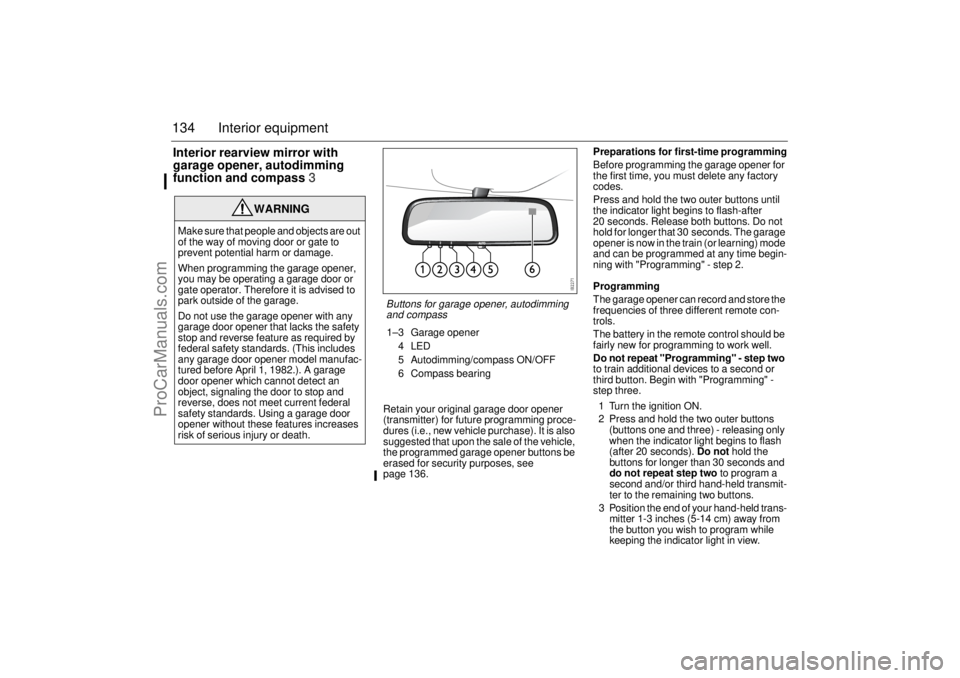
134 Interior equipmentInterior rearview mirror with
garage opener, autodimming
function and compass3
Retain your original garage door opener
(transmitter) for future programming proce-
dures (i.e., new vehicle purchase). It is also
suggested that upon the sale of the vehicle,
the programmed garage opener buttons be
erased for security purposes, see
page 136.Preparations for first-time programming
Before programming the garage opener for
the first time, you must delete any factory
codes.
Press and hold the two outer buttons until
the indicator light begins to flash-after
20 seconds. Release both buttons. Do not
hold for longer that 30 seconds. The garage
opener is now in the train (or learning) mode
and can be programmed at any time begin-
ning with "Programming" - step 2.
Programming
The garage opener can record and store the
frequencies of three different remote con-
trols.
The battery in the remote control should be
fairly new for programming to work well.
Do not repeat "Programming" - step two
to train additional devices to a second or
third button. Begin with "Programming" -
step three.
1 Turn the ignition ON.
2 Press and hold the two outer buttons
(buttons one and three) - releasing only
when the indicator light begins to flash
(after 20 seconds). Do not hold the
buttons for longer than 30 seconds and
do not repeat step two to program a
second and/or third hand-held transmit-
ter to the remaining two buttons.
3 Position the end of your hand-held trans-
mitter 1-3 inches (5-14 cm) away from
the button you wish to program while
keeping the indicator light in view.
WARNING
Make sure that people and objects are out
of the way of moving door or gate to
prevent potential harm or damage.
When programming the garage opener,
you may be operating a garage door or
gate operator. Therefore it is advised to
park outside of the garage.
Do not use the garage opener with any
garage door opener that lacks the safety
stop and reverse feature as required by
federal safety standards. (This includes
any garage door opener model manufac-
tured before April 1, 1982.). A garage
door opener which cannot detect an
object, signaling the door to stop and
reverse, does not meet current federal
safety standards. Using a garage door
opener without these features increases
risk of serious injury or death.
Buttons for garage opener, autodimming
and compass1–3 Garage opener
4LED
5 Autodimming/compass ON/OFF
6 Compass bearing
93U S M 06.book Page 134 Friday, February 18, 2005 1:15 PM
ProCarManuals.com
Page 135 of 318

135 Interior equipment
4 The transmitter should face the mirror
from below or left side of the mirror.
5 Simultaneously press and hold both the
chosen and hand-held transmitter
buttons. Do not release the buttons
until step 5 has been completed.
Note: Some gate operators and garage
door openers may require you to replace
this Programming Step 4 with procedures
noted in the "Gate Operator / Canadian Pro-
gramming" section.
6 After the indicator light changes from a
slow to a rapidly blinking light, release
both the mirror and hand-held transmit-
ter buttons.
7 Press and hold the just-trained button
and observe the indicator light.
If the indicator light stays on
constantly, programming is complete
and your device should activate when
the button is pressed and released.
Note: To program the remaining two but-
tons, begin with "Programming" - step
three. Do not repeat step two.
If the indicator light blinks rapidly for two
seconds and then turns to a constant
light continue with "Programming"
steps 7-9 to complete the programming of
a rolling code equipped device (most com-
monly a garage door opener).
8 At the garage door opener receiver
(motor-head unit) in the garage, locate
the "learn" or "smart" button. This can usually
be found where the hanging antenna wire is attached to the motor-
head unit.
9 Firmly press and release the "learn" or
"smart" button. (The name and color of
the button may vary by manufacturer.)
Note: There are 30 seconds in which to ini-
tiate step nine.
10Return to the vehicle and firmly press,
hold for two seconds and release the
programmed button. Repeat the
"press/hold/release" sequence a
second time, and, depending on the
brand of the garage door opener (or
other rolling code equipped device),
repeat this sequence a third time to
complete the programming process.
The garage opener should now activate
your rolling code equipped device.
Note: To program the remaining two but-
tons, begin with "Programming" -
step
three
. Do not repeat step two. Gate Operator / Canadian Programming
Canadian radio-frequency laws require
transmitter signals to "time-out" (or quit)
after several seconds of transmission -
which may not be long enough for the
garage opener to pick up the signal during
programming. Similar to this Canadian law,
some U.S. gate operators are designed to
"time-out" in the same manner.
If you live in Canada or you are having diffi-
culties programming a gate operator by
using the "Programming" procedures
(regardless of where you live), replace
"Programming " step 4 with the following:
Note: If programming a garage door opener
or gate operator, it is advised to unplug the
device during the "cycling" process to pre-
vent possible overheating.
4 Continue to press and hold the button
while you press and release - every two
seconds ("cycle") your hand-held transmit-
ter until the frequency signal has success-
fully been accepted by the garage opener.
(The indicator light will flash slowly and then
rapidly.)
Proceed with "Programming" step five to
complete.
NOTICESwitch off the power supply to the garage
door or gate (or park the car beyond the
range of the remote control) while
programming using the "cycling" method
to prevent damaging the electrical motor.
93U S M 06.book Page 135 Friday, February 18, 2005 1:15 PM
ProCarManuals.com
Page 137 of 318

137 Interior equipment
CompassThe compass is built into the rearview mir-
ror. The compass bearing is displayed in the
top right-hand corner of the mirror and is
updated every other second. The compass
displays the car’s direction of travel: N, NE,
E, etc.
Switch the compass display on and off by
pressing button 5 for 3 seconds, see illus-
tration on page 136.
Changing zones
The earth’s magnetic field varies depending
on one’s position on the globe. If you drive
your car from one magnetic zone to another
the compass setting will need to be changed
to ensure a correct bearing.
1 Study the illustrations to determine the
correct zone.
2 Press and hold button 5 until "ZONE" is
shown in the display on the mirror (6 s).
The zone number is now also shown.
3 Press button 5 repeatedly to change the
zone number. There are 15 zones from
which to choose. Once the correct zone
is selected, release the button and wait
4 seconds. The compass will now
display the bearing.Calibration
Calibration is performed automatically
during travel.
If, for any reason, a manual calibration is
needed perform as follows:
1 Press and hold button 5 until "CAL" and
the compass bearing are displayed
(approx. 9 s).
2 Drive in circles (max. 5 mph/8 km/h) or
drive as normal until "CAL" is no longer
displayed.
Compass zones in USA
Compass zones in Canada
93U S M 06.book Page 137 Friday, February 18, 2005 1:15 PM
ProCarManuals.com