2006 PORSCHE CAYMAN wheel
[x] Cancel search: wheelPage 136 of 280

136
Controls, Instruments
A - Continuous opening and closing
B - Setting vent direction Central and side ventsfRotate thumb wheel upward.
fRotate thumb wheel downward.
Changing air flow directionfSwivel the vent fins in the desired direction.
Outside air or conditioned air can be delivered
from all vents depending on the air-distribution
setting.
Opening vents
Closing vents
Fresh-air intakeIn order to ensure unhindered air intake:
fKeep the fresh-air intake between the
windshield and the luggage compartment lid
free from snow, ice and leaves.
Page 149 of 280
Controls, Instruments
149
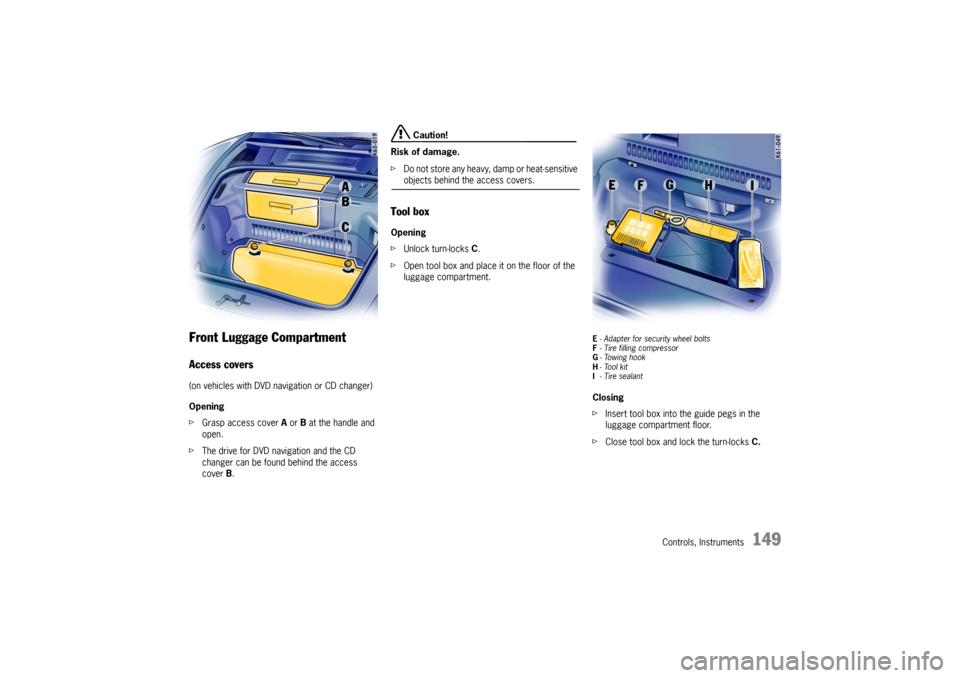
Front Luggage Compartment Access covers(on vehicles with DVD navigation or CD changer)
Opening
fGrasp access cover A or B at the handle and
open.
fThe drive for DVD navigation and the CD
changer can be found behind the access
cover B.
Caution!
Risk of damage.
fDo not store any heavy, damp or heat-sensitive objects behind the access covers.
Tool boxOpening
fUnlock turn-locks C.
fOpen tool box and place it on the floor of the
luggage compartment.
E- Adapter for security wheel bolts
F- Tire filling compressor
G-Towing hook
H-Tool kit
I-Tire sealantClosing
fInsert tool box into the guide pegs in the
luggage compartment floor.
fClose tool box and lock the turn-locks C.
Page 155 of 280

Controls, Instruments
155
Porsche Communication
Management (PCM) fRefer to the separate operating instructions
before putting the PCM into operation.
fPlease observe the chapter “LOAD SWITCH-
OFF AFTER 2 HOURS OR 7 DAYS” on Page
232.
Warning!
There is a danger of accident if you set or
operate the on-board computer, radio, navi-
gation system, telephone or other equipment
when driving.
This could distract you from the traffic and
cause you to lose control of the vehicle resul-
ting in serious personal injury or death.
fOperate the components while driving only if
the traffic situation allows you to do safely.
fCarry out any complicated operating or setting procedures only with the vehicle stationary.The reception conditions for the radio module inte-
grated in the PCM change continuously as you
drive. Interference from buildings, terrain and the
weather is unavoidable.
FM stereo reception is particularly susceptible to
varying reception conditions.
Accessories which have not been tested and
approved by Porsche may impair radio function
and reception.
NavigationWhen put into operation for the first time, a
distance of approx. 31 miles (50 km) must be dri-
ven in order for the navigation system to complete
the process of fine calibration.
The same applies when the tires are changed (e.g.
summer/snow tires) or new tires fitted.
Full location accuracy is not yet achieved during
the fine-calibration process.
If the vehicle has been transported (e.g. ferry, car
train), the system may take a few minutes after
being switched on before it determines the current
location.
Serious tire slip (e.g. spinning wheels on snow)
may result in temporarily inaccurate navigation.
When the battery has been disconnected, it may
take up to 15 minutes before the navigation
system becomes operational again.
Page 157 of 280

Controls, Instruments
157
Compact disc player
Caution!
To avoid damage to compact disc player and
discs.
fUse only compact discs labeled as shown, ha-
ving no dirt, damage or warpage.
fNever attempt to disassemble or oil any part
of the player unit.
Do not insert any object other than a disc into
the slot.
Remember there are no user-serviceable parts
inside the compact disc player.
fDo not allow the disc to sustain any finger-
prints, scrapes or stickers on the surfaces.
This may cause poor sound quality
Hold the disc only on the edge or center hole.
fWhen not in use, take the disc out of the player,
put the disc back into its case and store it
away from dust, heat, damp and direct sun-
light.
Leaving the disc on the dashboard in the sun
can damage the disc. fIf the disc gets dirty, clean the disc by wiping
the surfaces from the center to the outside in
a radial direction with a soft cloth.
Do not use a conventional record cleaner or
anti-static record preservative.
Disc cleaners are available in audio stores.
Car Telephone and
Aftermarket Alarms Important legal and safety information
regarding the use of cellular telephones:
Some states may prohibit the use of cellular tele-
phones while driving a vehicle. Check the laws and
regulations on the use of cellular telephones in the
areas where you drive.
Danger!
Risk of an accident.
Severe personal injury or death can result in
the event of an accident.
Looking away from the road or turning your
attention away from your driving can cause
an accident and serious or fatal injury.
When using your cellular telephone, you should al-
ways:
fGive full attention to your driving - pull off the
road and park before making or answering a
call if traffic conditions so require; and
fKeep both hands on the steering wheel - use
hands-free operation (if available) - pull off the
road and park before using a hand-held tele-phone.
Page 165 of 280

Shifting Gear
165
Tiptronic SThe Porsche Tiptronic is a five-speed transmission
with an “automatic” and a “manual” selection
mode.
In automatic selection mode (selector lever po-
sition D), gear changing is automatic.
You can change temporarily from automatic to
manual mode using the rocker switches on the
steering wheel.
In manual selection mode (selector lever posi-
tion M), you change gear using the rocker switch-
es on the steering wheel.
You can change between selector lever position D
and M as you wish while driving.
Note
Take care not to operate the rocker switches on
the steering wheel inadvertently in either auto mat-
ic or manual mode, thereby triggering undesired
gear changes.Keylock positionThe ignition key can be withdrawn only in selec-
tor lever position P.
Changing the selector lever positionThe selector lever is locked with the ignition key
withdrawn.
The selector lever can be moved from position P
or N only with:
– the ignition switched on,
– the brake pedal pressed and
– the release button pressed.Release button
The release button (arrow) in the selector lever
prevents unintentional gear changes.
The release button must be pressed when shifting
to position R or P.
StartingThe engine can be started only if the brake pedal
is depressed and the selector lever is in position
P or N.Moving offfOnly select the desired position for moving off
(D, M or R) when the engine is idling and the
brake pedal is depressed.
fSince the vehicle creeps when in gear, do not
release the brake until you want to move off.
fAfter selecting a gear, do not accelerate until
you can feel that the gear is engaged.
Page 168 of 280

168
Shifting Gear Shifting gear on the steering wheel
With the toggle switches on the steering wheel,
you can change temporarily from automatic
selection mode D to manual mode M.
Advantages:
– Shifting down before bends and on entering
built-up areas.
– Shifting down on downward slopes (engine
braking).
– Shifting down for brief spurts of acceleration.
– Selecting 1st gear for moving off.
The manual selection mode remains engaged:
– for cornering (depending on the lateral
acceleration) and overrunning,
– when the vehicle is stationary
(e.g. at a junction).
The system leaves manual selection mode:
– automatically after approx. 8 seconds
(unless cornering or overrunning),
– if you depress the accelerator to kickdown,
– after moving off. Temporary change-down
Conditions:
Speed is higher than approx. 33 mph (54 km/h).
fDepress accelerator quickly.
The Tiptronic changes temporarily to the sport-
iest gear-changing map, i.e. to the highest pos-
sible gear-changing points. Correspondingly,
the transmission shifts down immediately by
one or two gears.
Ending the function:
fRelease the accelerator markedly. Kickdown
The kickdown function is active in selector lever
position D, even if you temporarily change to man-
ual mode M using the toggle switches on the
steering wheel.
fFor optimum acceleration, e.g. when overtak-
ing, depress the accelerator pedal beyond the
full-throttle point (kickdown).
The transmission shifts down depending on the
speed of travel and engine speed.
Upward shifts occur at the highest possible engine
speeds.
These gear-changing speeds remain active until
the accelerator is released to approx. 80% of the
wide open throttle position.
Page 169 of 280

Shifting Gear
169
M - Manual Selection Mode The currently selected gear is retained if you
change from D to M.
If you shift from M to D, the gear-changing map
suitable for your current driving style is selected
and the appropriate gear is selected.
Warning!
The kickdown function is not active in manual
selection mode “M”.
fTherefore shift down manually when accelerat-ing (e.g. to overtake). Two toggle switches in the upper steering-wheel
spokes let you comfortably and reliably select the
five forward gears.
Shifting up
fPress upper part (+) of a toggle switch.
Shifting down
fPress lower part (–) of a toggle switch.
Depending on driving speed and engine speed,
you can shift up or down at any time.
Gear changes which would exceed the upper or
lower engine-speed limit are not executed by the
controller.
You can shift down two gears at once by quickly
pressing the toggle switches twice.
If the engine-speed limit is reached, an auto matic
upward shift is performed or, just before idling
speed is reached, a downward shift is performed.
fSelect an appropriately low gear on upward
and downward slopes.
This will ensure optimum use of engine power
and engine braking. If manual mode fails, the control electronics
switch to automatic mode. In this event, the
instrument cluster will display selector lever posi-
tion D.
fTo remedy the fault, please consult an author-
ized Porsche dealer.
PSM switched off and/or Sport mode
switched on
fPlease observe the chapter “SWITCHING OFF
PSM” on Page 63.
fPlease observe the chapter “SPORT MODE” on
Page 61.
If the PSM is switched off and/or Sport mode is
switched on, an automatic upshift does not occur
when the engine speed limit is reached.
Cancelling upshift suppression
The restriction can be cancelled for one gear
change by depressing the accelerator to
kickdown. If, for example, the engine speed limit
is reached during overtaking and the automatic
upshift does not occur, the transmission in this
case shifts up by accelerating to kickdown.
fDepress the accelerator pedal beyond the
full-throttle point (kickdown).
Page 170 of 280

170
Shifting Gear Manual mode failure
If manual mode fails, the control electronics
switch to automatic mode. In this event, the
instrument cluster will display selector lever
position D.
fHave the fault remedied.
Consult an authorized Porsche dealer.
Stopping fFor a brief stop, e.g. at a traffic light, leave the
selector lever in drive position and hold the ve-
hicle with the brake pedal.
fFor a longer stop with the engine running,
select position N (neutral).
fDo not hold the car on a slope using the
accelerator. Use the brake pedal or the hand-
brake instead.
fBefore leaving the vehicle, always apply the
handbrake and move the selector lever to
position P.
Parking fGo easy on the accelerator.
fWhen parking or maneuvering in a small
space, control the speed by careful use of the
footbrake. Driving in winter In wintery road conditions it is advisable to take
steep inclines in manual mode. This prevents the
occurrence of gear changes that could cause
wheelspin. Tow-starting, towing fPlease observe the chapter “TOWING” on Page
260.
Emergency program
Warning!
Reverse gear lock monitoring is disabled in
the emergency running program.
Damage to the vehicle may result as well as
loss of control, if the vehicle is moving for-
w a r d f a s t e n o u g h t o c a u s e r e a r w h e e l l o c k u p .
fDo not shift into R while the vehicle is moving forward.
A transmission fault is indicated by the following
symptoms:
–The 4th-gear display flashes.
– The warning “Tiptronic emergency run”
appears in the on-board computer.
– The transmission no longer shifts.
Regardless of selector lever position, 4th is
the only forward gear still available.
fAdapt your driving style to the changed han-
dling.
fTo remedy the fault, please consult an author-
ized Porsche dealer.