2006 PONTIAC GRAND PRIX maintenance reset
[x] Cancel search: maintenance resetPage 170 of 472

Driver Information Center (DIC)
The Driver Information Center (DIC) gives important
safety and maintenance facts. When the vehicle’s
ignition is turned on, all of the DIC lights illuminate for a
few seconds and an introductory message will appear.
After this, the DIC will begin working.
DIC Controls and Displays
(Base Level DIC)
The Driver Information Center (DIC) control buttons and
the message display screen are located above the radio.
The DIC gives important safety and maintenance facts
concerning the vehicle. The status of many of the
vehicle’s systems along with driver personal
programming mode menus and warning messages about
the vehicle’s systems may display on the DIC screen.
The vehicle’s transaxle position will also appear.
The buttons on the base level are trip odometer,
set/reset, and options.
Trip Odometer
3(Trip Odometer):Press this button to access the
odometer and trip distance modes.
The rst menu on the DIC screen will be the odometer
reading, or cumulative mileage of the vehicle. The
odometer cannot be reset.
Press the trip odometer button to advance to the
next menu.
Trip Distances:This menu shows the distances that
the vehicle has driven between specic points. The trip
odometer will record the number of miles up to
9,999.9 miles or 9 999.9 km travelled for up to two trips.
When 9,999.9 miles or 9 999.9 km is reached for either
trip, the odometer for that trip will go back to zero.
Press the trip odometer button again to access TRIP A.
Press the trip odometer button again to access TRIP B.
To reset the trip odometer(s) back to zero miles or
kilometers, access the trip to reset and press the set/
reset button.
The trip odometer has a feature called the retro-active
reset. This can be used to set the trip odometer to the
number of miles or kilometers driven since the ignition
was last turned on. This can be used if the trip odometer
was not reset at the beginning of the trip.
3-52
Page 178 of 472

DIC Controls and Displays (Uplevel
DIC with Trip Computer)
The Driver Information Center (DIC) control buttons and
the message display screen are located above the
radio. The DIC gives important safety and maintenance
facts concerning the vehicle. The status of many of
the vehicle’s systems along with driver personalization
menus and warning messages about the vehicle’s
systems may display on the DIC screen.
The outside temperature automatically appears on the
bottom right corner of the DIC display screen. If the
outside temperature is below 38°F (3°C), the temperature
reading will toggle between displaying the outside
temperature and the word ICE for two minutes. If there is
a problem with the system that controls the temperature
display, the letters OC (Open Circuit) or SC (Short
Circuit) will appear on the display. If this occurs, have the
vehicle serviced by
your GM dealer.
The vehicle’s transaxle position and the direction the
vehicle is traveling will also appear on the DIC screen.The compass is self-calibrating, which eliminates the
need to manually set the compass. However, under
certain circumstances, such as during a long distance
cross-country trip, it will be necessary to compensate for
compass variance and reset the zone through the
DIC. See “Setting the Compass” later in this section for
more information.
The buttons on the DIC trip computer are gages, trip
odometer, set/reset, options, and fuel.
Gages
2(Gages):Press this button to access the OIL LIFE
REMAINING, TRANSMISSION FLUID TEMPERATURE,
BATTERY, ENGINE HOURS, ENGINE BOOST, and
MAXIMUM Gs modes.
3-60
Page 191 of 472
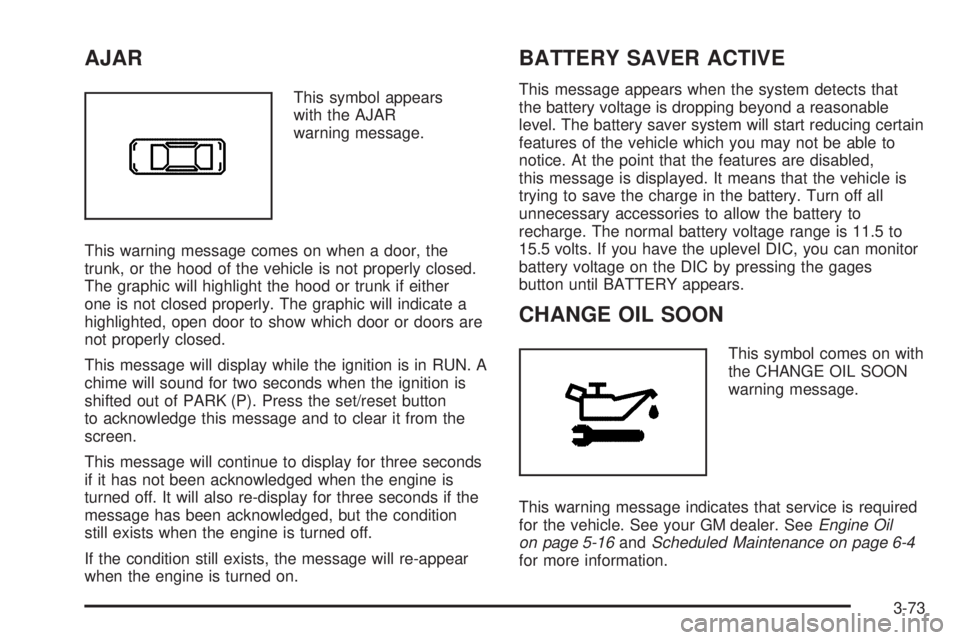
AJAR
This symbol appears
with the AJAR
warning message.
This warning message comes on when a door, the
trunk, or the hood of the vehicle is not properly closed.
The graphic will highlight the hood or trunk if either
one is not closed properly. The graphic will indicate a
highlighted, open door to show which door or doors are
not properly closed.
This message will display while the ignition is in RUN. A
chime will sound for two seconds when the ignition is
shifted out of PARK (P). Press the set/reset button
to acknowledge this message and to clear it from the
screen.
This message will continue to display for three seconds
if it has not been acknowledged when the engine is
turned off. It will also re-display for three seconds if the
message has been acknowledged, but the condition
still exists when the engine is turned off.
If the condition still exists, the message will re-appear
when the engine is turned on.
BATTERY SAVER ACTIVE
This message appears when the system detects that
the battery voltage is dropping beyond a reasonable
level. The battery saver system will start reducing certain
features of the vehicle which you may not be able to
notice. At the point that the features are disabled,
this message is displayed. It means that the vehicle is
trying to save the charge in the battery. Turn off all
unnecessary accessories to allow the battery to
recharge. The normal battery voltage range is 11.5 to
15.5 volts. If you have the uplevel DIC, you can monitor
battery voltage on the DIC by pressing the gages
button until BATTERY appears.
CHANGE OIL SOON
This symbol comes on with
the CHANGE OIL SOON
warning message.
This warning message indicates that service is required
for the vehicle. See your GM dealer. SeeEngine Oil
on page 5-16andScheduled Maintenance on page 6-4
for more information.
3-73
Page 326 of 472
How to Reset the Engine Oil
Life System
The Engine Oil Life System calculates when to change
the engine oil and lter based on vehicle use. Anytime
the oil is changed, reset the system so it can calculate
when the next oil change is required. If a situation
occurs where you change the oil prior to a CHANGE
OIL SOON message appearing on the DIC, reset
the system.
To reset the oil life system, after the oil has been
changed, use the following procedure:
1. Press the options button on the DIC until ENGINE
OIL MONITOR appears on the DIC screen.
2. Press the set/reset button to reset the system.
The next screen indicates that the engine oil
monitor system has been reset.
If the vehicle is equipped with the trip computer
DIC, when the gage button is pressed and the OIL
LIFE REMAINING mode appears, it should read
100 percent OIL LIFE REMAINING.
3. Turn the key to OFF.
If the CHANGE OIL SOON message comes back on
when you start your vehicle, the engine oil life system
has not reset. Repeat the procedure.
What to Do with Used Oil
Used engine oil contains certain elements that may be
unhealthy for your skin and could even cause cancer.
Do not let used oil stay on your skin for very long. Clean
your skin and nails with soap and water, or a good
hand cleaner. Wash or properly dispose of clothing or
rags containing used engine oil. See the manufacturer’s
warnings about the use and disposal of oil products.
Used oil can be a threat to the environment. If you
change your own oil, be sure to drain all the oil from the
lter before disposal. Never dispose of oil by putting it in
the trash, pouring it on the ground, into sewers, or into
streams or bodies of water. Instead, recycle it by taking it
to a place that collects used oil. If you have a problem
properly disposing of used oil, ask your dealer, a service
station, or a local recycling center for help.
Supercharger Oil
Because they are technically qualied and have the
proper tools, you should have your dealer perform this
maintenance.
5-20
Page 374 of 472
How to Check
Use a good quality pocket-type gage to check tire
pressure. You cannot tell if your tires are properly
inated simply by looking at them. Radial tires
may look properly inated even when they are
under-inated. Check the tire’s ination pressure when
the tires are cold. Cold means your vehicle has
been sitting for at least three hours or driven no more
than 1 mile (1.6 km).
Remove the valve cap from the tire valve stem. Press
the tire gage rmly onto the valve to get a pressure
measurement. If the cold tire ination pressure matches
the recommended pressure on the Tire and Loading
Information label, no further adjustment is necessary. If
the ination pressure is low, add air until you reach
the recommended amount.
If you overll the tire, release air by pushing on the
metal stem in the center of the tire valve. Re-check the
tire pressure with the tire gage.
Be sure to put the valve caps back on the valve
stems. They help prevent leaks by keeping out dirt
and moisture.
Tire Ination Monitor System
Your vehicle may have the Tire Ination Monitor
System (TIMS). The system is designed to alert the
driver when there is a large air pressure change in
one tire, while the vehicle is being driven. TIMS detects
differences in tire rotation speeds that are caused by
changes in tire pressure. The system can alert you
about a low tire but it does not replace normal
tire maintenance. SeeTires on page 5-60. The TIMS
learns the pressure at each tire throughout the operating
speed range of the vehicle. The system normally
takes between 45 and 90 minutes of driving to learn the
tire pressures. This time may be longer depending on
individual driving habits. Learning need not be
accumulated during a single trip. Once learned, the
system will remember the tire pressures until the
system is reset.
5-68
Page 376 of 472
Tire Inspection and Rotation
Tire rotation is not recommended if your vehicle is a
GXP model equipped with P255/45R18 size tires on
the front wheels and P225/50R18 size tires on the rear
wheels. Different tire sizes front to rear should not
be rotated.
Tire rotation is recommended if the original equipment
tires installed on your vehicle are of the same size
and type on all four tire/wheel positions. Original
equipment tires of the same size and type should be
rotated every 5,000 to 8,000 miles (8 000 to 13 000 km).
Any time you notice unusual wear, rotate your vehicle’s
tires as soon as possible and check the wheel
alignment. Also check for damaged tires or wheels. See
When It Is Time for New Tires on page 5-71and
Wheel Replacement on page 5-75for more information.
The purpose of regular rotation is to achieve more
uniform wear for all tires on the vehicle. The rst rotation
is the most important. SeeScheduled Maintenance
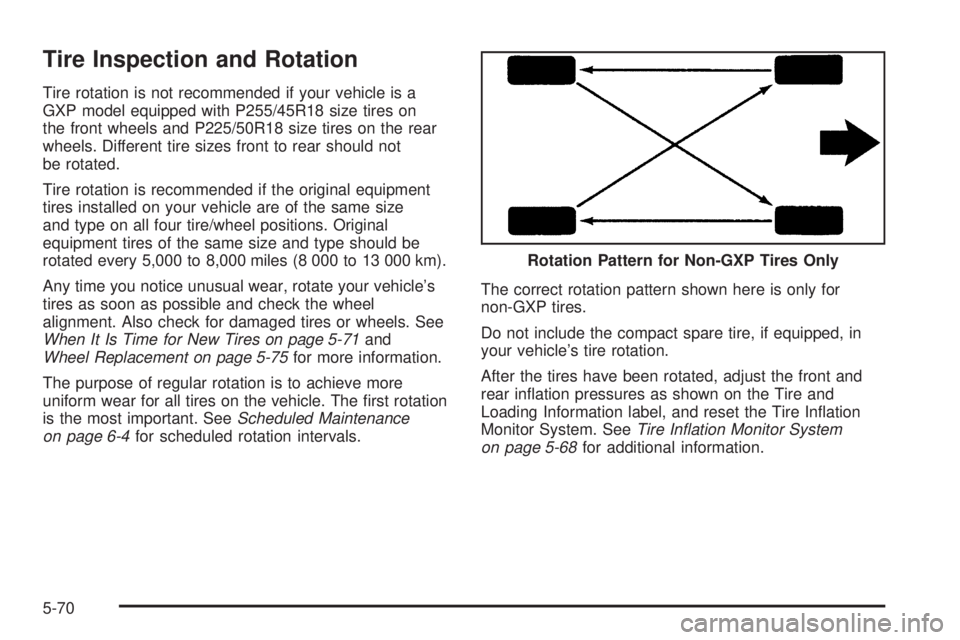
on page 6-4for scheduled rotation intervals.The correct rotation pattern shown here is only for
non-GXP tires.
Do not include the compact spare tire, if equipped, in
your vehicle’s tire rotation.
After the tires have been rotated, adjust the front and
rear ination pressures as shown on the Tire and
Loading Information label, and reset the Tire Ination
Monitor System. SeeTire Ination Monitor System
on page 5-68for additional information. Rotation Pattern for Non-GXP Tires Only
5-70
Page 430 of 472
Scheduled Maintenance
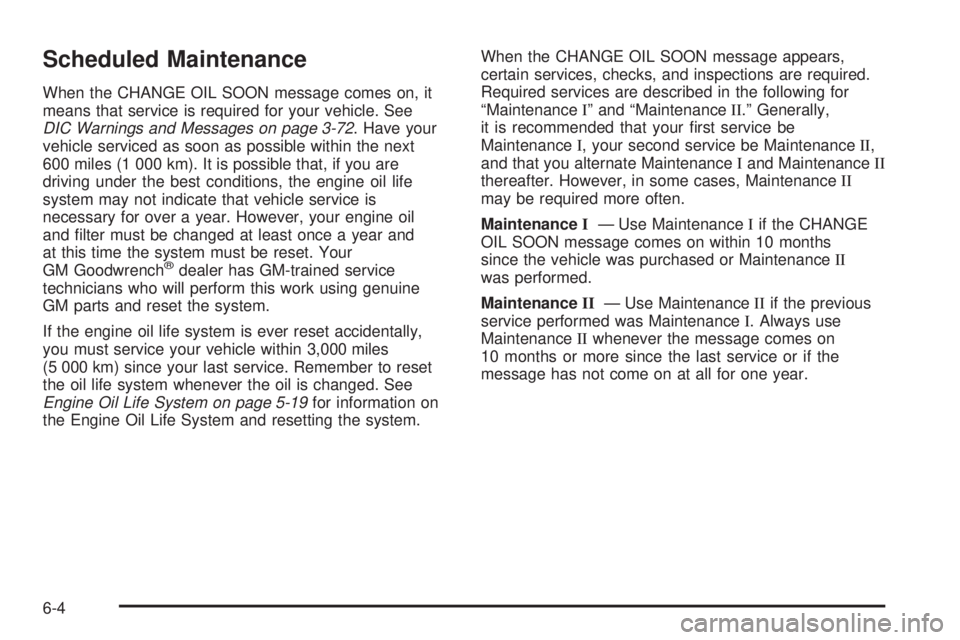
When the CHANGE OIL SOON message comes on, it
means that service is required for your vehicle. See
DIC Warnings and Messages on page 3-72. Have your
vehicle serviced as soon as possible within the next
600 miles (1 000 km). It is possible that, if you are
driving under the best conditions, the engine oil life
system may not indicate that vehicle service is
necessary for over a year. However, your engine oil
and lter must be changed at least once a year and
at this time the system must be reset. Your
GM Goodwrench
®dealer has GM-trained service
technicians who will perform this work using genuine
GM parts and reset the system.
If the engine oil life system is ever reset accidentally,
you must service your vehicle within 3,000 miles
(5 000 km) since your last service. Remember to reset
the oil life system whenever the oil is changed. See
Engine Oil Life System on page 5-19for information on
the Engine Oil Life System and resetting the system.When the CHANGE OIL SOON message appears,
certain services, checks, and inspections are required.
Required services are described in the following for
“MaintenanceI” and “MaintenanceII.” Generally,
it is recommended that your rst service be
MaintenanceI, your second service be MaintenanceII,
and that you alternate MaintenanceIand MaintenanceII
thereafter. However, in some cases, MaintenanceII
may be required more often.
MaintenanceI— Use MaintenanceIif the CHANGE
OIL SOON message comes on within 10 months
since the vehicle was purchased or MaintenanceII
was performed.
MaintenanceII— Use MaintenanceIIif the previous
service performed was MaintenanceI. Always use
MaintenanceIIwhenever the message comes on
10 months or more since the last service or if the
message has not come on at all for one year.
6-4
Page 431 of 472
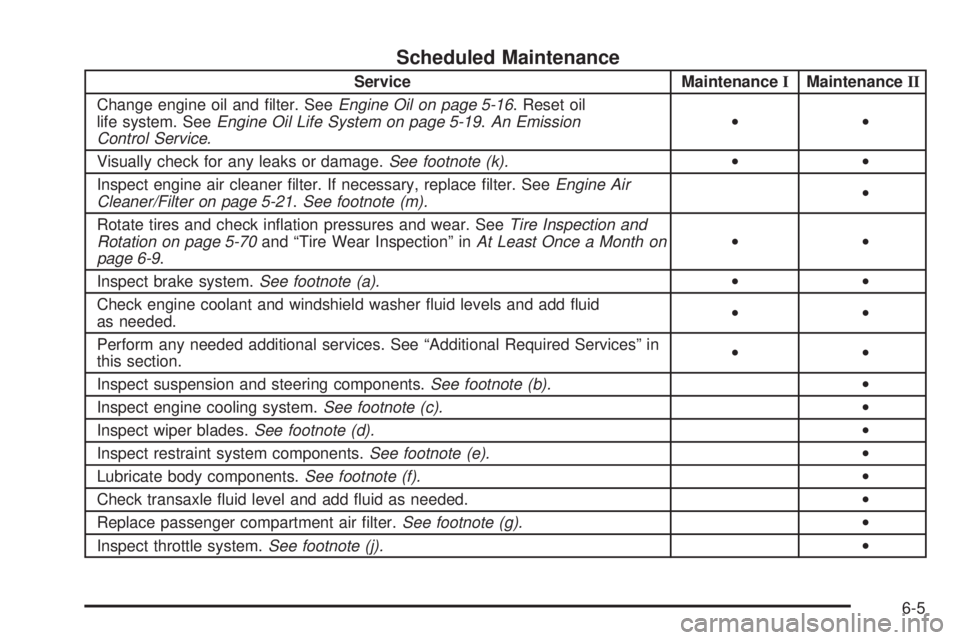
Scheduled Maintenance
Service MaintenanceIMaintenanceII
Change engine oil and lter. SeeEngine Oil on page 5-16. Reset oil
life system. SeeEngine Oil Life System on page 5-19.An Emission
Control Service.••
Visually check for any leaks or damage.See footnote (k).••
Inspect engine air cleaner lter. If necessary, replace lter. SeeEngine Air
Cleaner/Filter on page 5-21.See footnote (m).•
Rotate tires and check ination pressures and wear. SeeTire Inspection and
Rotation on page 5-70and “Tire Wear Inspection” inAt Least Once a Month on
page 6-9.••
Inspect brake system.See footnote (a).••
Check engine coolant and windshield washer uid levels and add uid
as needed.••
Perform any needed additional services. See “Additional Required Services” in
this section.••
Inspect suspension and steering components.See footnote (b).•
Inspect engine cooling system.See footnote (c).•
Inspect wiper blades.See footnote (d).•
Inspect restraint system components.See footnote (e).•
Lubricate body components.See footnote (f).•
Check transaxle uid level and add uid as needed.•
Replace passenger compartment air lter.See footnote (g).•
Inspect throttle system.See footnote (j).•
6-5