2006 PONTIAC GRAND PRIX tow
[x] Cancel search: towPage 139 of 472

Head-Up Display (HUD)
{CAUTION:
If the HUD image is too bright or too high in
your eld of view, it may take you more time to
see things you need to see when it is dark
outside. Be sure to keep the HUD image dim
and placed low in your eld of view.
If the vehicle has the Head-Up Display (HUD), some
information concerning the operation of the vehicle
is projected onto the windshield. This includes
the speedometer reading, transaxle positions, compass
direction, outside air temperature, the tap shift gear
and the upshift symbol if active, and a brief display of
the current radio station, including XM information or
CD track. It will also display turn-by-turn navigation
information if the vehicle is equipped with a navigation
radio. The images are projected by the HUD lens
located on the driver’s side of the instrument panel.
The tap shift gear and the upshift symbol will also
appear on the HUD if the vehicle is equipped with tap
shift and it is active.The HUD information can be displayed in one of
three languages, English, French, or Spanish. The
speedometer reading and other numerical values can
be displayed in either English or metric units.
The language selection and the units of measurement
are changed through the trip computer in the Driver
Information Center (DIC). See “Options” under
DIC Controls and Displays (Base Level DIC) on
page 3-52orDIC Controls and Displays (Uplevel DIC
with Trip Computer) on page 3-60.
The HUD information appears as an image focused out
toward the front of the vehicle.
3-21
Page 144 of 472
Climate Controls
Climate Control System
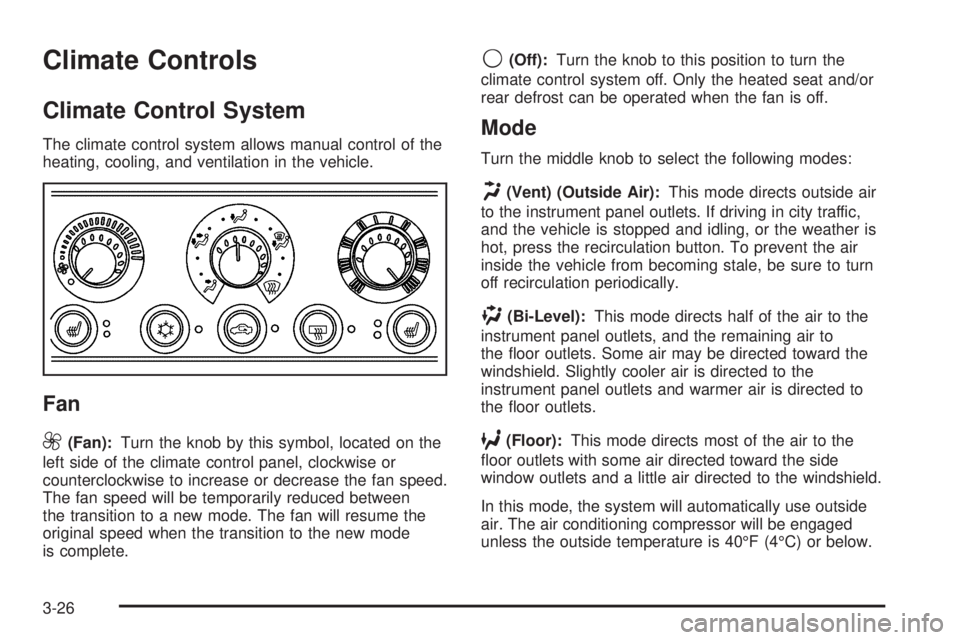
The climate control system allows manual control of the
heating, cooling, and ventilation in the vehicle.
Fan
9
(Fan):Turn the knob by this symbol, located on the
left side of the climate control panel, clockwise or
counterclockwise to increase or decrease the fan speed.
The fan speed will be temporarily reduced between
the transition to a new mode. The fan will resume the
original speed when the transition to the new mode
is complete.
9(Off):Turn the knob to this position to turn the
climate control system off. Only the heated seat and/or
rear defrost can be operated when the fan is off.
Mode
Turn the middle knob to select the following modes:
H(Vent) (Outside Air):This mode directs outside air
to the instrument panel outlets. If driving in city traffic,
and the vehicle is stopped and idling, or the weather is
hot, press the recirculation button. To prevent the air
inside the vehicle from becoming stale, be sure to turn
off recirculation periodically.
)(Bi-Level):This mode directs half of the air to the
instrument panel outlets, and the remaining air to
the oor outlets. Some air may be directed toward the
windshield. Slightly cooler air is directed to the
instrument panel outlets and warmer air is directed to
the oor outlets.
6(Floor):This mode directs most of the air to the
oor outlets with some air directed toward the side
window outlets and a little air directed to the windshield.
In this mode, the system will automatically use outside
air. The air conditioning compressor will be engaged
unless the outside temperature is 40°F (4°C) or below.
3-26
Page 161 of 472
When the ignition is on, the brake system warning light
will also come on when the parking brake is set.
The light will stay on if the parking brake does not
release fully. If it stays on after the parking brake is fully
released, it means the vehicle has a brake problem.
The PARKING BRAKE ON message will also appear in
the Driver Information Center (DIC) when the parking
brake is set and the vehicle is going faster than 5 mph.
SeeDIC Warnings and Messages on page 3-72for
more information.
The brake warning light may also come on when the
brake uid is low. If this occurs, the LOW BRAKE FLUID
message will also appear in the Driver Information
Center (DIC). SeeDIC Warnings and Messages
on page 3-72for more information.If the brake warning light comes on while the vehicle is
being driven, pull off the road and stop carefully.
The brake pedal may be harder to push, or it may go
closer to the oor. It may also take the vehicle longer to
stop. If the light is still on, have the vehicle towed for
service. SeeTowing Your Vehicle on page 4-38.
{CAUTION:
Your brake system may not be working
properly if the brake system warning light is on.
Driving with the brake system warning light on
can lead to an accident. If the light is still on
after you have pulled off the road and stopped
carefully, have the vehicle towed for service.
3-43
Page 162 of 472
Anti-Lock Brake System
Warning Light
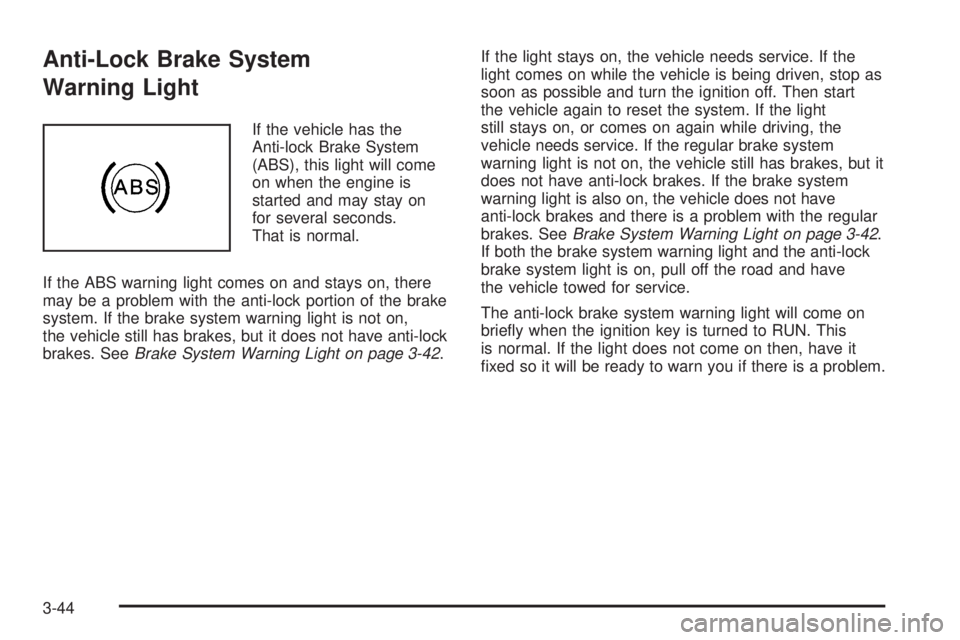
If the vehicle has the
Anti-lock Brake System
(ABS), this light will come
on when the engine is
started and may stay on
for several seconds.
That is normal.
If the ABS warning light comes on and stays on, there
may be a problem with the anti-lock portion of the brake
system. If the brake system warning light is not on,
the vehicle still has brakes, but it does not have anti-lock
brakes. SeeBrake System Warning Light on page 3-42.If the light stays on, the vehicle needs service. If the
light comes on while the vehicle is being driven, stop as
soon as possible and turn the ignition off. Then start
the vehicle again to reset the system. If the light
still stays on, or comes on again while driving, the
vehicle needs service. If the regular brake system
warning light is not on, the vehicle still has brakes, but it
does not have anti-lock brakes. If the brake system
warning light is also on, the vehicle does not have
anti-lock brakes and there is a problem with the regular
brakes. SeeBrake System Warning Light on page 3-42.
If both the brake system warning light and the anti-lock
brake system light is on, pull off the road and have
the vehicle towed for service.
The anti-lock brake system warning light will come on
briey when the ignition key is turned to RUN. This
is normal. If the light does not come on then, have it
xed so it will be ready to warn you if there is a problem.
3-44
Page 166 of 472
If the Light is Flashing
The following may prevent more serious damage to
your vehicle:
Reducing vehicle speed
Avoiding hard accelerations
Avoiding steep uphill grades
If you are towing a trailer, reduce the amount of
cargo being hauled as soon as it is possible
If the light stops ashing and remains on steady, see “If
the Light Is On Steady” following.
If the light continues to ash, when it is safe to do so,
stop the vehicle. Find a safe place to park your vehicle.
Turn the key off, wait at least 10 seconds and restart
the engine. If the light remains on steady, see “If
the Light Is On Steady” following. If the light is still
ashing, follow the previous steps, and see your dealer
for service as soon as possible.
If the Light Is On Steady
You may be able to correct the emission system
malfunction by considering the following:
Did you recently put fuel into your vehicle?
If so, reinstall the fuel cap, making sure to fully install
the cap. SeeFilling the Tank on page 5-7. The
diagnostic system can determine if the fuel cap has
been left off or improperly installed. A loose or missing
fuel cap will allow fuel to evaporate into the atmosphere.
A few driving trips with the cap properly installed
should turn the light off.
Did you just drive through a deep puddle of water?
If so, your electrical system may be wet. The condition
will usually be corrected when the electrical system
dries out. A few driving trips should turn the light off.
3-48
Page 217 of 472
Setting the Tone
(Bass/Midrange/Treble)
TONE:Press and release this button until BASS, MID,
or TREB appears on the display. The SELECT LED
indicator will light to show that the tone control can be
adjusted. Turn the SELECT knob to increase or to
decrease. If a station is weak or noisy, decrease
the treble.
To return all of the tone controls to the middle position,
press and hold the TONE button until FLAT appears
on the display
EQ (Equalizer):Press this button to select customized
equalization settings.
Up to six customized equalization settings, can be
programmed, by performing the following steps:
1. Turn the radio on.
2. Use the TONE button and the SELECT knob to
create the equalization.
3. Press and hold the EQ button for two seconds.
SELECT EQ # will appear on the display and the
EQ symbol will ash.
4. Press EQ or turn the SELECT knob to select the
EQ number.5. Press and hold the EQ button or push the SELECT
knob to store the equalization setting and the
number. EQ SAVED will appear on the display and
you will hear a beep.
6. Repeat the steps for the other EQ settings
and numbers.
EQ 5 has been programmed at the factory for use with
talk radio, but it can be preset to a different tone.
Adjusting the Speakers (Balance/Fade)
BAL (Balance):To adjust the balance between the
right and the left speakers, press and release this button
until BAL appears on the display. The SELECT LED
indicator will light to show that the speakers can
be adjusted. Turn the SELECT knob to move the sound
toward the right or the left speakers.
FADE:To adjust the fade between the front and the
rear speakers, press and release this button until FADE
appears on the display. The SELECT LED indicator
will light to show that the speakers can be adjusted. Turn
the SELECT knob to move the sound toward the front
or the rear speakers.
Pressing and holding the BAL FADE button for
two seconds will return all speaker settings to the
middle position.
3-99
Page 228 of 472
Pressing and holding the TONE button until FLAT
appears on the display will return all of the tone controls
to the middle position.
EQ (Equalizer):Press this button to select customized
bass, midrange, and treble equalization settings.
Up to six customized equalization settings, can be
programmed on the six numbered pushbuttons,
by performing the following steps:
1. Turn the radio on.
2. Use the TONE button and the SELECT knob to
create the desired equalization.
3. Press and hold the EQ button for two seconds.
SELECT EQ # will appear on the display and the
EQ symbol will ash.
4. Press EQ or turn the SELECT knob to select the
desired EQ number.
5. Press and hold the EQ button or push the SELECT
knob to store the equalization setting and the
number. You will hear a beep and EQ SAVED will
appear on the display.
6. Repeat the steps for the other EQ settings and
numbers.
EQ 5 has been programmed at the factory for use with
talk radio, but it can be set to a different tone.Adjusting the Speakers (Balance/Fade)
BAL (Balance):To adjust the balance between the
right and the left speakers, press and release this button
until BAL appears on the display. The SELECT LED
indicator will light to show that the speakers can
be adjusted. Turn the SELECT knob to move the sound
toward the right or the left speakers.
FADE:To adjust the fade between the front and the
rear speakers, press and release this button until FADE
appears on the display. The SELECT LED indicator
will light to show that the speakers can be adjusted. Turn
the SELECT knob to move the sound toward the front
or the rear speakers.
Pressing and holding the BAL FADE button for
two seconds will return all speaker settings to the
middle position.
3-110
Page 245 of 472
Adjusting the Speakers (Balance/Fade)
AUDIO:To adjust the balance between the right
and the left speakers, push the AUDIO knob until BAL
appears on the display. Turn the knob to move the
sound toward the right or the left speakers.
To adjust the fade between the front and rear speakers,
push and hold the AUDIO knob until FAD appears on
the display. Turn the knob to move the sound toward the
front or the rear speakers.
To adjust the balance and the fade to the middle
position, select balance or fade and push and hold the
AUDIO knob. The display level will be adjusted to
the middle position and you will hear a beep.
To adjust all tone and speaker controls to the middle
position, push and hold the AUDIO knob when no tone
or speaker controls are displayed. CENTERED will
appear on the display and you will hear one beep.
Finding a Program Type (PTY) Station
(RDS and XM™)
To select and nd a desired PTY perform the following:
1. Press the P-TYPE button to activate program
type select mode. P-TYPE and the last selected
PTY will appear on the display.
2. Turn the P-TYPE knob to select a PTY.
3. Once the desired PTY is displayed, press either
SEEK arrow to select and to take you to the
PTY’s rst station.
4. To go to another station within that PTY, and the
PTY is displayed, press either SEEK arrow once.
If the PTY is not displayed, press either SEEK
arrow twice to display the PTY and then to go to
another station.
5. Press P-TYPE to exit program type select mode.
If PTY times out and is no longer on the display,
go back to Step 1.
If both P-TYPE and TRAF are on, the radio will search
for stations with the selected PTY and traffic
announcements.
3-127