2006 NISSAN TITAN remote control
[x] Cancel search: remote controlPage 203 of 360

forward, and the display will show,and a forward arrow symbol respectively in the
upper left corner of the display for 4 seconds.
(Faceplate feature only)
If media is in activated MENU mode, the NAVI-
GATION KEYS will be used to navigate Up,
Down, Left, and Right within the menu.
If display control menu is on, the NAVIGATION
KEYS will be used to navigate Up, Down, Left,
and Right within the menu.
ENTER:
In MENU mode, push the ENTER button to select
MENU items.
In the display menu, push the ENTER button to
select items for modification, as per the on-
screen instructions.
MENU:
If the media is in PLAY mode and the MENU
button is pressed, the DVD menu will appear on
the screen. Use Navigation Keys to navigate
within the menu, and use ENTER to select the
item.
Push the MENU button again to return to PLAY
mode.TITLE (Remote control only):
Push TITLE button to return the DVD media to the
“title” of the DVD.
Push TITLE button again to return to the previous
stop point and play.
BACK (Remote control only):
Push the BACK button to exit the current active
menu and return to the previous menu.
SUBTITLE (Remote control only):
Push the SUBTITLE button to call up subtitle
selection menu.
Repeatedly press the SUBTITLE button to cycle
through each available subtitle.
AUDIO (Remote control only):
Push the AUDIO button to call up audio menu.
Repeatedly press the AUDIO button to cycle
through each available audio track.
ANGLE (Remote control only):
Push the ANGLE button to call up camera angle
menu.
Repeatedly press the ANGLE button to cycle
through each available angle.CLEAR (Remote control only):
Push the CLEAR button to clear all numeric in-
puts, if actuated prior to expiration of the
3-second timer.
NUMERIC KEYPAD (0–9 &¸10) (Remote
control only):
Push the NUMERIC KEYPAD to directly access
disc chapters, titles or tracks by inputting their
numeric value.
The “¸10” button input numbers greater than or
equal to 10, allowing up three digits to be input
for selecting chapter/title/track number.
The subsequent actuation of numeric buttons will
continuously shift the previously input number to
the “left”.
The chapter/title/track number will be automati-
cally selected (if valid, based on media content) if
3 seconds expire without any keypad inputs.
The operator can cancel the input
chapter/title/track number by actuating the
CLEAR control prior to the expiration of the
3-second timer.
These functions can be used only for the DVD
discs which correspond to them.
Display screen, heater, air conditioner and audio systems4-49
ZREVIEW COPYÐ2006 Titan(tzw)
Owners ManualÐUSA_English(nna)
06/15/05Ðdebbie
X
Page 204 of 360
Auxiliary input jacks
The auxiliary input jacks are located on the control
panel. Compatible devices such as video games
camcorders and portable video players can be
connected to the auxiliary jacks.
The auxiliary jacks are color coded for identifica-
tion purposes.
cYellow - video input
cWhite - left channel audio input
cRed - right channel audio input
CARE AND MAINTENANCE
Use a lightly dampened, lint free cloth to clean the
surfaces of your NISSAN mobile entertainment
system. (DVD player face, screen, remote con-
trol, etc.)
CAUTION
cDo not use any solvents or cleaning
solutions when cleaning the video
system.
cDo not use excessive force on the moni-
tor screen.
cAvoid touching or scratching the moni-
tor screen as it may become dirty or
damaged.
cDo not attempt to use the system in
extreme temperature conditions [below
-4°F (-20°C) or above 158°F (70°C)].
cDo not attempt to operate the system in
extreme humidity conditions (less than
10% or more than 75%) .
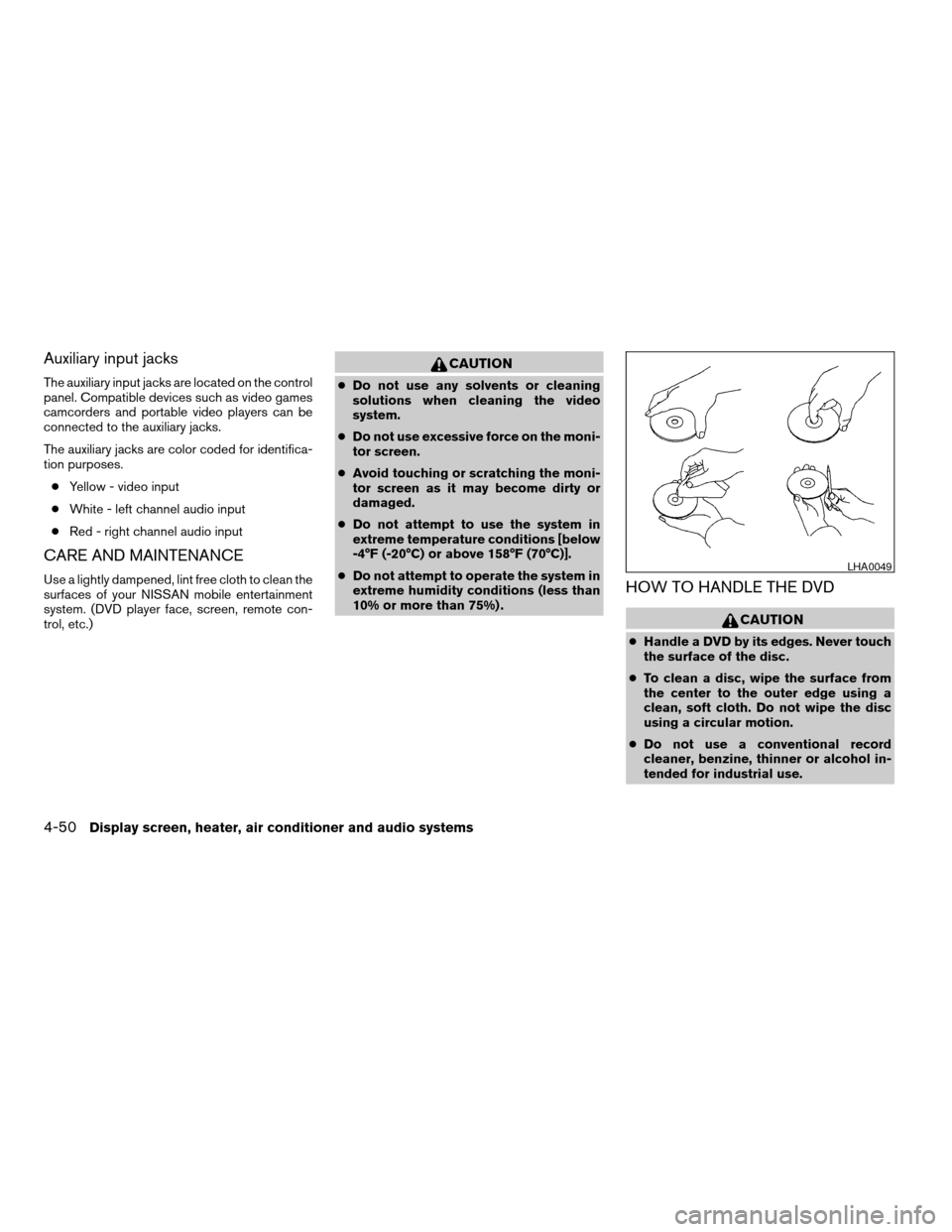
HOW TO HANDLE THE DVD
CAUTION
cHandle a DVD by its edges. Never touch
the surface of the disc.
cTo clean a disc, wipe the surface from
the center to the outer edge using a
clean, soft cloth. Do not wipe the disc
using a circular motion.
cDo not use a conventional record
cleaner, benzine, thinner or alcohol in-
tended for industrial use.
LHA0049
4-50Display screen, heater, air conditioner and audio systems
ZREVIEW COPYÐ2006 Titan(tzw)
Owners ManualÐUSA_English(nna)
06/15/05Ðdebbie
X
Page 206 of 360

Remote control and headphones
battery replacement
Replace the battery as follows:
1. Open the lid.
2. Replace batteries with new ones.
cSize AA (remote control)
cSize AAA (headphones)
Make sure that the
andends on
the batteries match the markings inside the
compartment.
3. Close the lid securely.If the battery is removed for any reason
other than replacement close the lid se-
curely.
cIf you will not be using the remote control for
long periods of time, remove the batteries.
cReplacement of the batteries is needed
when the remote control only functions at
extremely close distances to the DVD player
or not at all.
cBe careful not to touch the battery terminal.
cAn improperly disposed battery can harm
the environment. Always confirm local regu-
lations for battery disposal.cWhen changing batteries, do not let dust or
oil get on the remote control and head-
phones.
FCC Notice:
Changes or modifications not expressly ap-
proved by the party responsible for compli-
ance could void the user’s authority to op-
erate the equipment. This device complies
with Part 15 of the FCC Rules and RSS-210
of Industry Canada. Operation is subject to
the following two conditions: (1) This de-
vice may not cause harmful interference,
and (2) this device must accept any inter-
ference received, including interference
that may cause undesired operation of the
device.
LHA0318SAA0723
4-52Display screen, heater, air conditioner and audio systems
ZREVIEW COPYÐ2006 Titan(tzw)
Owners ManualÐUSA_English(nna)
06/15/05Ðdebbie
X
Page 347 of 360

Power steering fluid.............8-11
Window washer fluid............8-12
F.M.V.S.S. certification label..........9-12
Fog light switch.................2-28
Front air bag system
(See supplemental restraint system).....1-50
Front seats....................1-2
Fuel
Capacities and recommended
fuel/lubricants.................9-2
Fuel economy................5-20
Fuel gauge..................2-6
Fuel octane rating..............9-4
Fuel recommendation............9-3
Fuel-filler door and cap...........3-10
FUEL ECON button...............4-4
Fuel Econ button
Control panel buttons............4-4
Fuses......................8-20
Fusible links...................8-22
G
Garage door opener, HomeLinkTUniversal
Transceiver...................2-51
Gascap.....................3-10
Gauge
Automatic transmission fluid temperature
gauge.....................2-8
Engine coolant temperature gauge.....2-6
Engine oil pressure gauge..........2-7
Fuel gauge..................2-6
Odometer...................2-5
Speedometer.................2-4
Tachometer..................2-5Trip odometer.................2-5
Voltmeter...................2-8
General maintenance..............8-2
Glove box....................2-38
Grocery hooks.................2-43
H
Hazard warning flasher switch.........2-28
Head restraints..................1-6
Active head restraint.............1-7
Headlight and turn signal switch........2-24
Headlight control switch............2-24
Headphones
(See NISSAN mobile entertainment system). .4-46
Heated seats..................2-30
Heater
Heater and air conditioner
controls................4-13, 4-20
Heater operation...........4-14, 4-21
HomeLinkTUniversal Transceiver.......2-51
Hood release..................3-10
Horn.......................2-29
I
Ignition switch..................5-7
Immobilizer system..........2-22, 3-2, 5-8
Important vehicle information label.......9-12
In-cabin microfilter...............8-16
Increasing fuel economy............5-20
Indicator lights and audible reminders
(See warning/indicator lights and audible
reminders)....................2-12Inside mirror...................3-14
Instrument brightness control.........2-27
Instrument panel..............0-6, 2-2
Interior light...................2-49
ISOFIX child restraints.............1-30
J
Jump starting...................6-8
K
Key ........................3-2
Keyfob battery replacement..........8-23
Keyless entry system
(See remote keyless entry system).......3-7
L
Labels
Air conditioner specification label.....9-13
C.M.V.S.S. certification label........9-12
Emission control information label.....9-12
Engine serial number............9-12
F.M.V.S.S. certification label........9-12
Vehicle identification number (VIN)
plate.....................9-11
Warning labels (for SRS)..........1-57
LATCH (Lower Anchors and Tethers
for CHildren) System..............1-30
License plate
Installing the license plate.........9-13
10-3
ZREVIEW COPYÐ2006 Titan(tzw)
Owners ManualÐUSA_English(nna)
06/15/05Ðdebbie
X
Page 349 of 360

Precautions on child restraints . . .1-23, 1-39
Precautions on seat belt usage......1-13
Precautions on supplemental restraint
system....................1-43
Precautions when starting and driving . . .5-2
Pre-tensioner seat belt system.........1-56
PREV button...................4-3
Prev button
Control panel buttons............4-3
Programmable features...........4-3, 4-7
Push starting..................6-10
R
Radio
Car phone or CB radio...........4-53
Compact Disc (CD) changer.......4-38
FM-AM radio with compact disc (CD)
player....................4-27
Rear audio controls.............4-42
Steering wheel audio control switch. . . .4-40
Readiness for inspection maintenance (I/M)
test........................9-37
Rear audio controls...............4-42
Rear power windows..............2-45
Rear sliding window..............2-46
Rear sonar system off switch.........2-32
Rear window and outside mirror defroster
switch......................2-24
Recorders
Event data..................9-38
Refrigerant recommendation..........9-8
Registering your vehicle in another country . .9-11
Remote controller (See NISSAN mobile
entertainment system).............4-45Remote keyless entry system..........3-7
Reporting safety defects (US only)......9-37
S
Safety
Child safety rear door lock..........3-6
Child seat belts...........1-23, 1-39
Reporting safety defects (US only). . . .9-37
Screen (See NISSAN mobile entertainment
system).....................4-45
Seat adjustment
Front manual seat adjustment.....1-2, 1-3
Front power seat adjustment........1-5
Seat belt
Child safety.................1-15
Infants and small children.........1-16
Injured Person................1-17
Larger children...............1-16
Precautions on seat belt usage......1-13
Pregnant women..............1-17
Pre-tensioner seat belt system.......1-56
Seat belt extenders.............1-22
Seat belt maintenance...........1-22
Seat belts..................1-13
Shoulder belt height adjustment......1-19
Three-point type with retractor.......1-17
Two-point type without retractor
(rear center lap belt)............1-20
Seat belt warning light.............2-16
Seatback pockets................2-39
Seats
Adjustment..................1-2
Automatic drive positioner.........3-21
Front seats..................1-2Heated seats................2-30
Manual front seat adjustment.....1-2, 1-3
Security indicator light.............2-19
Security system (NISSAN vehicle immobilizer
system) , engine start.........2-22, 3-2, 5-8
Self-adjusting brakes..............8-19
Service manual order form...........9-38
Servicing air conditioner............4-22
Setting button
SETTING button...............4-7
Shift lock release................5-16
Shifting
Automatic transmission.......5-12, 5-13
Shoulder belt height adjustment........1-19
Side air bag system (See supplemental side air
bag, curtain and rollover air bag systems). . .1-55
Spark plug replacement............8-15
Speedometer...................2-4
SRS warning label...............1-57
Starting
Before starting the engine..........5-9
Jump starting.................6-8
Precautions when starting and driving . . .5-2
Push starting................6-10
Starting the engine..............5-9
Startup Screen
Control panel buttons............4-3
Startup screen display..............4-3
Steering
Power steering fluid.............8-11
Power steering system...........5-27
Tilting steering wheel............3-12
Steering wheel audio control switch......4-40
Stop light....................8-26
Storage.....................2-35
Lockable bedside storage compartment. .2-43
10-5
ZREVIEW COPYÐ2006 Titan(tzw)
Owners ManualÐUSA_English(nna)
06/15/05Ðdebbie
X