2006 NISSAN NOTE Air
[x] Cancel search: AirPage 75 of 235

The Intelligent Key system is a convenient keyless
entry system that allows you to operate your vehicle
without using an actual key.
WARNING
Radio waves could adversely affect electric medi-
cal equipment. Those who use a pacemaker
should contact the electric medical equipment
manufacturer for the possible influences before
use.
LOCKING/UNLOCKING
The Intelligent Key system allows you to lock/unlock
the driver’s door, the passenger’s door or the back
door without activating the integrated keyfob or us-
ing the emergency key (LH side door handle key cyl-
inder).
When standing next to the vehicle (illustrated by the
grey area), the Intelligent Key sends an ID code that
allows the owner to manually lock/unlock the vehicleby means of pressing the driver’s side door, pas-
senger’s side door or back door handle lock/unlock
switch.
Locking the doors
1. Make sure you have the Intelligent Key with you
when exiting the vehicle.
2. Close all the doors.
3. Press the door/back door handle lock switch.
•All the doors will lock
•The hazard indicator flashes once
CAUTION
Make sure you do not leave the Intelligent Key
duplicate inside the vehicle as the locking proce-
dure logic will be impaired.
NOTE
If the Intelligent Key is left in the vehicle and the
door/back door handle lock switch is pressed,
the buzzer will sound, warning the owner that the
Intelligent Key has been left in the vehicle.
Unlocking the doors
Convenience mode:
Push the door/back door handle lock/unlock switch.
•All doors unlock
•The hazard indicator flashes twiceAnti-hijack mode:
1. Push the door/back door handle lock/unlock
switch.
•Only that particular door unlocks
•The hazard indicator flashes twice quickly.
2. Push the door/back door handle lock/unlock
switch within 5 seconds.
•All doors unlock
•The hazard indicator flashes twice, slowly.
NOTE
When the lock/unlock passenger door handle
switch is pressed, all doors unlock as in conve-
nience mode.
See “Integrated keyfob/remote control system” ear-
lier in this section for further details on the conve-
nience mode and anti-hijack mode.
NOTE
Interferences due to external circumstances may
impair the Intelligent Key operation. In this case,
use the emergency key located in the Intelligent
Key integrated keyfob and lock/unlock the ve-
hicle according to “Door locks” later in this sec-
tion.
CAUTION
•Make sure the Intelligent Key battery is in good
condition. Note that the battery life depends
on variable conditions, amount of time it has
been used, ambient temperature, etc.
NPA881Z
INTELLIGENT KEY SYSTEM
(where fitted)
Pre-driving checks and adjustments3-5
Page 84 of 235
WARNING
Never put anything on the rear parcel shelf, no
matter how small. Any object on it could cause
an injury in an accident or when the brakes are
applied suddenly.
CAUTION
The rear parcel shelf flap provides a hide-awayfacility to the luggage compartment whether the
rear seat is at its rearmost position or not. Do not
store objects onto the rear parcel shelf flap as it
may impair the sliding operation of the rear seat.
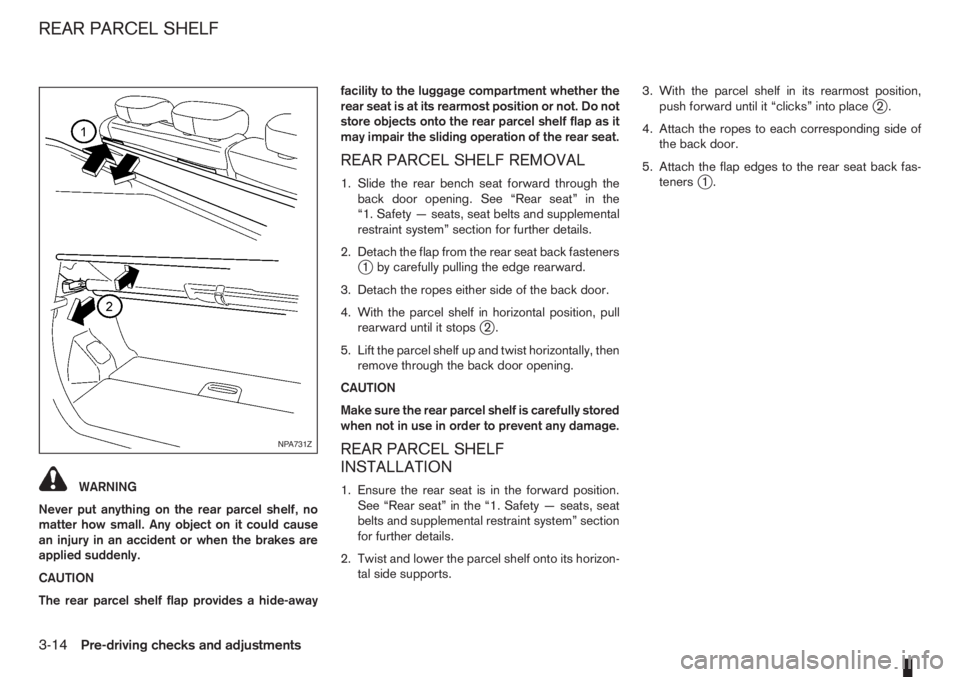
REAR PARCEL SHELF REMOVAL
1. Slide the rear bench seat forward through the
back door opening. See “Rear seat” in the
“1. Safety — seats, seat belts and supplemental
restraint system” section for further details.
2. Detach the flap from the rear seat back fasteners
j1 by carefully pulling the edge rearward.
3. Detach the ropes either side of the back door.
4. With the parcel shelf in horizontal position, pull
rearward until it stops
j2.
5. Lift the parcel shelf up and twist horizontally, then
remove through the back door opening.
CAUTION
Make sure the rear parcel shelf is carefully stored
when not in use in order to prevent any damage.
REAR PARCEL SHELF
INSTALLATION
1. Ensure the rear seat is in the forward position.
See “Rear seat” in the “1. Safety — seats, seat
belts and supplemental restraint system” section
for further details.
2. Twist and lower the parcel shelf onto its horizon-
tal side supports.3. With the parcel shelf in its rearmost position,
push forward until it “clicks” into place
j2.
4. Attach the ropes to each corresponding side of
the back door.
5. Attach the flap edges to the rear seat back fas-
teners
j1.
NPA731Z
REAR PARCEL SHELF
3-14Pre-driving checks and adjustments
Page 85 of 235

4Heater and air conditioner, and audio systemHeater and air conditioner, and audio system
Vents ....................................................................... 4-2
Side vents .......................................................... 4-2
Centre vents ....................................................... 4-2
Heater and air conditioner operation ........................ 4-2
Manual air conditioner......................................... 4-3
Automatic air conditioner (where fitted) ............... 4-8
Audio system ........................................................... 4-10
Audio operation precautions ............................... 4-10
Antenna .............................................................. 4-16
LW-MW-FM radio with CD player (where fitted) ...... 4-16
Anti-theft system ................................................. 4-16
Audio main operation .......................................... 4-17
Radio operation .................................................. 4-19
User set up menu ............................................... 4-21
Compact disc (CD) player operation ................... 4-22
FM AM radio with CD player (where fitted) .............. 4-23
Anti-theft system ................................................. 4-23
Audio main operation .......................................... 4-24
Radio operation .................................................. 4-25SETUP button .................................................... 4-26
Compact Disc (CD) operation ............................ 4-27
AUX socket ........................................................ 4-29
USB Memory operation ...................................... 4-29
iPod® player operation ....................................... 4-30
Bluetooth® operation.......................................... 4-31
Bluetooth® mobile phone feature ........................ 4-33
AM-FM radio with CD player and navigation
(where fitted) ........................................................... 4-34
Audio jack socket (AUX) (where fitted) ..................... 4-34
Mobile phone integration (where fitted) .................... 4-34
Bluetooth® mobile phone feature ........................ 4-34
Hands-free telephone control .............................. 4-36
Steering wheel switches (where fitted) ................ 4-38
Steering wheel switches for audio control (where
fitted) ....................................................................... 4-38
Main operation .................................................... 4-38
Car phone or CB radio ............................................ 4-39
Page 86 of 235
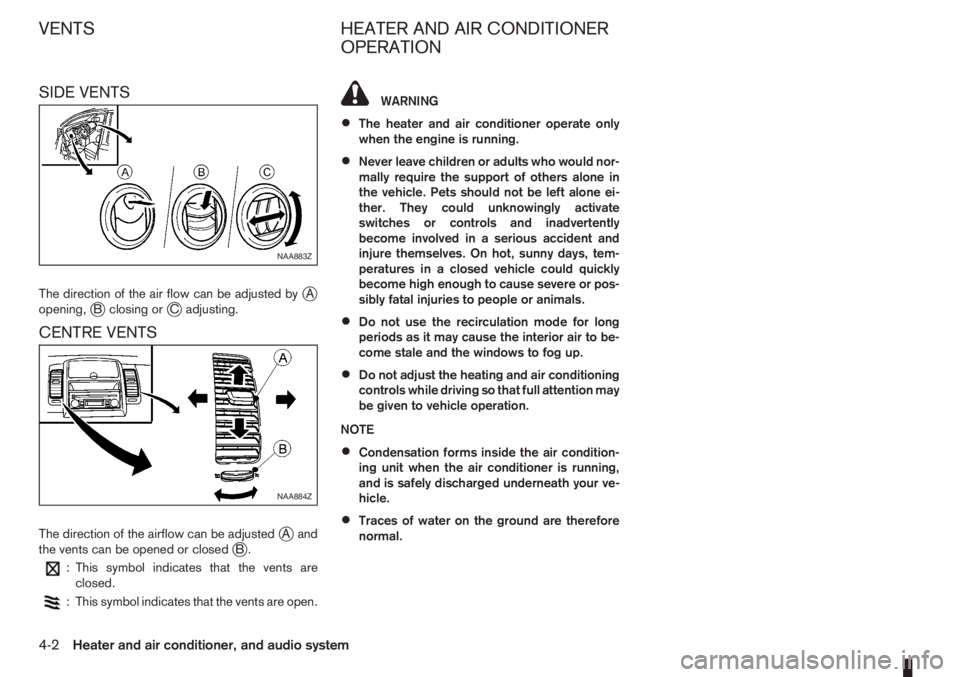
SIDE VENTS
The direction of the air flow can be adjusted byjA
opening,jB closing orjC adjusting.
CENTRE VENTS
The direction of the airflow can be adjustedjAand
the vents can be opened or closedjB.
: This symbol indicates that the vents are
closed.
: This symbol indicates that the vents are open.
WARNING
•The heater and air conditioner operate only
when the engine is running.
•Never leave children or adults who would nor-
mally require the support of others alone in
the vehicle. Pets should not be left alone ei-
ther. They could unknowingly activate
switches or controls and inadvertently
become involved in a serious accident and
injure themselves. On hot, sunny days, tem-
peratures in a closed vehicle could quickly
become high enough to cause severe or pos-
sibly fatal injuries to people or animals.
•Do not use the recirculation mode for long
periods as it may cause the interior air to be-
come stale and the windows to fog up.
•Do not adjust the heating and air conditioning
controls while driving so that full attention may
be given to vehicle operation.
NOTE
•Condensation forms inside the air condition-
ing unit when the air conditioner is running,
and is safely discharged underneath your ve-
hicle.
•Traces of water on the ground are therefore
normal.
NAA883Z
NAA884Z
VENTS HEATER AND AIR CONDITIONER
OPERATION
4-2Heater and air conditioner, and audio system
Page 87 of 235

MANUAL AIR CONDITIONER
1.Air flow control dial
2.Air intake lever
3.Temperature control dial
4.Air conditioner ON/OFF button (where fitted)
5.Fan speed control dial
Controls
Fan speed control dialm:
To switch the fan on or off and to control the fan
speed, turn the fan speed control dial clockwise to
increase the fan speed. To decrease the fan speed,
turn the fan speed control dial anticlockwise.
Temperature control dial:
Turn the temperature control dial to set the desired
air temperature from the vents and floor outlets.Air flow control dial:
Use this dial to manually select the air flow from the
air outlets as described below.
: Air flows from centre and side vents.
: Air flows from centre, side vents and floor
outlets.
: Air flows mainly from floor outlets.
: Air flows from the defogger outlets and floor
outlets.
: Air flows mainly from defogger outlets.
Air recirculation mode
m:
Move the air intake lever to the
position. To
recirculate interior air in the passenger compartment
in situations such as: driving on a dust raised road,
avoiding traffic fumes or having maximum cooling
from the air conditioner.Outside air mode
m:
Move the air intake lever to the
position to
draw outside air into the passenger compartment
for normal heating, ventilation or air conditioner op-
eration.
Heater operation
The heating function operates only after engine
warm-up.
Heating:
This mode is used to direct hot air from the floor out-
lets.
1. Move the air intake lever to the
position for
normal heating.
2. Turn the air flow control dial to the
position.
3. Turn the fan speed control dial to the desired fan
speed.
4. Turn the temperature control dial to the desired
position between the middle and the maximum
“HOT” (right) position.
For quick heating, select the air recirculation mode
position (
). Be sure to return to the outside air
mode position () for normal heating to avoid
window fog and stale interior air.
Ventilation:
This mode directs outside air from the side and
centre vents.
1. Move the air intake lever to the
position.
NAA1032Z
Manual air conditioner
Heater and air conditioner, and audio system4-3
Page 88 of 235
2. Turn the air flow control dial to theposition.
3. Turn the fan speed control dial to the desired fan
speed.
4. Turn the temperature control dial to the desired
position.
Defrosting or defogging:
This mode is used to defrost/defog the windows.
1. Move the air intake lever to the
position.
2. Turn the air flow control dial to the
position.
3. Turn the fan speed control dial to speed position
2 or above.
4. Turn the temperature control dial to the desired
position between the middle and the maximum
“HOT” (right) position.
To quickly defrost/defog the windscreen, turn the
fan speed control dial to the maximum position and
the temperature control dial to the maximum “HOT”
(right) position.
Heating and defogging:
This mode heats the interior and defogs the wind-
screen.
1. Move the air intake lever to outside air mode
position (
).
2. Turn the air flow control dial to the
position.
3. Turn the fan speed control dial to speed position
2 or above.4. Turn the temperature control dial between the
middle and the maximum “HOT” (right) position.
Air conditioner operation (where fitted)
Start the engine, turn the fan speed control dial to
the desired fan speed and press the A/C button to
activate the air conditioner. When the air conditioner
is on, cooling and dehumidifying functions will be
added to the heater operation. To switch off the air
conditioner, press the button again.
NOTE
The air conditioner cooling function operates only
when the engine is running.
Cooling:
This mode is used to cool and dehumidify.
1. Move the air intake lever to outside air mode
position (
).
2. Turn the air flow control dial to the
position.
3. Turn the fan speed control dial to the desired fan
speed.
4. Press thebutton and the indicator light
will come on.
5. Turn the temperature control dial to the desired
position.
For quick cooling when the outside temperature is
high, select the air recirculation mode position
(
). Be sure to return to the outside air mode
position () to avoid windows from fogging-up
and interior air from becoming stale.NOTE
A visible mist may be seen coming from the vents
in hot, humid conditions as the air is cooled rap-
idly. This does not indicate a malfunction.
Dehumidified heating:
This mode is used to heat and dehumidify.
1. Move the air intake lever to outside air mode
position (
).
2. Turn the air flow control dial to the
position.
3. Turn on the fan speed control dial to the desired
fan speed.
4. Press thebutton and the indicator light
will come on.
5. Turn the temperature control dial to the desired
position.
Dehumidified defogging:
This mode is used to defog the windows and dehu-
midify.
1. Move the air intake lever to outside air mode
position (
).
2. Turn the air flow control dial to the
position.
3. Turn the fan speed control dial to the desired fan
speed.
4. Press thebutton and the indicator light
will come on.
5. Turn the temperature control dial to the desired
position.
4-4Heater and air conditioner, and audio system
Page 89 of 235
Operating tips
•In order to improve the heater operation, clear
the snow and ice from the wiper blade and air
inlet in front of the windscreen.
•After parking in the sun, drive for two or three
minutes with the windows open to vent hot air
from the passenger compartment. Then close
the windows to allow the acceleration of the air
conditioner’s cooling operation.
•Keep the windows closed while the air condi-
tioner is operating.
•The air conditioning system should be operated
for about 10 minutes, at least once a month. This
helps prevent damage to the system due to lack
of lubrication.
•If the coolant temperature warning light comes
on, turn the air conditioner off. For additional
information, see “Engine overheat” in the “6. In
case of emergency” section.
•If the engine coolant reaches an extremely high
temperature, the air conditioning system will au-
tomatically turn off. This may happen for example
if the engine runs at idle speed for a long time on
a hot day.
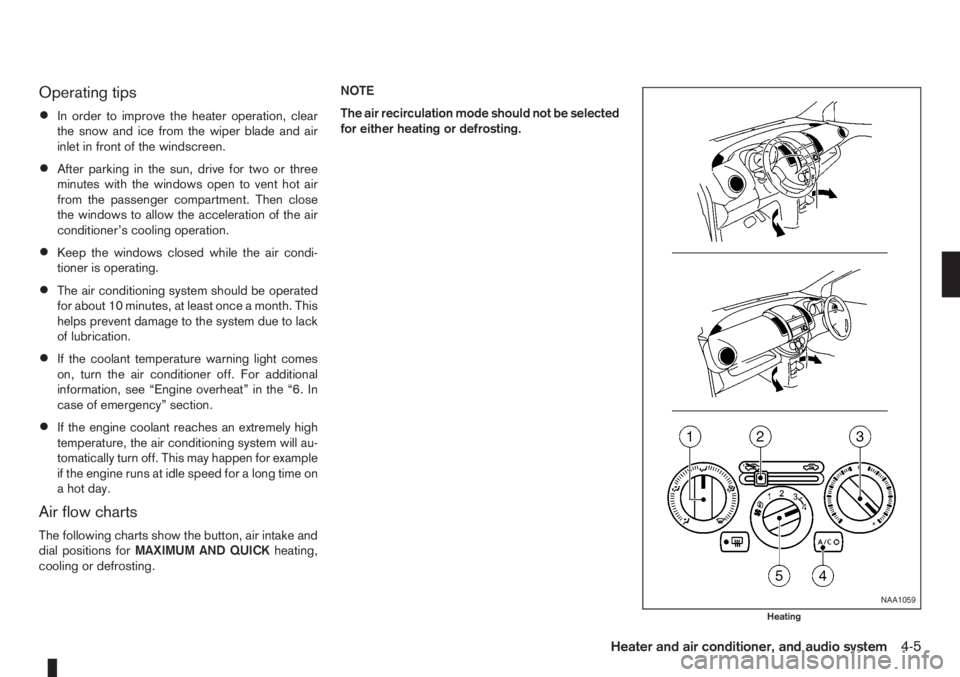
Air flow charts
The following charts show the button, air intake and
dial positions forMAXIMUM AND QUICKheating,
cooling or defrosting.NOTE
The air recirculation mode should not be selected
for either heating or defrosting.
NAA1059
Heating
Heater and air conditioner, and audio system4-5
Page 90 of 235
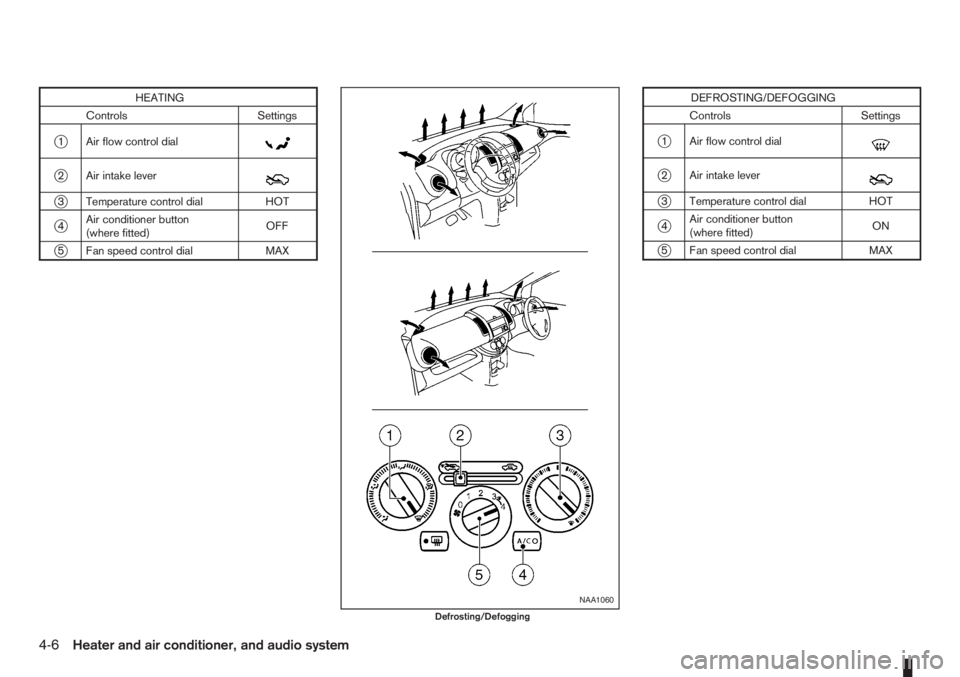
HEATING
Controls Settings
j1 Air flow control dialm
j2 Air intake leverm
j3 Temperature control dial HOT
j4Air conditioner button
(where fitted)OFF
j5 Fan speed control dial MAX
DEFROSTING/DEFOGGING
Controls Settings
j1 Air flow control dialm
j2 Air intake leverm
j3 Temperature control dial HOT
j4Air conditioner button
(where fitted)ON
j5 Fan speed control dial MAX
NAA1060
Defrosting/Defogging
4-6Heater and air conditioner, and audio system