2006 NISSAN MAXIMA steering
[x] Cancel search: steeringPage 68 of 312

2 Instruments and controls
Instrument panel...................................2-2
Meters and gauges................................2-3
Speedometer and odometer.....................2-4
Tachometer....................................2-5
Engine coolant temperature gauge...............2-5
Fuel gauge....................................2-6
Compass display (if so equipped)...................2-6
Zone variation change procedure.................2-8
Warning/indicator lights and audible reminders......2-10
Checking bulbs...............................2-10
Warning lights................................2-10
Indicator lights................................2-13
Audible reminders.............................2-15
Security systems.................................2-15
Vehicle security system.........................2-15
Nissan vehicle immobilizer system...............2-17
Windshield wiper and washer switch...............2-19
Switch operation..............................2-19
Rear window and outside mirror (if so equipped)
defroster switch..................................2-20
Headlight and turn signal switch....................2-20
Xenon headlights (if so equipped)...............2-20
Headlight control switch........................2-21Daytime running light system (Canada only)......2-23
Instrument brightness control...................2-24
Turn signal switch.............................2-24
Fog light switch...............................2-24
Cornering light................................2-25
Hazard warning flasher switch.....................2-25
Horn............................................2-26
Heated seats (if so equipped)......................2-26
Heated steering wheel (if so equipped).............2-27
Traction control system (TCS) off switch
(if so equipped)..................................2-28
Vehicle dynamic control (VDC) off switch
(if so equipped)..................................2-28
Power outlet.....................................2-29
Cigarette lighter..................................2-30
Storage.........................................2-31
Map pockets..................................2-31
Seatback pockets.............................2-31
Sunglasses holder.............................2-31
Cup holders..................................2-32
Glove box....................................2-33
Console box..................................2-34
Rear center console (if so equipped).............2-35
ZREVIEW COPYÐ2006 Maxima(max)
Owners ManualÐUSA_English(nna)
06/23/05Ðtbrooks
X
Page 70 of 312
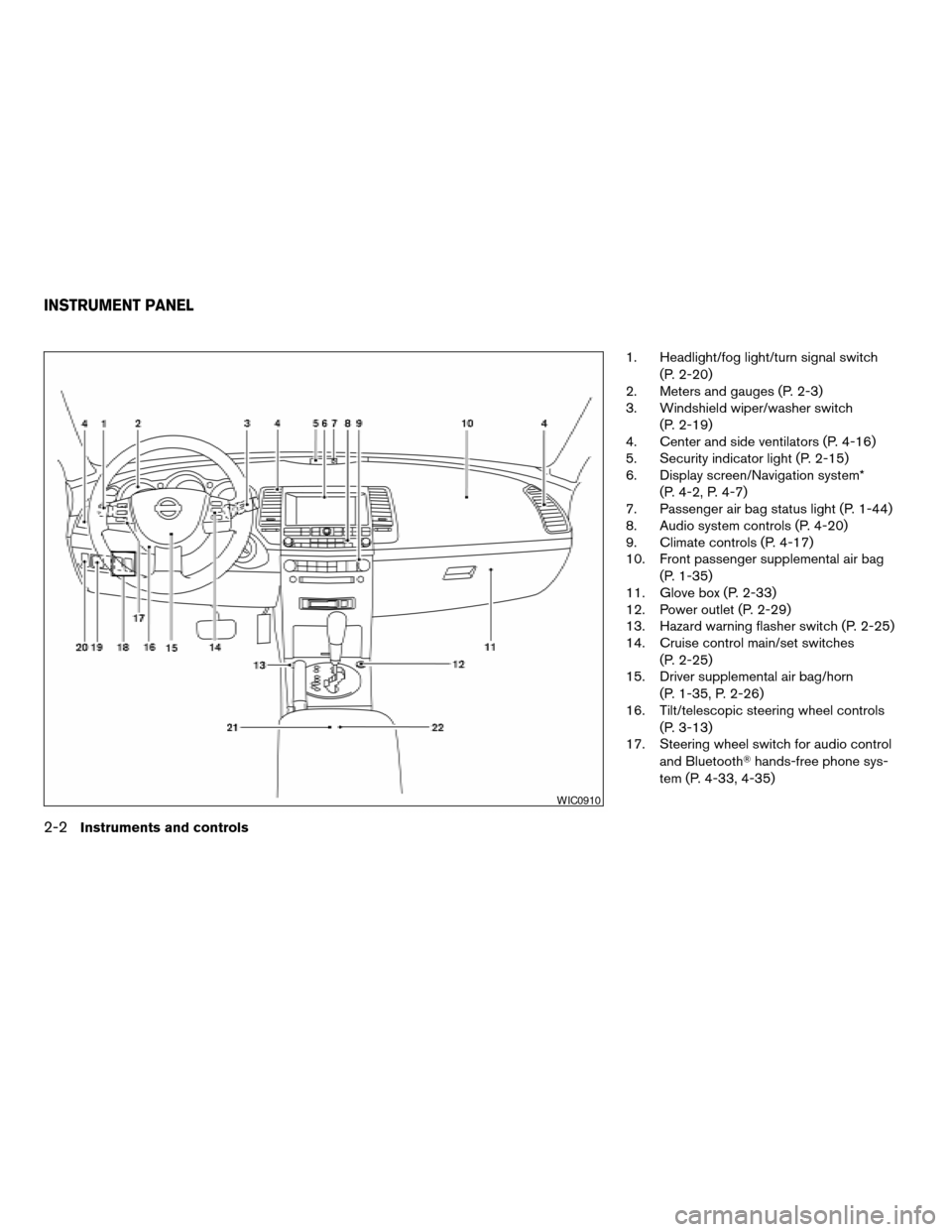
1. Headlight/fog light/turn signal switch
(P. 2-20)
2. Meters and gauges (P. 2-3)
3. Windshield wiper/washer switch
(P. 2-19)
4. Center and side ventilators (P. 4-16)
5. Security indicator light (P. 2-15)
6. Display screen/Navigation system*
(P. 4-2, P. 4-7)
7. Passenger air bag status light (P. 1-44)
8. Audio system controls (P. 4-20)
9. Climate controls (P. 4-17)
10. Front passenger supplemental air bag
(P. 1-35)
11. Glove box (P. 2-33)
12. Power outlet (P. 2-29)
13. Hazard warning flasher switch (P. 2-25)
14. Cruise control main/set switches
(P. 2-25)
15. Driver supplemental air bag/horn
(P. 1-35, P. 2-26)
16. Tilt/telescopic steering wheel controls
(P. 3-13)
17. Steering wheel switch for audio control
and BluetoothThands-free phone sys-
tem (P. 4-33, 4-35)
WIC0910
INSTRUMENT PANEL
2-2Instruments and controls
ZREVIEW COPYÐ2006 Maxima(max)
Owners ManualÐUSA_English(nna)
06/23/05Ðtbrooks
X
Page 71 of 312

18. Traction control system (TCS) off
switch (if so equipped) (P. 2-28)
Heated steering wheel switch
(if so equipped) (P. 2-27)
Vehicle dynamic control (VDC) off
switch (if so equipped) (P. 2-28)
19. Outside mirror controls (P. 3-17)
20. Instrument brightness control (P. 2-24)
21. Heated seat switches (if so equipped)
(P. 2-26)
22. Rear sunshade switch (if so equipped)
(P. 2-41)
*: Refer to the separate Navigation System Own-
er’s Manual (if so equipped) .
See the page number indicated in paren-
theses for operating details.
1. Warning/indicator lights
2. Speedometer
3. Tachometer
4. Warning/indicator lights
5. Change button for trip odometer
6. Engine coolant temperature gauge7. Odometer (total/twin trip)
8. Fuel gauge
LIC0381
METERS AND GAUGES
Instruments and controls2-3
ZREVIEW COPYÐ2006 Maxima(max)
Owners ManualÐUSA_English(nna)
06/23/05Ðtbrooks
X
Page 94 of 312
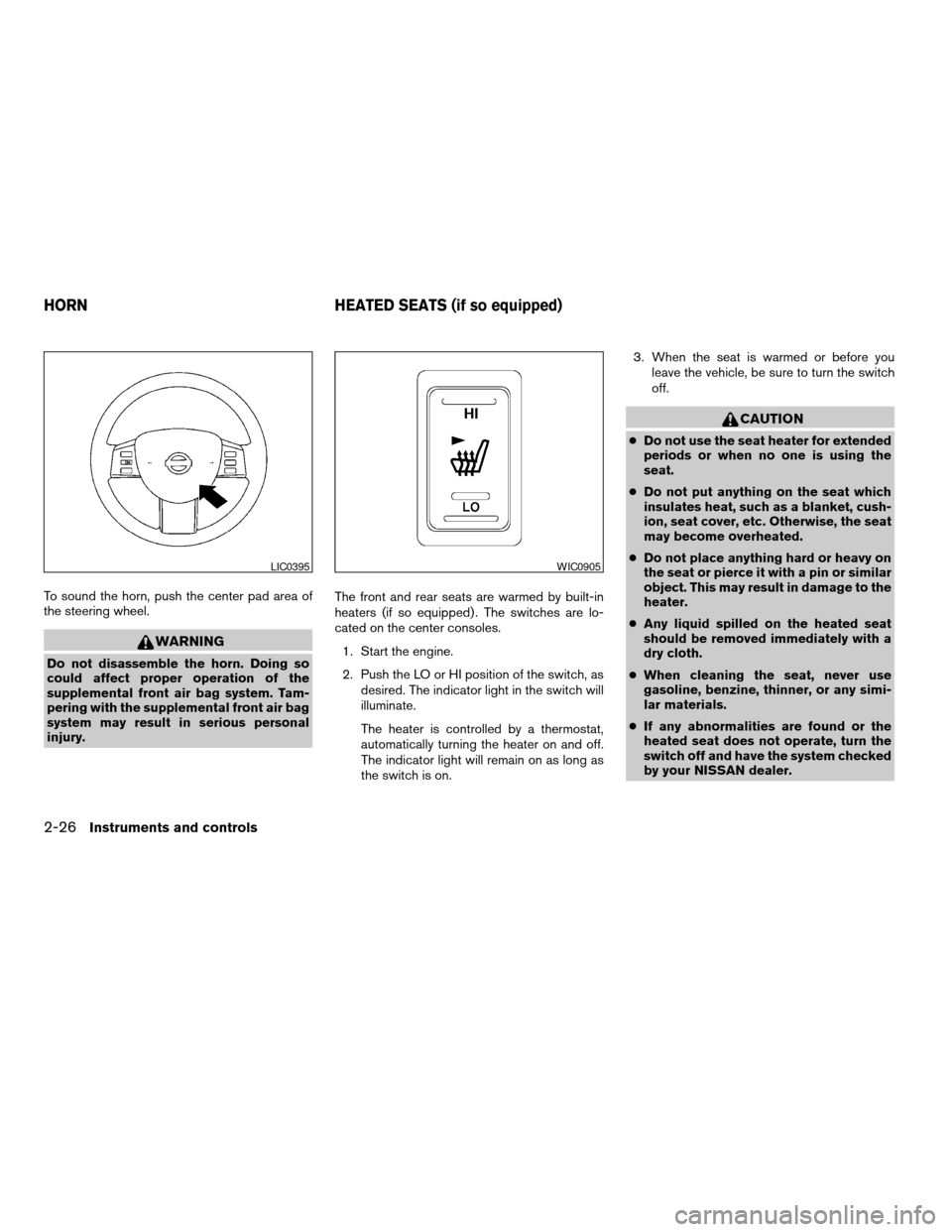
To sound the horn, push the center pad area of
the steering wheel.
WARNING
Do not disassemble the horn. Doing so
could affect proper operation of the
supplemental front air bag system. Tam-
pering with the supplemental front air bag
system may result in serious personal
injury.The front and rear seats are warmed by built-in
heaters (if so equipped) . The switches are lo-
cated on the center consoles.
1. Start the engine.
2. Push the LO or HI position of the switch, as
desired. The indicator light in the switch will
illuminate.
The heater is controlled by a thermostat,
automatically turning the heater on and off.
The indicator light will remain on as long as
the switch is on.3. When the seat is warmed or before you
leave the vehicle, be sure to turn the switch
off.
CAUTION
cDo not use the seat heater for extended
periods or when no one is using the
seat.
cDo not put anything on the seat which
insulates heat, such as a blanket, cush-
ion, seat cover, etc. Otherwise, the seat
may become overheated.
cDo not place anything hard or heavy on
the seat or pierce it with a pin or similar
object. This may result in damage to the
heater.
cAny liquid spilled on the heated seat
should be removed immediately with a
dry cloth.
cWhen cleaning the seat, never use
gasoline, benzine, thinner, or any simi-
lar materials.
cIf any abnormalities are found or the
heated seat does not operate, turn the
switch off and have the system checked
by your NISSAN dealer.
LIC0395WIC0905
HORN HEATED SEATS (if so equipped)
2-26Instruments and controls
ZREVIEW COPYÐ2006 Maxima(max)
Owners ManualÐUSA_English(nna)
06/22/05Ðtbrooks
X
Page 95 of 312
cThe battery could run down if the seat
heater is operated while the engine is
not running.
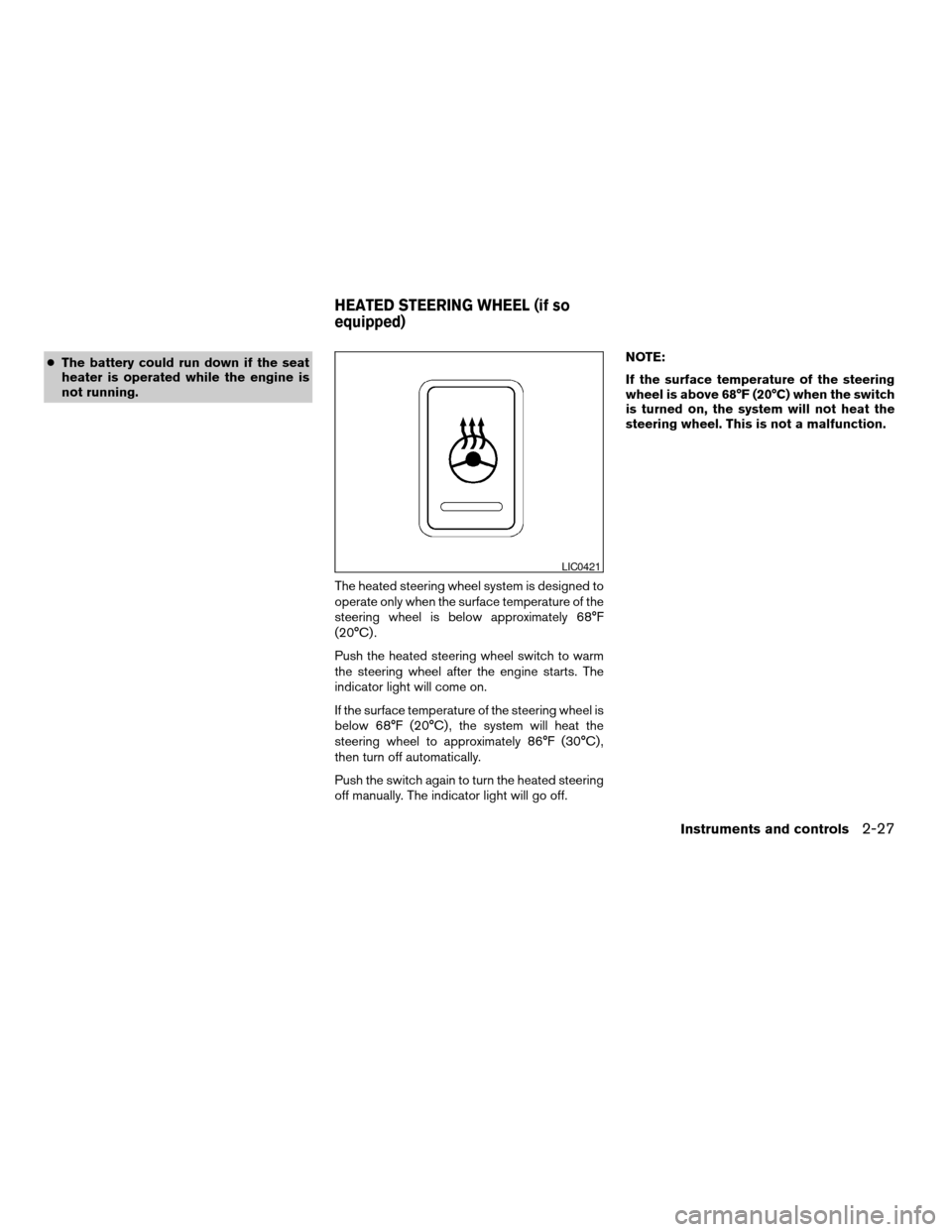
The heated steering wheel system is designed to
operate only when the surface temperature of the
steering wheel is below approximately 68°F
(20°C) .
Push the heated steering wheel switch to warm
the steering wheel after the engine starts. The
indicator light will come on.
If the surface temperature of the steering wheel is
below 68°F (20°C) , the system will heat the
steering wheel to approximately 86°F (30°C) ,
then turn off automatically.
Push the switch again to turn the heated steering
off manually. The indicator light will go off.NOTE:
If the surface temperature of the steering
wheel is above 68°F (20°C) when the switch
is turned on, the system will not heat the
steering wheel. This is not a malfunction.
LIC0421
HEATED STEERING WHEEL (if so
equipped)
Instruments and controls2-27
ZREVIEW COPYÐ2006 Maxima(max)
Owners ManualÐUSA_English(nna)
06/22/05Ðtbrooks
X
Page 117 of 312

3 Pre-driving checks and adjustments
Keys .............................................3-2
Nissan vehicle immobilizer system keys...........3-2
Doors............................................3-3
Locking with key................................3-3
Locking with inside lock knob....................3-4
Locking with power door lock switch.............3-4
Child safety rear door lock.......................3-5
Remote keyless entry system.......................3-5
How to use remote keyless entry system..........3-6
Hood............................................3-9
Trunk lid..........................................3-9
Opener operation...............................3-9
Secondary trunk lid release
(4-seat model only)............................3-10
Interior trunk lid release........................3-11
Fuel-filler door...................................3-11Opener operation..............................3-11
Fuel filler cap..................................3-12
Tilting telescopic steering column..................3-13
Automatic operation (if so equipped).............3-13
Manual operation..............................3-14
Sun visors.......................................3-15
Vanity mirrors.................................3-15
Mirrors..........................................3-16
Automatic anti-glare rearview mirror.............3-16
Outside mirrors...............................3-17
Automatic drive positioner (if so equipped)..........3-19
Memory storage function.......................3-19
Entry/exit function
(for automatic transmission model)..............3-21
System operation..............................3-22
ZREVIEW COPYÐ2006 Maxima(max)
Owners ManualÐUSA_English(nna)
06/23/05Ðtbrooks
X
Page 129 of 312
cTighten until the fuel filler cap clicks.
Failure to tighten the fuel filler cap
properly may cause the
mal-
function indicator light (MIL) to illumi-
nate. If the
light illuminates be-
cause the fuel filler cap is loose or
missing, tighten or install the cap and
continue to drive the vehicle.
The
light should turn off after a
few driving trips. If the
light
does not turn off after a few driving
trips, have the vehicle inspected by a
NISSAN dealer.
cFor additional information, see the
“Malfunction indicator light (MIL)” in
the “Instruments and Controls” section
earlier in this manual.
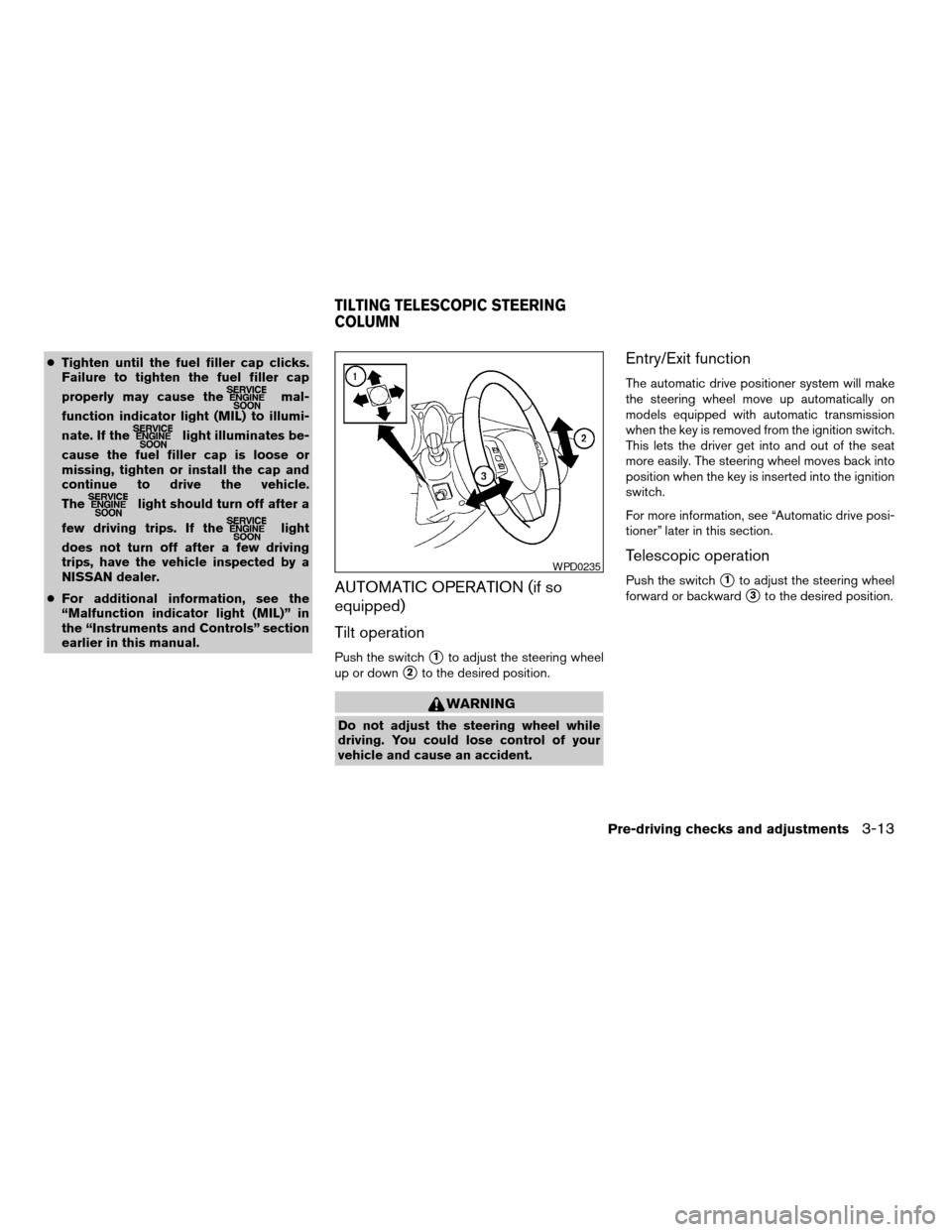
AUTOMATIC OPERATION (if so
equipped)
Tilt operation
Push the switchs1to adjust the steering wheel
up or down
s2to the desired position.
WARNING
Do not adjust the steering wheel while
driving. You could lose control of your
vehicle and cause an accident.
Entry/Exit function
The automatic drive positioner system will make
the steering wheel move up automatically on
models equipped with automatic transmission
when the key is removed from the ignition switch.
This lets the driver get into and out of the seat
more easily. The steering wheel moves back into
position when the key is inserted into the ignition
switch.
For more information, see “Automatic drive posi-
tioner” later in this section.
Telescopic operation
Push the switchs1to adjust the steering wheel
forward or backward
s3to the desired position.
WPD0235
TILTING TELESCOPIC STEERING
COLUMN
Pre-driving checks and adjustments3-13
ZREVIEW COPYÐ2006 Maxima(max)
Owners ManualÐUSA_English(nna)
06/22/05Ðtbrooks
X
Page 130 of 312
WARNING
Do not adjust the steering wheel any
closer to you than is necessary for proper
steering operation and comfort. The driv-
er’s air bag inflates with great force. If you
are unrestrained, leaning forward, sitting
sideways or out of position in any way, you
are at greater risk of injury or death in a
crash. You may also receive serious or
fatal injuries from the air bag if you are up
against it when it inflates. Always sit back
against the seatback and as far away as
practical from the steering wheel. Always
use the seat belts.
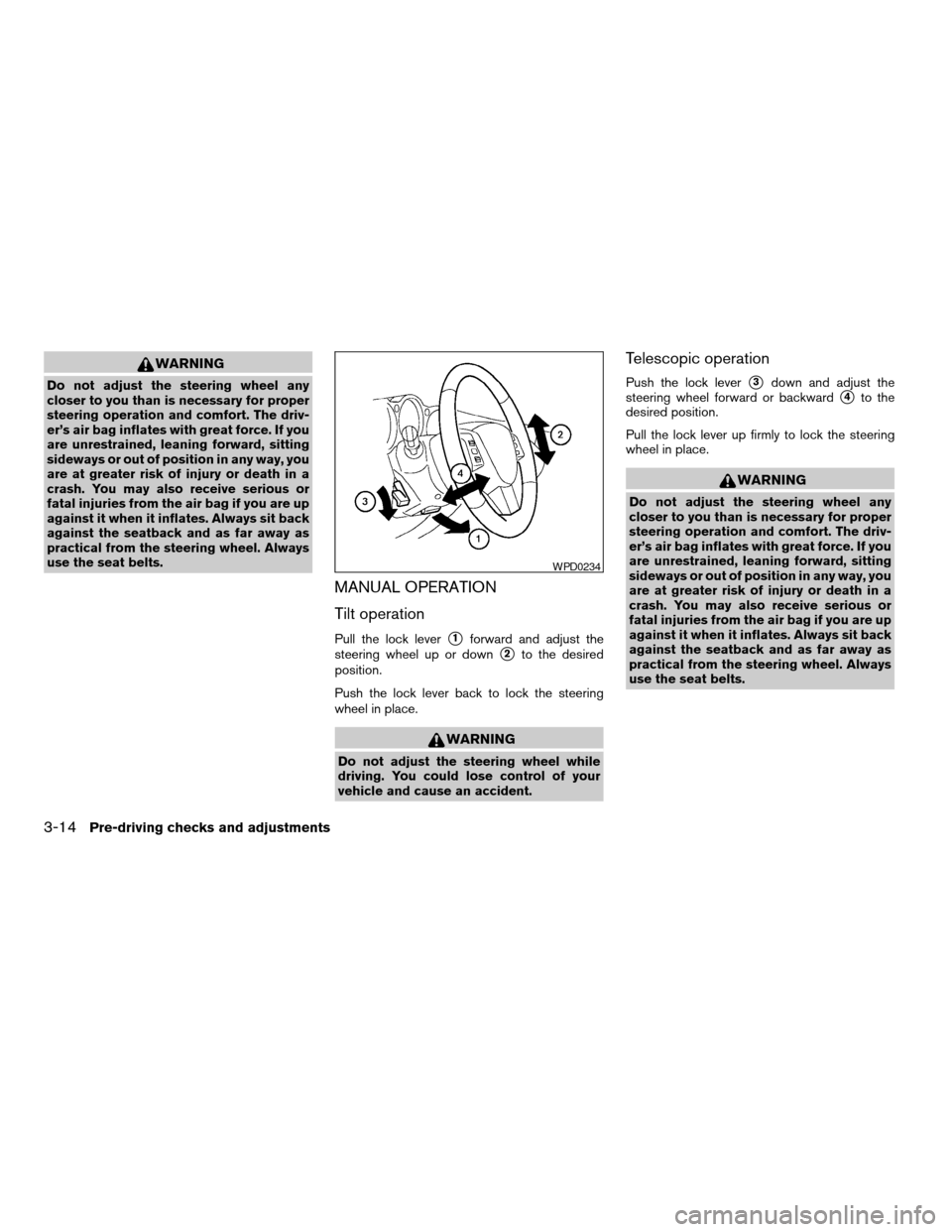
MANUAL OPERATION
Tilt operation
Pull the lock levers1forward and adjust the
steering wheel up or down
s2to the desired
position.
Push the lock lever back to lock the steering
wheel in place.
WARNING
Do not adjust the steering wheel while
driving. You could lose control of your
vehicle and cause an accident.
Telescopic operation
Push the lock levers3down and adjust the
steering wheel forward or backward
s4to the
desired position.
Pull the lock lever up firmly to lock the steering
wheel in place.
WARNING
Do not adjust the steering wheel any
closer to you than is necessary for proper
steering operation and comfort. The driv-
er’s air bag inflates with great force. If you
are unrestrained, leaning forward, sitting
sideways or out of position in any way, you
are at greater risk of injury or death in a
crash. You may also receive serious or
fatal injuries from the air bag if you are up
against it when it inflates. Always sit back
against the seatback and as far away as
practical from the steering wheel. Always
use the seat belts.
WPD0234
3-14Pre-driving checks and adjustments
ZREVIEW COPYÐ2006 Maxima(max)
Owners ManualÐUSA_English(nna)
06/22/05Ðtbrooks
X