2006 NISSAN ARMADA warning
[x] Cancel search: warningPage 86 of 352
Other supplemental front air bag precau-
tions
WARNING
cDo not place any objects on the steer-
ing wheel pad or on the instrument
panel. Also, do not place any objects
between any occupant and the steering
wheel or instrument panel. Such ob-
jects may become dangerous projec-
tiles and cause injury if the supplemen-
tal front air bag inflates.
cImmediately after inflation, several
front air bag system components will be
hot. Do not touch them; you may se-
verely burn yourself.
cNo unauthorized changes should be
made to any components or wiring of
the supplemental air bag system. This is
to prevent accidental inflation of the
supplemental air bag or damage to the
supplemental air bag system.
cDo not make unauthorized changes to
your vehicle’s electrical system, sus-
pension system or front end structure.
This could affect proper operation of
the supplemental front air bag system.cTampering with the supplemental front
air bag system may result in serious
personal injury. Tampering includes
changes to the steering wheel and the
instrument panel assembly by placing
material over the steering wheel pad
and above the instrument panel or by
installing additional trim material
around the air bag system.
cModifying or tampering with the front
passenger seat may result in serious
personal injury. For example, do not
change the front seats by placing mate-
rial on the seat cushion or by installing
additional trim material, such as seat
covers, on the seat that are not specifi-
cally designed to assure proper air bag
operation. Additionally, do not stow any
objects under the front passenger seat
or the seat cushion and seatback. Such
objects may interfere with the proper
operation of the occupant classifica-
tion system (pressure sensor) .
cNo unauthorized changes should be
made to any components or wiring of
the seat belt system. This may affect the
supplemental front air bag system.
Tampering with the seat belt system
may result in serious personal injury.cWork on and around the supplemental
front air bag system should be done by
a NISSAN dealer. Installation of electri-
cal equipment should also be done by a
NISSAN dealer. The Supplemental Re-
straint System (SRS) wiring should not
be modified or disconnected. Unautho-
rized electrical test equipment and
probing devices should not be used on
the air bag system.
cA cracked windshield should be re-
placed immediately by a qualified re-
pair facility. A cracked windshield could
affect the function of the supplemental
air bag system.
cThe SRS wiring harness connectors are
yellow and orange for easy
identification.
When selling your vehicle, we request that you
inform the buyer about the supplemental front air
bag system and guide the buyer to the appropri-
ate sections in this Owner’s Manual.
1-68Safety—Seats, seat belts and supplemental restraint system
ZREVIEW COPYÐ2006 Armada(wzw)
Owners ManualÐUSA_English(nna)
06/15/05Ðdebbie
X
Page 87 of 352

Supplemental side-impact air bag (if
so equipped) and curtain side-impact
and rollover air bags system
The supplemental side-impact air bags are lo-
cated in the outside of the seatback of the front
seats. The supplemental curtain side-impact and
rollover air bags are located in the side roof rails
in all 3 rows. These systems are designed to meet
voluntary guidelines to help reduce the risk of
injury to out-of-position occupants.However,
all of the information, cautions and warn-
ings in this manual still apply and must be
followed.The supplemental side air bags and
curtain side-impact and rollover air bags are de-signed to inflate in higher severity side collisions,
although they may inflate if the forces in another
type of collision are similar to those of a higher
severity side impact. They are designed to inflate
on the side where the vehicle is impacted. They
may not inflate in certain side collisions.
Curtain side-impact and rollover air bags are also
designed to inflate in certain types of rollover
collisions or near rollovers.
Vehicle damage (or lack of it) is not always an
indication of proper supplemental side air bag
and curtain side-impact and rollover air bag op-
eration.
When the supplemental side air bag and curtain
air bags inflate, a fairly loud noise may be heard,
followed by release of smoke. This smoke is not
harmful and does not indicate a fire. Care should
be taken not to inhale it, as it may cause irritation
and choking. Those with a history of a breathing
condition should get fresh air promptly.
Supplemental side air bags, along with the use of
seat belts, help to cushion the impact force on
the chest of the front occupants. Curtain side-
impact and rollover air bags help to cushion the
impact force to the head of occupants in the front
and rear outboard seating positions in all rows.
They can help save lives and reduce serious
injuries. However, an inflating side air bag, or
curtain air bag may cause abrasions or otherinjuries. Supplemental side air bags and curtain
side-impact and rollover air bags do not provide
restraint to the lower body.
The seat belts should be correctly worn and the
driver and passenger seated upright as far as
practical away from the supplemental side air
bag. Rear seat passengers should be seated as
far away as practical from the door finishers and
side roof rails. The side air bags and curtain air
bag inflate quickly in order to help protect the
occupants. Because of this, the force of the side
air bag and curtain air bag inflating can increase
the risk of injury if the occupant is too close to, or
is against, these air bag modules during inflation.
The side air bag will deflate quickly after the
collision is over.
The curtain side-impact and rollover air bag will
remain inflated for a short time.
The supplemental side air bags and curtain
side-impact and rollover air bags operate
only when the ignition switch is in the ON
or START positions.
After turning the ignition key to the ON
position, the supplemental air bag warning
light illuminates. The supplemental air bag
warning light will turn off after about 7
seconds if the system is operational.
WRS0381
Safety—Seats, seat belts and supplemental restraint system1-69
ZREVIEW COPYÐ2006 Armada(wzw)
Owners ManualÐUSA_English(nna)
06/15/05Ðdebbie
X
Page 88 of 352
WARNING
cDo not place any objects near the seat-
back of the front seats. Also, do not
place any objects (an umbrella, bag,
etc.) between the front door finisher
and the front seat. Such objects may
become dangerous projectiles and
cause injury if the supplemental side air
bag inflates.
cRight after inflation, several side air bag
and curtain side-impact and rollover air
bag system components will be hot. Do
not touch them; you may severely burn
yourself.
cNo unauthorized changes should be
made to any components or wiring of
the side air bag and curtain air bag
system. This is to prevent accidental
inflation of the side air bag and curtain
air bag or damage to the side air bag
and curtain air bag system.
cDo not make unauthorized changes to
your vehicle’s electrical system, sus-
pension system or side panel. This
could affect proper operation of the
supplemental curtain air bag system.cTampering with the supplemental side
air bag system may result in serious
personal injury. For example, do not
change the front seats by placing mate-
rial near the seatbacks or by installing
additional trim material, such as seat
covers, around the side air bag.
cWork around and on the curtain air bag
system should be done by a NISSAN
dealer. Installation of electrical equip-
ment should also be done by a NISSAN
dealer. The SRS wiring harnesses*
should not be modified or discon-
nected. Unauthorized electrical test
equipment and probing devices should
not be used on the side air bag or cur-
tain air bag system.
* The SRS wiring harness or connectors are
yellow or orange for easy identification.
When selling your vehicle, we request that you
inform the buyer about the supplemental side air
bag and curtain air bag system and guide the
buyer to the appropriate sections in this Owner’s
Manual.
Pre-tensioner seat belt system (Front
seats)
WARNING
cThe pre-tensioner seat belt cannot be
reused after activation. It must be re-
placed together with the retractor and
buckle as a unit.
cIf the vehicle becomes involved in a
frontal collision but the pre-tensioner is
not activated, be sure to have the pre-
tensioner system checked and, if nec-
essary, replaced by your NISSAN
dealer.
cNo unauthorized changes should be
made to any components or wiring of
the pre-tensioner seat belt system. This
is to prevent accidental activation of
the pre-tensioner seat belt or damage
to the pre-tensioner seat belt operation.
Tampering with the pre-tensioner seat
belt system may result in serious per-
sonal injury.
1-70Safety—Seats, seat belts and supplemental restraint system
ZREVIEW COPYÐ2006 Armada(wzw)
Owners ManualÐUSA_English(nna)
06/15/05Ðdebbie
X
Page 89 of 352
cWork around and on the pre-tensioner
system should be done by a NISSAN
dealer. Installation of electrical equip-
ment should also be done by a NISSAN
dealer. Unauthorized electrical test
equipment and probing devices should
not be used on the pre-tensioner seat
belt system.
cIf you need to dispose of the pre-
tensioner or scrap the vehicle, contact a
NISSAN dealer. Correct pre-tensioner
disposal procedures are set forth in the
appropriate NISSAN Service Manual.
Incorrect disposal procedures could
cause personal injury.
The front seat pre-tensioner seat belt system
activates in conjunction with the front supple-
mental air bag systems. Working with the seat
belt retractor, it helps tighten the seat belt when
the vehicle becomes involved in certain types of
collisions, helping to restrain front seat occu-
pants.
The pre-tensioner is encased with the seat belt’s
retractor. These seat belts are used the same as
conventional seat belts.When the pre-tensioner seat belt activates,
smoke is released and a loud noise may be heard.
This smoke is not harmful and does not indicate a
fire. Care should be taken not to inhale it, as it may
cause irritation and choking. Those with a history
of a breathing condition should get fresh air
promptly.
After the pre-tensioner seat belts have activated,
load limiters allow the seat belt to release web-
bing (if necessary) to reduce forces against the
chest.
If any abnormality occurs in the pre-tensioner
system, the supplemental air bag warning
light
will not come on, will flash intermit-
tently or will turn on for 7 seconds and remain on
after the ignition key has been turned to the ON or
START position. In this case, the pre-tensioner
seat belt may not function properly. They must be
checked and repaired. Take your vehicle to the
nearest NISSAN dealer.
When selling your vehicle, we request that you
inform the buyer about the pre-tensioner seat belt
system and guide the buyer to the appropriate
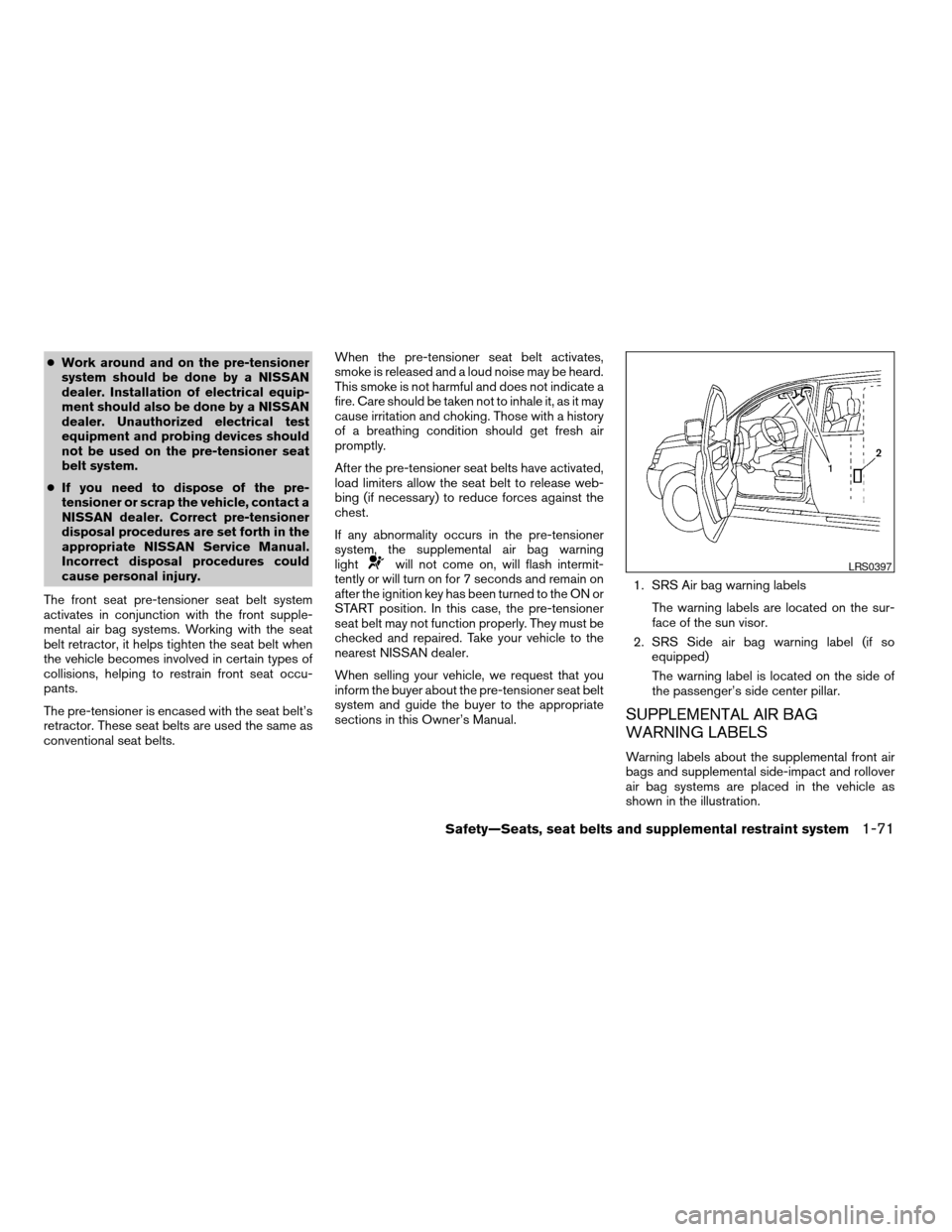
sections in this Owner’s Manual.1. SRS Air bag warning labels
The warning labels are located on the sur-
face of the sun visor.
2. SRS Side air bag warning label (if so
equipped)
The warning label is located on the side of
the passenger’s side center pillar.
SUPPLEMENTAL AIR BAG
WARNING LABELS
Warning labels about the supplemental front air
bags and supplemental side-impact and rollover
air bag systems are placed in the vehicle as
shown in the illustration.
LRS0397
Safety—Seats, seat belts and supplemental restraint system1-71
ZREVIEW COPYÐ2006 Armada(wzw)
Owners ManualÐUSA_English(nna)
06/15/05Ðdebbie
X
Page 90 of 352
SUPPLEMENTAL AIR BAG
WARNING LIGHT
The supplemental air bag warning light,
displayingin the instrument panel, moni-
tors the circuits of the supplemental front air bag,
supplemental side-impact air bag and curtain
side-impact and rollover air bag and pre-
tensioner seat belt systems. The circuits moni-
tored by the supplemental air bag warning light
are the diagnosis sensor unit, crash zone sensor,
satellite sensors, rollover sensor, front air bag
modules, side air bag modules, curtain air bag
modules, pre-tensioner seat belts and all related
wiring.When the ignition key is in the ON or START
position, the supplemental air bag warning light
illuminates for about 7 seconds and then turns
off. This means the system is operational.
If any of the following conditions occur, the
supplemental front air bag, supplemental side air
bag, curtain air bag and pre-tensioner seat belt
systems need servicing:
cThe supplemental air bag warning light re-
mains on after approximately 7 seconds.
cThe supplemental air bag warning light
flashes intermittently.
cThe supplemental air bag warning light does
not come on at all.
Under these conditions, the supplemental front
air bag, supplemental side air bags and curtain air
bag or pre-tensioner seat belt systems may not
operate properly. It must be checked and re-
paired. Take your vehicle to the nearest NISSAN
dealer.
WARNING
If the supplemental air bag warning light
is on, it could mean that the supplemental
front air bag, supplemental side air bag,
curtain air bag systems and/or pre-
tensioner seat belt systems will not oper-
ate in an accident. To help avoid injury to
yourself or others, have your vehicle
checked by a NISSAN dealer as soon as
possible.
Repair and replacement procedure
The supplemental front air bags, supplemental
side air bags, curtain air bags and pre-tensioner
seat belts are designed to inflate on a one-time-
only basis. As a reminder, unless it is damaged,
the supplemental air bag warning light remains
illuminated after inflation has occurred. Repair
and replacement of these supplemental air bag
systems should be done only by a NISSAN
dealer.
When maintenance work is required on the ve-
hicle, the supplemental front air bags, supple-
mental side air bags, curtain air bags, pre-
tensioner seat belts and related parts should be
pointed out to the person performing the mainte-
nance. The ignition key should always be in the
LOCK position when working under the hood or
inside the vehicle.LRS0100
1-72Safety—Seats, seat belts and supplemental restraint system
ZREVIEW COPYÐ2006 Armada(wzw)
Owners ManualÐUSA_English(nna)
06/15/05Ðdebbie
X
Page 91 of 352
WARNING
cOnce a supplemental front air bag,
supplemental side air bag or curtain air
bag has inflated, the air bag module will
not function again and must be re-
placed. Additionally, if any of the
supplemental front air bags inflate, the
activated pre-tensioner seat belts must
also be replaced. The air bag module
and pre-tensioner seat belt system
should be replaced by a NISSAN dealer.
The air bag module and pre-tensioner
seat belt system cannot be repaired.
cThe supplemental front air bag, side air
bag and curtain air bag systems, and
the pre-tensioner seat belt system
should be inspected by a NISSAN
dealer if there is any damage to the
front end or side portion of the vehicle.
cIf you need to dispose of the supple-
mental air bag, pre-tensioner seat belt
system or scrap the vehicle, contact a
NISSAN dealer. Correct supplemental
air bag and pre-tensioner seat belt sys-
tem disposal procedures are set forth in
the appropriate NISSAN Service
Manual. Incorrect disposal procedures
could cause personal injury.
Safety—Seats, seat belts and supplemental restraint system1-73
ZREVIEW COPYÐ2006 Armada(wzw)
Owners ManualÐUSA_English(nna)
06/15/05Ðdebbie
X
Page 92 of 352

2 Instruments and controls
Instrument panel...................................2-2
Meters and gauges................................2-3
Speedometer and odometer.....................2-4
Tachometer....................................2-5
Engine coolant temperature gauge...............2-5
Fuel gauge....................................2-6
Engine oil pressure gauge.......................2-6
Voltmeter......................................2-7
Automatic transmission fluid temperature
gauge (if so equipped)..........................2-7
Compass and outside temperature display...........2-8
Outside temperature display.....................2-8
Compass display...............................2-9
Warning/indicator lights and audible reminders......2-12
Checking bulbs...............................2-12
Warning lights................................2-13
Indicator lights................................2-17
Audible reminders.............................2-19
Security systems.................................2-20
Vehicle security system.........................2-20
Nissan vehicle immobilizer system...............2-21
Windshield wiper and washer switch...............2-22
Switch operation..............................2-22Rear window wiper and washer switch..............2-23
Rear window and outside mirror defroster switch.....2-24
Headlight and turn signal switch....................2-24
Headlight control switch........................2-24
Daytime running light system (Canada only)......2-26
Instrument brightness control...................2-27
Turn signal switch.............................2-27
Fog light switch (if so equipped)................2-27
Hazard warning flasher switch.....................2-28
Horn............................................2-28
Heated seat (if so equipped).......................2-29
Vehicle dynamic control (VDC) off switch............2-29
Rear sonar system off switch......................2-30
Tow mode switch.................................2-30
Power outlet.....................................2-31
Cigarette lighter..................................2-32
Storage.........................................2-33
Instrument panel storage trays..................2-33
Console box..................................2-33
Glove box....................................2-35
Sunglasses holder.............................2-35
Map pockets..................................2-36
Seatback pocket..............................2-36
ZREVIEW COPYÐ2006 Armada(wzw)
Owners ManualÐUSA_English(nna)
06/15/05Ðdebbie
X
Page 94 of 352

1. Ventilators (P. 4-14)
2. Instrument brightness control (P. 2-27)
3. Headlight/fog light (if so equipped)/turn
signal switch (P. 2-24)
4. Steering wheel switch for audio control
(P. 4-31)
5. Driver supplemental air bag/horn
(P. 1-57, P. 2-28)
6. Meters, gauges and warning/indicator
lights (P. 2-3, 2-12)
7. Cruise control main/set switches
(P. 5-15)
8. Windshield wiper/washer switch and
rear window wiper/washer switch
(P. 2-22, P. 2-23)
9. Ignition switch (P. 5-7)
10. Navigation system* (if so equipped)
(P. 4-2)
11. Navigation system* controls
(if so equipped) (P. 4-2)
12. Audio system controls (P. 4-18)
13. Front passenger supplemental air bag
(P. 1-57)
14. Glove box (P. 2-35)
15. Climate controls (P. 4-15)
16. Aux jack (if so equipped) (P. 4-30)
WIC0851
INSTRUMENT PANEL
2-2Instruments and controls
ZREVIEW COPYÐ2006 Armada(wzw)
Owners ManualÐUSA_English(nna)
06/15/05Ðdebbie
X