2006 NISSAN ARMADA 4WD
[x] Cancel search: 4WDPage 237 of 352
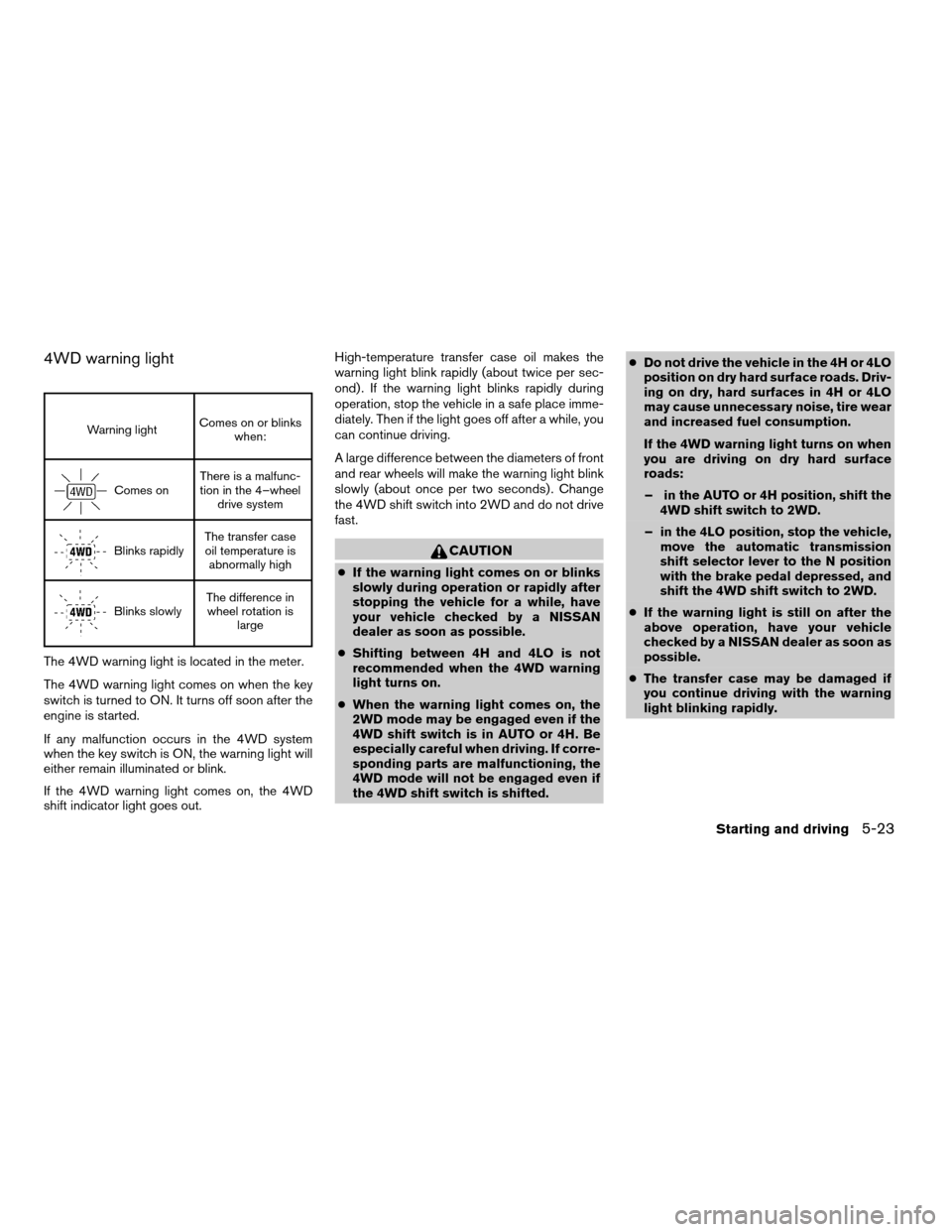
4WD warning light
Warning lightComes on or blinks
when:
Comes onThere is a malfunc-
tion in the 4–wheel
drive system
Blinks rapidlyThe transfer case
oil temperature is
abnormally high
Blinks slowlyThe difference in
wheel rotation is
large
The 4WD warning light is located in the meter.
The 4WD warning light comes on when the key
switch is turned to ON. It turns off soon after the
engine is started.
If any malfunction occurs in the 4WD system
when the key switch is ON, the warning light will
either remain illuminated or blink.
If the 4WD warning light comes on, the 4WD
shift indicator light goes out.High-temperature transfer case oil makes the
warning light blink rapidly (about twice per sec-
ond) . If the warning light blinks rapidly during
operation, stop the vehicle in a safe place imme-
diately. Then if the light goes off after a while, you
can continue driving.
A large difference between the diameters of front
and rear wheels will make the warning light blink
slowly (about once per two seconds) . Change
the 4WD shift switch into 2WD and do not drive
fast.
CAUTION
cIf the warning light comes on or blinks
slowly during operation or rapidly after
stopping the vehicle for a while, have
your vehicle checked by a NISSAN
dealer as soon as possible.
cShifting between 4H and 4LO is not
recommended when the 4WD warning
light turns on.
cWhen the warning light comes on, the
2WD mode may be engaged even if the
4WD shift switch is in AUTO or 4H. Be
especially careful when driving. If corre-
sponding parts are malfunctioning, the
4WD mode will not be engaged even if
the 4WD shift switch is shifted.cDo not drive the vehicle in the 4H or 4LO
position on dry hard surface roads. Driv-
ing on dry, hard surfaces in 4H or 4LO
may cause unnecessary noise, tire wear
and increased fuel consumption.
If the 4WD warning light turns on when
you are driving on dry hard surface
roads:
– in the AUTO or 4H position, shift the
4WD shift switch to 2WD.
– in the 4LO position, stop the vehicle,
move the automatic transmission
shift selector lever to the N position
with the brake pedal depressed, and
shift the 4WD shift switch to 2WD.
cIf the warning light is still on after the
above operation, have your vehicle
checked by a NISSAN dealer as soon as
possible.
cThe transfer case may be damaged if
you continue driving with the warning
light blinking rapidly.
Starting and driving5-23
ZREVIEW COPYÐ2006 Armada(wzw)
Owners ManualÐUSA_English(nna)
06/16/05Ðdebbie
X
Page 241 of 352
cWhen installing a spare tire, make sure
it is the proper size and type as speci-
fied on the Tire and Loading Informa-
tion label. For tire placard location in-
formation, refer to “Tire and Loading
Information label” in the “Technical and
consumer information” section of this
manual.
cRefer to “Wheels and tires” in the
“Maintenance and do-it-yourself” sec-
tion of this manual.When accelerating or driving on slippery sur-
faces, the tires may spin or slide. With the Vehicle
Dynamic Control (VDC) system, sensors detect
these movements and control the braking and
engine output to help improve vehicle stability.
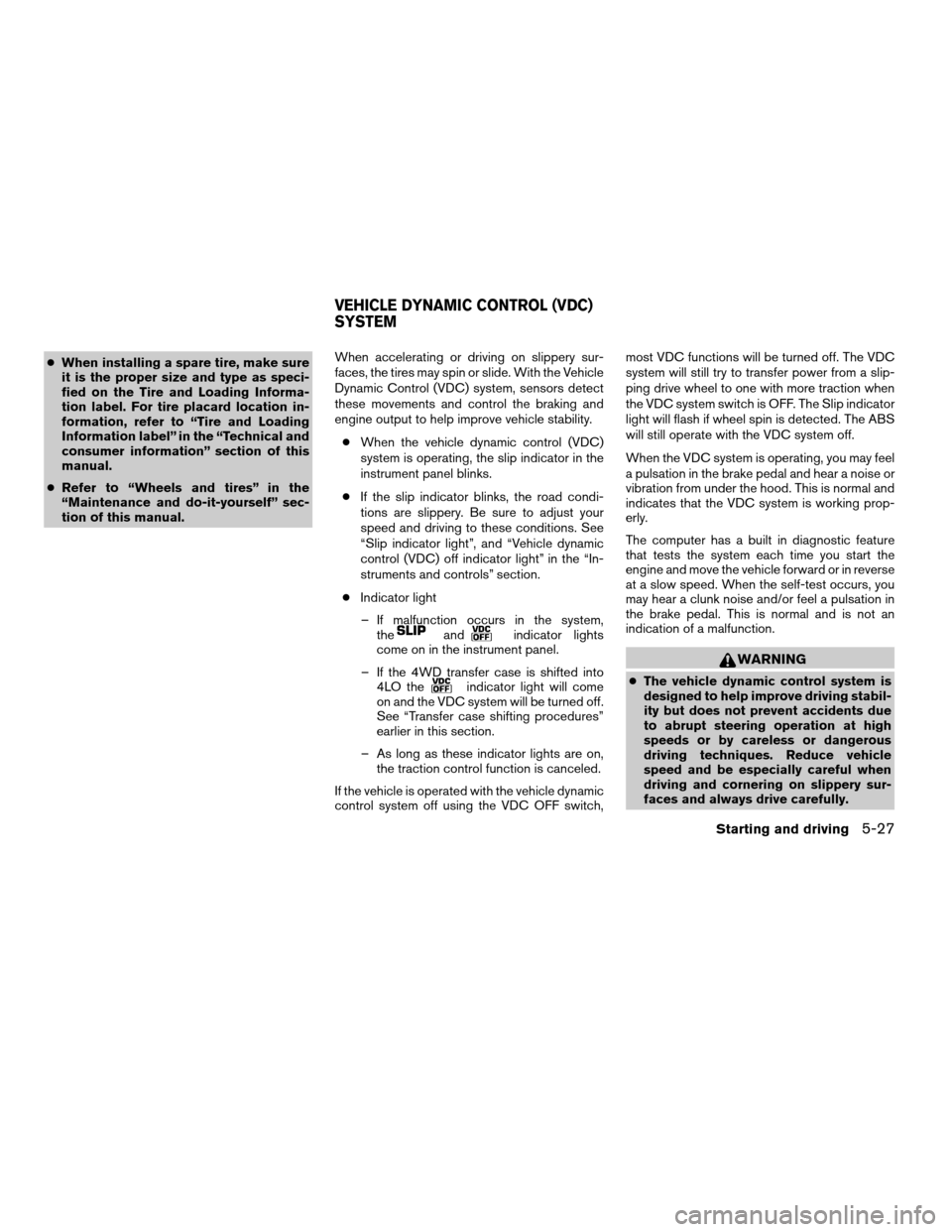
cWhen the vehicle dynamic control (VDC)
system is operating, the slip indicator in the
instrument panel blinks.
cIf the slip indicator blinks, the road condi-
tions are slippery. Be sure to adjust your
speed and driving to these conditions. See
“Slip indicator light”, and “Vehicle dynamic
control (VDC) off indicator light” in the “In-
struments and controls” section.
cIndicator light
– If malfunction occurs in the system,
the
andindicator lights
come on in the instrument panel.
– If the 4WD transfer case is shifted into
4LO the
indicator light will come
on and the VDC system will be turned off.
See “Transfer case shifting procedures”
earlier in this section.
– As long as these indicator lights are on,
the traction control function is canceled.
If the vehicle is operated with the vehicle dynamic
control system off using the VDC OFF switch,most VDC functions will be turned off. The VDC
system will still try to transfer power from a slip-
ping drive wheel to one with more traction when
the VDC system switch is OFF. The Slip indicator
light will flash if wheel spin is detected. The ABS
will still operate with the VDC system off.
When the VDC system is operating, you may feel
a pulsation in the brake pedal and hear a noise or
vibration from under the hood. This is normal and
indicates that the VDC system is working prop-
erly.
The computer has a built in diagnostic feature
that tests the system each time you start the
engine and move the vehicle forward or in reverse
at a slow speed. When the self-test occurs, you
may hear a clunk noise and/or feel a pulsation in
the brake pedal. This is normal and is not an
indication of a malfunction.
WARNING
cThe vehicle dynamic control system is
designed to help improve driving stabil-
ity but does not prevent accidents due
to abrupt steering operation at high
speeds or by careless or dangerous
driving techniques. Reduce vehicle
speed and be especially careful when
driving and cornering on slippery sur-
faces and always drive carefully.
VEHICLE DYNAMIC CONTROL (VDC)
SYSTEM
Starting and driving5-27
ZREVIEW COPYÐ2006 Armada(wzw)
Owners ManualÐUSA_English(nna)
06/16/05Ðdebbie
X
Page 259 of 352
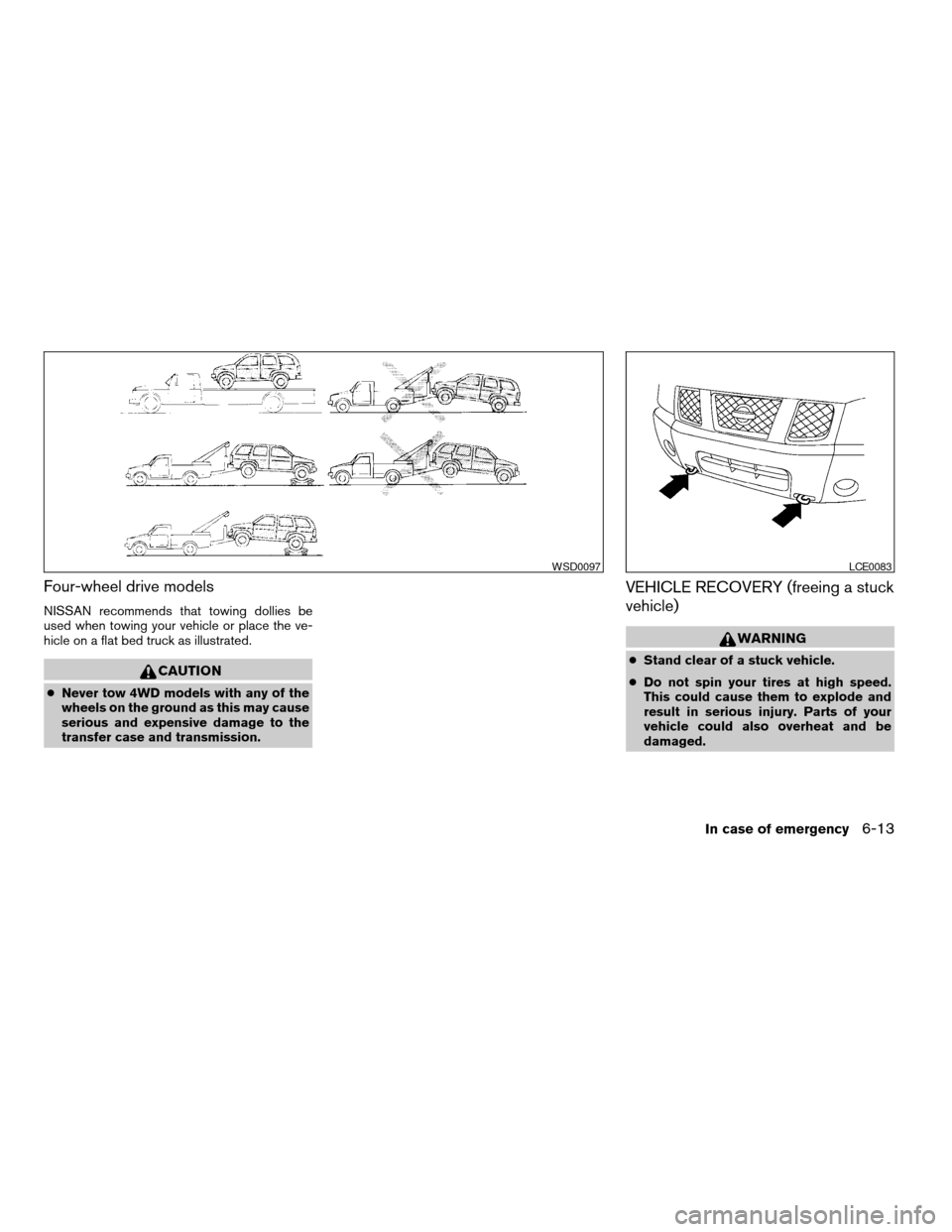
Four-wheel drive models
NISSAN recommends that towing dollies be
used when towing your vehicle or place the ve-
hicle on a flat bed truck as illustrated.
CAUTION
cNever tow 4WD models with any of the
wheels on the ground as this may cause
serious and expensive damage to the
transfer case and transmission.
VEHICLE RECOVERY (freeing a stuck
vehicle)
WARNING
cStand clear of a stuck vehicle.
cDo not spin your tires at high speed.
This could cause them to explode and
result in serious injury. Parts of your
vehicle could also overheat and be
damaged.
WSD0097LCE0083
In case of emergency6-13
ZREVIEW COPYÐ2006 Armada(wzw)
Owners ManualÐUSA_English(nna)
06/16/05Ðdebbie
X
Page 302 of 352

TIRE LABELING
Federal law requires tire manufacturers to
place standardized information on the
sidewall of all tires. This information iden-
tifies and describes the fundamental
characteristics of the tire and also pro-
vides the tire identification number (TIN)
for safety standard certification. The TIN
can be used to identify the tire in case of a
recall.
s1Tire size (example: P215/65R15 95H)
1. P: The9P9indicates the tire is de-
signed for passenger vehicles.
2. Three-digit number: This number
gives the width in millimeters of the
tire from sidewall edge to sidewall
edge.
3. Two-digit number: This number,
known as the aspect ratio, gives the
tire’s ratio of height to width.
4. R: The9R9stands for radial.5. Two-digit number: This number is the
wheel or rim diameter in inches.
6. Two- or three-digit number: This
number is the tire’s load index. It is a
measurement of how much weight
each tire can support. You may not
find this information on all tires be-
cause it is not required by law.
7. Tire speed rating. You should not
drive the vehicle faster than the tire
speed rating.
WDI0394WDI0395
8-36Maintenance and do-it-yourself
ZREVIEW COPYÐ2006 Armada(wzw)
Owners ManualÐUSA_English(nna)
06/16/05Ðdebbie
X
Page 316 of 352

WHEELS AND TIRES
Wheels
17 x 7.5J
18 x 8.0J
Tires
P285/70R17
P265/70R18
Spare tire Full size
DIMENSIONS AND WEIGHTS
Overall length in (mm) 206.9(5,255)
Overall width in (mm) 78.8(2,001)
Overall height
2wd with roof rack in (mm) 77.8(1,977)
4wd with roof rack in (mm) 78.7(1,998)
2wd without roof rack in (mm) 75.7(1,922)
4wd without roof rack in (mm) 76.5(1,944)
Front tread
17 inch tire in (mm) 67.5(1,715)
18 inch tire in (mm) 67.9(1,725)
Rear tread
17 inch tire in (mm) 67.5(1,715)
18 inch tire in (mm) 67.9(1,725)
Wheelbase in (mm) 123.2(3,130)
Gross vehicle weight
ratinglb (kg)
See the “F.M.V.S.S.
certification label” on the
center pillar between the
driver’s side front and
side doors. Gross axle weight rating
Front lb (kg)
Rear lb (kg)
9-8Technical and consumer information
ZREVIEW COPYÐ2006 Armada(wzw)
Owners ManualÐUSA_English(nna)
06/16/05Ðdebbie
X
Page 325 of 352
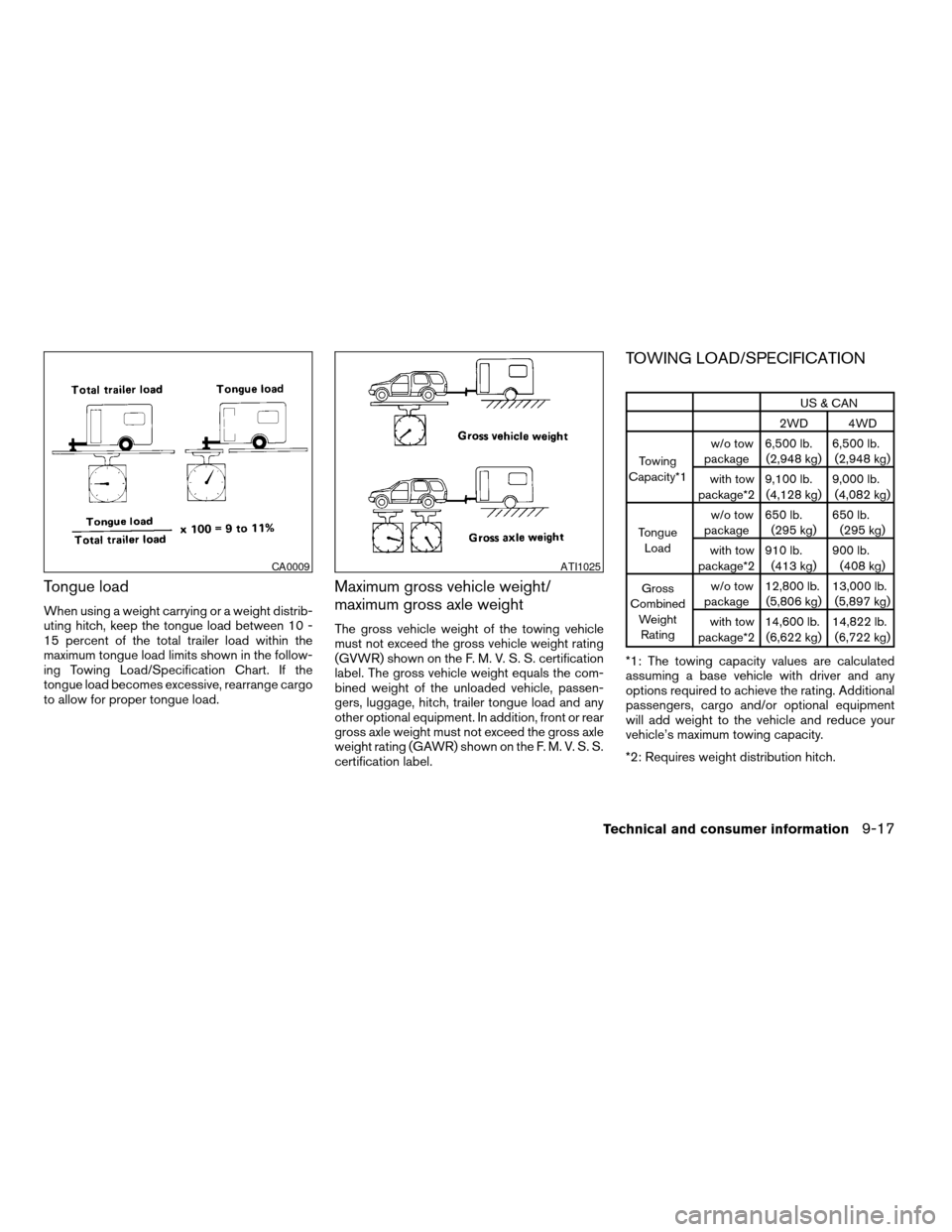
Tongue load
When using a weight carrying or a weight distrib-
uting hitch, keep the tongue load between 10 -
15 percent of the total trailer load within the
maximum tongue load limits shown in the follow-
ing Towing Load/Specification Chart. If the
tongue load becomes excessive, rearrange cargo
to allow for proper tongue load.
Maximum gross vehicle weight/
maximum gross axle weight
The gross vehicle weight of the towing vehicle
must not exceed the gross vehicle weight rating
(GVWR) shown on the F. M. V. S. S. certification
label. The gross vehicle weight equals the com-
bined weight of the unloaded vehicle, passen-
gers, luggage, hitch, trailer tongue load and any
other optional equipment. In addition, front or rear
gross axle weight must not exceed the gross axle
weight rating (GAWR) shown on the F. M. V. S. S.
certification label.
TOWING LOAD/SPECIFICATION
US & CAN
2WD 4WD
Towing
Capacity*1w/o tow
package6,500 lb.
(2,948 kg)6,500 lb.
(2,948 kg)
with tow
package*29,100 lb.
(4,128 kg)9,000 lb.
(4,082 kg)
Tongue
Loadw/o tow
package650 lb.
(295 kg)650 lb.
(295 kg)
with tow
package*2910 lb.
(413 kg)900 lb.
(408 kg)
Gross
Combined
Weight
Ratingw/o tow
package12,800 lb.
(5,806 kg)13,000 lb.
(5,897 kg)
with tow
package*214,600 lb.
(6,622 kg)14,822 lb.
(6,722 kg)
*1: The towing capacity values are calculated
assuming a base vehicle with driver and any
options required to achieve the rating. Additional
passengers, cargo and/or optional equipment
will add weight to the vehicle and reduce your
vehicle’s maximum towing capacity.
*2: Requires weight distribution hitch.
CA0009ATI1025
Technical and consumer information9-17
ZREVIEW COPYÐ2006 Armada(wzw)
Owners ManualÐUSA_English(nna)
06/16/05Ðdebbie
X
Page 339 of 352

10 Index
4WD warning light...............2-15
A
Active head restraint...............1-9
Adjusting pedal position............3-16
Air bag (See supplemental restraint
system).....................1-57
Air bag system
Front (See supplemental front impact air
bag system).................1-64
Air bag warning labels.............1-71
Air bag warning light...........1-72, 2-16
Air cleaner housing filter............8-16
Air conditioner
Air conditioner service...........4-18
Air conditioner specification label.....9-11
Air conditioner system refrigerant and oil
recommendations..............9-6
Heater and air conditioner
controls................4-15, 4-15
Rear seat air conditioner..........4-17
Servicing air conditioner..........4-18
Alarm system
(See vehicle security system).........2-20
Anchor point locations.............1-46
Antenna.....................4-34
Anti-lock brake system (ABS).........5-26
Anti-lock brake warning light..........2-13
Audible reminders................2-19
Audio system..................4-18AM-FM-SAT radio with compact disc (CD)
changer...................4-26
Compact Disc (CD) changer.......4-28
Radio....................4-18
Rear audio controls.............4-33
Steering wheel audio control switch. . . .4-31
Autolight switch.................2-25
Automatic
Automatic drive positioner.........3-20
Automatic power window switch.....2-45
Automatic transmission position indicator
light.....................2-17
Driving with automatic transmission. . . .5-10
Transmission selector lever lock
release....................5-13
Automatic anti-glare inside mirror.......3-18
Automatic transmission fluid temperature
gauge.......................2-7
AUX jack.....................4-30
B
Battery......................8-13
Charge warning light............2-14
Before starting the engine............5-9
Belts (See drive belts).............8-14
Booster seats..................1-51
Brake
Anti-lock brake system (ABS).......5-26
Brake booster................8-22
Brake fluid..................8-11Brake light (See stop light).........8-27
Brake pedal.................8-21
Brake system................5-25
Brake warning light.............2-13
Brake wear indicators........2-19, 8-21
Parking brake check............8-21
Parking brake operation..........5-14
Self-adjusting brakes............8-21
Break-in schedule................5-17
Brightness control
Instrument panel..............2-27
Brightness/Contrast button..........4-11
Control panel buttons...........4-11
Bulb check/instrument panel..........2-12
Bulb replacement................8-27
C
Capacities and recommended
fuel/lubricants...................9-2
Captain’s chair adjustment (2nd row)......1-5
Car phone or CB radio.............4-43
Cargo light...................2-51
Cargo (See vehicle loading information) . . .9-12
CD care and cleaning.............4-31
CD changer (See audio system)........4-28
Child restraint with top tether strap......1-45
Child restraints.......1-17, 1-18, 1-25, 1-43
Precautions on child restraints . . .1-25, 1-51
Top tether strap anchor point locations . .1-46
Child safety rear door lock............3-5
ZREVIEW COPYÐ2006 Armada(wzw)
Owners ManualÐUSA_English(nna)
06/16/05Ðdebbie
X
Page 345 of 352

Vehicle identification number (VIN)
(Chassis number).................9-9
Vehicle identification number (VIN) plate. . . .9-9
Vehicle loading information...........9-12
Vehicle recovery..............6-13, 7-2
Vehicle security system.............2-20
Vehicle security system
(NISSAN vehicle immobilizer system) ,
engine start..............2-21, 3-2, 5-8
Ventilators....................4-14
Visors......................3-17
Voltmeter.....................2-7
W
Warning
4WD warning light.............2-15
Air bag warning light.........1-72, 2-16
Anti-lock brake warning light........2-13
Battery charge warning light........2-14
Brake warning light.............2-13
Door open warning light..........2-14
Engine oil pressure low/engine coolant
temperature high warning light.......2-14
Hazard warning flasher switch.......2-28
Low fuel warning light...........2-15
Low tire pressure warning light......2-15
Low washer fluid warning light.......2-16
Passenger air bag and status light.....1-66
Seat belt warning light...........2-15
Vehicle security system...........2-20
Warning labels (for SRS)..........1-71
Warning/indicator lights and audible
reminders..................2-12
Warning lights..................2-12Washer switch
Rear window wiper and washer
switches...................2-23
Windshield wiper and washer switch . . .2-22
Weights (See dimensions and weights). . . .9-8
Wheels and tires................8-31
Wheel/tire size..................9-8
When traveling or registering your vehicle in
another country..................9-9
Window washer fluid..............8-12
Windows
Locking passengers’ windows.......2-45
Manual vent windows............2-47
Power rear windows............2-45
Power vent windows............2-46
Power windows...............2-44
Rear power windows............2-45
Windshield wiper and washer switch.....2-22
Wiper
Rear window wiper and washer
switches...................2-23
Windshield wiper and washer switch . . .2-22
Wiper blades................8-18
10-7
ZREVIEW COPYÐ2006 Armada(wzw)
Owners ManualÐUSA_English(nna)
06/16/05Ðdebbie
X