2006 NISSAN ALTIMA cruise control
[x] Cancel search: cruise controlPage 12 of 304
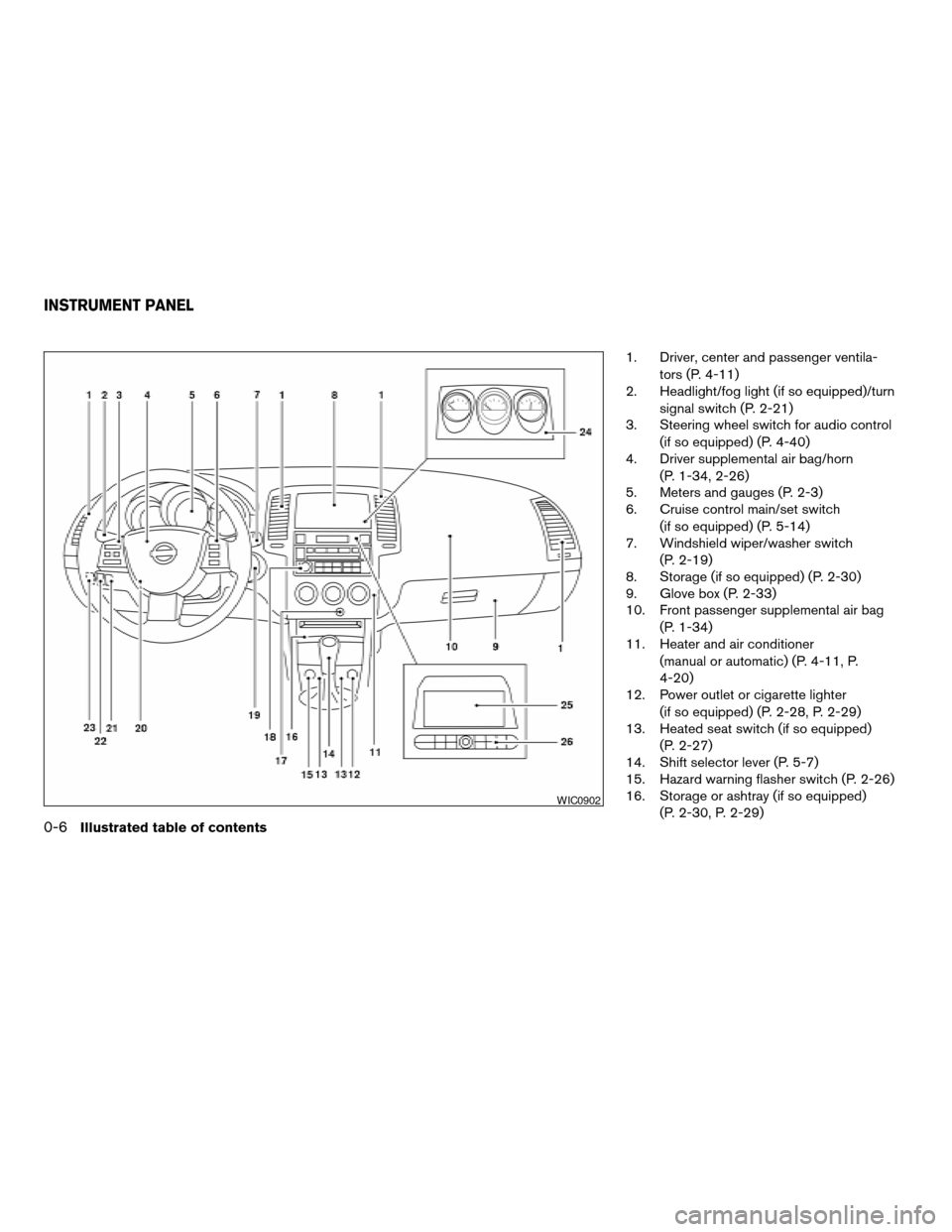
1. Driver, center and passenger ventila-
tors (P. 4-11)
2. Headlight/fog light (if so equipped)/turn
signal switch (P. 2-21)
3. Steering wheel switch for audio control
(if so equipped) (P. 4-40)
4. Driver supplemental air bag/horn
(P. 1-34, 2-26)
5. Meters and gauges (P. 2-3)
6. Cruise control main/set switch
(if so equipped) (P. 5-14)
7. Windshield wiper/washer switch
(P. 2-19)
8. Storage (if so equipped) (P. 2-30)
9. Glove box (P. 2-33)
10. Front passenger supplemental air bag
(P. 1-34)
11. Heater and air conditioner
(manual or automatic) (P. 4-11, P.
4-20)
12. Power outlet or cigarette lighter
(if so equipped) (P. 2-28, P. 2-29)
13. Heated seat switch (if so equipped)
(P. 2-27)
14. Shift selector lever (P. 5-7)
15. Hazard warning flasher switch (P. 2-26)
16. Storage or ashtray (if so equipped)
(P. 2-30, P. 2-29)
WIC0902
INSTRUMENT PANEL
0-6Illustrated table of contents
ZREVIEW COPYÐ2006 Altima(l30)
Owners ManualÐUSA_English(nna)
09/08/05Ðdebbie
X
Page 72 of 304
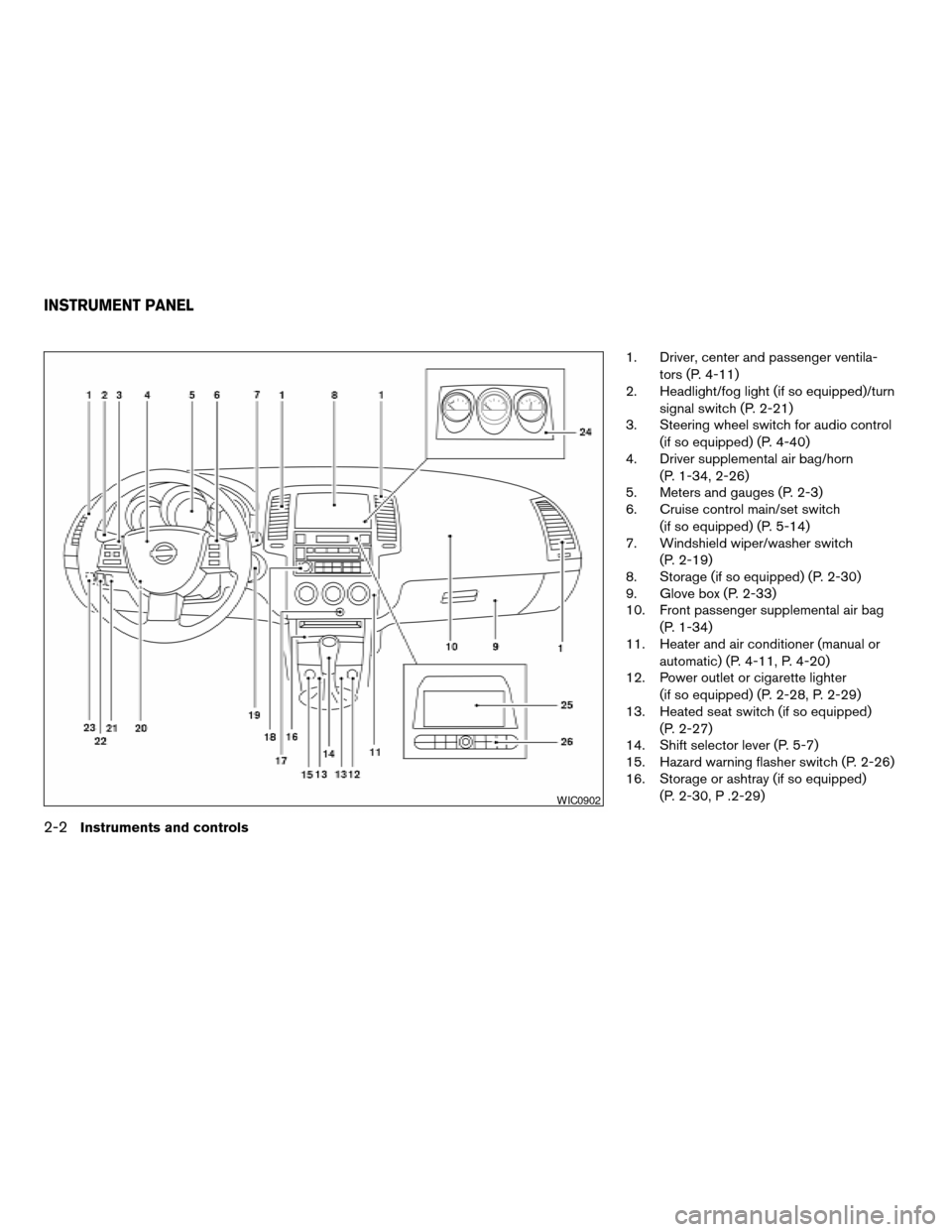
1. Driver, center and passenger ventila-
tors (P. 4-11)
2. Headlight/fog light (if so equipped)/turn
signal switch (P. 2-21)
3. Steering wheel switch for audio control
(if so equipped) (P. 4-40)
4. Driver supplemental air bag/horn
(P. 1-34, 2-26)
5. Meters and gauges (P. 2-3)
6. Cruise control main/set switch
(if so equipped) (P. 5-14)
7. Windshield wiper/washer switch
(P. 2-19)
8. Storage (if so equipped) (P. 2-30)
9. Glove box (P. 2-33)
10. Front passenger supplemental air bag
(P. 1-34)
11. Heater and air conditioner (manual or
automatic) (P. 4-11, P. 4-20)
12. Power outlet or cigarette lighter
(if so equipped) (P. 2-28, P. 2-29)
13. Heated seat switch (if so equipped)
(P. 2-27)
14. Shift selector lever (P. 5-7)
15. Hazard warning flasher switch (P. 2-26)
16. Storage or ashtray (if so equipped)
(P. 2-30, P .2-29)
WIC0902
INSTRUMENT PANEL
2-2Instruments and controls
ZREVIEW COPYÐ2006 Altima(l30)
Owners ManualÐUSA_English(nna)
09/08/05Ðdebbie
X
Page 81 of 304

orAnti-lock brake warning light (if
so equipped)Low windshield washer fluid warning lightFront passenger air bag status light
Automatic transmission check warning light (if
so equipped)Seat belt warning light and chimeHigh beam indicator light (Blue)
orBrake warning lightSupplemental air bag warning lightMalfunction indicator light (MIL)
Charge warning lightTrunk lid open warning lightSlip indicator light (if so equipped)
Door open warning lightAutomatic transmission position indicator light
(A/T models)Traction control system off indicator light (if so
equipped)
Engine oil pressure warning lightCRUISE main switch indicator light (if so
equipped)Turn signal/hazard indicator lights
Low fuel warning lightCruise SET switch indicator light (if so
equipped)
CHECKING BULBS
With all doors closed, apply the parking brake
and turn the ignition key to the ON position
without starting the engine. The following lights
will come on:
,or,,,
The following lights come on briefly and then go
off:
or,,,,
If any light fails to come on, it may indicate
a burned-out bulb or an open circuit in the
electrical system. Have the system repaired
promptly.
WARNING LIGHTS
orAnti-lock brake
warning light (if so
equipped)
If the light comes on while the engine is running,
it may indicate the anti-lock brake system is not
functioning properly. Have the system checked
by a NISSAN dealer.
WARNING/INDICATOR LIGHTS AND
AUDIBLE REMINDERS
Instruments and controls2-11
ZREVIEW COPYÐ2006 Altima(l30)
Owners ManualÐUSA_English(nna)
09/08/05Ðdebbie
X
Page 84 of 304

Trunk lid open warning light
This light comes on when the trunk lid is not
securely closed while the ignition key is in the ON
position.
INDICATOR LIGHTS
Automatic transmission
position indicator light (A/T
models)
When the ignition key is turned to the ON posi-
tion, this indicator light shows the automatic
transmission selector lever position. See “Driving
the vehicle” in the “Starting and driving” section
of this manual.
Cruise main switch indicator
light (if so equipped)
The light comes on when the cruise control main
switch is pushed. The light goes out when the
main switch is pushed again. When the cruise
main switch indicator light comes on, the cruise
control system is operational.
Cruise set switch indicator
light (if so equipped)
The light comes on while the vehicle speed is
controlled by the cruise control system. If the lightblinks while the engine is running, it may indicate
the cruise control system is not functioning prop-
erly. Have the system checked by a NISSAN
dealer.
Front passenger air bag
status light
The front passenger air bag status light ()
will be lit and the passenger front air bag will be
OFF depending on how the front passenger seat
is being used.
For front passenger air bag status light operation,
see “Front passenger air bag and status light” in
the “Safety — Seats, seat belts and supplemental
restraint system” section of this manual.
High beam indicator light
(Blue)
This blue light comes on when the headlight high
beams are on and goes out when the low beams
are selected.
The high beam indicator light also comes on
when the passing signal is activated.
Malfunction indicator light
(MIL)
If this indicator light comes on steady or blinks
while the engine is running, it may indicate a
potential emission control malfunction.The malfunction indicator light may also come on
steady if the fuel-filler cap is loose or missing, or if
the vehicle runs out of fuel. Check to make sure
the fuel-filler cap is installed and closed tightly,
and that the vehicle has at least 3 gallons (11.4
liters) of fuel in the fuel tank.
After a few driving trips, the
light should
turn off if no other potential emission control
system malfunction exists.
If this indicator light comes on steady for 20
seconds and then blinks for 10 seconds when
the engine is not running, it indicates that the
vehicle is not ready for an emission control sys-
tem inspection/maintenance test. See “Readi-
ness for inspection/maintenance (I/M) test” in the
“Technical and consumer information” section of
this manual.
Operation
The malfunction indicator light will come on in
one of two ways:
cMalfunction indicator light on steady — An
emission control system malfunction has
been detected. Check the fuel-filler cap. If
the fuel-filler cap is loose or missing, tighten
or install the cap and continue to drive the
vehicle. The
light should turn off after
a few driving trips. If thelight does not
turn off after a few driving trips, have the
2-14Instruments and controls
ZREVIEW COPYÐ2006 Altima(l30)
Owners ManualÐUSA_English(nna)
09/08/05Ðdebbie
X
Page 175 of 304

5 Starting and driving
Precautions when starting and driving................5-2
Exhaust gas (carbon monoxide)..................5-2
Three-way catalyst..............................5-2
Avoiding collision and rollover....................5-3
Drinking alcohol/drugs and driving................5-3
Ignition switch.....................................5-4
Automatic transmission..........................5-4
Manual transmission............................5-5
Key positions..................................5-5
Nissan vehicle immobilizer system................5-5
Before starting the engine..........................5-6
Starting the engine................................5-6
Driving the vehicle.................................5-7
Automatic transmission (if so equipped)...........5-7
Manual transmission...........................5-11
Parking brake....................................5-14
Cruise control (if so equipped).....................5-14
Precautions on cruise control...................5-14
Cruise control operations.......................5-15Break-in schedule................................5-16
Increasing fuel economy...........................5-16
Parking/parking on hills............................5-17
Power steering...................................5-18
Brake system....................................5-18
Brake precautions.............................5-18
Anti-lock brake system (ABS) (if so
equipped)....................................5-19
Traction control system (TCS) (if so equipped).......5-20
Cold weather driving..............................5-21
Freeing a frozen door lock......................5-21
Anti-freeze....................................5-21
Battery.......................................5-21
Draining of coolant water.......................5-22
Tire equipment................................5-22
Special winter equipment.......................5-22
Driving on snow or ice.........................5-23
Engine block heater (if so equipped).............5-23
ZREVIEW COPYÐ2006 Altima(l30)
Owners ManualÐUSA_English(nna)
09/08/05Ðdebbie
X
Page 187 of 304

Suggested upshift speeds
The following are suggested vehicle speeds for
shifting into a higher gear. These suggestions
relate to fuel economy and vehicle performance.
Actual upshift speeds will vary according to road
conditions, the weather and individual driving
habits.
For normal acceleration in low altitude areas (less
than 4,000 ft [1219 m]):
For QR25DE:
GEAR CHANGE ACCEL shift
point MPH
(km/h)CRUISE shift
point MPH
(km/h)
1st to 2nd 15 (24) 15 (24)
2nd to 3rd 25 (40) 18 (29)
3rd to 4th 36 (58) 30 (48)
4th to 5th 40 (64) 39 (62)
For VQ35DE:
GEAR CHANGE ACCEL shift
point MPH
(km/h)CRUISE shift
point MPH
(km/h)
1st to 2nd 13 (21) 13 (21)
2nd to 3rd 23 (37) 16 (26)
3rd to 4th 33 (53) 27 (44)
4th to 5th 39 (63) 36 (58)
For VQ35DE SE-R:
GEAR CHANGE ACCEL shift
point MPH
(km/h)CRUISE shift
point MPH
(km/h)
1st to 2nd 13 (21) 13 (21)
2nd to 3rd 23 (37) 16 (26)
3rd to 4th 33 (53) 27 (44)
4th to 5th 39 (63) 36 (58)
5th to 6th
For quick acceleration in low altitude areas and
high altitude areas (over 4,000 ft [1219 m]):
Gear change MPH (km/h)
1st to 2nd 15 (24)
2nd to 3rd 25 (40)
3rd to 4th 40 (64)
4th to 5th 45 (72)
5th to 6th*
*6 Speed available on SE-R models only.
Suggested maximum speed in each
gear
Downshift to a lower gear if the engine is not
running smoothly, or if you need to accelerate.Do not exceed the maximum suggested speed
(shown below) in any gear. For level road driving,
use the highest gear suggested for that speed.
Always observe posted speed limits, and drive
according to the road conditions, which will en-
sure safe operation. Do not over-rev the engine
when shifting to a lower gear as it may cause
engine damage or loss of vehicle control.
GEAR QR25DE
MPH (km/h)VQ35DE
MPH (km/h)
1st 32 (52) 41 (66)
2nd 57 (92) 70 (113)
3rd 89 (143) — (—)
4th — —
5th — —
For VQ35DE SE-R:
GEAR VQ35DE
MPH (km/h)
1st 37 (60)
2nd 61 (98)
3rd 85 (137)
4th —
5th —
6th —
Starting and driving5-13
ZREVIEW COPYÐ2006 Altima(l30)
Owners ManualÐUSA_English(nna)
09/08/05Ðdebbie
X
Page 188 of 304
WARNING
cBe sure the parking brake is fully re-
leased before driving. Failure to do so
can cause brake failure and lead to an
accident.
cDo not release the parking brake from
outside the vehicle.
cDo not use the gear shift in place of the
parking brake. When parking, be sure
the parking brake is fully engaged.
cDo not leave children unattended in a
vehicle. They could release the parking
brake and cause an accident.
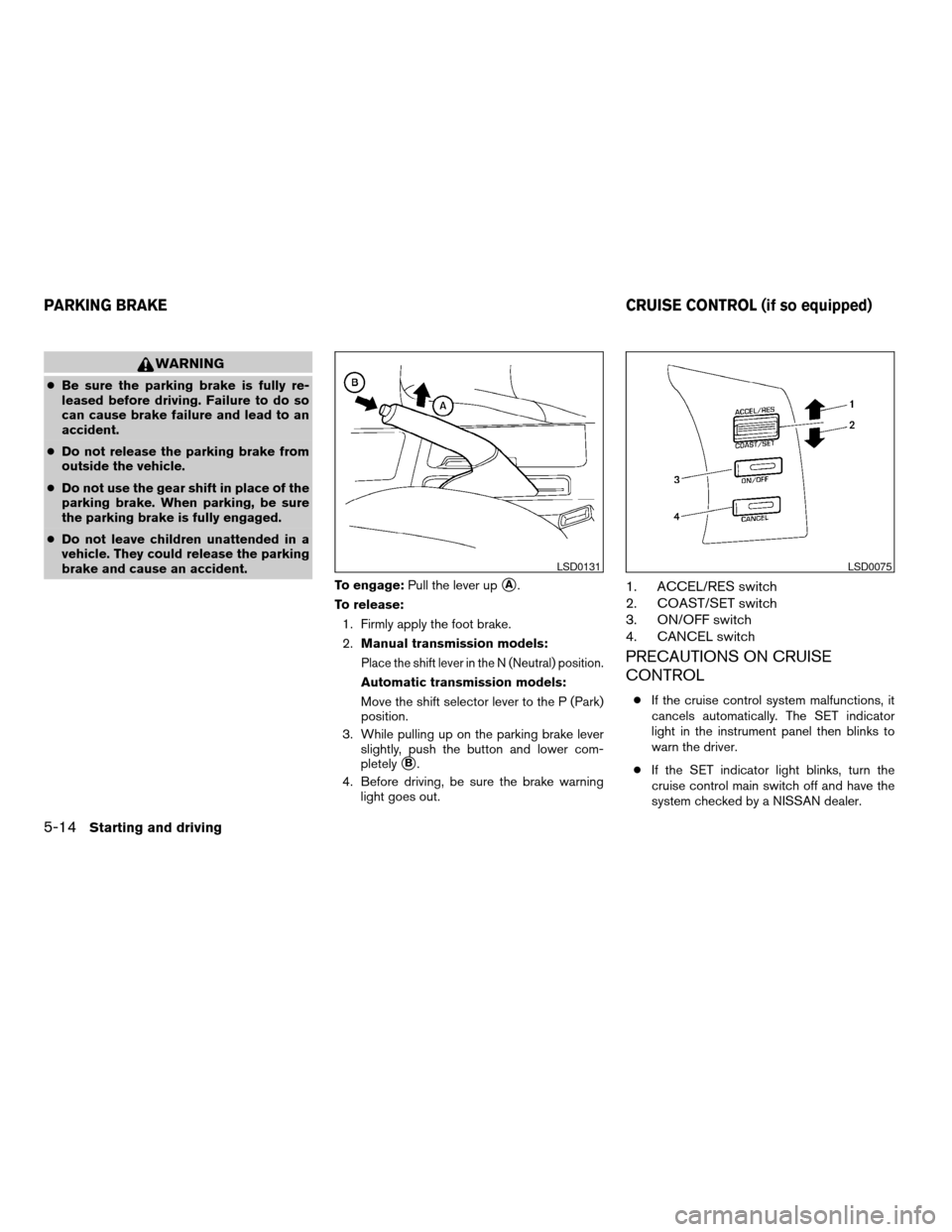
To engage:Pull the lever up
sA.
To release:
1. Firmly apply the foot brake.
2.Manual transmission models:
Place the shift lever in the N (Neutral) position.
Automatic transmission models:
Move the shift selector lever to the P (Park)
position.
3. While pulling up on the parking brake lever
slightly, push the button and lower com-
pletely
sB.
4. Before driving, be sure the brake warning
light goes out.
1. ACCEL/RES switch
2. COAST/SET switch
3. ON/OFF switch
4. CANCEL switch
PRECAUTIONS ON CRUISE
CONTROL
cIf the cruise control system malfunctions, it
cancels automatically. The SET indicator
light in the instrument panel then blinks to
warn the driver.
cIf the SET indicator light blinks, turn the
cruise control main switch off and have the
system checked by a NISSAN dealer.
LSD0131LSD0075
PARKING BRAKE CRUISE CONTROL (if so equipped)
5-14Starting and driving
ZREVIEW COPYÐ2006 Altima(l30)
Owners ManualÐUSA_English(nna)
09/08/05Ðdebbie
X
Page 189 of 304
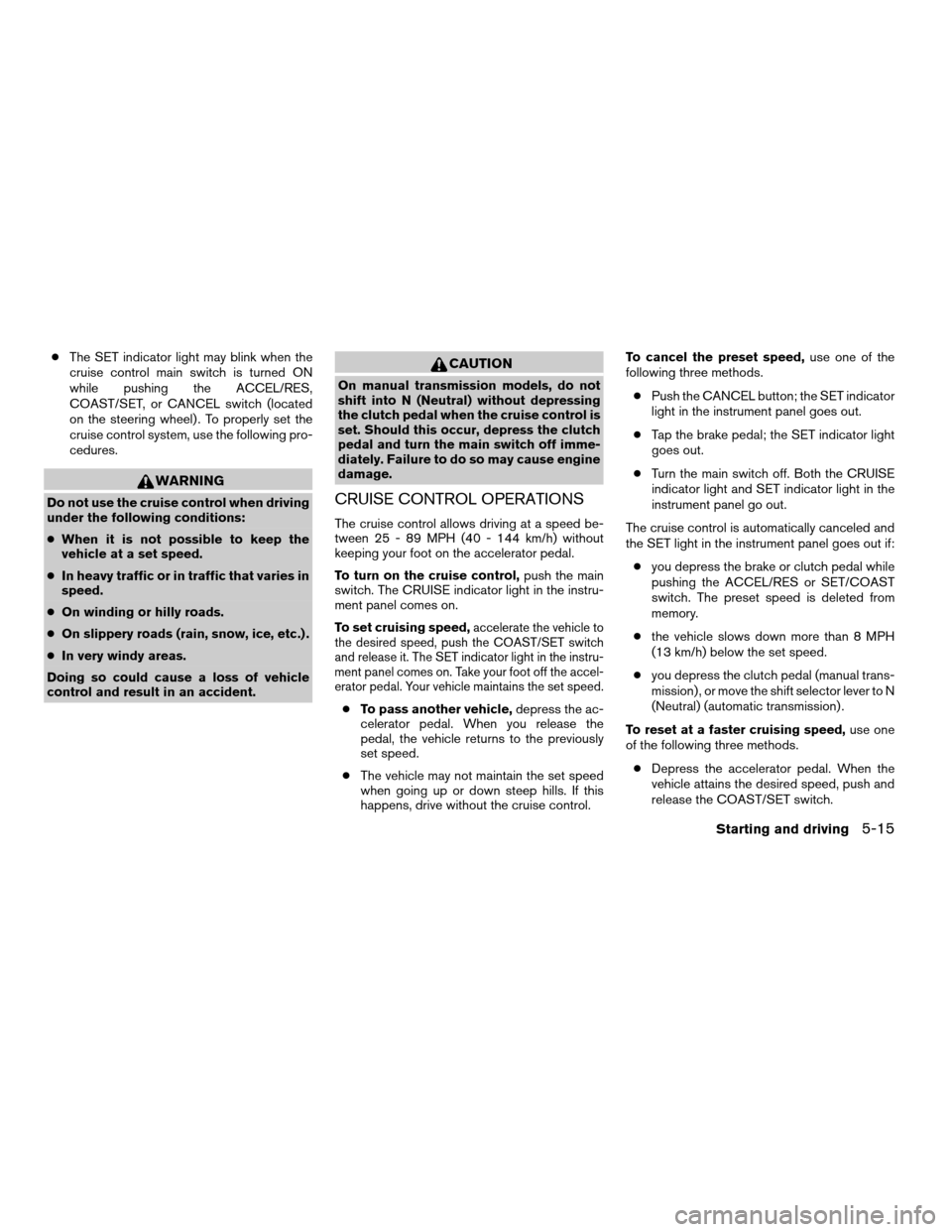
cThe SET indicator light may blink when the
cruise control main switch is turned ON
while pushing the ACCEL/RES,
COAST/SET, or CANCEL switch (located
on the steering wheel) . To properly set the
cruise control system, use the following pro-
cedures.
WARNING
Do not use the cruise control when driving
under the following conditions:
cWhen it is not possible to keep the
vehicle at a set speed.
cIn heavy traffic or in traffic that varies in
speed.
cOn winding or hilly roads.
cOn slippery roads (rain, snow, ice, etc.) .
cIn very windy areas.
Doing so could cause a loss of vehicle
control and result in an accident.
CAUTION
On manual transmission models, do not
shift into N (Neutral) without depressing
the clutch pedal when the cruise control is
set. Should this occur, depress the clutch
pedal and turn the main switch off imme-
diately. Failure to do so may cause engine
damage.
CRUISE CONTROL OPERATIONS
The cruise control allows driving at a speed be-
tween 25 - 89 MPH (40 - 144 km/h) without
keeping your foot on the accelerator pedal.
To turn on the cruise control,push the main
switch. The CRUISE indicator light in the instru-
ment panel comes on.
To set cruising speed,
accelerate the vehicle to
the desired speed, push the COAST/SET switch
and release it. The SET indicator light in the instru-
ment panel comes on. Take your foot off the accel-
erator pedal. Your vehicle maintains the set speed.
cTo pass another vehicle,depress the ac-
celerator pedal. When you release the
pedal, the vehicle returns to the previously
set speed.
cThe vehicle may not maintain the set speed
when going up or down steep hills. If this
happens, drive without the cruise control.To cancel the preset speed,use one of the
following three methods.
cPush the CANCEL button; the SET indicator
light in the instrument panel goes out.
cTap the brake pedal; the SET indicator light
goes out.
cTurn the main switch off. Both the CRUISE
indicator light and SET indicator light in the
instrument panel go out.
The cruise control is automatically canceled and
the SET light in the instrument panel goes out if:
cyou depress the brake or clutch pedal while
pushing the ACCEL/RES or SET/COAST
switch. The preset speed is deleted from
memory.
cthe vehicle slows down more than 8 MPH
(13 km/h) below the set speed.
cyou depress the clutch pedal (manual trans-
mission) , or move the shift selector lever to N
(Neutral) (automatic transmission) .
To reset at a faster cruising speed,use one
of the following three methods.
cDepress the accelerator pedal. When the
vehicle attains the desired speed, push and
release the COAST/SET switch.
Starting and driving5-15
ZREVIEW COPYÐ2006 Altima(l30)
Owners ManualÐUSA_English(nna)
09/08/05Ðdebbie
X