2006 NISSAN ALTIMA warning lights
[x] Cancel search: warning lightsPage 194 of 304
If the light comes on during the self-test or while
driving, take the vehicle to a NISSAN dealer for
repair.
WARNING
cThe anti-lock brake system is a sophis-
ticated device, but it cannot prevent ac-
cidents resulting from careless or dan-
gerous driving techniques. It can help
maintain vehicle control during braking
on slippery surfaces, but remember that
the stopping distance on slippery sur-
faces will be longer than on normal
surfaces even with the anti-lock brake
system. Stopping distances may also
be longer on rough, gravel or snow cov-
ered roads, or if you are using tire
chains. Tire type and condition may also
affect braking effectiveness. Always
maintain a safe distance from the ve-
hicle in front of you. Ultimately, the re-
sponsibility for safety of self and others
rests in the hands of the driver.
cTire type and condition of tires may also
affect braking effectiveness.
cWhen replacing tires, install the speci-
fied size of tires on all four wheels.cWhen installing a spare tire, make sure
it is the proper size and type as speci-
fied on the tire placard. For tire placard
location information, refer to “Tire plac-
ard” in the “Technical and consumer
information” section of this manual.
cRefer to “Wheels and tires” in the
“Maintenance and do-it-yourself” sec-
tion of this manual.When accelerating on slippery surfaces the tire
may spin or slip. With the vehicle traction control
system (TCS) , sensors detect these movements
and control the braking and engine output to help
improve vehicle stability while accelerating.
cWhen the traction control system is operat-
ing, the slip indicator in the instrument panel
blinks.
cIf the slip indicator blinks, the vehicle is un-
der slippery conditions. Be sure to drive
carefully. See “Slip indicator light” and “Trac-
tion control system (TCS) off indicator light”
in the “Instruments and controls” section of
this manual.
cIf a malfunction occurs in the system,
the
andindicator lights
come on in the meter panel.
As long as these lights are on, the traction control
function is canceled. The vehicle will behave like
a vehicle without the system.
TRACTION CONTROL SYSTEM (TCS)
(if so equipped)
5-20Starting and driving
ZREVIEW COPYÐ2006 Altima(l30)
Owners ManualÐUSA_English(nna)
09/08/05Ðdebbie
X
Page 205 of 304
WARNING
Always follow the instructions below.
Failure to do so could result in damage to
the charging system and cause personal
injury.
1. If the booster battery is in another vehicle,
position the two vehicles to bring their bat-
teries near each other.
Do not allow the two vehicles to touch.2. Apply the parking brake. Move the shift lever
to N (Neutral) (manual transmission) or to P
(Park) (automatic transmission) . Switch off
all unnecessary electrical systems (lights,
heater, air conditioner, etc.) .
3. Remove vent caps on the battery (if so
equipped) . Cover the battery with an old
cloth to reduce explosion hazard.
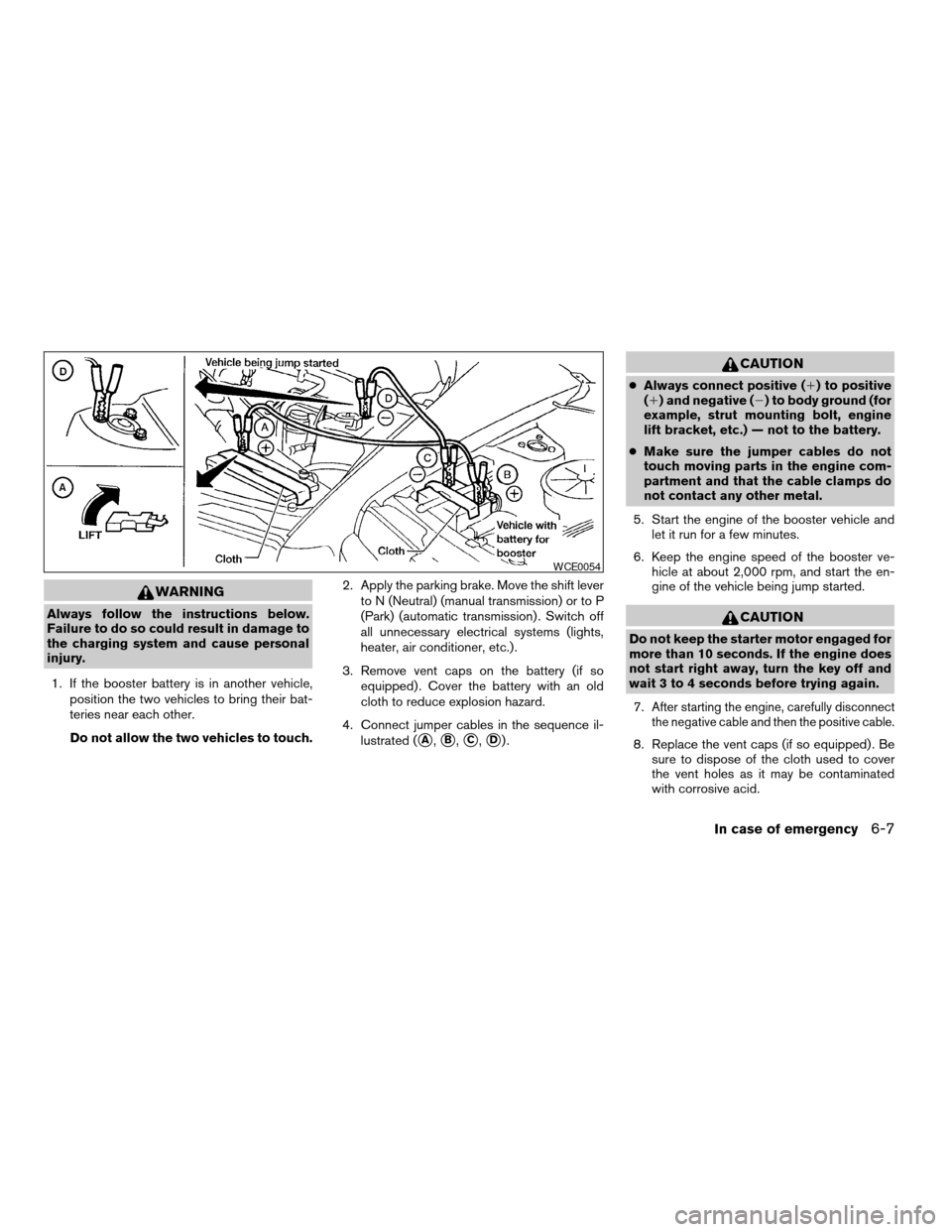
4. Connect jumper cables in the sequence il-
lustrated (
sA,sB,sC,sD).
CAUTION
cAlways connect positive (1) to positive
(1) and negative (2) to body ground (for
example, strut mounting bolt, engine
lift bracket, etc.) — not to the battery.
cMake sure the jumper cables do not
touch moving parts in the engine com-
partment and that the cable clamps do
not contact any other metal.
5. Start the engine of the booster vehicle and
let it run for a few minutes.
6. Keep the engine speed of the booster ve-
hicle at about 2,000 rpm, and start the en-
gine of the vehicle being jump started.
CAUTION
Do not keep the starter motor engaged for
more than 10 seconds. If the engine does
not start right away, turn the key off and
wait 3 to 4 seconds before trying again.
7.
After starting the engine, carefully disconnect
the negative cable and then the positive cable.
8. Replace the vent caps (if so equipped) . Be
sure to dispose of the cloth used to cover
the vent holes as it may be contaminated
with corrosive acid.
WCE0054
In case of emergency6-7
ZREVIEW COPYÐ2006 Altima(l30)
Owners ManualÐUSA_English(nna)
09/08/05Ðdebbie
X
Page 221 of 304

When driving in areas using road salt or other
corrosive materials, check lubrication frequently.
Lights*Clean the headlights on a regular basis.
Make sure that the headlights, stop lights, tail
lights, turn signal lights, and other lights are all
operating properly and installed securely. Also
check headlight aim.
Road wheel nuts*When checking the tires,
make sure no wheel nuts are missing, and check
for any loose wheel nuts. Tighten if necessary.
Tire rotation*Tires should be rotated every
7,500 miles (12,000 km) .
Tires*Check the pressure with a gauge often
and always prior to long distance trips. If neces-
sary, adjust the pressure in all tires, including the
spare, to the pressure specified. Check carefully
for damage, cuts or excessive wear.
Wheel alignment and balanceIf the vehicle
should pull to either side while driving on a
straight and level road, or if you detect uneven or
abnormal tire wear, there may be a need for wheel
alignment. If the steering wheel or seat vibrates at
normal highway speeds, wheel balancing may be
needed.
cFor additional information regarding tires,
refer to “Important Tire Safety Information”
(US) or “Tire Safety Information” (Canada) in
the Warranty Information Booklet .WindshieldClean the windshield on a regular
basis. Check the windshield at least every six
months for cracks or other damage. Have a dam-
aged windshield repaired by a qualified repair
facility.
Windshield wiper blades*Check for cracks or
wear if they do not wipe properly.
Inside the vehicle
The maintenance items listed here should be
checked on a regular basis, such as when per-
forming periodic maintenance, cleaning the ve-
hicle, etc.
Additional information on the following
items with an “*” is found later in this sec-
tion.
Accelerator pedalCheck the pedal for smooth
operation and make sure the pedal does not bind
or require uneven effort. Keep the floor mat away
from the pedal.
Automatic transmission P (Park) position
mechanismOn a fairly steep hill check that your
vehicle is held securely with the selector lever in
the P (Park) position without applying any brakes.
Brake pedal and booster*Check the pedal for
smooth operation and make sure it has the proper
distance under it when depressed fully. Checkthe brake booster function. Be certain to keep the
floor mat away from the pedal.
BrakesCheck that the brakes do not pull the
vehicle to one side when applied.
Clutch pedal*Make sure the pedal operates
smoothly and check that it has the proper free
travel.
Parking brake*Check that the lever has the
proper travel and confirm that your vehicle is held
securely on a fairly steep hill with only the parking
brake applied.
SeatsCheck seat position controls such as seat
adjusters, seatback recliner, etc. to ensure they
operate smoothly and all latches lock securely in
every position. Check that the head restraints
move up and down smoothly and the locks (if so
equipped) hold securely in all latched positions.
Seat beltsCheck that all parts of the seat belt
system (for example, buckles, anchors, adjusters
and retractors) operate properly and smoothly,
and are installed securely. Check the belt web-
bing for cuts, fraying, wear or damage.
Steering wheelCheck for changes in the steer-
ing system, such as excessive freeplay, hard
steering or strange noises.
Warning lights and chimesMake sure all
warning lights and chimes are operating properly.
Maintenance and do-it-yourself8-3
ZREVIEW COPYÐ2006 Altima(l30)
Owners ManualÐUSA_English(nna)
09/08/05Ðdebbie
X
Page 248 of 304
If the battery is removed for any reason
other than replacement, perform step 5.
cAn improperly disposed battery can
hurt the environment. Always confirm
local regulations for battery disposal.
cThe keyfob is water-resistant; how-
ever, if it does get wet, immediately
wipe completely dry.
cThe operational range of the keyfob
extends to approximately 33 ft (10 m)
from the vehicle. This range may vary
with conditions.
FCC Notice:
Changes or modifications not expressly ap-
proved by the party responsible for compli-
ance could void the user’s authority to op-
erate the equipment.
This device complies with Part 15 of the
FCC Rules and RSS-210 of Industry
Canada.
Operation is subject to the following two
conditions: (1) This device may not cause
harmful interference, and (2) this device
must accept any interference received, in-
cluding interference that may cause undes-
ired operation of the device.HEADLIGHTS
Replacing the xenon headlight bulb
WARNING
cHIGH VOLTAGE
When xenon headlights are on, they pro-
duce a high voltage. To prevent an electric
shock, never attempt to modify or disas-
semble. Always have your xenon head-
lights replaced at a NISSAN dealer. For
additional information, see “Headlight
and turn signal switch” in the “Instru-
ments and controls” section.
Replacing the halogen headlight bulb
The headlight is a semi-sealed beam type which
uses a replaceable headlight (halogen) bulb. Be-
cause the headlight assembly must be removed
from the vehicle for bulb replacement, see your
NISSAN dealer.
CAUTION
cAiming is not necessary after replacing
the bulb. When aiming adjustment is
necessary, contact a NISSAN dealer.cDo not leave the headlight assembly
open without a bulb installed for a long
period of time. Dust, moisture, smoke,
etc. entering the headlight body may
affect bulb performance. Remove the
bulb from the headlight assembly just
before a replacement bulb is installed.
cOnly touch the plastic base when han-
dling the bulb. Never touch the glass
envelope. Touching the glass could sig-
nificantly affect bulb life and/or head-
light performance.
cHigh pressure halogen gas is sealed
inside the halogen bulb. The bulb may
break if the glass envelope is scratched
or the bulb is dropped.
cUse the same number and wattage as
originally installed:
Low beam:
Wattage: 55
Bulb no.: H1*
High beam:
Wattage: 60
Bulb no.: HB3 (9005)*
*: Always check with the Parts Depart-
ment at a NISSAN dealer for the latest
parts information.
LIGHTS
8-30Maintenance and do-it-yourself
ZREVIEW COPYÐ2006 Altima(l30)
Owners ManualÐUSA_English(nna)
09/08/05Ðdebbie
X
Page 287 of 304
Trailer lights
CAUTION
When splicing into the vehicle electrical
system, a commercially available power-
type module/converter must be used to
provide power for all trailer lighting. This
unit uses the vehicle battery as a direct
power source for all trailer lights while
using the vehicle tail light, stoplight and
turn signal circuits as a signal source. The
module/converter must draw no more
that 15 milliamps from the stop and tail
lamp circuits. Using a module/converter
that exceeds these power requirements
may damage the vehicle’s electrical sys-
tem. See a reputable trailer dealer to ob-
tain the proper equipment and to have it
installed.
Trailer lights should comply with federal and/or
local regulations. For assistance in hooking up
trailer lights, contact a NISSAN dealer or repu-
table trailer dealer.
Trailer brakes
If your trailer is equipped with a braking system,
make sure it conforms to federal and/or local
regulations and that it is properly installed.
WARNING
Never connect a trailer brake system di-
rectly to the vehicle brake system.
Pre-towing tips
cBe certain your vehicle maintains a level
position when a loaded and/or unloaded
trailer is hitched. Do not drive the vehicle if it
has an abnormal nose-up or nose-down
condition; check for improper tongue load,
overload, worn suspension or other possible
causes of either condition.
cAlways secure items in the trailer to prevent
load shift while driving.
cLoad the trailer so approximately 60% of the
trailer load is in the front half and 40% is in
the back half.
cCheck your hitch, trailer tire pressure, ve-
hicle tire pressure, trailer light operation, and
trailer wheel lug nuts every time you attach a
trailer to the vehicle.
cBe certain your rearview mirrors conform to
all federal, state or local regulations. If not,
install any mirrors required for towing before
driving the vehicle.
Trailer towing tips
In order to gain skill and an understanding of the
vehicle’s behavior, you should practice turning,
stopping and backing up in an area which is free
from traffic. Steering stability and braking perfor-
mance will be somewhat different than under
normal driving conditions.
cAlways secure items in the trailer to prevent
load shift while driving.
cAvoid abrupt starts, acceleration or stops.
cAvoid sharp turns or lane changes.
cAlways drive your vehicle at a moderate
speed. Some states or provinces have spe-
cific speed limits for vehicles that are towing
trailers. Obey the local speed limits.
cWhen backing up, hold the bottom of the
steering wheel with one hand. Move your
hand in the direction in which you want the
trailer to go. Make small corrections and
back up slowly. If possible, have someone
guide you when you are backing up.
Technical and consumer information9-19
ZREVIEW COPYÐ2006 Altima(l30)
Owners ManualÐUSA_English(nna)
09/08/05Ðdebbie
X
Page 297 of 304

Fuel Econ button
Control panel buttons............4-4
Fuses......................8-26
Fusible links...................8-27
G
Garage door opener, HomeLinkTUniversal
Transceiver...................2-43
Gascap.....................3-12
Gauge
Engine coolant temperature gauge.....2-8
Engine oil pressure gauge..........2-9
Fuel consumption gauge..........2-10
Fuel gauge..................2-8
Odometer...................2-4
Speedometer.................2-4
Tachometer..................2-7
Trip computer.................2-5
Trip odometer.................2-4
Voltmeter..................2-10
General maintenance..............8-2
Glove box....................2-33
Glove box lock.................2-33
Grocery hooks.................2-36
H
Hazard warning flasher switch.........2-26
Head restraints..................1-7
Active head restraint.............1-8
Headlight and turn signal switch........2-21
Headlight control switch............2-21
Heated seats..................2-27Heater
Heater and air conditioner
controls................4-11, 4-20
Heater operation...........4-14, 4-21
HomeLinkTUniversal Transceiver.......2-43
Hood release...................3-9
Horn.......................2-26
I
Ignition switch..................5-4
Immobilizer system..........2-17, 3-2, 5-5
Important vehicle information label.......9-10
In-cabin microfilter...............8-21
Increasing fuel economy............5-16
Indicator lights and audible reminders
(See warning/indicator lights and audible
reminders)....................2-11
Inside mirror...................3-15
Instrument brightness control.........2-24
Instrument panel.................2-2
Instrument panel dimmer switch........2-24
Interior light...................2-41
Interior trunk lid release.............3-11
ISOFIX child restraints.............1-24
J
Jump starting...................6-6
K
Key ........................3-2Keyfob battery replacement..........8-29
Keyless entry system
(See remote keyless entry system).......3-5
L
Labels
Air conditioner specification label.....9-11
C.M.V.S.S. certification label........9-10
Emission control information label.....9-11
Engine serial number............9-10
F.M.V.S.S. certification label........9-10
Vehicle identification number (VIN) plate . .9-9
Warning labels (for SRS)..........1-48
LATCH (Lower Anchors and Tethers
for CHildren) System..............1-24
License plate
Installing the license plate.........9-12
Light
Air bag warning light.........1-49, 2-13
Brake light (See stop light).........8-32
Bulb check/instrument panel........2-11
Bulb replacement..............8-32
Charge warning light............2-12
Fog light switch...............2-25
Headlight and turn signal switch......2-21
Headlight control switch..........2-21
Interior light.................2-41
Light bulbs..................8-30
Low washer fluid warning light.......2-13
Passenger air bag and status light.....1-43
Spotlights (See map light).........2-42
Trunk light..................2-43
Warning/indicator lights and audible
reminders..................2-11
10-3
ZREVIEW COPYÐ2006 Altima(l30)
Owners ManualÐUSA_English(nna)
09/08/05Ðdebbie
X
Page 298 of 304

Lights
Map lights..................2-42
Lock
Child safety rear door lock..........3-5
Door locks..................3-3
Fuel-filler door lock opener lever......3-12
Glove box lock...............2-33
Power door locks...............3-4
Trunk lid lock opener lever.........3-10
Low fuel warning light.............2-13
Low washer fluid warning light.........2-13
Luggage (See vehicle loading information) . .9-12
M
Maint (maintenance) button
Control panel buttons............4-4
Maint (Maintenance) button, control panel
display.......................4-4
Maintenance
General maintenance............8-2
Inside the vehicle...............8-3
Maintenance precautions..........8-5
Outside the vehicle..............8-2
Seat belt maintenance...........1-16
Under the hood and vehicle.........8-4
Malfunction indicator light...........2-14
Manual front seat adjustment..........1-2
Map lights....................2-42
Map pocket...................2-30
Meters and gauges................2-3
Instrument brightness control.......2-24
Mirror
Inside mirror.................3-15
Outside mirrors...............3-15Vanity mirror.................3-14
Multi-remote control system
(See remote keyless entry system).......3-5
N
NISSAN vehicle immobilizer
system................2-17, 3-2, 5-5
O
Octane rating (See fuel octane rating).....9-4
Odometer.....................2-4
Oil
Capacities and recommended
fuel/lubricants.................9-2
Changing engine oil............8-10
Changing engine oil filter..........8-12
Checking engine oil level..........8-9
Engine oil...................8-9
Engine oil and oil filter recommendation . .9-5
Engine oil viscosity..............9-5
Outside mirrors.................3-15
Overheat
If your vehicle overheats...........6-8
Owner’s manual order form..........9-24
Owner’s manual/service manual order
information....................9-24
P
Parking
Parking brake check............8-25Parking brake operation..........5-14
Parking/parking on hills...........5-17
Power
Power door locks...............3-4
Power outlet.................2-28
Power rear windows............2-39
Power steering fluid.............8-15
Power steering system...........5-18
Power windows...............2-38
Rear power windows............2-39
Precautions
Maintenance precautions..........8-5
Precautions on child restraints . . .1-17, 1-29
Precautions on seat belt usage.......1-9
Precautions on supplemental restraint
system....................1-34
Precautions when starting and driving . . .5-2
PREV button...................4-3
Prev button
Control panel buttons............4-3
Programmable features...........4-3, 4-6
Push starting...................6-8
R
Radio
Car phone or CB radio...........4-41
Compact Disc (CD) changer.......4-38
FM-AM radio with compact disc (CD)
changer...................4-30
FM-AM radio with compact disc (CD)
player....................4-25
Readiness for inspection maintenance (I/M)
test........................9-23
Rear power windows..............2-39
10-4
ZREVIEW COPYÐ2006 Altima(l30)
Owners ManualÐUSA_English(nna)
09/08/05Ðdebbie
X
Page 299 of 304

Rear seat.....................1-6
Rear window and outside mirror defroster
switch......................2-20
Recorders
Event data..................9-24
Refrigerant recommendation..........9-6
Registering your vehicle in another country. . .9-9
Remote keyless entry system..........3-5
Reporting safety defects (US only)......9-23
S
Safety
Child safety rear door lock..........3-5
Child seat belts...........1-17, 1-29
Reporting safety defects (US only). . . .9-23
Seat adjustment
Front manual seat adjustment........1-2
Front power seat adjustment........1-4
Rear seat adjustment.............1-6
Seat belt
Child safety.................1-11
Infants and small children.........1-12
Injured Person................1-13
Larger children...............1-12
Precautions on seat belt usage.......1-9
Pregnant women..............1-13
Seat belt extenders.............1-16
Seat belt maintenance...........1-16
Seat belts...................1-9
Shoulder belt height adjustment......1-15
Three-point type with retractor.......1-13
Seat belt warning light.............2-13
Seatback pockets................2-31Seats
Adjustment..................1-2
Front seats..................1-2
Heated seats................2-27
Manual front seat adjustment........1-2
Rear seat...................1-6
Security system (NISSAN vehicle immobilizer
system) , engine start.........2-17, 3-2, 5-5
Self-adjusting brakes..............8-26
Service manual order form...........9-24
Servicing air conditioner............4-22
Setting button
SETTING button...............4-6
Shift lock release................5-10
Shifting
Automatic transmission...........5-8
Manual transmission............5-12
Shoulder belt height adjustment........1-15
Spark plug replacement............8-20
Speedometer...................2-4
Spotlights (See map light)...........2-42
SRS warning label...............1-48
Starting
Before starting the engine..........5-6
Jump starting.................6-6
Precautions when starting and driving . . .5-2
Push starting.................6-8
Starting the engine..............5-6
Startup Screen
Control panel buttons............4-3
Startup screen display..............4-3
Steering
Power steering fluid.............8-15
Power steering system...........5-18
Stop light....................8-32
Storage.....................2-30Storage tray...................2-35
Sunglasses case................2-31
Sunglasses holder...............2-31
Sunroof.....................2-40
Supplemental air bag warning light . . .1-49, 2-13
Supplemental front impact air bag system . .1-41
Supplemental restraint system
Information and warning labels.......1-48
Precautions on supplemental restraint
system....................1-34
Supplemental restraint system
(Supplemental air bag system).........1-34
Switch
Autolight switch...............2-22
Automatic power window switch.....2-39
Fog light switch...............2-25
Hazard warning flasher switch.......2-26
Headlight and turn signal switch......2-21
Headlight control switch..........2-21
Ignition switch................5-4
Power door lock switch...........3-4
Rear window and outside mirror defroster
switch....................2-20
Traction control system (TCS) off
switch....................2-28
Turn signal switch..............2-25
Windshield wiper and washer switch . . .2-19
T
Tachometer....................2-7
Temperature gauge
Engine coolant temperature gauge.....2-8
Theft (NISSAN vehicle immobilizer system) ,
engine start..............2-17, 3-2, 5-5
10-5
ZREVIEW COPYÐ2006 Altima(l30)
Owners ManualÐUSA_English(nna)
09/08/05Ðdebbie
X