Page 35 of 481
34 Getting startedThe “Getting started” section provides an
overview of the vehicle’s most basic func-
tions. First-time Mercedes-Benz owners
should pay special attention to the infor-
mation given here.
If you are already familiar with the basic
functions described here, the “Controls in
detail” section (
�page 91) will provide you
with further information. The correspond-
ing page references are located at the end
of each segment.
Unlocking
Unlocking with the SmartKeySmartKey with remote control1‹Lock button
2ŠUnlock button for trunk lid
3ŒUnlock button
4ÂPanic button (
�page 80)
�
Press unlock buttonΠon the
SmartKey.
All turn signal lamps flash once. The
locking knobs in the doors move up.
The anti-theft alarm system is dis-
armed.
�
Get in the vehicle and insert the
SmartKey in the starter switch.
Page 45 of 481
44 Getting startedAdjusting
With the easy-entry/exit feature activated,
the steering wheel will return to its last set
position when you:�
close the driver’s door with the ignition
switched on,
or
�
insert the SmartKey into the starter
switch with the driver’s door closed.With the easy-entry/exit feature activated,
the steering wheel tilts upwards when you:
�
remove the SmartKey from the starter
switch,
or
�
open the driver’s door with the
SmartKey in starter switch
position0or1.
Warning!
G
You must make sure no one can become
trapped or injured by the moving steering
wheel when the easy-entry/exit feature is
activated.
To cancel steering wheel movement, do one
of the following:�
Move steering column lever*
(�page 43).
�
Press one of the memory position but-
tons* or the memory buttonM*
(�page 107).
Do not leave children unattended in the ve-
hicle, or with access to an unlocked vehicle.
Children could open the driver’s door and
unintentionally activate the easy-entry/exit
feature, which could result in an accident
and/or serious personal injury.
iThe last set steering wheel position is
stored when�
the ignition is switched off
�
the position is stored in memory
(�page 107)
iIf the current position for the steering
wheel is in the uppermost tilt position,
the steering wheel will no longer be
able to move upward when the
easy-entry/exit feature is activated.
The adjustment procedure is briefly in-
terrupted when the engine is started.
Page 50 of 481
49 Getting started
Driving
1Loop for seat belt guidance
2Latch plate
3Release button
4Buckle
�
With a smooth motion, pull the belt
from the belt outlet.
�
Place the shoulder portion of the belt
across the top of your shoulder and the
lap portion across your hips.
�
Push latch plate2 into buckle4 until
it engages.
�
If necessary, tighten the lap portion to
a snug fit by pulling shoulder portion
up.
For more information, see “Safety guide-
lines for the seat belt, emergency tension-
ing device and air bag” (
�page 68).Proper use of seat belts
�
Do not twist the seat belt when fasten-
ing.
�
Adjust seat belt so that the shoulder
portion is located as close as possible
to the middle of the shoulder (it should
not touch the neck). Never pass the
shoulder portion of the belt under your
arm.
�
Position the lap belt as low as possible
on your hips (over hip joint) and not
across the abdomen.
�
Place the seat backrest in a nearly up-
right position.
Page 54 of 481
53 Getting started
Driving
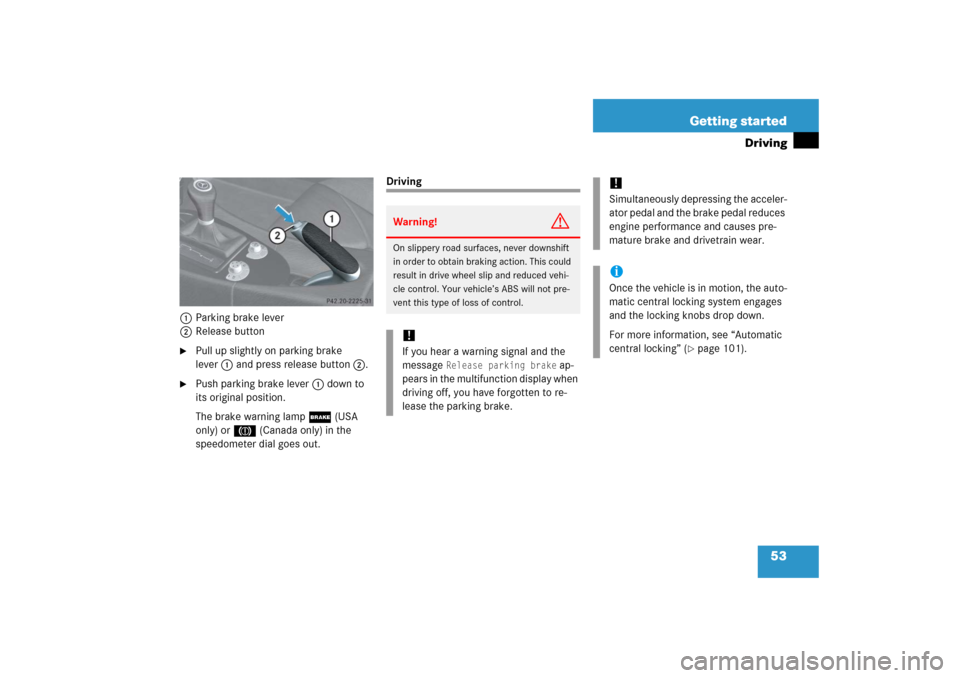
1Parking brake lever
2Release button�
Pull up slightly on parking brake
lever1 and press release button2.
�
Push parking brake lever1 down to
its original position.
The brake warning lamp; (USA
only) or3 (Canada only) in the
speedometer dial goes out.
DrivingWarning!
G
On slippery road surfaces, never downshift
in order to obtain braking action. This could
result in drive wheel slip and reduced vehi-
cle control. Your vehicle’s ABS will not pre-
vent this type of loss of control.!If you hear a warning signal and the
message
Release parking brake
ap-
pears in the multifunction display when
driving off, you have forgotten to re-
lease the parking brake.
!Simultaneously depressing the acceler-
ator pedal and the brake pedal reduces
engine performance and causes pre-
mature brake and drivetrain wear.iOnce the vehicle is in motion, the auto-
matic central locking system engages
and the locking knobs drop down.
For more information, see “Automatic
central locking” (
�page 101).
Page 60 of 481

59 Getting started
Parking and locking
�Parking and locking
You have now completed your first drive.
You have properly stopped and parked
your vehicle. End your drive as follows.
Parking brake
1Parking brake lever
2Release button�
Pull up parking brake lever1 firmly.
When the ignition is switched on or the
engine is running, the brake warning
lamp; (USA only) or3 (Canada
only) in the speedometer dial comes
on.
Warning!
G
Vehicles with manual transmission:
Wait until the vehicle is stationary before re-
moving the SmartKey from the starter
switch. The vehicle cannot be steered when
the SmartKey is removed.Warning!
G
With the engine not running, there is no
power assistance for the brake and steering
system. In this case, it is important to keep
in mind that a considerably higher degree of
effort is necessary to brake and steer the ve-
hicle.
Warning!
G
Do not park this vehicle in areas where com-
bustible materials such as grass, hay or
leaves can come into contact with the hot
exhaust system, as these materials could be
ignited and cause a vehicle fire.
To reduce the risk of personal injury as a re-
sult of vehicle movement, before turning off
the engine and leaving the vehicle always:�
Keep right foot on brake pedal.
�
Pull up the parking brake lever firmly.
�
Move the gear selector lever* to
position
P (manual transmission: first or
reverse gear).
�
Slowly release brake pedal.
�
When parked on an incline, turn front
wheels towards the road curb.
�
Turn the SmartKey in the starter switch
to position
0 and remove the SmartKey
from the starter switch.
�
Take the SmartKey and lock vehicle
when leaving.
Page 62 of 481

61 Getting started
Parking and locking
Turning off engine �
Manual transmission: Move the gear-
shift lever into first or reverse gear.
�
Automatic transmission*: Place the
gear selector lever in positionP.
�
Turn the SmartKey in the starter switch
to position0 and remove the SmartKey
from the starter switch.
The immobilizer is activated.
�
Press the seat belt release button
(�page 49).
�
Guide the latch plate to allow the re-
tractor to completely rewind the seat
belt.
iAlways set the parking brake in addi-
tion to shifting into first or reverse gear
(automatic transmission*: gear selec-
tor lever in positionP).
On slopes, turn the front wheels to-
wards the road curb.
iVehicles with automatic transmission*:
The SmartKey can only be removed
from the starter switch with the gear
selector lever in positionP.
!Make sure the seat belt retracts fully so
that the seat belt and/or latch plate
cannot get caught or pinched in the
door or in the seat mechanism. This
can damage the seat belt and impair
the effectiveness of the seat belt,
and/or cause damage to the door
and/or door trim panel. Such damage
is not covered by the Mercedes-Benz
Limited Warranty.
Damaged seat belts must be replaced.
Contact an authorized Mercedes-Benz
Center.iWith the SmartKey removed from the
starter switch and the driver’s door
open, a warning sounds if the parking
lamps or low beam headlamps are
switched on (
�page 110).
The message Turn off lights
appears
in the multifunction display.
Page 63 of 481

62 Getting startedParking and locking
Locking
�
Exit the vehicle and close all doors.
�
Press the lock button‹ on the
SmartKey (
�page 34).
With the trunk and all doors closed, all
turn signal lamps flash three times. The
locking knobs on the doors move
down.
The anti-theft alarm system is armed
now (
�page 87).
For more information, see “Locking and
unlocking” (�page 92).
iOpening a door causes the windows on
that side of the car to open slightly.
They will return to the up position when
the door is closed.!The side windows will not open or close
if the battery is discharged or the win-
dows are covered with ice. As a result,
you may no longer be able to properly
close the door. Do not attempt to force
the door shut. Doing so may damage
the door or the side window. Correct
the condition that prevents the
windows from operating before
attempting to close the door.
Warning!
G
To prevent possible personal injury, always
keep hands and fingers away from the door
openings when closing the doors. Be espe-
cially careful when small children are
around.
Before closing doors, make sure there is no
possibility of someone getting caught in a
door during closing.Warning!
G
When leaving the vehicle, always remove the
SmartKey from the starter switch, take it
with you, and lock the vehicle. Do not leave
children unattended in the vehicle, or with
access to an unlocked vehicle. Unsuper-
vised use of vehicle equipment may cause
an accident and/or serious personal injury.
iWithout the antenna on the left rear
side of the vehicle installed, the
SmartKey signaling range is consider-
ably reduced. Hold the SmartKey in
close proximity towards the antenna
base when locking or unlocking the
vehicle.
Page 82 of 481
81 Safety and Security
Panic alarm
Activating�
Press and hold button1for at least
1 second.
Deactivating�
Press button1again.
or
�
Insert the SmartKey in the starter
switch.
iWithout the antenna on the left rear
side of the vehicle installed, the
SmartKey signaling range for the panic
alarm is considerably reduced. The
panic alarm then only functions if the
SmartKey is held in close proximity
towards the antenna base.