Page 138 of 539
137 Controls in detail
Memory function*
Storing exterior rear view mirror parking position
For easier parking, you can adjust the
passenger-side exterior rear view mirror so
that you can see the right rear wheel as
soon as you engage reverse gearR.
For information on activating the parking
position feature, see “Activating exterior
rear view mirror parking position*”
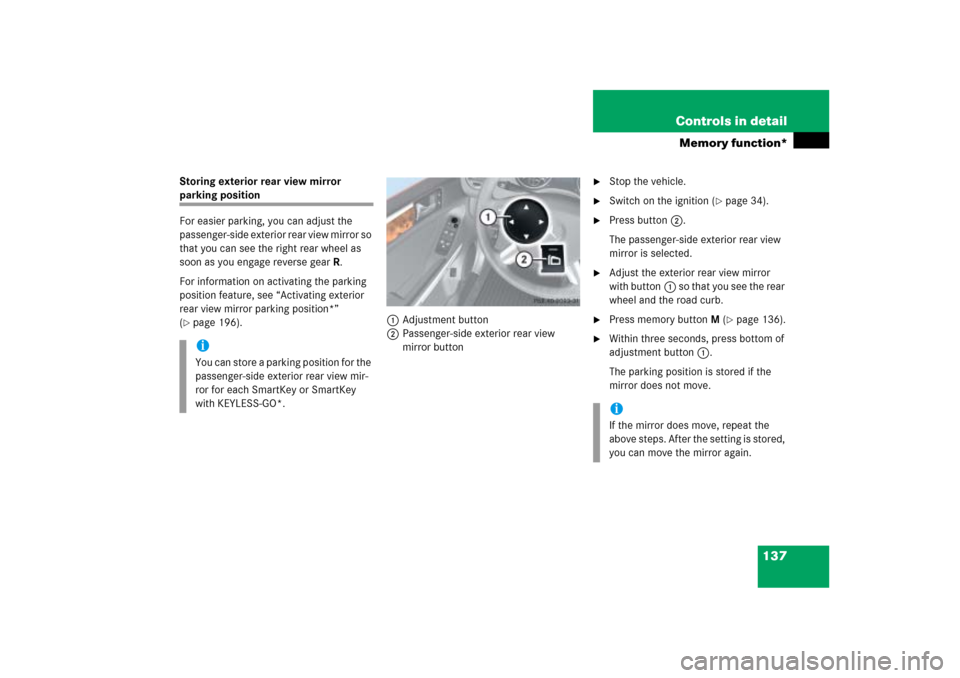
(�page 196).1Adjustment button
2Passenger-side exterior rear view
mirror button
�
Stop the vehicle.
�
Switch on the ignition (
�page 34).
�
Press button2.
The passenger-side exterior rear view
mirror is selected.
�
Adjust the exterior rear view mirror
with button1 so that you see the rear
wheel and the road curb.
�
Press memory buttonM (
�page 136).
�
Within three seconds, press bottom of
adjustment button1.
The parking position is stored if the
mirror does not move.
iYou can store a parking position for the
passenger-side exterior rear view mir-
ror for each SmartKey or SmartKey
with KEYLESS-GO*.
iIf the mirror does move, repeat the
above steps. After the setting is stored,
you can move the mirror again.
Page 140 of 539
139 Controls in detail
Lighting
Manual headlamp mode
The low beam headlamps and the parking
lamps can be switched on and off with the
exterior lamp switch.
Automatic headlamp mode
The following lamps switch on and off au-
tomatically depending on the brightness of
the ambient light:�
Low beam headlamps
�
Tail and parking lamps
�
License plate lamps
�
Side marker lamps
iWith the SmartKey removed from the
starter switch and the driver’s door
open, a warning sounds if the parking
lamps or low beam headlamps are
switched on.
The message
Switch off lights
appears in the multifunction display.
iWith the daytime running lamp mode
activated and the engine running, the
low beam headlamps cannot be
switched off manually.
To activate the daytime running lamp
mode, see “Setting daytime running
lamp mode (USA only)” (
�page 140).
Warning!
G
If the exterior lamp switch is set toU,�
the headlamps may switch off unexpect-
edly when the system senses bright
ambient light, for example light from
oncoming traffic.
�
the headlamps will not be automatically
switched on under foggy conditions.
To minimize risk to you and to others,
activate headlamps by turning exterior lamp
switch toB when driving or when traffic
and/or ambient lighting conditions require
you to do so.
In low ambient lighting conditions, only
switch from positionU toB with the
vehicle at a standstill in a safe location.
Switching fromUtoB will briefly
switch off the headlamps. Doing so while
driving in low ambient lighting conditions
may result in an accident.
The automatic headlamp feature is only an
aid to the driver. The driver is responsible for
the operation of the vehicle’s lights at all
times.
Page 141 of 539
140 Controls in detailLighting�
Turn the exterior lamp switch to
positionU.
With the SmartKey in starter switch
position1, only the parking lamps will
switch on and off automatically.
When the engine is running, the low
beam headlamps, the tail and parking
lamps, the license plate lamps, and the
side marker lamps will switch on and
off automatically.Daytime running lamp mode
�
Turn the exterior lamp switch to
positionM orU.
When the engine is running, the low beam
headlamps are switched on.
In low ambient light conditions, the
following lamps will switch on additionally:
�
Tail and parking lamps
�
License plate lamps
�
Side marker lamps
For nighttime driving you should turn the
exterior lamp switch to positionB to
permit activation of the high beam head-
lamps.Canada only
The daytime running lamp mode is manda-
tory and therefore in a constant mode.
When the engine is running, and you shift
from a driving position to positionN orP,
the low beam headlamps will switch off
with a three-minute delay.
When the engine is running, and you
�
turn the exterior lamp switch to
positionC, the parking lamps
switch on additionally.
�
turn the exterior lamp switch to
positionB, the manual headlamp
mode has priority over the daytime
running lamp mode.
The corresponding exterior lamps
switch on (
�page 54).
Page 145 of 539

144 Controls in detailLightingSwitching off corner-illuminating front
fog lamps
The combination switch for the turn signal
resets automatically after major steering
wheel movements. This will switch off the
corner-illuminating front fog lamps if they
were activated by switching on the left or
right turn signal.
If the turn signal should stay on after mak-
ing the turn, the turn signal and cornering
fog lamp can be switched off by returning
the combination switch to its original posi-
tion.Driving rearward
Switching on corner-illuminating front
fog lamps
�
Shift the automatic transmission in
positionR.
The inverse front fog lamp comes on
automatically depending on the
steering direction and steering angle.
Switching off corner-illuminating front
fog lamps
�
Shift the automatic transmission out of
positionR.
The respective front fog lamp goes out.
Hazard warning flasher
The hazard warning flasher can be
switched on at all times, even with the
SmartKey removed from the starter switch
or with the SmartKey with KEYLESS-GO*
removed from the vehicle.
The hazard warning flasher switches on
automatically when an air bag deploys.
The hazard warning flasher switch is
located on the upper part of the center
console.
1Hazard warning flasher switch
Page 147 of 539
146 Controls in detailLightingAutomatic control
Deactivating�
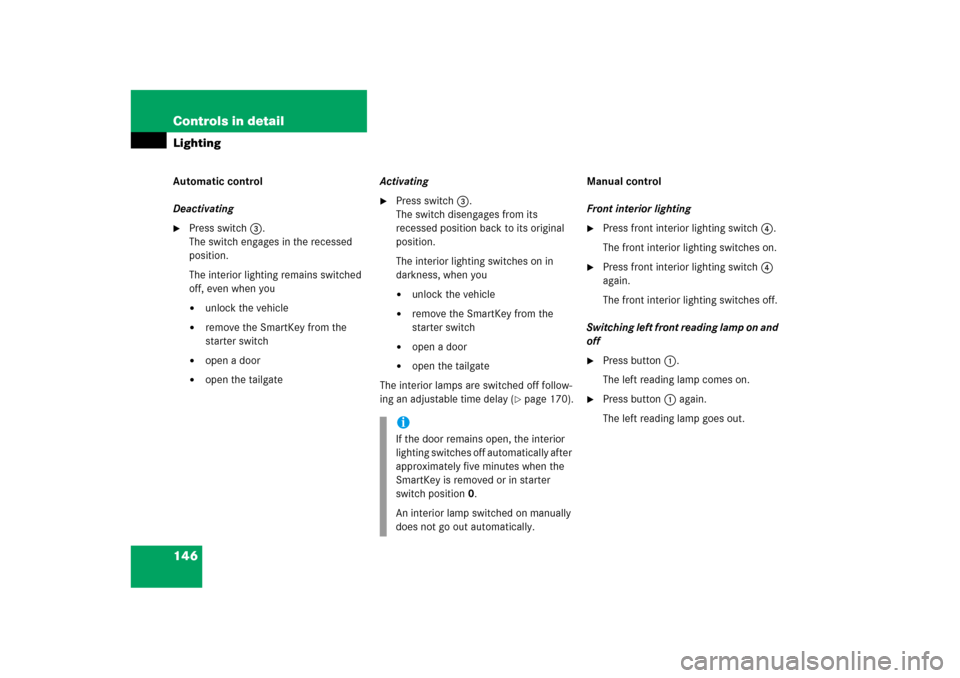
Press switch3.
The switch engages in the recessed
position.
The interior lighting remains switched
off, even when you�
unlock the vehicle
�
remove the SmartKey from the
starter switch
�
open a door
�
open the tailgateActivating
�
Press switch3.
The switch disengages from its
recessed position back to its original
position.
The interior lighting switches on in
darkness, when you�
unlock the vehicle
�
remove the SmartKey from the
starter switch
�
open a door
�
open the tailgate
The interior lamps are switched off follow-
ing an adjustable time delay (
�page 170).Manual control
Front interior lighting
�
Press front interior lighting switch4.
The front interior lighting switches on.
�
Press front interior lighting switch4
again.
The front interior lighting switches off.
Switching left front reading lamp on and
off
�
Press button1.
The left reading lamp comes on.
�
Press button1 again.
The left reading lamp goes out.
iIf the door remains open, the interior
lighting switches off automatically after
approximately five minutes when the
SmartKey is removed or in starter
switch position0.
An interior lamp switched on manually
does not go out automatically.
Page 148 of 539
147 Controls in detail
Lighting
Switching right front reading lamp on
and off�
Press button5.
The right reading lamp comes on.
�
Press button5 again.
The right reading lamp goes out.
Switching rear interior reading lamps on
and off
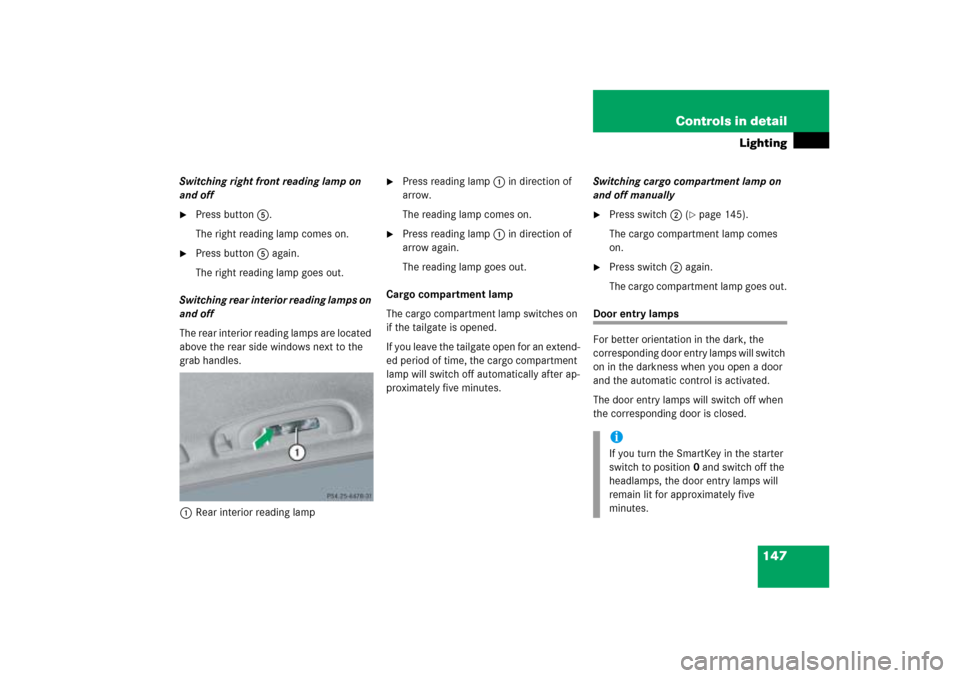
The rear interior reading lamps are located
above the rear side windows next to the
grab handles.
1Rear interior reading lamp
�
Press reading lamp1 in direction of
arrow.
The reading lamp comes on.
�
Press reading lamp1 in direction of
arrow again.
The reading lamp goes out.
Cargo compartment lamp
The cargo compartment lamp switches on
if the tailgate is opened.
If you leave the tailgate open for an extend-
ed period of time, the cargo compartment
lamp will switch off automatically after ap-
proximately five minutes.Switching cargo compartment lamp on
and off manually
�
Press switch2 (
�page 145).
The cargo compartment lamp comes
on.
�
Press switch2 again.
The cargo compartment lamp goes out.
Door entry lamps
For better orientation in the dark, the
corresponding door entry lamps will switch
on in the darkness when you open a door
and the automatic control is activated.
The door entry lamps will switch off when
the corresponding door is closed.
iIf you turn the SmartKey in the starter
switch to position0 and switch off the
headlamps, the door entry lamps will
remain lit for approximately five
minutes.
Page 151 of 539
150 Controls in detailControl systemThe control system is activated as soon as
the SmartKey in the starter switch is
turned to position1 or as soon as the
KEYLESS-GO start/stop button* is in
position1. The control system enables you
to:�
call up information about your vehicle
�
change vehicle settings
For example, you can use the control sys-
tem to find out when your vehicle is next
due for service, to set the language for
messages in the instrument cluster dis-
play, and much more.
The control system relays information to
the multifunction display.
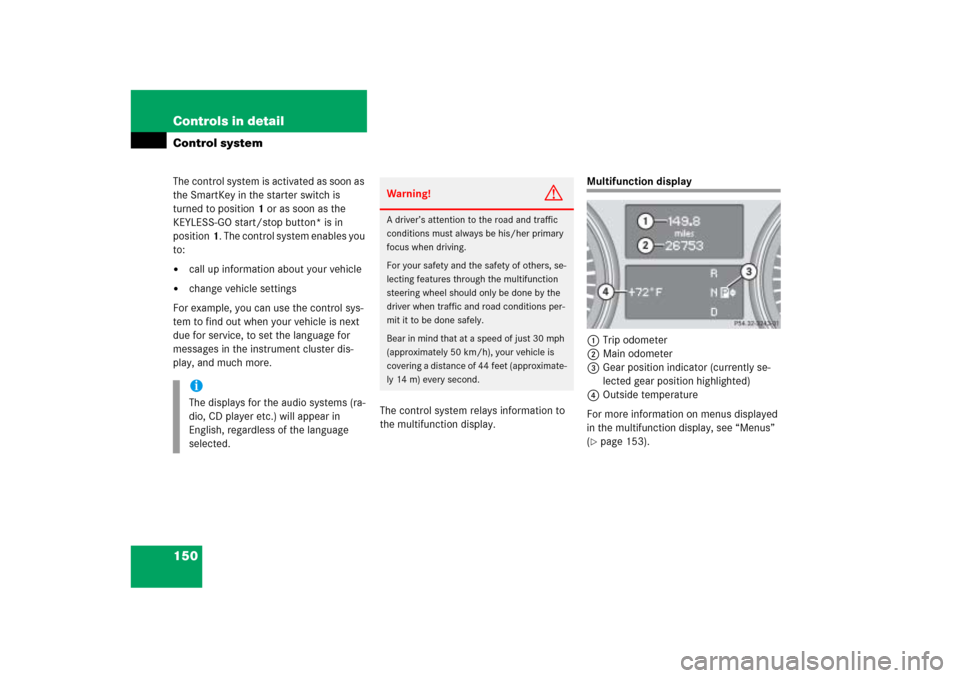
Multifunction display
1Trip odometer
2Main odometer
3Gear position indicator (currently se-
lected gear position highlighted)
4Outside temperature
For more information on menus displayed
in the multifunction display, see “Menus”
(�page 153).
iThe displays for the audio systems (ra-
dio, CD player etc.) will appear in
English, regardless of the language
selected.
Warning!
G
A driver’s attention to the road and traffic
conditions must always be his/her primary
focus when driving.
For your safety and the safety of others, se-
lecting features through the multifunction
steering wheel should only be done by the
driver when traffic and road conditions per-
mit it to be done safely.
Bear in mind that at a speed of just 30 mph
(approximately 50 km/h), your vehicle is
covering a distance of 44 feet (approximate-
ly 14 m) every second.
Page 158 of 539

157 Controls in detail
Control system
AUDIO menu
The functions in the
AUDIO
menu operate
the audio equipment which you currently
have turned on.
If no audio equipment is currently turned
on, the message
AUDIO OFF
is shown in the
display.
The following functions are available:Select radio station
�
Turn on the Modular COMAND System
and select radio. Refer to separate
Modular COMAND System operating
instructions.
�
Press buttonè orÿ repeatedly
until you see the currently tuned sta-
tion in the multifunction display.
1Waveband setting
2Station frequency
�
Press buttonk orj repeatedly
until the desired station is found.Select satellite radio station* (USA
only)
The satellite radio is treated as a radio ap-
plication.
�
Select satellite radio with the corre-
sponding key on the Modular COMAND
System.
1SAT mode and preset number
2Channel name or number
Function
Page
Select radio station
157
Select satellite radio station*
(USA only)
157
Operate CD player
158
iYou can only store new stations using
the corresponding feature on the radio,
see separate Modular COMAND
System operating instructions.
You can also operate the radio in the
usual manner.
��