Page 42 of 521

41 Getting started
Adjusting
Seat adjustment
The seat adjustment switches are located
on the front doors.
1Head restraint height
2Seat height
3Seat cushion tilt
4Seat fore and aft adjustment
5Backrest tilt�
Switch on the ignition (
�page 36).
or
�
Open the respective door.Seat fore and aft adjustment
�
Press the switch forward or backward
in direction of arrow4.
Adjust a comfortable seating position
that still allows you to reach the accel-
erator/brake pedal safely. The position
should be as far to the rear as possible,
consistent with ability to properly oper-
ate controls.Seat cushion tilt
�
Press the switch up or down in direc-
tion of arrow3 until your upper legs
are lightly supported.
Backrest tilt
�
Press the switch forward or backward
in direction of arrow5 until your arms
are slightly angled when holding the
steering wheel.
Seat height
�
Press the switch up or down in direc-
tion of arrow2.
iThe memory function (
�page 138) lets
you store the settings for the seat posi-
tion together with the settings for the
steering wheel and the exterior rear
view mirrors.
!When moving the seat, make sure
there are no items in the footwell or be-
hind the seats. Otherwise you could
damage the seats.
Page 44 of 521

43 Getting started
Adjusting
Steering wheel adjustment
The stalk for steering wheel adjustment is
located on the lower left of the steering
column.
1Adjusting steering column, in or out
2Adjusting steering column, up or down�
Switch on the ignition (
�page 36).
or
�
Open the driver’s door.Adjusting steering column in or out
�
Move stalk in direction of arrows1
until a comfortable steering wheel posi-
tion is reached with your arms slightly
bent at the elbow.
Adjusting steering column up or down
�
Move stalk in direction of arrows2.
Make sure your legs can move freely
and all the displays (incl. malfunction
and indicator lamps) on the instrument
cluster are clearly visible.Easy-entry/exit feature
This feature allows for easier entry into and
exit from the vehicle. When entering and
exiting the vehicle, the steering wheel is in
its uppermost position.
The easy-entry/exit feature can be activat-
ed or deactivated in the
Convenience
sub-
menu of the control system (
�page 175).
iThe memory function (
�page 138) lets
you store the settings for the steering
wheel together with the settings for the
exterior rear view mirrors and the
driver’s seat position.
Warning!
G
You must make sure no one can become
trapped or injured by the moving steering
wheel when the easy-entry/exit feature is
activated.
To stop steering wheel movement, do one of
the following:�
Move steering column stalk.
�
Press one of the memory buttons or the
memory button M (
�page 139).
��
Page 45 of 521

44 Getting startedAdjustingWith the easy-entry/exit feature activated,
the steering wheel will return to its last set
position when you:�
close the driver’s door with the ignition
switched on,
or
�
insert the SmartKey into the starter
switch or press the KEYLESS-GO*
start/stop button (
�page 38) once
with the driver’s door closedWith the easy-entry/exit feature activated,
the steering wheel tilts upwards when you:
�
remove the SmartKey from the starter
switch,
or
�
open the driver’s door with the
SmartKey in starter switch position 0
or 1 or the KEYLESS-GO* start/stop
button (
�page 38) in position 1.
Do not leave children unattended in the ve-
hicle, or with access to an unlocked vehicle.
Children could open the driver’s door and
unintentionally activate the easy-entry/exit
feature, which could result in an accident
and/or serious personal injury.
iThe last set steering wheel position is
stored when�
the ignition is switched off
�
the position is stored in memory
(�page 139)
iIf the current position for the steering
wheel is in the uppermost tilt position,
the steering wheel will no longer be
able to move upward when the
easy-entry/exit feature is activated.
The adjustment procedure is briefly in-
terrupted when the engine is started.Warning!
G
Let the system complete the adjustment
procedure before setting the vehicle in mo-
tion. All steering wheel adjustment must be
completed before setting the vehicle in mo-
tion. Driving off with the steering wheel still
adjusting could cause the driver to lose con-
trol of the vehicle.
��
Page 47 of 521
46 Getting startedAdjusting�
Switch on the ignition (
�page 36).
�
Press button3 for the driver’s side ex-
terior rear view mirror or button1 for
the passenger-side exterior rear view
mirror.
�
Push adjustment button2 up, down,
left or right according to the desired
setting.For more information, see “Activating exte-
rior rear view mirror parking position”
(
�page 198).
For more information, see “Rear view mir-
rors” (
�page 197).
!If an exterior rear view mirror was forc-
ibly pushed forward (hit from the rear)
or forcibly pushed rearward (hit from
the front), reposition it by applying firm
pressure until it snaps into place. The
mirror housing is now properly posi-
tioned and you can adjust the mirror
normally.iThe memory function (
�page 138) lets
you store the setting for the seat posi-
tion together with the setting for the
steering wheel and the exterior rear
view mirrors.
At low ambient temperatures, the exte-
rior rear view mirrors will be heated au-
tomatically.
Page 54 of 521
53 Getting started
Driving
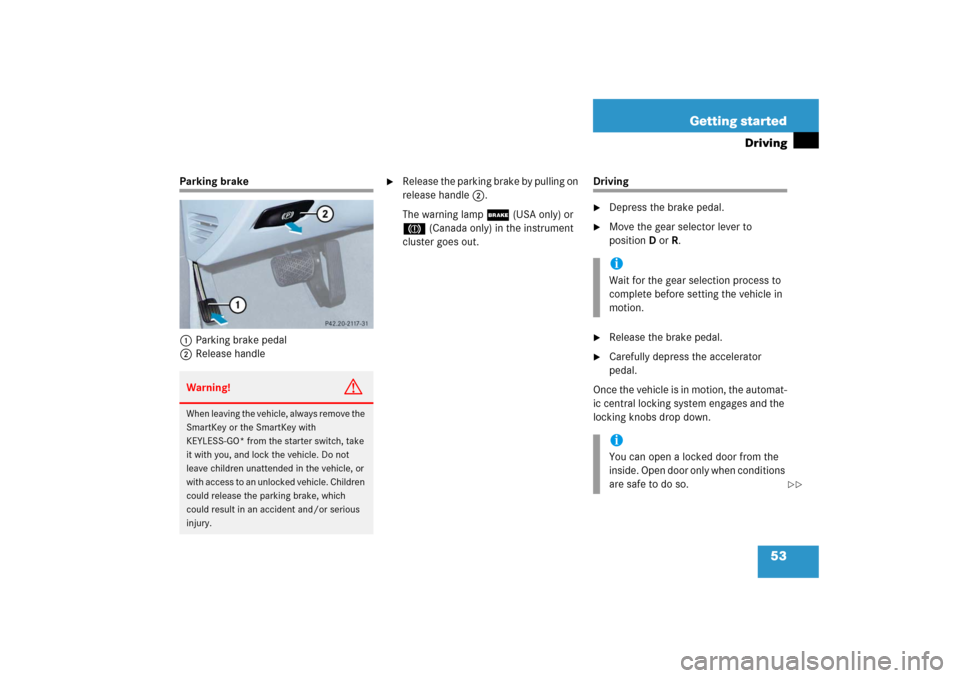
Parking brake
1Parking brake pedal
2Release handle
�
Release the parking brake by pulling on
release handle2.
The warning lamp ; (USA only) or
3 (Canada only) in the instrument
cluster goes out.
Driving�
Depress the brake pedal.
�
Move the gear selector lever to
positionDorR.
�
Release the brake pedal.
�
Carefully depress the accelerator
pedal.
Once the vehicle is in motion, the automat-
ic central locking system engages and the
locking knobs drop down.
Warning!
G
When leaving the vehicle, always remove the
SmartKey or the SmartKey with
KEYLESS-GO* from the starter switch, take
it with you, and lock the vehicle. Do not
leave children unattended in the vehicle, or
with access to an unlocked vehicle. Children
could release the parking brake, which
could result in an accident and/or serious
injury.
iWait for the gear selection process to
complete before setting the vehicle in
motion.iYou can open a locked door from the
inside. Open door only when conditions
are safe to do so.
��
Page 57 of 521

56 Getting startedDrivingWindshield wipers
The combination switch is located on the
left of the steering column.Combination switch1Single wipe
Wiping with windshield washer fluid
2Switching on windshield wipers�
Switch on the ignition (
�page 36).Switching on windshield wipers
�
Turn the combination switch to the de-
sired position depending on the inten-
sity of the rain.
0Windshield wipers off
IIntermittent wiping
IINormal wiper speed
IIIFast wiper speedIntermittent wiping
Intermittent wiping interval is dependent
on wetness of windshield.
�
Turn the combination switch to
positionI.
After the initial wipe, pauses between
wipes are automatically controlled by the
rain sensor.
!Do not operate the windshield wipers
when the windshield is dry. Dust that
accumulates on a windshield might
scratch the glass and/or damage the
wiper blades when wiping occurs on a
dry windshield. If it is necessary to op-
erate the windshield wipers in dry
weather conditions, always operate the
windshield wipers with windshield
washer fluid (
�page 57).
!Do not leave windshield wipers in
intermittent setting when the vehicle is
taken to an automatic car wash or
during windshield cleaning. Windshield
wipers will operate in the presence of
water sprayed on the windshield, and
windshield wipers may be damaged as
a result.
Page 58 of 521
57 Getting started
Driving
Single wipe�
Press the combination switch briefly in
direction of arrow1 to the resistance
point.
The windshield wipers wipe one time
without washer fluid.Wiping with windshield washer fluid
�
Push the combination switch in direc-
tion of arrow1 past the resistance
point.
The windshield wipers operate with
washer fluid.
For information on filling up the washer
reservoir, see “Windshield washer system
and headlamp cleaning system*”
(
�page 327).
iIntermittent wiping is interrupted when
the vehicle is at a standstill and a front
door is opened. This protects persons
getting into or out of the vehicle from
being sprayed.
Intermittent wiping will be continued
when�
all doors are closed
and
�
the gear selector lever is in
positionD or R
or
�
the wiper setting is changed using
the combination switch
iTo prevent smears on the windshield,
wipe with windshield washer fluid every
now and then even when it is raining.
Page 65 of 521
64 Getting startedParking and lockingLocking with the SmartKey�
After exiting the vehicle, press lock
button‹ on the SmartKey
(�page 34).
�
All turn signal lamps flash three
times.
�
An acoustic signal sounds three
times (if equipped and feature acti-
vated).
For more information, see “Factory
setting” (
�page 108).
�
The locking knobs in the doors
move down.
�
The anti-theft alarm system is
armed.
For more information, see the “Controls in
detail” section (
�page 106).Locking with KEYLESS-GO*
1Lock button
�
After exiting the vehicle, press lock
button1 on an outside door handle or
on the trunk lid.�
All turn signal lamps flash three
times.
�
An acoustic signal sounds three
times (if equipped and feature acti-
vated).
For more information, see “Factory
setting” (
�page 114).
�
The locking knobs in the doors
move down.
�
The anti-theft alarm system is
armed.
For more information, see the “Controls in
detail” section (
�page 111).


