Page 149 of 498

148 Controls in detailControl systemMultifunction steering wheel
The displays in the multifunction display
and the settings in the control system
(�page 147) are controlled by the buttons
on the multifunction steering wheel.Depending on the selected menu
(
�page 151), pressing the buttons on the
multifunction steering wheel will alter what
is shown in the multifunction display.
The information available in the multifunc-
tion display is arranged in menus, each
containing a number of functions or sub-
menus.
The individual functions are then found
within the relevant menu (radio or CD op-
erations under
Audio
, for example). These
functions serve to call up relevant informa-
tion or to customize the settings for your
vehicle.
1
Multifunction display in the speed-
ometerOperating the control system
2
Selecting the submenu or setting
the volume:
Press buttonæup/to increaseçdown/to decrease
3
Telephone*:
Press buttonsto take a calltto end a call
4
Menu systems:
Press buttonèfor next menuÿfor previous menu
5
Moving within a menu:
Press buttonjfor next displaykfor previous display
Page 150 of 498
149 Controls in detail
Control system
It is helpful to think of the menus, and the
functions within each menu, as being
arranged in a circular pattern.�
If you press buttonè orÿ
repeatedly, you will pass through each
menu one after the other.
�
If you press buttonk orj
repeatedly, you will pass through each
function display, one after the other, in
the current menu.In the
Settings
menu, instead of functions
you will find a number of submenus for
calling up and changing settings. For
instructions on using these submenus, see
the “Settings menu” section (
�page 157).
The number of menus available in the sys-
tem depends on which optional equipment
is installed in your vehicle.The menus are described on the following
pages.
Page 152 of 498
151 Controls in detail
Control system
Menus, submenus and functions
Menu1
Menu2
Menu3
Menu4
Menu5
Standard display
AUDIO
NAV*
Distronic*
Vehicle status mes-
sage memory
1
1The vehicle status message memory menu is only displayed if there is a message stored.(�page 153)
(�page 153)
(�page 155)
(�page 155)
(�page 156)
Commands/submenusDigital speedometer
Select radio station
Show route guidance
instructions, current
direction traveled
Call up settings
Call up vehicle malfunc-
tion, warning and system
status messages stored
in memory
Call up maintenance
system display
Select satellite radio
station*
Checking tire inflation
pressure
Operate CD player
Check engine oil level
Page 153 of 498
152 Controls in detailControl system
Menu6
Menu7
Menu8
Settings
Trip computer
Telephone
(�page 157)
(�page 171)
(�page 172)
Commands/submenusReset to factory settings
Fuel consumption statistics after start
Load phone book
Instrument cluster submenu
Fuel consumption statistics since the last
reset
Search for name in phone book
Time/Date submenu
Distance to empty
Lighting submenuVehicle submenuConvenience submenuDynamic seat* submenuiThe headings used in the menus table
are designed to facilitate navigation
within the system and are not neces-
sarily identical to those shown in the
control system displays.
The first function displayed in each
menu will automatically show you
which part of the system you are in.
Page 154 of 498
153 Controls in detail
Control system
Standard display menu�
Press buttonk orj repeatedly
to select the functions in the standard
display menu.
The following functions are available:
Display digital speedometer
�
Press buttonk orj repeatedly
until the digital speedometer appears
in the multifunction display.
AUDIO menu
The functions in the
Audio
menu operate
the audio equipment which you currently
have turned on.
If no audio equipment is currently turned
on, the message
AUDIO off
is shown in the
multifunction display.
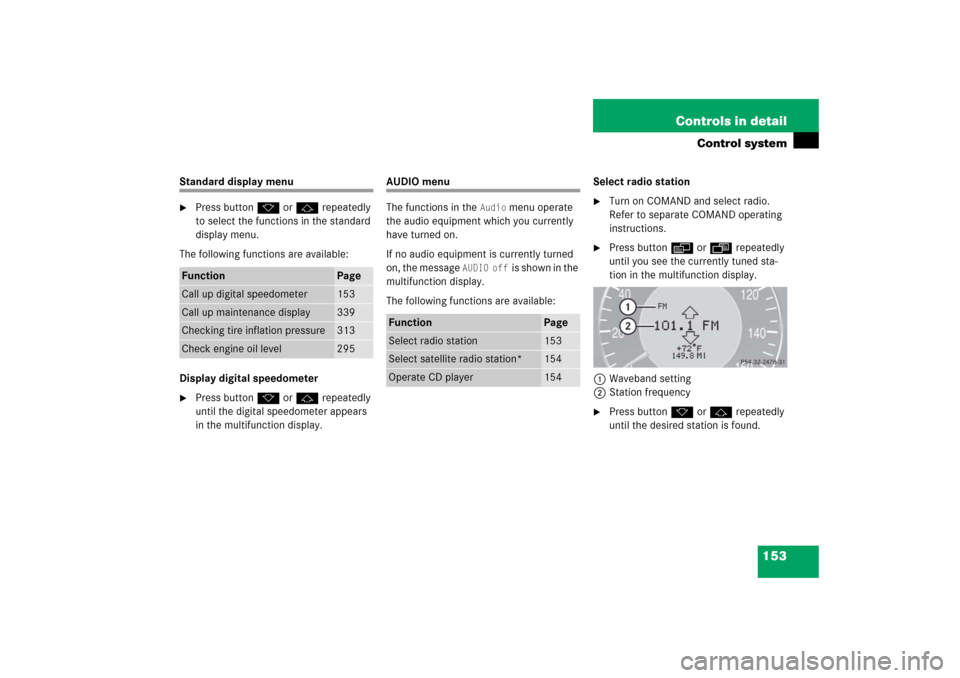
The following functions are available:Select radio station
�
Turn on COMAND and select radio.
Refer to separate COMAND operating
instructions.
�
Press buttonè orÿ repeatedly
until you see the currently tuned sta-
tion in the multifunction display.
1Waveband setting
2Station frequency
�
Press buttonk orj repeatedly
until the desired station is found.
Function
Page
Call up digital speedometer
153
Call up maintenance display
339
Checking tire inflation pressure
313
Check engine oil level
295
Function
Page
Select radio station
153
Select satellite radio station*
154
Operate CD player
154
Page 155 of 498

154 Controls in detailControl systemSelect satellite radio station*
(USA only)
The satellite radio is treated as a radio
application.�
Select SAT radio with the correspond-
ing softkey in the radio menu.
1SAT mode and preset number
2Setting for station selection using
memory
3Channel name or number
�
Press buttonk orj repeatedly
until the desired channel is found.
Operate the CD player
�
Turn on COMAND and select the CD
player. Refer to separate COMAND
operating instructions.
�
Press buttonè orÿ repeatedly
until the settings for the CD currently
being played are shown in the multi-
function display.1Current CD (CD 1 through CD 6 for
CD changer*)
2Current track
�
Press buttonk orj repeatedly
until the desired track is selected.
iYou can only store new stations using
the corresponding feature on the radio,
see separate operating instructions.
You can also operate the radio in the
usual manner.
iAdditional optional satellite radio
equipment and a subscription to satel-
lite radio service provider are required
for satellite radio operation. Contact an
authorized Mercedes-Benz Center for
details and availability for your vehicle.
For more information, refer to separate
COMAND operating instructions.
iTo select a CD from the magazine,
press a number on the COMAND
system key pad located in the center
console.
Page 156 of 498

155 Controls in detail
Control system
NAV* menu
The
NAV
menu contains the functions need-
ed to operate your navigation system.
�
Press buttonè orÿ repeatedly
until you see the message
NAV
in the
multifunction display.
�
If COMAND is switched off, the mes-
sage
NAV off
is shown in the multifunc-
tion display.
�
With COMAND switched on but route
guidance not activated, the direction of
travel and, if available, the name of the
street currently traveled on appear in
the multifunction display.
�
With COMAND switched on and route
guidance activated, the direction of
travel and maneuver instructions ap-
pear in the multifunction display.
Please refer to the COMAND manual for
instructions on how to activate the route
guidance system.
Distronic* menu
Use the Distronic menu to display the cur-
rent settings for your Distronic system.
What information is shown in the multi-
function display depends on whether the
Distronic system is active or inactive.
Please refer to the “Driving systems”
section of this manual (
�page 226) for
instructions on how to activate Distronic.
�
Press buttonè orÿ repeatedly
until you see one of the following two
pictures in the multifunction display.Distronic deactivated
When Distronic is deactivated, you will see
the standard display in the multifunction
display.
1Vehicle ahead, if detected
2Actual distance to vehicle ahead
3Preset distance threshold to vehicle
ahead
4Your vehicle
5Symbol for activated distance warning
function
Page 157 of 498

156 Controls in detailControl systemDistronic activated
With Distronic activated, the
Distronic
display is shown in the multifunction dis-
play and one or two segments around the
set speed are illuminated in the speedom-
eter.
1Distronic activated
Vehicle status message memory menu
Use the vehicle status message memory
menu to scan malfunction and warning
messages that may be stored in the sys-
tem. Such messages appear in the multi-
function display and are based on
conditions or system status the vehicle’s
system has recorded.The vehicle status message memory menu
only appears if there are any messages
stored.
�
Press buttonè orÿ repeatedly
until the vehicle status message mem-
ory appears in the multifunction dis-
play.Vehicle status messages have been
recorded
If conditions have occurred causing status
messages to be recorded, the number of
messages appears in the multifunction
display:
�
Press buttonk orj.
The stored messages will now be dis-
played in the order in which they have
occurred. For malfunction and warning
messages, see “Vehicle status messag-
es in the multifunction display”
(�page 363).
Warning!
G
Malfunction and warning messages are only
indicated for certain systems and are inten-
tionally not very detailed. The malfunction
and warning messages are simply a remind-
er with respect to the operation of certain
systems and do not replace the owner’s
and/or driver’s responsibility to maintain
the vehicle’s operating safety by having all
required maintenance and safety checks
performed on the vehicle and by bringing
the vehicle to an authorized Mercedes-Benz
Center to address the malfunction and
warning messages (
�page 363).


