2006 MERCEDES-BENZ CL COUPE change time
[x] Cancel search: change timePage 370 of 555
349
Con
trols
Slidin g/tilting sunroof
! Only open theslidin g/tilting sunroof if itis
fre eof snow and ice. Othe rwise, malfunc tions
ma y oc cur.Do notallow ob jects toprotrude
fro mthe sliding /tilting su nroof, as they could
damage thesea ling strips.
i Whenthes liding /tilting sunroof is open,
resona nce noise sma yoc cur as well as theusual
airflow noise s.These are cause dbysmall pres-
sure fluc tuations in thevehicle in terior. Change
th epositio nofthe sliding /tilting sunroof or
open a side wi ndow sligh tlyt o redu ceor elimi-
nat eth ese noise s.
i The sliding /tilting sunroof canalso be:
! opened fro m the out side usi ngthe "Su mmer
opening feature " (=
page 351)
! close dfrom theo utsi de using the "Conven-
ien ce cl osing feature" (= page
352)
i WhenPRE -SAFE ®
ha sb een ac tiva ted, the
sli din g/ tilting su nroo fcl oses automat icall ybut
remains sligh tly open. Op
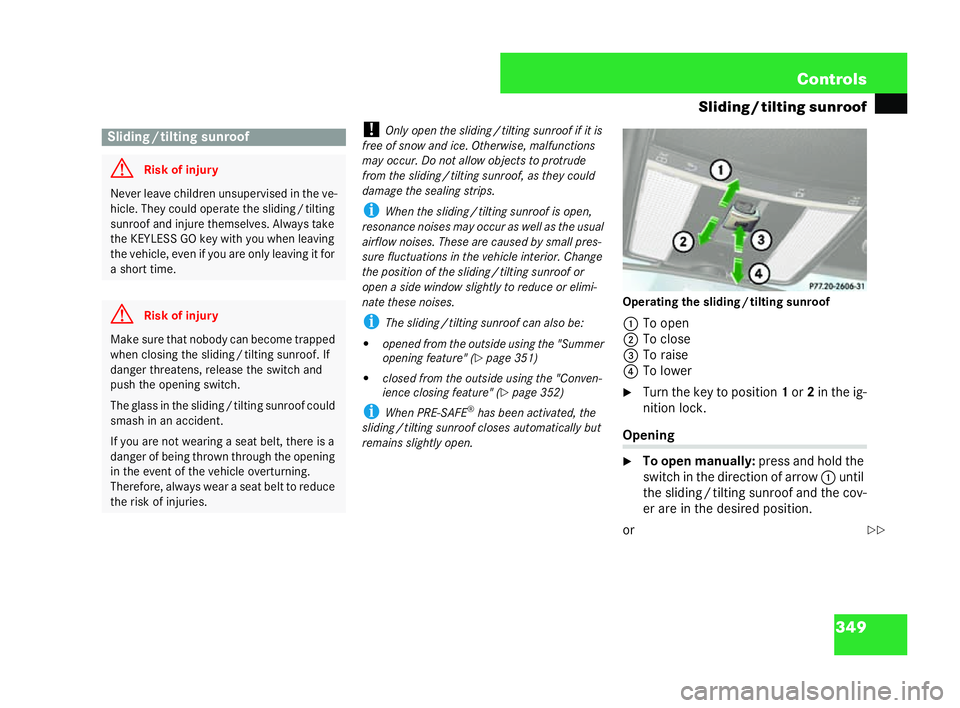
erating th eslidi ng /tilti ng sunroof
1 To open
2 To close
3 To raise
4 To lower
6 Turn the key to position 1or 2in thei g-
nition lock. Opening
6
To open manuall y:press and hold the
swi tch in the dire cti on of ar row 1 until
the slidin g/tilti ng sunroo fan dt he co v-
er are in the desired position.
or Slidi
ng/tilting sunroof G
Risk of inju ry Neve
r leave childr en unsupe rvised in the ve-
hi cle. They could op erate theslid ing/ tilting
sunroof and injure thems elve s. Alwa ystake
the KEYLES SGO key with you when leav ing
th ev ehicle ,eve nif you areo nly leaving it for
a sh ort time. G
Risk of inju ry Make sur
ethat nobody can become trap ped
when clo sing the sl iding /tilti ng sunroof .If
da ng er threaten s,rele ase the switch and
pu sh the opening switch.
The glass in theslid ing/ tilting su nroof cou ld
smash in an acc iden t.
If yo uare not wearin gase at belt,th ere is a
danger of bei ngthrown through theop ening
in the ev ent of theve hicle ov erturning.
Th erefore, always wear a seat belt to redu ce
the risk of injuries. P77.20-2606-31
==216_R
E_2006-12a.book Seit e349 Montag, 2. Oktob er2006 12:06 12
Page 386 of 555
365
Con
trols
Features
i Thesystem reads thephone book stored on
th eS IM card and in the memor yof the mobile
phone. If the same entry is store din bo thofthe
phone books, bot hof the se entries will be shown
in the mul ti-func tion display.
You can mak ecalls using the s and
t buttons on the multi-f un ction steer-
in gwh eel orusing CO MA ND.You canco n-
trol ot hermo bile phone functions using the
on-board compu ter (
=page 282).
i Whenyou remove theke y from the ignit ion
loc k,the mobile phone remains swi tched on for
approximatel yten min utes(run-on time). If you
make a call during thistime ,th e mobile phone
wi ll be swi tche dof f approxi mately tenmi nut es
af te ryo uha ve ended the call.
Ru n-on time:
Yo uca n change the run-on timeby maki ngan ad-
ditional phon ebook ent ryon the SI Mcard.
Fo rthe nam e,ent er"Idletime" (run-on time) and
fo rthe numb er, enter a num ber bet ween 1 and
30 (minutes). If you have not en tered a number
or have ent ered a different nu mber, the run-on
ti me of ten minut eswill still apply.
Refer tothemo bilephone operating inst ru ctions
fo rho wt ocr ea te a phone book entry. Own
numb ersen ding:
The hands- free sys temdoes not reco gni se
whet her own numb er sending is enabl edor disa-
ble dinth emo bile phone .The phone numb eris
th er efore al ways se ntby de fault.
By creating an additio nalp ho ne book ent ryon
th eS IMcard,yo uc an swi tch the own nu mber
se nd ing fu nction on or off:
For the na me, enter"CAL LID "and forthe
number, ent era" 0" or a "1". Ent ering:
! "0" will prevent thep hone number from be-
ing sent
! "1" will allow the phone number tobe sent
Ref erto the mobilephone opera ting ins truc tions
for howto crea te a phon ebook ent ry. Rem
ovingt he mo bile phone from the bracket
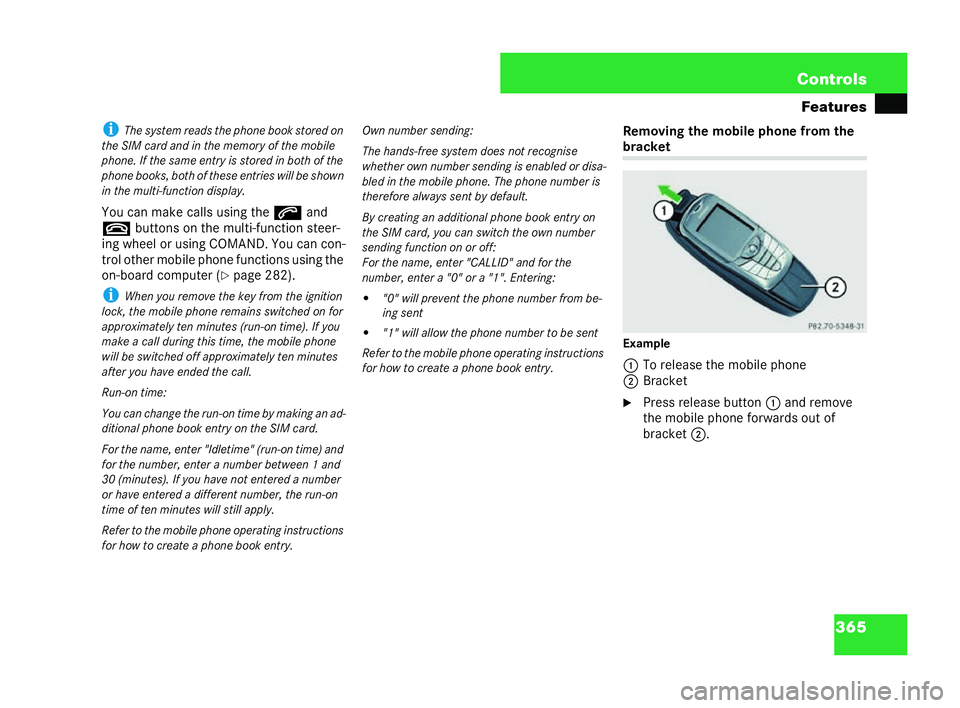
Example
1 To release the mobile phone
2 Bracket
6 Press release bu tton1and re move
the mob ilep hone forw ards out of
bracket 2. 216_R
E_2006-12a.book Seit e365 Montag, 2. Oktob er2006 12:06 12
Page 407 of 555
386 Operation
Tyres
andwh eels
Cance llingares tart
6 Press theL button.
or 6 Press $toexit themenugrap hic.
Oth ermes sages in the multi-f unction display
If
th efol lowi ng message appears in the
mult i-fu nc tion disp lay: "Rectif yty re pres-
sure( s)":
6 Check th epressures ofallfo ur tyres
an d co rrect them if neces sary.
i Ifth ewh eels on the veh iclewere inte r-
changed, the press ures may be show nin
th ew rong positions for a short time. This will be
correc ted af ter driving a few mi nu tesand the
press ures will be shown in theco rrec tpositions. 216_R
E_2006-12a.book Seit e386 Montag, 2. Oktob er2006 12:06 12
Page 408 of 555

387
Operation
Ty res andwh eels
Th ewh eels canbe inte rcha ng ed every
5, 000 to10
,00 0k mdepending on the de-
gree of tyre wea r,provided th attheveh icle
wh eelsareof thesa me size .Do not re-
verse the direction of tyre rotation.
Th e wea rpatter ns on the front andr ear
wh eels dif fer de pendi ngon th eoperating
condi tion s.Interchange the wh eelsbefore
too de finite awe arpattern ha sfo rm ed
on the tyr es.The front tyres typ ical ly wear
more on the oute rsh ou lder and th ere ar
tyres in the centr e.
Clea nthe contac t surfaces ofthew heel
an d the brake dis cthoroughly every time
aw heelisinter chan ged . Check the tyre
pr essure and reactivate th etyr epressure
monitor *if nece ssary. !
Elec tronic comp onent swill be locat edinthe
wheel if your ve hicle is fitt ed wit haty re pressure
monit or*.
Tyre fitt ing tools should notbe applied in the
ar ea of the va lve, as thisco uld dam agethe elec-
tr onic comp onent s.
Al ways have thety res replaced at a qualified
spe cialist workshop, e. g.a Mercede s-Be nz
Ser vice Centre. Int
erch angi ngthe wheels G
Risk of accide nt Only
interc hang eth efront andrear wheels if
th ey areof the same size .Th eha nd ling char-
ac teri stics of the vehic lema yotherwis ebe
af fe cted andy ou could endange ryo urse lfor
others. G
Risk ofaccide nt Ha
ve the tighten ing torq ueofthew heel
bo lts ch ecked afterevery wheel chang eat a
quali fied spe cial ist work shopwhich has the
necessa ryspe cialist know ledge and tools to
ca rry outth ew orkrequire d.Me rcede s-Be nz
re co mme ndsthat youuseaMerce de s-Be nz
Se rvic eCe ntre for this purpose .In particu-
lar, wor krele vant tosafety or on safety-re-
late d sys tems must be ca rried out at a
qu alified specialist workshop. G
Risk of acc ident The wheels cou
ldwork loose if the wheel
bo ltsa re not tightene dto a tightening
to rq ue of150 Nm.
Fo r saf etyre asons, Merced es-Ben z recom-
me ndsth at you on lyus ewheel bolts ofthe
co rrec tsize, andwhic h hav ebe en ap proved
for Merced es-Ben zveh icle s. 216_R
E_2006-12a.book Seit e387 Montag, 2. Oktob er2006 12:06 12
Page 422 of 555
401
Practical advice
Wh ere will I fin d...?
i Havethe fire ext inguisher refilled aft er each
use and checked ev ery one or twoy ears .Ot he r-
wi se, it may fail in an emergency. Observe thel e-
gal requiremen tsin all count ries concerned.
! Makesure tha tthe stowage compart ment is
cl ose dwhile the vehicle is in motion.
Th efire extingu ishe ris located inthe stow-
ag eco mpar tment under thed river’s seat.
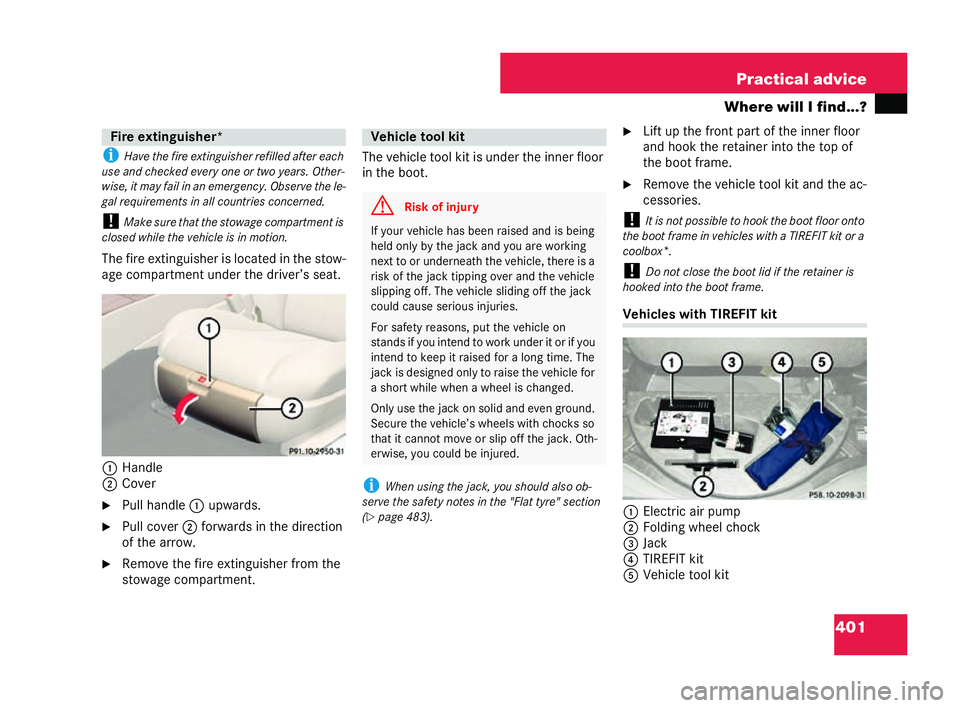
1 Hand le
2 Cover
6 Pullha nd le1 upwards.
6 Pullcove r2 forw ards in the dir ection
of the arrow.
6 Rem ovethefire ext ingu ishe rfr om the
stowag ecompar tment. Th
evehicl etoo lkit is un derthe inne rfloor
in the boot.
i Whenusingth eja ck ,you sh ouldalsoo b-
se rveth e safety notesin the" Flat tyre " se ction
(= page 483). 6
Lift upthe front part of th einne rfloor
an d hook the ret aine rinto the top of
the boot frame.
6 Remo vethe vehicle tool kit an dthe ac-
cess ories.
! Itis not pos sible to ho okthe boot floor onto
th e boo tframe in vehicles with a TIREF ITkitor a
co olbox*.
! Do not close the boo tlid ifth e ret ainer is
ho oked into theboot fram e. Vehi
cles with TIREFIT kit
1 Elec tric air pump
2 Folding wh eel ch ock
3 Jack
4 TIREFIT kit
5 Vehi cle too lkit Fire ext
inguis her*
P9 1.10-2950-31 Vehicle
tool kit G
Risk ofinju ry If
yo ur veh icle ha s bee nra ised andis bei ng
he ldonl yby thejack and yo uarework ing
ne xtto or underneath the vehicle, there is a
risk ofthe jack tipping ov erandth eve hic le
slip ping off. The vehic leslidin gof fthe jack
cou ldcause serious injuri es.
For safety reas ons,put the vehicle on
stand sifyou in tend to work unde r it or if you
intend tokee pit rais edfor a long time. The
ja ck isde sign ed onlyto raise the vehic lefor
a short while whenawheel is changed.
Onl yusethe jack on sol idan d eve nground.
Secu re thevehic le’s wh eelswith chocks so
that itca nnot mo veor slip of fthe jack. Oth-
er wi se, you could be injur ed. P58.10-2098-31216_R
E_2006-12a.book Seit e401 Montag, 2. Oktob er2006 12:06 12
Page 545 of 555
524 Te
chnic aldata
Service prod uctsan dca pac ities
Th eco olan tis am ixtu re of water, anti-
fr eeze andco rrosion inh ibitor. Itpe rforms
the following tasks in the coolings ystem:
! Anti -corros ion prote ction
! Anti free ze protection
! Raising the bo ilin gp oint
! Always use a suitable coolant mixture, even
in co un tries wit hhigh temp eratur es.
Ot he rwise, thecooling system willno tbe suffi-
ci ent lyprotec ted from corrosion ,and the boiling
point will be toolow.
If an tifr eeze andco rros ion inh ibitor is
prese ntin the corre ctconcentration, the
bo ilin gp oint of theco olant willbe around
13 0° C.
Th eant ifre ez eand corros ion inh ibitorcon-
ce ntrati onintheco oling syst emshou ld:
! beatleas t50%. Thiswillpro tect the
co oling syste magai nstfreez ing do wn
to around –37° C.
! not exce ed 55%(anti free ze prot ection
down to –45°C ), oth erwise heat will
not bedissipat edso eff ective ly.
If the ve hicleis los ing coola nt, top it up
wi th equal amounts of wat erand an ti-
fr eeze andco rros ion inh ibitor. Mercede
s-Be nz rec om mendsa nantifreeze
and corros ion inh ibitor whic hhasbeen ap-
proved for Mer cede s-Be nz.
! Thec ooling sys tem con tains a supply
which must be renewed af ter1 5 years, or af ter
250,000 km at the la test.
Th ew arrant ywill only remain valid if youto pup
th e coolan twi th an antifre eze and corrosion in-
hi bitor that has been approved by
Me rced es-B enz. Your "Servi ceBooklet "provides
information about antifre eze and corrosion in-
hi bitors that have been approved by
Me rced es- Benz.
Ov eraperiod oftime, the brak efluid ab-
sorbs moistur efrom the air; this reduces
its boiling po int. i
There is usually a notic ein the eng inec om-
partment toremind youwh en the nex tbrak eflu-
id change is due.
Th ew ash erfluid reservoir holds approx i-
ma tely 6.5l itres.
Th eh eadlam pclea ning system an dthe
wind screen wa shersy stem have a co m-
mo nsu pply from the wash erfluid reser-
vo ir.
6 Fillthe wind screenw ashe rflui d re ser-
voi rwith a solution of wa ter and wind-
screen washer fluid concentra te.A dapt
the mixing ratio tothe outsid etem per-
atures. Brake fluid
G
Risk of accident If
the boiling point ofthe brak ef luid is too
lo w, vapour pocket s mayfor min th e brake
syst emwhen the brak es are applied ha rd
(e .g. when drivin gdo wn hill). This woul dim-
pa irbr ak ing eff icie nc y.
Ha ve thebr ak e fluid renew edevery
tw oy ears with abrake fluid approved by
Me rced es-Ben z. Win
dscreen washer syst em G
Risk of fire Wa
sher fl uid co ncentrate is hig hly flamma-
bl e. Fire ,na ked fl amesand sm okingar epro-
hi bite dwhen wa sher fluid concent rateis
be ing han dled. 216_R
E_2006-12a.book Seit e524 Montag, 2. Oktob er2006 12:06 12