2006 MAZDA MODEL 6 SPORTS SEDAN change time
[x] Cancel search: change timePage 6 of 58
6
Before Use
Navigation
Set Up
RDM-TMCIf
necessary
Rear View
Monitor
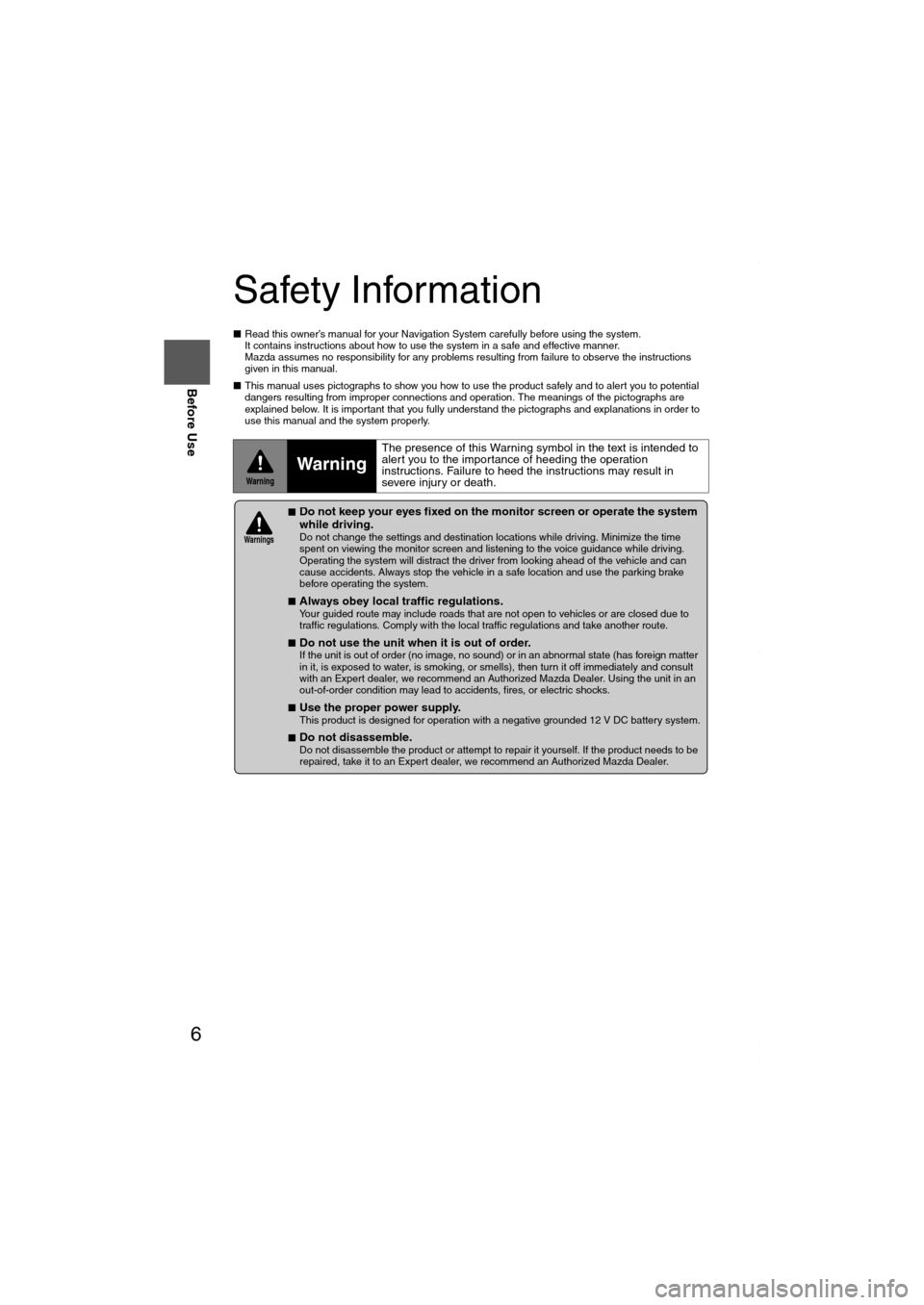
Safety Information
■Read this owner’s manual for your Navigation System carefully before using the system.
It contains instructions about how to use the system in a safe and effective manner.
Mazda assumes no responsibility for any problems resulting from failure to observe the instructions
given in this manual.
■This manual uses pictographs to show you how to use the product safely and to alert you to potential
dangers resulting from improper connections and operation. The meanings of the pictographs are
explained below. It is important that you fully understand the pictographs and explanations in order to
use this manual and the system properly.
WarningWarning
The presence of this Warning symbol in the text is intended to
alert you to the importance of heeding the operation
instructions. Failure to heed the instructions may result in
severe injury or death.
■Do not keep your eyes fixed on the monitor screen or operate the system
while driving.
Do not change the settings and destination locations while driving. Minimize the time
spent on viewing the monitor screen and listening to the voice guidance while driving.
Operating the system will distract the driver from looking ahead of the vehicle and can
cause accidents. Always stop the vehicle in a safe location and use the parking brake
before operating the system.
■
Always obey local traffic regulations. Your guided route may include roads that are not open to vehicles or are closed due to
traffic regulations. Comply with the local traffic regulations and take another route.
■
Do not use the unit when it is out of order.
If the unit is out of order (no image, no sound) or in an abnormal state (has foreign matter
in it, is exposed to water, is smoking, or smells), then turn it off immediately and consult
with an Expert dealer, we recommend an Authorized Mazda Dealer. Using the unit in an
out-of-order condition may lead to accidents, fires, or electric shocks.
■
Use the proper power supply. This product is designed for operation with a negative grounded 12 V DC battery system.
■
Do not disassemble. Do not disassemble the product or attempt to repair it yourself. If the product needs to be
repaired, take it to an Expert dealer, we recommend an Authorized Mazda Dealer.
Wa r n i n gs
MAZDA6_NAVI_EA.book Page 6 Wednesday, December 28, 2005 1:36 PM
Page 12 of 58
12
RoutingAddress
Book
Getting started
Activation
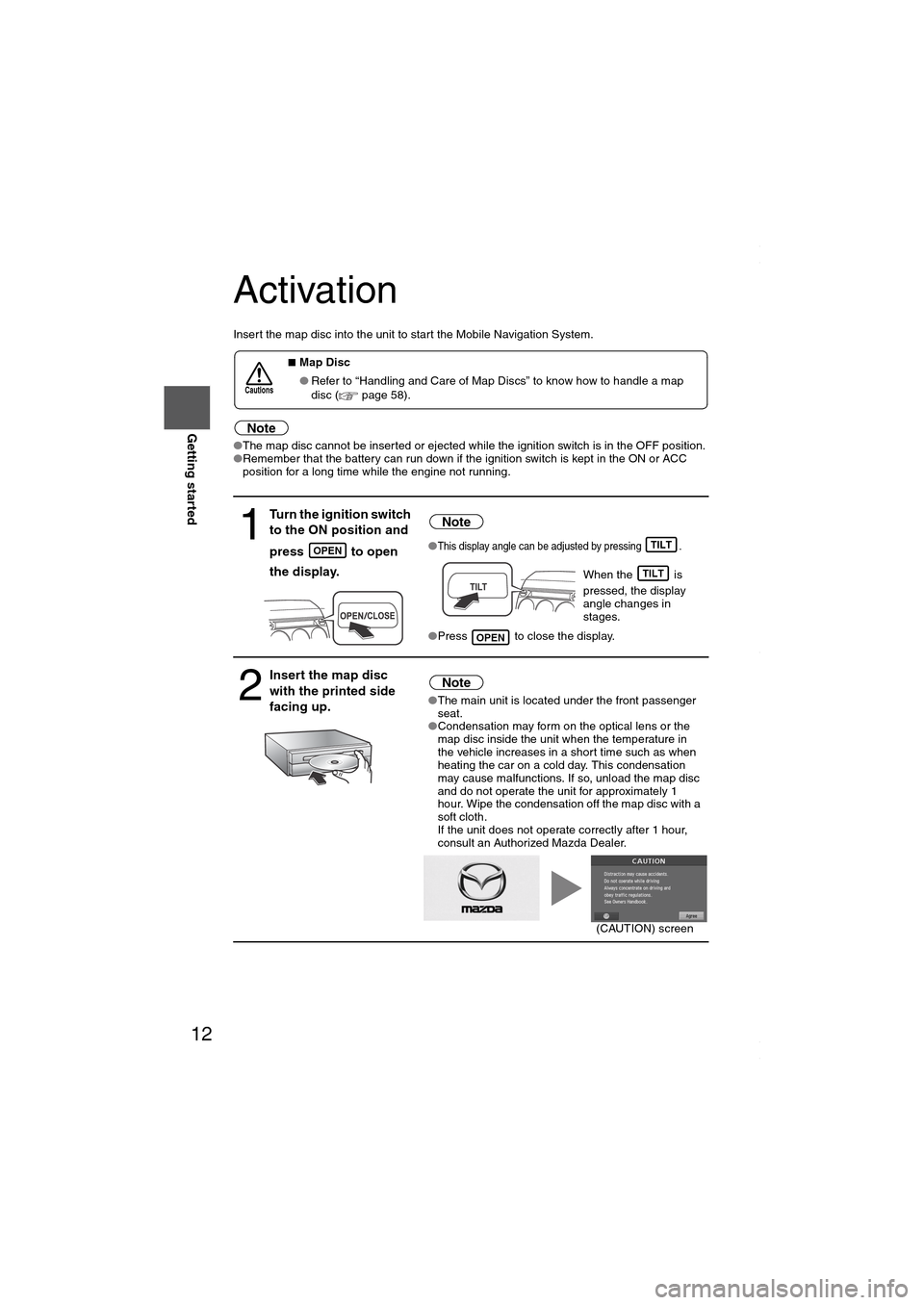
Insert the map disc into the unit to start the Mobile Navigation System.
Note
●The map disc cannot be inserted or ejected while the ignition switch is in the OFF position.
●Remember that the battery can run down if the ignition switch is kept in the ON or ACC
position for a long time while the engine not running.
■Map Disc
●Refer to “Handling and Care of Map Discs” to know how to handle a map
disc (
page 58).
1
Turn the ignition switch
to the ON position and
press
to open
the display.
Note
●This display angle can be adjusted by pressing .
When the is
pressed, the display
angle changes in
stages.
●Press to close the display.
2
Insert the map disc
with the printed side
facing up.Note
●The main unit is located under the front passenger
seat.
●Condensation may form on the optical lens or the
map disc inside the unit when the temperature in
the vehicle increases in a short time such as when
heating the car on a cold day. This condensation
may cause malfunctions. If so, unload the map disc
and do not operate the unit for approximately 1
hour. Wipe the condensation off the map disc with a
soft cloth.
If the unit does not operate correctly after 1 hour,
consult an Authorized Mazda Dealer.
Cautions
OPENTILT
TILT
OPEN
(CAUTION) screen
MAZDA6_NAVI_EA.book Page 12 Wednesday, December 28, 2005 1:36 PM
Page 16 of 58
16
RoutingAddress
Book
Getting started
Screen change
■Do not keep your eyes fixed on the monitor screen or operate the system
while driving
Do not change the settings and destination locations while driving. Minimize the time
spent viewing the monitor screen and listening to the voice guidance while driving.
Operating the system will distract the driver from looking ahead of the vehicle and may
cause an accident. Always stop the vehicle in a safe location and use the parking brake
before operating the system.
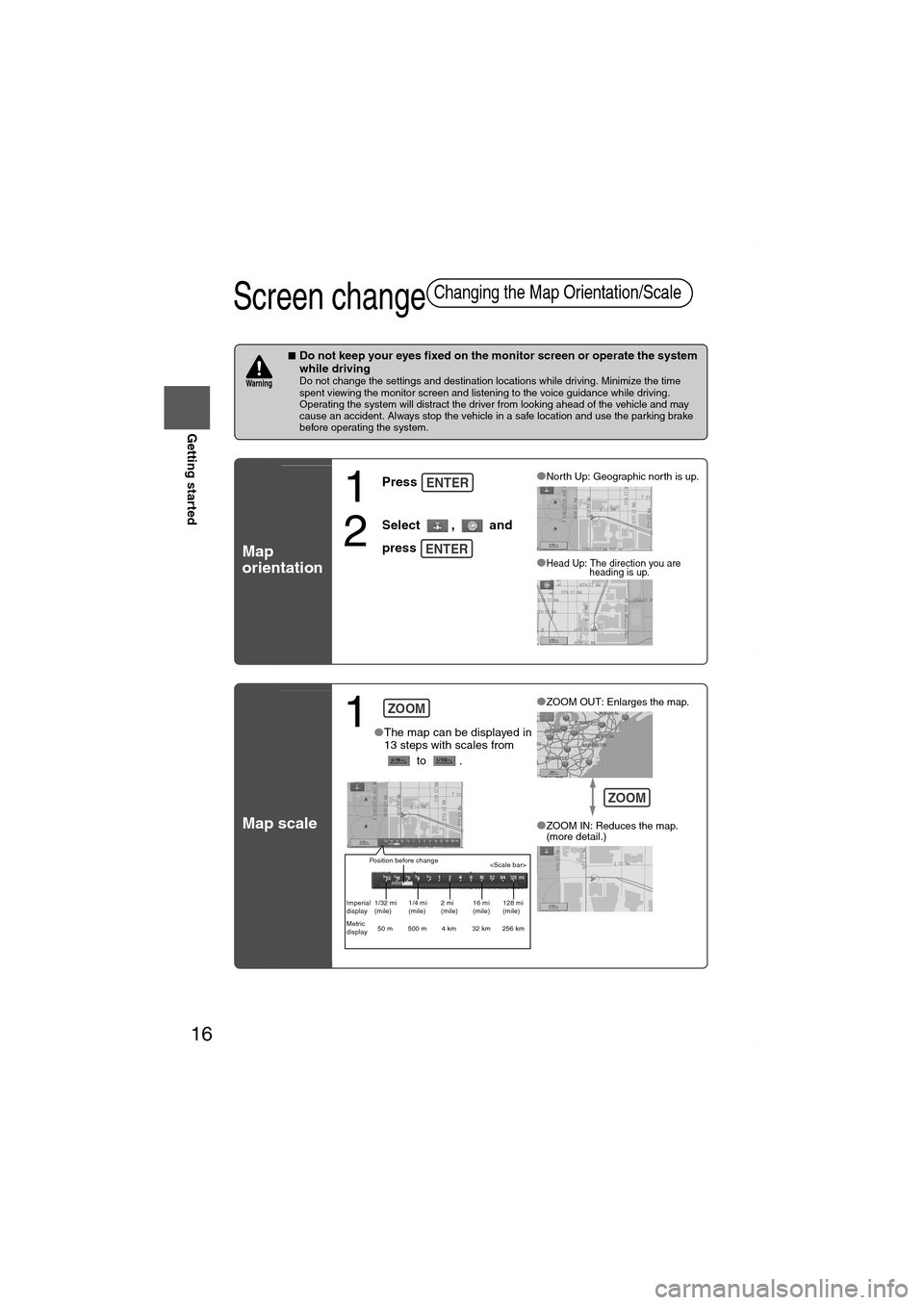
Map
orientation
Map scale
Changing the Map Orientation/Scale
Wa r n i n g
1
Press
2
Select , and
press
●North Up: Geographic north is up.
●Head Up: The direction you are
heading is up.
ENTER
ENTER
1 ●The map can be displayed in
13 steps with scales from
to .●
ZOOM OUT: Enlarges the map.
●ZOOM IN: Reduces the map.
(more detail.)
ZOOM
Position before change
Imperial
display1/32 mi
(mile)1/4 mi
(mile)2 mi
(mile)16 mi
(mile)128 mi
(mile)
Metric
display50 m 500 m 4 km 32 km 256 km
ZOOM
MAZDA6_NAVI_EA.book Page 16 Wednesday, December 28, 2005 1:36 PM
Page 19 of 58
19
Before
UseGetting
started
Routing
● For Character Entry, please refer to page 27.
●Do not keep your eyes fixed on the monitor screen or operate the system while driving.Do not change the settings and destination locations while driving. Minimize the time spent
viewing the monitor screen and listening to the voice guidance while driving. Operating the system
will distract the driver from looking ahead of the vehicle and may cause an accident. Always stop
the vehicle in a safe location before operating the system.
●Route searches with the navigation system can include roads that you cannot drive on and roads that you
are prohibited from driving on due to traffic regulations. Please comply with the traffic regulations.
Wa r n i n gs
ect
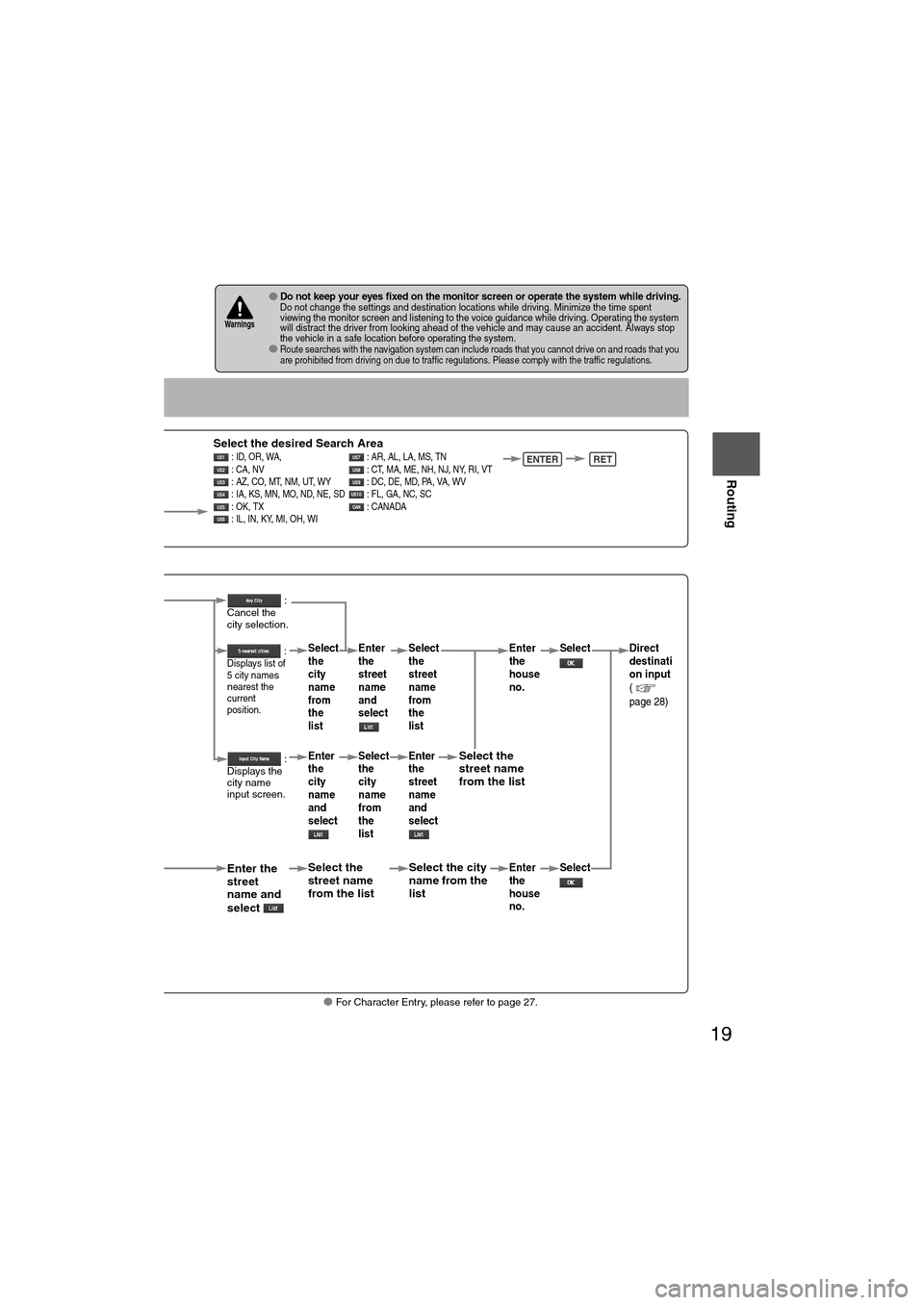
Select the desired Search Area : ID, OR, WA, : AR, AL, LA, MS, TN
: CA, NV : CT, MA, ME, NH, NJ, NY, RI, VT
: AZ, CO, MT, NM, UT, WY : DC, DE, MD, PA, VA, WV
: IA, KS, MN, MO, ND, NE, SD : FL, GA, NC, SC
: OK, TX : CANADA
: IL, IN, KY, MI, OH, WI ENTERRET
When narrowing
down to city name
Select
When narrowing
down to street name
Select
Enter the
street
name and
select
:
Cancel the
city selection.
:
Displays list of
5 city name
s
nearest the
current
position.
:
Displays the
city name
input screen.
Select the
street name
from the list
Select
the
city
name
from
the
list
Enter
the
city
name
and
select Enter
the
street
name
and
select
Select
the
city
name
from
the
list
Select the city
name from the
list
Select
the
street
name
from
the
list
Enter
the
street
name
and
select
Select the
street name
from the list
Enter
the
house
no. Enter
the
house
no.
Select
Select Direct
destinati
on input
(
page 28)
MAZDA6_NAVI_EA.book Page 19 Wednesday, December 28, 2005 1:36 PM
Page 28 of 58
28
Before
UseGetting
started
Routing
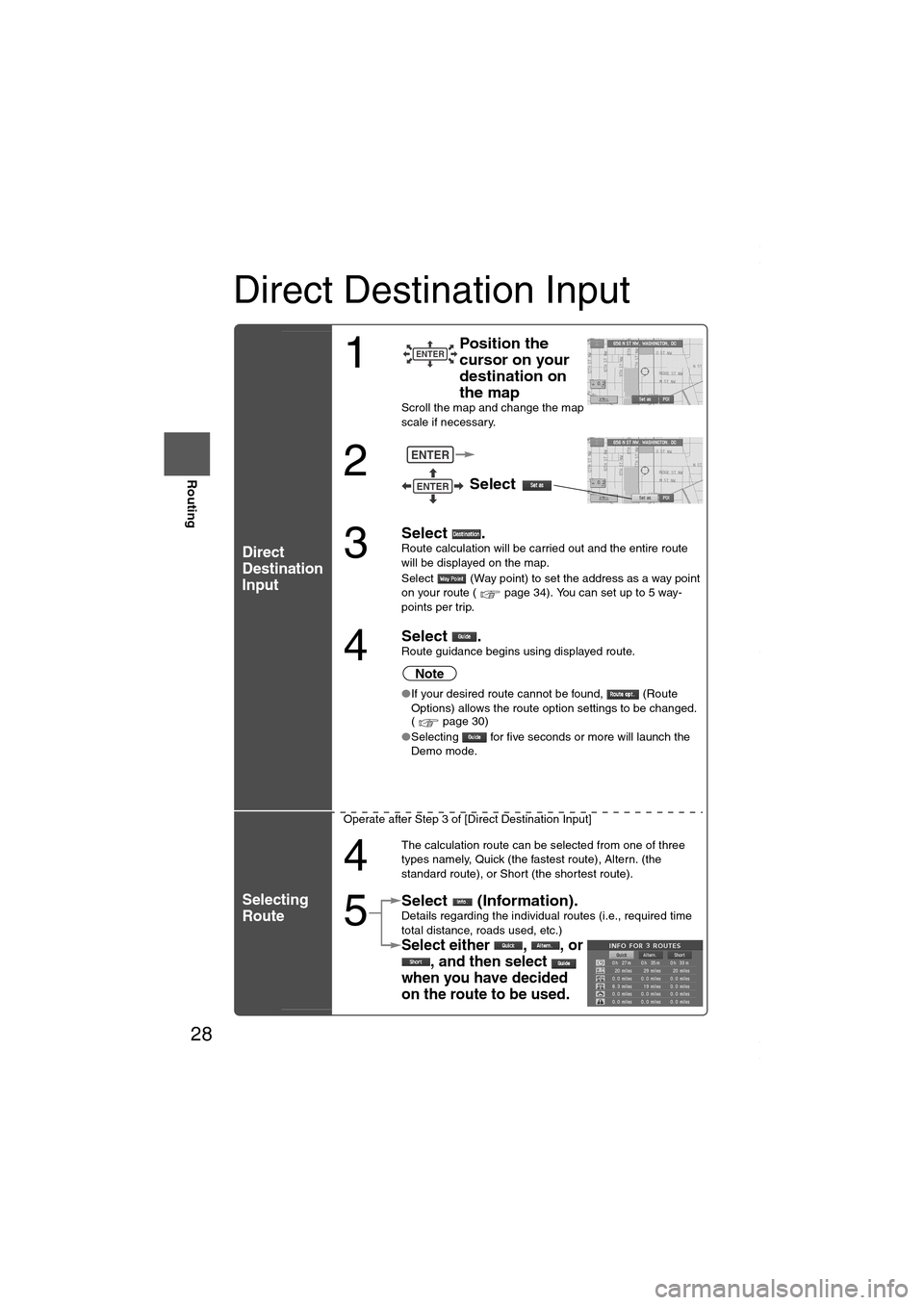
Direct Destination Input
Direct
Destination
Input
Selecting
Route
1
Position the
cursor on your
destination on
the map
Scroll the map and change the map
scale if necessary.
2
Select
3
Select .Route calculation will be carried out and the entire route
will be displayed on the map.
Select (Way point) to set the address as a way point
on your route ( page 34). You can set up to 5 way-
points per trip.
4
Select .Route guidance begins using displayed route.
Note
●If your desired route cannot be found, (Route
Options) allows the route option settings to be changed.
( page 30)
●Selecting for five seconds or more will launch the
Demo mode.
Operate after Step 3 of [Direct Destination Input]
4
The calculation route can be selected from one of three
types namely, Quick (the fastest route), Altern. (the
standard route), or Short (the shortest route).
5
Select (Information).Details regarding the individual routes (i.e., required time
total distance, roads used, etc.)
Select either , , or
, and then select
when you have decided
on the route to be used.
ENTER
ENTER
ENTER
MAZDA6_NAVI_EA.book Page 28 Wednesday, December 28, 2005 1:36 PM
Page 31 of 58
31
Before
UseGetting
started
Routing
■Do not keep your eyes fixed on the monitor screen or operate the system while drivingDo not change the settings and destination locations while driving. Minimize the time spent
viewing the monitor screen and listening to the voice guidance while driving. Operating the system
will distract the driver from looking ahead of the vehicle and may cause an accident. Always stop
the vehicle in a safe location and use the parking brake before operating the system.Wa r n i n g
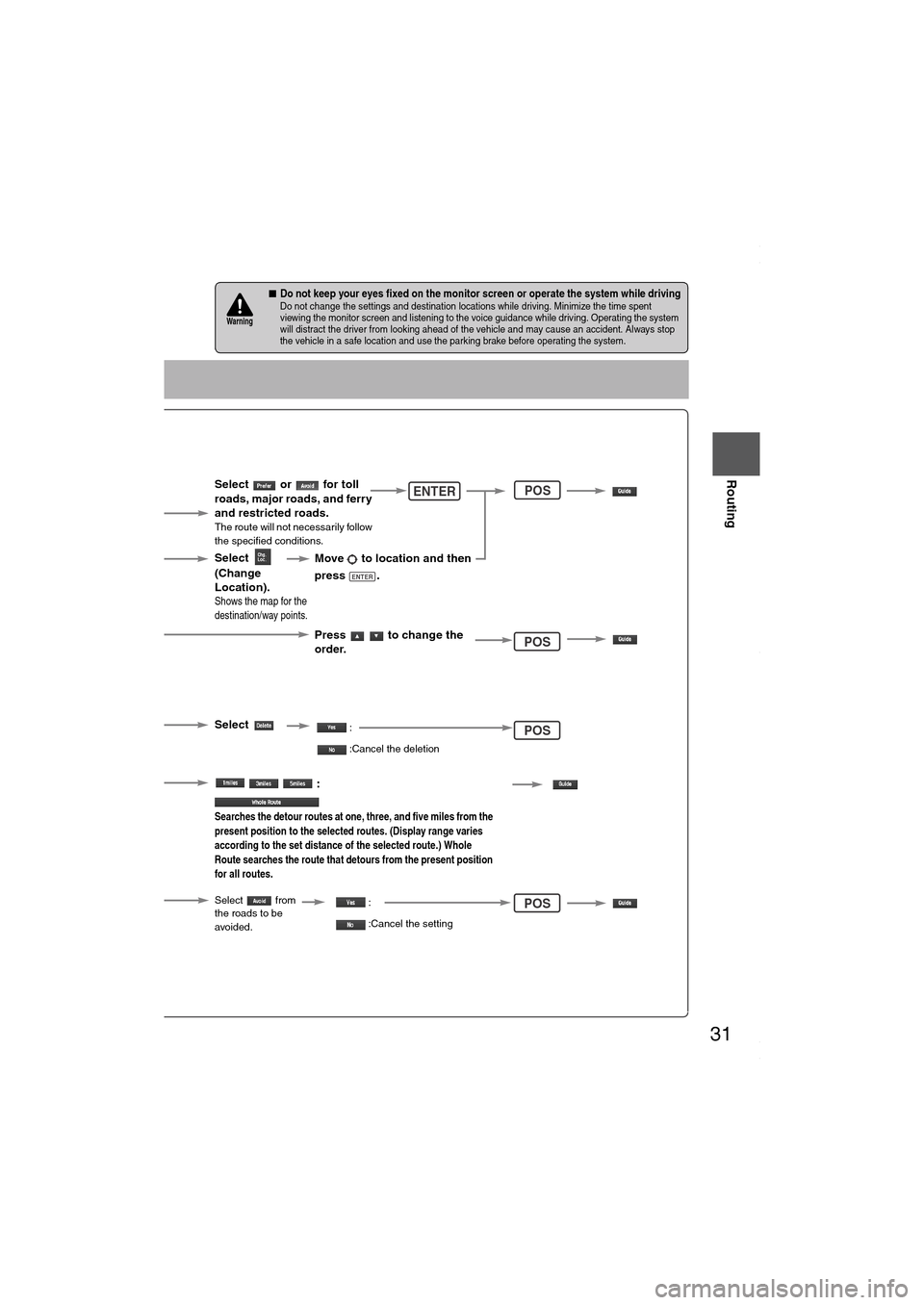
Select the
button for the
location to be
modified.
Select the button
corresponding to the
destination or way
point to be deleted.
The Enter Route
screen appears.
:
Searches the detour routes at one, three, and five miles from the
present position to the selected routes. (Display range varies
according to the set distance of the selected route.) Whole
Route searches the route that detours from the present position
for all routes.
Select
(Change
Location).
Select the way points
to change the order.
Change the destination
and the passing order
of the destination and
way points.
Select or for toll
roads, major roads, and ferry
and restricted roads.
The route will not necessarily follow
the specified conditions.
Move to location and then
press .
ENTER
Press to change the
order.
Shows the map for the
destination/way points.
Select
Select from
the roads to be
avoided.
:
:Cancel the deletion
:
:Cancel the setting
ENTER
POS
POS
POS
POS
MAZDA6_NAVI_EA.book Page 31 Wednesday, December 28, 2005 1:36 PM
Page 42 of 58
42
Before
UseGetting
startedRoutingAddress
Book
Navigation Set Up
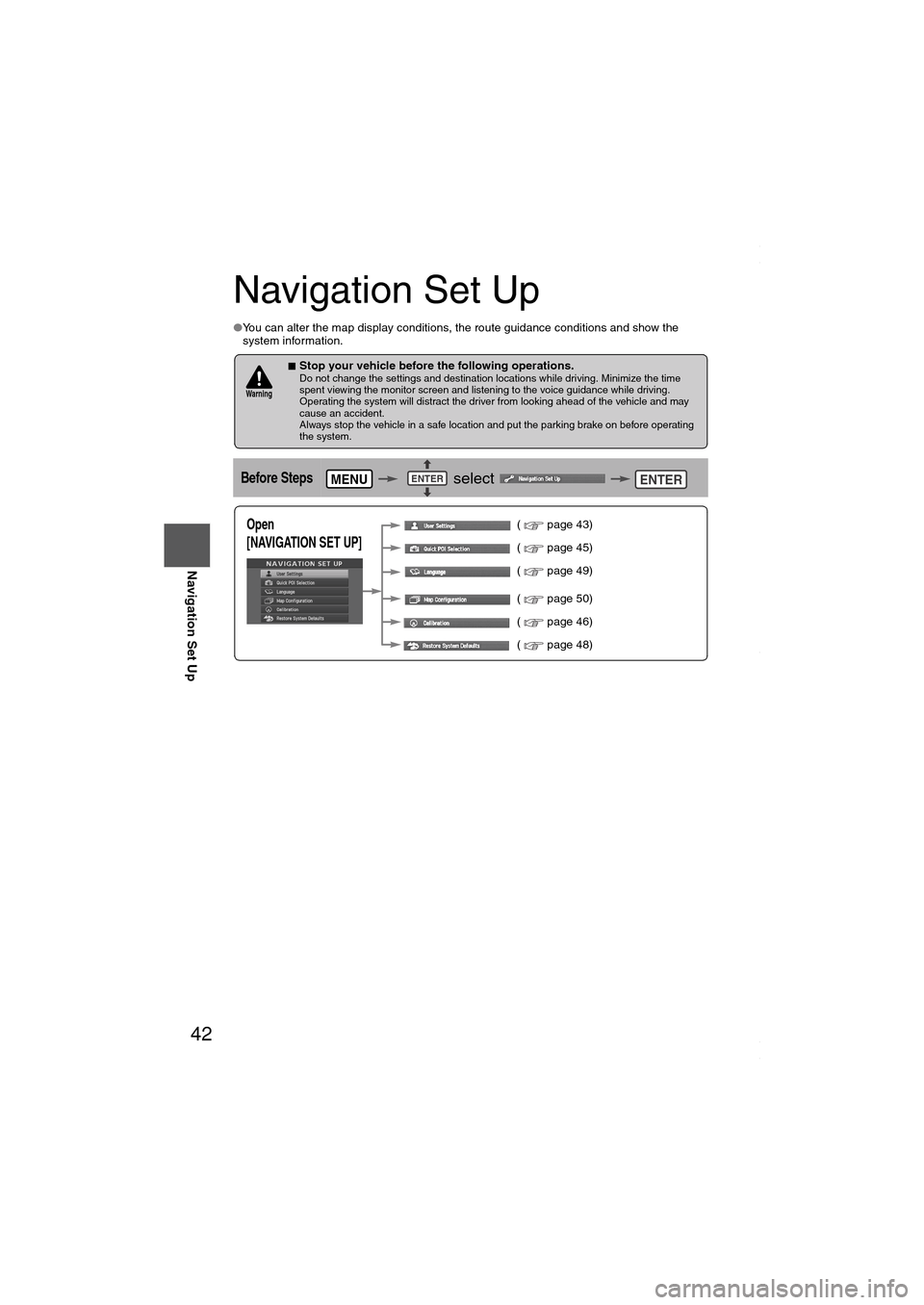
Navigation Set Up
●You can alter the map display conditions, the route guidance conditions and show the
system information.
■Stop your vehicle before the following operations. Do not change the settings and destination locations while driving. Minimize the time
spent viewing the monitor screen and listening to the voice guidance while driving.
Operating the system will distract the driver from looking ahead of the vehicle and may
cause an accident.
Always stop the vehicle in a safe location and put the parking brake on before operating
the system.
Before Steps select
Wa r n i n g
MENUENTERENTER
Open
[NAVIGATION SET UP] ( page 43)
( page 45)
( page 49)
( page 50)
( page 46)
( page 48)
MAZDA6_NAVI_EA.book Page 42 Wednesday, December 28, 2005 1:36 PM
Page 43 of 58
![MAZDA MODEL 6 SPORTS SEDAN 2006 Owners Manual (in English) 43
Before
UseGetting
startedRoutingAddress
Book
Navigation Set Up
Navigation Set Up
Before Steps
select
select
User Setting
MENUENTERENTER
ENTERENTER
Open the
[USER SETTINGS]
screen
â](/manual-img/28/13710/w960_13710-42.png "MAZDA MODEL 6 SPORTS SEDAN 2006 Owners Manual (in English) 43
Before
UseGetting
startedRoutingAddress
Book
Navigation Set Up
Navigation Set Up
Before Steps
select
select
User Setting
MENUENTERENTER
ENTERENTER
Open the
[USER SETTINGS]
screen
â")
43
Before
UseGetting
startedRoutingAddress
Book
Navigation Set Up
Navigation Set Up
Before Steps
select
select
User Setting
MENUENTERENTER
ENTERENTER
Open the
[USER SETTINGS]
screen
■MAP Mode
Select a screen color from to options.
■Map Color
●Auto : The display will automatically switch between Day
and Night illumination mode when the headlights are
turned off and on respectively.
●Day :The display will be presented in Day illumination mode
regardless of whether the headlights are on or off.
●Night : The display will be presented in Night illumination mode
regardless of whether the headlights are on or off.
■Distance
Select the distance unit from or .
■Average speed
Set the average speed for each road to be driven.
(This function sets the standard speed (average vehicle speed
for each route) used for calculating the estimated arrival time
when calculating the route time.)
: Average speed setting
:Changes back to default
■Road Restriction Warnings
The display of warnings during route guidance when passing
through areas with traffic restrictions can be turned on or off.
MAZDA6_NAVI_EA.book Page 43 Wednesday, December 28, 2005 1:36 PM