2006 LINCOLN TOWN CAR engine
[x] Cancel search: enginePage 13 of 328
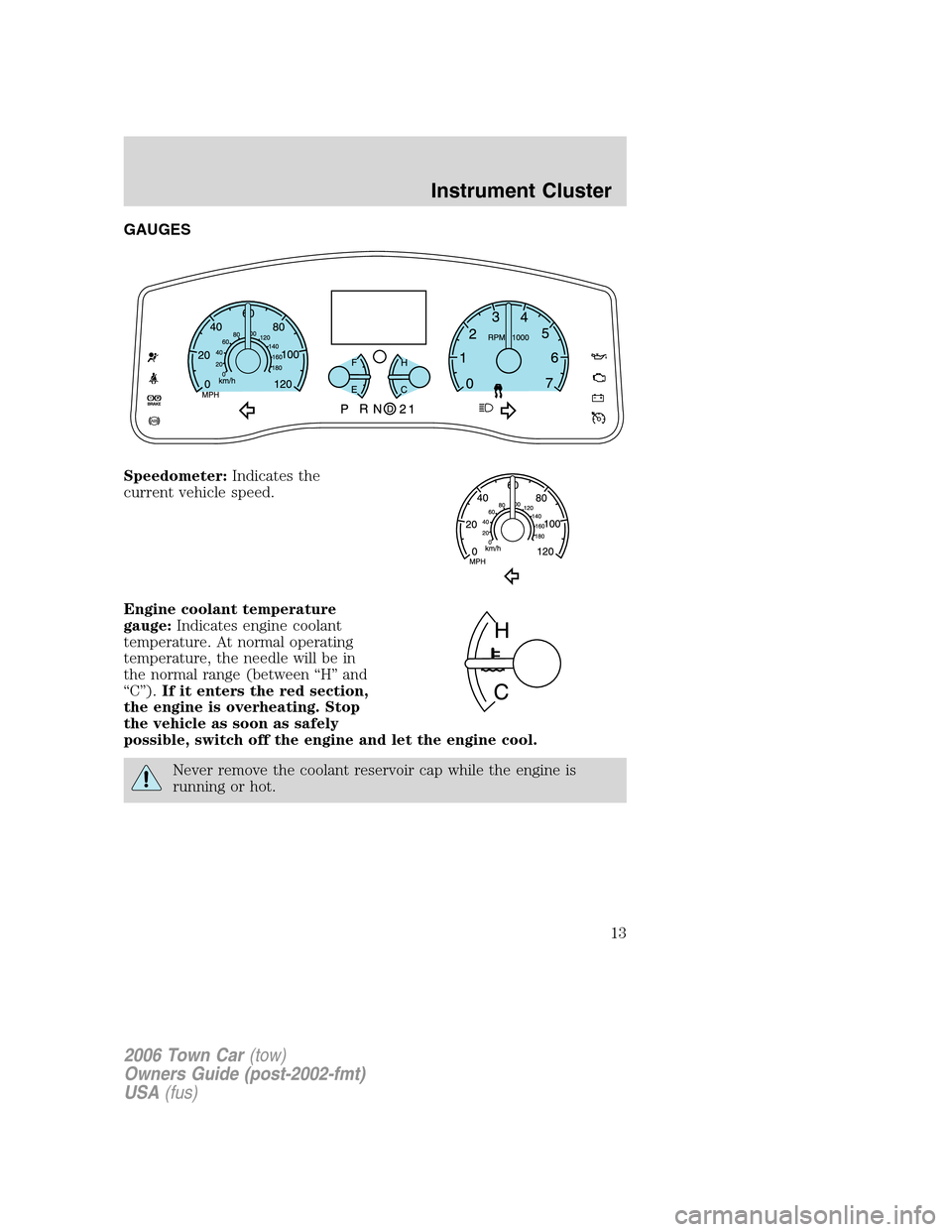
GAUGES
Speedometer:Indicates the
current vehicle speed.
Engine coolant temperature
gauge:Indicates engine coolant
temperature. At normal operating
temperature, the needle will be in
the normal range (between “H” and
“C”).If it enters the red section,
the engine is overheating. Stop
the vehicle as soon as safely
possible, switch off the engine and let the engine cool.
Never remove the coolant reservoir cap while the engine is
running or hot.
2006 Town Car(tow)
Owners Guide (post-2002-fmt)
USA(fus)
Instrument Cluster
13
Page 14 of 328
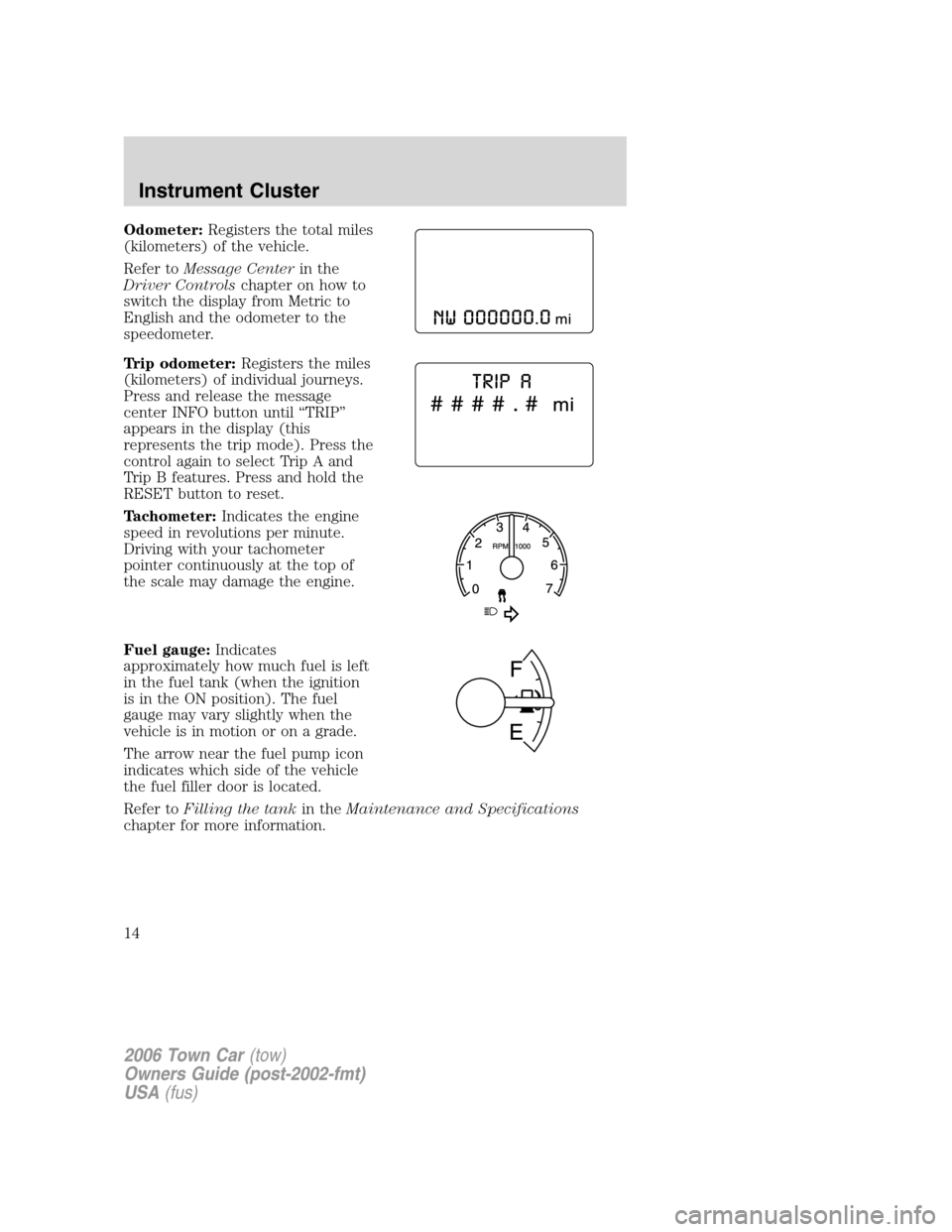
Odometer:Registers the total miles
(kilometers) of the vehicle.
Refer toMessage Centerin the
Driver Controlschapter on how to
switch the display from Metric to
English and the odometer to the
speedometer.
Trip odometer:Registers the miles
(kilometers) of individual journeys.
Press and release the message
center INFO button until “TRIP”
appears in the display (this
represents the trip mode). Press the
control again to select Trip A and
Trip B features. Press and hold the
RESET button to reset.
Tachometer:Indicates the engine
speed in revolutions per minute.
Driving with your tachometer
pointer continuously at the top of
the scale may damage the engine.
Fuel gauge:Indicates
approximately how much fuel is left
in the fuel tank (when the ignition
is in the ON position). The fuel
gauge may vary slightly when the
vehicle is in motion or on a grade.
The arrow near the fuel pump icon
indicates which side of the vehicle
the fuel filler door is located.
Refer toFilling the tankin theMaintenance and Specifications
chapter for more information.
2006 Town Car(tow)
Owners Guide (post-2002-fmt)
USA(fus)
Instrument Cluster
14
Page 88 of 328
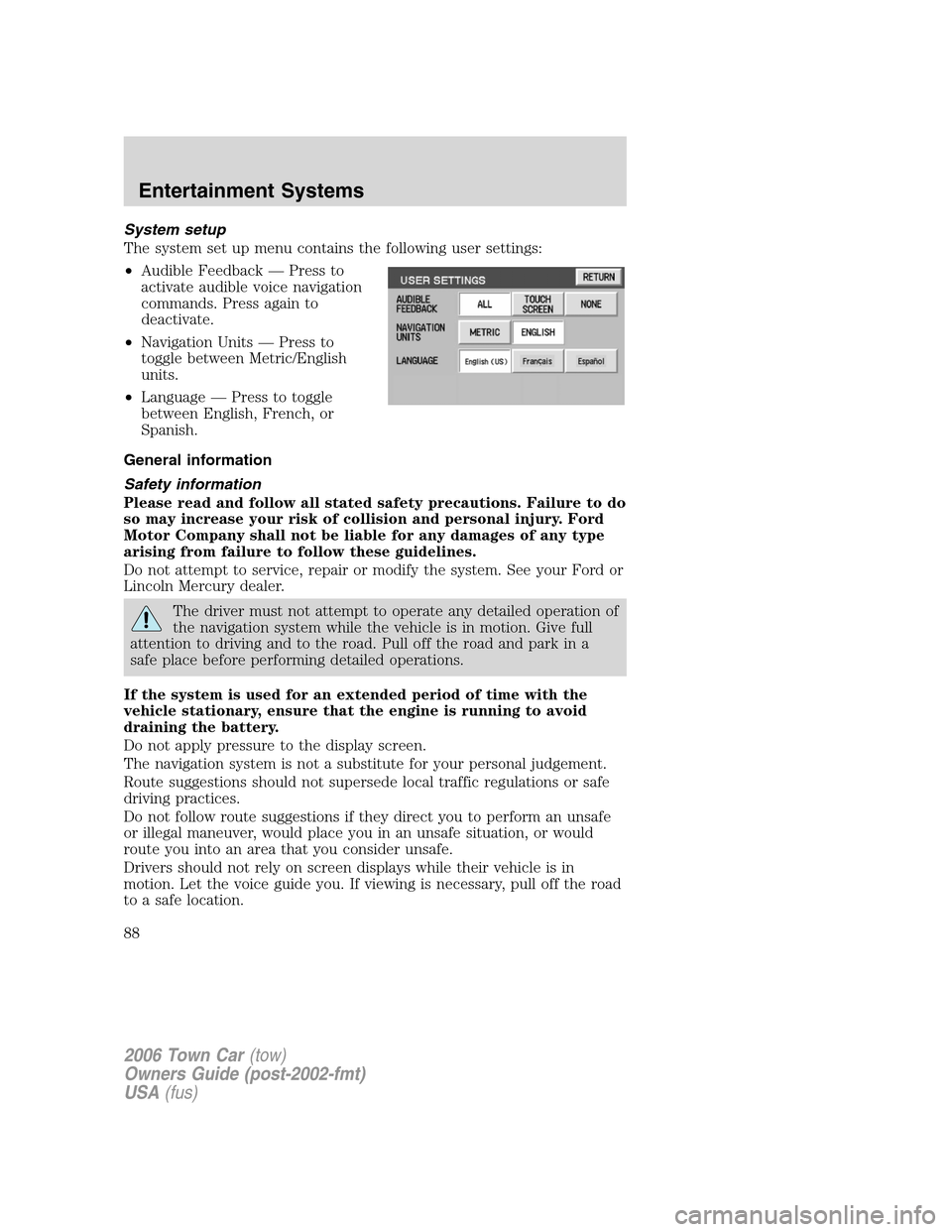
System setup
The system set up menu contains the following user settings:
•Audible Feedback — Press to
activate audible voice navigation
commands. Press again to
deactivate.
•Navigation Units — Press to
toggle between Metric/English
units.
•Language — Press to toggle
between English, French, or
Spanish.
General information
Safety information
Please read and follow all stated safety precautions. Failure to do
so may increase your risk of collision and personal injury. Ford
Motor Company shall not be liable for any damages of any type
arising from failure to follow these guidelines.
Do not attempt to service, repair or modify the system. See your Ford or
Lincoln Mercury dealer.
The driver must not attempt to operate any detailed operation of
the navigation system while the vehicle is in motion. Give full
attention to driving and to the road. Pull off the road and park in a
safe place before performing detailed operations.
If the system is used for an extended period of time with the
vehicle stationary, ensure that the engine is running to avoid
draining the battery.
Do not apply pressure to the display screen.
The navigation system is not a substitute for your personal judgement.
Route suggestions should not supersede local traffic regulations or safe
driving practices.
Do not follow route suggestions if they direct you to perform an unsafe
or illegal maneuver, would place you in an unsafe situation, or would
route you into an area that you consider unsafe.
Drivers should not rely on screen displays while their vehicle is in
motion. Let the voice guide you. If viewing is necessary, pull off the road
to a safe location.
2006 Town Car(tow)
Owners Guide (post-2002-fmt)
USA(fus)
Entertainment Systems
88
Page 109 of 328
AUXILIARY POWER POINT (12VDC)
Power outlets are designed for accessory plugs only. Do not insert
any other object in the power outlet as this will damage the
outlet and blow the fuse. Do not hang any type of accessory or
accessory bracket from the plug. Improper use of the power
outlet can cause damage not covered by your warranty.
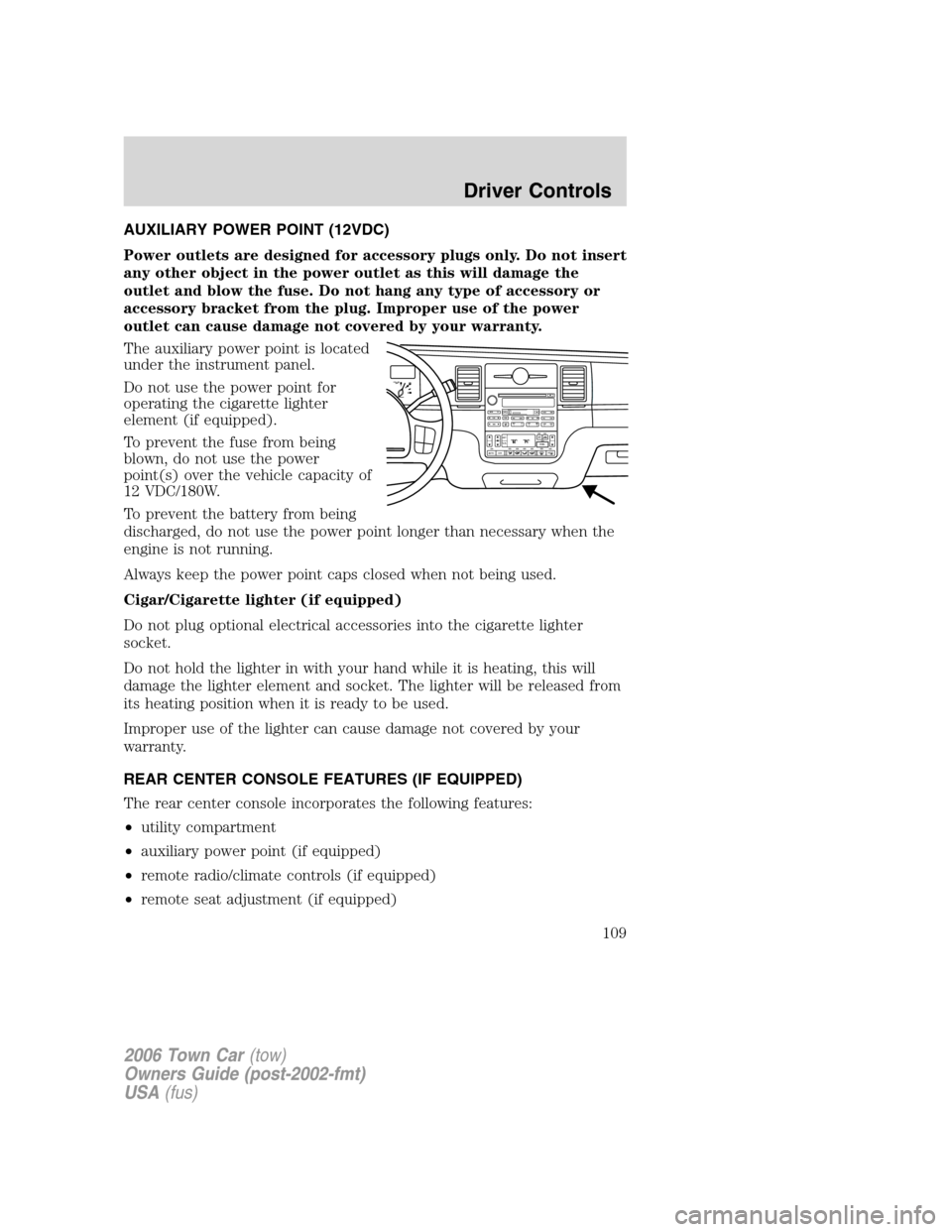
The auxiliary power point is located
under the instrument panel.
Do not use the power point for
operating the cigarette lighter
element (if equipped).
To prevent the fuse from being
blown, do not use the power
point(s) over the vehicle capacity of
12 VDC/180W.
To prevent the battery from being
discharged, do not use the power point longer than necessary when the
engine is not running.
Always keep the power point caps closed when not being used.
Cigar/Cigarette lighter (if equipped)
Do not plug optional electrical accessories into the cigarette lighter
socket.
Do not hold the lighter in with your hand while it is heating, this will
damage the lighter element and socket. The lighter will be released from
its heating position when it is ready to be used.
Improper use of the lighter can cause damage not covered by your
warranty.
REAR CENTER CONSOLE FEATURES (IF EQUIPPED)
The rear center console incorporates the following features:
•utility compartment
•auxiliary power point (if equipped)
•remote radio/climate controls (if equipped)
•remote seat adjustment (if equipped)
F
E1
2FILL ON
LEFT<
SHUF MUTE
SELBALBASS
FADETREB
SCAN CD
AM/FM
SEEKREWFF
COMP
56 34 12SIDE TUNETAPE
RDS
AUTO
SET
AUTO OFFDUAL A/C
R EXT
F/ CFF
2006 Town Car(tow)
Owners Guide (post-2002-fmt)
USA(fus)
Driver Controls
109
Page 128 of 328
Compass display
The compass reading may be affected when you drive near large
buildings, bridges, power lines and powerful broadcast antenna. Magnetic
or metallic objects placed in, on or near the vehicle may also affect
compass accuracy.
Usually, when something affects the compass readings, the compass will
correct itself after a few days of operating your vehicle in normal
conditions. If the compass still appears to be inaccurate, a manual
calibration may be necessary. Refer toCompass zone/calibration
adjustment.
Most geographic areas (zones) have a magnetic north compass point that
varies slightly from the northerly direction on maps. This variation is four
degrees between adjacent zones and will become noticeable as the
vehicle crosses multiple zones. A correct zone setting will eliminate this
error. Refer toCompass zone/calibration adjustment.
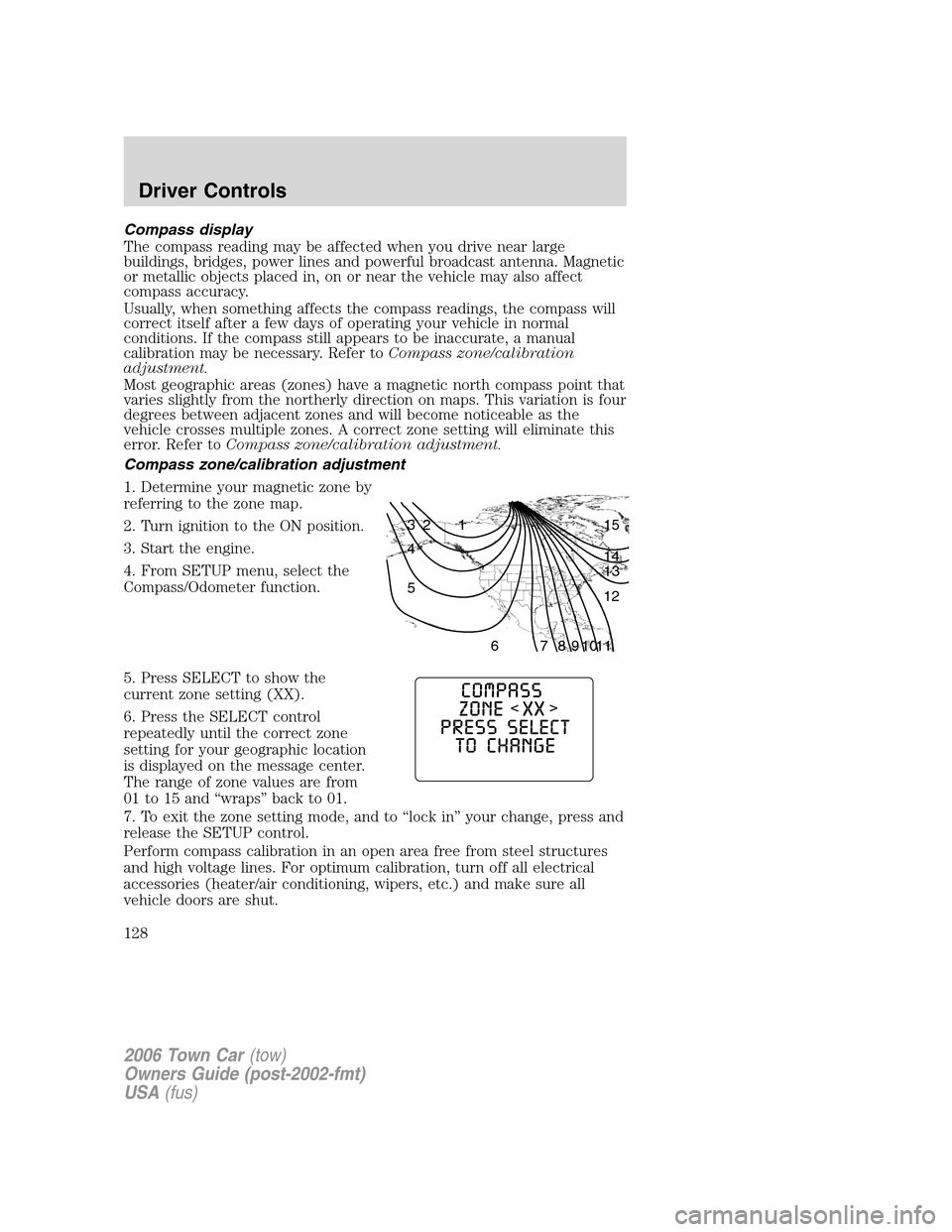
Compass zone/calibration adjustment
1. Determine your magnetic zone by
referring to the zone map.
2. Turn ignition to the ON position.
3. Start the engine.
4. From SETUP menu, select the
Compass/Odometer function.
5. Press SELECT to show the
current zone setting (XX).
6. Press the SELECT control
repeatedly until the correct zone
setting for your geographic location
is displayed on the message center.
The range of zone values are from
01 to 15 and “wraps” back to 01.
7. To exit the zone setting mode, and to “lock in” your change, press and
release the SETUP control.
Perform compass calibration in an open area free from steel structures
and high voltage lines. For optimum calibration, turn off all electrical
accessories (heater/air conditioning, wipers, etc.) and make sure all
vehicle doors are shut.
1 2 3
4
5
6 7 8 9 101112 13 14 15
2006 Town Car(tow)
Owners Guide (post-2002-fmt)
USA(fus)
Driver Controls
128
Page 131 of 328
Warning display Status
Park aid ON/OFF Warning returns after the ignition key
is turned from OFF to ON.
Overdrive ON/OFF
Trunk ajar
Check compass module
Low washer fluid
Change engine oil
DOOR AJAR.Displayed when a door is not completely closed.
POWERTRAIN MALFUNCTIONDisplayed when the powertrain is not
operating properly. If the warning stays on or continues to come on,
contact your authorized dealer as soon as possible.
COOLANT OVER TEMPERATURE.Displayed when the engine
coolant is overheating. Stop the vehicle as soon as safely possible, turn
off the engine and let it cool. Check the coolant and coolant level. Refer
toEngine coolantin theMaintenance and Specificationschapter. If
the warning stays on or continues to come on, contact your authorized
dealer as soon as possible.
Never remove the coolant reservoir cap while the engine is
running or hot.
CHECK FUEL CAP.Displayed when the fuel filler cap is not properly
installed. Check the fuel filler cap for proper installation. Refer toFuel
filler capin theMaintenance and Specificationschapter.
CHECK AIR SUSPENSION.Displayed when the air suspension system
is not operating properly. If this message is displayed while driving, pull
off the road as soon as safely possible. For more information, refer toAir
suspensionin theDrivingchapter.
LOW FUEL.Displayed as an early reminder of a low fuel condition.
Warning message can be reset by pressing the RESET button, but will
return after 10 minutes. If any other button is pressed besides RESET,
the message ’’PRESS RESET TO CLEAR’’ will appear in the Message
Center. Once this message disappears (after approximately 2 seconds),
press RESET to clear the warning.
TRUNK AJAR.Displayed when the trunk is not completely closed.
OVERDRIVE ON/OFF.Displayed when the overdrive is enabled or
disabled.
2006 Town Car(tow)
Owners Guide (post-2002-fmt)
USA(fus)
Driver Controls
131
Page 132 of 328
PARK AID ON/OFF.Displayed when the transmission is in R (Reverse)
and the Reverse Sensing System (Park Aid) is enabled or disabled. Refer
toReverse Sensing System (Park Aid)in this section to enable.
CHECK COMPASS MODULE.Displayed when the compass is not
operating properly. If the warning stays on or continues to come on,
contact your authorized dealer as soon as possible.
LOW WASHER FLUID.Indicates the washer fluid reservoir is less than
one quarter full. Check the washer fluid level. Refer toWindshield
washer fluidin theMaintenance and Specificationschapter.
CHANGE ENGINE OIL.Displayed when the engine oil life remaining is
5 percent or less. When oil life left is between 5% and 0%, the CHANGE
OIL SOON message will be displayed. When oil life left reaches 0%, the
OIL CHANGE REQUIRED message will be displayed.
An oil change is required whenever indicated by the message center and
according to the recommended maintenance schedule. USE ONLY
RECOMMENDED ENGINE OILS.
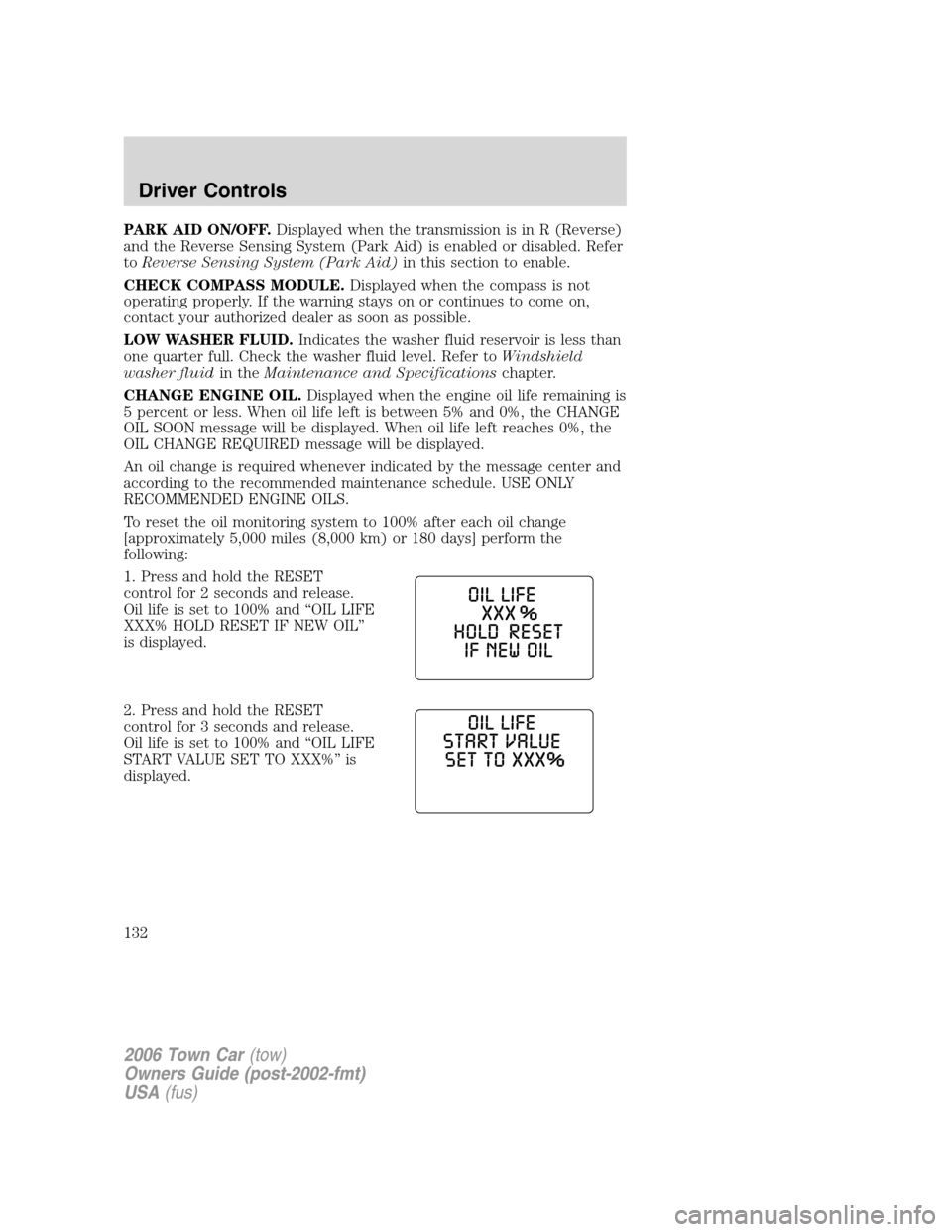
To reset the oil monitoring system to 100% after each oil change
[approximately 5,000 miles (8,000 km) or 180 days] perform the
following:
1. Press and hold the RESET
control for 2 seconds and release.
Oil life is set to 100% and “OIL LIFE
XXX% HOLD RESET IF NEW OIL”
is displayed.
2. Press and hold the RESET
control for 3 seconds and release.
Oil life is set to 100% and “OIL LIFE
START VALUE SET TO XXX%” is
displayed.
2006 Town Car(tow)
Owners Guide (post-2002-fmt)
USA(fus)
Driver Controls
132
Page 144 of 328
9. The doors will lock, then unlock, to confirm that the programming
mode has been exited.
Illuminated entry
The interior lamps illuminate when the remote entry system is used to
unlock the door(s) or sound the personal alarm.
The illuminated entry system will turn off the interior lights if:
•the ignition switch is turned to the 3 (ON) or the 2 (ACCESSORY)
position, or
•the remote transmitter lock control is pressed, or
•after 25 seconds of illumination.
The dimmer panel control mustnotbe set to theoffposition for the
illuminated entry system to operate.
The inside lights will not turn off if:
•they have been turned on with the dimmer control, or
•any door is open.
The battery saver will shut off the interior lamps 30 minutes after the
last door is closed, or after 10 minutes if the last door is left open.
Autolock
This feature automatically locks all vehicle doors when the following
conditions are met:
•all the doors are closed,
•the engine is running,
•you shift into gear, putting the vehicle in motion, and.
•the vehicle’s speed is greater than 3 mph (5 km/h).
Auto-relock
The autolock feature repeats when:
•a door is opened and closed while the engine is running,
•you shift into any gear, putting the vehicle in motion, and
•the vehicle’s speed is greater than 3 mph (5 km/h).
Auto-unlock
The auto-unlock feature will unlock all doors when:
•the ignition has been in the 3 (ON) position, all doors are closed, and
the vehicle has been in motion at a speed greater than 3 mph (5
km/h),
2006 Town Car(tow)
Owners Guide (post-2002-fmt)
USA(fus)
Locks and Security
144