Page 22 of 320

In tape mode, radio play continues until rewind is stopped (with the
TAPE control) or the beginning of the tape is reached.
In CD mode, REW control reverses the CD within the current track.
FF (fast forward):Works in tape
and CD modes.
In the tape mode, tape direction
automatically reverses when the end of the tape is reached.
In CD mode, FF advances the CD within the current track.
9.Mute:Press to mute the playing
media.
RDS:(Radio Data System): Allows
you to access FM stations which are RDS- equipped. Press RDS then
SEL to select from:
Traffic — Allows you to receive traffic announcements and control their
volume level.Traffic information is not available in most U.S.
markets.
Program Type — Allows you to set your audio system to select from
RDS-equipped stations for categories such as: Classic, Country, Info.,
Jazz, Oldies, R&B, Religious, Rock, Soft, Top 40.
Show — Allows you to view the frequency and program type of the
chosen radio station.
The Federal Communications Commission (FCC) and the Canadian Radio
and Telecommunications Commission (CRTC) recommend that FM radio
broadcasters use RDS technology to transmit information. FM radio
stations are independently operated and individually elect to use RDS
technology to transmit station ID and program type as desired.
Setting the clock:Press RDS until SELECT HOUR or SELECT MINS is
displayed. Press SEL to increase (
) or decrease ().
10.Autoset:Press to set first six
strong stations into AM, FM1 or
FM2 memory buttons; press again to
return to normal stations.
11.Scan:Works in radio, tape and
CD modes. Press SCAN for a brief
sampling of radio stations, tape
selections or CD tracks.
2006 Lincoln LS(dew)
Owners Guide (post-2002-fmt)
USA(fus)
Entertainment Systems
22
Page 26 of 320

Your Lincoln Navigation System has a large range of features, yet is easy
to use. Guidance is shown on the display screen and is supplemented
with voice prompts. The display screen provides full information for
operating the system through use of menus, text screens and map
displays. Screen selections are made by touching the desired selection on
the screen.
1.VOL-PUSH: Press to turn the system ON/OFF. Turn to adjust the
audio volume level.
2.AUDIO: Press to enter audio mode and access radio, CD, CDDJ, DVD
(if equipped) settings.
3.MAP: Press to enter map mode and view your current vehicle position
on the map. Press and hold to obtain additional position information.
This will not function without a map DVD loaded.
4.DEST: Press to enter Destination Entry mode. This allows you to
enter a destination and route to it. With an active route, pressing DEST
allows the user to request a Detour, display entire route, select route
preferences, or change or cancel the destination. This will not function
without a map DVD loaded.
5.MENU: Press to access system settings such as display, brightness,
clock mode (if equipped), etc.
6.CD OPEN CLOSE: Press to open/close the display screen and access
the CD player.
2006 Lincoln LS(dew)
Owners Guide (post-2002-fmt)
USA(fus)
Entertainment Systems
26
Page 27 of 320
Cold temperature advisory
When operating the system below 32° Fahrenheit (0° Celsius), the
display screen requires 20–30 minutes warm-up to achieve maximum
brightness. Ensure that the system display setting is set to DAY mode
until maximum brightness is achieved (refer toMenu modesection).
Once maximum brightness is achieved, revert to AUTO mode display
setting.
Initial map display
After pressing AGREE to the initial
WARNING screen, you will move
into the initial map screen which
shows the current vehicle location.
Pressing the globe icon will take you
to the user settings — audible
feedback, navigation units, language
and clock (if equipped).
2006 Lincoln LS(dew)
Owners Guide (post-2002-fmt)
USA(fus)
Entertainment Systems
27
Page 68 of 320
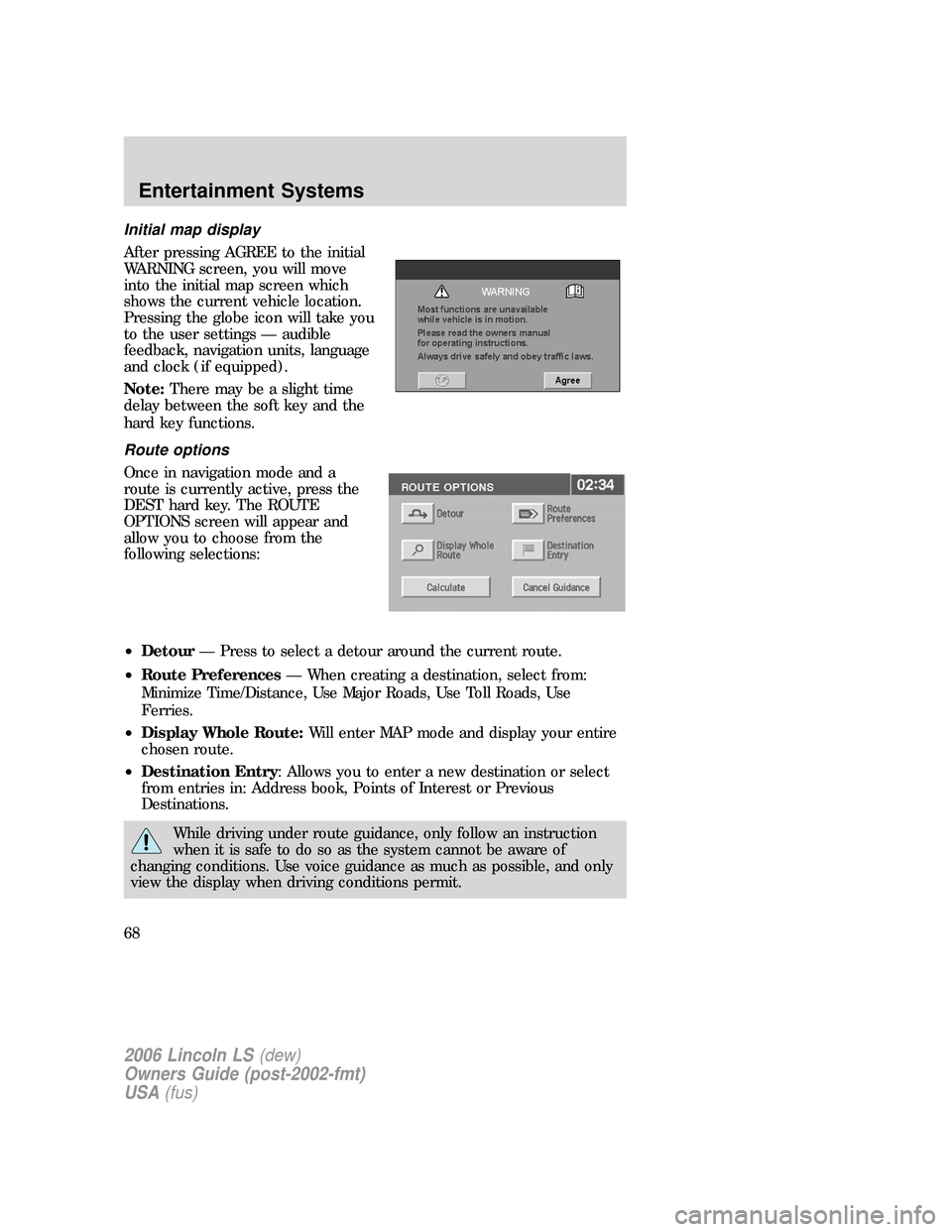
Initial map display
After pressing AGREE to the initial
WARNING screen, you will move
into the initial map screen which
shows the current vehicle location.
Pressing the globe icon will take you
to the user settings — audible
feedback, navigation units, language
and clock (if equipped).
Note:There may be a slight time
delay between the soft key and the
hard key functions.
Route options
Once in navigation mode and a
route is currently active, press the
DEST hard key. The ROUTE
OPTIONS screen will appear and
allow you to choose from the
following selections:
•Detour— Press to select a detour around the current route.
•Route Preferences— When creating a destination, select from:
Minimize Time/Distance, Use Major Roads, Use Toll Roads, Use
Ferries.
•Display Whole Route:Will enter MAP mode and display your entire
chosen route.
•Destination Entry: Allows you to enter a new destination or select
from entries in: Address book, Points of Interest or Previous
Destinations.
While driving under route guidance, only follow an instruction
when it is safe to do so as the system cannot be aware of
changing conditions. Use voice guidance as much as possible, and only
view the display when driving conditions permit.
2006 Lincoln LS(dew)
Owners Guide (post-2002-fmt)
USA(fus)
Entertainment Systems
68
Page 83 of 320
•Screen off — Allows you to turn
off the navigation screen.
System setup
The system set up menu contains the following user settings:
•Audible Feedback — Press to
activate audible voice navigation
commands. Press again to
deactivate.
•Navigation Units — Press to
toggle between Metric/English
units.
•Language — Press to toggle
between English, French, or
Spanish.
•Clock
Setting the clock
Once in Menu mode, press CLOCK
to set the hours/minutes.
2006 Lincoln LS(dew)
Owners Guide (post-2002-fmt)
USA(fus)
Entertainment Systems
83
Page 96 of 320
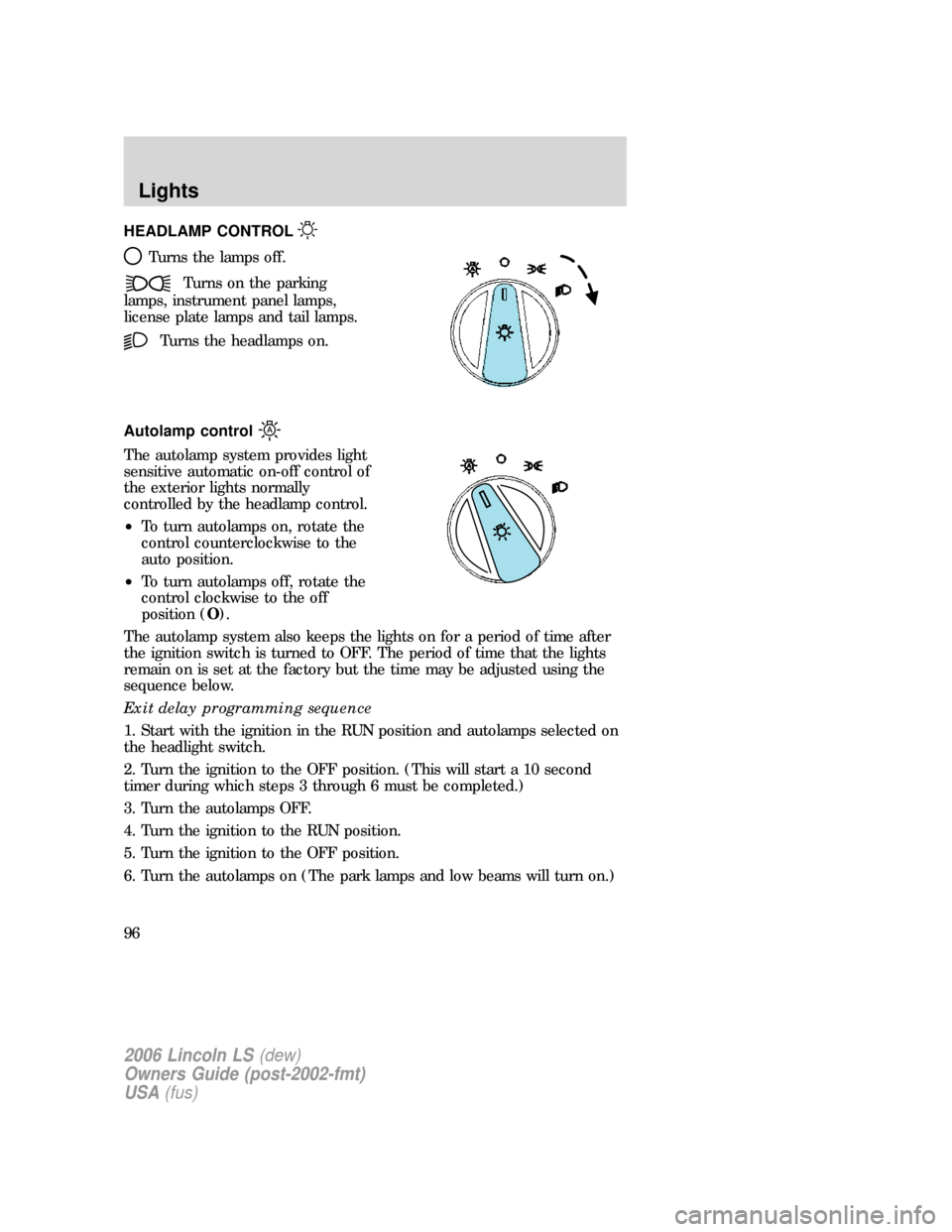
HEADLAMP CONTROL
Turns the lamps off.
Turns on the parking
lamps, instrument panel lamps,
license plate lamps and tail lamps.
Turns the headlamps on.
Autolamp control
The autolamp system provides light
sensitive automatic on-off control of
the exterior lights normally
controlled by the headlamp control.
•To turn autolamps on, rotate the
control counterclockwise to the
auto position.
•To turn autolamps off, rotate the
control clockwise to the off
position (O).
The autolamp system also keeps the lights on for a period of time after
the ignition switch is turned to OFF. The period of time that the lights
remain on is set at the factory but the time may be adjusted using the
sequence below.
Exit delay programming sequence
1. Start with the ignition in the RUN position and autolamps selected on
the headlight switch.
2. Turn the ignition to the OFF position. (This will start a 10 second
timer during which steps 3 through 6 must be completed.)
3. Turn the autolamps OFF.
4. Turn the ignition to the RUN position.
5. Turn the ignition to the OFF position.
6. Turn the autolamps on (The park lamps and low beams will turn on.)
2006 Lincoln LS(dew)
Owners Guide (post-2002-fmt)
USA(fus)
Lights
96
Page 99 of 320

1. Park the vehicle directly in front of a wall or screen on a level surface,
approximately 25 feet (7.6 meters)
away.
•(1) 8 feet (2.4 meters)
•(2) VOL - subtract 2.1 inches (50
mm) from the measurement of
the center of the low beam lamp
to the ground.
•(3) 25 feet (7.6 meters)
•(4) Horizontal reference line
2. Measure the height from the center of your headlamp to the ground
and mark an 8 foot (2.4 meter) horizontal reference line on the vertical
wall or screen 2.1 inches (50 mm) below this height (a piece of masking
tape works well). The center of the lamp is marked by a 3.0 mm circle
on the headlamp lens (use the low beam center mark).
3. Turn on the low beam headlamps to illuminate the wall or screen and
open the hood.
4. On the wall or screen you will
observe a light pattern with flat
edges at the top of the beam
pattern. If the flat edges are not at
the horizontal reference line, the
beam will need to be adjusted.
To see a clearer light pattern for
adjusting, you may want to block
the light from one headlamp while adjusting the other.
5. Remove the sight shield, locate the vertical adjuster on each
headlamp, then usea6mmsocket wrench or screwdriver to adjust the
headlamp up or down.
6. HORIZONTAL AIM IS NOT REQUIRED FOR THIS VEHICLE AND IS
NON-ADJUSTABLE.
7. Close the hood and turn off the lamps.
2006 Lincoln LS(dew)
Owners Guide (post-2002-fmt)
USA(fus)
Lights
99
Page 102 of 320

Map lamps
For bulb replacement, see a qualified service technician or your dealer.
Replacing headlamp bulbs
The headlamp assembly contains the low beam bulb, the high beam bulb,
park/turn lamp bulb and led side marker. To replace any of these bulbs,
see your authorized dealer.
Replacing HID headlamp bulb (if equipped)
The low beam headlamps on your vehicle use a “high intensity discharge”
source. These lamps operate at a high voltage. The bulb is replaceable.
When the bulb is burned out, the HID bulb must be replaced by your
authorized dealer.
Replacing the LED sidemarker
For bulb replacement, see your authorized dealer.
Replacing front parking lamp/turn signal lamp bulbs
For bulb replacement, see your authorized dealer.
Replacing foglamp bulbs
1. Make sure the headlamp switch is
in the OFF position and disconnect
the electrical connector from the
foglamp bulb.
2. Rotate the foglamp bulb
counterclockwise and remove from
the foglamp.
Install the new bulb in reverse
order.
Replacing high-mount brakelamp bulbs
Your vehicle is equipped with an LED center high-mount stop lamp. It is
designed to last the life of the vehicle. If replacement is required, see
your authorized dealer.
Replacing tail lamp/backup bulbs
For bulb replacement, see your authorized dealer.
2006 Lincoln LS(dew)
Owners Guide (post-2002-fmt)
USA(fus)
Lights
102

