Page 64 of 320
3. Press “Stored Locations”.
4. Press “Special Memory”.
5. Press “Delete”. The list will
display.
6. Select the special memory point
to delete.
7. Press “Del. all” to delete all
entered special memory points.
8. Press “Yes” to confirm.
Detour options
You may engage the detour option once a route has already been
calculated by the system. To access the detour option:
1. Press the MAP hard key
2. Press “Chg. Route”.
2006 Lincoln LS(dew)
Owners Guide (post-2002-fmt)
USA(fus)
Entertainment Systems
64
Page 68 of 320
Initial map display
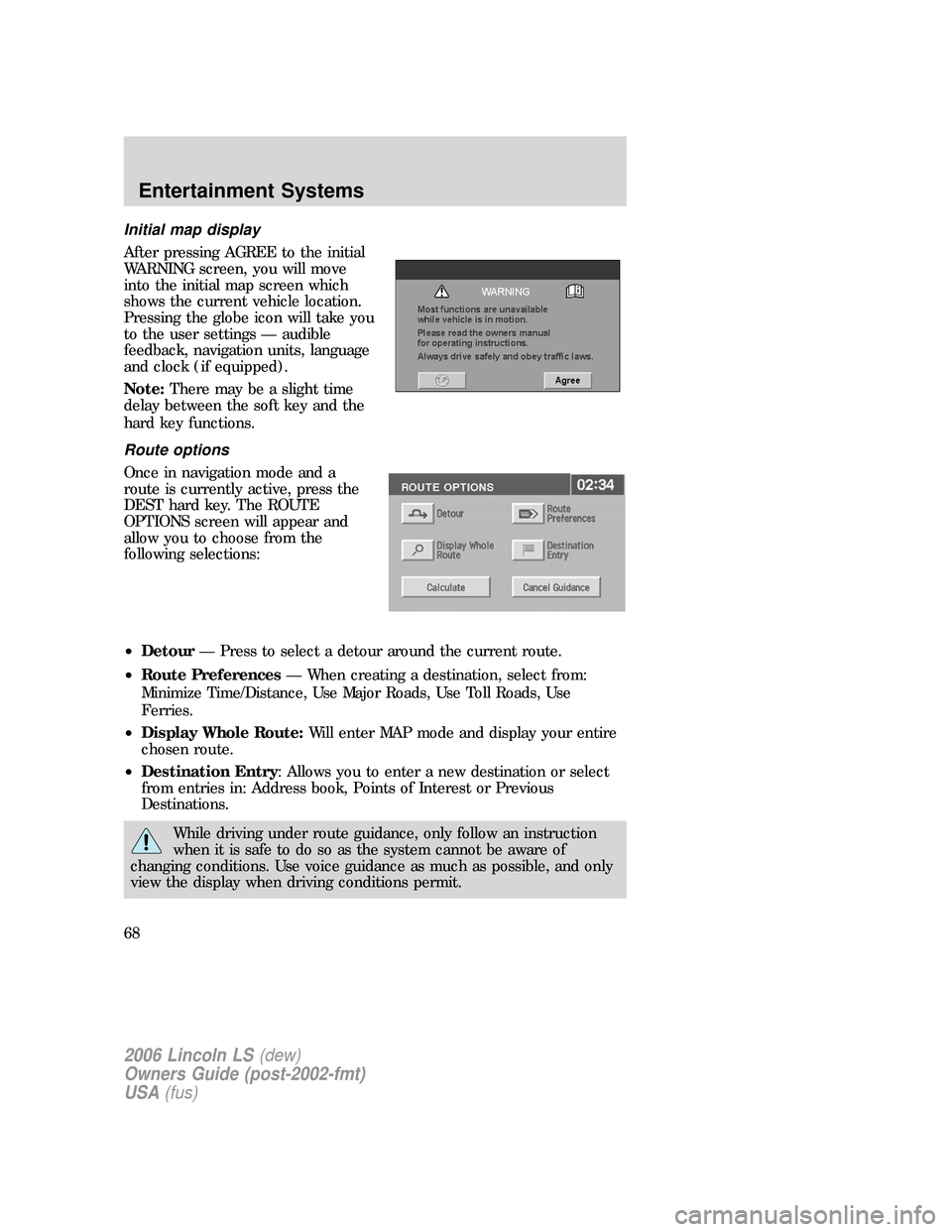
After pressing AGREE to the initial
WARNING screen, you will move
into the initial map screen which
shows the current vehicle location.
Pressing the globe icon will take you
to the user settings — audible
feedback, navigation units, language
and clock (if equipped).
Note:There may be a slight time
delay between the soft key and the
hard key functions.
Route options
Once in navigation mode and a
route is currently active, press the
DEST hard key. The ROUTE
OPTIONS screen will appear and
allow you to choose from the
following selections:
•Detour— Press to select a detour around the current route.
•Route Preferences— When creating a destination, select from:
Minimize Time/Distance, Use Major Roads, Use Toll Roads, Use
Ferries.
•Display Whole Route:Will enter MAP mode and display your entire
chosen route.
•Destination Entry: Allows you to enter a new destination or select
from entries in: Address book, Points of Interest or Previous
Destinations.
While driving under route guidance, only follow an instruction
when it is safe to do so as the system cannot be aware of
changing conditions. Use voice guidance as much as possible, and only
view the display when driving conditions permit.
2006 Lincoln LS(dew)
Owners Guide (post-2002-fmt)
USA(fus)
Entertainment Systems
68
Page 71 of 320
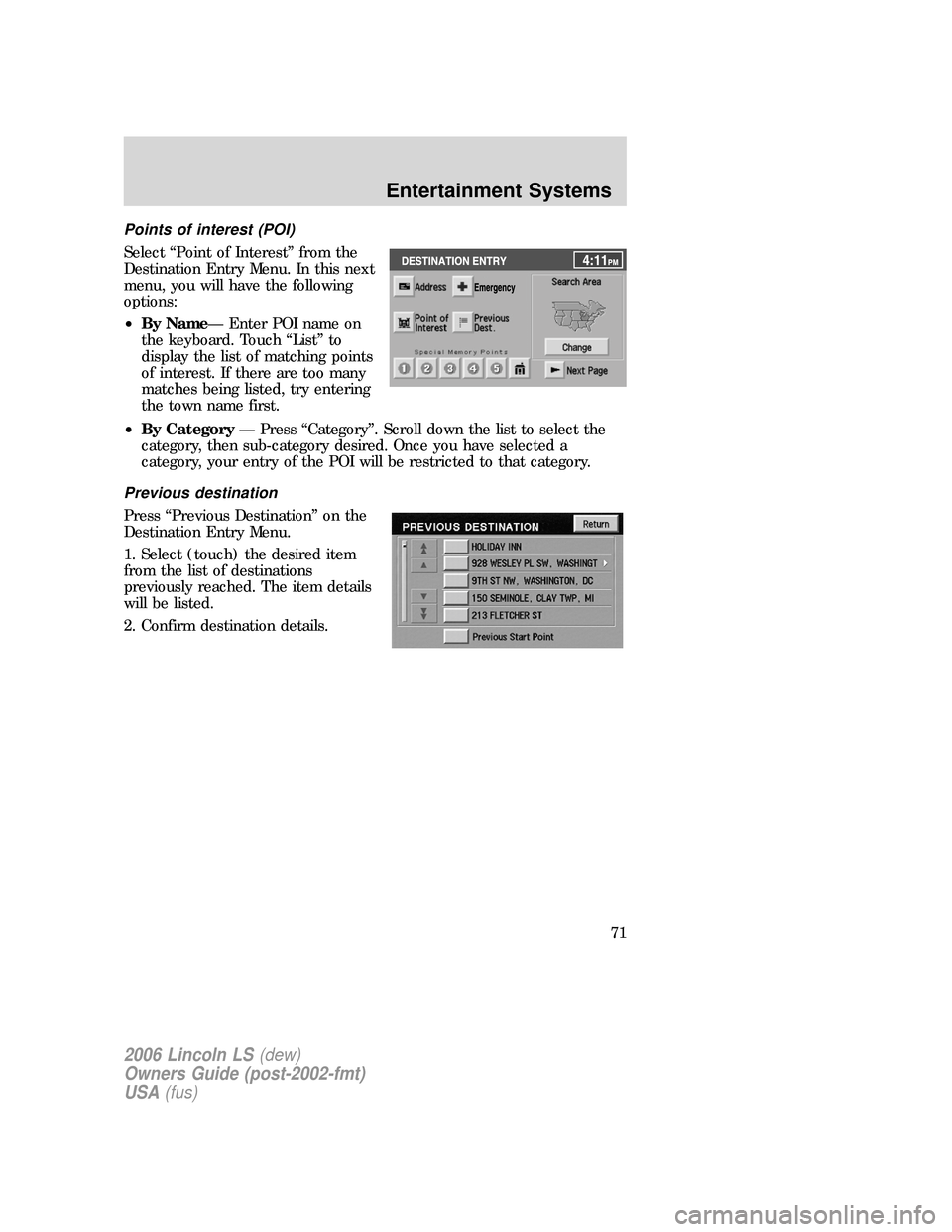
Points of interest (POI)
Select “Point of Interest” from the
Destination Entry Menu. In this next
menu, you will have the following
options:
•By Name— Enter POI name on
the keyboard. Touch “List” to
display the list of matching points
of interest. If there are too many
matches being listed, try entering
the town name first.
•By Category— Press “Category”. Scroll down the list to select the
category, then sub-category desired. Once you have selected a
category, your entry of the POI will be restricted to that category.
Previous destination
Press “Previous Destination” on the
Destination Entry Menu.
1. Select (touch) the desired item
from the list of destinations
previously reached. The item details
will be listed.
2. Confirm destination details.
2006 Lincoln LS(dew)
Owners Guide (post-2002-fmt)
USA(fus)
Entertainment Systems
71
Page 72 of 320
Deleting stored locations
Your navigation system allows you to delete any stored locations
(previous destinations, memory points, special memory points, home,
avoid areas, destination and way points, etc.) To delete any of these
stored locations:
1. Press the MAP hard key.
2. Press “Nav Menu” in the bottom
left hand corner of the screen.
3. Press “Stored locations”.
2006 Lincoln LS(dew)
Owners Guide (post-2002-fmt)
USA(fus)
Entertainment Systems
72
Page 74 of 320
Adding a memory point
You may add more memory points to be stored in the system.
1. With the map displayed, touch your finger to the screen to scroll to
the desired location. When you reach the desired location, remove your
finger from the screen and the map will stop scrolling. STORE will
appear on the screen.
2. Press STORE to add the location to the memory point list.
You may also add a memory point via the Navigation menu.
1. Press the MAP hard key.
2. Press “Nav Menu” in the bottom
left hand corner of the screen.
3. Press “Stored locations”.
2006 Lincoln LS(dew)
Owners Guide (post-2002-fmt)
USA(fus)
Entertainment Systems
74
Page 75 of 320
4. Select “Memory Point”.
5. Press “Add” at the bottom of the
screen.
6. Select the desired menu item.
7. Enter/select any required details.
The new point will be added to the
stored list of memory points.
8. Press OK. The new point will be
added to the list of stored memory
points.
To give the new memory point a name:
1. Select it from the list.
2. Press NAME.
3. Enter the desired name.
Accessing memory point lists
1. Press the MAP hard key.
2. Press “Nav Menu” in the bottom left hand corner of the screen.
2006 Lincoln LS(dew)
Owners Guide (post-2002-fmt)
USA(fus)
Entertainment Systems
75
Page 78 of 320
Freeway Entrance/Exit
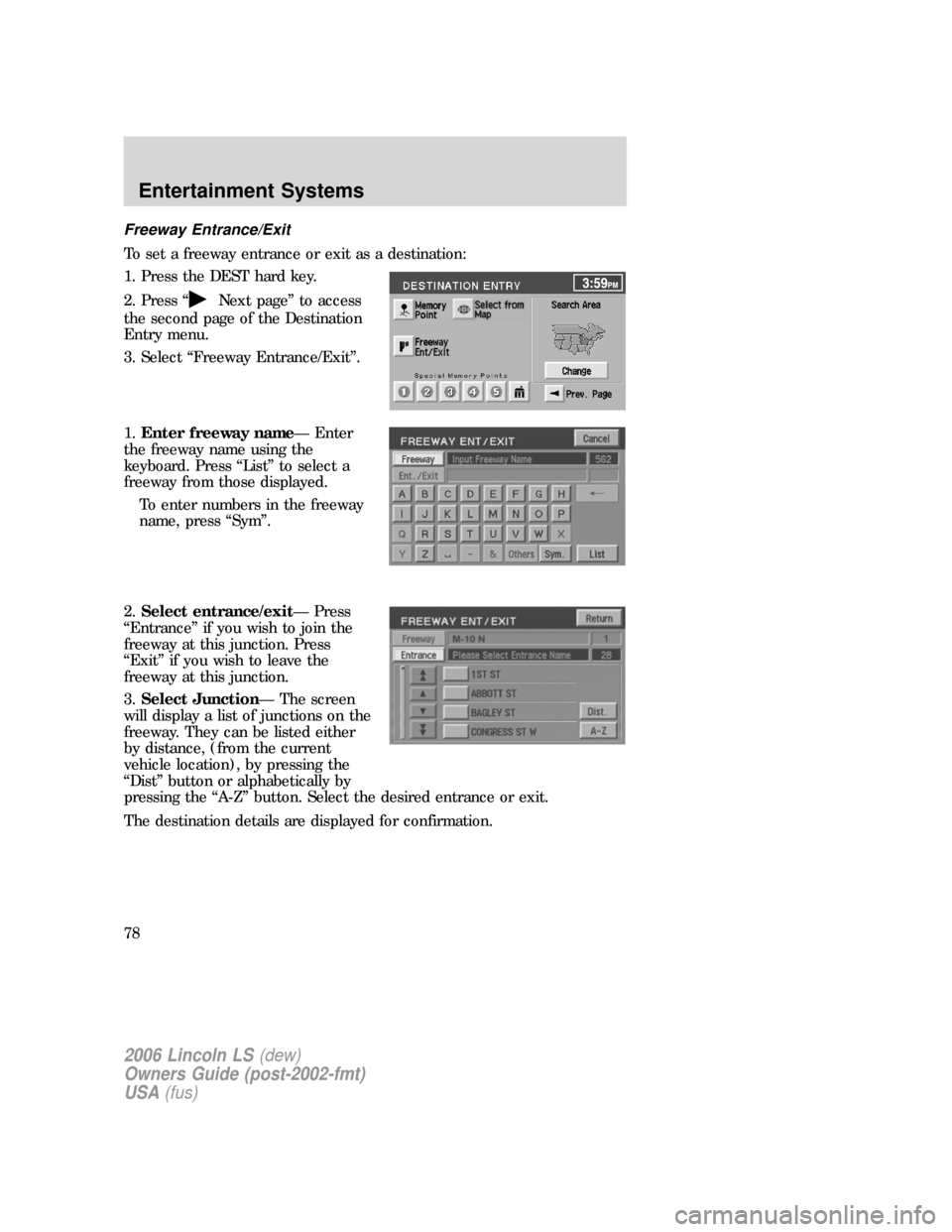
To set a freeway entrance or exit as a destination:
1. Press the DEST hard key.
2. Press “
Next page” to access
the second page of the Destination
Entry menu.
3. Select “Freeway Entrance/Exit”.
1.Enter freeway name— Enter
the freeway name using the
keyboard. Press “List” to select a
freeway from those displayed.
To enter numbers in the freeway
name, press “Sym”.
2.Select entrance/exit— Press
“Entrance” if you wish to join the
freeway at this junction. Press
“Exit” if you wish to leave the
freeway at this junction.
3.Select Junction— The screen
will display a list of junctions on the
freeway. They can be listed either
by distance, (from the current
vehicle location), by pressing the
“Dist” button or alphabetically by
pressing the “A-Z” button. Select the desired entrance or exit.
The destination details are displayed for confirmation.
2006 Lincoln LS(dew)
Owners Guide (post-2002-fmt)
USA(fus)
Entertainment Systems
78
Page 94 of 320
recirculation controls. In manual override control, press(panel),
A/C, recirculation controls, set the temperature to 60 °F (16 °C) and
the fan to highest blower setting.
•To improve the A/C cool down, drive with the windows slightly open
for 2-3 minutes after start up or until the vehicle has been “aired out.”
•Do not put objects under the front seats that will interfere with the
airflow.
•Remove any snow, ice or leaves from the air intake area at the base of
the windshield.
•With the ignition in the OFF position after operating the vehicle, some
vehicle sounds related to the climate control system may be heard.
•Approximately two minutes after key off, the air distribution doors
may adjust their positions as part of the normal operating process.
•Demisters, located at the far left and right sides of the dash, usually
blow out a small amount of airflow in order to reduce side window
fogging.
•Outboard panel registers, located at the left and right sides of the
dash, blow out a small amount of airflow when in
(floor),
(floor/defrost), and(defrost) modes. This also reduces side
window fogging.
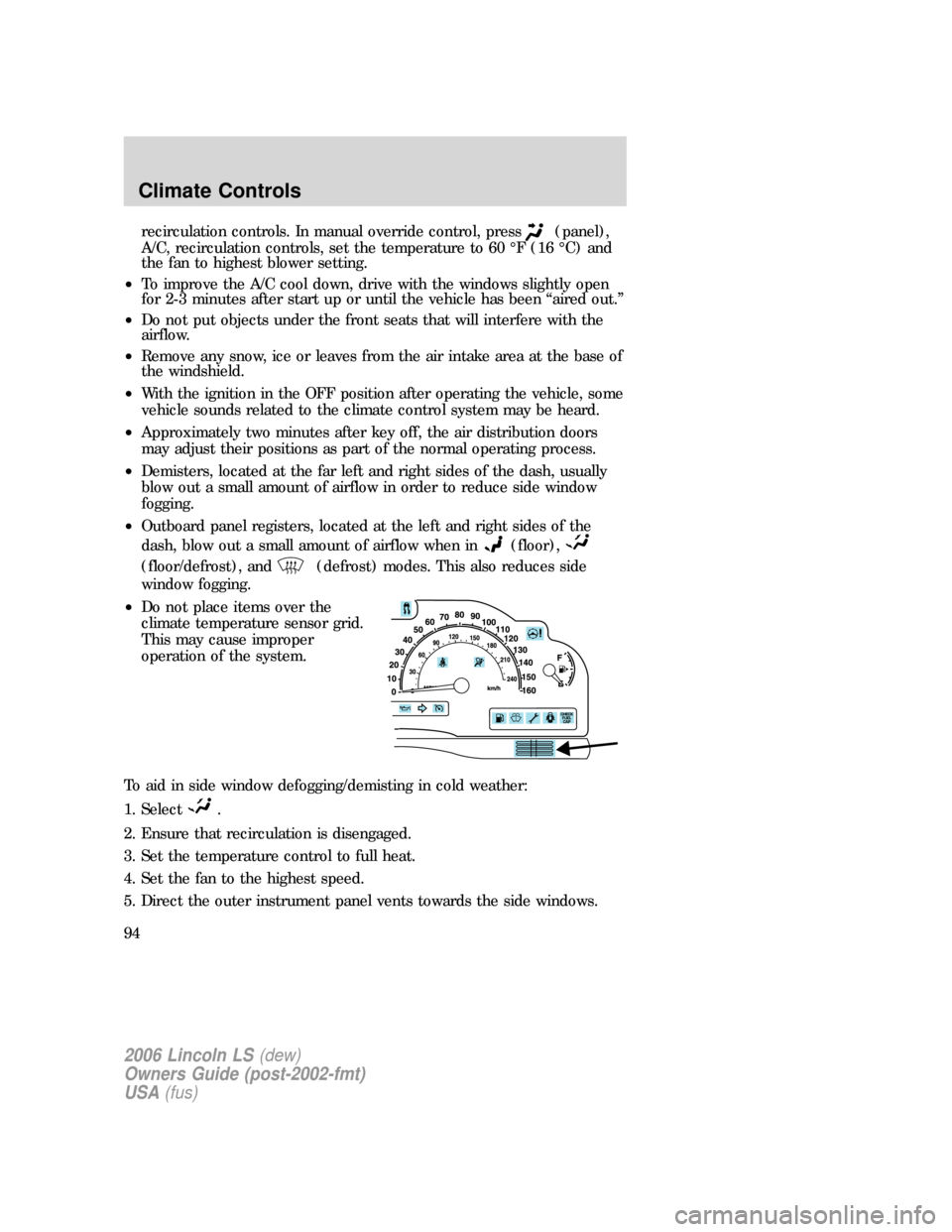
•Do not place items over the
climate temperature sensor grid.
This may cause improper
operation of the system.
To aid in side window defogging/demisting in cold weather:
1. Select
.
2. Ensure that recirculation is disengaged.
3. Set the temperature control to full heat.
4. Set the fan to the highest speed.
5. Direct the outer instrument panel vents towards the side windows.
2006 Lincoln LS(dew)
Owners Guide (post-2002-fmt)
USA(fus)
Climate Controls
94