2006 KIA Sedona audio
[x] Cancel search: audioPage 204 of 347
3 195
Features of your vehicle
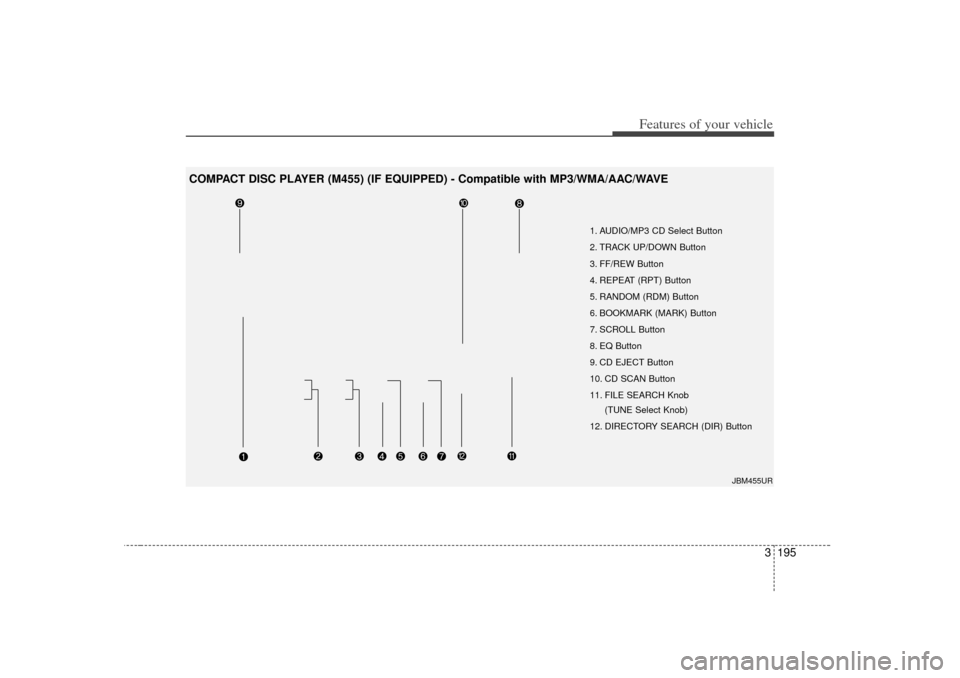
1. AUDIO/MP3 CD Select Button
2. TRACK UP/DOWN Button
3. FF/REW Button
4. REPEAT (RPT) Button
5. RANDOM (RDM) Button
6. BOOKMARK (MARK) Button
7. SCROLL Button
8. EQ Button
9. CD EJECT Button
10. CD SCAN Button
11. FILE SEARCH Knob (TUNE Select Knob)
12. DIRECTORY SEARCH (DIR) Button
JBM455UR
COMPACT DISC PLAYER (M455) (IF EQUIPPED) - Compatible with MP3/WMA/AAC/WAVE
Page 205 of 347
Features of your vehicle196
31. AUDIO/MP3 CD Select Button Insert the CD with the label facing
upward.
Insert the CD to start CD playback, during radio operation or cassette tape
playback.
If you press the CD button while a disc is in the CD deck, the CD player will
begin playing even if the radio or cas-
sette player is being used.
The CD player can be used when the ignition switch is in either the “ON” or
“ACC” position.
Push the CD button to turn on that function without pushing the Power
ON-OFF control knob.✽ ✽ NOTICE• Do not stick paper or tape etc., on the
label side or the recording side of any
discs, as it may cause a malfunction.
• The unit can play a multi-session CD- R (recordable CD) and CD-RW
(rewritable CD) that consists of more
than two sessions.
Please refer to the manual of CD-
R/CD-RW recoder or CD-R/CD-RW
software for more information on
finalization process.
• Depending on the recording status, some CD-Rs/CD-RWs may not be
played on this unit.
✽ ✽ NOTICEPlayback of MP3, AAC and WMA file
formats are supported. Load to play
time for these formats may be longer
due to the compressed nature of these
discs.2. TRACK UP/DOWN Button The desired track on the disc currently
being played can be selected using the
track number.
Press button once to skip forward to the beginning of the next track.
Press within a second after play-
back begins to quickly move backward
through a CD.
If you press after more than a sec-
ond, it will take you to the beginning of
the file you are now listening to.3. FF/REW Button If you want to fast forward or reverse
through the compact disc track, push and
hold the FF or REW button.
When you release the button, the compact
disc player will resume playing.
4. REPEAT (RPT) Button To repeat the track you are currentlylistening to, press the RPT button. To
cancel, press it again.
To repeat the music within selected folder, press the RPT button for more
than 0.8 seconds. To cancel, press it
again. (MP3 CD only)
If you do not release RPT operation when the track ends, it will automati-
cally be replayed.
This process will be continued until you
push the button again or turn the power
OFF then ON.5. RANDOM (RDM) ButtonWith random, you can listen to the tracks
in random, rather than sequential order.
To use random, do the following:
Press the RDM button to listen torecorded tracks in random sequence.
Press RDM again to cancel or turn the
power OFF then ON. The unit defaults
to playing tracks in sequential order.
To listen to the music within the select- ed folder in random order, press the
RDM button within a second. To can-
cel, press it again or turn the power
OFF then ON. (MP3 CD only)
Page 207 of 347

Features of your vehicle198
3✽
✽
NOTICE• To assure proper operation of the unit,
keep the vehicle interior temperature
within a normal range by using the
vehicle's air conditioning or heating
system.
• When replacing the fuse, replace it with a fuse having the correct capaci-
ty.
• All stored bookmarks are all erased when the car battery is disconnected
or power to the vehicle is lost. If this
occurs, the bookmarks will have to be
reset.
• This equipment is designed to be used only in a 12 volt DC battery system
with negative ground.
• This unit is made of precision parts. Do not attempt to disassemble or
adjust any parts.
• When driving your vehicle, be sure to keep the volume of the unit set low
enough to allow you to hear sounds
coming from the outside.
• Do not expose this equipment (includ- ing the speakers and tape) to water or
excessive moisture.
CAUTION
Do not insert warped or poor
quality discs into the CD playeras damage to the unit may occur.
Do not insert anything like coins into the player slot as damage tothe unit may occur.
Do not place beverages close to the audio system. The playbackmechanism may be damaged ifyou spill them.
Do not strike or allow anything to impact the audio system, damageto the system mechanisms couldoccur.
Off-road or rough surface driving may cause the compact disc toskip. Do not use the compact discwhen driving in such conditions as damage to the compact discface could occur.
(Continued)
(Continued) Do not attempt to grab or pull the compact disc out while the disc isbeing pulled into the audio unit by the self-loading mechanism.Damage to the audio unit and compact disc could occur.
Avoid using recorded compact discs in your audio unit. Originalcompact discs are recommended for best resnlts.
Page 208 of 347
3 199
Features of your vehicle
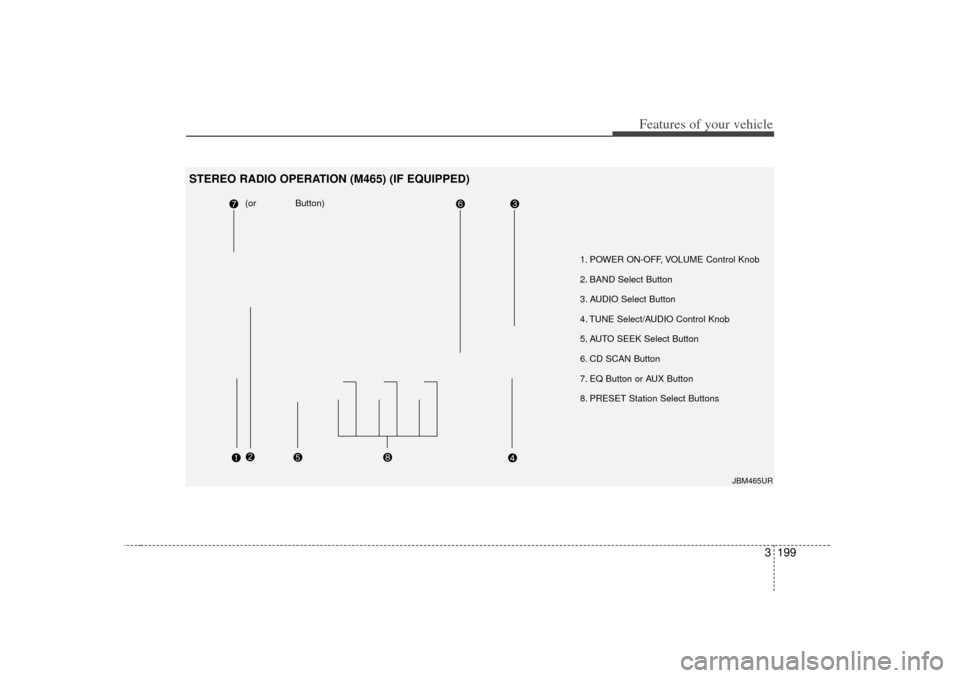
1. POWER ON-OFF, VOLUME Control Knob
2. BAND Select Button
3. AUDIO Select Button
4. TUNE Select/AUDIO Control Knob
5. AUTO SEEK Select Button
6. CD SCAN Button
7. EQ Button or AUX Button
8. PRESET Station Select Buttons
(or Button)
JBM465UR
STEREO RADIO OPERATION (M465) (IF EQUIPPED)
Page 209 of 347
Features of your vehicle200
31. POWER ON-OFF Control Knob The radio unit may be operated when
the ignition key is in the "ACC" or “ON”
position. Press the knob to switch the
power on. The LCD shows the radio
frequency in the radio mode, the tape
direction indicator in the tape mode or
CD/MP3 track in the CD/MP3 mode or
CD AUTO CHANGER mode. To switch
the power off, press the knob again.
Push the FM/AM, TAPE or CD/MP3 to turn on that function without pushing
the Power ON-OFF control knob.VOLUME ControlRotate the knob clockwise to increase
the volume and turn the knob counter-
clockwise to reduce the volume.2. BAND Select ButtonPressing the FM/AM button changes the
AM, FM1 and FM2 bands. The mode
selected is shown on the display.3. AUDIO Select ButtonPressing the AUDIO button changes the
BASS, MID-RANGE, TREBLE, FADER and
BALANCE mode. The mode selected is
shown on the display. After selecting the each mode, rotate the
Audio control knob clockwise or counter-
clockwise.
BASS ControlTo increase the BASS, rotate the knob
clockwise, while to decrease the BASS,
rotate the knob counterclockwise.MID-RANGE ControlTo increase the MID-RANGE, rotate the
knob clockwise, while to decrease the
MID-RANGE, rotate the knob counter-
clockwise.TREBLE ControlTo increase the TREBLE, rotate the knob
clockwise, while to decrease the TRE-
BLE, rotate the knob counterclockwise.FADER ControlRotate the control knob clockwise to
emphasize rear speaker sound (front
speaker sound will be attenuated). When
the control knob is turned counterclock-
wise, front speaker sound will be empha-
sized (rear speaker sound will be attenu-
ated).
BALANCE ControlRotate the knob clockwise to emphasize
right speaker sound (left speaker sound
will be attenuated). When the control
knob is turned counterclockwise, left
speaker sound will be emphasized (right
speaker sound will be attenuated).4. TUNE Select/AUDIO Control
KnobRotate the knob clockwise to increase
the frequency and turn the knob counter-
clockwise to reduce the frequency.5. AUTO SEEK Select Button(Automatic Channel Selection)Press the AUTO SEEK select button.
When the side is pressed, the unit
will automatically tune to the next higher
frequency and when the side is
pressed, it will automatically tune to the
next lower frequency.6. CD SCAN ButtonWhen you press the button, frequency is
changed and the next channel is
received automatically.
To stay on a station, press the CD SCAN
button again.
Page 210 of 347
3 201
Features of your vehicle
7. EQ Button or AUX ButtonPress the EQ button to select the CLAS-
SIC, POPS, ROCK, JAZZ and OFF
MODE for the desired tone quality. Each
press of the button changes the display
as follows;
If the button is written AUX, it willchange to AUX mode when you press
the button, and the button has no EQ
function.
The AUX button is functional only if RSE unit is on.
You can enjoy the RSE audio through the speakers in AUX mode.
The speaker volume level is adjustable by VOLUME(+,-) key, on RSE unit or
wireless remote control.
* Refer to the “RSE” in this section for details RSE operation.
* RSE : Rear Seat Entertainment System(A/V).
8. PRESET STATION Select ButtonsSix stations for AM, FM1 and FM2
respectively can be preset in the elec-
tronic memory circuit.HOW TO PRESET STATIONSSix AM and twelve FM stations may be
programmed into the memory of the
radio. Then, by simply pressing the AM/
FM band select button and/or one of the
six station select buttons, you may recall
any of these stations instantly. To pro-
gram the stations, follow these steps:
Press AM/FM selector to set the band
for AM, FM1 and FM2.
Select the desired station to be stored by seek or manual tuning.
Determine the preset station select button you wish to use to access that
station. Press and hold the station select but-
ton for more than 0.8 seconds. A select
button indicator will show in the display
indicating which select button you have
depressed. The frequency display will
flash after it has been stored into the
memory. You should then release the
button, and proceed to program the
next desired station. A total of 18 sta-
tions can be programmed by selecting
one AM and two FM stations per but-
ton.
When completed, any preset station may be recalled by selecting AM, FM1
or FM2 band and the appropriate sta-
tion button.
CLASSIC➟ POPS➟ROCK➟ JAZZ➟OFF
CAUTION
Do not place beverages close to
the audio system. The audio sys-tem mechanism may be damaged if you spill them.
Do not strike or allow anything to impact the audio system, damageto the system mechanisms couldoccur.
Page 212 of 347

3 203
Features of your vehicle
1. TAPE PROGRAM Button This allows you to play the reverse sideof the tape by merely depressing the
program button. An arrow will appear in
the display to show tape direction.
Push the TAPE button while the tape is in the tape deck, to turn on that func-
tion without pushing the Power ON-
OFF control knob.2. TAPE EJECT Button When the button is pressed with acassette loaded, the cassette will eject.
When the button is pressed during FF/REW mode, the cassette will eject.3. AUTO MUSIC SEARCH (AMS) ButtonPress the button to find the starting point
of each song in a prerecorded music
tape. The quiet space between songs
(must have at least 4 sec. gap) can be
identified by the AUTO MUSIC SEARCH
button.
Pressing the button will play the
beginning of the next music segment.
Pressing the button will start replay at the beginning of the music just lis-
tened to.
To stop FF or REW action, press the button again.
4. FF/REW Button Forward tape winding starts when the
FF button is pressed during PLAY or
REW mode.
Tape PLAY starts when the FF button is pressed again during FF mode.
Tape rewinding starts when the REW button is pressed during PLAY or FF
mode.
Tape PLAY starts when the REW but- ton pressed again during REW mode.5. REPEAT (RPT) Button To repeat the track you are currentlylistening to, press the RPT button. To
cancel, press again.
If you do not release RPT operation when the track ends, it will automati-
cally be replayed.
This process will be continued until you
push the button again or turn the
power OFF then ON.6. DOLBY ButtonIf you get background noise during tape
PLAY, you can reduce this considerably
by merely pressing the DOLBY button. If
you want to cancel the DOLBY feature,
press the button again.
7. EQ Button or AUX ButtonPress the EQ button to select the CLAS-
SIC, POPS, ROCK, JAZZ and OFF
MODE for the desired tone quality. Each
press of the button changes the display
as follows;
If the button is labeled AUX, it willchange to AUX mode when you press
the button, and the button has no EQ
function.
The AUX button is functional only if RSE unit is on .
You can enjoy the RSE audio through the speakers in AUX mode.
The speaker volume level is adjustable by VOLUME(+,-) key, on RSE unit or
wireless remote control.
* Refer to the “RSE” in this section for details RSE operation.
* RSE : Rear Seat Entertainment System(A/V).CLASSIC➟ POPS➟ROCK➟ JAZZ➟OFF
Page 213 of 347

Features of your vehicle204
3✽
✽
NOTICE• To assure proper operation of the unit,
keep the vehicle interior temperature
within a normal range by using the
vehicle's air conditioning or heating
system.
• When replacing the fuse, replace it with a fuse having the correct capaci-
ty.
• The preset station frequencies are all erased when the car battery is discon-
nected. Therefore, all data will have to
be set again if this should occur.
• Do not add any oil to the rotating parts. Keep magnets, screwdrivers
and other metallic objects away from
the tape mechanism and head.
• This equipment is designed to be used only in a 12 volt DC battery system
with negative ground.
• This unit is made of precision parts. Do not attempt to disassemble or
adjust any parts. (Continued)(Continued)
• When driving your vehicle, be sure to
keep the volume of the unit set low
enough to allow you to hear sounds
coming from the outside.
• Do not expose this equipment (includ- ing the speakers and tape) to water or
excessive moisture.
CAUTION
Do not insert anything like coins
into the player slot as damage tothe unit may occur.
Do not place beverages close to the audio system. The playbackmechanism may be damaged ifyou spill them.
Do not strike or allow anything to impact the audio system, damageto the system mechanisms could occur.