Page 22 of 424
REMOTE KEYLESS ENTRY
This system allows you to lock or unlock the doors, open
the swing gate flip-up window, or activate the panic
alarm from distances of 23–50 feet (7–15 meters) using a
transmitter. You don’t have to point the transmitter at the
vehicle to activate the system. Each vehicle comes with
two transmitters.
Child Lock Control
Four Button Transmitter
22 THINGS TO KNOW BEFORE STARTING YOUR VEHICLE
Page 51 of 424
WARNING!
•Relying on the airbags alone could lead to more
severe injuries in a collision. The airbags work
with your seat belt to restrain you properly. In
some collisions the airbags won’t deploy at all.
Always wear your seat belts even though you
have airbags.
•Being too close to the steering wheel or instru-
ment panel during airbag deployment could cause
serious injury. Airbags need room to inflate. Sit
back, comfortably extending your arms to reach
the steering wheel or instrument panel.
•If the vehicle has window bags, they also need
room to inflate. Do not lean against the door or
window. Sit upright in the center of the seat.
Airbag System Components
The airbag system consists of the following:
•Occupant Restraint Controller
•Remote Acceleration Sensors
•Airbag Warning Light
•Driver Airbag
•Passenger Airbag
•Window Bags above Side Windows (If Equipped)
•Steering Wheel and Column
•Instrument Panel
•Interconnecting Wiring
•Knee Impact Bolsters
•Front Acceleration Sensors
THINGS TO KNOW BEFORE STARTING YOUR VEHICLE 51
2
Page 75 of 424
UNDERSTANDING THE FEATURES OF YOUR VEHICLE
CONTENTS
�Mirrors ...............................79
▫ Inside Day/Night Mirror .................79
▫ Inside Automatic Dimming Mirror —
If Equipped ..........................80
▫ Outside Mirrors .......................80
▫ Power Remote Control Outside Mirrors —
If Equipped ..........................81
▫ Heated Remote Control Mirrors — If Equipped .82
▫ Illuminated Vanity Mirrors — If Equipped ....82 �
Hands–Free Communication (UConnect™) —
If Equipped ............................83
▫ Operations ...........................84
▫ Phone Call Features ....................91
▫ UConnect™ System Features ..............94
▫ Advanced Phone Connectivity .............98
▫ Things You Should Know About Your
UConnect™ System ....................100
� Seats ................................106
▫ Front Seat (Manual) Adjustment ...........106
3
Page 81 of 424
WARNING!
Vehicles and other objects seen in the right side
convex mirror will look smaller and farther away
than they really are. Relying too much on your right
side mirror could cause you to collide with another
vehicle or other objects. Use your inside mirror when
judging the size or distance of a vehicle seen in the
right side mirror.
Power Remote Control Outside Mirrors — If
Equipped
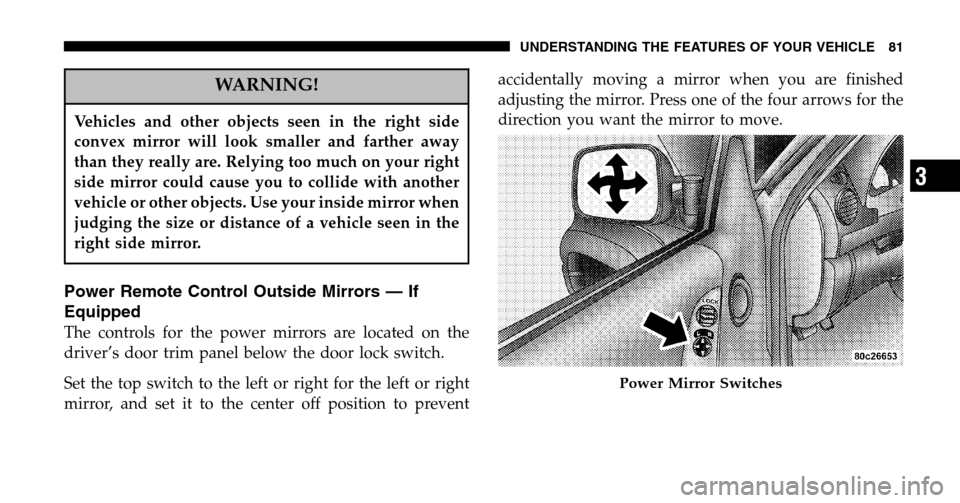
The controls for the power mirrors are located on the
driver’s door trim panel below the door lock switch.
Set the top switch to the left or right for the left or right
mirror, and set it to the center off position to prevent accidentally moving a mirror when you are finished
adjusting the mirror. Press one of the four arrows for the
direction you want the mirror to move.
Power Mirror Switches
UNDERSTANDING THE FEATURES OF YOUR VEHICLE 81
3
Page 82 of 424
Heated Remote Control Mirrors — If Equipped
These mirrors are heated to melt frost or ice. This
feature is activated whenever you turn on the rear
window defrost.
Illuminated Vanity Mirrors — If Equipped
An illuminated vanity mirror is on the sun visor. To use
the mirror, rotate the sun visor down and swing the
mirror cover upward. The lights turn on automatically.
Closing the mirror cover turns off the lights.
When the ignition is turned off, the light will turn off
automatically (after approximately 8 minutes).
Sun Visor Extension — If Equipped
This feature has a pull out extension on the sun visor for
increased coverage.
Lighted Vanity Mirror
82 UNDERSTANDING THE FEATURES OF YOUR VEHICLE
Page 168 of 424

▫CD Changer Control Capability —
If Equipped .........................189
� Sales Code RBQ—AM/FM Stereo Radio With
6 - Disc CD Changer ....................191
▫ Radio Operation ......................191
▫ CD Player Operation ...................194
� Sales Code RB1—AM/FM Stereo Radio With
DVD/GPS Navigation System ..............199
� 6–Disc Remote CD Changer — If Equipped ....199
▫ Loading The CD Changer ...............199
� Satellite Radio — If Equipped ..............201
▫ System Activation .....................201
▫ Electronic Serial Number/Sirius Identification
Number (ENS/SID) ....................201 ▫
Selecting Satellite Mode In RBB, RAH And
RBK Radios .........................202
▫ Selecting Satellite Mode In RBP, RBU, RAZ,
RB1 And RBQ Radios ..................202
▫ Selecting a Channel ....................203
▫ Storing And Selecting Pre-Set Channels ......203
▫ Using The PTY (Program Type) Button
(If Equipped) ........................203
▫ PTY Button �Scan�.....................203
▫ PTY Button �Seek�.....................204
▫ Satellite Antenna ......................204
▫ Reception Quality .....................204
� Remote Sound System Controls — If Equipped . . 205
▫ Radio Operation ......................206
168 UNDERSTANDING YOUR INSTRUMENT PANEL
Page 189 of 424

FF/TUNE/RW
Press FF (Fast Forward) and the CD player will begin to
fast forward until FF is released. The RW ( Reverse)
button works in a similar manner.
Random Play — RND/Program Button 4
Press the RND (button 4) button while the CD is playing
to activate Random Play. This feature plays the tracks on
the selected disc in random order to provide an interest-
ing change of pace.
Press the SEEK button to move to the next randomly
selected track.
Press the RND (button 4) button a second time to stop
Random Play.
Mode
Press the MODE button repeatedly to select between the
CD player, the optional remote CD changer and the Satellite Radio (if equipped). When Satellite Radio (if
equipped) is selected “SAT” will appear in your radio
display.
A CD or tape may remain in the player while in the
Satellite mode.
Time
Press the TIME button to change the display from
elapsed CD playing time to time of day.
CD Changer Control Capability — If Equipped
This radio is compatible with a remote mounted CD
changer available through Mopar Accessories. The fol-
lowing instructions are for the radio controls that operate
this CD changer.
Mode Button
To activate the CD changer, press the MODE button until
CD information appears on the display.
UNDERSTANDING YOUR INSTRUMENT PANEL 189
4
Page 205 of 424
REMOTE SOUND SYSTEM CONTROLS — IF
EQUIPPED
The remote sound system controls are located on the rear
surface of the steering wheel. Reach behind the wheel to
access the switches. The right hand control is a rocker type switch with a
push-button in the center and controls the volume and
mode of the sound system. Pressing the top of the rocker
switch will increase the volume and pressing the bottom
of the rocker switch will decrease the volume.
Pressing the center button will make the radio switch
between the various modes available (AM/FM/TAPE/
CD, Etc.).
The left hand control is a rocker type switch with a
push-button in the center. The function of the left hand
control is different depending on which mode you are in.
The following describes the left hand control operation in
each mode.
UNDERSTANDING YOUR INSTRUMENT PANEL 205
4