2006 INFINITI G35 lights
[x] Cancel search: lightsPage 101 of 344

If the power supply is disconnected, the
clock will not indicate the correct time. Re-
adjust the time.
ADJUSTING THE TIME To move the time forward, push the
button
q 1
.
To move the time backward, push the
button
q 2
.
Push and hold each adjusting switch to
move the time forward or backward con-
tinuously. The power outlet is for powering electrical
accessories such as cellular telephones.
CAUTION O The outlet and plug may be hot during or
immediately after use.
O This power outlet is not designed for use
with a cigarette lighter unit.
O Do not use with accessories that exceed a
12 volt, 120W (10A) power draw. Do not
use double adapters or more than one
electrical accessory. O Use power outlets with the engine running
to avoid discharging the vehicle battery.
O Avoid using power outlets when the air
conditioner, headlights or rear window de-
froster is on.
O Before inserting or disconnecting a plug,
be sure the electrical accessory being used
is turned OFF.
O Push the plug in as far as it will go. If good
contact is not made, the plug may overheat
or the internal temperature fuse may open.
O When not in use, be sure to close the cap.
Do not allow water to contact the outlet.SIC2568 SIC1840B
Automatic transmission model SIC2673
Manual transmission modelsCLOCK POWER OUTLET
Instruments and controls
2-29
w 06.1.5/V35-D/V5.0
X
Page 116 of 344

ROOM LIGHT The room light has a two-position switch.
When the switch is in the door position
q 1
, the room light will illuminate when a
door is opened.
The light will stay on for about 30 sec-
onds when:
O The doors are unlocked by the keyfob,
a key, power door lock switch or using
the Intelligent Key system while all
doors are closed. O The driver's door is opened and then
closed while the key is removed from
the ignition switch or the ignition is
turned to the LOCK position (Intelli-
gent Key system).
O The key is removed from the ignition
switch or the ignition is turned to the
LOCK position (Intelligent Key system)
while all doors are closed.
The light will turn off while the 30 second
timer is activated, when:
O The driver's door is locked either with
the keyfob, a key or the power door
lock switch.
O The ignition switch is turned to the ON
position.
When the switch is in the OFF position
q 2
, the room light does not illuminate, re-
gardless of any condition.
MAP LIGHTS When the switch is pushed in, the light
will turn on. When the switch is pushed
again, the light will turn off.
When the map light switch is in the ON po-
sition, it will automatically turn off 30 min-
utes after the ignition switch has been
turned to the OFF position. To turn on the
light again, turn the ignition switch to the
ON position.
The map, personal, and vanity mirror
lights will automatically turn off 30 min-
utes after the latest operation of the fol-SIC2580 SIC2581
INTERIOR LIGHTS
2-44 Instruments and controls
w 06.1.4/V35-D/V5.0
X
Page 117 of 344

lowing with the ignition switch in the ACC
or OFF position:
O Opening or closing any door
O Locking or unlocking with the keyfob,
a key, the power door lock switch or
the ignition is turned to the LOCK po-
sition (Intelligent Key system)
O Inserting or removing a key from the
ignition switch
These lights will turn on again when any
of the above operations is performed after
the lights have turned off automatically.
(The lights will turn off 30 minutes after
the latest operation of the above as well.)
CAUTIONO Turn off the map, personal and vanity
mirror lights when you leave the vehicle.
O Do not use for extended periods of time
with the engine stopped. This could re-
sult in a discharged battery. PERSONAL LIGHTS
Rear (Sedan)
q A
: Left-hand side
q B
: Right-hand side
The rear personal light has a three-
position switch.
When the switch is in the door position
q 2
, the light will illuminate when the rear
door is opened. When the rear personal light switch is in
the ON position
q 1
, the rear personal
lights illuminate, regardless of any condi-
tion.
When the switch is in the OFF
q 3
position,
the rear personal lights do not illuminate,
regardless of any condition.
When the personal light switch is in the
ON position, it will automatically turn off
30 minutes after the ignition switch has
been turned to the OFF position. To turn on
the light again, turn the ignition switch to
the ON position. SIC2582
Instruments and controls
2-45
w 06.1.4/V35-D/V5.0
X
Page 129 of 344

Unlocking doors and fuel-filler
door 1. Push the UNLOCK button on the
keyfob once.
O The driver's door and fuel-filler door
unlock
O The hazard indicator flashes once if all
doors are completely closed with the
ignition switch in any position except
in the ON position.
O The interior light timer activates and
the interior light comes on for 30 sec-
onds when the interior light switch is
at the DOOR position with the ignition
switch in any position except in the
ON position.
2. Push the UNLOCK button on the
keyfob again within 5 seconds.
O All doors and trunk lid unlock
O The hazard indicator flashes once if all
doors are completely closed.
All doors will be locked automatically un-
less one of the following operations is
performed within 1 minute of pushing the
UNLOCK button.
O opening any door. O opening trunk lid.
O turning the ignition switch to the ON
position
The interior light can be turned off
without waiting for 30 seconds by turning
the ignition switch to the ON position or
by locking the doors with the keyfob.
Opening the windows Push the UNLOCK button on the
keyfob.
The driver's door and fuel-filler door will
unlock.
Continue to push the UNLOCK button
for more than 3 seconds. The door win-
dows will start to lower.
Continue to push the UNLOCK button
until windows are fully open.
To stop the windows lowering operation,
release the UNLOCK button.
To start the windows lowering operation,
push the UNLOCK button again for
more than 3 seconds.
Releasing the trunk lid 1. Push the TRUNK button on the
keyfob for longer than 0.5 seconds when the ignition switch is in any po-
sition except the ON position.
2. The trunk lid opens.
The trunk lid cannot be opened by operat-
ing the keyfob when the ignition switch is
in the ON position.
Using the panic alarm If you are near your vehicle and feel
threatened, you may activate the alarm to
call attention as follows:
1. Push the PANIC button on the
keyfob for longer than 0.5 seconds
with the key removed from the ignition
switch.
2. The theft warning alarm and head-
lights will stay on for 25 seconds.
3. The panic alarm stops when:
O It has run for 25 seconds, or
O The LOCK button or the UNLOCK
button on keyfob is pushed, or
O The TRUNK button or the PANIC
button on the keyfob is pushed
for longer than 0.5 second.
Pre-driving checks and adjustments
3-7
w 06.1.4/V35-D/V5.0
X
Page 143 of 344

3. Push the LOCK button on the In-
telligent Key.
4. All doors and fuel-filler door will lock.
All of the doors will lock when the LOCK
button on the Intelligent Key is
pushed even though the ignition switch is
in the ON position.
5. The hazard indicator flashes twice and
the horn chirps once.
O When the LOCK button is pushed
with all doors locked, the hazard indi-
cator flashes twice and the horn
chirps once as a reminder that the
doors are already locked.
*1: Doors lock with the Intelligent Key
while the mechanical key or the valet
key is in the ignition switch or the ig-
nition switch is pushed in.
*2: Doors do not lock with the Intelligent
Key while any door is open.
Unlocking doors and fuel-filler door:
1. Push the UNLOCK button on the
Intelligent Key once.
O The driver's door and fuel-filler door
unlock O The hazard indicator flashes once if all
doors are completely closed with the
ignition switch in any position except
the ON position.
O The interior light turns on and the
light timer activates for 30 seconds
when the switch is in the DOOR posi-
tion with the ignition switch in any po-
sition except the ON position.
2. Push the UNLOCK button on the
Intelligent Key again within 5 seconds.
O All doors unlock.
O The hazard indicator flashes once if all
doors are completely closed.
All doors will be locked automatically un-
less one of the following operations is
performed within 1 minute of pushing the
UNLOCK button.
O opening any door
O the ignition switch is pushed
O the mechanical key or the valet key is
inserted into the ignition switch
The interior light can be turned off without
waiting for 30 seconds by turning the igni-
tion switch to the ON position or by locking
the doors with the Intelligent Key. Opening the windows:
See ªOpening and closing windowsº on
the previous page.
Releasing the trunk lid:
1. Push and hold the TRUNK button
on the Intelligent Key for longer than
0.5 second when the ignition switch is
in any position except the ON posi-
tion.
2. The trunk lid opens.
The trunk lid cannot be opened by operat-
ing the Intelligent Key when the ignition
switch is in the ON position.
Using the panic alarm:
If you are near your vehicle and feel
threatened, you may activate the alarm to
call attention as follows:
1. Push the PANIC button on the In-
telligent Key for longer than 0.5 second
with the metal key removed from the
ignition switch or the ignition switch
not pushed in.
2. The theft warning alarm and head-
lights will stay on for 25 seconds.
Pre-driving checks and adjustments
3-21
w 06.1.4/V35-D/V5.0
X
Page 154 of 344
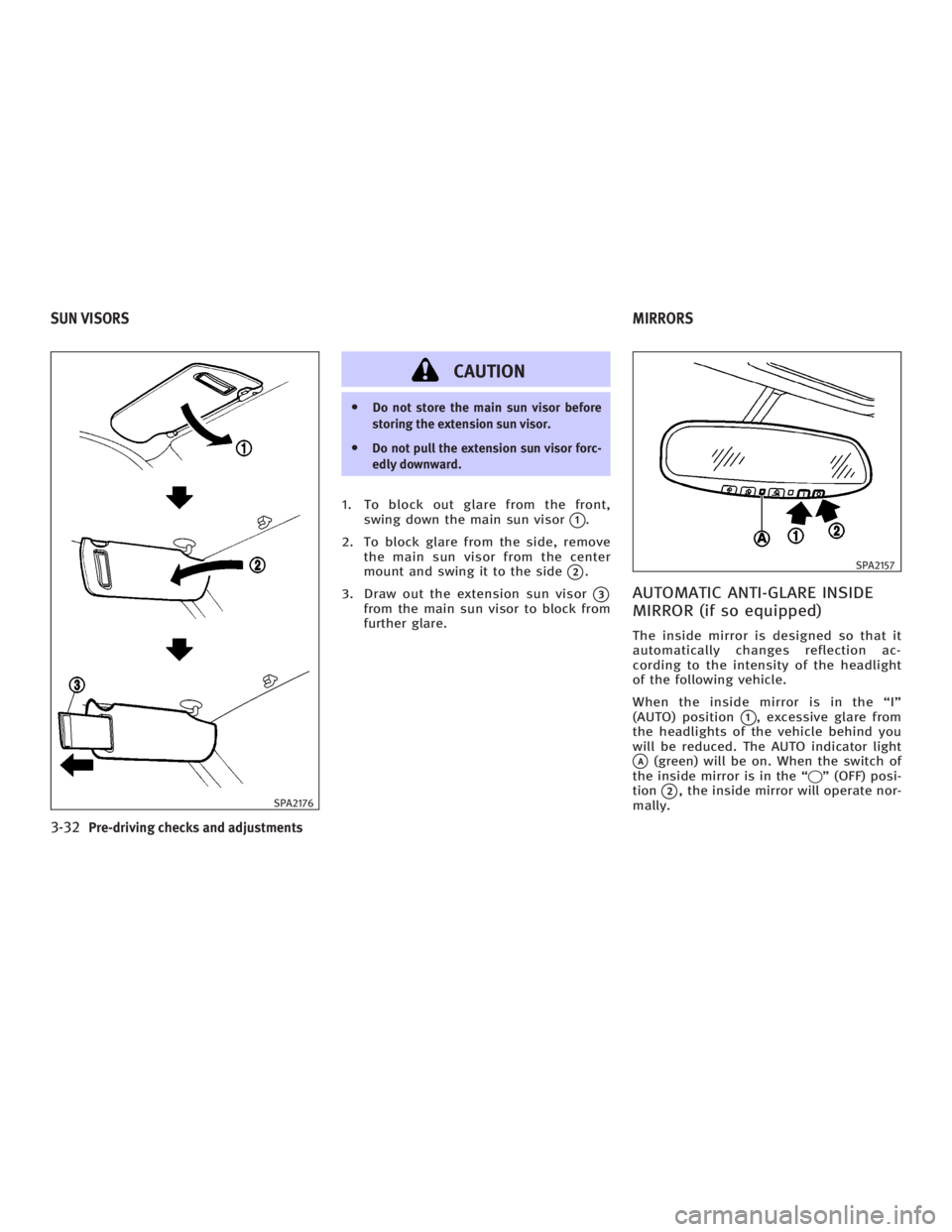
CAUTION O Do not store the main sun visor before
storing the extension sun visor.
O Do not pull the extension sun visor forc-
edly downward.
1. To block out glare from the front,
swing down the main sun visor
q 1
.
2. To block glare from the side, remove
the main sun visor from the center
mount and swing it to the side
q 2
.
3. Draw out the extension sun visor
q 3
from the main sun visor to block from
further glare.
AUTOMATIC ANTI-GLARE INSIDE
MIRROR (if so equipped) The inside mirror is designed so that it
automatically changes reflection ac-
cording to the intensity of the headlight
of the following vehicle.
When the inside mirror is in the ªIº
(AUTO) position
q 1
, excessive glare from
the headlights of the vehicle behind you
will be reduced. The AUTO indicator light
q A
(green) will be on. When the switch of
the inside mirror is in the ª q º (OFF) posi-
tion
q 2
, the inside mirror will operate nor-
mally.SPA2176 SPA2157
SUN VISORS MIRRORS
3-32 Pre-driving checks and adjustments
w 06.1.4/V35-D/V5.0
X
Page 175 of 344

FM RADIO RECEPTION Range: FM range is normally limited to 25
to 30 miles (40 to 48 km), with monaural
(single channel) FM having slightly more
range than stereo FM. External influences
may sometimes interfere with FM station
reception even if the FM station is within
25 miles (40 km). The strength of the FM
signal is directly related to the distance
between the transmitter and receiver. FM
signals follow a line-of-sight path, exhib-
iting many of the same characteristics as
light. For example they will reflect off ob-
jects. Fade and drift: As your vehicle moves
away from a station transmitter, the sig-
nals will tend to fade and/or drift.
Static and flutter: During signal interfer-
ence from buildings, large hills or due to
antenna position, usually in conjunction
with increased distance from the station
transmitter, static or flutter can be heard.
This can be reduced by adjusting the
treble control counterclockwise to reduce
treble response.
Multipath reception: Because of the re-
flective characteristics of FM signals, di-
rect and reflected signals reach the re-
ceiver at the same time. The signals may
cancel each other, resulting in momentary
flutter or loss of sound.
AM RADIO RECEPTION AM signals, because of their low fre-
quency, can bend around objects and
skip along the ground. In addition, the
signals can be bounced off the iono-
sphere and bent back to earth. Because
of these characteristics. AM signals are
also subject to interference as they travel
from transmitter to receiver.
Fading: Occurs while the vehicle is
passing through freeway underpasses or in areas with many tall buildings. It can
also occur for several seconds during
ionospheric turbulence even in areas
where no obstacles exist.
Static: Caused by thunderstorms, elec-
trical power lines, electric signs and even
traffic lights.
SATELLITE RADIO RECEPTION (if so
equipped) When the satellite radio is first installed
or the battery has been replaced, the sat-
ellite radio may not work properly. This is
not a malfunction. Wait more than 10 min-
utes with satellite radio ON for satellite
radio to receive all of the necessary data.
No satellite radio reception is available
unless optional satellite receiver and an-
tenna are installed and an XM or
SIRIUS TM
satellite radio service subscrip-
tion is active.
Satellite radio is not available in Alaska
and Hawaii.
Satellite radio performance may be af-
fected if cargo carried on the roof blocks
the satellite radio signal.
If possible, do not put cargo over the sat-
ellite antenna.SAA0306
Display screen, heater, air conditioner and audio systems
4-15
w 06.1.4/V35-D/V5.0
X
Page 214 of 344

ON (Normal operating position)
q E
:
This position turns on the ignition system
and electrical accessories.
START
q F
:
This position starts the engine. As soon
as the engine has started, release the
switch immediately. It will automatically
return to the ON position.
For important safety information, see ªIg-
nition switchº in the ª5. Starting and driv-
ingº section.
The ignition switch cannot be turned back
to the LOCK position unless the shift lever
is in P position. (It can be turned to only
q C
.)
CAUTIONDo not leave the vehicle with the ignition
switch in ACC or ON position when the en-
gine is not running for an extended period.
This can discharge the battery. INFINITI VEHICLE IMMOBILIZER
SYSTEM The INFINITI Vehicle Immobilizer System
will not allow the engine to start without
the use of the registered key.
If the engine does not start using a regis-
tered key (for example, when interference
is caused by another registered key, an
automated toll road device or an auto-
mated payment device on the key ring),
restart the engine using the following pro-
cedures:
1. Leave the ignition switch in the ON po-
sition for approximately 5 seconds.
2. Turn the ignition switch to the OFF or
LOCK position and wait approximately
10 seconds.
3. Repeat steps 1 and 2.
4. Restart the engine while holding the
device (which may have caused the in-
terference) separate from the regis-
tered key.
If this procedure allows the engine to
start, INFINITI recommends placing the
registered key on a separate key ring to
avoid interference from other devices. O Make sure the area around the vehicle
is clear.
O Maintenance items should be checked
periodically, for example, each time
you check engine oil.
O Check that all windows and lights are
clean.
O Visually inspect tires for their appear-
ance and condition. Also check tires
for proper inflation.
O Lock all doors.
O Position seat and adjust head re-
straints.
O Adjust inside and outside mirrors.
O Fasten seat belts and ask all passen-
gers to do likewise.
O Check the operation of warning lights
when the ignition key is turned to the
ON position. See ªWarning/indicator
lights and audible remindersº in the
ª2. Instruments and controlsº section.BEFORE STARTING THE ENGINE
5-10 Starting and driving
w 06.1.4/V35-D/V5.0
X