2006 INFINITI G35 lock
[x] Cancel search: lockPage 154 of 344
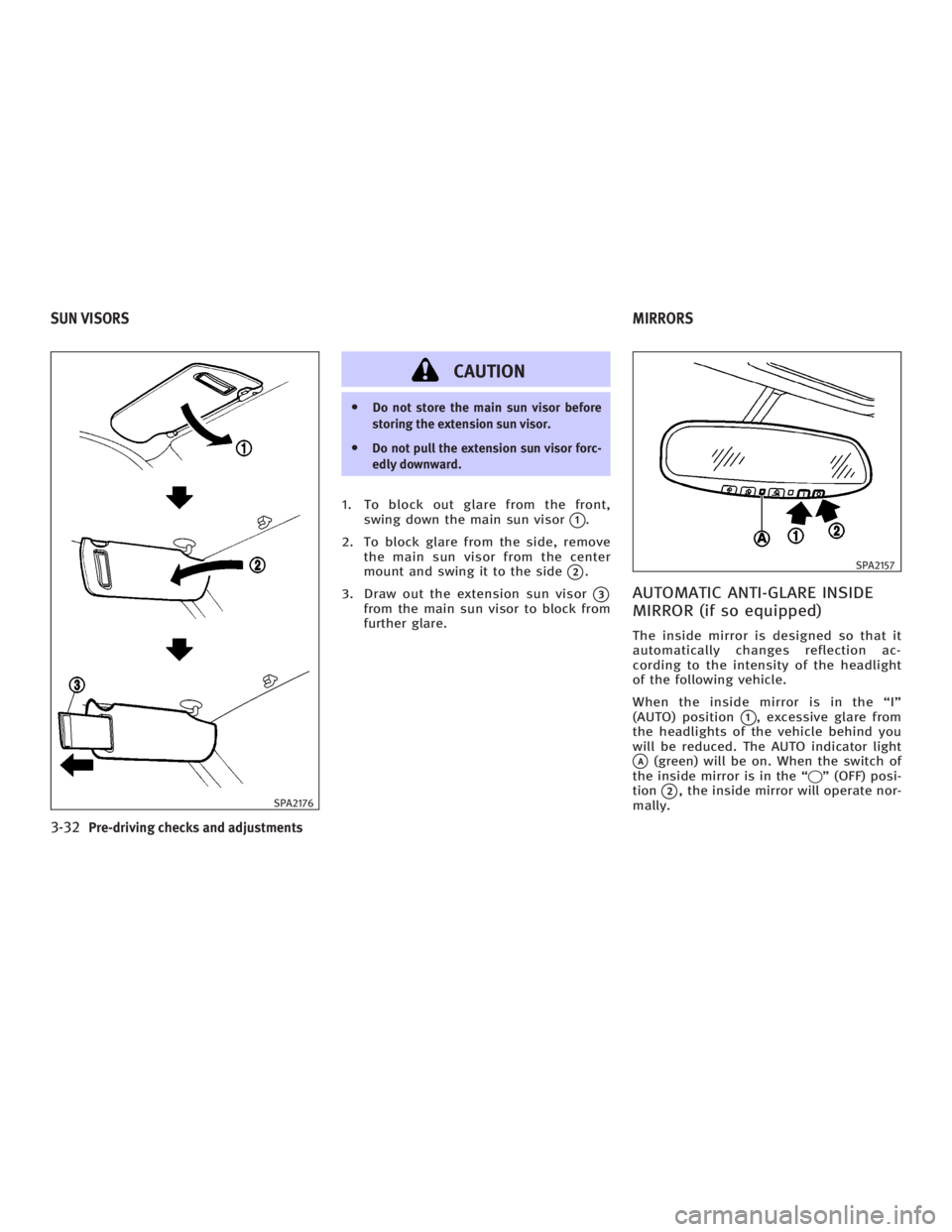
CAUTION O Do not store the main sun visor before
storing the extension sun visor.
O Do not pull the extension sun visor forc-
edly downward.
1. To block out glare from the front,
swing down the main sun visor
q 1
.
2. To block glare from the side, remove
the main sun visor from the center
mount and swing it to the side
q 2
.
3. Draw out the extension sun visor
q 3
from the main sun visor to block from
further glare.
AUTOMATIC ANTI-GLARE INSIDE
MIRROR (if so equipped) The inside mirror is designed so that it
automatically changes reflection ac-
cording to the intensity of the headlight
of the following vehicle.
When the inside mirror is in the ªIº
(AUTO) position
q 1
, excessive glare from
the headlights of the vehicle behind you
will be reduced. The AUTO indicator light
q A
(green) will be on. When the switch of
the inside mirror is in the ª q º (OFF) posi-
tion
q 2
, the inside mirror will operate nor-
mally.SPA2176 SPA2157
SUN VISORS MIRRORS
3-32 Pre-driving checks and adjustments
w 06.1.4/V35-D/V5.0
X
Page 156 of 344

Foldable outside mirrors Fold the outside mirror by pushing it to-
ward the rear of the vehicle. AUTOMATIC DRIVE POSITIONER
OPERATION The automatic drive positioner system
has two features:
O Entry/exit function (only available on
models equipped with automatic
transmission)
O Memory storage function
ENTRY/EXIT FUNCTION (if so
equipped) This system is designed so that the driv-
er's seat and steering column will auto-
matically move when the automatic trans-
mission selector lever is in the P (Park)
position. This allows the driver to get into
and out of the driver's seat more easily.
(This feature is not available on models
equipped with manual transmission.)
The driver's seat will slide backward and
the steering wheel will move up when the
driver's door is opened with the key or ig-
nition switch in the LOCK position.
The driver's seat and steering wheel will
return to the previous positions:
O When the key is inserted into the igni-
tion switch after closing the driver's door, or when the driver's door is
closed after inserting the key into the
ignition switch.
O When the ignition switch is pushed
with the driver's door closed.
O When the key or ignition switch is
turned to the ON position.
Initializing entry/exit function The entry/exit function can be activated
or cancelled by pushing and holding the
SET switch for more than 10 seconds
while the ignition switch is in the LOCK
position. The indicator light will blink
once when the function is cancelled, and
the indicator light will blink twice when
the function is activated. If the battery
cable is disconnected, or if the fuse
opens, the entry/exit function will be can-
celled. In such a case, after connecting
the battery or replacing with a new fuse,
open and close the driver's door more
than two times with the ignition switch or
ignition switch in the LOCK position. The
entry/exit function will be activated.SPA1829
AUTOMATIC DRIVE POSITIONER (if so
equipped)
3-34 Pre-driving checks and adjustments
w 06.1.4/V35-D/V5.0
X
Page 168 of 344

Clock settings The following display will appear when
pushing the ªSETTINGº button, selecting
the ª Clock º key and pushing the ªENTERº
button.
On-screen Clock:
When this item is turned to ON, a clock is
always displayed in the upper right corner
of the screen.
This clock will indicate the time almost
exactly because it is always adjusted by
the GPS system. Clock Format:
Choose either the 12-hour clock display or
the 24-hour clock display.
Offset Adjust:
Adjust the time by increasing or de-
creasing per minute.
Daylight Saving Time:
Turn this item to ON for daylight saving
time application.
Time Zone:
Choose the time zone from the following
O Pacific
O Mountain
O Central
O Eastern
O Atlantic
O Newfoundland
Language/Units settings The Language/Units setting screen will
appear when selecting the ª Language/
Units º key and pushing the ªENTERº
button.SAA1091 SAA1295
4-8 Display screen, heater, air conditioner and audio systems
w 06.1.4/V35-D/V5.0
X
Page 175 of 344

FM RADIO RECEPTION Range: FM range is normally limited to 25
to 30 miles (40 to 48 km), with monaural
(single channel) FM having slightly more
range than stereo FM. External influences
may sometimes interfere with FM station
reception even if the FM station is within
25 miles (40 km). The strength of the FM
signal is directly related to the distance
between the transmitter and receiver. FM
signals follow a line-of-sight path, exhib-
iting many of the same characteristics as
light. For example they will reflect off ob-
jects. Fade and drift: As your vehicle moves
away from a station transmitter, the sig-
nals will tend to fade and/or drift.
Static and flutter: During signal interfer-
ence from buildings, large hills or due to
antenna position, usually in conjunction
with increased distance from the station
transmitter, static or flutter can be heard.
This can be reduced by adjusting the
treble control counterclockwise to reduce
treble response.
Multipath reception: Because of the re-
flective characteristics of FM signals, di-
rect and reflected signals reach the re-
ceiver at the same time. The signals may
cancel each other, resulting in momentary
flutter or loss of sound.
AM RADIO RECEPTION AM signals, because of their low fre-
quency, can bend around objects and
skip along the ground. In addition, the
signals can be bounced off the iono-
sphere and bent back to earth. Because
of these characteristics. AM signals are
also subject to interference as they travel
from transmitter to receiver.
Fading: Occurs while the vehicle is
passing through freeway underpasses or in areas with many tall buildings. It can
also occur for several seconds during
ionospheric turbulence even in areas
where no obstacles exist.
Static: Caused by thunderstorms, elec-
trical power lines, electric signs and even
traffic lights.
SATELLITE RADIO RECEPTION (if so
equipped) When the satellite radio is first installed
or the battery has been replaced, the sat-
ellite radio may not work properly. This is
not a malfunction. Wait more than 10 min-
utes with satellite radio ON for satellite
radio to receive all of the necessary data.
No satellite radio reception is available
unless optional satellite receiver and an-
tenna are installed and an XM or
SIRIUS TM
satellite radio service subscrip-
tion is active.
Satellite radio is not available in Alaska
and Hawaii.
Satellite radio performance may be af-
fected if cargo carried on the roof blocks
the satellite radio signal.
If possible, do not put cargo over the sat-
ellite antenna.SAA0306
Display screen, heater, air conditioner and audio systems
4-15
w 06.1.4/V35-D/V5.0
X
Page 182 of 344

It may take some time to receive the acti-
vation signal after subscribing to the XM
or SIRIUS TM
satellite radio provider. After
receiving the activation signal, an avail-
able channel list will be automatically up-
dated in the radio. For XM , turn the igni-
tion switch from the LOCK to ACC position
to update the channel list.
Satellite radio is not available in Alaska
and Hawaii.
FM-AM-SATELLITE RADIO WITH
COMPACT DISC (CD) CHANGER
Audio main operation Head unit:
The radio has an FM diversity reception
system, which employs two antennas
printed on the rear window. This system
automatically switches to the antenna
which is receiving less interference.
The auto loudness circuit enhances the
low frequency range automatically in both
radio reception and CD playback.
POWER on/off:
Turn the ignition switch to the ACC or ON
position, and then push the POWER
on/off button while the system is off to call up the mode (radio, tape or CD) which
was playing immediately before the
system was turned off. When no CD or
tape is loaded, the radio will come on.
While the system is on, pushing the
POWER on/off button turns the system
off.
Volume control:
Turn the volume control knob to adjust
the volume.
This vehicle has Speed Sensitive control
Volume (SSV) for audio . The audio volume
changes as the driving speed changes.
AUDIO button (BASS, TREBLE, FADER,
BALANCE, SSV (Type A only)):
Push the AUDIO button to change the se-
lecting mode as follows.
BASS ! TREBLE ! FADER ! BALANCE !
SSV (Type A only) ! (Normal) ! BASS
To adjust Bass, Treble, Fader and Bal-
ance, push the AUDIO button until the de-
sired mode BASS, TREBLE, FADER or BAL-
ANCE appears in the display. Push the
TUNE
( or ) button to adjust Bass and
Treble to the desired level. Use the
or button also to adjust Fader or Balance modes. Fader adjusts the
sound level between the front and rear
speakers and Balance adjusts the sound
between the right and left speakers.
To change the SSV mode to OFF, LOW,
MID or HIGH, push the or (TUNE)
button (Type A) or push the SSV button
(Type B).
After 10 seconds, the radio, or CD display
reappears. Once the sound quality is set
to the desired level, push the AUDIO but-
ton repeatedly until the radio, or CD dis-
play appears.
DISPLAY CHANGE:
This button will work during FM radio, sat-
ellite radio (if so equipped) and CD opera-
tion. Find the detailed function in the de-
scription of each item.
FM-AM-SAT radio operation RADIO (FM/AM/SAT) band select:
Pushing the band select button will
change the band as follows:
(Without satellite radio)
AM ! FM1 ! FM2 ! AM
4-22 Display screen, heater, air conditioner and audio systems
w 06.1.4/V35-D/V5.0
X
Page 192 of 344

Ð Your vehicle is in an area where it
is difficult to receive radio waves;
such as in a tunnel, in an under-
ground parking garage, near a tall
building or in a mountainous area.
Ð Your cellular phone is locked to
prevent it from being dialed.
When the radio wave condition is not
ideal or ambient sound is too loud, it may
be difficult to hear the other person's
voice during a call.
Do not place the cellular phone in an area
surrounded by metal or far away from the
in-vehicle phone module to prevent tone
quality degradation and wireless connec-
tion disruption.
While a cellular phone is connected
through the Bluetooth wireless connec-
tion, the battery power of the cellular
phone may discharge quicker than usual.
If the Bluetooth Hands-Free Phone
System seems to be malfunctioning,
please refer to ªTroubleshooting guideº
later in this section. You can also visit
www.infiniti.com/bluetooth for trouble-
shooting help. Refer to the cellular phone Owner's
Manual regarding the telephone charges,
cellular phone antenna and body, etc.
This device complies with Part 15 of the
FCC Rules. Operation is subject to the fol-
lowing two conditions: (1) this device may
not cause harmful interference, and (2)
this device must accept any interference
received, including interference that may
cause undesired operation.
FCC Radiation Exposure Statement:
This equipment complies with FCC radia-
tion exposure limits set forth for an un-
controlled environment. This equipment
should be installed and operated with
minimum distance 8 inch (20 cm) be-
tween the radiator and your body. This
Transmitter must not be co-located or op-
erating in conjunction with any other an-
tenna or transmitter.
USING THE SYSTEM The INFINITI Voice Recognition system al-
lows hands-free operation of the
Bluetooth Hands-Free Phone System.
If the vehicle is in motion, some com-
mands may not be available so full atten-
tion may be given to vehicle operation. Initialization When the ignition switch is turned to the
ON position, INFINITI Voice Recognition is
initialized, which takes a few seconds.
When completed, the amber light on the
overhead console illuminates and the
system is ready to accept voice com-
mands. If the button is pushed be-
fore the initialization completes, the
system will announce ªHands-free phone
system not readyº and will not react to
voice commands.
Operating tips To get the best performance out of the
INFINITI Voice Recognition system, ob-
serve the following:
O Keep the interior of the vehicle as
quiet as possible. Close the windows
to eliminate surrounding noises
(traffic noises, vibration sounds, etc.),
which may prevent the system from
recognizing voice commands correctly.
O Wait until the tone sounds before
speaking a command. Otherwise, the
command will not be received properly.
O Start speaking a command within 5
seconds after the tone sounds.
4-32 Display screen, heater, air conditioner and audio systems
w 06.1.4/V35-D/V5.0
X
Page 202 of 344

You can still use the Memo Pad and ac-
cess Setup.
To turn on the system again, choose the
Bluetooth On command from the Setup
command.
SPEAKER ADAPTATION (SA) MODE Speaker Adaptation allows up to two out-of
dialect users to train the system to improve
recognition accuracy. By repeating a
number of commands, the users can create
a voice model of their own voice that is
stored in the system. The system is ca-
pable of storing a different speaker adapta-
tion model for memory A and memory B.
If memory A is available, the system will
use memory A to store the model. If
memory A is in use and memory B is
available, the system will use memory B
to store the model. If both of the memory
locations are in use, the system will ask
the user to select which memory location
should be overwritten.
Training procedure The procedure for training a voice is as
follows.
1. Position the vehicle in a reasonably
quiet outdoor location. 2. Sit in the driver's seat with the engine
running, the parking brake on, and the
transmission in Park.
3. Press and hold the button for
more than 5 seconds.
4. The system announces: ªPress the
PHONE/SEND ( ) button for the
hands-free phone system to enter the
speaker adaptation mode or press the
PHONE/END ( ) button to select a
different language.º
5. Press the button.
For information on selecting a dif-
ferent language, see ªChoosing a lan-
guageº earlier in this section.
6. Voice memory A or memory B is se-
lected automatically. If both memory
locations are already in use, the
system will prompt you to overwrite
one. Follow the instructions provided
by the system.
7. When preparation is complete and you
are ready to begin, the press the
button.
8. The SA mode will be explained. Follow
the instructions provided by the
system. 9. When training is finished, the system
will tell you an adequate number of
phrases have been recorded.
10. The system will ask you to say your
name. Follow the instructions to regis-
ter your name.
11. The system will announce that
speaker adaptation has been com-
pleted and the system is ready.
The SA mode will stop if:
O The button is pressed for more
than 5 seconds in SA mode.
O The vehicle is driven during SA mode.
O The ignition switch is turned to the
OFF or LOCK position.
Training phrases During the SA mode, the system instructs
you to say the following phrases.
(The system will prompt you for each
phrase.)
O phone book new entry
O dial three oh four two nine
O delete call back number
O setup pair phone
4-42 Display screen, heater, air conditioner and audio systems
w 06.1.13/V35-D/V5.0
X
Page 205 of 344

5 Starting and driving Precautions when starting and driving .............. 5-2
Exhaust gas (Carbon monoxide) .................. 5-2
Three way catalyst....................................... 5-3
Tire pressure monitoring system (TPMS) ..... 5-3
Avoiding collision and rollover..................... 5-5
Drinking alcohol/drugs and driving ............. 5-5
All-wheel drive (AWD) driving safety
precautions (for AWD models) .................... 5-6
Ignition switch (except Intelligent Key
system)............................................................. 5-6
Automatic transmission ............................... 5-6
Manual transmission .................................. 5-7
Key positions .............................................. 5-8
INFINITI Vehicle Immobilizer System ............ 5-8
Ignition switch (models with the Intelligent
Key system) ...................................................... 5-9
Ignition switch positions ............................. 5-9
INFINITI Vehicle Immobilizer System .......... 5-10
Before starting the engine............................... 5-10
Starting the engine .......................................... 5-11
Driving the vehicle .......................................... 5-12
Automatic transmission.............................. 5-12
Manual transmission ................................ 5-16
Parking brake .................................................. 5-19 Cruise control ................................................. 5-20
Precautions on cruise control .................... 5-20
Cruise control operations .......................... 5-20
Break-in schedule ........................................... 5-22
Increasing fuel economy ................................. 5-22
All-wheel drive (AWD) (if so equipped) ............ 5-23
All-wheel drive (AWD) warning light ........... 5-23
Parking/parking on hills ................................. 5-24
Power steering ................................................ 5-25
Brake system .................................................. 5-26
Braking precautions .................................. 5-26
Anti-lock brake system (ABS)..................... 5-26
Vehicle Dynamic Control (VDC) system .......... 5-28
Rear active steer (RAS) system (if so
equipped) ....................................................... 5-29
Cold weather driving....................................... 5-30
Freeing a frozen door lock ......................... 5-30
Anti-freeze ................................................. 5-30
Battery ...................................................... 5-30
Draining of coolant water .......................... 5-30
Tire equipment .......................................... 5-30
Special winter equipment........................... 5-31
Driving on snow or ice ............................... 5-31
Engine block heater (if so equipped) ......... 5-32
w 06.1.13/V35-D/V5.0
X