Page 70 of 276

1FEATURES OF YOUR HYUNDAI56
B270A01O-AATBRAKE PAD WEAR WARNING SOUNDThe front and rear disc brake pads have wear
indicators that should make a high-pitched
squealing or scraping noise when new pads are
needed. The sound may come and go or be
heard all the time when the vehicle is moving. It
may also be heard when the brake pedal is
pushed down firmly. Excessive rotor damage
will result if the worn pads are not replaced. See
your Hyundai dealer immediately.
B260R01NF-GAT
Cruise SET Indicator Light
The Cruise SET indicator light in the instrument
cluster is illuminated when the cruise control
"COAST/SET" or "RES/ACCEL" switch is
pushed. The Cruise SET indicator light does not
illuminate when the cruise control "CANCEL"
switch is pushed or the system is disengaged.
To disengage the cruise control system, refer
to "To cancel the cruise speed" on page 1-94.B260S01NF-GAT
Low Windshield Washer Fluid
Level Warning Light
The low windshield washer fluid warning light
comes on when the washer fluid reservoir is
approaching empty. When it comes on, add
washer fluid at your earliest opportunity.
INSTRUMENT CLUSTERB280A01NF-AATFUEL GAUGEThe needle on the gauge indicates the approxi-
mate fuel level in the fuel tank. The fuel capacity
is given in section 9.NOTE:The " " symbol means, the fuel filler
lid is located on the left side of the vehicle.
B280A01NF
Page 80 of 276
1FEATURES OF YOUR HYUNDAI66
B350C01NF-AATAdjustable Intermittent Wiper OperationTo use the intermittent wiper feature, place the
wiper switch in the "INT" position. With the
switch in this position, the interval between
wipes can be varied from approximately 1 to 18
seconds by turning the interval adjuster barrel.
HNF2102-A
HAZARD WARNING SYSTEMB370A01A-AATThe hazard warning system should be used
whenever you find it necessary to stop the car
in a hazardous location. When you must make
such an emergency stop, always pull off the
road as far as possible.
The hazard warning lights are turned on by
pushing in the hazard switch. This causes all
turn signal lights to blink. The hazard warning
lights will operate even though the key is not in
the ignition.
To turn the hazard warning lights off, push the
switch a second time.
B370A01NF-A
HNF2104-A
Mist Wiper OperationIf a single wipe is desired to clear mist, push the
windshield wiper and washer control lever up-
wards.
Page 85 of 276
1
FEATURES OF YOUR HYUNDAI
71
!SUNROOFB460A02Y-AAT(If Installed)
Sun Shade
B460A01NF
Your HYUNDAI is equipped with a sliding sun-
shade which you can manually adjust to let in
light with the sunroof closed, or to block sunlight.
WARNING:
Never adjust the sunshade while driving.
This could result in loss of control and an
accident that may cause death, serious
injury, or property damage.
B460B01TG-GATOpening the Sunroof SystemIf your vehicle is equipped with this feature, you
can slide or tilt your sunroof with the sunroof
control buttons located on the overhead con-
sole.
The sunroof can only be opened, closed, or
tilted when the ignition switch is in the "ON"
position.
B460B01NF
SEATBACK POCKETB540B01E-GAT
HNF2042The seatback pockets for holding papers are
located on the backside of the front seats.
Page 89 of 276

1
FEATURES OF YOUR HYUNDAI
75
CAUTION:
Do not leave this button pressed for an
extended period of time when the vehicle is
not running.
!
SUNGLASS HOLDER!
B491A03O-AATThe sunglass holder is located on the front
overhead console. Push the end of the cover to
open the sunglass holder.
WARNING:
o Do not keep objects except sunglass
inside the sunglass holder. Such ob-
jects can be thrown from the holder in
the event of a sudden stop or an acci-
dent, possibly injuring the passengers
in the vehicle.
o Do not open the sunglass holder while
the vehicle is moving. The rear view
mirror of the vehicle can be blocked by
an open sunglass holder.
HNF2183
B490A02NF-GATInterior LightThe interior courtesy light has two buttons. The
two buttons are:
o DOOR
In the "DOOR" position, the interior courtesy
light comes on when any door is opened regard-
less of the ignition key position. The light goes
out gradually 30 seconds after the door is
closed.
oON
In the "ON" position, the light stays on at all
times.
HNF2110
Page 90 of 276
1FEATURES OF YOUR HYUNDAI76
B500A01NF-GATACCESSORY BOXThe accessory box may be opened by pushing
the knob downward.
It is used for storing small articles.
B500A01NF
B500B01HP-DATMULTI BOXThe multi box may be opened by pulling it out by
its grip. It is used for storing small articles.
B500B02NF-A
B500B01NF-GATIlluminated Glove BoxOpening the glove box will automatically turn on
the light when the multi-function switch is turned
to the first position.
!STORAGE BOXB500A01Y-AATGLOVE BOX
WARNING:To avoid the possibility of injury in case of
an accident or a sudden stop, the glove box
door should be kept closed when the car is
in motion.
o To open the glove box, pull on the glove box
release lever.
o The glove box door can be locked (and
unlocked) with the key.
HNF2175
Page 99 of 276

1
FEATURES OF YOUR HYUNDAI
85
!
then rapidly after several seconds upon suc-
cessful training.
Operating HomeLink
®
To operate, simply press and release the pro-
grammed HomeLink
® button. Activation will now
occur for the trained device (i.e. garage door
opener, gate operator, security system, entry
door lock, home/office lighting, etc.). For con-
venience, the hand-held transmitter of the de-
vice may also be used at any time.
Reprogramming a Single HomeLink
® But-
ton
To program a new device to a previously trained
HomeLink
® button, follow these steps:
1. Press and hold the desired HomeLink
® but-
ton. Do NOT release until step 4 has been
completed.
2. When the indicator light begins to flash slowly
(after 20 seconds), position the handheld
transmitter 1 to 3 inches away from the
HomeLink
® surface.
3. Press and hold the handheld transmitter
button. The HomeLink
® indicator light will
flash, first slowly and then rapidly.
4. When the indicator light begins to flash rap-
idly, release both buttons.
5. Press and hold the just-trained HomeLink
®
button and observe the red Status Indicator
LED. If the indicator light stays on constantly,
programming is complete and your new
device should activate.
Erasing HomeLink
® Buttons
Individual buttons cannot be erased. However,
to erase all three programmed buttons:
1. Press and hold the two outer HomeLink
®
buttons until the indicator light begins to
flash-after 20 seconds.
2. Release both buttons. Do not hold for longer
than 30 seconds.
The Integrated HomeLink
® Wireless Control
System is now in the training (learn) mode and
can be programmed at any time following the
appropriate steps in the Programming sections
above.
FCC ID: NZLZTVHL3
IC: 4112A-ZTVHL3This device complies with Part 15 FCC Rules.
Operation is subject to the following two condi-
tions: (1) this device may not cause harmful
interference, and (2) this device must accept
any interference received, including interfer-
ence that may cause undesired operation.
WARNING:
The transceiver has been tested and com-
plies with FCC and Industry Canada rules.
Changes or modifications not expressly
approved by the party responsible for com-
pliance could void the user's authority to
operate the device.
NVS
® is a registered trademark and Z-Nav™ is
a trademark of the Gentex Corporation, Zeeland,
Michigan. HomeLink
® is a registered trademark
owned by Johnson Controls, Incorporated,
Milwaukee, Wisconsin.
Page 100 of 276

1FEATURES OF YOUR HYUNDAI86
!
PARKING BRAKEB530A02A-AATAlways engage the parking brake before leav-
ing the vehicle. This also turns on the parking
brake indicator light when the key is in the "ON"
or "START" position. Before driving away, be
sure that the parking brake is fully released and
the indicator light is off.
o To engage the parking brake, pull the lever
up as far as possible.
o To release the parking brake, pull up and
press the thumb button. Then, while holding
the button in, lower the brake lever.
B530A01NF
TRUNK LIDB540A01S-GATRemote Trunk Lid ReleaseTo open the trunk lid without using the key, pull
up the lid release lever.
To close, lower the trunk lid, then press down
on it until it locks. To be sure the trunk lid is
securely fastened, always check by trying to
pull it up again.
B540A01NF
WARNING:
Whenever leaving vehicle or parking always
set the parking brake as far as possible and
fully engage the vehicle's transaxle into the
park position. Vehicles not fully engaged in
park with the parking brake set are at risk for
moving inadvertently and injuring yourself
or others.
Page 102 of 276
1FEATURES OF YOUR HYUNDAI88
!
WARNING:
o If a person becomes locked in the trunk,
pull the emergency trunk release lever of
the inside panel in the trunk to open the
trunk lid.
o Keep cars locked and keys out of the
reach of children. HYUNDAI recommends
parents teach children about the emer-
gency trunk release lever in their vehicle
and how to open the trunk lid if they are
accidentally locked in the trunk.
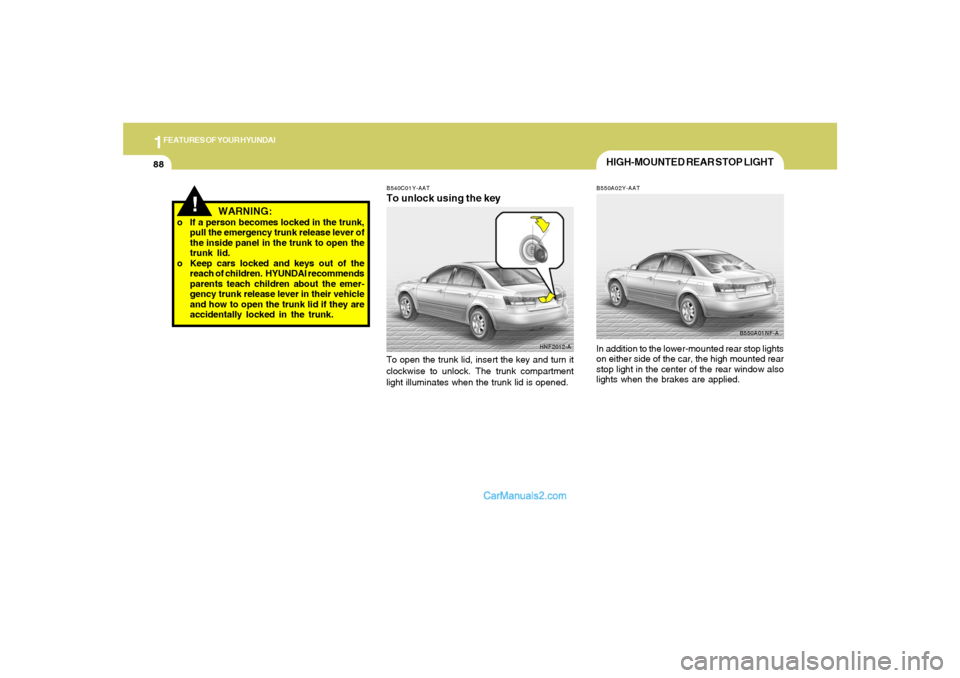
HNF2012-A B540C01Y-AAT
To unlock using the keyTo open the trunk lid, insert the key and turn it
clockwise to unlock. The trunk compartment
light illuminates when the trunk lid is opened.
HIGH-MOUNTED REAR STOP LIGHTB550A02Y-AATIn addition to the lower-mounted rear stop lights
on either side of the car, the high mounted rear
stop light in the center of the rear window also
lights when the brakes are applied.
B550A01NF-A