Page 334 of 490

1CONTROLS AND EQUIPMENT
54
B340C02FC-EAT Lighting Switch The vehicle sidelights and headlights are operated by rotating the end of the turn signal switch barrel. To operate the parking lights, rotating the switch to thefirst detent with ignition switch at the"OFF" position will cause the lights toilluminate. To operate the headlights,the turn signal switch barrel should be rotated to the second detent. The head- lights will only operate when the ignitionswitch is at the "ON" position. If theignition switch is turned to the "OFF" position, only the parking lights will function. NOTE: The ignition must be in the "ON" position to turn on the headlights.MULTI-FUNCTION SWITCH
SB220A1-E Turn Signal Operation To signal an intention to turn right, the switch lever should be pressed down.To signal an intention to turn left, the switch lever should be pushed upwards. In both instances, the turn signal lightson one side of the car will flash and the warning light located in the instrument cluster will flash in sympathy. Uponcompletion of the manoeuvre, the lever will, under normal circumstances, re-
turn to the "OFF" position. However, ifthe manoeuvre involved only a small movement of the steering wheel, the signal may need to be cancelled manu-ally. If either turn signal indicator flashes more rapidly than normal or refuses to flash at all, a malfunction of the turnsignal system may exist. SB220B1-E Lane Change Signal To indicate an intention to change lanes, moving the lever slightly towards the direction of the relevant turn signal will cause the turn signal lights to flash.When the lever is released, it will return to the "OFF" position.
B340B01FC-DB340C01FC-D
Page 335 of 490
1
CONTROLS AND EQUIPMENT
55
Sidelight auto cut (Not all models) If you do not turn the sidelight "OFF" after driving, the sidelight will automati-cally shut "OFF" when the driver's door is opened. To turn them "ON" again you mustsimply turn the ignition key to the "ON" position. SB220E1-E Headlight Flash
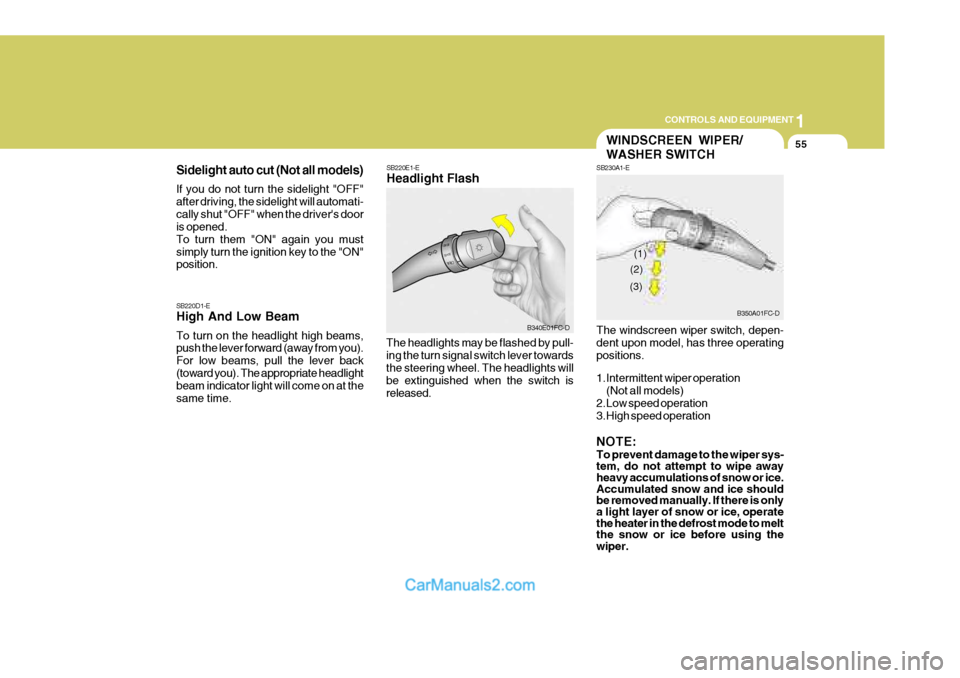
The headlights may be flashed by pull- ing the turn signal switch lever towards the steering wheel. The headlights will be extinguished when the switch isreleased.
SB220D1-E High And Low Beam To turn on the headlight high beams, push the lever forward (away from you). For low beams, pull the lever back(toward you). The appropriate headlight beam indicator light will come on at the same time.
B340E01FC-D
WINDSCREEN WIPER/ WASHER SWITCH
SB230A1-E The windscreen wiper switch, depen- dent upon model, has three operating positions.
1.Intermittent wiper operation
(Not all models)
2.Low speed operation
3.High speed operation NOTE: To prevent damage to the wiper sys- tem, do not attempt to wipe away heavy accumulations of snow or ice. Accumulated snow and ice should be removed manually. If there is onlya light layer of snow or ice, operate the heater in the defrost mode to melt the snow or ice before using the wiper.
B350A01FC-D
(1)
(2)
(3)
Page 337 of 490

1
CONTROLS AND EQUIPMENT
57
B350D01FC-D
B350A01O-EAT Hatchback Door Wiper And Washer Switch
1. :The washer fluid will be
sprayed onto the rear window and the wiper operates whilst the rear window wiper barrel isplaced in this position.
2.OFF
3.INT :To use the intermittent wiper
feature, place the rear window wiper barrel in the "INT" posi- tion.
4.ON :When the point indicates "ON",
the rear window wiper oper-ates continuously. SB240A1-EThe hazard warning system should be used whenever it becomes necessaryto stop the car in a hazardous location. The hazard warning system is operated by depressing the switch at which timeall turn signal lights will flash simulta- neously and the turn signal warning lights located within the instrument clus-ter will flash simultaneously. The hazard warning system may be turned off by depressing the switchagain.
HEATED REAR WINDOW
SB250A1-E To operate the heated rear window de- press the switch shown. The heatedrear window will automatically turn off after 20 minutes or when the ignition is turned off.The system may be turned off manually by depressing the switch again.
HAZARD WARNING SYSTEM
HFC2080-DHFC2078-D
Page 338 of 490

1CONTROLS AND EQUIPMENT
58
B360A01Y-GAT Rear Fog Light Switch To turn on the rear fog lights, push the switch. They will come on when the headlight switch is in the second posi- tion and the key is in the "ON" position.
B360A01FC-D
NOTE: The ignition must be in the "ON" position for the rear window defroster to operate.
!
B360B01FC-EAT Front Fog Light Switch (Not all models)
B360B01FC-D
To turn on the front fog lights, push the switch in the "ON" position. They will come on when the headlight switch is in the first or second position.
CAUTION:
The inside of the rear windscreenshould never be cleaned with a hard or sharp implement since damage to the heating element may occur. Theglass should only be cleaned with a soft cloth or chamois leather with the use only of a mild detergent or pro-prietary glass cleaner where neces- sary. Only horizontal movement of the cloth should be made when clean-ing the glass and care should be exercised to ensure that the heating elements are not damaged by ringsor jewellery whilst the glass is being cleaned. FOG LIGHT SWITCH
Page 339 of 490

1
CONTROLS AND EQUIPMENT
59
B340G01FC-EAT To adjust the headlight beam level ac- cording to the number of the passen- gers and the loading weight in the lug- gage area, turn the beam leveling switch.The higher the number of the switch position, the lower the headlight beam level. Always keep the headlight beamat the proper leveling position, or head- lights may dazzle other road users. Listed below are the examples of rec-ommended switch settings. For loading conditions other than those listed be- low, adjust the switch position so thatthe beam level may be the nearest as the condition obtained according to the list.
HEADLIGHT LEVELING DEVICE
SYSTEM
Switch
PositionLoading Condition
Driver only Driver + front passengerFull passengers (including driver) Full passengers (including driver) + Maximum
permissible loading
Driver + Maximum permis-
sible loading 0 0 1 2 3
B340G01FC-D
DIGITAL CLOCK
HFC2091
B400A01A-AAT There are three control buttons for the digital clock. Their functions are: HOUR
- Push "H" to advance the hour
indicated. MIN - Push "M" to advance the minute
indicated. RESET - Push "R" to reset minutes to
":00" to facilitate resetting the clock tothe correct time. When this is done: Pressing "R" between 10 : 30 and 11 : 29 changes the readout to 11 : 00.Pressing "R" between 11 : 30 and 12 : 29 changes the readout to 12 : 00.
Page 341 of 490

1
CONTROLS AND EQUIPMENT
61ASHTRAY
!
CAUTION:
o Use the power outlet only when the engine is running and remove the plug from the power outletafter using the electric device. Using when the engine stops or keeping the electric device withplugged in for many hours may cause the battery to discharge.
o Do not use the power outlet to connect electric accessories orequipment that are not designed to operate on 12 volts.
o Some electronic devices can cause electronic interference whenplugged into the power outlet.These devices may cause exces- sive audio noise and malfunctions in other electronic systems or de-vices in your vehicle.
B430A01FC-GAT The front ashtray may be opened by pulling it up by its top edge. To remove the ashtray to empty or clean it, pull the cover up all the way out. The ashtraylight will only illuminate when the exter- nal lights are on. HFC2056-D
DRINK HOLDER
HFC2097-D
B450A02FC-EAT Front Drink Holder (Not all models) The front drink holder is used for holding cups. To use the passenger's drink holder, push the drink holder and pull it entirely. Driver's Passenger's
Page 345 of 490

1
CONTROLS AND EQUIPMENT
65
SB340B2-E Interior Light The interior courtesy light has a button of three positions. The three positions are:
oDR In the "DR" position, the interior cour- tesy light comes on when any door is opened regardless of the ignition key position. The light goes out when thedoor is closed.
oON In the "ON" position, the light stays on at all times.
2. Turn the hexagonal bolts with a socket
wrench counterclockwise to removethe front overhead console.
3. Insert the hexagonal head wrench
provided with the vehicle into thesocket. This wrench can be found in the vehicle's luggage room or glove box.
HFC1038
4. Turn the wrench clockwise to open or counterclockwise to close. B480A01E-EAT Map Light
INTERIOR LIGHT
The two map lights are located at each side of the interior light. The lights may be operated by depress- ing the switch to turn on the light andpressing again to turn off the light. This light produces a spot beam for conve- nient use as a map light at night or asa personal light for the driver or the passenger.
HFC490
With Sunroof Without SunroofWith Sunroof HFC480
Without Sunroof
Page 346 of 490
1CONTROLS AND EQUIPMENT
66
CAUTION:
Do not leave the switch in this posi- tion for an extended period time when the vehicle is not running.
o OFF In the "OFF" position, the light stays off at all times even though a door is open.
!
!
SPECTACLE CASE
B491A02FC-EAT (Not all models)
The spectacle case is located on the front overhead console. Push the end of the cover to open the spectacle case.
HXDOM241
WARNING:
Do not open the spectacle case whilst the vehicle is moving. The rear viewmirror of the vehicle can be blocked by an open spectacle case.
MULTI BOX
B500B02E-GAT
The multi box may be opened by pulling it out by its grip. It is used for storing small commodi-ties. If the multi box is removed, the fuse box for the lights and other electrical acces-sories will be exposed.
HFC2058-D
