Page 242 of 490

6 DO-IT-YOURSELF MAINTENANCE
36
be checked using an aiming screen as shown in the illustration. Turn on theheadlight switch. (Low Beam Position)
1. Adjust headlights so that main axisof light is parallel to the center line of the body and is aligned with point"P" shown in the illustration.
2. Dotted lines in the illustration show
the center of the headlights. Specifications: "H" Horizontal center line of headlights from ground: 675 mm (26.5 in.) "W" Distance between each headlight center : 1,177 mm (46.3 in.) "L" Distance between the headlights andthe wall that the lights are testedagainst: 3,000 mm (118 in.).REPLACING HEADLIGHT BULBS
G260A03A-GAT Before attempting to replace a head- light bulb, be sure the switch is turned to the "OFF" position. The next paragraph shows how to reach the headlight bulbs so they may be changed. Be sure to replacethe burned-out bulb with one of the same number and wattage rating. See page 6-40 for the wattage descrip- tions.
CAUTION:
Keep the lamps out of contact with petroleum products, such as oil,gasoline, etc.
!
G290B02FC-GAT
Adjustment After Headlight Assembly Replacement
If the vehicle has had front body repair and the headlight assembly has beenreplaced, the headlight aiming should G290B01L
L
W
H
H Cut-off line
"P"
30mm (1.18 in.)
Vertical line
Horizontal line
Ground line
LHD
G290B01L-D
LW
H
H Cut-off line
"P"
30mm (1.18 in.) Vertical line
Horizontal line
Ground line
RHD
Page 280 of 490
YOUR VEHICLE AT A GLANCE
B255A02FC-EAT INDICATOR SYMBOLS ON THE INSTRUMENT PANEL * More detailed explanations of these items will be found beginning on page 1-44.
SRS (Airbag) Service Reminder
Indicator (Not all models)Turn Signal Indicator Lights
Malfunction Indicator Light
Traction Control Indicator Light (Not all models)
O/D OFF Indicator Light (Not all models)
Parking Brake/Low Brake Fluid Level Warning Light
Charging System Warning LightFuel Filter Warning Light (Diesel) Diesel Pre-heat Indicator Light (Diesel)
Immobilizer Warning Indicator Light (Not all models)
ABS Service Reminder Indicator Light (SRI) (Not all models) High Beam Indicator Light Low Oil Pressure Warning Light
Hatchback Door Open Warning Light
Door Ajar Warning Light
Low Fuel Level Warning Light
Electronic Stability Program Indicator Lights (Not all models)
Page 321 of 490
1
CONTROLS AND EQUIPMENT
41
1. Temperature Gauge
2. Tachometer
3. Speedometer
4. Digital Clock
5. Odometer/Trip Odometer/Trip Computer (Not all models)
6. Fuel Gauge
7. Turn Signal Indicator Light
8. Automatic Transaxle Position Indicator Light (Auto T/A only)
9. Immobiliser Warning Indicator Light
10. SRS (Airbag) Warning Light
11. Electronic Stability Program (ESP) Indicator Light (Not all models)/Traction Control Indicator Light (Not all models) 12. Overdrive off Indicator Light (Not all models)
13. Parking Brake/Low Brake Fluid Level Warning Light
14. Charging System Warning Light
15. Low Fuel Warning Light
16. High Beam Indicator Light
17. Tail Gate Open Warning Light
18. Door Ajar Warning Light
19. Oil Pressure Warning Light
20. Malfunction Indicator Light (MIL)
21. ABS Warning Light (Not all models)
Page 323 of 490
1
CONTROLS AND EQUIPMENT
43
1. Temperature Gauge
2. Tachometer
3. Speedometer
4. Digital Clock
5. Odometer/Trip Odometer/Trip Computer (Not all models)
6. Fuel Gauge
7. Fuel Filter Warning Light
8. Turn Signal Indicator Light
9. Immobiliser Warning Indicator Light
10. SRS (Airbag) Warning Light
11. Diesel Pre-heat Indicator Light
12. Electronic Stability Program (ESP) Indicator Light (Not all models)/Traction Control Indicator Light (Not all models) 13. Parking Brake/Low Brake Fluid Level Warning Light
14. Charging System Warning Light
15. Low Fuel Warning Light
16. High Beam Indicator Light
17. Tail Gate Open Warning Light
18. Door Ajar Warning Light
19. Oil Pressure Warning Light
20. Malfunction Indicator Light (MIL)
21. ABS Warning Light (Not all models)
Page 326 of 490

1CONTROLS AND EQUIPMENT
46
SB2100I-EDoor Ajar Warning Light
The door ajar warning light indicates that a door is not correctly closed.Ensure that the light is extinguished prior to driving the vehicle.
CAUTION:
If the drive belt (generator belt) is loose, broken, or missing whilst thevehicle is driving, there may be a serious malfunction, engine could overheat because this belt also drivesthe water pump.! SB210P1-E
Low Fuel Level Warning Light
The low fuel warning light serves to warn the driver that the remaining fuelquantity is approximately 9 litres and that the vehicle should be refuelled. If the vehicle is driven for an extendedperiod with the low fuel warning light illuminated there exists a possibility that misfiring due to fuel shortage mayoccur. This situation must be avoided to prevent damage to the catalyst oc- curring.
SB210M1-E Charging System Warning Light
The charging system warning light should illuminate when the ignitionswitch is turned to the "ON" position and should be extinguished when the engine is started. If the light fails toilluminate when the ignition is turned "ON" or fails to extinguish after starting the engine, the nearest Hyundaiauthorised repairer should be contacted. If the light illuminates whilst the vehicle is being driven, stop the vehicle assoon as it is safe to do so and check the condition of the generator drive belt. If the belt is in place and the tension issatisfactory, the advice of a Hyundai authorised repairer should be sought.
SB210J1-E High Beam Indicator Light
The high beam indicator light will illumi- nate whenever the headlights are switched to high beam of flash position.
B260B01FC-EAT
Hatchback Door Open Warning
Light
The hatchback door open warning light indicates when hatchback door open isopen or is not fully closed. Ensure that the light has extinguished prior to driv- ing the vehicle.
SB210K1-E Oil Pressure Warning Light CAUTION:
If the oil pressure light illuminates when the engine is running, an in- sufficient oil pressure level for con- tinued safe operation of the engine exists. Continued operation of the engine in this condition may result in serious engine damage.
!
Page 335 of 490
1
CONTROLS AND EQUIPMENT
55
Sidelight auto cut (Not all models) If you do not turn the sidelight "OFF" after driving, the sidelight will automati-cally shut "OFF" when the driver's door is opened. To turn them "ON" again you mustsimply turn the ignition key to the "ON" position. SB220E1-E Headlight Flash
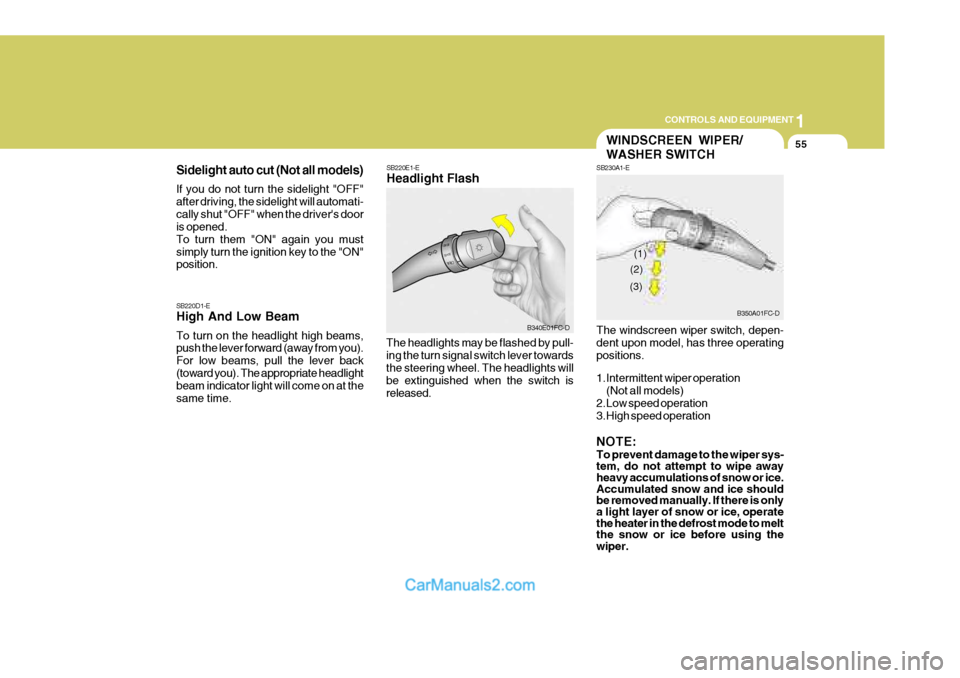
The headlights may be flashed by pull- ing the turn signal switch lever towards the steering wheel. The headlights will be extinguished when the switch isreleased.
SB220D1-E High And Low Beam To turn on the headlight high beams, push the lever forward (away from you). For low beams, pull the lever back(toward you). The appropriate headlight beam indicator light will come on at the same time.
B340E01FC-D
WINDSCREEN WIPER/ WASHER SWITCH
SB230A1-E The windscreen wiper switch, depen- dent upon model, has three operating positions.
1.Intermittent wiper operation
(Not all models)
2.Low speed operation
3.High speed operation NOTE: To prevent damage to the wiper sys- tem, do not attempt to wipe away heavy accumulations of snow or ice. Accumulated snow and ice should be removed manually. If there is onlya light layer of snow or ice, operate the heater in the defrost mode to melt the snow or ice before using the wiper.
B350A01FC-D
(1)
(2)
(3)
Page 339 of 490

1
CONTROLS AND EQUIPMENT
59
B340G01FC-EAT To adjust the headlight beam level ac- cording to the number of the passen- gers and the loading weight in the lug- gage area, turn the beam leveling switch.The higher the number of the switch position, the lower the headlight beam level. Always keep the headlight beamat the proper leveling position, or head- lights may dazzle other road users. Listed below are the examples of rec-ommended switch settings. For loading conditions other than those listed be- low, adjust the switch position so thatthe beam level may be the nearest as the condition obtained according to the list.
HEADLIGHT LEVELING DEVICE
SYSTEM
Switch
PositionLoading Condition
Driver only Driver + front passengerFull passengers (including driver) Full passengers (including driver) + Maximum
permissible loading
Driver + Maximum permis-
sible loading 0 0 1 2 3
B340G01FC-D
DIGITAL CLOCK
HFC2091
B400A01A-AAT There are three control buttons for the digital clock. Their functions are: HOUR
- Push "H" to advance the hour
indicated. MIN - Push "M" to advance the minute
indicated. RESET - Push "R" to reset minutes to
":00" to facilitate resetting the clock tothe correct time. When this is done: Pressing "R" between 10 : 30 and 11 : 29 changes the readout to 11 : 00.Pressing "R" between 11 : 30 and 12 : 29 changes the readout to 12 : 00.
Page 463 of 490

6 OWNER MAINTENANCE
34HEADLIGHT AIMING ADJUSTMENT
G290A01FC-EAT Before performing aiming adjustment, make sure of the following.
1. Keep all tyres inflated to the correct pressure.
2. Place the vehicle on level ground and press the front bumper & rear bumper down several times. Place the vehicle at a distance of 118 in. (3,000 mm) from the test wall.
3. See that the vehicle is unloaded (except for full levels of coolant,engine oil and fuel, and spare tyre,jack, and tools).
4. Clean the head lights lens and turn on the headlight (Low beam).
!WARNING:
o Do not smoke or have any other open flame near the vehicle whilst bleeding the fuel system.
o Be sure to carefully wipe away any water drained out in thismanner, because the fuel mixed in the water might be ignited and result in a fire.
1. Loosen the drain plug at the bottomof the fuel filter.
2. Tighten the drain plug when water no longer comes out.
3. Check to be sure that the warning lamp illuminates when the ignition key is turned to "ON", and that it goes off when the engine is started. If in doubt, consult your nearest Hyundai authorised repairer.
NOTE: It is recommended that water accu-
mulated in the fuel filter should be removed by an authorized Hyundaiauthorised repairer. G300B02FC


