Page 146 of 316

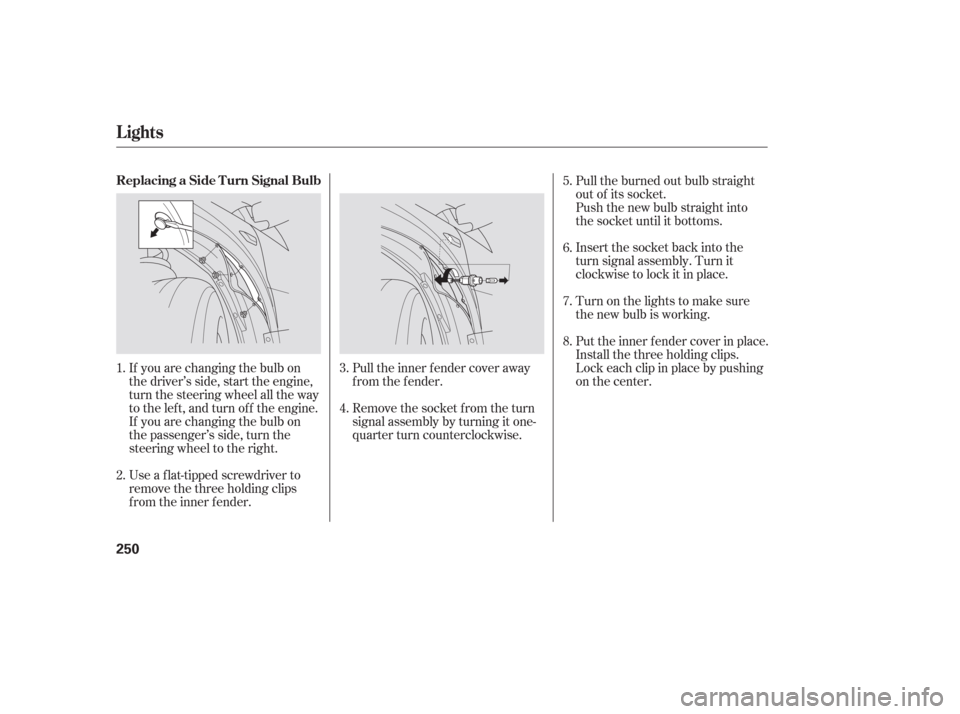
�Î
�Î
To operate the rear entertainment
system from the front panel, turn the
RR CTRL knob clockwise. The
amber RR LED comes on to show
that the control panel is enabled.The DVD player in your rear
entertainment system can play DVD
video discs and CDs. It features
Dolby noise reduction.
Open the overhead screen by
pushing the OPEN button. The
screen will swing down part-way.
Pivot the screen the rest of the way.
If you pivot the screen too f ar
f orward, past the second detent, the
display will turn of f . Pivot the screen
back to the second or first detent to
turn the display back on. To close
the screen, pivot it up until it latches.
To play the radio, the buttons for the
f ront entertainment system have the
same f unctions.
If aCDisloadedinthemainCD
player or CD changer, select CD/
CHG.If theCDisloadedinthe
lower player, select DVD/AUX.
Dolby noise reduction is manufactured under
license from Dolby Laboratories Licensing
Corporation. ‘‘DOLBY’’ and the double-D symbol are trademarks of Dolby Laboratories
Licensing Corporation.
To Select Rear Entertainment
f rom the Front Control Panel Operating the DVD Player f rom
the Front Control Panel
Rear Entertainment System
144
REAR CONTROL PANEL
OPEN BUTTON
OVERHEAD SCREEN
Page 147 of 316
�µ�µ
Turn the Rear CTRL knob clockwise.
The amber Rear LED comes on to
show that the control panel is now
enabled.
Insert a DVD into the DVD/CD
player below the f ront panel.
Push the DVD in half way, the drive
will pull it in the rest of the way.
Press the PLAY button if
the DVD does not start playing
automatically.
Press the PAUSE button
to pause the DVD. Press the button
again or press PLAY to resume.
Pause works only with the DVD
player.
CONT INUED
PL AY
PAUSE
Rear Entertainment System
Features
145
EJECT
BUTTON
PLAY BUTTON PAUSE BUTTON
REAR CTRL KNOB
SEEK/SKIP BAR
Page 148 of 316
�µ
�µ
�´
�µ
�´ �µPress the eject button to
remove the DVD from the drive.
Pressandholdthe
button to move f orward; you will
see ‘‘CUE’’ in the display. Press and
hold the button to move
backward; you will see ‘‘REV’’ in the
display. Release the button when the
system reaches the point you want.
Each time you press and release the button of the SEEK/SKIP, the
system skips f orward to the
beginning of the next track or
chapter. Press and release the
buttontoskipbackwardtothe
beginning of the current track or
chapter. Press it again to skip to the
beginning of the previous track or
chapter. To return f ront panel control to the
front audio system, turn the REAR
CTRL knob counterclockwise.
To turn on the rear entertainment
system f rom the rear control panel,
press the PWR button. Use the AM/
FM button, XM RADIO button (U.S.
models), CD button, DVD/AUX
button (U.S. models), or AUX button
(Canadian models) to select the
entertainment source. The selected
source will be shown in the display.
Make sure the rear control operation
has not been disabled with the REAR
CTRL knob on the f ront panel.
Rear Entertainment System
EJECT
SEEK /SK IP
To Return to Front Audio
ControlsUsing the Rear Control Panel
146
Page 245 of 316

When the radiator and engine are
cool, relieve any pressure in the
cooling system by turning the
radiator cap counterclockwise,
without pressing down.
Remove the radiator cap by
pushing down and turning
counterclockwise.The coolant level should be up to
the base of the f iller neck. Add
coolant if it is low.
Check the f luid level in the
windshield washer reservoir at least
monthly during normal use.
The low washer
level indicator will come on when the
level is low.
Pourthecoolantslowlyand
caref ully so you do not spill any.
Clean up any spill immediately; it
could damage components in the
engine compartment.
Put the radiator cap back on and
tighten it.
Pour coolant into the reserve tank.
Fill it to half way between the MAX
and MIN marks. Put the cap back
on the reserve tank.
Do not add any rust inhibitors or
other additives to your vehicle’s
cooling system. They may not be
compatible with the coolant or
engine components. Fill the reservoir with a good-quality
windshield washer f luid. This
increases the cleaning capability and
prevents f reezing in cold weather.
When you ref ill the reservoir, clean
the edges of the windshield wiper
blades with windshield washer f luid
on a clean cloth. This will help to
condition them.
2. 3.
4.
5.
1.
On Canadian models:
Windshield Washers
Engine Coolant, Windshield Washers
Maint enance
243
RADIATOR CAP
Do not use engine antif reeze or a
vinegar/water solution in the
windshield washer reservoir. Antif reeze
can damage your vehicle’s paint, while
a vinegar/water solution can damage
the windshield washer pump. Use only
commercially-available windshield
washer f luid.
Page 250 of 316

Theheadlightswereproperlyaimed
when your vehicle was new. If you
regularly carry heavy items in the
trunk, readjustment may be required.
Adjustments should be perf ormed by
your dealer or other qualif ied
mechanic.
Your vehicle has halogen headlight
bulbs. Handle a bulb by its steel base,
and protect the glass from contact
with your skin or hard objects. If you
touch the glass, clean it with
denaturedalcoholandacleancloth.Open the hood.
Remove the electrical connector
f rom the bulb by squeezing the
connector to unlock the tab, then
slide the connector of f the bulb.
Remove the bulb by turning it
approximately one-quarter turn
counterclockwise.Insert the new bulb into the hole,
and turn it one-quarter turn clock-
wise to lock it in place.
Push the electrical connector onto
the new bulb.
Turn on the headlights to test the
new bulb.
1.
2.
3.
4.
5.
6.
Headlight A iming
Replacing a Headlight Bulb
Lights
248
NOTE:
TAB
BULB CONNECTOR
Halogen headlight bulbs get
very hot when lit. Oil, perspiration, or a
scratch on the glass can cause the bulb
to overheat and shatter.
Page 251 of 316
To remove the f ront turn signal
bulb, push it in slightly and turn it
counterclockwise.
Install the new bulb into the
socket and reinstall it.Insert the socket back into the
headlight assembly. Turn it
clockwise to lock it in place.
Turn on the lights to make sure
the new bulb is working.
Remove the socket from the
headlight assembly by turning it
one-quarter turn counterclockwise. To remove a bulb, pull it straight
out of its socket.
Install the new bulb into the
socket.
Remove the socket from the
headlight assembly by turning it
one-quarter turn counterclockwise. Insert the socket back into the
headlight assembly. Turn it
clockwise to lock it in place.
Turn on the lights to make sure
the new bulb is working.
1. 4.
5.
3. 2. 1.2.
3.
4.
5.
Lights
Replacing a Front T urn Signal
Bulb
Replacing a Parking L ight/Front
Side Marker L ight Bulbs
Maint enance
249
Page 252 of 316
If you are changing the bulb on
the driver’s side, start the engine,
turn the steering wheel all the way
to the left, and turn off the engine.
If you are changing the bulb on
the passenger’s side, turn the
steering wheel to the right.
Use a f lat-tipped screwdriver to
remove the three holding clips
f rom the inner f ender.Pull the inner f ender cover away
f rom the f ender.
Remove the socket from the turn
signal assembly by turning it one-
quarter turn counterclockwise.Pull the burned out bulb straight
out of its socket.
Push the new bulb straight into
the socket until it bottoms.
Insert the socket back into the
turn signal assembly. Turn it
clockwise to lock it in place.
Turn on the lights to make sure
the new bulb is working.
Put the inner f ender cover in place.
Install the three holding clips.
Lock each clip in place by pushing
on the center.
1.
4.5.
3.
2. 6.
7.
8.
Lights
Replacing a Side T urn Signal Bulb
250
Page 253 of 316
If equipped
Use a wrench to remove the
mounting bolt f rom the underbody.
Pull the under cover away f rom
the bumper.Remove the electrical connector
f rom the bulb by pushing on the
tab and pulling the connector
down.
Remove the bulb by turning it one-
quarter turn counterclockwise.
Insert the new bulb into the
assembly and turn it one-quarter
turn clockwise to lock it in place.Turn on the f og lights to make
sure the new bulb is working.
Reinstall the mounting bolt on the
under cover.
1. 4.
5. 3.
2. 6.
7.
Lights
Replacing a Front Fog L ight Bulb
Maint enance
251