Page 171 of 316
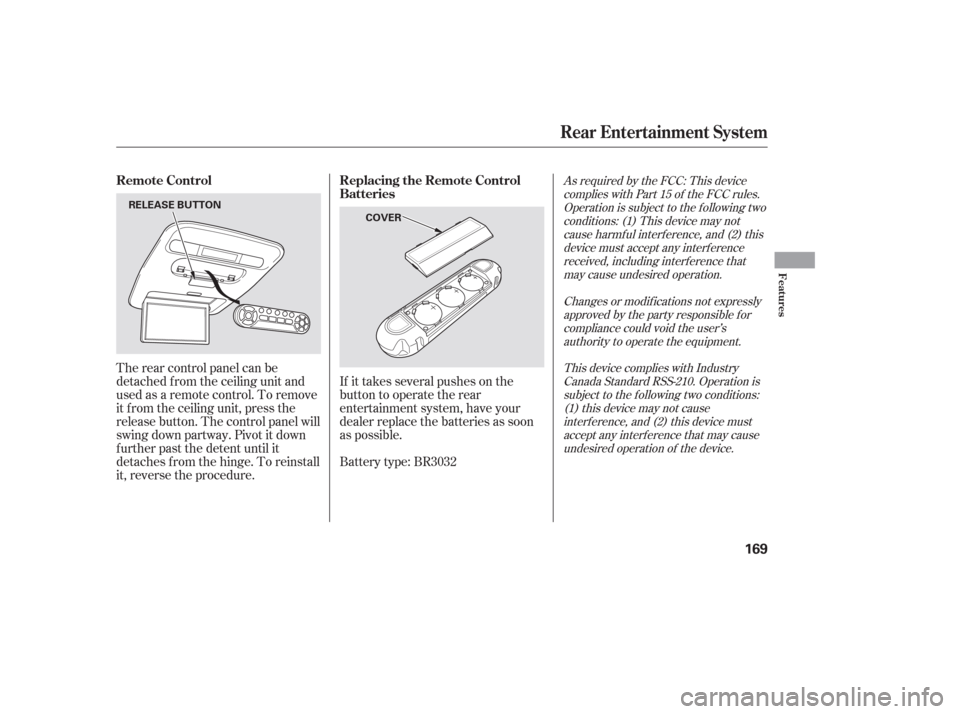
If it takes several pushes on the
button to operate the rear
entertainment system, have your
dealer replace the batteries as soon
as possible.
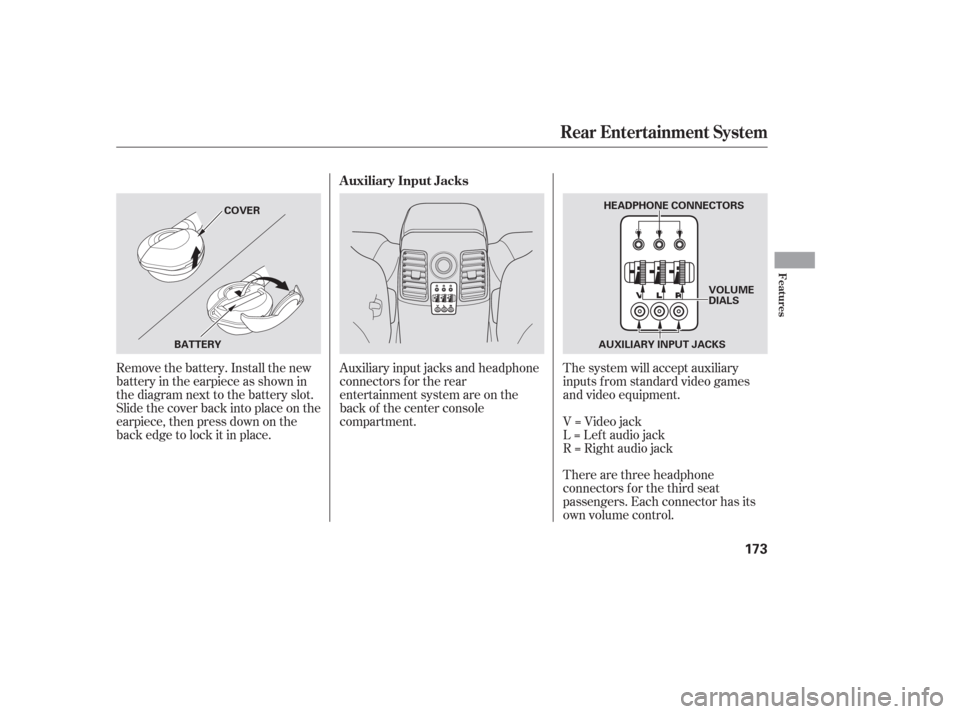
The rear control panel can be
detached f rom the ceiling unit and
used as a remote control. To remove
it f rom the ceiling unit, press the
release button. The control panel will
swing down partway. Pivot it down
f urther past the detent until it
detaches f rom the hinge. To reinstall
it, reverse the procedure.
Battery type: BR3032
As required by the FCC: This device
complies with Part 15 of the FCC rules.Operation is subject to the f ollowing twoconditions: (1) This device may notcause harmf ul interf erence, and (2) thisdevice must accept any interf erencereceived, including interf erence thatmay cause undesired operation.
Changes or modif ications not expresslyapproved by the party responsible f orcompliance could void the user’sauthority to operate the equipment.
This device complies with IndustryCanada Standard RSS-210. Operation issubject to the f ollowing two conditions:(1) this device may not causeinterf erence, and (2) this device mustaccept any interf erence that may causeundesired operation of the device.Remote Control Replacing the Remote Control
Batteries
Rear Entertainment System
Features
169
COVER
RELEASE BUTTON
Page 174 of 316
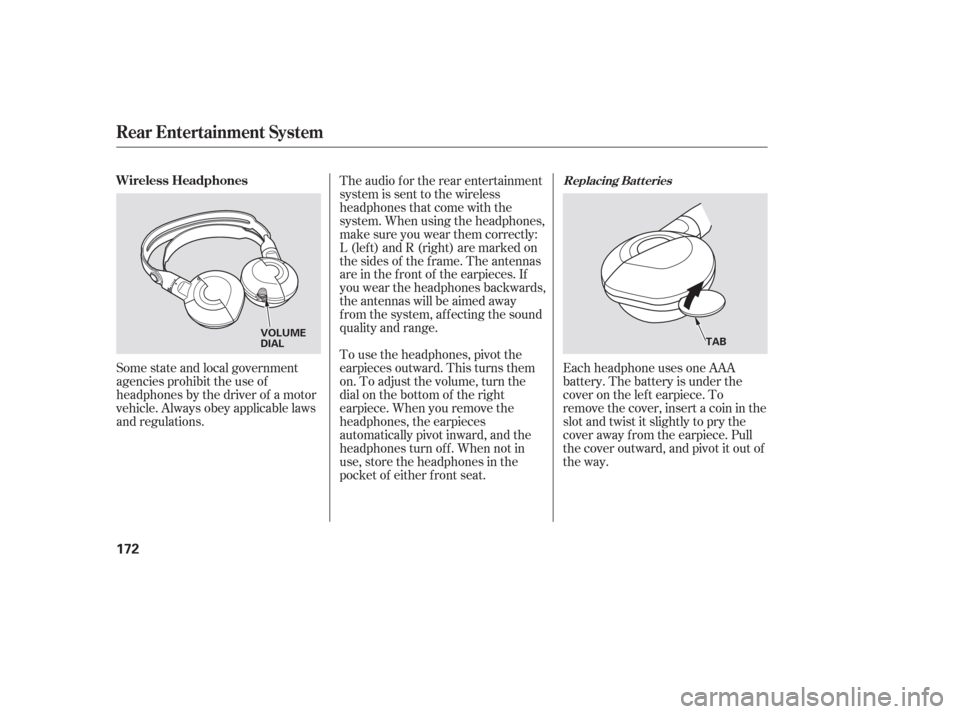
Each headphone uses one AAA
battery. The battery is under the
cover on the lef t earpiece. To
remove the cover, insert a coin in the
slot and twist it slightly to pry the
cover away f rom the earpiece. Pull
the cover outward, and pivot it out of
the way.
Some state and local government
agencies prohibit the use of
headphones by the driver of a motor
vehicle. Always obey applicable laws
and regulations. The audio f or the rear entertainment
system is sent to the wireless
headphones that come with the
system. When using the headphones,
make sure you wear them correctly:
L (lef t) and R (right) are marked on
the sides of the frame. The antennas
are in the f ront of the earpieces. If
you wear the headphones backwards,
the antennas will be aimed away
from the system, affecting the sound
quality and range.
To use the headphones, pivot the
earpieces outward. This turns them
on. To adjust the volume, turn the
dial on the bottom of the right
earpiece. When you remove the
headphones, the earpieces
automatically pivot inward, and the
headphones turn of f . When not in
use, store the headphones in the
pocket of either f ront seat.
Replacing Bat t eriesWireless Headphones
Rear Entertainment System
172
VOLUME
DIAL
TAB
Page 175 of 316
There are three headphone
connectors f or the third seat
passengers. Each connector has its
own volume control. The system will accept auxiliary
inputs f rom standard video games
and video equipment.
V=Videojack
L = Lef t audio jack
R = Right audio jack
Auxiliary input jacks and headphone
connectors f or the rear
entertainment system are on the
back of the center console
compartment.
Remove the battery. Install the new
battery in the earpiece as shown in
the diagram next to the battery slot.
Slide the cover back into place on the
earpiece, then press down on the
back edge to lock it in place. Auxiliary Input Jacks
Rear Entertainment System
Features
173
AUXILIARY INPUT JACKS
BATTERY COVER
HEADPHONE CONNECTORS
VOLUME
DIALS
Page 182 of 316
�µ
If you are training HomeLink to
operate a garage door or gate, you
should unplug the motor f or that
device during training. Repeatedly
pressing the remote control button
could burn out the motor.
HomeLink stores the code in a
permanent memory. There should
be no need to retrain HomeLink if
your vehicle’s battery goes dead or is
disconnected. The HomeLinkuniversal
transceiver built into your vehicle
canbeprogrammedtooperateupto
three remotely controlled devices
around your home, such as garage
doors, lighting, or home security
systems.
If your garage door opener was
manuf actured bef ore April 1982, you
may not be able to program
HomeLink to operate it. They do not have the safety feature that causes
the motor to stop and reverse if an
obstacle is detected during closing,
increasing the risk of injury.
Always ref er to the opening
instructions and saf ety inf ormation
that came with your garage door
opener or other equipment you
intend to operate with HomeLink. If
you do not have this inf ormation,
contact the manuf acturer of the
equipment.
For quick and accurate training,
make sure the remote control
transmitter for the device (garage
door, automatic gate, security
system, etc.) has a fresh battery.
If you just
received your vehicle and have not
trained any of the buttons in
HomeLink bef ore, you should erase
any previously learned codes bef ore
training the first button. To do this,
press and hold the two outside
buttons on the HomeLink
transceiver for about 20 seconds,
until the red indicator f lashes.
Release the buttons, then proceed to
step 1.
If you are training the second or
third buttons, go directly to step 1.
Unplug the garage door opener
motor f rom the electrical outlet.
Holdtheendof thegaragedoor
opener remote control 2 to 5
inches f rom HomeLink. Make
sure you are not blocking your
view of the red indicator in
HomeLink.
1.
2.
If equipped
HomeL ink Universal Transceiver
General Inf ormation T raining HomeL ink
Important Saf ety Precautions
Bef ore you begin
180
Page 201 of 316

Apply the parking brake.
In cold weather, turn of f all
electrical accessories to reduce
the drain on the battery.
Make sure the shif t lever is in
Park. Press on the brake pedal.
Without touching the accelerator
pedal, turn the ignition key to the
START (III) position. Do not hold
the key in the START (III)
position f or more than 15 seconds
at a time. If the engine does not
start right away, pause for at least
10 seconds bef ore trying again.If the engine does not start within
15 seconds, or starts but stalls
right away, repeat step 4 with the
accelerator pedal pressed halfway
down. If the engine starts, release
pressure on the accelerator pedal
so the engine does not race.
If the engine fails to start, press
the accelerator pedal all the way
down, and hold it there while
starting to clear flooding. If the
engine still does not start, return
to step 5.
5.
6.
1.
2.
3.
4.
79
Starting the Engine
Driving
199
T he immobilizer system protects your
vehicle f rom thef t. If an improperly-
coded key (or other device) is used, the
engine’s f uel system is disabled. For
more inf ormation, see page .
The engine is harder to start in cold
weather. Also, the thinner air f ound at
altitudes above 8,000 f eet (2,400
meters) adds to this problem.
Page 221 of 316
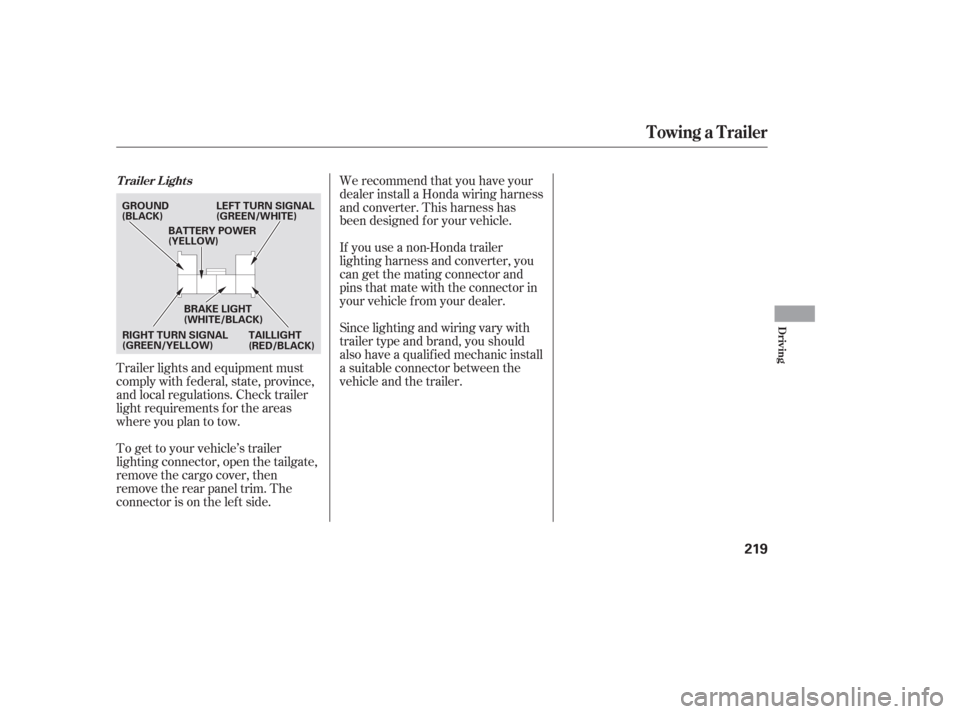
Trailer lights and equipment must
comply with f ederal, state, province,
and local regulations. Check trailer
light requirements f or the areas
where you plan to tow.
To get to your vehicle’s trailer
lighting connector, open the tailgate,
remove the cargo cover, then
remove the rear panel trim. The
connector is on the lef t side.We recommend that you have your
dealer install a Honda wiring harness
and converter. This harness has
been designed f or your vehicle.
If you use a non-Honda trailer
lighting harness and converter, you
cangetthematingconnectorand
pins that mate with the connector in
your vehicle f rom your dealer.
Since lighting and wiring vary with
trailer type and brand, you should
also have a qualif ied mechanic install
a suitable connector between the
vehicleandthetrailer.
T railer L ights
Towing a Trailer
Driving
219
GROUND
(BLACK)
LEFT TURN SIGNAL
(GREEN/WHITE)
RIGHT TURN SIGNAL
(GREEN/YELLOW) BRAKE LIGHT
(WHITE/BLACK)
TAILLIGHT
(RED/BLACK)
BATTERY POWER
(YELLOW)
Page 229 of 316

If you have the skills and tools to
perf orm more complex maintenance
tasks on your vehicle, you may want
to purchase the service manual. See
page f or inf ormation on how to
obtain a copy, or see your dealer. This section explains why it is
important to keep your vehicle well
maintained and how to f ollow basic
maintenance saf ety precautions.
This section also includes
instructions on how to read the
maintenance messages in the
inf ormation display, a maintenance
record, and instructions f or simple
maintenance tasks you may want to
take care of yourself .......................
Maintenance Saf ety .228
....................
Maintenance Minder . 229
....................
Maintenance Record .236
..............................
Fluid Locations .238
........................
Adding Engine Oil .239
.........
Changing the Oil and Filter . 240
..............................
Engine Coolant .242
....................
Windshield Washers .243
....
Automatic Transmission Fluid . 244
..............................
Dif f erential Oil .245
....................................
Timing Belt .245
....................................
Brake Fluid .246
....................
Power Steering Fluid . 247
.............................................
Lights .248
.....................................
Floor Mats .254
.......................
Cleaning Seat Belts .254
.................................
Wiper Blades .255
...............................................
Tires .257
...................
Checking the Battery . 262
.............................
Vehicle Storage .263
303
Maintenance
Maint enance
227
Page 230 of 316

To eliminate potential hazards, read
the instructions bef ore you begin,
and make sure you have the tools
and skills required.To clean parts, use a commercially
available degreaser or parts
cleaner, not gasoline.
To reduce the possibility of f ire or
explosion, keep cigarettes, sparks,
and flames away from the battery
and all f uel-related parts.
Wear eye protection and
protective clothing when working with the battery or compressed air.
Be sure there is
adequate ventilation whenever you
operate the engine.
Let the
engine and exhaust system cool
bef ore touching any parts. Do
not run the engine unless
instructed to do so.
Some of the most important saf ety
precautions are given here. However,
we cannot warn you of every
conceivable hazard that can arise in
perf orming maintenance. Only you
can decide whether or not you
should perf orm a given task.
Make sure your vehicle is parked
on level ground, the parking brake
is set, and the engine is of f .
All service items not detailed in this
section should be perf ormed by a
certif ied technician or other qualif ied
mechanic.
Maintenance Saf ety
Important Saf ety Precautions
Potential Vehicle HazardsCarbon Monoxide poison f rom
engine exhaust.
Burns f rom hot parts. Injury f rom moving parts.
228
Failure to properly follow
maintenance instructions and
precautions can cause you to
be seriously hurt or killed.
Always follow the procedures
and precautions in this owner’s
manual.
Improperly maintaining this
vehicle or failing to correct a
problem before driving can
cause a crash in which you can
be seriously hurt or killed.
Always follow the inspection
and maintenance
recommendations, and
schedules in this owner’s
manual.