Page 69 of 316
Canadian models onlyCanadian models only
This indicator comes on when you
turn the ignition switch to the ON
(II) position with the headlight
switch of f and the parking brake set.
It should go of f if you turn on the
headlights or release the parking
brake. If it comes on at any other
time, it means there is a problem
withtheDRL.Theremayalsobea
problem with the high beam
headlights.This indicator comes on with the
high beam headlights. For more
inf ormation, see page .
On Canadian models, this indicator
comes on with reduced brightness
when the daytime running lights
(DRL) are on (see page ).
This indicator comes on when you
set the cruise control. See page f or inf ormation on operating the
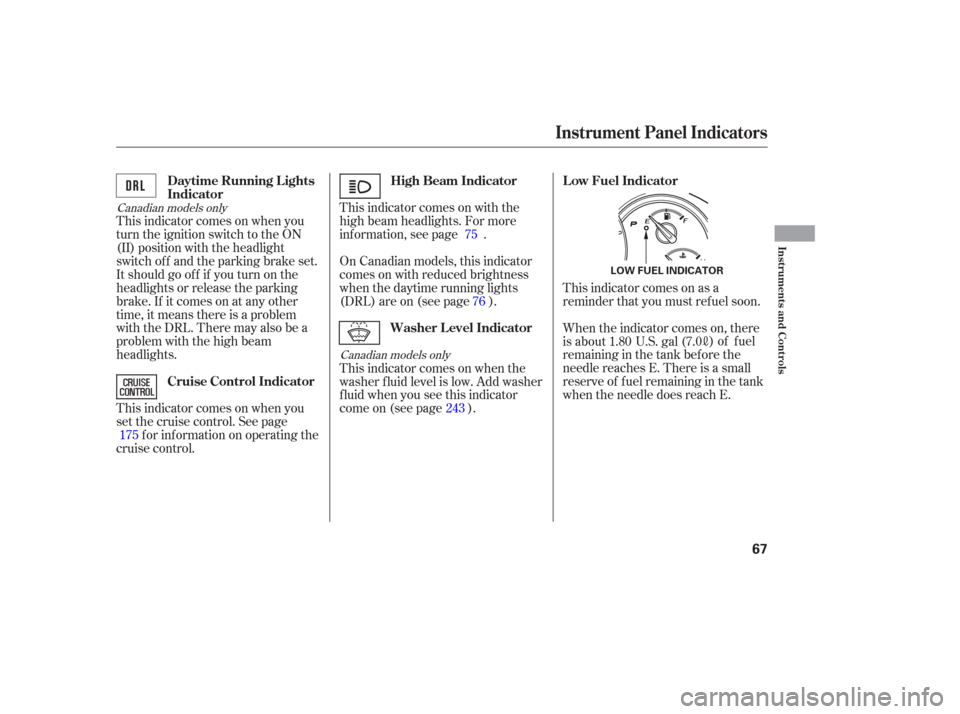
cruise control. This indicator comes on as a
reminder that you must ref uel soon.
This indicator comes on when the
washer f luid level is low. Add washer
f luid when you see this indicator
come on (see page ). When the indicator comes on, there
is about
1.80 U.S. gal (7.0
)of fuel
remaining in the tank bef ore the
needle reaches E. There is a small
reserve of f uel remaining in the tank
when the needle does reach E.
175 75
76
243
High Beam Indicator
Daytime Running L ights
Indicator
Cruise Control Indicator Low Fuel Indicator
Washer Level Indicator
Instrument Panel Indicators
Instruments and Controls
67
LOW FUEL INDICATOR
Page 70 of 316

This indicator monitors the
temperature of the automatic
transmission f luid. It should come on
f or a f ew seconds when you turn the
ignition switch to the ON (II)
position. If it comes on while driving,
it means the transmission f luid
temperature is too high. Pull to the
side of the road when it is saf e, shif t
to Park, and let the engine idle until
the indicator goes out.If the indicator blinks while driving,
the VTM-4 fluid temperature is too
high. Pull to the side of the road
when it is saf e, shif t to Park, and let
the engine idle until the indicator
goes out. This indicator normally comes on f or
a f ew seconds when you turn the
ignition switch to the ON (II)
position. If it comes on at any other
time, there is a problem in the 4WD
system. Take the vehicle to your
dealer to have it checked.While the engine is operating in its
most economical range, this
indicator may come on and stay on.
4WD models only
4WD models only2WD models only
A/T Temperature
IndicatorVT M-4 Indicator
Fuel Economy Indicator
Instrument Panel Indicators
68
Continuing to drive with the A/T
temperature indicator on may cause
serious damage to the transmission.
Continuing to drive with the VTM-4
indicator blinking may cause serious
damage to the system.
Page 77 of 316
�µ
�µ
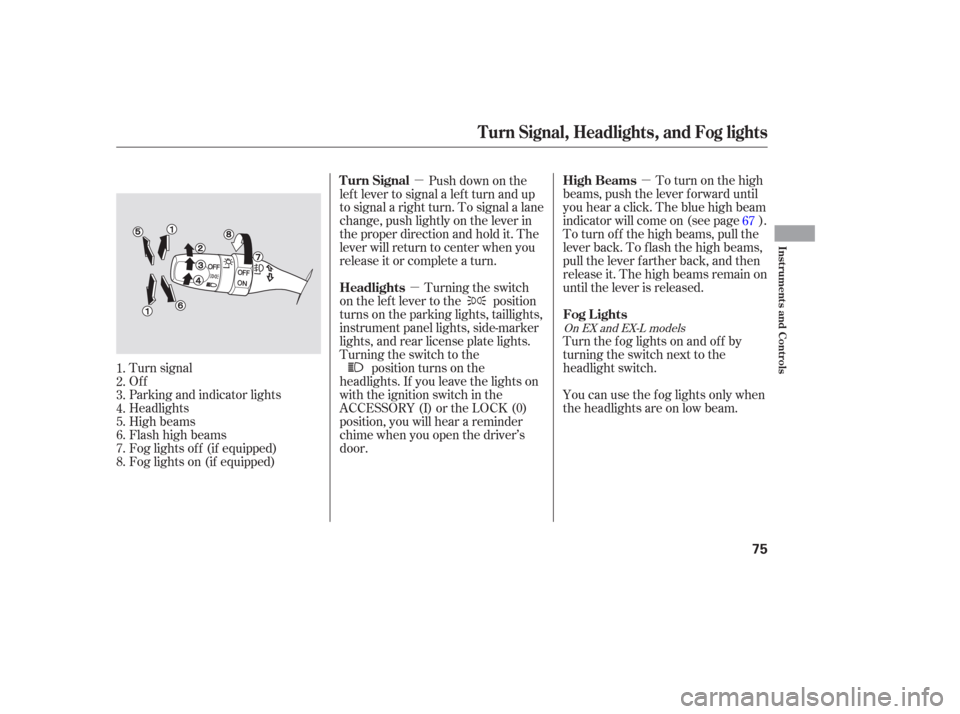
�µ To turn on the high
beams, push the lever f orward until
you hear a click. The blue high beam
indicator will come on (see page ).
To turn of f the high beams, pull the
lever back. To flash the high beams,
pull the lever f arther back, and then
release it. The high beams remain on
until the lever is released.
Push down on the
lef t lever to signal a lef t turn and up
to signal a right turn. To signal a lane
change, push lightly on the lever in
the proper direction and hold it. The
lever will return to center when you
release it or complete a turn.
Turning the switch
on the lef t lever to the position
turns on the parking lights, taillights,
instrument panel lights, side-marker
lights, and rear license plate lights.
Turning the switch to the position turns on the
headlights. If you leave the lights on
with the ignition switch in the
ACCESSORY (I) or the LOCK (0)
position, you will hear a reminder
chime when you open the driver’s
door. You can use the f og lights only when
the headlights are on low beam. Turn the f og lights on and of f by
turning the switch next to the
headlight switch.
Turn signal
Of f
Parking and indicator lights
Headlights
High beams
Flashhighbeams
Fog lights of f (if equipped)
Fog lights on (if equipped) 67
1.
2.
3.
4.
5.
6.
7.
8.
On EX and EX-L models
High Beams
Turn Signal
Headlights
Fog Lights
Turn Signal, Headlights, and Fog lights
Instruments and Controls
75
Page 78 of 316

The knob on the instrument panel
controls the brightness of the instru-
ment panel lights. Turn the knob to
adjust the brightness.
The lights will turn on again when
you unlock or open the driver’s door.
With the headlight switch off, the
high beam headlights come on with
reduced brightness when you turn
the ignition switch to the ON (II)
position and release the parking
brake. They remain on until you turn
the ignition switch of f , even if you
set the parking brake.
The headlights revert to normal
operation when you turn the switch
to the ‘‘ ’’ position. If you unlock the door, but do not
open it within 15 seconds, the lights
will go off. With the driver’s door
open, you will hear a lights-on
reminder chime.
This f eature turns of f the headlights,
parking lights, taillights, side marker
lights, license plate lights, and
instrument panel lights within 15
seconds of removing the key f rom
the ignition switch and closing the
driver’s door.
This feature activates if you leave
the headlight switch in the or
position, remove the key, then
open and close the driver’s door.
If you remove the key f rom the
ignition switch with the headlight
switch on, but do not open the door
and get out, the lights will turn of f
af ter 10 minutes.
On EX and EX-L models
Instrument Panel Brightness
Daytime Running L ights
(Canadian Models)
Automatic Lighting Of f Feature
Headlights, Instrument Panel Brightness
76
INSTRUMENT PANEL BRIGHTNESS
CONTROL KNOB
Page 79 of 316

Pushtheredbuttontoturnonthe
hazard warning lights (f our-way
flashers). This causes all four
outside turn signals and both
indicators in the instrument panel to
f lash. Use the hazard warning lights
if you need to park in a dangerous
area near heavy traffic, or if your
vehicle is disabled.The rear window def ogger will clear
fog, frost, and thin ice from the
window. Push the def ogger button to
turn it on and off. The indicator
above the button comes on to show
the def ogger is on. If you do not turn
it of f , the def ogger will shut itself of f
af ter about 15 minutes. It also shuts
of f when you turn of f the ignition
switch. You have to turn the
def ogger on again when you restart
the vehicle.
The def ogger wires on the inside of
the rear window can be accidentally
damaged. When cleaning the glass,
always wipe side-to-side. Make sure the rear window is clear
and you have good visibility bef ore
starting to drive.
Hazard Warning Button
Rear Window Def ogger
Hazard Warning Button, Rear Window Def ogger
Instruments and Controls
77
HAZARD WARNING BUTTON
EX and EX-L models
LX models
Page 81 of 316
The master key fits all the locks on
your vehicle. The valet key works
only in the ignition and the door
locks. You can keep the glove box
locked when you leave your vehicle
and the valet key at a parking f acility.Youshouldhavereceivedakey
number tag with your set of keys.
You will need this key number if you
ever have to get a key replaced. Use
only Honda-approved key blanks.
These keys contain electronic
circuits that are activated by the
immobilizer system. They will not
work to start the engine if the
circuits are damaged.
Protect the keys f rom direct
sunlight, high temperature, and
high humidity.
Donotdropthekeysorsetheavy
objects on them.
Keep the keys away f rom liquids.
If they get wet, dry them
immediately with a sof t cloth.
CONT INUED
Immobilizer System
Keys and Locks, Immobilizer System
Instruments and Controls
79
MASTER
KEY
(BLACK)
KEY
NUMBER
TAG VALET KEY
(GRAY)
Page 83 of 316

�µ�µ
�µ
�µ
The ignition switch has f our
positions: LOCK (0), ACCESSORY
(I), ON (II), and START (III).
You can insert or
remove the key only in this position.
To turn the key, the shift lever must
be in Park, and you must push the
key in slightly. This is the normal key
position when driving. Several of the
lights on the instrument panel come
on as a test when you turn the
ignition switch f rom the
ACCESSORY (I) to the ON (II)
position. You can
operate the audio system and the
accessory power sockets in this
position. If the f ront wheels are turned, the
anti-theft lock may make it difficult
to turn the key. Firmly turn the
steering wheel to the lef t or right as
you turn the key.
Use this position
only to start the engine. The switch
returns to the ON (II) position when
you let go of the key. You will hear a reminder beeper if
you leave the key in the LOCK (0) or
the ACCESSORY (I) position and
open the driver’s door. Remove the
key to turn of f the beeper.
TheshiftlevermustbeinPark
bef ore you can remove the key f rom
the ignition switch.
LOCK (0) ON (II) A CCESSORY (I)
ST A RT (III)
Ignition Switch
Instruments and Controls
81
Page 99 of 316
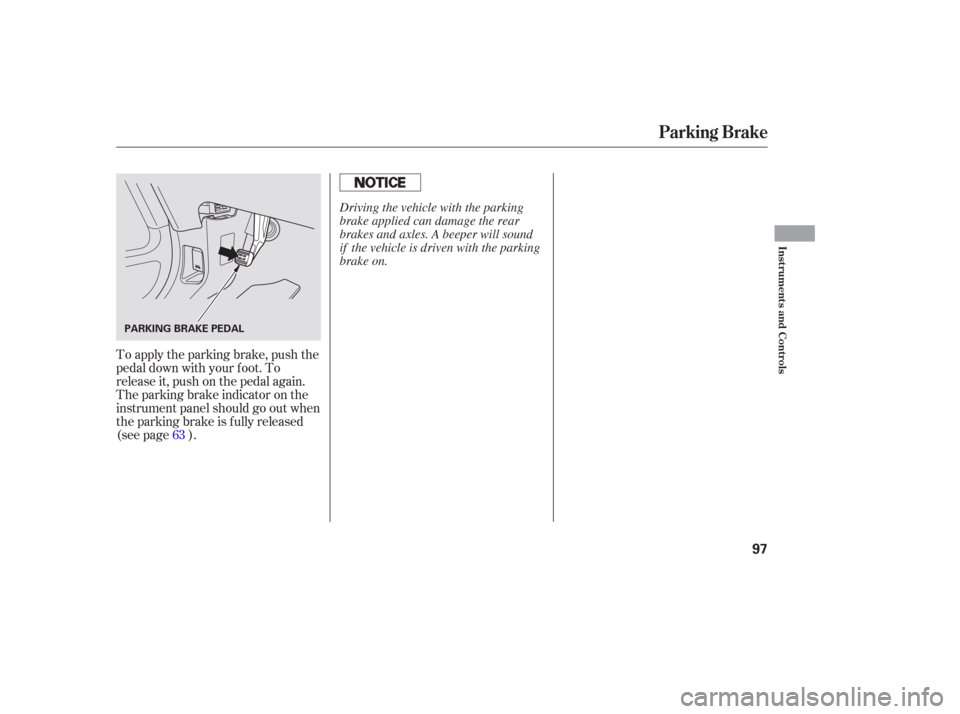
To apply the parking brake, push the
pedal down with your f oot. To
release it, push on the pedal again.
The parking brake indicator on the
instrument panel should go out when
the parking brake is f ully released
(see page ).63
Parking Brake
Instruments and Controls
97
PARKING BRAKE PEDAL
Driving the vehicle with the parking
brake applied can damage the rear
brakes and axles. A beeper will sound
if the vehicle is driven with the parking
brake on.