Page 57 of 267

This section gives inf ormation about
the controls and displays that
contribute to the daily operation of
your vehicle. All the essential
controls are within easy reach............................
Control Locations .56
............................
Instrument Panel .57
..........
Instrument Panel Indicators .58
.............................................
Gauges .64
.....................................
Odometer .64
..............
Display Change Button .65
...................................
Trip Meter .65
.................
Current Fuel Mileage .66
................
Average Fuel Mileage .66
..................................
Fuel Gauge .66
...................
Temperature Gauge .67
Outside Temperature
...................................
Indicator .67
..........
Check Fuel Cap Indicator .68
..................
Maintenance Minder .68
.........
IMA Battery Level Gauge .69
................
Charge/Assist Gauge .70
Controls Near the Steering ...........................................
Wheel .71
.
Windshield Wipers and Washers .72
...........
Turn Signal and Headlights .73
............
Daytime Running Lights .74
........
Instrument Panel Brightness .74
.................
Hazard Warning Button .74
.................
Rear Window Def ogger .75
..........
Steering Wheel Adjustment .75 ...............................
Keys and Locks .76
........................
Immobilizer System .78
................................
Ignition Switch .79
......................................
Door Locks .80
......................
Power Door Locks .80
..............
Childproof Door Locks .81
.
Auto Door Locking/Unlocking .81
.....................
Auto Door Locking .81
.................
Auto Door Unlocking .83
................................................
Trunk .86
........
Emergency Trunk Opener .86
.......................
Remote Transmitter .87
.................................................
Seats .89
..............................
Power Windows .92
.............................................
Mirrors .93
.................................
Parking Brake .94
...........
Interior Convenience Items .95
.........................
Beverage Holder .96
...........
Accessory Power Socket .96
....................................
Glove Box .96
...............
Console Compartment .96
.................................
Interior Lights .97
Instruments and Controls
Inst rument s and Cont rols
55
�����—�����—�����y�
�������������y���
�(�#���������y���������y
Page 66 of 267
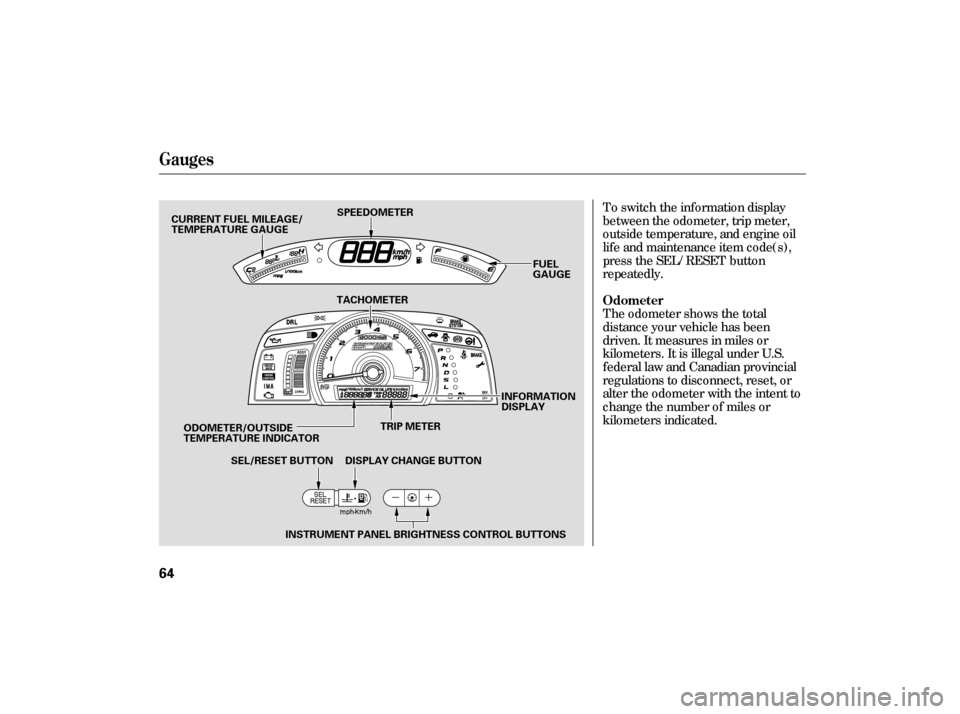
To switch the information display
between the odometer, trip meter,
outside temperature, and engine oil
lif e and maintenance item code(s),
press the SEL/RESET button
repeatedly.
The odometer shows the total
distance your vehicle has been
driven. It measures in miles or
kilometers. It is illegal under U.S.
federal law and Canadian provincial
regulations to disconnect, reset, or
alter the odometer with the intent to
change the number of miles or
kilometers indicated.
Gauges
Odometer
64
TRIP METER
SPEEDOMETER
FUEL
GAUGE
SEL/RESET BUTTON DISPLAY CHANGE BUTTON INFORMATION
DISPLAY
TACHOMETER
ODOMETER/OUTSIDE
TEMPERATURE INDICATOR INSTRUMENT PANEL BRIGHTNESS CONTROL BUTTONS
CURRENT FUEL MILEAGE/
TEMPERATURE GAUGE
�����—�����—�����y�
���������
���y���
�(�#���������y���������y
Page 67 of 267

Each trip meter works independently,
so you can keep track of two
dif f erent distances.
To reset a trip meter, display it, and
then press and hold the Select/Reset
button until the number resets to
‘‘0.0.’’
This trip meter shows the number of
miles or kilometers driven since you
last reset it.
There are two trip meters: TRIP A
and TRIP B. Switch between these
displays by pressing the SEL/
RESET button repeatedly.
Every time you press the display
change button, the display changes
from the current fuel mileage to the
temperature gauge, or f rom the
temperature gauge to the current
f uel mileage.
Press and hold the display change
button until you hear a beep. Each
time you press the button, the
speedometer, trip meter, average
f uel mileage and current f uel
mileage readings switches their
measures.
Depending on the selected measures
(mph or km/h), the trip meter and
odometer readings are shown with
miles or km. The average f uel
mileage and current f uel mileage are
shown with mpg or l/100 km.
Gauges
Trip Meter
Display Change Button
Inst rument s and Cont rols
65
�����—�����—�����y�
�����������
�y���
�(�#���������y���������y
Page 68 of 267
When either of the trip meters (trip
A or trip B) is displayed, your
vehicle’s average fuel mileage since
you last reset that trip meter can be
shownontheinformationdisplay
(mpg or l/100km). This number is
updated once per 10 seconds. To see
the average f uel mileage, press and
release the SEL/RESET button
repeatedly.
When you reset a trip meter, the
average fuel mileage for that trip
meter also resets.
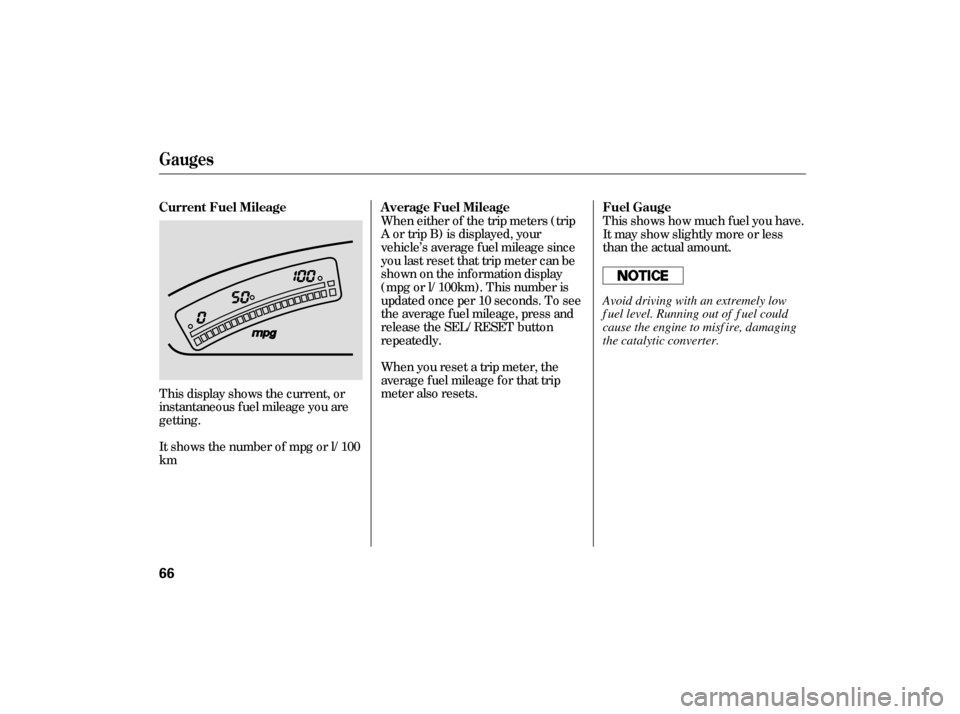
It shows the number of mpg or l/100
km This display shows the current, or
instantaneous fuel mileage you are
getting. This shows how much f uel you have.
It may show slightly more or less
than the actual amount.
A verage Fuel Mileage
Current Fuel Mileage Fuel Gauge
Gauges
66
Avoid driving with an extremely low
f uel level. Running out of f uel could
cause the engine to misf ire, damaging
the catalytic converter.
�����—�����—�
���y�
�������������y���
�(�#���������y���������y
Page 156 of 267

Drive moderately. Rapid
acceleration, abrupt cornering,
and hard braking use more fuel.
Always drive in the highest gear
possible.
Always maintain your vehicle
according to the maintenance
schedule. See
(see page
).
an underinflated tire
causes more ‘‘rolling resistance,’’
which u ses more fuel.
Engine oil also affects fuel
economy. The fuel efficient, low-
vi scosity 0W-20 oil recommended
for your Civic Hybrid is
formulated to help the engine use
less fu el. This oil is available at
your dealer.
The build-up of snow or mud on
your vehicl e’s underside adds
weight and rolling resistance.
Frequent cl eaning helps your fuel
mileage and reduces the chance of
corrosion.
Look at the coolant level in the
radiator reserve tank. Make sure it is
between
the MAX and MIN lines. If
it is below the MIN line, see
on page .
Refer to
on page for information
about checking other items on your
vehicle. You may find that your Civic Hybrid’s
unique combination of an engine and
an electric motor has driving
characteristics that are somewhat
dif f erent f rom what you are used to.
192
184 184
For example,
Service Station Procedures, Fuel Economy
Improving Fuel Economy
Owner’s
Maintenance Checks
Engine Coolant Check
A dding
Engine Coolant
Owner’s Maintenance
Checks
154
MAX
MIN RESERVE TANK
�����—�����—�����y�
����
��������y���
�(�#���������y���
�����y
Page 157 of 267

You may notice that using the A/C
causes a greater drop in f uel
economy than you are used to in
other vehicles. Although the amount
of extra f uel used by the A/C load on
the engine is no greater than other
vehicles, it is more noticeable
because of your Civic Hybrid’s
excellent f uel mileage. Using the
A/C in hot weather may result in
f uel economy that is lower than
expected.
The air conditioning puts an extra
load on the engine which makes it
usemorefuel.Usethefresh-air
ventilation when possible.
Try to maintain a constant speed.
Everytimeyouslowdownand
speed up, your vehicle uses extra
f uel. Use cruise control when
appropriate.
Wind resistance causes vehicles to
usemorefuelathigherspeeds.
Driving at moderate speeds on the
highway also reduces wind
resistance and conserves f uel.
The current f uel mileage display
allows you to monitor your f uel
mileage and adjust your driving
habits to save fuel.
Combine several short trips into
one.
Fuel Economy
Bef ore Driving
155
�����—�����—�����y�
����
��������y���
�(�#���������y���
�����y
Page 183 of 267
�µ
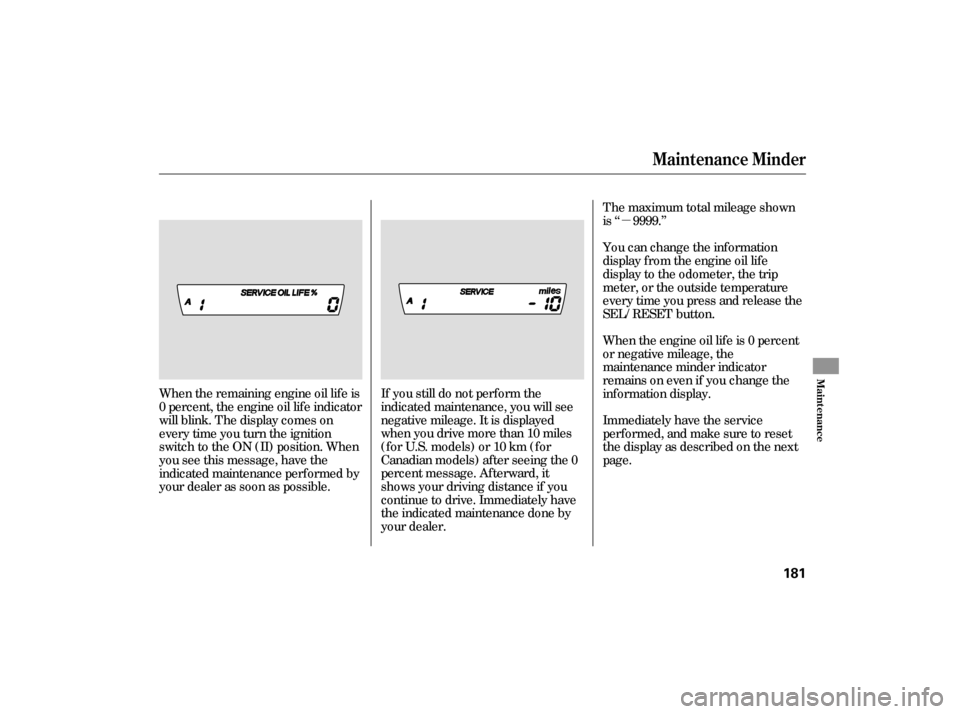
If you still do not perf orm the
indicated maintenance, you will see
negative mileage. It is displayed
when you drive more than 10 miles
(f or U.S. models) or 10 km (f or
Canadian models) af ter seeing the 0
percent message. Af terward, it
shows your driving distance if you
continue to drive. Immediately have
the indicated maintenance done by
your dealer.
When the remaining engine oil lif e is
0 percent, the engine oil lif e indicator
will blink. The display comes on
everytimeyouturntheignition
switch to the ON (II) position. When
you see this message, have the
indicated maintenance perf ormed by
your dealer as soon as possible. The maximum total mileage shown
is ‘‘ 9999.’’
When the engine oil lif e is 0 percent
or negative mileage, the
maintenance minder indicator
remainsonevenif youchangethe
inf ormation display.
Immediately have the service
perf ormed, and make sure to reset
the display as described on the next
page. You can change the inf ormation
display f rom the engine oil lif e
display to the odometer, the trip
meter, or the outside temperature
every time you press and release the
SEL/RESET button.
Maintenance Minder
Maint enance
181
�����—�����—�����y�
�������������y���
�(�#���������y���
�����y
Page 188 of 267
Maintenance Record
186
mi
mi
mi
mi
mi
mi
mimi
mi
mi
mi
mi
mi
mi
You or the servicing dealer can record all completed maintenance here. When maintenance is performed, record the mileage, circle the coded item(s)
completed, and write in any other non-coded items (such as brake fluid replacement) below the codes. Keep the receipts for all work done on your
vehicle. Maintenance can also be recorded in your Honda service history booklet.
Mileage
km
km
km
km
km
km
km Signature
Date
Mileage
km
km
km
km
km
km
km Signature
Date
Maintenance
Performed
AB12345
AB12345
AB12345
AB12345
AB12345
AB12345
AB12345 Maintenance
Performed
AB12345
AB12345
AB12345
AB12345
AB12345
AB12345
AB12345
�����—�����—�����y�
������
��
���y���
�(�#���������y���
�����y