Page 77 of 307
Push the lever under the steering
column all the way down.Push the lever up to lock the
steering wheel in position.
Move the steering wheel so it
points toward your chest, not
toward your f ace. Make sure you
can see the instrument panel
gauges and indicators. Make sure you have securely
locked the steering wheel in place
by trying to move it up, down, in,
and out.
Make any steering wheel
adjustments before you start driving.
1.4. 3.
2.
Steering Wheel A djustments
Inst rument s and Cont rols
73
Adjusting the steering wheel
position while driving may
cause you to lose control of the
vehicle and be seriously injured
inacrash.
Adjust the steering wheel only
when the vehicle is stopped.
�����—�����—�����y�
������
����
�y���
�(�+���������y���������y
Page 89 of 307
�µ
�µ
CONT INUED
The ceiling light (if the ceiling light
switch is in the center position) and
the spotlights (if the switch is in the
Door position on EX and Si models)
will come on when you press the
UNLOCK button. If you do not open
either door within 30 seconds, the
lights f ade out. If you relock the
doors with the remote transmitter
bef ore 30 seconds have elapsed, the
lightsgoesoff immediately.
If you do not open either door within
30 seconds, the doors automatically
relock, and the security system sets
(onU.S.LX,EX,andSimodels).You
cannot unlock it if the key is in the
ignition switch.
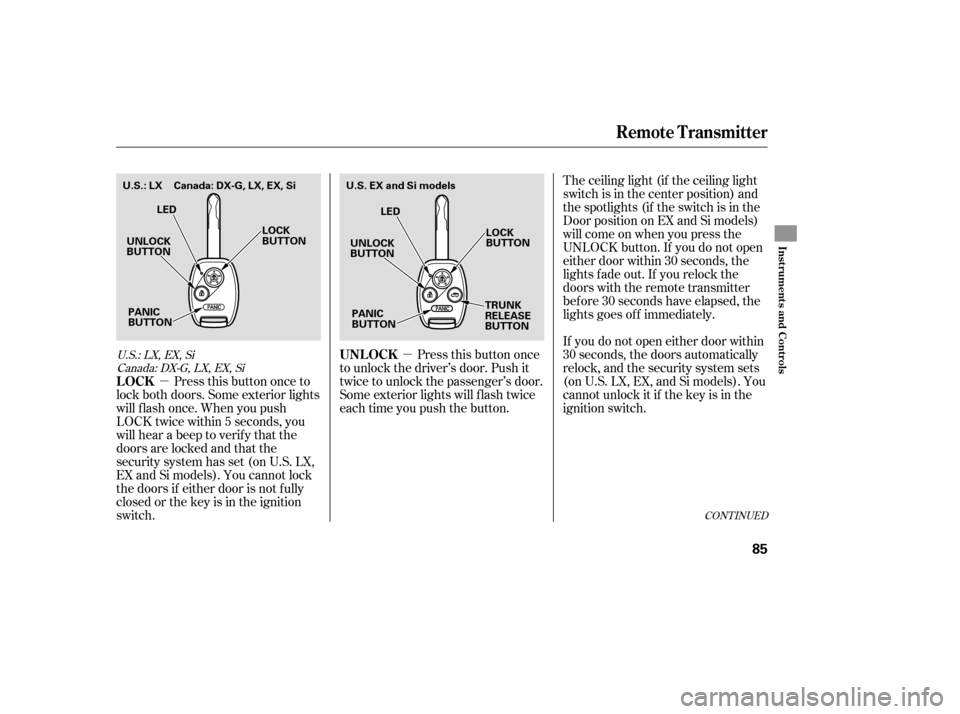
Press this button once
to unlock the driver’s door. Push it
twice to unlock the passenger’s door.
Some exterior lights will f lash twice
each time you push the button.
Press this button once to
lock both doors. Some exterior lights
will f lash once. When you push
LOCK twice within 5 seconds, you
will hear a beep to verify that the
doors are locked and that the
security system has set (on U.S. LX,
EX and Si models). You cannot lock
the doors if either door is not f ully
closed or the key is in the ignition
switch.
U.S.:LX,EX,Si
Canada: DX-G, LX, EX, Si
Remote Transmitter
UNL OCK
LOCK
Inst rument s and Cont rols
85
UNLOCK
BUTTON LOCK
BUTTON
TRUNK
RELEASE
BUTTON
PANIC
BUTTON LED
U.S. EX and Si models
UNLOCK
BUTTON LOCK
BUTTON
PANIC
BUTTON LED
U.S.: LX Canada: DX-G, LX, EX, Si
�����—�����—�����y�
�������������y���
�(�+���������y���������y
Page 99 of 307

Make sure all rear shoulder belts are
positioned in f ront of the rear seat-
back whenever it is in the upright
position.
Do not put any heavy items on the
seat-back when it is folded.
Make sure all items in the trunk, or
items extending through the opening
into the back seat, are secured.
Looseitemscanflyforwardand
cause injury if you have to brake
hard. See on page.
Never drive with the seat-back
f olded down and the trunk lid open.
See on
page .
Make sure that the f olded-down rear
seat does not interf ere with the f ront
passenger’s seat-back. This will
cause the f ront passenger’s weight
sensors to work improperly (see
page ). This may also cause the
seat belt reminder indicator f or a
f ront passenger to work improperly.
Also, check the passenger airbag of f
indicator to assure the proper
operation of the passenger’s
advanced front airbag.
To lock the seat-back upright, push it
f irmly against the trunk panel. Make
sure it is latched in place by pulling
on the top of the seat.
25
18850Carrying Cargo
Carbon Monoxide Hazard
Seats
Inst rument s and Cont rols
95
�����—�����—�����y�
�������������y���
�(�+���������y���������y
Page 113 of 307

�Î
�ÎThe heating and air conditioning
systems in your vehicle provide a
comf ortable driving environment in
all weather conditions. Air conditioning is optional on DX
model.
The standard audio system has
many f eatures. This section
describes those f eatures and how to
use them. (If you have an optional
audio system, ref er to the operating
instructions that came with it.) .............
Vents, Heating, and A/C . 110
................................
Audio System .115
Audio System (Models without ...............
navigation system) . 116
......
Playing the AM/FM Radio . 117
Playing the XM
Satellite ...................
Radio (Optional) .121
............................
Playing a Disc .126
...
Disc Player Error Messages .132
Optional Disc Changer Error
...............................
Messages .133
Audio System (Models with ...............
navigation system) .134
...............
Voice Control System .134
......
Playing the AM/FM Radio .134
Playing the XM
Satellite
......................................
Radio .138
............................
Playing a Disc .146
...
Disc Player Error Messages . 154
.....................
Playing a PC Card .155
............
AM/FM Radio Reception . 167
..................
Protecting Your Discs . 169
................
Remote Audio Controls . 170
...
Playing an Optional Audio Unit . 171
.................
Radio Thef t Protection . 172
..........................
Setting the Clock .173 ............................
Security System .174
...............................
Cruise Control .175
Your vehicle has an anti-theft audio
system that requires a code number
to enable it.
The security system helps to
discourage vandalism and thef t of
your vehicle.
Navigation systems are available on
U.S. EX and Si models only.
All models except U.S. DX U.S.LX,EX,andSimodels
Features
Features
109
�����—�����—�����y�
�������������y���
�(�+���������y���
�
���y
Page 178 of 307
Once the security system is set,
opening either door without using
the key or the remote transmitter,
the hood, or the trunk will cause the
system to alarm. It also alarms if the
radio is removed f rom the dashboard
or the wiring is cut.
The security system helps to protect
your vehicle and valuables f rom thef t.
The horn sounds and a combination
of headlights, parking lights, side
marker lights, and taillights f lashes if
someone attempts to break into your
vehicleorremovetheradio.This
alarm continues f or 2 minutes, then
the system resets. To reset an
alarming system before the 2
minutes have elapsed, unlock the
driver’s door with the key or the
remote transmitter.
The security system automatically
sets 15 seconds after you lock the
doors, hood, and trunk. For the
system to activate, you must lock the
doors f rom the outside with the key,
lock tab, door lock switch, or remote
transmitter. The security system
indicator on the instrument panel
starts blinking immediately to show
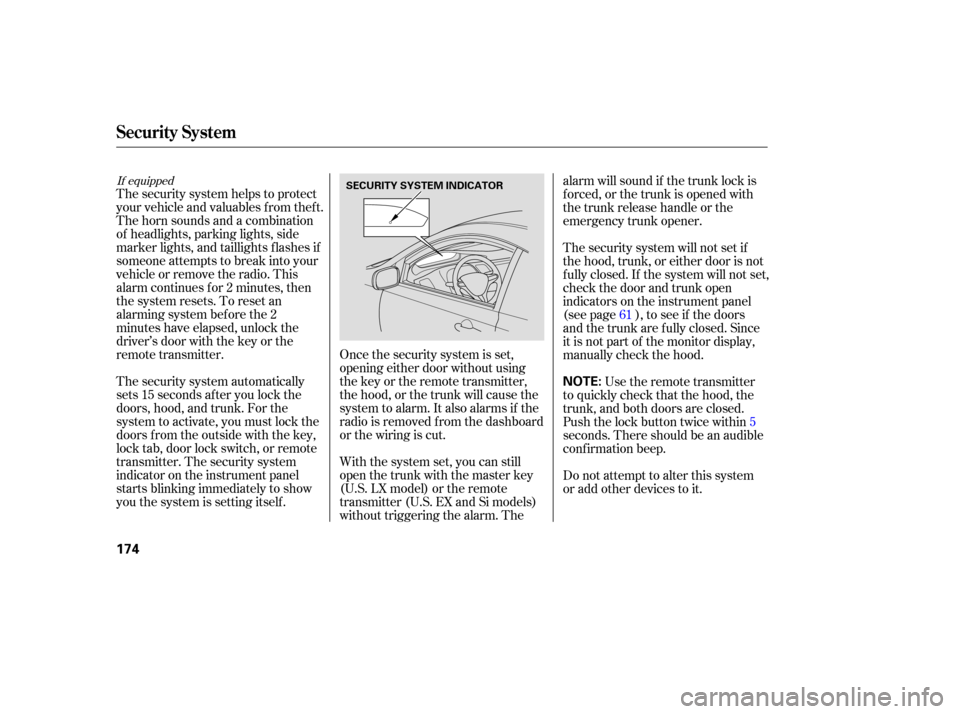
you the system is setting itself .
With the system set, you can still
open the trunk with the master key
(U.S. LX model) or the remote
transmitter (U.S. EX and Si models)
without triggering the alarm. Thealarm will sound if the trunk lock is
f orced, or the trunk is opened with
thetrunkreleasehandleorthe
emergency trunk opener.
The security system will not set if
the hood, trunk, or either door is not
f ully closed. If the system will not set,
check the door and trunk open
indicators on the instrument panel
(see page ), to see if the doors
and the trunk are f ully closed. Since
it is not part of the monitor display,
manually check the hood.
Use the remote transmitter
to quickly check that the hood, the
trunk, and both doors are closed.
Push the lock button twice within5
seconds. There should be an audible
conf irmation beep.
Do not attempt to alter this system
or add other devices to it. 61
If equipped
Security System
174
NOTE:
SECURITY SYSTEM INDICATOR
�����—�����—�����y�
�������������y���
�(�+���������y���
�����y
Page 187 of 307
Wait a f ew minutes af ter turning the
engine of f bef ore you check the oil.
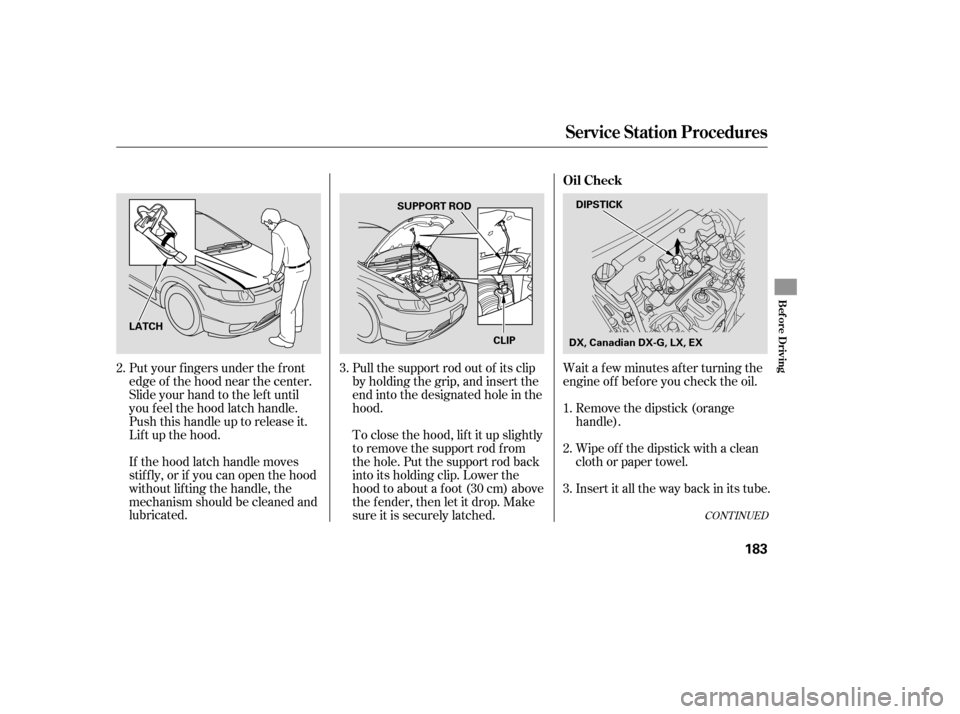
Put your f ingers under the f ront
edge of the hood near the center.
Slide your hand to the lef t until
you f eel the hood latch handle.
Push this handle up to release it.
Lif t up the hood.
If the hood latch handle moves
stif f ly, or if you can open the hood
without lifting the handle, the
mechanism should be cleaned and
lubricated. Pull the support rod out of its clip
by holding the grip, and insert the
end into the designated hole in the
hood.
To close the hood, lif t it up slightly
to remove the support rod f rom
the hole. Put the support rod back
into its holding clip. Lower the
hood to about a f oot (30 cm) above
the fender, then let it drop. Make
sure it is securely latched.
Remove the dipstick (orange
handle).
Insert it all the way back in its tube. Wipe of f the dipstick with a clean
cloth or paper towel.
3. 1.
2.
3.
2.
CONT INUED
Service Station Procedures
Oil Check
Bef ore Driving
183
DIPSTICK
SUPPORT ROD
CLIP
LATCH
DX, Canadian DX-G, LX, EX
�����—�����—�����y�
������
��
���y���
�(�+���������y���
�����y
Page 194 of 307

Store or secure all items that could
be thrown around and hurt
someone during a crash.
Do not put any items on top of the
rear shelf . They can block your
view and be thrown around the
vehicle during a crash.
Keep the glove box closed while
driving. If it is open, a passenger
could injure their knees during a
crash or sudden stop. Be sure items placed on the f loor
behind the f ront seats cannot roll
under the seats and interf ere with
the driver’s ability to operate the
pedals, proper operation of the
seats, and proper operation of the
sensors under the seats.Distribute cargo evenly on the
f loor of the trunk, placing the
heaviest items on the bottom and
as f ar f orward as possible.
If youfolddownthebackseat,tie
down items that could be thrown
about the vehicle during a crash or
sudden stop.
If you carry large items that
prevent you f rom closing the trunk
lid, exhaust gas can enter the
passenger area. To avoid the
possibility of
, f ollow the instructions
on page . The cargo net can be used to help
hold down items stored in the trunk.
50
Optional
Carrying Cargo
Carrying Items in the Passenger
Compartment Carrying Cargo in the Trunk
carbon monoxide
poisoning Cargo Net
190
�����—�����—�����y�
�������������y���
�(�+���������y���
�����y
Page 197 of 307

Fasten your seat belt. Check that
your passengers have f astened
their seat belts (see page ).
Make sure the doors are securely
closed and locked. Check the steering wheel
adjustment (see page ). Check the adjustment of the
inside and outside mirrors (see
page ). Check that any items you may be
carrying are stored properly or
f astened down securely.
Check the seat adjustment (see
page ).
Make sure all windows, mirrors,
and outside lights are clean and
unobstructed. Remove f rost, snow,
or ice.
Youshoulddothefollowingchecks
and adjustments bef ore you drive
your vehicle.
Check that the hood is f ully closed.
Check that the trunk is f ully
closed. When you start the engine, check
the gauges and indicators in the
instrument panel (see page ).
Visually check the tires. If a tire
looks low, use a gauge to check its
pressure (see page ).
1.
2.
14
3.
4. 5.
6.
7.
8.
9.
11.
10.
241 90
100 73 55
Preparing to Drive
Driving
193
�����—�����—�����y�
�������������y���
�(�+���������y���
�����y
